

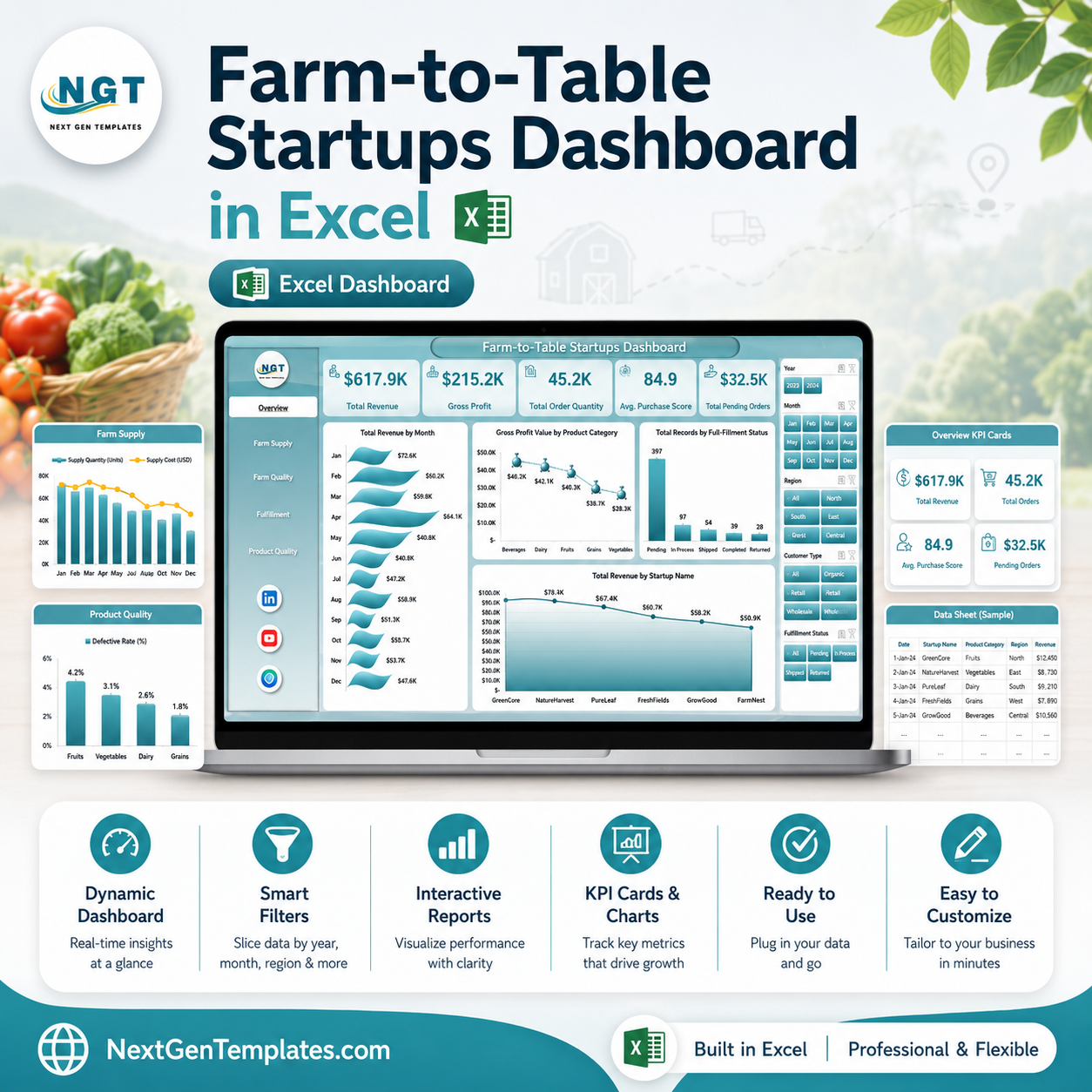



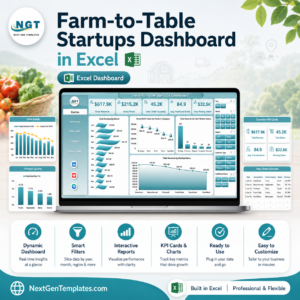
Farm-to-Table Startups Dashboard in Excel helps food founders, local produce operators, farm partners, and fulfillment teams review revenue, gross profit, order quantity, freshness score, packaging cost, procurement cost, logistics cost, delivery performance, customer rating, and fulfillment status in one editable workbook. Many farm-to-table startups manage 100+ orders across product categories, regions, channels, customer types, and delivery zones, but still rely on scattered exports for weekly reporting. This Excel dashboard gives you 7 worksheet tabs, KPI cards, slicers, pivot-driven charts, a Data Sheet, and a Support Sheet. Instant download. One-time payment. No monthly analytics subscription.
Last updated: June 11, 2026
{“@context”:”https://schema.org”,”@graph”:[{“@type”:”Product”,”name”:”Farm-to-Table Startups Dashboard in Excel”,”description”:”Editable Excel dashboard for farm-to-table startups to track revenue, gross profit, order quantity, freshness score, packaging cost, fulfillment, supply, and product quality.”,”image”:[“https://nextgentemplates.com/wp-content/uploads/2026/06/Farm-to-Table-Startups-Dashboard-1.jpg”],”brand”:{“@type”:”Brand”,”name”:”NextGenTemplates”},”offers”:{“@type”:”Offer”,”url”:”https://nextgentemplates.com/product/farm-to-table-startups-dashboard-in-excel/”,”priceCurr
Farm-to-Table Startups Dashboard in Excel
Key Features of Farm-to-Table Startups Dashboard in Excel
- 7 Excel sheet tabs covering Overview, Startup Mix, Farm Supply, Fulfillment, Product Quality, Data Sheet, and Support Sheet.
- 5 executive KPI cards for Total Revenue, Gross Profit Value, Total Order Quantity, Avg. Freshness Score, and Total Packaging Cost.
- Multiple slicers for quick filtering across startup, product, region, channel, customer type, delivery zone, and time fields.
- Pivot-driven charts so dashboard pages refresh when the Data Sheet is updated and Excel Refresh All is clicked.
- Financial and operational views for revenue, gross profit, procurement cost, logistics cost, packaging cost, and fulfillment status.
- Quality analysis for freshness score, customer rating, freshness bands, revenue bands, and product category trends.
- Editable Excel workbook so you can adjust fields, chart titles, colors, slicers, formulas, and report pages.
What’s Inside the Farm-to-Table Startups Dashboard in Excel
1. Overview Page
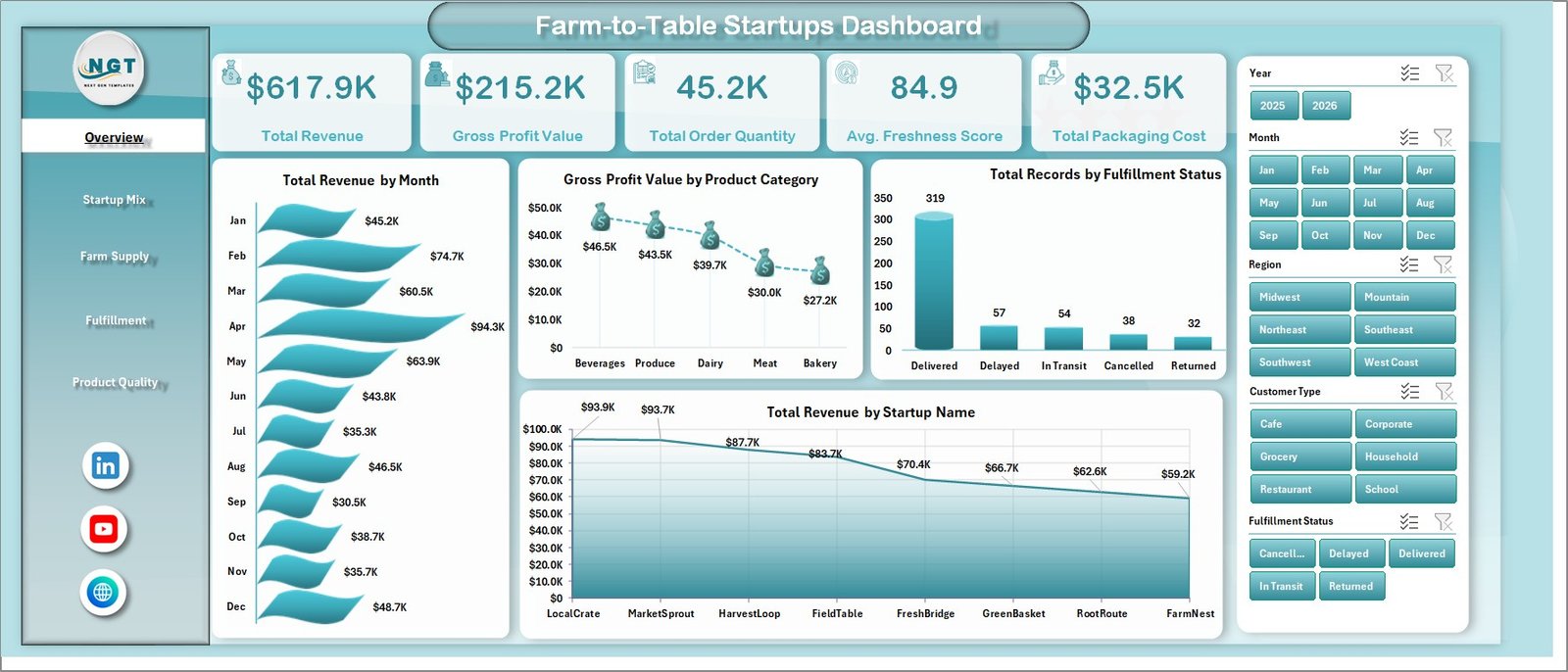
The Overview page is the executive summary of the workbook. KPI cards show Total Revenue, Gross Profit Value, Total Order Quantity, Avg. Freshness Score, and Total Packaging Cost so leaders can read sales, margin, volume, freshness, and cost position quickly.
Total Revenue by Month: This chart shows monthly sales movement for farm-to-table orders. It helps teams identify demand cycles, strong months, and periods where local sourcing or fulfillment activity increases.
Gross Profit Value by Product Category: This chart compares profit contribution across product categories. It helps founders see whether produce, dairy, bakery, pantry, or prepared items are protecting margin.
Total Records by Fulfillment Status: This visual summarizes order records by fulfillment status. It supports daily operations review by showing how many orders are completed, pending, delayed, cancelled, or in progress.
Total Revenue by Startup Name: This chart compares revenue contribution by startup. It is useful for multi-brand operators, incubators, co-ops, and analysts tracking several farm-to-table businesses.
2. Startup Mix
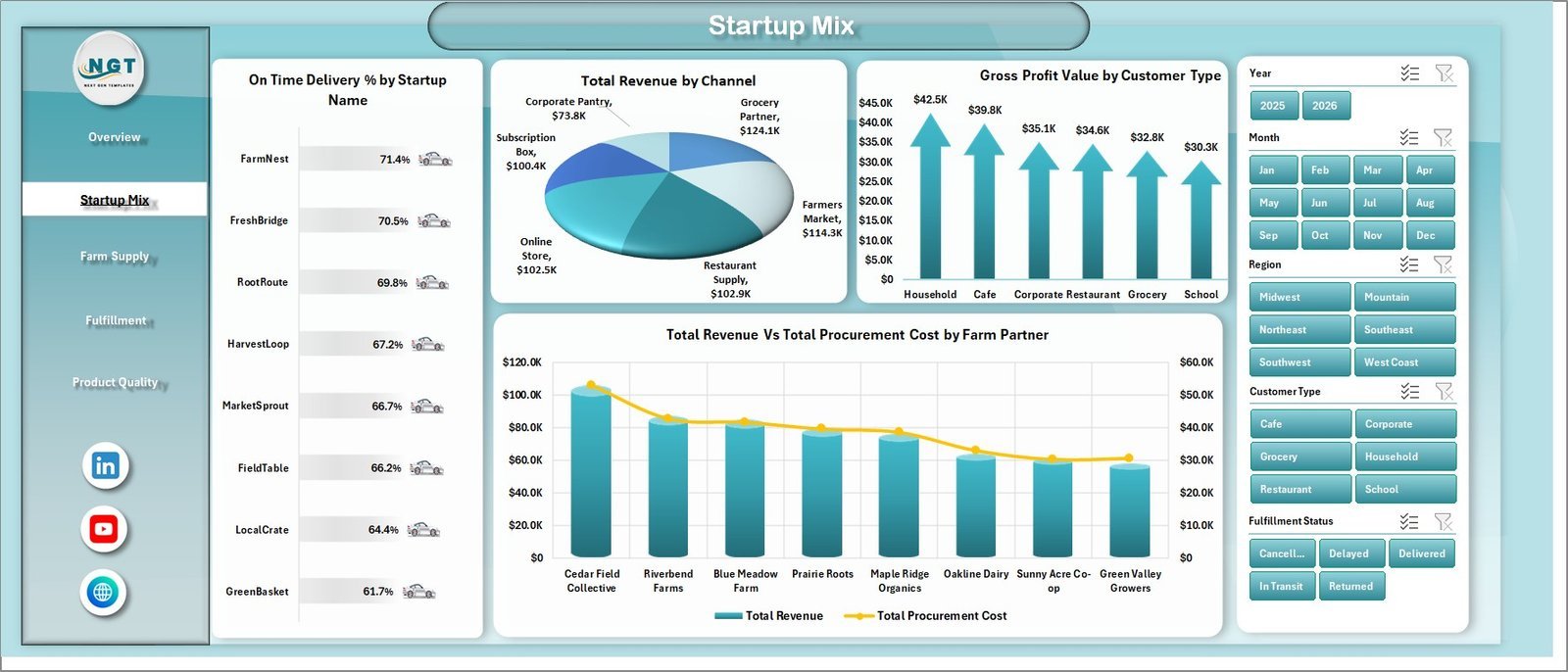
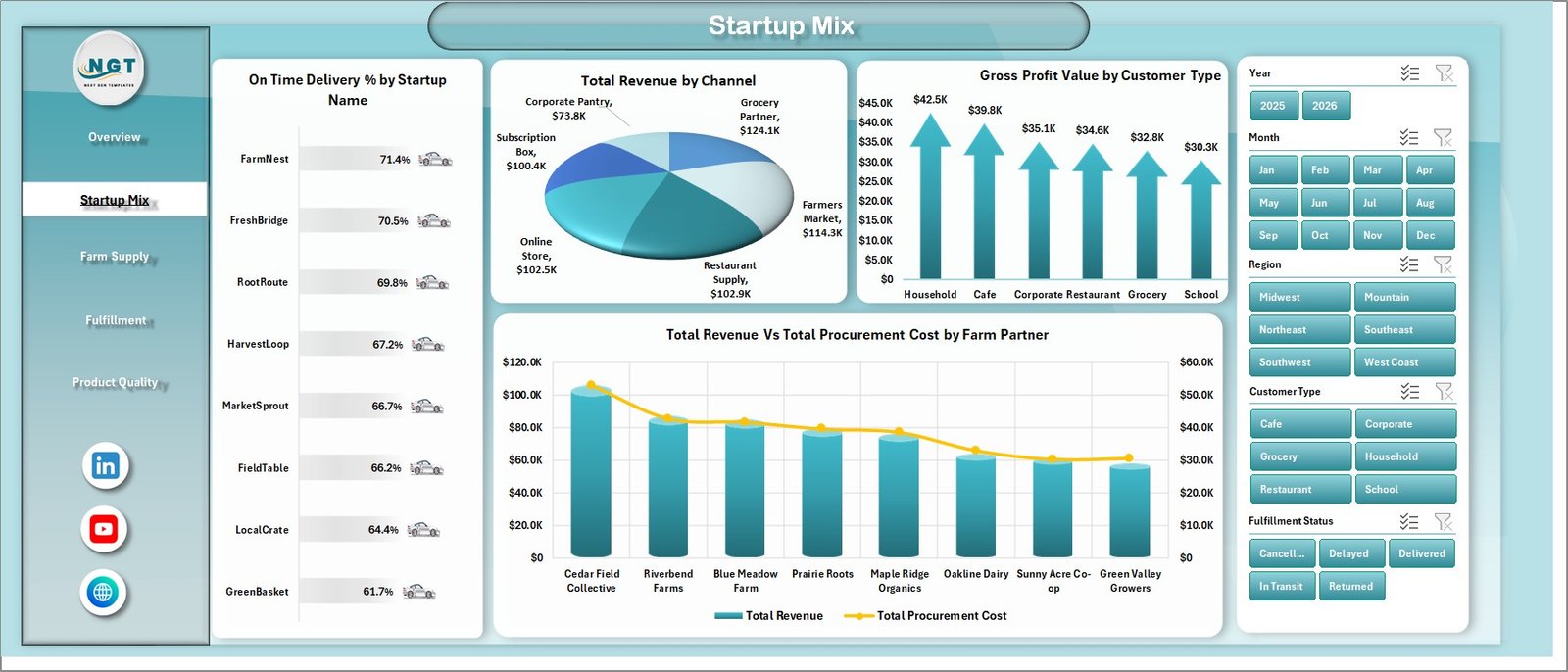
The Startup Mix tab compares business model, channel, customer type, farm partner, and delivery reliability. On Time Delivery % by Startup Name highlights which startups are fulfilling orders reliably. Total Revenue by Channel shows whether online, retail, subscription, wholesale, or market channels drive stronger sales.
Gross Profit Value by Customer Type compares profitability across households, restaurants, retailers, institutions, or subscription customers. Total Revenue Vs Total Procurement Cost by Farm Partner helps users review whether specific farm partners are generating healthy revenue relative to sourcing cost.
Startup Mix
3. Farm Supply
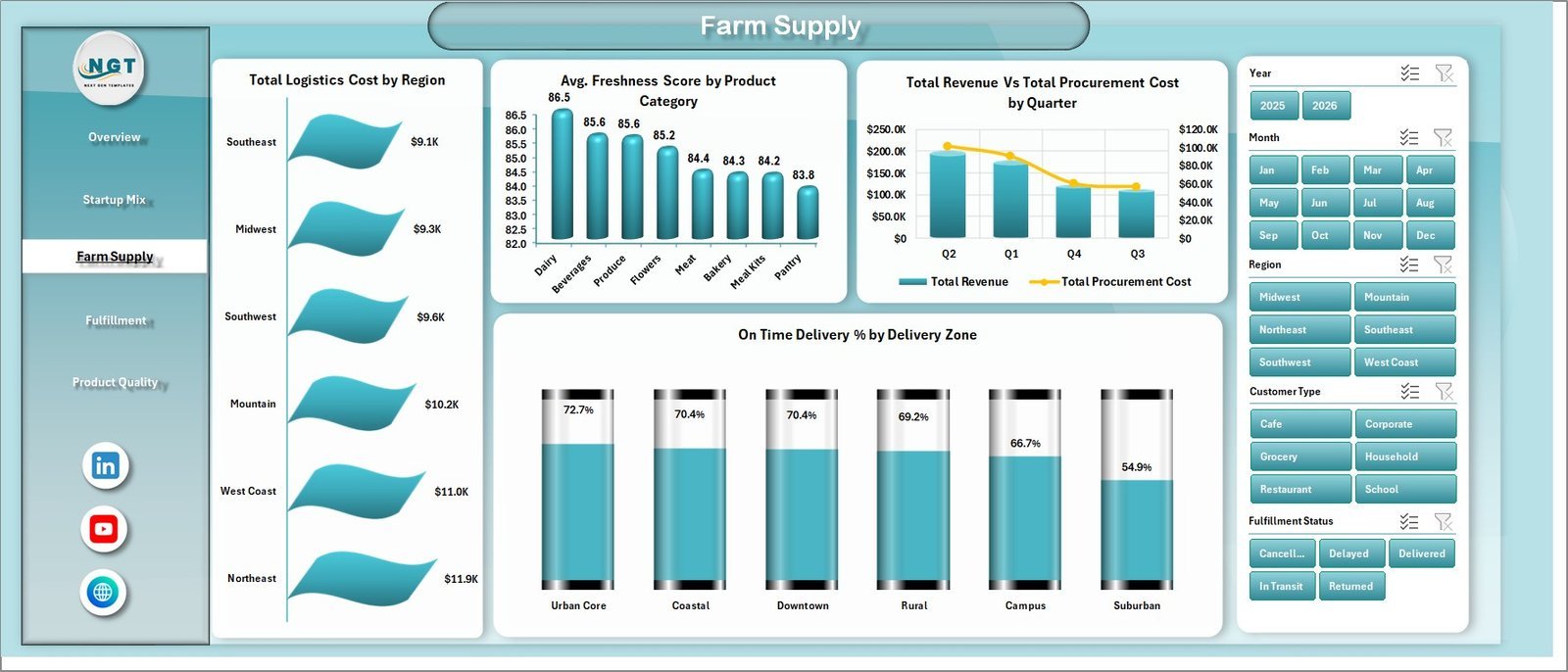
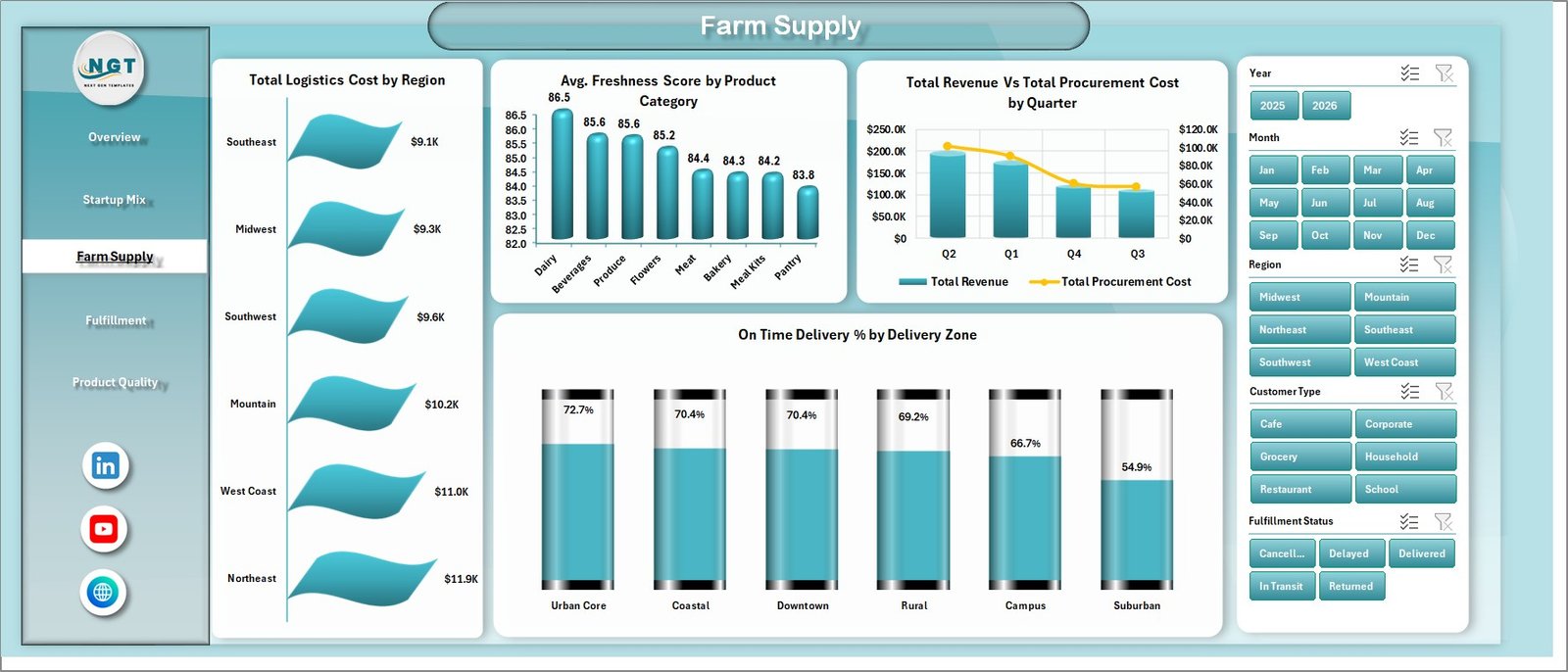
The Farm Supply tab focuses on logistics, freshness, procurement, region, quarter, and delivery zone. Total Logistics Cost by Region shows where delivery and supply movement costs are highest. Avg. Freshness Score by Product Category helps teams compare product quality across categories.
Total Revenue Vs Total Procurement Cost by Quarter compares sales and sourcing cost over time. On Time Delivery % by Delivery Zone helps operations teams identify zones where delivery reliability needs attention.
Farm Supply
4. Fulfillment
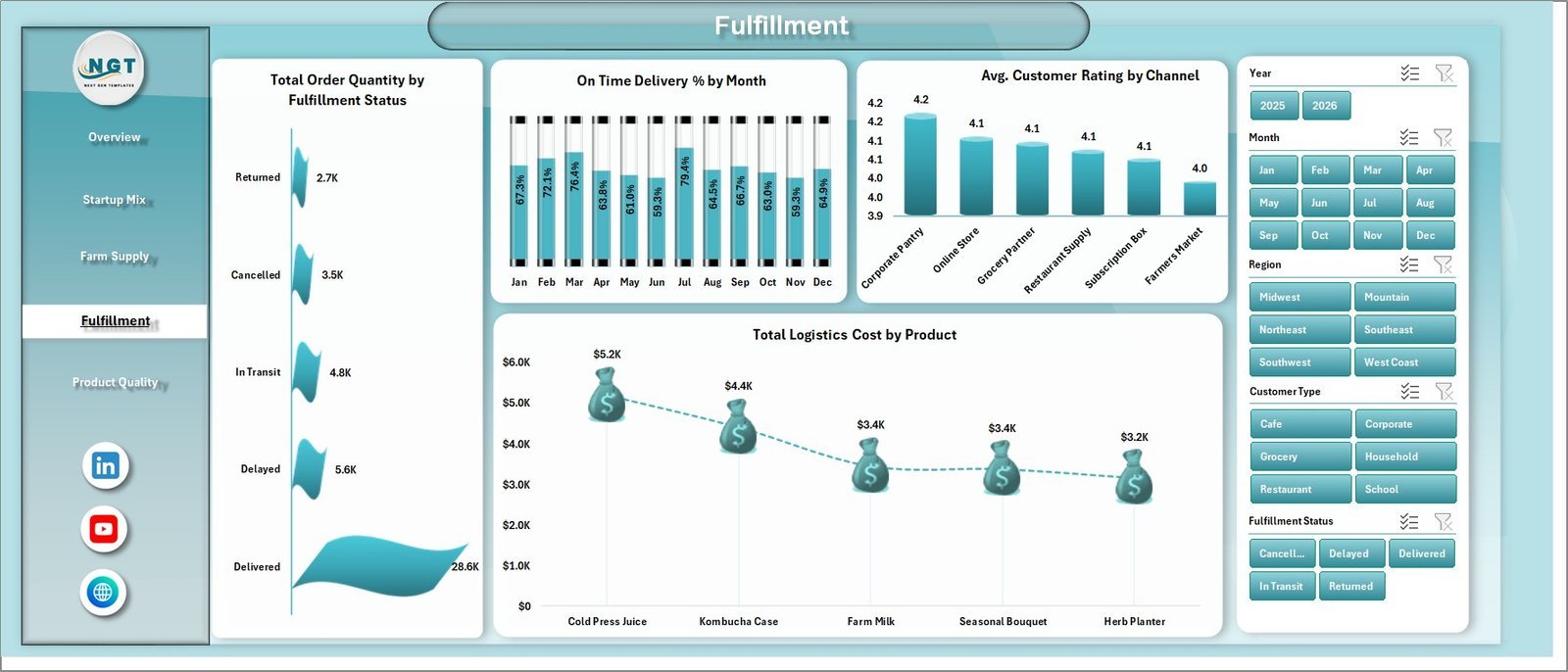
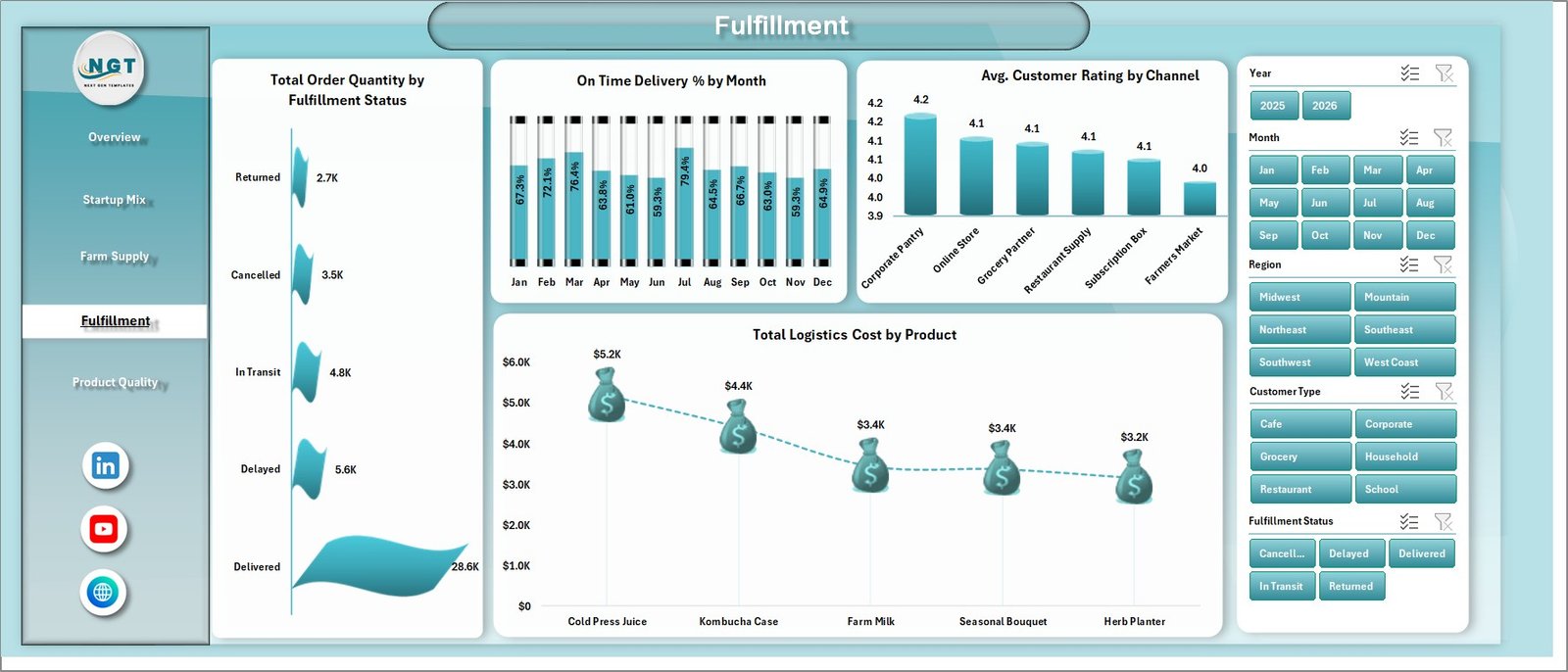
The Fulfillment tab connects order quantity, delivery reliability, customer rating, channel, logistics cost, and product performance. Total Order Quantity by Fulfillment Status helps teams understand order volume by delivery stage or completion status.
On Time Delivery % by Month shows whether delivery reliability is improving or slipping. Avg. Customer Rating by Channel compares buyer experience across channels, while Total Logistics Cost by Product identifies products that carry higher movement cost.
Fulfillment
5. Product Quality
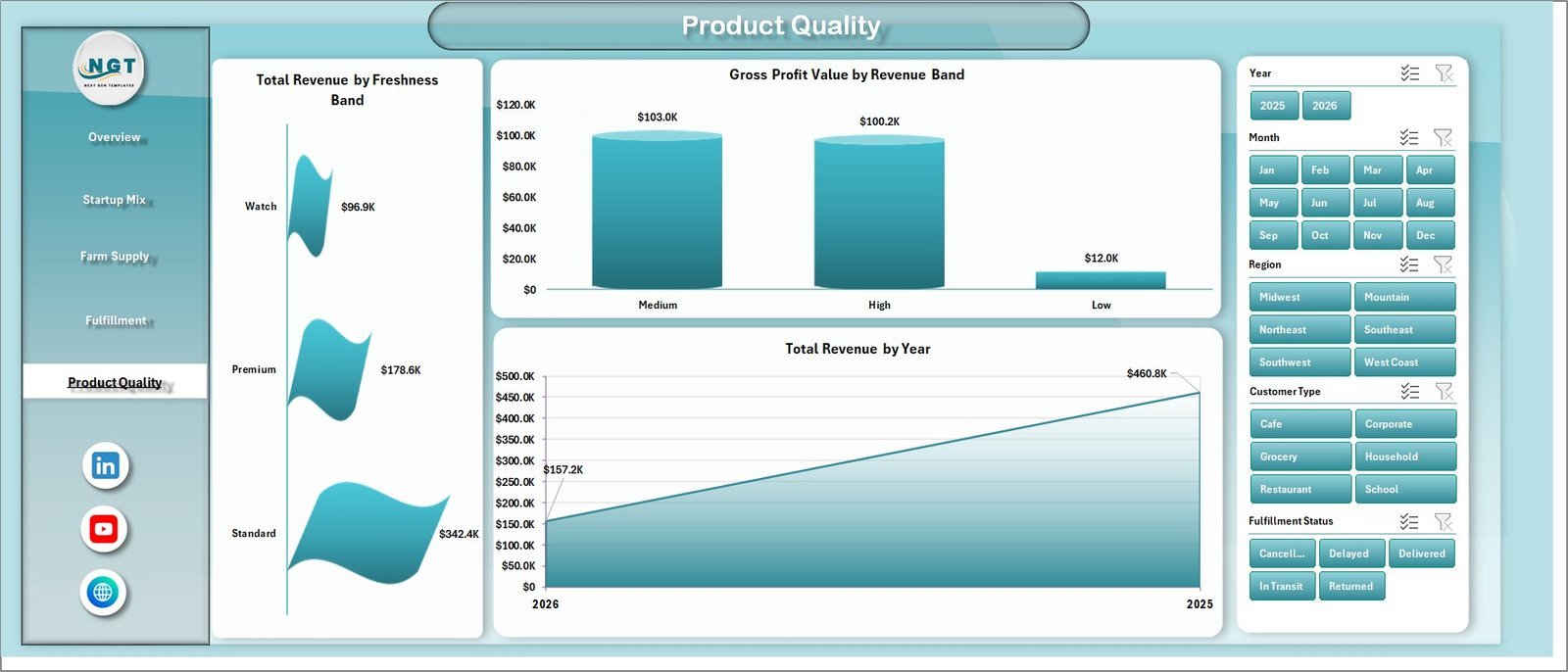
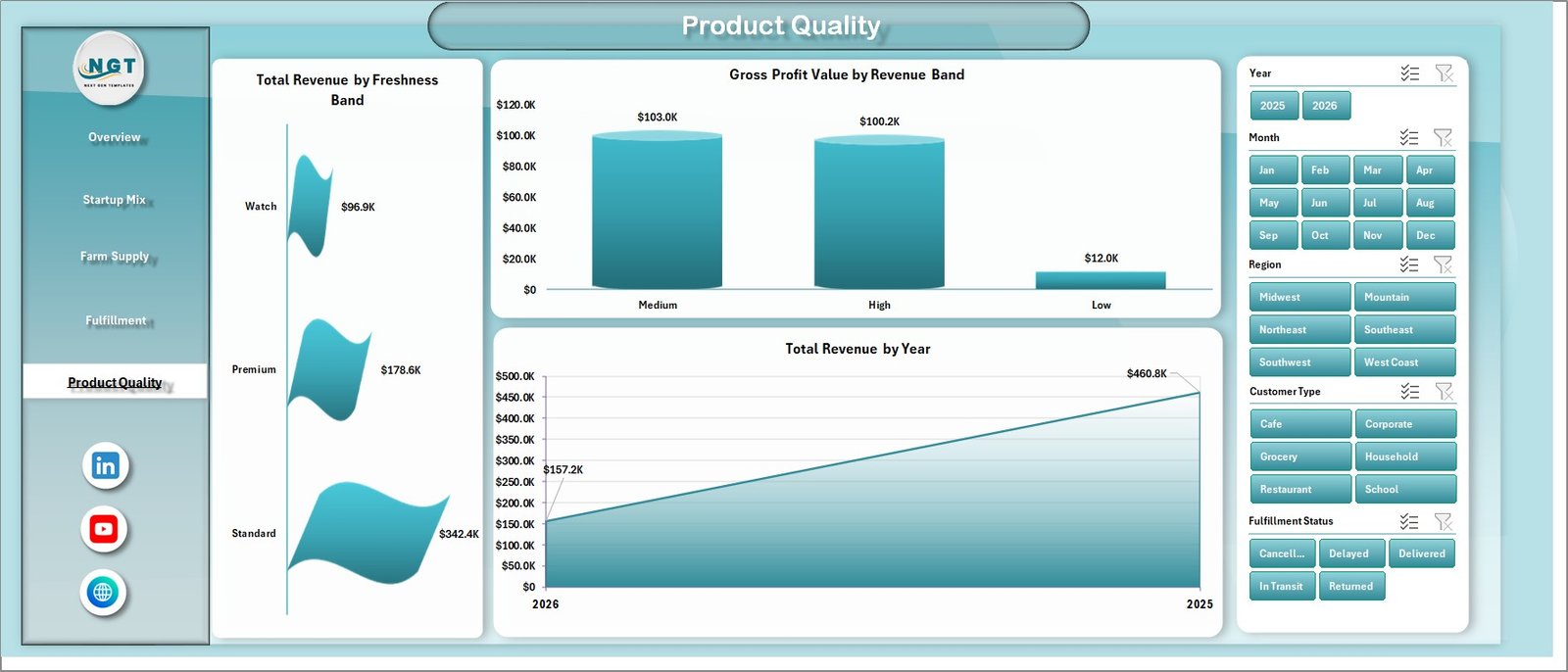
The Product Quality tab is built for freshness, revenue quality, and annual trend review. Total Revenue by Freshness Band shows how revenue is distributed across freshness groups. This helps users see whether better freshness scores are connected with stronger sales.
Gross Profit Value by Revenue Band compares profit across revenue segments. Total Revenue by Year gives a long-term revenue trend for farm-to-table startup reporting.
Product Quality
6. Data Sheet Tab
The Data Sheet is where you add or paste records in the same structure as the sample data. Keep the column format consistent so KPI cards, slicers, pivot tables, and charts refresh correctly.

Data Sheet tab
7. Support Sheet
The Support Sheet contains multiple pivot tables used to build the dashboard dynamically. After updating the Data Sheet, go to the Data tab in the Excel Ribbon and click Refresh All. All pivot tables and dashboard charts refresh together. You can keep this sheet hidden during normal use.

Support sheet tab
Farm-to-Table Startups Dashboard in Excel vs. Google Sheets vs. Paid CRM/SaaS – Where This Fits
| Feature | This Excel Dashboard | Google Sheets Alternative | Paid Food Operations SaaS |
|---|---|---|---|
| Cost | $17.99 one-time | Template cost or manual build | Monthly or annual subscription |
| Platform | Microsoft Excel | Browser-based spreadsheet | Vendor cloud platform |
| Setup time | Paste records and refresh | Copy sheet, rebuild pivots, or configure formulas | Onboarding and data setup |
| Real-time team collaboration | Available through OneDrive or SharePoint | Native collaboration | Usually included by user plan |
| Mobile access | Excel mobile app or cloud storage | Google Sheets mobile app | Vendor app |
| Customizable fields | Fully editable workbook | Editable spreadsheet | Limited by vendor settings |
| Share with link | Possible through Microsoft 365 sharing | Built in | Login controlled |
| Year-1 cost at 5 users | $17.99 plus Excel licensing you already use | Template cost plus build time | Often hundreds or thousands |
| Farm-to-table reporting | Built across 5 dashboard pages | Must be built or adapted | Depends on plan and integrations |
Who This Template Is For – and Who It’s Not For
Best for: farm-to-table startups, local food marketplaces, farm co-ops, produce delivery teams, subscription box operators, food incubators, operations analysts, and founders who need a spreadsheet-based reporting layer.
Not for: teams that need live route optimization, POS checkout, inventory barcode scanning, food safety compliance automation, supplier contract management, or a fully custom ERP. Use it as an analytics dashboard after your source data is exported, cleaned, or pasted into Excel.
How to Use the Farm-to-Table Startups Dashboard in Excel
- Download and unzip the workbook.
- Open the file in Microsoft Excel.
- Review the sample records in the Data Sheet.
- Replace the sample rows with your own farm-to-table order, revenue, procurement, freshness, and fulfillment data.
- Keep the same column headers and field structure.
- Click Data > Refresh All in Excel.
- Use slicers to filter dashboard pages and review updated KPIs, charts, and trends.
Real-World Use Cases
Aarav, farm-to-table founder: Aarav reviews revenue by month, gross profit by product category, packaging cost, and procurement cost before monthly investor updates.
Meera, fulfillment manager: Meera uses fulfillment status, order quantity, on-time delivery percentage, delivery zone, and logistics cost views to plan staffing and delivery improvements.
Daniel, local food consultant: Daniel compares farm partners, customer types, channels, freshness bands, and customer ratings across several startups to recommend pricing and supply improvements.
Frequently Asked Questions
What KPI cards are included?
The Overview page includes Total Revenue, Gross Profit Value, Total Order Quantity, Avg. Freshness Score, and Total Packaging Cost.
How many worksheet tabs are included?
The workbook includes Overview, Startup Mix, Farm Supply, Fulfillment, Product Quality, Data Sheet, and Support Sheet tabs.
Can I use my own farm-to-table data?
Yes. Replace the sample rows in the Data Sheet with your own records and keep the same format so pivots and charts refresh correctly.
Do I need macros or VBA?
No. The dashboard is built with Excel sheets, pivots, charts, slicers, and refreshable workbook logic.
Can I hide the Support Sheet?
Yes. The Support Sheet can be kept hidden because it mainly stores pivot tables that power the dashboard visuals.
Does this replace food delivery software?
No. It is an Excel reporting dashboard, not a live ordering, delivery routing, POS, or compliance platform.
About the Author
Built by PK – Microsoft Certified Professional with 15+ years of Excel, Google Sheets, and Power BI experience. Founder of NextGenTemplates, reaching 300K+ subscribers across YouTube channels. Every template is hand-built and tested before release.
Explore Related Templates
Pair this workbook with Drone Farming Startups Dashboard in Power BI, Vertical Farming Dashboard in Power BI, and Aquaculture KPI Scorecard in Excel. Browse more Excel Dashboard templates and MS Excel templates.
Download the Farm-to-Table Startups Dashboard in Excel today and start reviewing revenue, gross profit, order quantity, freshness, packaging cost, farm supply, fulfillment, and product quality from one editable Excel workbook.
Watch the step-by-step video tutorial:
Compatibility and Requirements
- Works in Microsoft Excel desktop (Excel 2016 or later, or Microsoft 365).
- The dashboard pages use slicers and pivot-driven charts. Excel explains them in Use slicers to filter data.
































Reviews
There are no reviews yet.