



The Elevator Maintenance Checklist in Excel is a vital tool for property managers, building maintenance teams, and facilities managers who want to ensure that their elevator systems are in safe and efficient working condition. This easy-to-use checklist helps track the maintenance and inspection of elevators, ensuring compliance with safety regulations and prolonging the lifespan of the equipment.
Whether you’re overseeing commercial buildings, residential complexes, or any other properties with elevators, this Excel-based template simplifies the process of scheduling regular maintenance tasks, logging inspections, and tracking repairs. With clear tracking and reporting capabilities, it helps minimize downtime, reduce repair costs, and keep your elevators running smoothly.
Key Features of the Elevator Maintenance Checklist in Excel
🚪 Track Maintenance Tasks
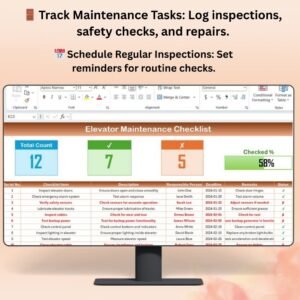
Keep a comprehensive record of all required elevator maintenance tasks such as lubrication, safety checks, door operation tests, and inspection of electrical components. Ensure nothing is overlooked during inspections.
📅 Schedule Regular Inspections & Service
Set reminders for routine inspections and maintenance tasks. Track the frequency of checks and ensure compliance with safety standards and regulatory requirements.
📝 Log Repairs & Issues
Document any repairs, malfunctions, or service calls. Track the status of repairs, their cost, and the time taken to resolve the issues to maintain a detailed repair history.
⚙️ Compliance Tracking
Ensure that elevator systems comply with safety regulations and industry standards by tracking compliance-related tasks. Stay audit-ready with detailed logs of maintenance and inspection activities.
📊 Visualize Data & Track Performance
Use charts and graphs to monitor maintenance trends, analyze repair history, and identify recurring issues. Visual data insights help pinpoint areas for improvement and streamline future maintenance activities.
🛠️ Customizable Checklist
Easily customize the checklist to suit the specific needs of your building or elevator system. Add new tasks, modify existing categories, or adjust inspection frequency as required.
Why You’ll Love the Elevator Maintenance Checklist in Excel

✅ Ensure Safety & Compliance
This checklist helps you stay on top of elevator safety inspections and ensure that all components are in safe working order. Comply with local regulations and avoid penalties.
✅ Minimize Downtime
By staying proactive with maintenance and repairs, you can prevent unexpected elevator failures and minimize downtime, ensuring your tenants or customers have consistent access to elevator services.
✅ Extend Equipment Lifespan
Regular maintenance improves the longevity of your elevator system, reducing the need for costly repairs and replacements. Keep your elevators running efficiently for years.
✅ Streamline Maintenance Tasks
Simplify your maintenance schedule by tracking inspections, repairs, and tasks in one place. Improve your building’s operational efficiency with this organized system.
✅ Customizable & User-Friendly
This checklist is fully customizable to fit your needs. Whether you manage one elevator or a fleet, the template adapts to suit the unique specifications of each elevator system.
What’s Inside the Elevator Maintenance Checklist Template in Excel?
- Maintenance Task Tracker: Log essential tasks such as lubrication, safety checks, and electrical inspections.
- Repair & Service Log: Record repair history, costs, and downtime.
- Compliance Tracker: Stay on top of safety compliance tasks and ensure regulations are met.
- Customizable Categories: Add or remove tasks, adjust inspection frequencies, and modify fields based on your building’s needs.
- Real-Time Data & Reporting: Track maintenance trends, visualize performance, and generate reports for management or audits.
How to Use the Elevator Maintenance Checklist in Excel
1️⃣ Download the Template: Instantly access the Elevator Maintenance Checklist in Excel.
2️⃣ Enter Elevator Details: Input relevant information such as elevator model, maintenance team contact details, and inspection schedule.
3️⃣ Track Maintenance Tasks: Record routine maintenance, repairs, and inspections as they occur.
4️⃣ Schedule Inspections: Set up regular reminders for inspections and maintenance tasks to stay ahead of issues.
5️⃣ Generate Reports & Share Insights: Use the dashboard and charts to generate reports for stakeholders, audits, and compliance purposes.
Who Can Benefit from the Elevator Maintenance Checklist in Excel?
🔹 Property Managers & Building Owners
🔹 Facilities Maintenance Teams
🔹 Elevator Service Providers & Technicians
🔹 Commercial Property Managers
🔹 Residential Complex Managers
🔹 Health & Safety Inspectors
Ensure the safety, reliability, and efficiency of your elevator systems with the Elevator Maintenance Checklist in Excel. Track inspections, maintenance tasks, repairs, and compliance to guarantee smooth and safe operations.
Click here to read the Detailed blog post
Visit our YouTube channel to learn step-by-step video tutorials
Youtube.com/@PKAnExcelExpert
Compatibility and Requirements
- Works in Microsoft Excel desktop (Excel 2016 or later, or Microsoft 365).
- Results are shown in charts. Microsoft explains Excel charts in Create a chart from start to finish.
Frequently Asked Questions
Which elevator tasks does the checklist cover?
It covers maintenance tasks such as lubrication, safety checks, door operation tests and inspection of electrical components.
Can I log repairs and costs?
Yes. You can record repairs, malfunctions and service calls with their status, cost and time to resolve, which builds a repair history.
Does it help with compliance and audits?
Yes. A compliance tracker logs safety tasks, and detailed maintenance and inspection records help you stay audit-ready.
Can I change tasks and inspection frequency?
Yes. You can add tasks, change categories and adjust how often inspections happen for your building.
Related Elevator and Building Maintenance Templates
- Elevator Maintenance Checklist in Google Sheets: the same checklist in Google Sheets
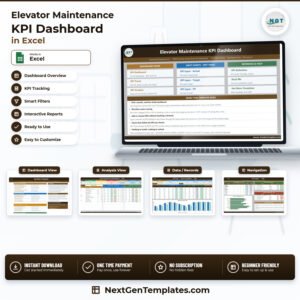
- Elevator Maintenance KPI Dashboard in Excel: track elevator maintenance KPIs in Excel
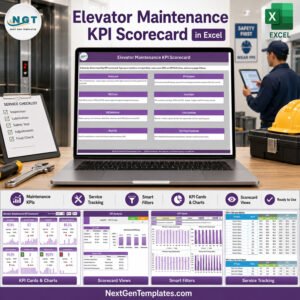
- Elevator Maintenance KPI Scorecard in Excel: an elevator maintenance KPI scorecard in Excel
- HVAC Maintenance Checklist in Excel: an HVAC maintenance checklist in Excel
- Checklist & SOP Pack: 12 checklist templates in one download
Browse all Excel checklists or the Excel health and safety templates.






























Reviews
There are no reviews yet.