



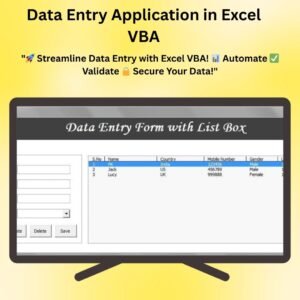
The Data Entry Application in Excel VBA is a robust, easy-to-use tool designed for streamlining the data entry process. Whether you’re managing large datasets or need a customized solution for your business, this Excel-based application simplifies data entry tasks, ensuring greater efficiency, accuracy, and user-friendly navigation.
This dynamic application leverages the power of Excel VBA to automate and enhance data entry workflows. With an intuitive user interface, you can easily input, update, and validate data while minimizing human errors. The built-in error-checking feature ensures that only accurate data is recorded, reducing the risk of mistakes and improving overall data integrity.

Key Features of the Data Entry Application in Excel VBA
📌 User-Friendly Interface
This application is designed with simplicity in mind. The interface is easy to navigate, making it ideal for users of all experience levels. You don’t need to be a programming expert to make full use of this tool.
🛠 Automated Data Entry
Say goodbye to repetitive manual data entry tasks. The application automates key functions such as data validation, updates, and error-checking, making data entry faster and more efficient.
🧭 Error Checking and Validation
Built-in validation rules ensure that incorrect or incomplete data cannot be entered. This feature automatically flags any data entry errors, helping users maintain clean, consistent, and accurate records.
📊 Data Formatting and Organization
The data entry fields are automatically formatted to maintain consistency across all records. This feature helps prevent common mistakes such as inconsistent date formats, numeric entries, or misspelled words.
🔒 Data Security
With data security in mind, this application provides password protection and encrypted data storage. You can rest assured that your sensitive information is safe from unauthorized access.
⚙ Customizable Inputs
Easily adjust the data fields according to your specific needs. Whether you’re tracking customer information, inventory, or financial data, you can modify the application to suit your requirements.
📈 Reports and Insights
The application generates comprehensive reports based on the entered data, helping you gain insights into your workflow. Use these reports to improve decision-making and optimize processes.
🚀 Why You’ll Love This Data Entry Application in Excel VBA
✅ Increased Productivity – Automate and simplify data entry tasks, allowing your team to focus on more important tasks. ✅ Improved Accuracy – Built-in error checking and validation ensure that your data is always correct. ✅ Customizable for Any Industry – Whether you are in retail, finance, or healthcare, this application can be tailored to your specific needs. ✅ No More Manual Data Entry – Save time and reduce mistakes by automating repetitive data entry processes. ✅ Secure and Reliable – Data protection is at the forefront, with encrypted storage and password protection.
📂 What’s Inside the Data Entry Application in Excel VBA?
- User Interface: Clean, simple layout for easy navigation.
- Data Entry Fields: Customizable fields for any type of data.
- Validation Rules: Ensure data accuracy with automatic error checks.
- Reports Generation: Generate reports based on your entries to track key metrics.
- Security Features: Password protection and encryption to keep your data secure.
🔍 How to Use the Data Entry Application in Excel VBA
1️⃣ Download the Template – Get immediate access to the Excel file once you purchase the tool. 2️⃣ Customize the Fields – Adjust the data entry fields according to your business requirements. 3️⃣ Start Entering Data – Begin inputting your data with ease, knowing the system will automatically check for errors. 4️⃣ Generate Reports – Use the application’s reporting features to track and analyze your data.
🎯 Who Can Benefit from This Application? 🔹 Business Owners 🔹 HR & Admin Professionals 🔹 Data Entry Clerks 🔹 Small & Medium Enterprises (SMBs) 🔹 Large Corporations 🔹 Consultants and Analysts
Streamline your data entry process today with this powerful Excel VBA tool. Save time, improve data accuracy, and enhance your workflow efficiency!
Click here to read the detailed blog post
After downloading and unzipping this file, ensure that macros are enabled before use. Refer to our below tutorial link for step-by-step instructions on enabling macros in Excel.
Visit our YouTube channel to learn step-by-step video tutorials
Watch the step-by-step video tutorial:
Also check our Incentive Dashboard in Excel
Compatibility and Requirements
- Needs Microsoft Excel desktop on Windows with macros enabled. Microsoft shows how in Enable or disable macros in Microsoft 365 files.
- It does not run in Excel for the web, Google Sheets or the Excel mobile apps.
- Password protection and the data entry form are built with Excel VBA, so keep the file as a macro-enabled workbook.
Frequently Asked Questions
Do I need to enable macros?
Yes. The application runs on Excel VBA, so enable macros after you download and unzip the file.
Can I change the data entry fields?
Yes. The fields are customizable, so you can set them up for customer, inventory or financial records.
How does it stop wrong entries?
Built-in validation rules check each entry and flag incorrect or incomplete data.
Can it produce reports?
Yes. The application generates reports from the data you enter, so you can track key metrics.
Is my data protected?
The application includes password protection to keep the records away from unauthorized users.
Related Data Entry Templates
- Data Entry Form in Excel: a simpler form for everyday data entry
- Smart Data Entry form with minimum VBA: a light form that uses very little code
- Data Entry form with Picture Box in Excel VBA: adds a picture to each record
- Pro Gantt Chart in Excel with data entry form: a project Gantt chart fed by a form
- VBA Management Systems Mega Pack: 5 premium VBA management systems in one bundle
Browse all Excel VBA tools or the Excel templates.





























Reviews
There are no reviews yet.