



The Change Management Tracker in Google Sheets is a simple yet powerful tool to help organizations manage and track change requests effectively. This template is designed to provide a clear overview of all your change requests, their statuses, priorities, and other vital details, making it easier to monitor progress and ensure smooth transitions. With visual insights and real-time collaboration, this tracker streamlines the change management process, helping your team stay on track.
Centralized Tracking: Manage all change requests in one place for better organization.
Visual Data Insights: Quickly assess change request statuses with pie charts, column charts, and line graphs.
Real-Time Updates: Share and update the tracker in real-time with your team for seamless collaboration.
Customizable: Tailor the tracker to fit your organization’s specific change management needs.
Easy Collaboration: With Google Sheets, multiple team members can access and work on the tracker simultaneously.

What’s Inside the Change Management Tracker
This Change Management Tracker is equipped with two main sheets that offer an organized structure for managing change requests:
Tracker Sheet Tab:
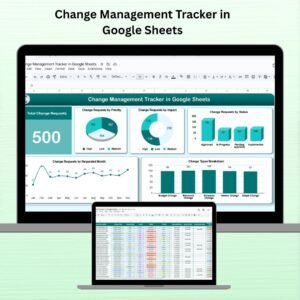
This is the main sheet where you can track and analyze all change requests. Key components include:Total Change Request Card: Displays the total number of change requests submitted.
Change Request by Priority (Pie Chart): A pie chart showing the distribution of requests by priority (Low, Medium, High).
Change Request by Impact (Donut Chart): A donut chart to visualize how requests are distributed based on their impact.
Change Request by Status (Column Chart): A column chart that displays the status of each change request (e.g., Pending, Approved, Implemented).
Change Request by Request Month (Line Chart): A line chart showing the number of requests submitted each month to identify trends.
Change Type Breakdown (Column Chart): A breakdown of requests by type (e.g., System Changes, Process Changes).
Data Sheet Tab:
The Data Sheet serves as the input sheet where all the change request details are captured. The columns include:Change Type: Categorize each request (e.g., System Change, Process Improvement).
Priority: Assign a priority level (Low, Medium, High).
Impact: Specify the impact level (Low, Medium, High).
Status: Track the status of each request (Pending, Approved, Implemented).
Request Month: Identify the month when the request was made.
How the Change Management Tracker Works
Using the Change Management Tracker is straightforward and efficient. Follow these steps to start optimizing your change management process:
Capture Change Requests: Enter the details of each change request into the Data Sheet, including type, priority, impact, and status.
Track Progress: The Tracker Sheet automatically updates the charts and metrics as you add data, providing real-time insights into the status of requests.
Visualize the Data: Use the pie charts, column charts, and line graphs to easily visualize the distribution of change requests, their priority, impact, and status.
Collaborate and Share: Share the tracker with your team via Google Sheets, enabling real-time collaboration and communication.
Who Can Benefit from This Change Management Tracker
The Change Management Tracker is ideal for any organization involved in managing change requests. Here’s who can benefit the most:
Project Managers: Efficiently track the status and progress of change requests across multiple projects.
IT Teams: Manage system changes and monitor progress with visual insights into the impact of each request.
HR Departments: Track process changes and ensure that any updates to HR systems are managed smoothly.
Change Management Teams: Use this tool to streamline the process of requesting, approving, and implementing changes.
Click here to read the Detailed blog post
Visit our YouTube channel to learn step-by-step video tutorials
Youtube.com/@NeotechNavigators
Watch the step-by-step video tutorial:
Compatibility and Requirements
- Works in Google Sheets with a free Google account and a web browser.
- Make a copy to your own Google Drive, then share it with your team if you want to work on it together.
- New to Sheets? Google’s guide How to use Google Sheets covers the basics.
- Google’s guide Add & edit a chart or graph explains how to edit the charts.
Frequently Asked Questions
Which sheets are in the Change Management Tracker?
Two. The Data sheet is where you enter each change request, and the Tracker sheet shows the summary card and charts.
Which charts are included?
A total change request card, requests by priority (pie), by impact (donut), by status (column), by request month (line) and a change type breakdown (column).
What do I record for each change request?
Change type, priority, impact, status and request month.
Which statuses and priority levels does it use?
Statuses such as Pending, Approved and Implemented, and priority and impact levels of Low, Medium and High.
Can my team update it together?
Yes. Share the Google Sheets file and several people can work in it at the same time.
Related Change Management Templates
- Project Change Order Tracker in Google Sheets: log change orders on projects
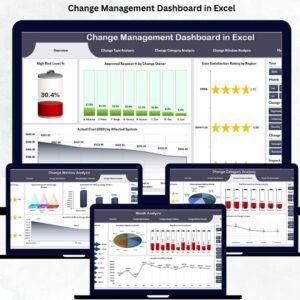
- Change Management Dashboard in Excel: the same topic as an Excel dashboard
- Change Management KPI Dashboard in Excel: measure change programs with KPIs
- Change Management Dashboard in Power BI: an interactive Power BI option
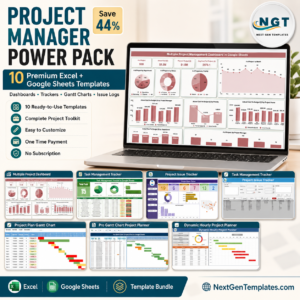
- Project Management Pro Bundle: 9 Excel and Google Sheets project templates in one bundle
Browse all Google Sheets dashboards or the Google Sheets project management templates.













Reviews
There are no reviews yet.