

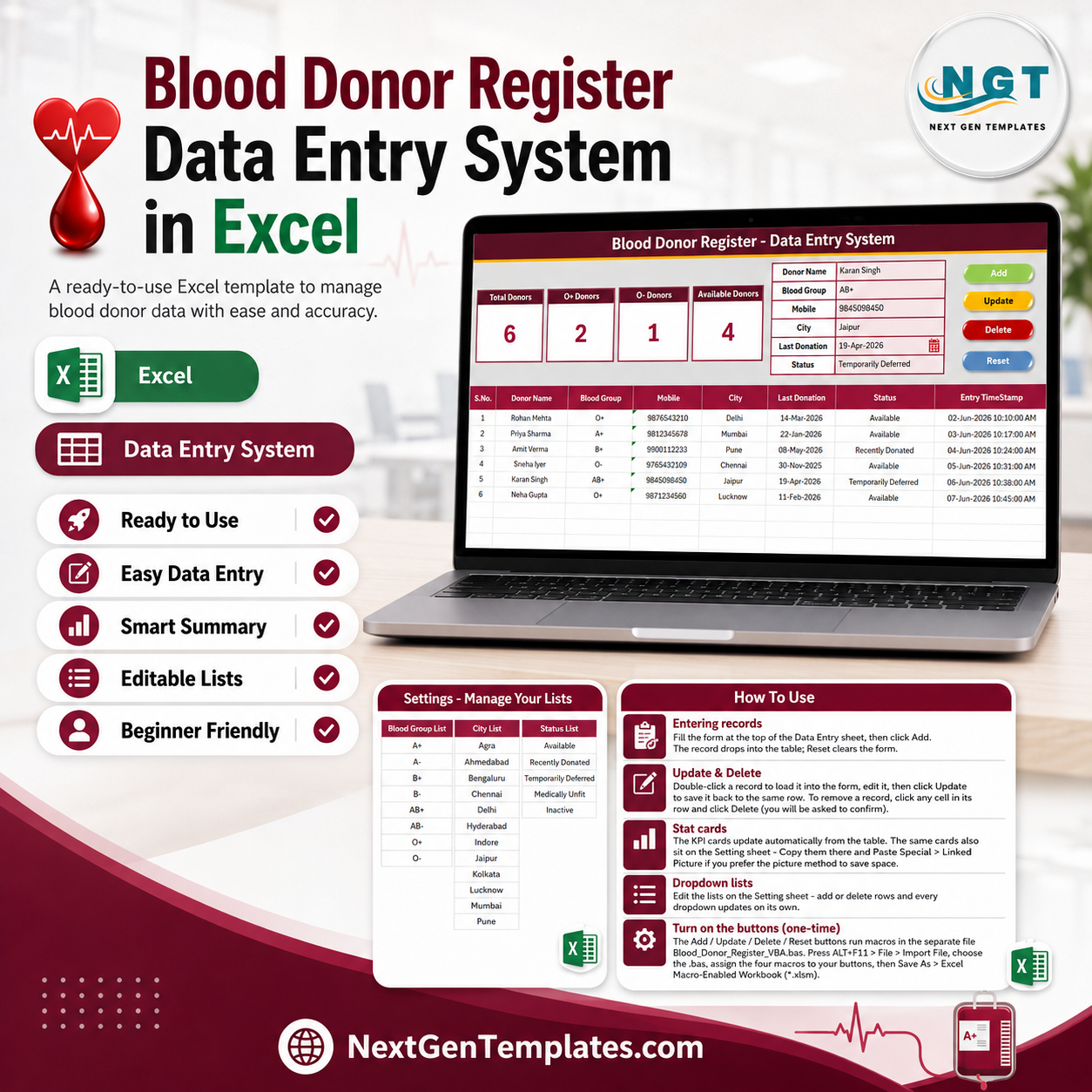
The Blood Donor Register Data Entry System in Excel stores 6 fields per donor — Donor Name, Blood Group, Mobile, City, Last Donation and Status — and rolls them into 4 live KPI cards that recalculate the moment a record is added, edited or deleted. The Setting sheet carries 25 editable dropdown values across 3 lists, and the records table comes pre-formatted for 200 donor rows with automatic serial numbers and entry timestamps.
🌍 Join 8,400+ teams in 40+ countries using NextGenTemplates to replace paid SaaS tools with one-time-purchase Excel, Google Sheets, Power BI and HTML templates.
✅ Instant download · One-time payment · No subscription · No per-user fees · Lifetime access
🔑 Key Features of the Blood Donor Register Data Entry System in Excel
🩸 4 live KPI cards. Total Donors, O+ Donors, O- Donors and Available Donors sit across the top of the Data Entry sheet. The O- card matters most in an emergency, since O negative is the universal red-cell donor group.
📝 A VBA form with four working buttons. Add writes the record with an auto serial number and Entry TimeStamp, Update rewrites the selected row, Delete asks for confirmation first, and Reset clears the form. Double-click any donor row to load it back into the form for editing.
📋 25 dropdown values you control. Blood Group carries all 8 groups (A+, A-, B+, B-, AB+, AB-, O+, O-), City ships with 12 entries, and Status covers Available, Recently Donated, Temporarily Deferred, Medically Unfit and Inactive. Edit any list on the Setting sheet and every dropdown updates on its own.
🎨 Four sheets, one house style. Data Entry, Setting, Instructions and Get More Templates share a deep-maroon heading bar, gold divider and Aptos Narrow typography. The workbook ships with 208 live formulas, recalculated to zero errors, plus 6 sample donor records so the cards show real numbers on first open.
📦 What’s Inside the Blood Donor Register Data Entry System in Excel
Data Entry Sheet
The working screen. Four KPI cards on the left, the six-field donor form on the right, and the Add / Delete / Update / Reset button block beside it. Below sits the records table with S.No., Donor Name, Blood Group, Mobile, City, Last Donation, Status and Entry TimeStamp, pre-formatted for 200 rows with frozen panes so headers stay visible as the register grows.

Setting Sheet
Three source lists — Blood Group, City and Status — feed every dropdown in the workbook through named ranges. The same four KPI cards are duplicated here, so you can copy them and use Paste Special → Linked Picture if you want the stats somewhere else without rebuilding the formulas.

Instructions & Get More Templates Sheets
Instructions covers entering records, updating and deleting, editing dropdown lists and the one-time VBA activation. Get More Templates links to the wider library including HR & Payroll Templates and Excel Dashboard Templates.

📊 Blood Donor Register in Excel vs. Google Sheets Donor Tracker vs. Paid Blood Bank SaaS — Where This Fits
| Feature | Blood Donor Register Data Entry System in Excel | Google Sheets donor tracker | Paid blood bank / donor CRM |
|---|---|---|---|
| Cost | $5.99 one-time ✅ | $8–$12 one-time | Typically subscription-priced per month |
| Platform | Microsoft Excel, works fully offline ✅ | Browser, needs internet | Vendor-hosted cloud |
| Setup time | About 5 minutes after VBA import | Under 2 minutes ✅ | Days, often with paid onboarding |
| Real-time team collaboration | One machine at a time | Native multi-user editing ✅ | Yes, billed per seat |
| Mobile access | Excel mobile app, view-oriented | Sheets app ✅ | Yes |
| Customizable fields | Full control — edit sheets, lists and VBA ✅ | Editable | Limited to vendor settings |
| Share with link | File copy or email | Yes ✅ | Login controlled |
| Year-1 cost at 5 users | $5.99 total ✅ | $8–$12 total | Recurring per-seat billing |
| Blood-group-wise donor counts | Built in — O+ and O- cards ✅ | Manual build | Yes |
| Works with no internet | Yes ✅ | No | No |
For blood banks, NGO drives and hospital desks that need a callable donor list without a monthly bill, the Blood Donor Register Data Entry System in Excel sits in the sweet spot.
👥 Who This Template Is For — and Who It’s Not For
✅ This template is built for:
- Small and mid-size blood banks keeping a callable donor list of 50–5,000 records
- NGOs and Rotary / Lions clubs running periodic blood donation drives
- Hospital front desks and pathology labs that need a quick blood-group-wise donor lookup
- College and corporate volunteer coordinators maintaining a standing donor panel
- Anyone who wants donor records offline, on their own machine, with no subscription
❌ This template is NOT for:
- Facilities needing HIPAA-certified or regulator-approved storage of medical records — a workbook is not a certified system
- Teams needing several people editing the register simultaneously (Excel VBA locks to one machine at a time; the Google Sheets route suits that better)
- Blood bank operations that also need unit inventory, cross-matching, component separation or expiry tracking
- Mac users who need the VBA buttons — the macros are written for Excel on Windows
⚙️ How to Use the Blood Donor Register Data Entry System in Excel
- Unzip the download and open the workbook in Microsoft Excel.
- Press ALT+F11, then File → Import File, and select the included .bas module.
- Draw four Form Control buttons over the coloured Add, Delete, Update and Reset cells and assign Add_Record, Delete_Record, Update_Record and Reset_Form.
- Save As → Excel Macro-Enabled Workbook (.xlsm). This is a one-time step.
- Open the Setting sheet and replace the sample City list with your own locations.
- Fill the form and click Add. The record drops into the table with an automatic serial number and timestamp.
- Double-click any donor row to load it back into the form, edit it, then click Update.
💼 Real-World Use Cases
Dr. Anita runs a 40-bed hospital blood bank in Jaipur. When a B- request comes in at 2 a.m., she filters the Blood Group column, sorts by Last Donation, and calls the donors who are past the 90-day window and marked Available — instead of scrolling a WhatsApp group.
Ravi coordinates donation drives for a Rotary club. Before every camp he checks the Total Donors card against last quarter, filters City to the drive location, and exports the Available list to his volunteers. The register costs him $5.99 once, not a monthly platform fee for four camps a year.
Meera manages a college donor panel of about 600 students. Each semester she marks graduating students Inactive and adds new volunteers through the form. The O- Donors card gives her the emergency shortlist the campus clinic asks for twice a year.
❓ Frequently Asked Questions
What does the Blood Donor Register Data Entry System in Excel track?
The Blood Donor Register Data Entry System in Excel tracks 6 fields per donor — Donor Name, Blood Group, Mobile, City, Last Donation and Status — and shows 4 live KPI cards: Total Donors, O+ Donors, O- Donors and Available Donors. Every card recalculates automatically as records change.
How long does setup take?
About 5 minutes. Import the included VBA module through ALT+F11, assign the four macros to buttons over the coloured cells, and save the file as .xlsm. After that one-time activation, the Blood Donor Register Data Entry System in Excel is ready for live donor records.
Can I change the blood group, city and status lists?
Yes. All 25 dropdown values live on the Setting sheet of the Blood Donor Register Data Entry System in Excel. Add or delete rows in any of the 3 lists and every dropdown in the workbook updates automatically through named ranges — no formula editing needed.
How does this compare to paid blood bank software?
Paid donor CRM and blood bank platforms bill monthly per seat and add unit inventory, cross-matching and compliance modules. The Blood Donor Register Data Entry System in Excel is a one-time $5.99 purchase covering the donor register itself, and it runs offline on your own machine with no vendor lock-in.
How many donor records can it hold?
The records table in the Blood Donor Register Data Entry System in Excel is pre-formatted for 200 rows, and the Add macro appends beyond that as needed. The KPI formulas read the full column, so counts stay correct however far the register grows.
Does it work on Mac or in Excel Online?
The workbook opens anywhere, but the Add, Update, Delete and Reset buttons need desktop Excel with macros enabled — they will not run in Excel Online. For a browser-based multi-user alternative, see the Blood Bank Management System Tracker in Google Sheets.
👤 About the Author
Built by PK — Microsoft Certified Professional with 15+ years of Excel, Google Sheets, and Power BI experience. Founder of NextGenTemplates, reaching 300K+ subscribers across YouTube channels (@PK-AnExcelExpert, @NextGenTemplates, @NeoTechNavigators). Every template is hand-built and tested before release.
🔗 Explore Related Templates
- Blood Bank Management System Tracker in Google Sheets — the multi-user, browser-based route when several people need to edit at once.
- Blood Bank Management System Web App — full donor, stock and issue management with logins and role-based access.
- Blood Banks Dashboard in Excel — the reporting layer once your register has enough history to analyse.
- Vaccination Record Data Entry System in Excel and Doctor Duty Roster Data Entry System in Excel — same form-and-KPI structure for other clinic records.
- 💎 Save more — get all 9 healthcare Excel tools in the Healthcare Administrator Toolkit →
📖 Click here to read the Detailed Blog Post
🎥 Visit our YouTube channel for step-by-step video tutorials
👉 YouTube.com/@NextGenTemplates
Watch the demo video:






























Reviews
There are no reviews yet.