



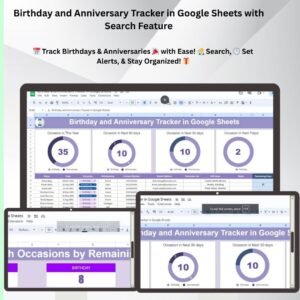
The Birthday and Anniversary Tracker in Google Sheets with Search Feature is a practical, customizable template for keeping every birthday, anniversary and special date in one organized place. It suits personal use, HR managers tracking employee dates, event planners, and small business owners who track special dates for clients. The main outcome is simple: you stay organized and never miss an important occasion.
A built-in search feature lets you find specific names, dates or events in seconds. Because it runs in Google Sheets, this cloud-based important dates tracker can be opened from any device and shared with others for real-time collaboration.

Key Features of the Birthday and Anniversary Tracker
- Easy date tracking: Record birthdays, anniversaries and other significant dates in a single, organized list.
- Built-in search function: Quickly search for specific names or dates using the search bar, saving time when your list grows.
- Date alerts: Set up alerts for upcoming birthdays and anniversaries so you do not forget an important event.
- Customizable fields: Add custom columns for gift ideas, notes, celebration plans or other personalized data.
- Data organization: Keep events organized by name, date and category for easy reference.
- Visualization: Color-coding and conditional formatting highlight upcoming events at a glance.
Why You’ll Love This Anniversary Tracker
- Stay organized: Manage important dates without missing a single occasion.
- Customizable to your needs: Add custom fields or categories, such as gift suggestions or celebration plans.
- Time-saving: Find events quickly with the search function and filter dates.
- Real-time collaboration: Share the tracker with others for collaborative event planning and updates.
- Easy access: Open the tracker anywhere, on any device, thanks to Google Sheets’ cloud-based system.
What’s Inside the Template
| Component | What it does |
|---|---|
| Event Calendar | A simple, organized list of birthdays and anniversaries. |
| Search Functionality | A search bar to quickly find names, dates and events. |
| Customizable Columns | Track additional information such as gift ideas or special notes. |
| Real-Time Updates | Collaborate with others to add or modify data in real time. |
| Visual Alerts | Color-coded cells highlight upcoming birthdays, anniversaries and important events. |
Who Is It For?
This template helps anyone who needs to track birthdays and anniversaries, whether for family and friends or for a team and customer base:
- Individuals and anyone needing a tracker for personal use
- HR Managers tracking employee birthdays and work anniversaries
- Event Planners managing an event calendar
- Small Business Owners remembering special dates for clients
- Customer Relationship Managers
- Team Leaders
How to Use the Birthday and Anniversary Tracker in Google Sheets
- Download the template: Get access to the pre-built Google Sheets tracker.
- Input your data: Add names, dates and relevant event details.
- Search for events: Use the built-in search feature to locate specific dates and events.
- Set alerts: Set up alerts for upcoming birthdays and anniversaries.
- Share and collaborate: Share the tracker with others for collaborative event management.
Watch the step-by-step video tutorial:
Visit our YouTube channel to learn from step-by-step video tutorials: Youtube.com/@PKAnExcelExpert
Click here to read the detailed blog post.
Frequently Asked Questions
What does the search feature do?
The built-in search bar lets you quickly find specific names, dates or events in your list, so you do not have to scroll through every entry.
Can I add my own columns, like gift ideas?
Yes. The tracker is customizable, so you can add columns for gift ideas, special notes, celebration plans or other personalized details.
How are upcoming birthdays and anniversaries highlighted?
The template uses color-coding and conditional formatting to highlight upcoming events, giving you visual alerts at a glance.
Can I share the tracker with my team?
Yes. Because it is built in Google Sheets, you can share it with others for real-time collaboration, and everyone can add or modify data.
Can I open it on my phone or another device?
Yes. Google Sheets is cloud-based, so you can access the tracker anywhere, on any device.
Is it only for personal use?
No. It works for personal dates as well as professional use by HR managers, event planners, small business owners, customer relationship managers and team leaders.
Stay organized, never forget an important date, and plan ahead with the Birthday and Anniversary Tracker in Google Sheets with Search Feature, ideal for managing personal or professional events and ensuring every celebration is remembered.
Also check our Attendance Template in Google Sheet
Last updated: October 2026
Compatibility and Requirements
- Works in Google Sheets with a free Google account and a web browser. Nothing to install.
- It opens on any device with Google Sheets, and you can share it for real-time editing. Google explains the basics in How to use Google Sheets.
Related Date and Celebration Templates
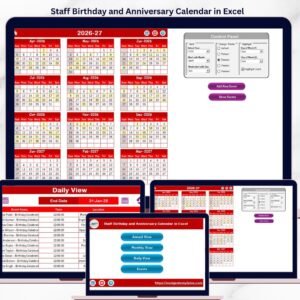
- Staff Birthday and Anniversary Calendar in Excel: a calendar view of staff dates in Excel
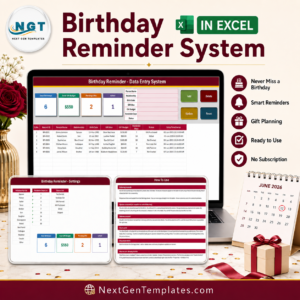
- Birthday Reminder Data Entry System in Excel: enter and track birthdays with a form
- Birthday Party Checklist in Excel: plan the celebration itself
- Anniversary Celebration Checklist in Excel: plan an anniversary event
- Dynamic Holiday and Event Calendar in Google Sheets: see holidays and events by month
Browse all miscellaneous Google Sheets templates or the Google Sheets calendar templates.





Reviews
There are no reviews yet.