



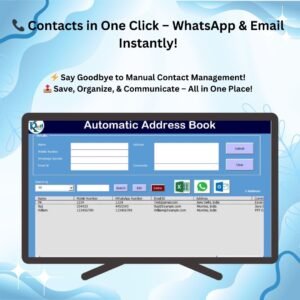
The Auto WhatsApp and Email Functionality Address Book in Google Sheets is an innovative and efficient tool designed to streamline communication for businesses and individuals. This template allows you to easily send personalized WhatsApp messages and emails directly from Google Sheets. Perfect for marketing campaigns, customer service, or bulk messaging, this tool automates the process, saving you time and effort.
With a simple and easy-to-use interface, this address book integrates seamlessly with WhatsApp and email, enabling you to send bulk messages or communicate with individual contacts. Whether you’re running a business, managing a customer list, or organizing events, this template provides the functionality you need to communicate effectively.

Key Features of the Auto WhatsApp and Email Functionality Address Book in Google Sheets
📅 Contact Management: Store and manage all your contacts in one centralized address book, including names, phone numbers, and email addresses.
⚙️ Automated Messaging: Send personalized WhatsApp messages and emails automatically from Google Sheets using built-in functions.
📈 Custom Message Templates: Create custom message templates that can be personalized for each contact, making communication more effective.
💼 Bulk Messaging: Send messages to multiple contacts at once, saving time when managing large contact lists.
📧 Email Integration: Send emails directly from Google Sheets, including attachments, to individual or multiple contacts.
🔄 Real-Time Updates: The template integrates with Google Sheets and updates in real-time as you add or modify contact details.
Why You’ll Love the Auto WhatsApp and Email Functionality Address Book in Google Sheets
✅ Streamlined Communication: Manage your contacts and communication in one place, eliminating the need for separate platforms.
✅ Time-Saving Automation: Automate the process of sending WhatsApp messages and emails, improving efficiency.
✅ Customizable Templates: Tailor messages for individual recipients or bulk messaging campaigns.
✅ Easy Integration: Works seamlessly with Google Sheets, making it simple to integrate with your existing systems.
✅ Real-Time Messaging: Ensure timely and personalized communication with real-time updates and instant messaging features.
What’s Inside the Auto WhatsApp and Email Functionality Address Book in Google Sheets?
📅 Contact List: A well-organized contact list to store names, phone numbers, and email addresses.
⚙️ Messaging Automation: Automated WhatsApp and email functionality, with templates for easy messaging.
📧 Email Sending Integration: Send emails, including attachments, from the address book with just a click.
💼 Customizable Fields: Modify the template to add additional fields for your specific needs, such as status, tags, or categories.
📈 Bulk Messaging Options: Send messages to multiple contacts at once, ensuring efficiency for marketing or customer support tasks.
How to Use the Auto WhatsApp and Email Functionality Address Book in Google Sheets
1️⃣ Download the Template – Get the pre-configured Google Sheets template for WhatsApp and email integration.
2️⃣ Add Your Contacts: Input contact information, including names, phone numbers, and email addresses.
3️⃣ Create Custom Templates: Design your personalized messages for WhatsApp and email.
4️⃣ Send Messages: Select the contacts and send personalized messages through WhatsApp or email with a click of a button.
5️⃣ Collaborate: Share the template with your team to collaborate on messaging campaigns and track communication.
Who Can Benefit from the Auto WhatsApp and Email Functionality Address Book in Google Sheets?
🔹 Business Owners
🔹 Marketing Teams
🔹 Customer Support Teams
🔹 Freelancers
🔹 Event Organizers
🔹 Sales Teams
🔹 Project Managers
Streamline your communication and improve efficiency with the Auto WhatsApp and Email Functionality Address Book in Google Sheets. Simplify messaging for individual or bulk communication and save valuable time.
Click here to read the detailed blog post
Visit our YouTube channel to learn step-by-step video tutorials
Watch the step-by-step video tutorial:
Compatibility and Requirements
- Works in Google Sheets with a free Google account and a web browser.
- Make a copy to your own Google Drive, then share it with your team if you want to work on it together.
- New to Sheets? Google’s guide How to use Google Sheets covers the basics.
Frequently Asked Questions
What can I send from this Google Sheets address book?
You can send personalized WhatsApp messages and emails to one contact or to many contacts at once, straight from the sheet.
What contact details does it store?
It stores names, phone numbers and email addresses. You can add more fields such as status, tags or categories.
Can I write my own message templates?
Yes. You create custom message templates and personalize them for each contact.
Can emails include attachments?
Yes. You can send emails with attachments to one or more contacts.
Can my team use it too?
Yes. Share the sheet with your team to work on messaging campaigns together.
Related Address Book and Messaging Templates
- Automated Address Book with Auto WhatsApp and Email: the Excel version of this address book
- Send WhatsApp and Email without VBA: send messages from Excel without macros
- Customer Address Book Web App: an address book that runs as a web app
- Customer Address Book and Follow Up System V1.0: contacts plus follow up tracking
Browse all Google Sheets tools or the Google Sheets sales and marketing templates.













Reviews
There are no reviews yet.