

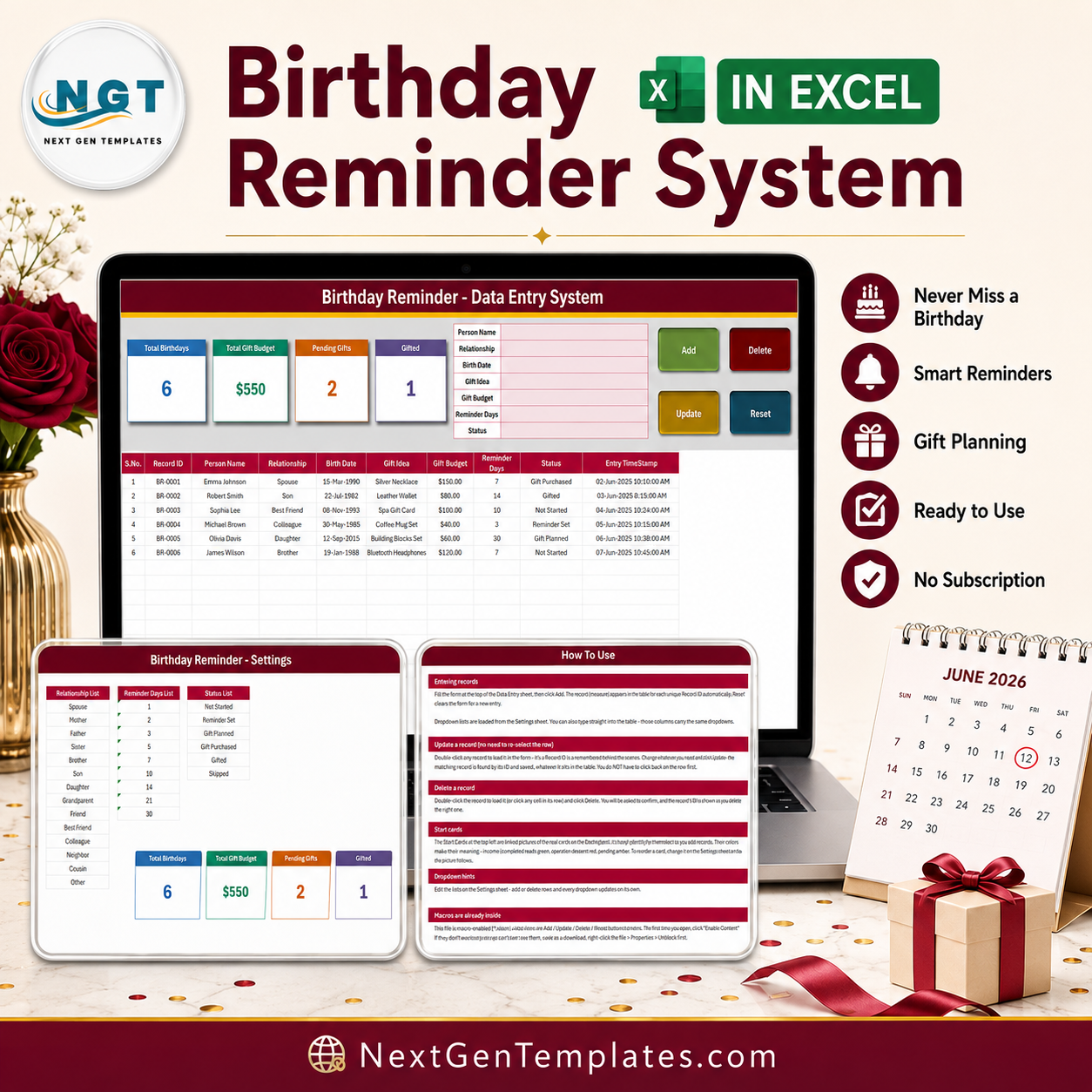

The Birthday Reminder Data Entry System in Excel is a macro-enabled workbook (.xlsm) that keeps one row per person: Person Name, Relationship, Birth Date, Gift Idea, Gift Budget, Reminder Days and Status. You fill a seven-field form, click Add, and the record drops into a 10-column table with its own Record ID (BR-0001, BR-0002 …) and an Entry TimeStamp written for you. Four summary cards sit above the form, three editable dropdown lists ship with 14, 9 and 7 options, and the table is pre-formatted for 200 records across four sheets. Setup takes under 10 minutes. One-time $6.99, no subscription, and the file is yours to edit forever.
This is an honest listing. Read the Who This Template Is Not For section and the FAQs before you buy – they say plainly what the four cards count and what this workbook deliberately does not do.
Key Features of the Birthday Reminder Data Entry System
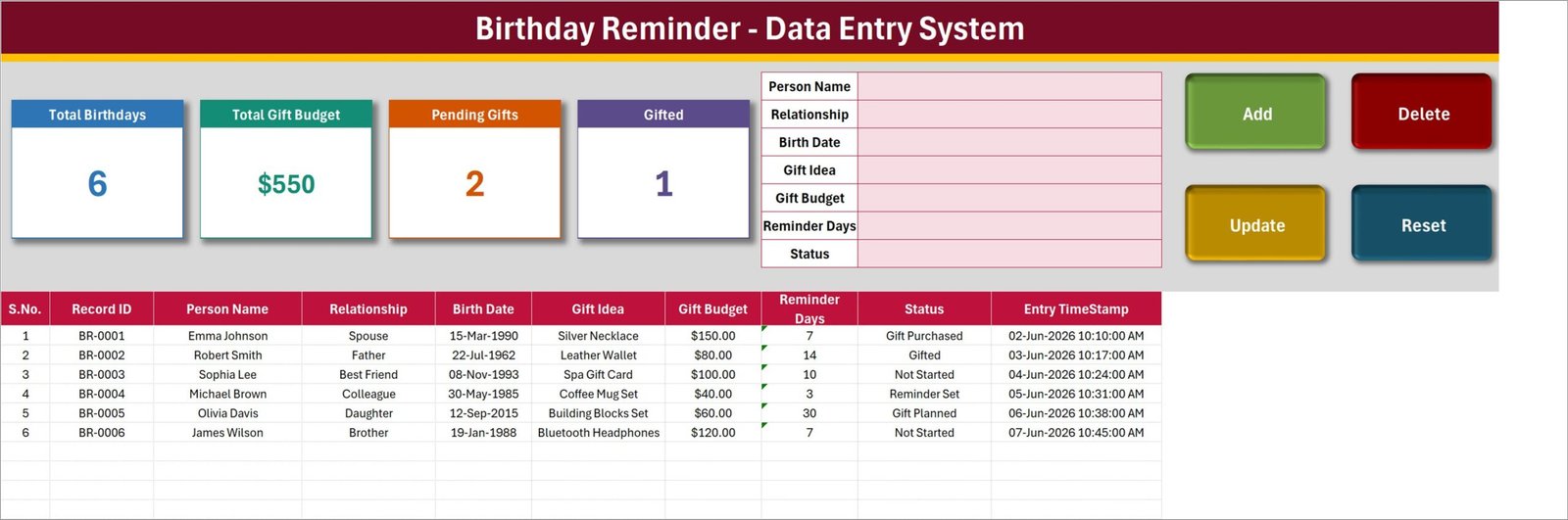
- Seven-field entry form – Person Name, Relationship, Birth Date, Gift Idea, Gift Budget, Reminder Days and Status, all in one panel at the top of the Data Entry sheet.
- Real VBA buttons, not pictures – Add, Update, Delete and Reset are wired to macros that ship inside the file.
- Automatic Record ID – every entry is stamped BR-0001, BR-0002 and so on. The macro takes one more than the largest number already used, so IDs stay unique even after you delete rows.
- Automatic Entry TimeStamp – the date and time each record was saved is written into column J.
- Double-click to edit – double-click any row to load it back into the form. The Record ID is remembered behind the scenes, so Update finds the right row wherever it sits in the table.
- Confirmed deletes – Delete shows you the Record ID before it removes anything.
- Four live summary cards – Total Birthdays, Total Gift Budget, Pending Gifts and Gifted. They are linked-picture mirrors of real cells on the Setting sheet, so they refresh as you type.
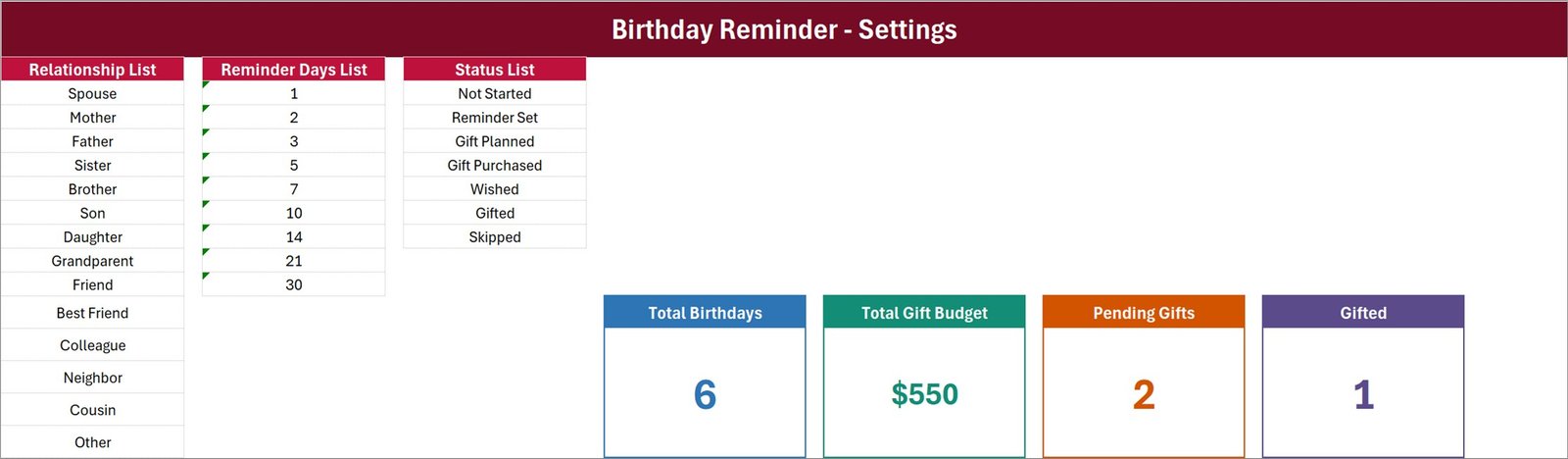
- Three editable dropdown lists – 14 relationships (Spouse, Mother, Father, Sister, Brother, Son, Daughter, Grandparent, Friend, Best Friend, Colleague, Neighbor, Cousin, Other), 9 reminder lead-times (1, 2, 3, 5, 7, 10, 14, 21 and 30 days) and 7 statuses (Not Started, Reminder Set, Gift Planned, Gift Purchased, Wished, Gifted, Skipped).
- Gift budget beside the person – what you planned to spend sits in the same row as who it is for and what the idea was.
- 200 pre-formatted record rows – rows 15 to 214 carry the dropdowns, the currency format and the running S.No.
What’s Inside the Birthday Reminder Data Entry System
Four sheets, no add-ins, no external connections.
Data Entry
The working sheet. Four summary cards and the seven-field form across the top, the Add / Delete / Update / Reset buttons on the right, and the record table below with S.No., Record ID, Person Name, Relationship, Birth Date, Gift Idea, Gift Budget, Reminder Days, Status and Entry TimeStamp. Six sample rows ship with the file so you can see the shape before you clear them.
Setting
The three dropdown source lists – Relationship, Reminder Days and Status – plus the four real KPI cards that the Data Entry sheet mirrors. Restyle a card here and the picture on the Data Entry sheet follows.
Instructions (How To Use)
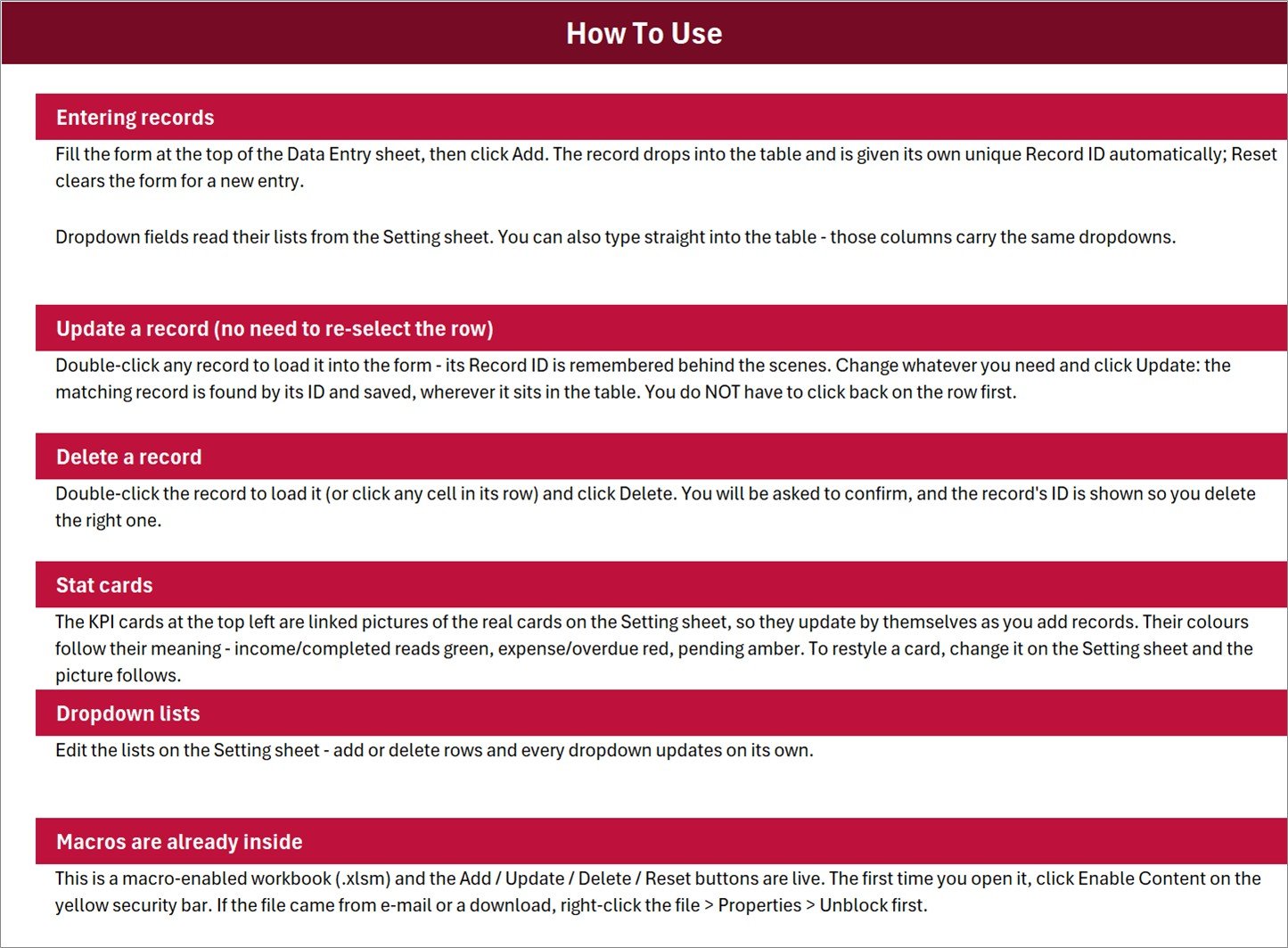
A one-page guide covering entering records, updating by double-click, deleting, how the stat cards work, editing the dropdown lists and enabling macros the first time you open the file.
Get More Templates
A short links sheet pointing back to the NextGenTemplates library.
Birthday Reminder in Excel vs. a Google Sheets List vs. a Paid Reminder App – Where This Fits
| This template (Excel) | Google Sheets birthday list | Paid reminder / contacts app | |
|---|---|---|---|
| Cost | $6.99 one time | Free, build it yourself | $3-$8 per user per month |
| Platform | Excel for Windows, desktop | Browser | Phone app plus web |
| Setup time | Under 10 minutes | 1-2 hours to build a form and lists | 15 minutes plus contact import |
| Real-time team collaboration | No – single-user file | Yes | Yes |
| Mobile access | No – macros need desktop Excel | Yes | Yes |
| Customizable fields | Yes – lists and columns are yours | Yes | Limited to the vendor’s fields |
| Share with link | No – send the file | Yes | Yes |
| Year-1 cost at 5 users | $6.99 total | $0 | $180-$480 |
| Automated alerts or notifications | No – you record a lead time, the file does not notify you | Only if you script it | Yes, push and e-mail |
| Gift idea and gift budget per person | Yes, built in | Add the columns yourself | Rarely |
Who This Template Is For – and Who It’s Not For
It is for you if you want one tidy, offline list of the people whose birthdays you care about, with the gift idea and the budget written down next to each name, and you would rather own a $6.99 file than rent another subscription. It suits a family list of 20-60 names, a small team’s birthday list kept by one person, or a shop owner who sends cards to regulars.
It is not for you if you expect the workbook to tell you when a birthday is coming. There is no alert, no e-mail, no pop-up and no days-until-birthday formula in this build – Reminder Days is a number you choose so you know how much lead time you wanted, and Status is how you mark that you acted. It is also not for you if you need it on a phone, need several people editing at once, or need it to pull dates out of Outlook, Google Contacts or Facebook. It imports nothing and syncs with nothing.
How to Use the Birthday Reminder Data Entry System
- Unzip the download and open Birthday_Reminder_System.xlsm in desktop Excel for Windows. Click Enable Content on the yellow bar – the buttons will not run otherwise.
- Open the Setting sheet and edit the three lists so the relationships, lead times and statuses match how you actually work.
- Go back to Data Entry and delete the six sample rows (rows 15 to 20).
- Fill the form: name, relationship, birth date, a gift idea, a budget, the lead time you want and a starting status. Click Add. The Record ID and TimeStamp are written for you.
- To change something, double-click the row, edit in the form and click Update. To remove one, load it and click Delete, then confirm.
- Once a month, sort the table by Birth Date, work down the names whose day is close, and move each one along the Status list as you go.
Real-World Use Cases
Priya, who keeps the family list. Thirty-eight names across two families. Relationship tells her who is close family and who is a cousin she only messages; Gift Budget keeps the December total from surprising her; Status stops her buying twice for the same person.
Daniel, office manager at a 24-person firm. He owns the staff birthday list. Reminder Days records how much notice each person’s team lead wants for the card, and Gift Idea holds the standing preference – vouchers for some, cake for others.
Meera, who runs a small boutique. Sixty regular customers whose birthdays earn a discount card. Gift Idea holds the offer, Gift Budget holds its value, and the Total Gift Budget card tells her what the whole gesture costs across the year.
Frequently Asked Questions
Does it actually remind me?
No. This is a record, not an alarm. Nothing in the file sends an e-mail, raises a pop-up, colours a row or counts days to the next birthday. Reminder Days is a lead time you pick from a dropdown, and Status is how you mark what you have done. Buy it for the list and the gift budget, not for notifications.
What exactly do the four cards count?
Total Birthdays counts filled Person Name cells. Total Gift Budget sums the whole Gift Budget column with no filter, so a gift you have already given or skipped is still inside that total. Pending Gifts counts only the status Not Started. Gifted counts only the status Gifted. Because five of the seven statuses have no card, the two status cards will not add up to Total Birthdays – in the shipped sample, 2 + 1 against a total of 6. Read them as four separate numbers, not as a breakdown.
Can I add my own relationships or statuses?
Yes, on the Setting sheet. One caveat: the dropdowns read fixed ranges (Relationship A3:A16, Reminder Days C3:C11, Status E3:E9). Insert a row inside a list and the range grows with it; type a new value below the last item and you will need to widen the named range under Formulas > Name Manager before it appears.
Why is there a small green triangle in the Reminder Days cells?
Reminder Days is stored as text in this build, so Excel flags it as a number stored as text. It is cosmetic – no card or formula uses that column – and the indicator can be switched off under File > Options > Formulas.
How many records does it hold?
Rows 15 to 214 are pre-formatted with the dropdowns and the running S.No., so 200 records out of the box. The summary cards read the whole column, so records past row 214 still count – they simply arrive without the dropdown lists until you copy the formatting down.
Will it work on Mac, on the web, or in Google Sheets?
No. The Add, Update, Delete and Reset buttons are VBA, and VBA does not run in Excel for the web, Excel for Mac or Google Sheets. Use desktop Excel for Windows.
How is this different from the Gift Register system?
The Gift Register Data Entry System in Excel logs gifts after the fact – what was given or received, on what occasion, and whether a thank-you went out. This one is the list of people and dates that comes before that, carrying the gift idea and budget you are planning. Plenty of buyers keep both.
About the Author
Built by PK – Microsoft Certified Professional with 15+ years of Excel, Google Sheets, and Power BI experience. Founder of NextGenTemplates, reaching 300K+ subscribers across YouTube channels. Every template is hand-built and tested before release.
Explore Related Templates
- Gift Register Data Entry System in Excel – log gifts given and received, with thank-you tracking.
- Staff Birthday and Anniversary Calendar in Excel – the same idea laid out as a workplace calendar.
- Birthday Party Checklist in Excel – for planning one party rather than keeping a list.
- Gift Wrapping Checklist in Excel – the small stuff that gets forgotten.
- Book Reading Log Data Entry System in Excel – the same VBA form built for a personal reading list.
- Browse every MS Excel template and every VBA Tool.
Get the Birthday Reminder Data Entry System in Excel for $6.99 – a one-time price, instant download, and a workbook you can reshape however you like. Add to cart above.
Last updated: August 2026.




























Reviews
There are no reviews yet.