

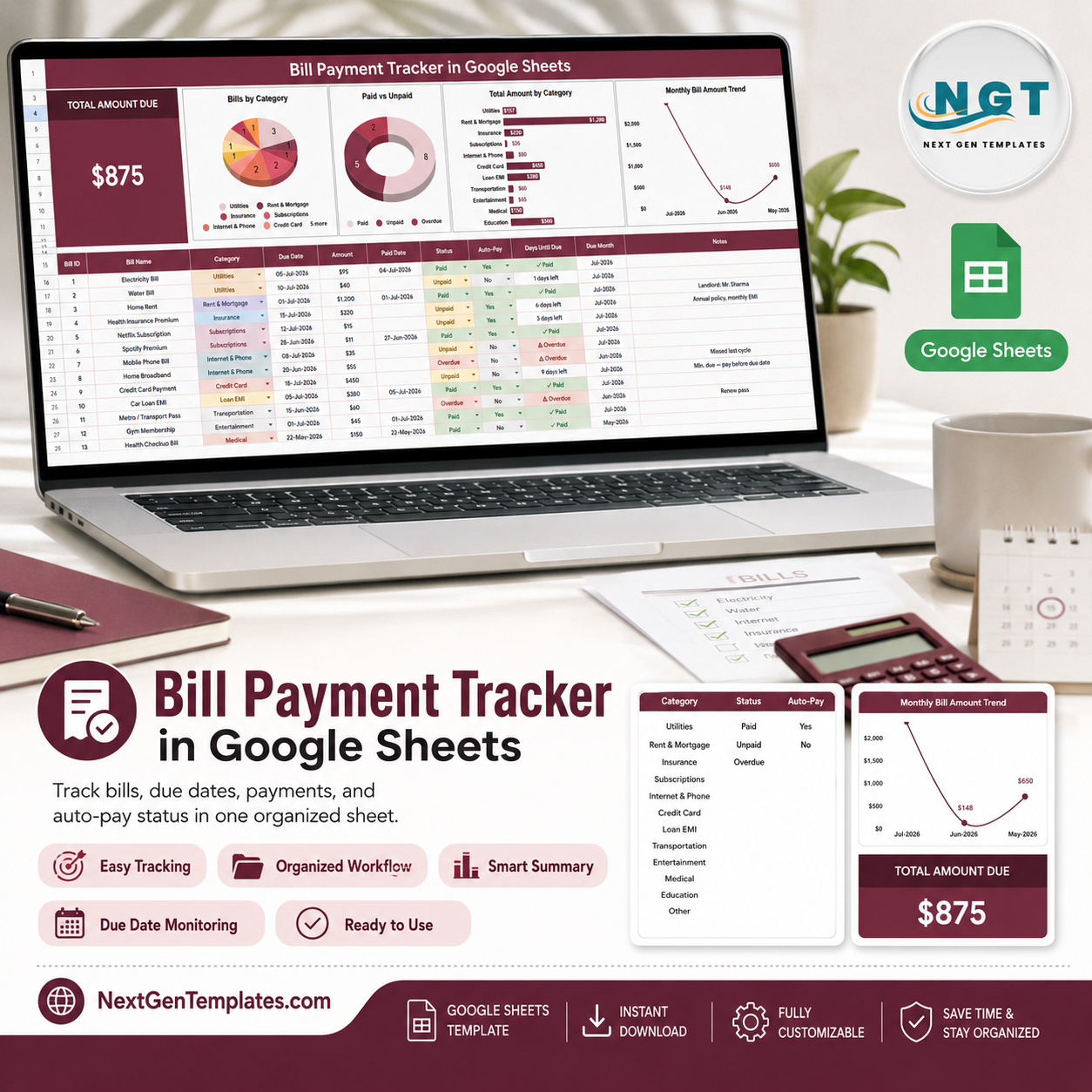
The Bill Payment Tracker in Google Sheets is a ready-to-use finance tracking template built to help individuals, families, freelancers, and small business owners monitor recurring bills, due amounts, payment status, and auto-pay selections in one organized spreadsheet.
Instead of switching between bank apps, calendars, reminders, and notes, this tracker gives you a clear dashboard view of what is due, what has been paid, which categories cost the most, and how monthly bill amounts change over time. It is designed in Google Sheets, so you can access it from your browser, update it from any device, and customize it for your own bill categories or payment workflow.
Overview Page
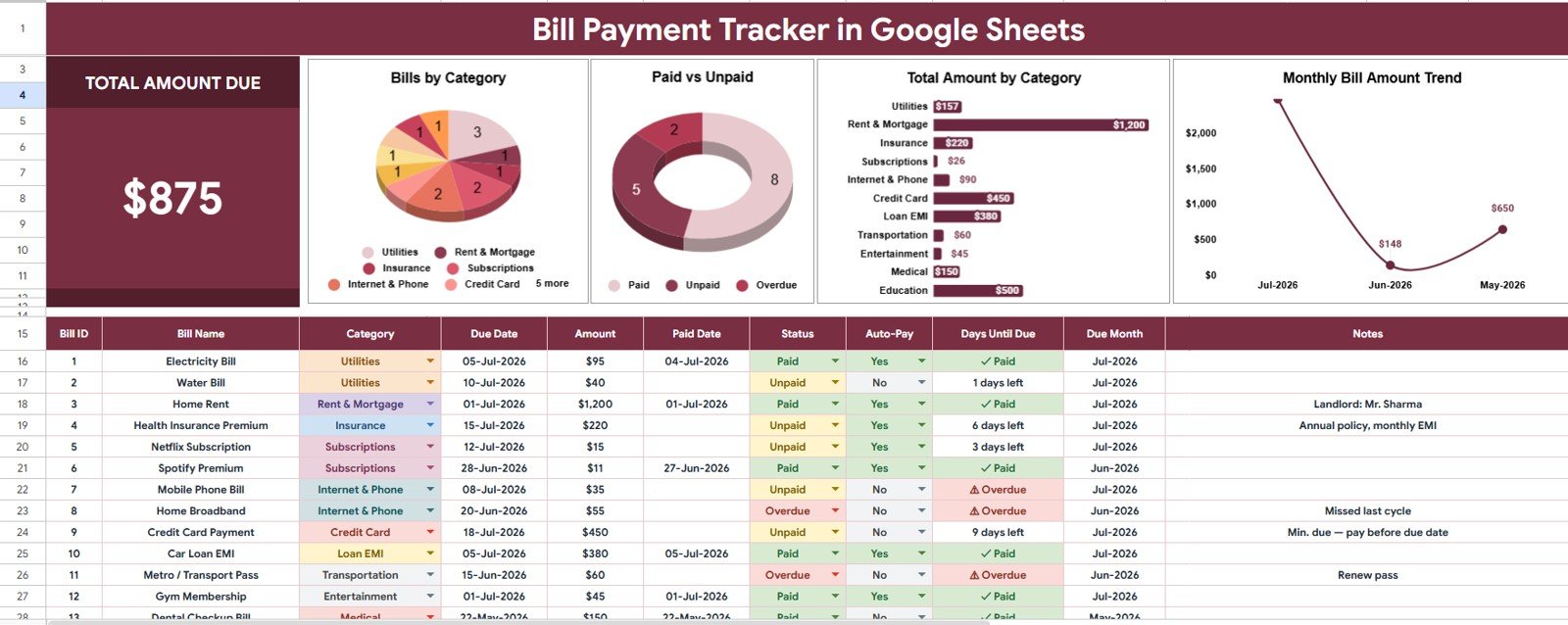
The Overview Page gives you a high-level snapshot of your bill payment activity. At the top of the sheet, a summary card displays the Total Amount Due, helping you quickly understand the total outstanding bill value for the selected period or filtered view.
This page also includes dashboard charts and slicers so you can filter the report quickly and review payment activity by category, status, and due month.
Total Amount Due
The Total Amount Due card highlights the total bill value that needs attention. It helps you quickly understand your upcoming or unpaid payment responsibility without reviewing every row manually.
Bill Count by Category
This chart shows how many bills are assigned to each bill category. It helps you identify which areas, such as utilities, subscriptions, rent, insurance, or services, appear most often in your payment schedule.
Payment Status Count by Status
This chart summarizes the number of bills by payment status. It makes it easier to see how many bills are paid, pending, overdue, or still waiting for confirmation.
Total Amount by Category
This chart shows the total bill amount grouped by category. It helps you understand where the largest portions of your money are going and which categories may need closer review.
Monthly Bill Amount by Due Month
This chart displays the total bill amount by due month. It helps you compare monthly payment obligations and spot months where your cash flow may need extra planning.
Dropdown List Sheet
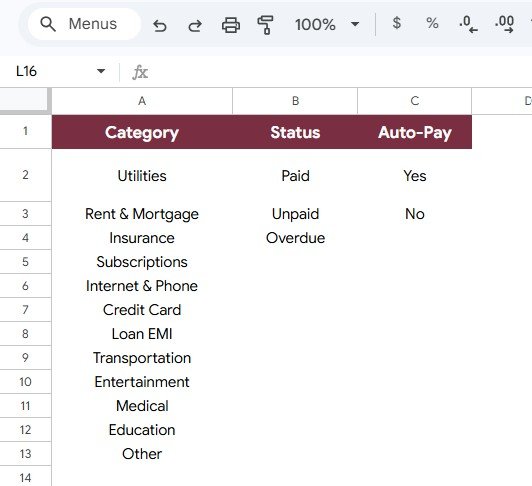
The Dropdown List Sheet is included to make the template easier to maintain and more consistent. It contains predefined options that support clean data entry across the bill tracker, helping reduce spelling differences, inconsistent categories, and reporting issues.
Bill Category Options by Category
This section stores the available bill category options used in the tracker. You can update these options to match your own expense structure, such as rent, utilities, loan payments, subscriptions, insurance, taxes, or business services.
Payment Status Options by Status
This section controls the payment status dropdown choices. It helps keep your reporting consistent by ensuring each bill uses the same status labels across the spreadsheet.
Auto-Pay Options by Auto-Pay Selection
This section manages the auto-pay dropdown options. It helps you separate bills that are paid manually from bills scheduled for automatic payment, making payment planning easier.
What You Can Track
- Bill names and bill categories
- Due dates and due months
- Total amount due
- Payment status
- Auto-pay selection
- Category-level bill counts
- Status-level payment counts
- Monthly bill amount trends
Who This Template Is For
- Individuals managing recurring monthly bills
- Families tracking household expenses
- Freelancers monitoring business and personal bills
- Small business owners reviewing vendor, subscription, and service payments
- Anyone who wants a simple Google Sheets bill payment spreadsheet
Key Benefits
- Organize bill payments in one Google Sheets tracker
- Use dropdown lists for cleaner and faster data entry
- Review total amount due without manual calculations
- Analyze bills by category, status, and month
- Use slicers to filter the dashboard quickly
- Customize categories and statuses for your own workflow
Template Details
- Format: Google Sheets
- Template Type: Tracker
- Pages Included: Overview Page and Dropdown List Sheet
- Access: Google account required to copy and edit the sheet
- Best For: Bill tracking, personal finance, household budgeting, small business payment planning, and recurring expense monitoring
How It Works
- Purchase the template and open the included Google Sheets copy link.
- Create your own editable copy in Google Drive.
- Enter your bill details, categories, due dates, amounts, payment status, and auto-pay selection.
- Use the Overview Page to review totals, charts, and filtered dashboard views.
- Update the Dropdown List Sheet whenever you want to customize the available options.
Frequently Asked Questions
Can I edit this Bill Payment Tracker?
Yes. After making your own copy in Google Sheets, you can edit the bill categories, payment status options, auto-pay options, formulas, and layout as needed.
Do I need Microsoft Excel?
No. This version is designed for Google Sheets. You only need a Google account to copy and use the template.
Can I use this for business bills?
Yes. The tracker can be used for personal bills, household bills, freelance expenses, vendor payments, subscriptions, and small business recurring payments.
Does the template include charts?
Yes. The Overview Page includes charts for bill count by category, payment status count by status, total amount by category, and monthly bill amount by due month.
Can I customize the dropdown lists?
Yes. The Dropdown List Sheet lets you manage bill category options, payment status options, and auto-pay selection options.


















Reviews
There are no reviews yet.