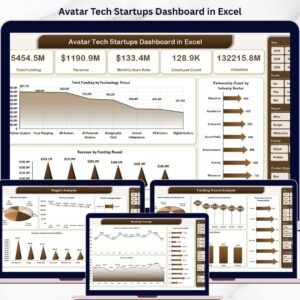
Take control of your startup growth with the Avatar Tech Startups Dashboard in Excel 💡. In today’s fast-paced tech ecosystem, tracking data across funding, revenue, partnerships, customer acquisition, and industry performance can quickly become overwhelming.
However, this powerful and ready-to-use Excel dashboard simplifies everything. It transforms complex startup data into clear visuals, actionable insights, and structured reports—all in one place.
With this dashboard, you can monitor your startup ecosystem, analyze trends, and make faster, smarter, and data-driven decisions without relying on multiple spreadsheets.
🚀 Key Feature of Avatar Tech Startups Dashboard in Excel
✅ 📊 Interactive Excel Dashboard
Analyze startup performance using dynamic charts and slicers.
✅ 📈 Complete KPI Tracking
Track funding, revenue, partnerships, customer acquisition cost, and more.
✅ 📅 Multi-Page Dashboard Structure
Explore insights across 5 structured analytical pages.
✅ 🔍 Smart Filtering with Slicers
Filter data instantly for customized analysis.
✅ 🌍 Region & Industry Insights
Evaluate performance across regions and industry sectors.
✅ ⚙️ Automated Calculations
Support sheet handles backend calculations for accurate results.
✅ 📂 Organized Data Structure
Separate Data and Support sheets for efficient data management.
📦 What’s Inside the Avatar Tech Startups Dashboard in Excel
This template includes 5 powerful analytical pages:
📊 Overview Page – Snapshot of startup performance with KPI cards

💰 Funding Round Analysis – Analyze funding trends and investment performance
🌍 Region Analysis – Compare performance across geographic regions
🏢 Industry Sector Analysis – Evaluate startup performance by sector
📅 Month Analysis – Track growth and trends over time
📂 Additional Sheets:
Data Sheet – Stores all raw startup data
Support Sheet – Handles calculations and backend logic
Everything is designed to provide a complete 360° startup performance view.
⚙️ How to Use the Avatar Tech Startups Dashboard in Excel
Getting started is simple:
👉 Enter your data in the Data Sheet
👉 Calculations update automatically in the Support Sheet
👉 Use slicers to filter by region, industry, or funding round
👉 Analyze KPI cards and charts
👉 Track trends across multiple pages
Within minutes, you can transform raw startup data into powerful business insights 📊.
👨💼 Who Can Benefit from This Avatar Tech Startups Dashboard in Excel
This dashboard is perfect for:
🚀 Startup Founders – Track growth and performance
💼 Investors & Venture Capitalists – Analyze funding and returns
📊 Business Analysts – Evaluate startup KPIs
📈 Finance Teams – Monitor financial performance
📉 Data Analysts – Generate insights
🌍 Consultants – Provide strategic recommendations
Anyone involved in startup growth, funding, and analytics will benefit from this tool.
🔗 Click hare to read the Detailed blog post
Explore the complete guide with detailed features, benefits, and use cases.
👉 Visit our YouTube channel to learn step-by-step video tutorials:
https://youtube.com/@PKAnExcelExpert
Watch the step-by-step video tutorial:
Compatibility and Requirements
- Works in Microsoft Excel desktop (Excel 2016 or later, or Microsoft 365).
- Slicers filter the dashboard by region, industry or funding round. Microsoft explains them in Use slicers to filter data.
Frequently Asked Questions
Which pages does the dashboard include?
Five analytical pages: Overview, Funding Round Analysis, Region Analysis, Industry Sector Analysis and Month Analysis. Two more sheets sit behind them: the Data sheet and the Support sheet.
Where do I enter my startup data?
Enter it in the Data sheet. The Support sheet handles the calculations, so the KPI cards and charts update from your entries.
How do I filter the dashboard?
Use the slicers to filter by region, industry or funding round.
What does the dashboard track?
It tracks funding, revenue, partnerships and customer acquisition cost, shown as KPI cards and charts across the five pages.
Is there a Power BI version?
Yes. See the Avatar Tech Startups Dashboard in Power BI.
Related Startup Dashboard Templates
- Avatar Tech Startups Dashboard in Power BI: the same dashboard for Power BI
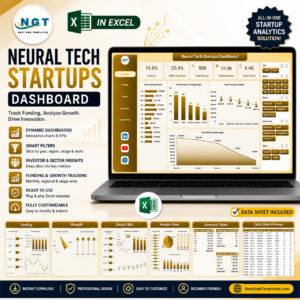
- Neural Tech Startups Dashboard in Excel: a startup dashboard for neural tech companies
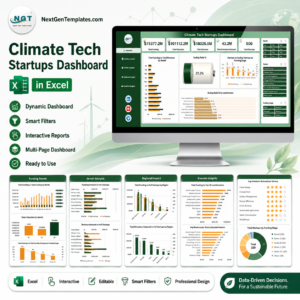
- Climate Tech Startups Dashboard in Excel: startup tracking for climate tech
- Financial Tech Startups KPI Dashboard in Excel: KPIs for fintech startups
- KPI Dashboard Library (Excel): 15 Excel KPI dashboards in one download
Browse all Excel dashboards.