



The Automatic Bulk Salary Slips Generator in Excel produces employee salary slips as PDF files from payroll records. Its Setting, Data and Template sheets handle the output folder, payroll month, employee earnings and deductions, and the salary slip layout used for each employee.

Key Features: Automatic Bulk Salary Slips Generator in Excel
1. Setting Sheet Tab:
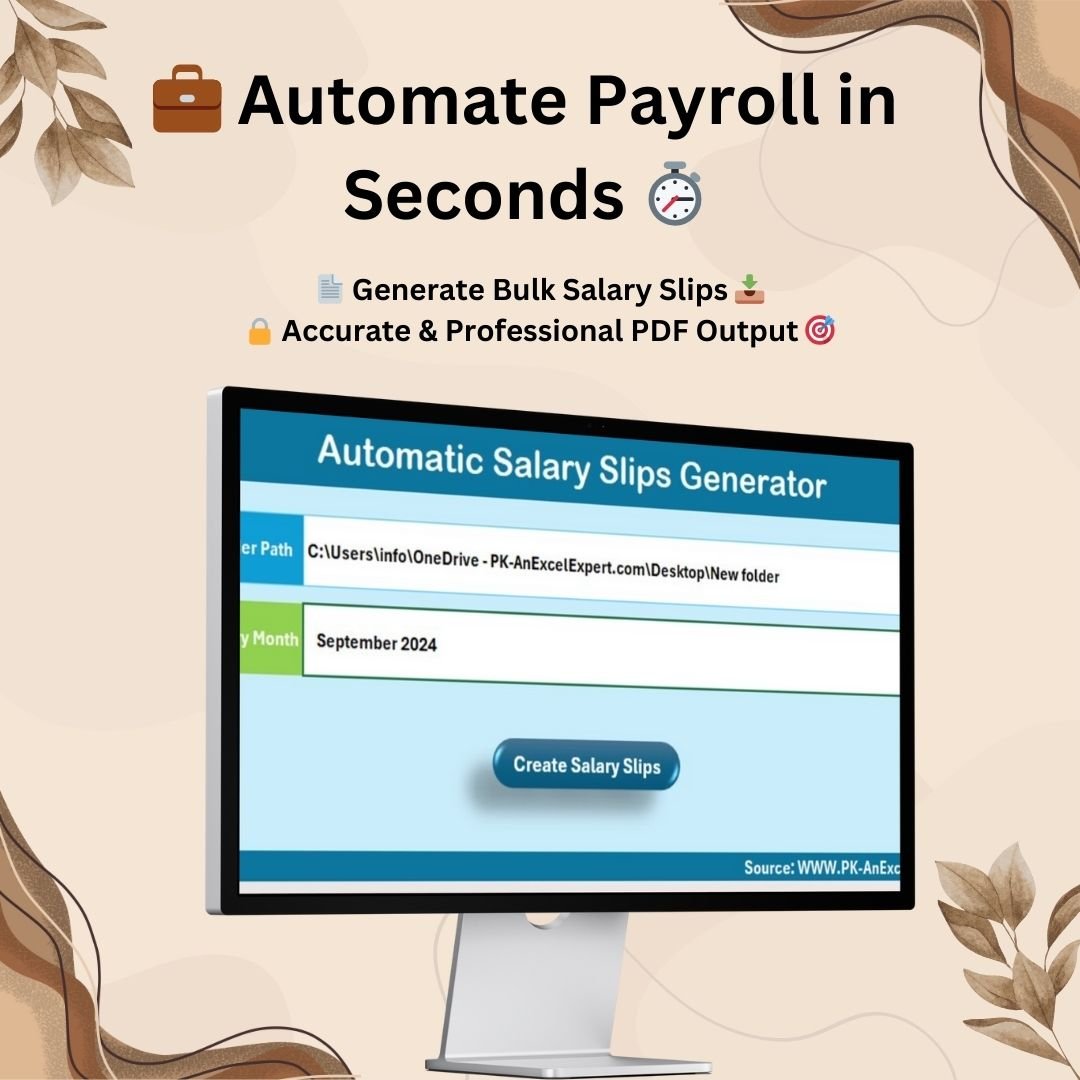
- Customizable Save Location: The tool allows you to specify the folder path where all generated salary slips will be saved in PDF format. You can easily update the folder path in the C4 cell of the Setting Sheet.
- Set the Salary Month: The Salary Month can be updated in the C7 cell of the Setting Sheet to specify the payroll period. This helps in generating accurate and time-specific salary slips for each month.
- Automatic Generation: After configuring the necessary details, you can click on the “Create Salary Slips” button, and the tool will automatically generate and save the salary slips in the designated folder. This ensures a seamless and error-free salary processing experience.
2. Data Sheet Tab:
- Simple Data Entry: The Data Sheet is designed to make it easy for users to input all relevant payroll data. You can enter details like Employee ID, Name, Department, Designation, and salary information including Basic Salary, House Rent Allowance, Conveyance Allowance, Special Allowance, and Other Deductions.
- Comprehensive Payroll Information: The sheet also includes columns for Tax Deductions, Provident Fund, Health Insurance, Loan Deductions, and other deductions. The well-organized column setup ensures that all necessary payroll data is captured accurately, enabling precise calculations and salary slip generation.
3. Template Sheet Tab:
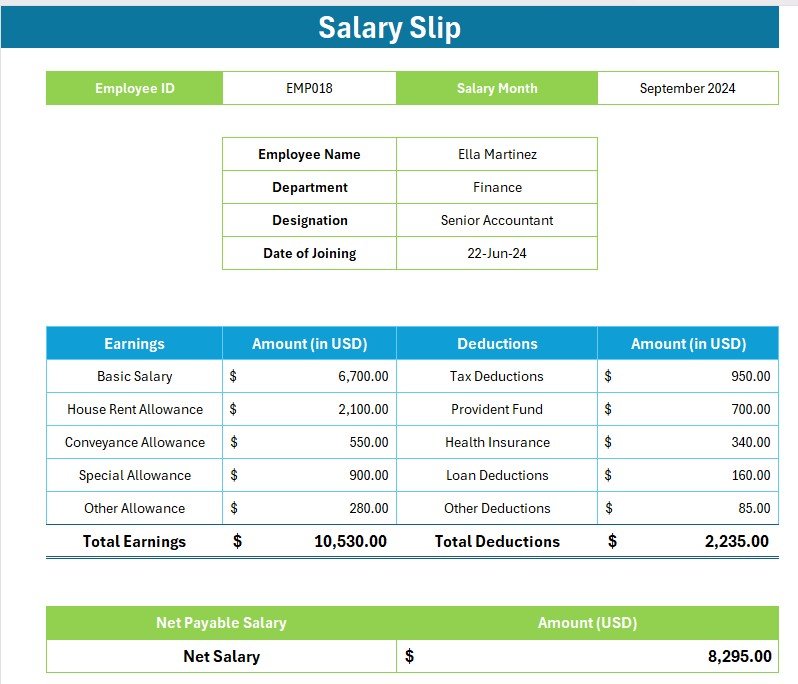
- Auto-Updating Salary Slip: The Template Sheet features a single-page salary slip template that automatically updates based on the Employee ID entered. This feature ensures that each employee receives a unique, accurate salary slip with all their details automatically populated.
- Formula-Driven System: The system uses pre-defined formulas to compute earnings, deductions, and the net payable salary. This formula-driven approach ensures consistency and accuracy across all generated salary slips, eliminating human errors and discrepancies.
Final Product:
Once the necessary details are entered, and the settings are configured, the tool generates professional PDF salary slips for all employees. These slips are automatically saved in the specified folder, ready to be distributed or archived for future reference.
Each salary slip includes comprehensive details such as employee earnings, deductions, and the net payable salary, providing transparency and clarity. It ensures that each employee receives an accurate, detailed breakdown of their salary, which helps to maintain trust and communication within the organization.
Benefits of Using the Tool:
- Time-Saving: By automating the salary slip generation process, this tool significantly reduces the time and effort spent on manually creating individual salary slips for each employee.
- Accuracy: The formula-driven system guarantees that calculations for earnings, deductions, and net salary are consistent and error-free.
- Professional Output: The generated salary slips are designed to look professional and can be used for distribution in both digital and printed formats.
- Reduced Manual Workload: This tool minimizes the need for manual data entry and repetitive tasks, allowing HR and finance teams to focus on more strategic work.
In summary, the Automatic Bulk Salary Slips Generator is a game-changer for businesses that want to streamline their payroll process. By eliminating manual calculations and providing an easy-to-use interface for generating salary slips, this tool enhances payroll efficiency and accuracy. It’s an indispensable solution for organizations looking to save time, reduce errors, and ensure a smooth payroll operation.
Click here to read the detailed blog post
Visit our YouTube channel to learn step-by-step video tutorials
Watch the step-by-step video tutorial:
Also check our Download Attachments from Multiple Emails Automatically using VBA
Questions about this template
Where do I set the salary month and PDF folder?
The Setting sheet uses cell C4 for the PDF output folder and C7 for the salary month. After entering payroll details, use Create Salary Slips to generate files in the selected folder.
For help comparing reporting tools for this area, see our HR and payroll template guide.
Compatibility and Requirements
- Needs Microsoft Excel desktop on Windows with macros enabled.
- It does not run in Excel for the web, Google Sheets or the Excel mobile apps.
- The Create Salary Slips button runs the automation and saves one PDF per employee to the folder you set.
- If Excel blocks the macros, Microsoft shows how to allow them: Enable or disable macros in Microsoft 365 files.
More Questions About This Template
Which salary fields can I enter?
Employee ID, name, department, designation, basic salary, house rent allowance, conveyance allowance and special allowance, plus tax, provident fund, health insurance, loan and other deductions.
How does the slip layout work?
The Template sheet holds a one-page salary slip that fills in each employee’s details from their Employee ID and calculates earnings, deductions and net pay.
Where are the PDF files saved?
In the folder path you enter in cell C4 of the Setting sheet.
Is there a video tutorial?
Yes. A step-by-step video tutorial is on this page.
🎁 Try Before You Buy: 7-Day Free Trial
Download the free trial of the Automatic Bulk Salary Slips Generator in Excel and use the complete system for 7 days. Every form, register, dashboard, printable document and setting works exactly as in the full version, so you can test it with your own records before you decide.
How the free trial works
- Click Get the 7-Day Free Trial below, enter your email and download the ZIP from the email we send you. Unzip it.
- Open it in Microsoft Excel for Windows (the desktop app, not Excel Online or Mac) and click Enable Content on the yellow bar. If there is no yellow bar, right-click the file, choose Properties, tick Unblock and open it again.
- Your 7 days start the first time the file opens with macros on. A banner on the Setting page shows how many days are left.
- After 7 days the trial locks and shows a Buy Full Version button. Buy the full version to keep working with no time limit.
| Free Trial | Full Version | |
|---|---|---|
| Every feature, form and dashboard | Yes | Yes |
| Time limit | 7 days | None, lifetime use |
| Trial banner | Yes | No |
| Editable (unlocked) VBA code | No, locked | Yes |
Enter your email and we send the download link straight to your inbox.
The trial runs once per computer: downloading it again does not restart the 7 days. Records you enter during the trial can be copied into the full version.
Related Payroll Templates
- Payroll Calculator and Payslip Generator in Excel: to calculate pay before slips are made
- Payroll Management Dashboard in Excel: to chart payroll costs
- Payroll Information Form Template in MS Word and Google Docs: to collect employee pay details
- Automation: Excel to PDF Converter: another Excel to PDF automation tool
- Payroll and Salary Management System Web App: a browser-based payroll system
Browse all Excel HR and payroll templates or the Excel VBA tools.























Reviews
There are no reviews yet.