


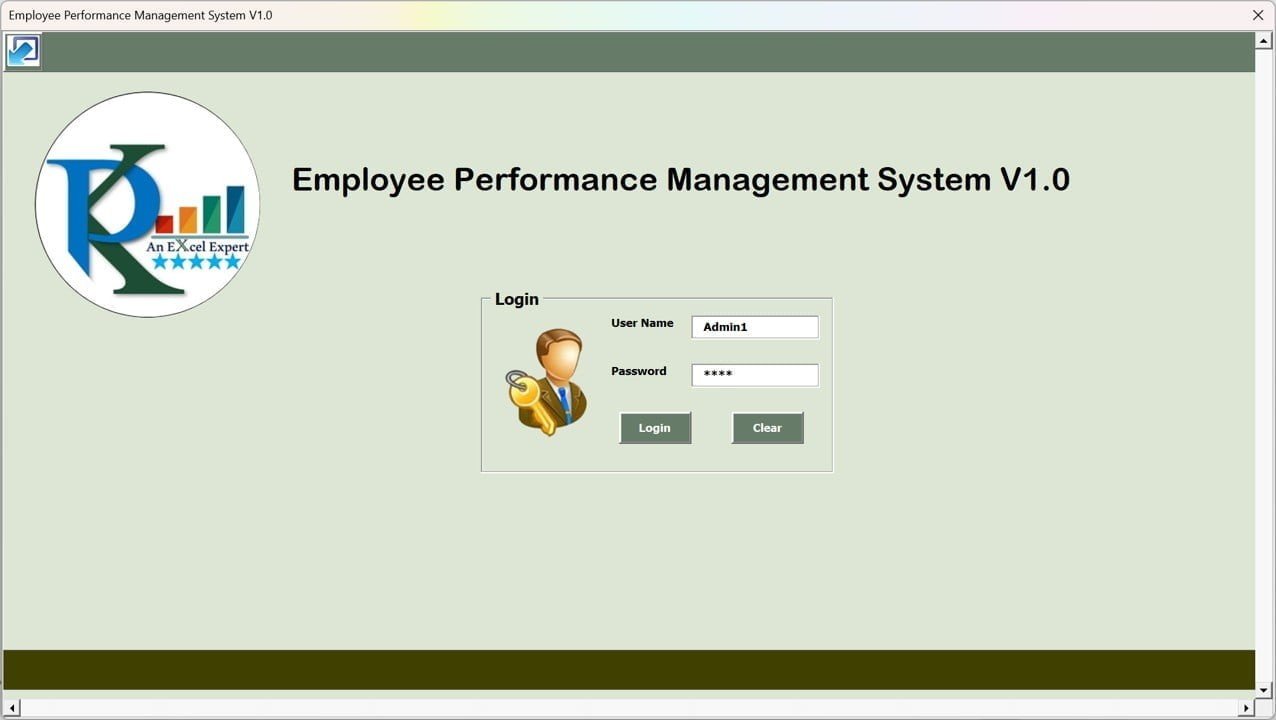



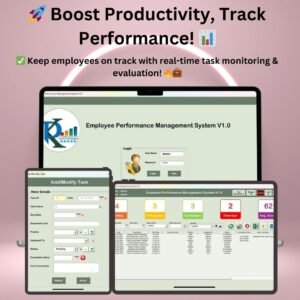
The Employee Performance Management System V1.0 is an Excel VBA tool for tracking, evaluating and improving employee productivity. It is built for HR managers, team leaders and business owners who want to manage tasks, monitor progress on a real-time performance dashboard and score workforce efficiency in one place. The result is clearer task tracking, better performance analysis and practical reports for team reviews.

Key Features of the Employee Performance Management System
Secure Login System
- Protects employee performance data with an admin-controlled access system.
- Only authorized users can log in using secure credentials.
- Supports data privacy and helps prevent unauthorized modifications.
User Management Module
- Add, update or remove employees and assign user roles (Admin, User).
- Maintain a centralized employee directory with contact details.
- Assign and manage individual user permissions for different sections.
Performance Dashboard
- Get a real-time overview of employee task statuses with categorized counts:
- Pending Tasks
- In-Progress Tasks
- Completed Tasks
- Overdue Tasks
- Color-coded indicators make task progress easy to read at a glance.
- Displays the average employee performance score based on completed tasks.
Task and Project Management
- Create and assign tasks with due dates and priorities.
- Track task progress and update statuses as work moves forward.
- Sort and filter tasks by date, priority or assigned employee.
- Add document links for better project collaboration.
Email Integration with Outlook
- Click the email icon to open a new email in Outlook for the selected record, so you can follow up on a task quickly.
Performance Evaluation and Scoring
- Supervisors can rate completed tasks based on quality and timeliness.
- Assign scores to employees for performance analysis.
- Track delayed tasks and issues to identify process bottlenecks.
Manage Lists and Priorities
- Customize dropdown lists for task priority levels (High, Medium, Low).
- Add or modify task status categories.
- Easily update employee lists and assign responsibilities.
Export Reports to Excel
- Generate detailed performance reports based on selected date ranges.
- Export reports in Excel format for HR analysis and team reviews.
- View historical performance trends for better decision-making.
What’s Inside the Tool
| Module | What it does |
|---|---|
| Login | Secure, admin-controlled access with role-based permissions |
| User Management | Employee directory, user roles (Admin, User) and permissions |
| Dashboard | Pending, in-progress, completed and overdue task counts plus average performance score |
| Task Management | Create, assign, prioritize, filter and sort tasks with due dates and document links |
| Evaluation and Scoring | Rate completed tasks on quality and timeliness |
| Manage Lists | Edit priority levels, status categories and employee lists |
| Reports | Date-range performance reports exported to Excel |
Who Is This Excel VBA Tool For?
- HR Managers – handle employee performance tracking and manage productivity.
- Team Leaders – assign and evaluate tasks efficiently.
- Business Owners – get insights into workforce efficiency.
- Freelancers and Agencies – manage multiple projects with ease.
How to Use It
- Download and unzip the file.
- Open the workbook in Excel and make sure macros are enabled.
- Log in with your admin credentials and set up users, roles and permissions.
- Customize priority levels, status categories and employee lists.
- Create and assign tasks, then monitor progress on the performance dashboard.
- Rate completed tasks and export performance reports to Excel for reviews.
After downloading and unzipping this file, ensure that macros are enabled before use. Refer to our tutorial for step-by-step instructions on enabling macros in Excel: https://www.pk-anexcelexpert.com/4-easy-ways-to-enable-macros-in-excel-vba/
Click here to read the detailed blog post Employee Performance Management System
Visit our YouTube channel to learn step-by-step video tutorials.
Watch the step-by-step video tutorial: Employee Performance Management System
🎁 Try Before You Buy: 7-Day Free Trial
Download the free trial of the Employee Performance Management System V1.0 and use the complete system for 7 days. Every form, register, dashboard, printable document and setting works exactly as in the full version, so you can test it with your own records before you decide.
How the free trial works
- Click Get the 7-Day Free Trial below, enter your email and download the ZIP from the email we send you. Unzip it.
- Open it in Microsoft Excel for Windows (the desktop app, not Excel Online or Mac) and click Enable Content on the yellow bar. If there is no yellow bar, right-click the file, choose Properties, tick Unblock and open it again.
- Your 7 days start the first time the file opens with macros on. The title bar of the main window shows how many days are left.
- After 7 days the trial locks and shows a Buy Full Version button. Buy the full version to keep working with no time limit.
| Free Trial | Full Version | |
|---|---|---|
| Every feature, form and dashboard | Yes | Yes |
| Time limit | 7 days | None, lifetime use |
| Trial banner | Yes | No |
| Editable (unlocked) VBA code | No, locked | Yes |
Enter your email and we send the download link straight to your inbox.
The trial runs once per computer: downloading it again does not restart the 7 days. Records you enter during the trial can be copied into the full version.
Frequently Asked Questions
What is the Employee Performance Management System V1.0?
It is an Excel-based VBA tool that combines secure login, user management, task tracking, a performance dashboard, supervisor scoring and Excel report export to help you manage and evaluate employee performance.
Do I need to enable macros?
Yes. The tool is built with VBA, so macros must be enabled after you download and unzip the file. The tutorial link above explains how to enable macros in Excel.
Can it send emails?
Clicking the email icon opens a new email in Outlook for the selected record, so Outlook is needed for this feature.
How are employees scored?
Supervisors rate completed tasks based on quality and timeliness, and the dashboard shows the average employee performance score based on completed tasks.
Can I customize task priorities and statuses?
Yes. You can customize dropdown lists for priority levels (High, Medium, Low), add or modify task status categories and update employee lists.
Can I export performance reports?
Yes. You can generate detailed performance reports for selected date ranges and export them in Excel format for HR analysis and team reviews.
Also check our Download Attachments from Multiple Emails Automatically using VBA
Last updated: October 2026
Compatibility and Requirements
- Needs Microsoft Excel desktop on Windows with macros enabled, because the forms and buttons run on VBA.
- It does not run in Excel for the web, Google Sheets or Excel mobile apps.
- The email button opens a new message in Microsoft Outlook, so Outlook is needed for that feature.
- Microsoft explains how to switch macros on in Enable or disable macros in Microsoft 365 files.
Related Employee Performance Templates
- Employee Performance Rating Card and Dashboard in Excel: rate employees and see results on a dashboard
- Employee Performance Tracking Dashboard in Excel: report on performance across teams
- Performance Appraisal KPI Dashboard in Excel: track appraisal KPIs by month
- Task Management Dashboard in Excel: a dashboard for task status and workload
- VBA Management Systems Mega Pack: five Excel VBA systems in one pack
Browse all Excel VBA tools or the Excel HR and payroll templates.











Reviews
There are no reviews yet.