


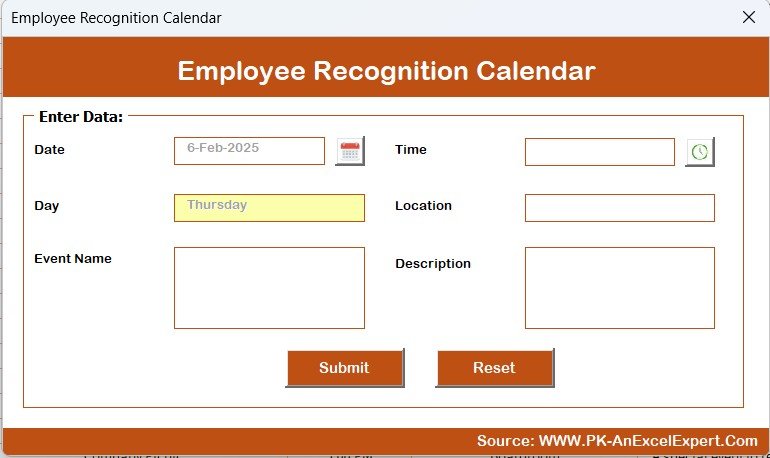


The Employee Recognition Calendar in Excel is a powerful and user-friendly tool designed for HR managers, team leaders, and organizational development professionals to streamline employee recognition and appreciation. This Excel-based calendar helps you plan, schedule, and track employee recognition events, ensuring that your team members are consistently acknowledged for their contributions and achievements.
With customizable features, automated reminders, and easy-to-read visuals, this calendar enables you to foster a positive work culture by celebrating employee milestones, achievements, and efforts, boosting morale and engagement.
Key Features of the Employee Recognition Calendar in Excel:
🎉 Track Employee Milestones
Celebrate key milestones such as work anniversaries, birthdays, promotions, and project completions, ensuring that employees feel valued and appreciated for their hard work.
🏆 Customizable Recognition Types
Customize the types of recognition, whether it’s for outstanding performance, team collaboration, or personal achievements, allowing you to tailor the recognition program to your organizational culture.
🔔 Automated Reminders
Set up automated reminders to notify HR or team leaders about upcoming recognition events, ensuring that no important milestone goes unnoticed.
📅 Annual Recognition Calendar
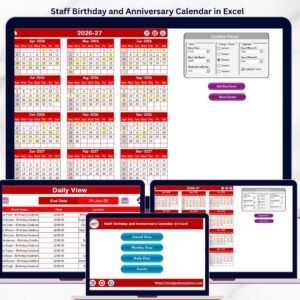
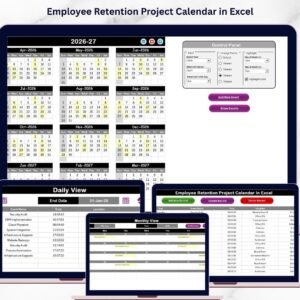
Plan and schedule recognition events throughout the year with an easy-to-read calendar format, helping you keep track of all the special moments and ensure consistent recognition.
📈 Monitor Recognition Trends
Track the frequency of employee recognition across different departments, teams, and time periods to identify trends and ensure that all employees are being recognized fairly.
🚀 Why You’ll Love the Employee Recognition Calendar in Excel:

✅ Streamline Employee Recognition – Plan and track employee recognition events, ensuring that every milestone is celebrated, and no achievement is overlooked.
✅ Boost Employee Engagement – Foster a positive and inclusive work environment by consistently recognizing and rewarding employees for their contributions.
✅ Enhance Employee Morale – Show employees that their efforts are valued, increasing job satisfaction and retention.
✅ Automated Reminders – Set automated reminders to ensure that recognition events are never missed, helping you stay on top of your employee appreciation efforts.
✅ Customizable for Your Organization – Tailor the calendar to fit your company’s unique recognition needs, including adding specific milestones and categories.
✅ Comprehensive Tracking – Monitor recognition trends and ensure that all employees are receiving fair and timely recognition.
What’s Inside the Employee Recognition Calendar in Excel:
Recognition Events: Track important employee milestones such as birthdays, work anniversaries, promotions, and special achievements.
Customizable Categories: Add specific categories of recognition that fit your company’s culture, such as teamwork, leadership, innovation, and more.
Automated Reminders: Receive automatic reminders for upcoming recognition events, ensuring that you never miss an opportunity to celebrate employees.
Annual Calendar Format: Plan and schedule employee recognition events with an easy-to-read calendar view that helps you stay organized.
Trends and Insights: Monitor recognition trends and ensure that all employees are being fairly and consistently recognized for their contributions.
Custom Reports: Generate reports summarizing employee recognition activity, including frequency, categories, and departmental breakdowns.
How to Use the Employee Recognition Calendar in Excel:
1️⃣ Download the Template – Instantly access your Excel file upon purchase.
2️⃣ Input Employee Data – Add employee names, birthdays, work anniversaries, and other milestones to the calendar.
3️⃣ Track and Schedule Recognition – Plan and track recognition events for each employee, ensuring that milestones are celebrated on time.
4️⃣ Set Reminders – Use the reminder system to get automatic notifications about upcoming recognition events.
5️⃣ Monitor Trends – Track recognition trends over time to ensure that all employees are equally recognized and appreciated.
Who Can Benefit from the Employee Recognition Calendar in Excel:
HR Managers
Team Leaders
Employee Engagement Coordinators
Organizational Development Teams
Small to Medium Enterprises (SMEs)
Large Corporations
Non-Profit Organizations
The Employee Recognition Calendar in Excel is the perfect tool for companies looking to create a culture of recognition and appreciation. By keeping track of important milestones and celebrations, you ensure that employees feel valued, improving morale, engagement, and retention across your organization.
Click here to read the Detailed blog post
https://www.pk-anexcelexpert.com/employee-recognition-calendar-in-excel/
Visit our YouTube channel to learn step-by-step video tutorials
Youtube.com/@PKAnExcelExpert
Compatibility and Requirements
- Works in Microsoft Excel desktop (Excel 2016 or later, or Microsoft 365).
- If you are new to Excel, Microsoft’s Excel for Windows training covers the basics.
Frequently Asked Questions
Which events can I track?
You can track birthdays, work anniversaries, promotions, project completions and other achievements.
Can I set my own recognition categories?
Yes. You can add categories that fit your company, such as teamwork, leadership or innovation.
Does it show the whole year?
Yes. The annual calendar format lets you plan and schedule recognition events across the year.
Can I see whether recognition is spread fairly?
Yes. It tracks recognition frequency across departments, teams and time periods, and the reports summarize activity by category and department.
Is there a Google Sheets version?
Yes. The Employee Recognition Calendar in Google Sheets covers the same job in a browser.
Related Employee Recognition Templates
- Employee Recognition Calendar in Google Sheets: the same calendar in Google Sheets
- Employee Recognition Nomination Tracker in Excel: log and review nominations
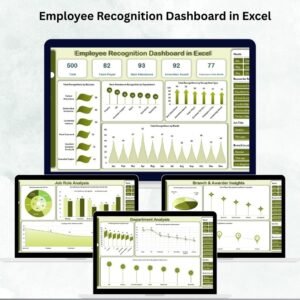
- Employee Recognition Dashboard in Excel: analyze recognition by team and month
- Employee Engagement Dashboard in Excel: track engagement scores
- Calendar & Planner Pack: 12 calendar and planner templates in one download
Browse all Excel calendars or the Excel HR and payroll templates.





























Reviews
There are no reviews yet.