

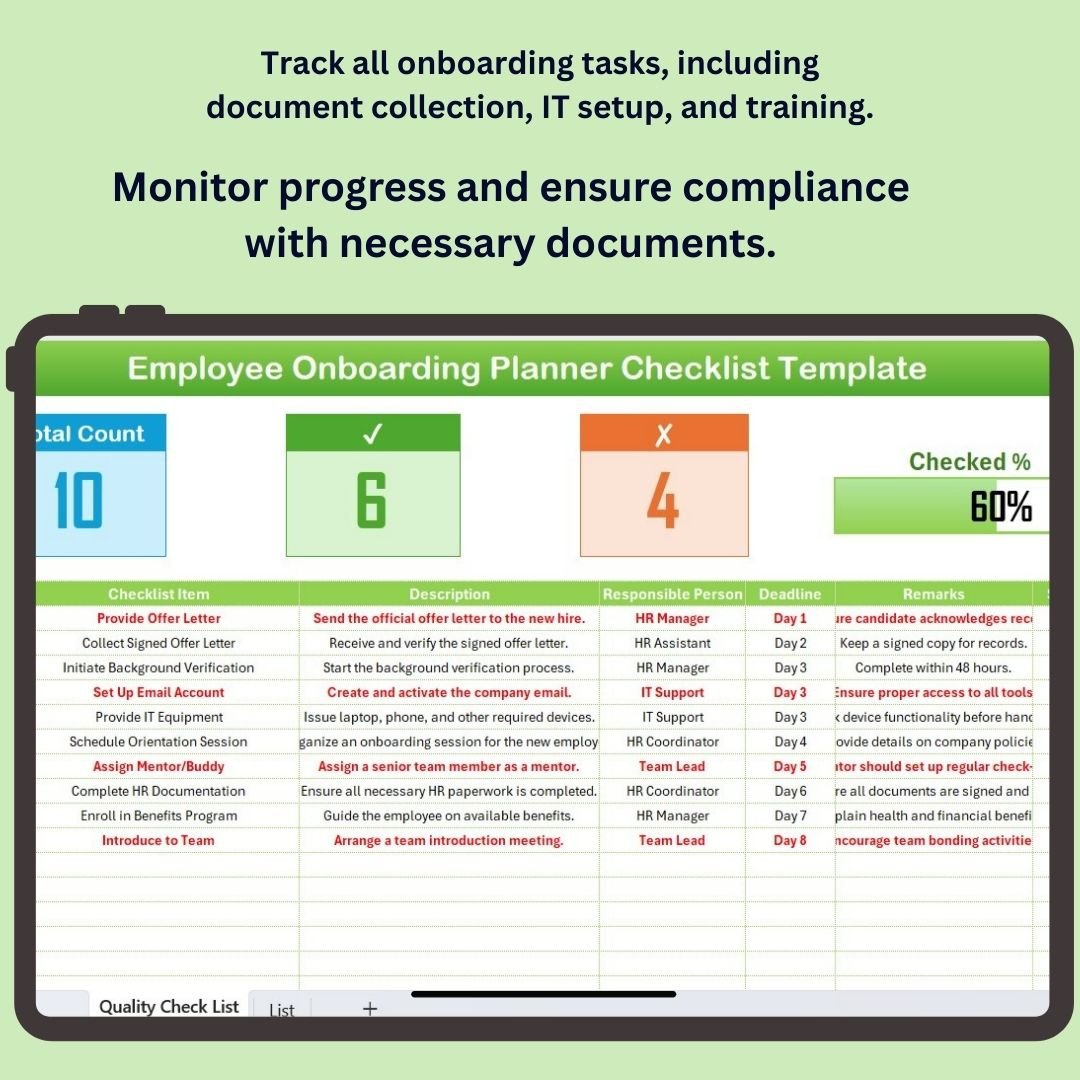

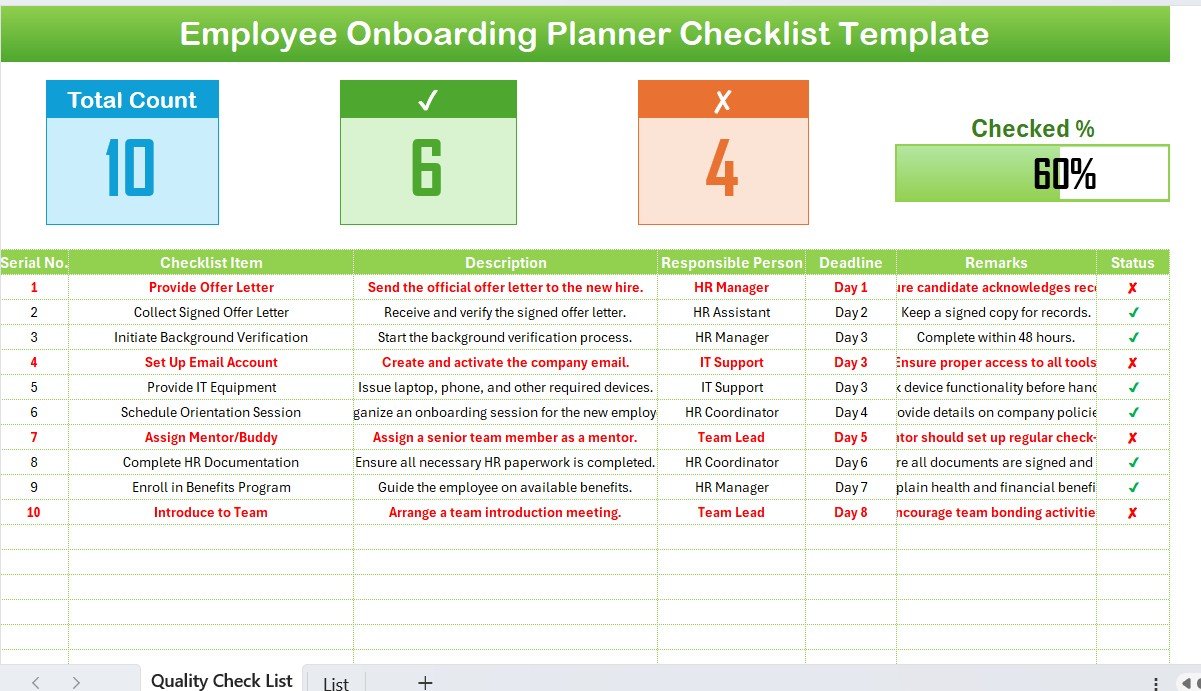
The Employee Onboarding Planner Checklist in Excel is an essential tool designed to help HR teams, hiring managers, and department heads streamline and manage the entire onboarding process. This Excel-based checklist ensures that new hires have a smooth and structured onboarding experience, from completing documentation to training and team introductions.
With an organized, easy-to-follow checklist, this tool helps you manage key onboarding tasks, track progress, and ensure that all necessary steps are completed on time, giving your new employees a warm and welcoming start.
Key Features of the Employee Onboarding Planner Checklist in Excel:
📋 Comprehensive Onboarding Tasks
Track all essential tasks, including document submission, IT setup, training sessions, and introductions, ensuring a smooth transition for new employees.
📝 Document Collection and Compliance
Ensure that all necessary employee documents, such as contracts, tax forms, and benefits enrollment, are completed and filed according to company policies.
💻 IT Setup and Access Management
Monitor IT setup tasks like email account creation, software installations, and access to systems, ensuring new hires are equipped from day one.
🎓 Training and Development Scheduling
Organize and track training sessions, including role-specific training, company policies, and compliance courses, to ensure that new hires are well-prepared.
👥 Team Integration and Socialization
Ensure new employees are introduced to their teams, department leaders, and key company figures, promoting a collaborative work environment.
🚀 Why You’ll Love the Employee Onboarding Planner Checklist in Excel:
✅ Stay Organized – Track every step of the onboarding process, from document collection to training, ensuring that no task is overlooked.
✅ Enhance Employee Experience – Provide a seamless onboarding experience for new hires, helping them feel welcomed and prepared for their new role.
✅ Ensure Compliance – Keep track of all required documents, ensuring that you meet compliance and legal obligations.
✅ Improve Efficiency – Streamline the onboarding process and reduce administrative work by organizing tasks in one easily accessible place.
✅ Customizable and Easy-to-Use – Fully customizable to meet your organization’s specific needs, with an intuitive interface that simplifies task tracking.
✅ Track New Hire Progress – Monitor new hire progress through each onboarding stage, ensuring everything is completed on time and with accuracy.
What’s Inside the Employee Onboarding Planner Checklist in Excel:
Task Management: Keep track of all key onboarding tasks, including document collection, IT setup, training, and team introductions.
Document Tracking: Ensure all necessary employee documents are completed and filed for compliance.
IT Setup Monitoring: Track the completion of IT setup tasks such as email creation, software access, and hardware provisioning.
Training Schedule: Organize and track training schedules to ensure that new employees are receiving the necessary training to succeed in their role.
Team Integration: Monitor socialization activities and team introductions to help new employees feel welcomed and engaged.
Progress Reporting: Generate reports summarizing the status of each new hire’s onboarding process, providing insights into areas that need attention.
How to Use the Employee Onboarding Planner Checklist in Excel:
1️⃣ Download the Template – Instantly access your Excel file upon purchase.
2️⃣ Add Employee Information – Enter new hire details, including start date, assigned tasks, and training schedules.
3️⃣ Track Onboarding Tasks – Use the checklist to monitor progress on key onboarding activities, such as document submission, IT setup, and training.
4️⃣ Ensure Compliance – Track the completion of employee documents and ensure they meet legal and company requirements.
5️⃣ Generate Reports – Create progress reports to monitor the status of each new hire’s onboarding process for easy review.
Who Can Benefit from the Employee Onboarding Planner Checklist in Excel:
HR Managers
Hiring Managers
Department Heads
IT and Operations Teams
Small and Medium-Sized Businesses (SMBs)
Large Enterprises with Multiple New Hires
Employee Engagement and Retention Teams
The Employee Onboarding Planner Checklist in Excel is a must-have tool for companies looking to provide a well-structured, efficient, and organized onboarding experience for new employees. With everything tracked and organized in one place, you can ensure that your new hires feel supported, prepared, and ready to contribute to your company’s success.
Click here to read the Detailed blog post
https://www.pk-anexcelexpert.com/employee-onboarding-planner-checklist-in-excel/
Visit our YouTube channel to learn step-by-step video tutorials
Youtube.com/@PKAnExcelExpert
Compatibility and Requirements
- Works in Microsoft Excel desktop (Excel 2016 or later, or Microsoft 365).
- If you want to add tick boxes to your own task rows, Microsoft explains how in Using check boxes in Excel.
Frequently Asked Questions
Which onboarding tasks does the checklist cover?
Document submission, IT setup, training sessions and team introductions, so each step of a new hire’s start is tracked.
Can I track employee documents?
Yes. You can record documents such as contracts, tax forms and benefits enrollment and check that each one is filed.
What do I enter for each new hire?
Add the new hire’s details, start date, assigned tasks and training schedule, then mark each task complete as it is done.
Can I report on onboarding progress?
Yes. The checklist summarizes the status of each new hire’s onboarding so you can see what still needs attention.
Related Employee Onboarding Templates
- Employee Onboarding Checklist Template in Excel: a shorter onboarding checklist
- Employee Onboarding Tracker in Excel: track several new hires in one table
- Employee Onboarding Tracker in Google Sheets: the tracker for Google Sheets users
- New Hire Onboarding Calendar in Excel: plan the first weeks on a calendar
- Employee Onboarding Form Template in MS Word and Google Docs: collect new hire details on a form
Browse all Excel checklists or the Excel HR and payroll templates.







Reviews
There are no reviews yet.