



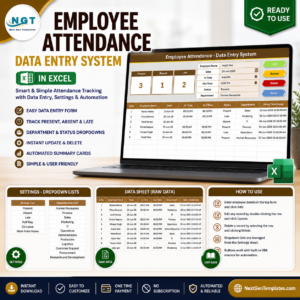
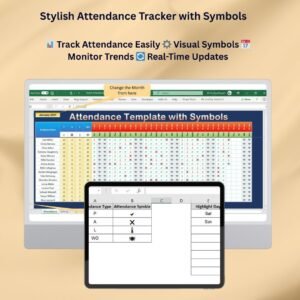
The Stylish Attendance Tracker with Symbols in Excel is a visually appealing Excel attendance tracker for businesses, schools and organizations that need to track employee or student attendance. Instead of plain text entries, it uses color-coded attendance symbols and easy-to-read layouts. You can spot absentees, review attendance patterns and keep accurate records at a glance.
The template is intuitive and user-friendly, so anyone can use it, regardless of technical skill. It is customizable for employees, students or any other group, and it helps you save time on manual attendance tracking.

Key Features of the Stylish Attendance Tracker with Symbols
- Visual symbols: Mark attendance with color-coded symbols such as checkmarks, crosses or circles for a quick overview.
- Customizable layout: Adapt the tracker to your needs, whether you track employees, students or other groups.
- Time-based tracking: Track attendance on a daily, weekly or monthly basis for better time management.
- Trend analysis: Identify attendance trends and patterns over time with visual insights.
- Real-time updates: Update attendance data and see the changes reflected on the dashboard straight away.
- User-friendly interface: The layout is simple and easy to navigate, even for non-technical users.
Why Use a Symbol-Based Excel Attendance Tracker?
Traditional text-based attendance sheets can be slow to read and easy to misinterpret. Symbols and color coding make the status of each person visible in seconds.
- Quick overview: Color-coded symbols and clear layouts let you check attendance instantly.
- Customizable for your needs: You can tailor the tracker to your organization, whether it is an employee attendance tracker or a student attendance register.
- Visual insights: Symbols and colors highlight attendance trends and patterns.
- Efficient and time-saving: You spend less time on manual attendance tracking and more time on important tasks.
- Real-time monitoring: The attendance status updates as you make changes, so your records stay accurate and up to date.
What’s Inside the Template
| Component | What it does |
|---|---|
| Color-coded attendance symbols | Shows attendance with easy-to-understand symbols such as checkmarks, crosses and circles. |
| Date and time management | Tracks attendance by specific dates or time frames. |
| Customizable templates | Lets you change the tracker layout and symbols to fit your needs. |
| Trend and pattern analysis | Shows attendance trends and highlights absenteeism or punctuality patterns. |
| Real-time updates | Reflects attendance changes across the tracker and dashboard as soon as you make them. |
Who Is It For?
- Businesses and employers who need a simple employee attendance tracker
- Schools and educational institutions that record student attendance
- Training and development teams that monitor session participation
- Event organizers who track who attended
- Project managers who keep an eye on team availability
- Human resources departments that maintain attendance records
How to Use the Stylish Attendance Tracker with Symbols
- Download the template: You can access the Excel file right after purchase.
- Customize the tracker: Change the layout and symbols to match your attendance needs.
- Input attendance data: Record attendance using the color-coded symbols or dates.
- Track trends: Use the visual insights to spot attendance patterns and issues.
- Generate reports: Create summary reports from the attendance data to share with stakeholders or managers.
Click here to read the detailed blog post
Visit our YouTube channel for step-by-step video tutorials.
Watch the step-by-step video tutorial:
Frequently Asked Questions
What is the Stylish Attendance Tracker with Symbols in Excel?
It is a ready-made Excel attendance tracker that records attendance with color-coded symbols instead of plain text. You can review attendance status, trends and patterns at a glance.
Can I use it for both employees and students?
Yes. The layout is customizable, so it works as an employee attendance tracker for businesses and HR teams. It also works as a student attendance tracker for schools and educational institutions.
Can I change the symbols and layout?
Yes. You can modify both the tracker layout and the symbols to fit your organization’s specific attendance needs.
Does it support daily, weekly and monthly tracking?
Yes. You can track attendance on a daily, weekly or monthly basis and by specific dates or time frames.
Do I need advanced Excel skills to use it?
No. The tracker has a simple, intuitive layout that is easy to navigate, even for non-technical users.
Can I create reports from the attendance data?
Yes. You can create summary reports from your attendance data to share with stakeholders or managers.
Also check our Asset Transfer Management System V1.0
Last updated: October 2026
Compatibility and Requirements
- Works in Microsoft Excel desktop (Excel 2016 or later, or Microsoft 365).
- If you want to limit each attendance cell to your set of symbols, Microsoft’s guide Apply data validation to cells shows how.
Related Attendance Templates
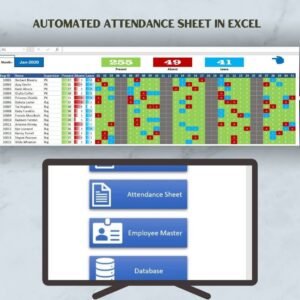
- Automated Attendance Sheet in Excel: an attendance sheet with automatic totals
- Attendance and Overtime Dashboard in Excel: chart attendance and overtime
- Attendance Sheet Template in Google Sheets: a shared attendance sheet in the browser
- Employee Attendance Tracker in Google Sheets: employee attendance in Sheets
- HR Director Toolkit: 10 Excel and Google Sheets HR templates
Browse all Excel HR and Payroll templates or the Excel tracker templates.










Reviews
There are no reviews yet.