



The Employee Offboarding Tracking Checklist in Excel is a comprehensive and easy-to-use tool designed to help HR professionals, managers, and business owners efficiently track and manage the employee offboarding process. Whether it’s due to resignation, retirement, or termination, this Excel-based checklist ensures a smooth and organized transition for both the departing employee and the company.
By using this tracker, you can ensure that all necessary steps—such as asset return, exit interviews, and final documentation—are completed on time. The tool helps minimize oversight, enhances communication between departments, and ensures that the offboarding process is thorough and compliant with company policies.
Key Features of the Employee Offboarding Tracking Checklist in Excel
📋 Employee Information Management
Easily store and organize important details about the employee, such as their role, department, last working day, and reason for departure. This ensures you have all relevant information at your fingertips.
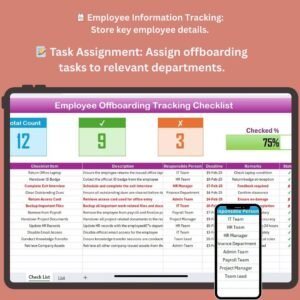
📝 Task Assignment & Tracking
Assign offboarding tasks to relevant team members (HR, IT, Facilities, etc.) and track their completion status. Ensure all necessary actions are completed before the employee leaves, such as collecting company equipment or completing paperwork.
⚙️ Exit Interviews & Documentation
Track the status of exit interviews, feedback forms, and any other important documents that need to be completed. This helps ensure compliance and provides valuable insights into the reasons for employee departures.
🔑 Asset Return & Final Clearance
Monitor the return of company property, such as laptops, phones, and IDs. This feature ensures that the company recovers all assets and has a clear record of what was returned.
⏱ Time-Based Tracking & Reminders
Set deadlines for each offboarding task and get reminders when tasks are due. This ensures that no step in the process is overlooked and that all deadlines are met.
📈 Reporting & Analytics
Generate reports to analyze trends in employee departures, reasons for leaving, and task completion times. Use this data to improve your offboarding process and address any recurring issues.
Why You’ll Love the Employee Offboarding Tracking Checklist in Excel
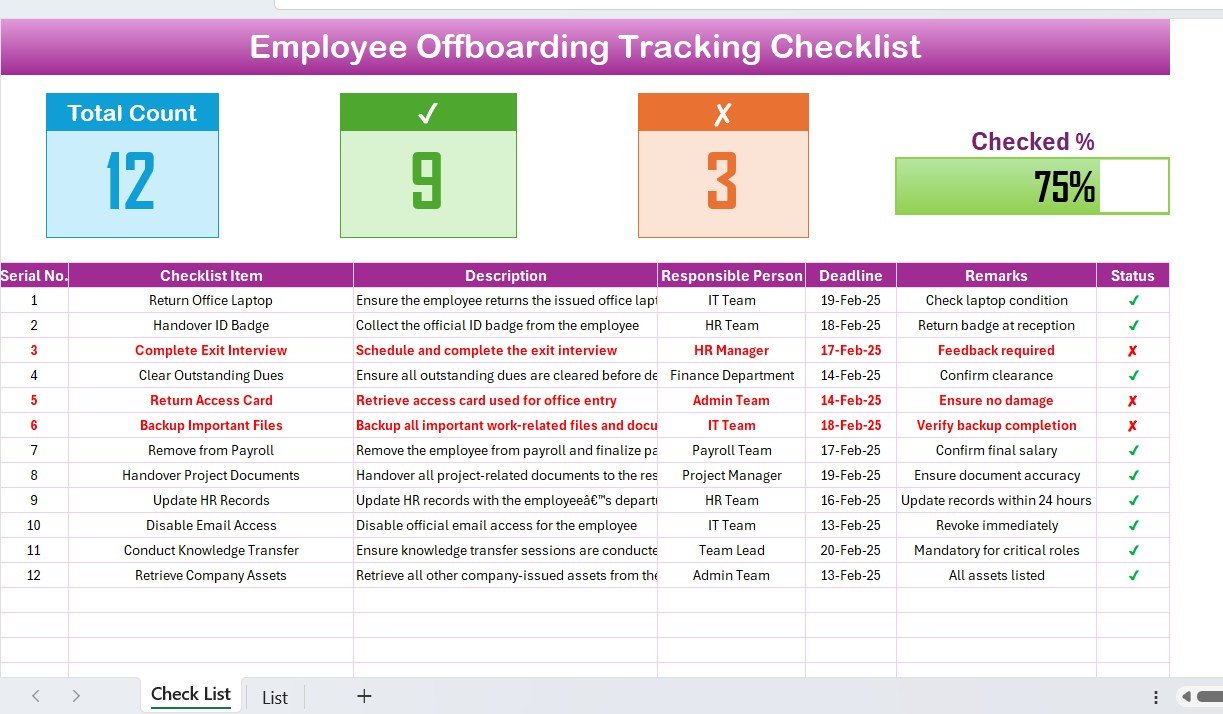
✅ Streamlined Offboarding Process
Easily manage and track all steps involved in the offboarding process, from asset return to final interviews, ensuring a smooth transition for both the employee and the company.
✅ Ensure Compliance & Reduce Errors
Keep track of all required offboarding tasks and documentation to ensure compliance with company policies and legal requirements.
✅ Improve Communication & Coordination
Assign tasks to relevant departments and track progress, improving communication and ensuring that no step is overlooked.
✅ Protect Company Assets
Monitor the return of company property and track any outstanding items, reducing the risk of loss or non-recovery of assets.
✅ Data-Driven Insights
Analyze employee offboarding data to identify trends and make improvements to your retention strategies, policies, and overall HR processes.
What’s Inside the Employee Offboarding Tracking Checklist in Excel?
- Employee Information Management: Store all key details such as role, department, and departure date.
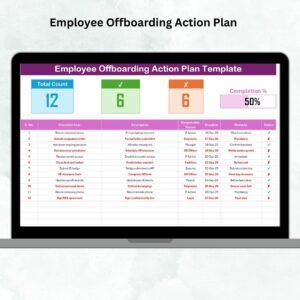
- Task Assignment & Tracking: Assign offboarding tasks to relevant team members and track progress.
- Exit Interviews & Documentation: Track the status of exit interviews and feedback forms.
- Asset Return & Clearance: Monitor the return of company property and track final clearance.
- Time-Based Tracking: Set deadlines for each task and get reminders.
- Reporting & Analytics: Generate reports to analyze employee departures and offboarding tasks.
How to Use the Employee Offboarding Tracking Checklist in Excel
1️⃣ Download the Template: Instantly access the Employee Offboarding Tracking Checklist in Excel.
2️⃣ Enter Employee Information: Input the employee’s role, department, and departure details.
3️⃣ Assign Tasks & Deadlines: Assign offboarding tasks to team members and set deadlines.
4️⃣ Track Task Completion: Monitor the completion of offboarding tasks such as asset return and exit interviews.
5️⃣ Generate Reports & Analyze Data: Use the reports and analytics features to analyze trends and improve the offboarding process.
Who Can Benefit from the Employee Offboarding Tracking Checklist in Excel?
🔹 HR Managers & Teams
🔹 Compliance & Legal Departments
🔹 IT & Facilities Managers
🔹 Business Owners & Executives
🔹 Small & Medium Businesses (SMBs)
🔹 Large Enterprises with Complex Offboarding Processes
Ensure a smooth and compliant employee offboarding process with the Employee Offboarding Tracking Checklist in Excel. Track tasks, monitor asset return, and gather important exit feedback to improve your company’s overall offboarding strategy.
Click here to read the Detailed blog post
Visit our YouTube channel to learn step-by-step video tutorials
Youtube.com/@PKAnExcelExpert
Compatibility and Requirements
- Works in Microsoft Excel desktop (Excel 2016 or later, or Microsoft 365).
- New to Excel? Microsoft’s Excel for Windows training covers the basics.
Frequently Asked Questions
What does the checklist track?
Employee details, offboarding tasks by department, exit interviews and documents, asset returns and final clearance.
Can I assign tasks to other teams?
Yes. You can assign tasks to HR, IT, Facilities and other teams and track their completion status.
Can I set deadlines for each task?
Yes. Each offboarding task can have a deadline so no step is missed.
Does it track returned company property?
Yes. It records the return of items such as laptops, phones and ID cards.
Related Offboarding Templates
- Employee Offboarding Tracker in Excel: a fuller tracker for many departures
- Employee Offboarding Checklist in Google Sheets: the checklist in a shared online sheet
- Employee Offboarding Tracker in Google Sheets: track departures online
- Employee Exit Management System V1.0: a full exit management system in Excel
- Employee Onboarding Checklist Template in Excel: the matching checklist for new hires
Browse all Excel HR and payroll templates or the Excel checklists.




























Reviews
There are no reviews yet.