



The Employee Onboarding Schedule Checklist in Excel is a comprehensive tool designed to help businesses streamline the onboarding process for new employees. This checklist ensures that every step of the onboarding process is covered, from initial paperwork to training sessions, making the entire experience seamless for both the employee and the HR team.
With clearly defined tasks and deadlines, the template helps HR professionals and team managers stay organized and on track, ensuring new hires are successfully integrated into the company. The customizable nature of this template allows businesses to tailor it to their specific onboarding procedures and employee needs.
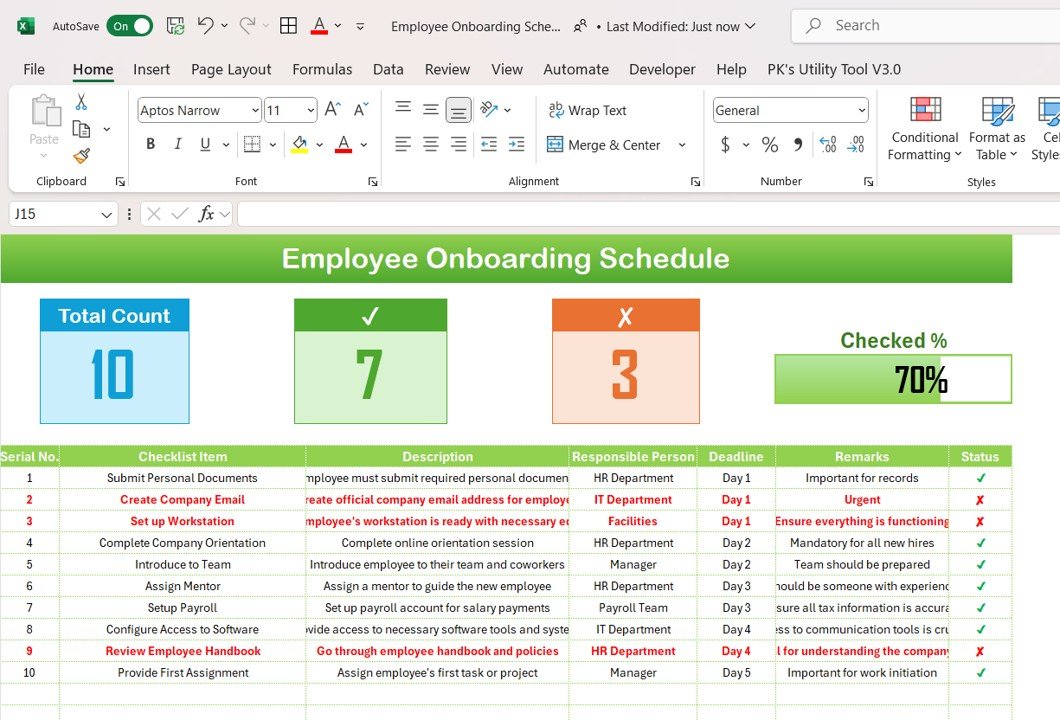
Key Features of the Employee Onboarding Schedule Checklist in Excel
📅 Onboarding Task Management: Track each task involved in the onboarding process, such as paperwork completion, training, and equipment setup.
⚙️ Customizable Checklist: Modify the checklist to fit your company’s onboarding procedures, adding or removing tasks as necessary.
📈 Progress Tracking: Monitor the status of each task with color-coded progress indicators (Not Started, In Progress, Completed).
💼 Role-Specific Onboarding: Create separate checklists for different roles within your organization, ensuring new employees receive the necessary training.
📊 Real-Time Updates: Automatically update the checklist as tasks are completed, making it easy to track the entire onboarding process.
🔄 Easy Collaboration: Share the document with team members involved in the onboarding process for real-time collaboration and updates.
Why You’ll Love the Employee Onboarding Schedule Checklist in Excel
✅ Simplified Onboarding: Streamline the process of bringing new employees on board by tracking essential tasks in a centralized checklist.
✅ Customizable: Easily adjust the checklist to accommodate your specific organizational needs and role requirements.
✅ Time-Saving: Automate progress tracking to save time and reduce the risk of missing important onboarding steps.
✅ Real-Time Collaboration: Share with HR teams and managers to keep everyone updated on the progress of new hires.
✅ Professional Onboarding Process: Ensure consistency and professionalism in how new employees are onboarded across the company.
What’s Inside the Employee Onboarding Schedule Checklist in Excel?
📅 Task Tracker: A well-organized task list to track all necessary steps in the onboarding process.
⚙️ Customizable Sections: Modify the template to fit your unique onboarding needs, including personalized tasks and timelines.
📈 Progress Indicators: Color-coded progress bars to easily track the completion status of each task.
💼 Role-Specific Tasks: Assign onboarding tasks to different roles to ensure new hires receive the appropriate training and resources.
📊 Visual Tracking: Use built-in graphs and charts to analyze onboarding efficiency and identify areas for improvement.
How to Use the Employee Onboarding Schedule Checklist in Excel
1️⃣ Download the Template – Get the pre-configured Excel file with a comprehensive employee onboarding checklist.
2️⃣ Add New Hires: Input the employee’s name, role, and start date.
3️⃣ Assign Tasks: Use the customizable checklist to assign tasks to the new hire and relevant team members.
4️⃣ Track Progress: Update the checklist as tasks are completed, and monitor the onboarding progress with visual indicators.
5️⃣ Share and Collaborate: Share the checklist with the HR team and managers to keep everyone on track.
Who Can Benefit from the Employee Onboarding Schedule Checklist in Excel?
🔹 HR Managers
🔹 Team Leaders
🔹 Onboarding Coordinators
🔹 Small and Medium Business Owners
🔹 Recruitment Teams
🔹 Freelancers and Consultants
🔹 Project Managers
Streamline your employee onboarding process with the Employee Onboarding Schedule Checklist in Excel. Ensure new hires are well-integrated into your company, saving time and resources.
Click here to read the Detailed blog post
Visit our YouTube channel to learn step-by-step video tutorials
Compatibility and Requirements
- Works in Microsoft Excel desktop (Excel 2016 or later, or Microsoft 365).
- Progress charts are standard Excel charts. Microsoft explains them in Create a chart from start to finish.
Frequently Asked Questions
Which onboarding tasks does it cover?
Tasks such as paperwork completion, training sessions and equipment setup. You can add or remove tasks to match your process.
How is progress shown?
Each task has a color-coded status: Not Started, In Progress or Completed. Built-in charts summarize onboarding progress.
Can I make checklists for different roles?
Yes. You can create separate checklists for different roles so each new hire gets the right training and resources.
What do I enter for each new hire?
The employee’s name, role and start date, then the tasks assigned to them and to team members.
Can HR and managers work on it together?
Yes. You can share the file with the HR team and managers so everyone sees the same progress.
Related Employee Onboarding Templates
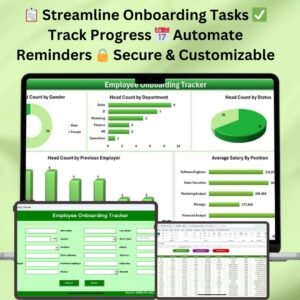
- Employee Onboarding Tracker in Excel: tracks onboarding for many new hires
- Employee Onboarding Checklist in Google Sheets: an onboarding checklist in Google Sheets
- New Hire Onboarding Calendar in Excel: plans onboarding dates on a calendar
- Employee Onboarding Form Template: a free form for new hire details in Word and Google Docs
- Checklist & SOP Pack: 12 checklist templates in one download
Browse all Excel checklists or the Excel HR and payroll templates.

































Reviews
There are no reviews yet.