

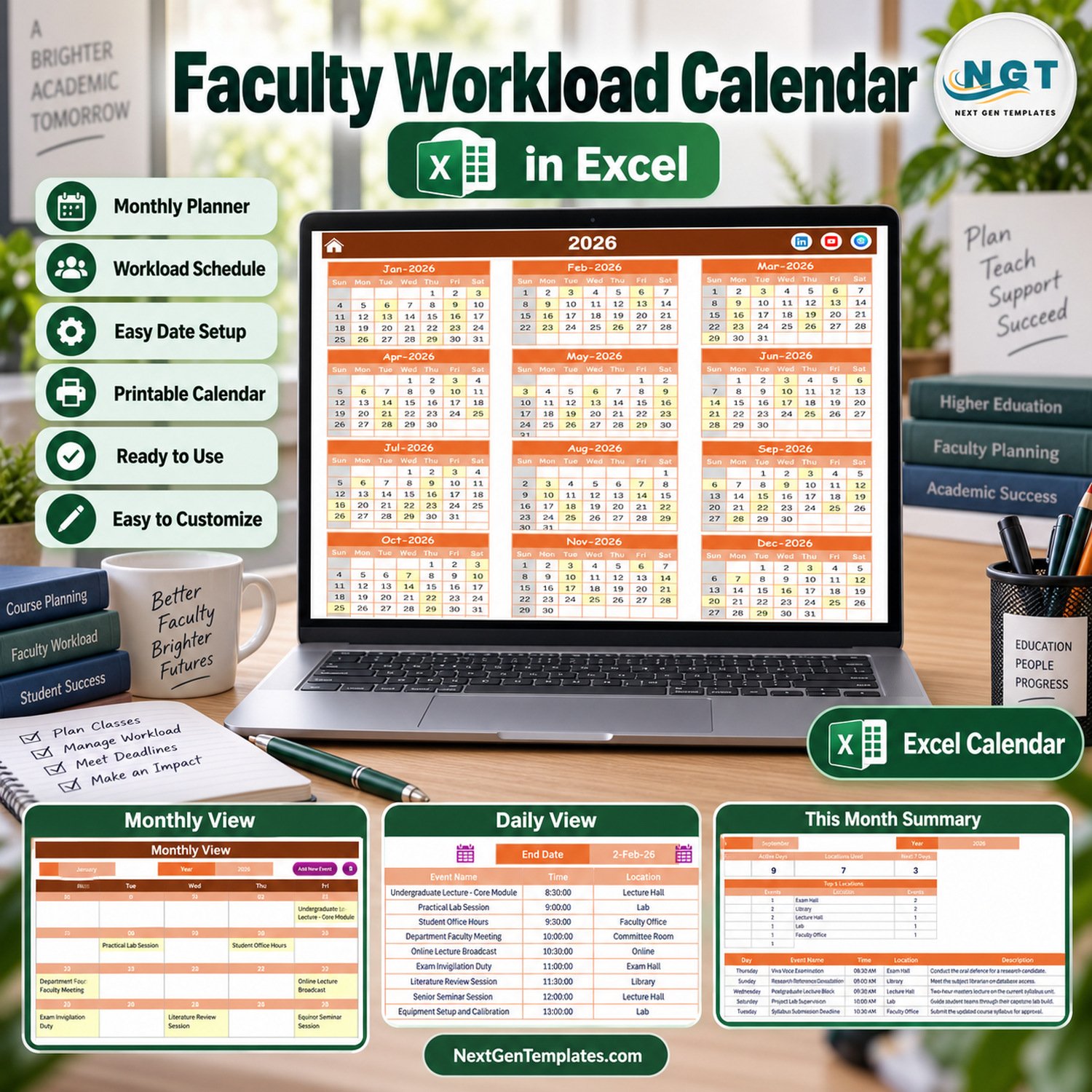
The Faculty Workload Calendar in Excel puts a full academic year of lectures, lab sessions, office hours, exam duties, research blocks and committee meetings into one macro-enabled workbook. It ships with 100 sample events dated 3 January to 29 December 2026, spread over 7 locations (Lecture Hall, Lab, Faculty Office, Committee Room, Online, Exam Hall and Library), and shows them on five linked pages: Annual View, Monthly View, Daily View, This Month and Events.
🌍 Built by NextGenTemplates, the store behind more than 7,000 Excel, Google Sheets and Power BI templates for teachers, departments and small teams that prefer a one-time file to a monthly subscription.
✅ Instant download · One-time payment · No subscription · No per-user fees · Lifetime access
⚠️ Requirements: desktop Microsoft Excel for Windows with macros enabled. The entry form, record buttons and the Daily View refresh are VBA macros, so Excel for the web, Mac, iPad and phones cannot run them.
📌 What it is, plainly: a calendar of workload events. Each row is one dated duty with a start time, a location and a description. It does not calculate teaching hours, credit loads or pay, and it has no column for a lecturer’s name, so it is not an HR, timesheet or teaching-load allocation tool.
🔑 Key Features of the Faculty Workload Calendar
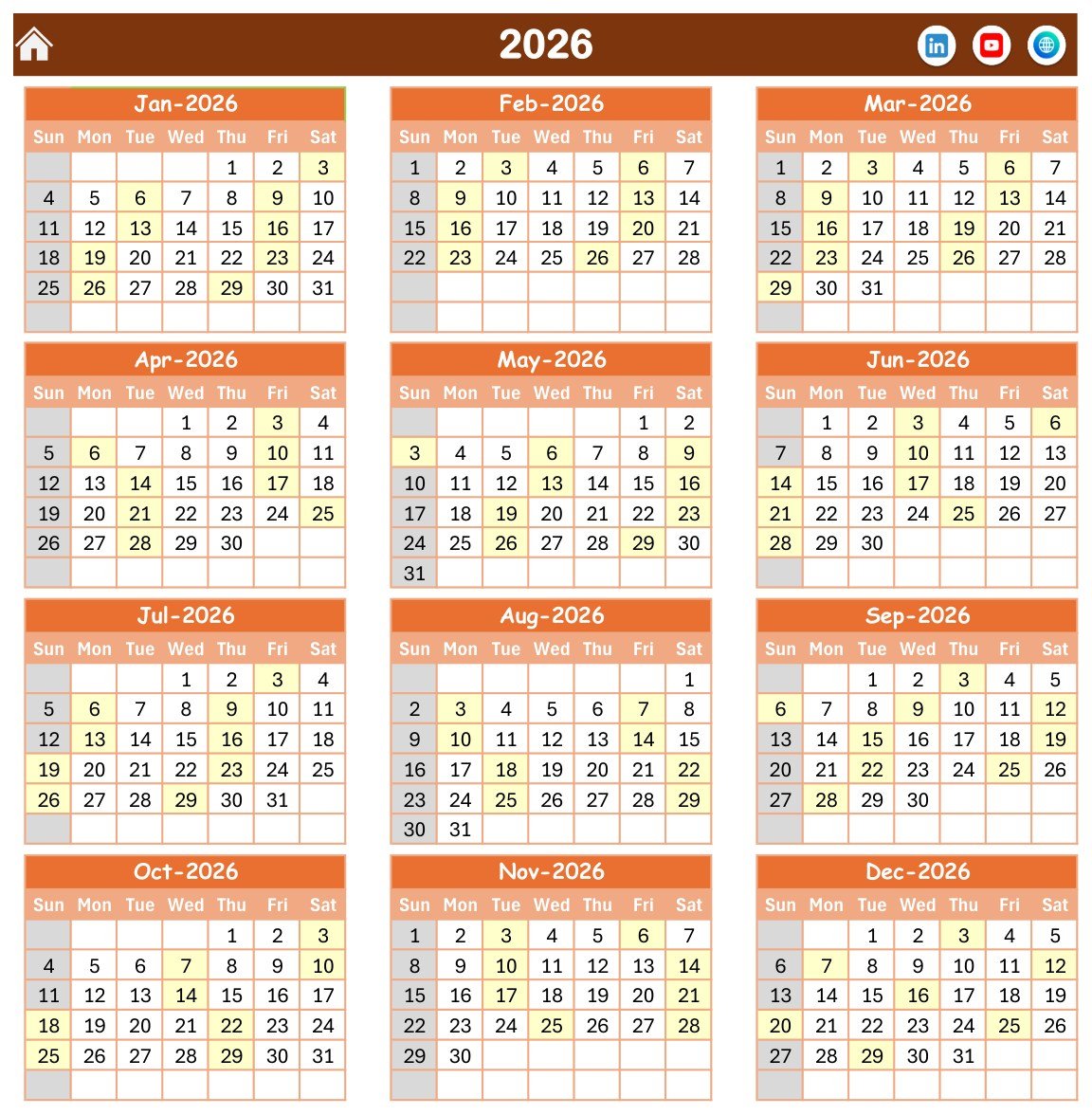
📅 Annual View for the whole year. All twelve months of 2026 sit on one page and every date that holds a duty is shaded, so a lecturer or head of department can spot crowded weeks around exams and term starts at a glance.
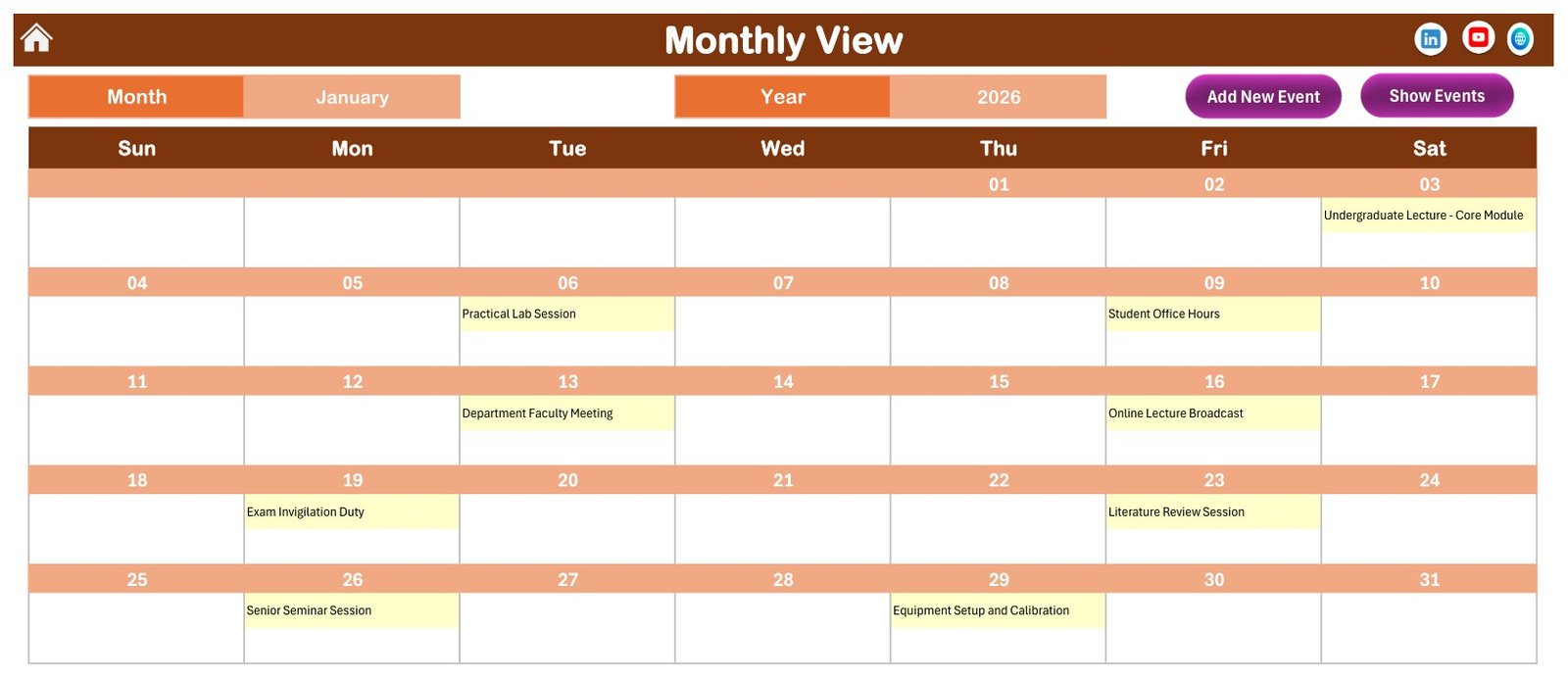
🗓️ Monthly View with the event name in each day. Pick a month and a year and the grid writes in every duty that month, for example Practical Lab Session on 6 January, Department Faculty Meeting on 13 January and Exam Invigilation Duty on 19 January.
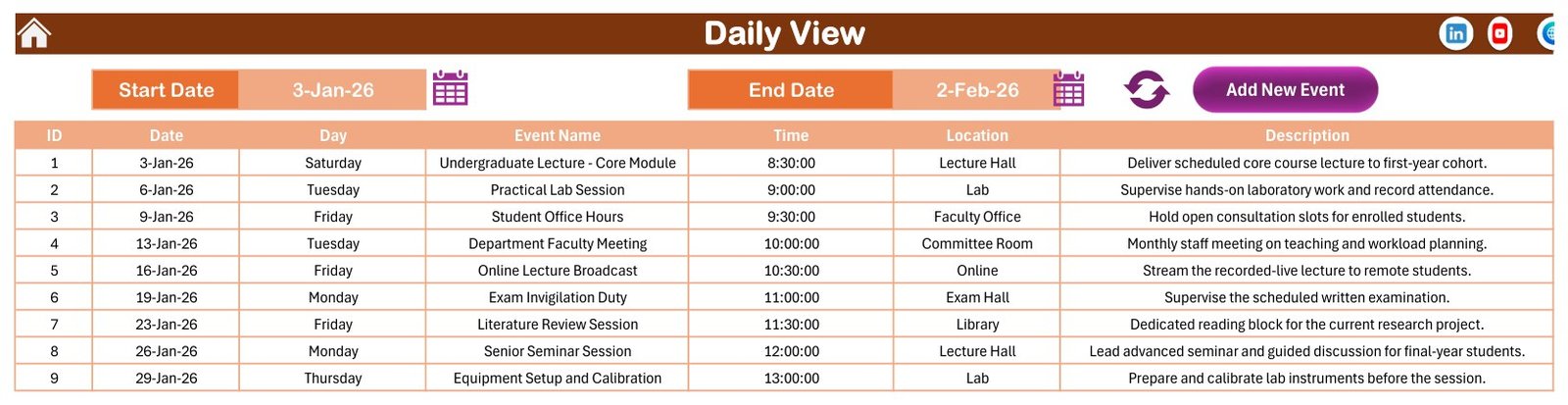
📋 Daily View for any date range. Set a Start Date and an End Date with the calendar pickers, press refresh and the sheet lists ID, date, day, event name, time, location and description for that window.
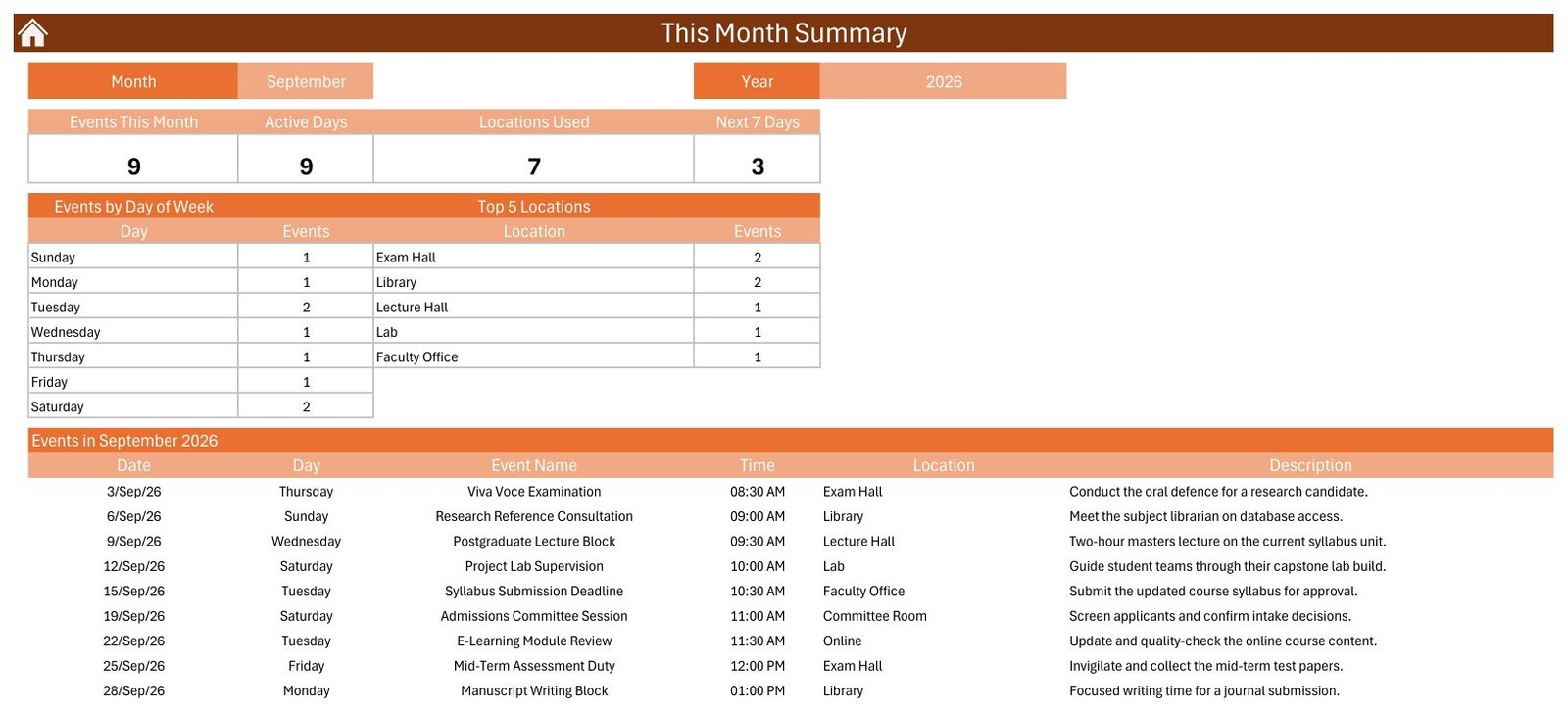
📈 This Month Summary. Four cards count Events This Month, Active Days, Locations Used and events in the Next 7 Days. Two tables break the month down by day of week and by the top 5 locations, and a list shows every duty in the month.
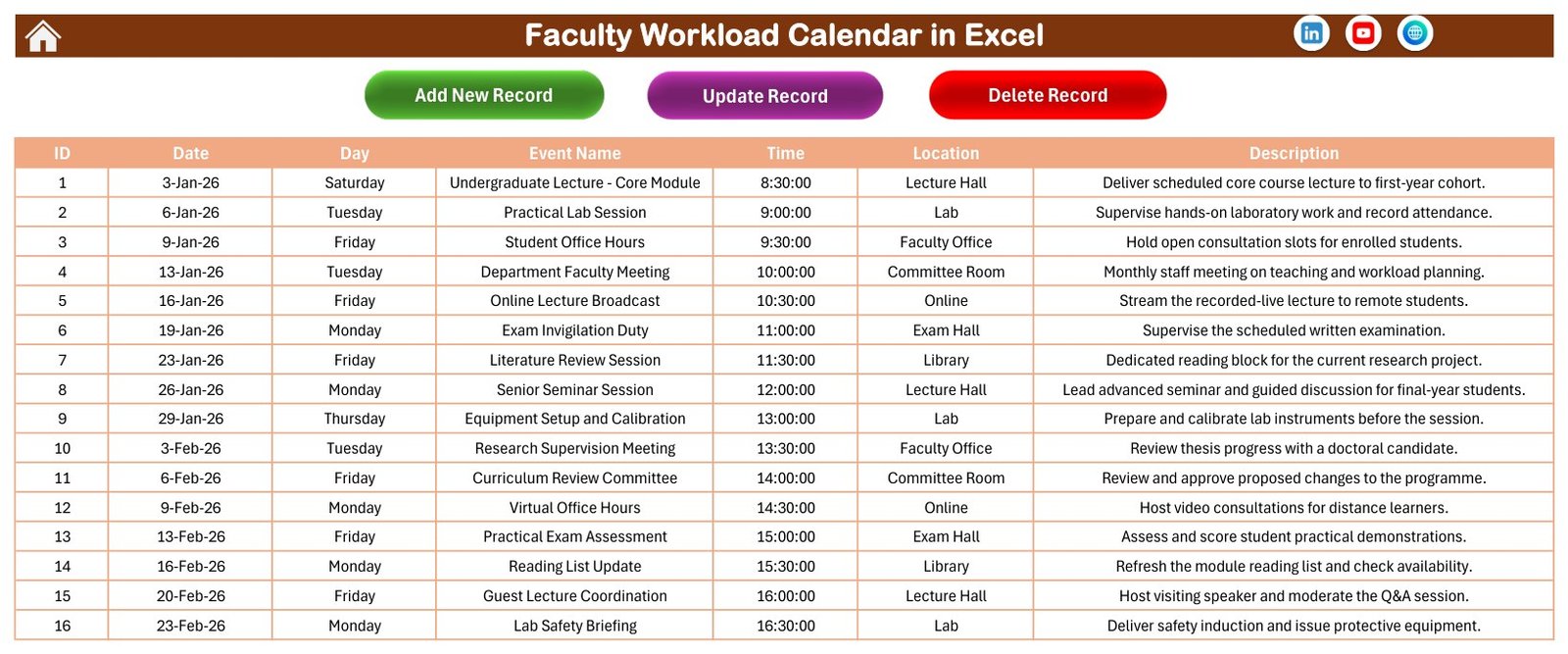
🧾 Events sheet with Add, Update and Delete buttons. All 100 records live in one seven-column table, so every view reads from the same source.
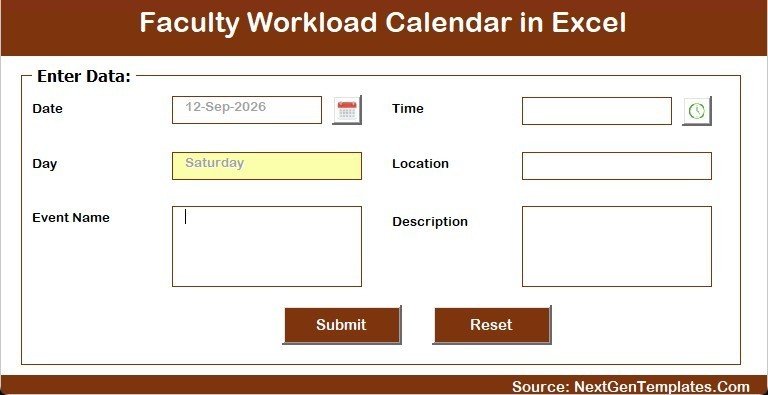
✍️ Data entry form. Date and time pickers, the weekday filled in automatically, plus Event Name, Location and Description boxes with Submit and Reset.
🎨 Setting sheet. Change the year, the starting month, the week start day, the two highlighted weekdays, event highlighting on or off, and five colour themes (Default, Blue, Red, Black, Orange).
🏠 Home menu. Five large buttons jump to Annual View, Monthly View, Daily View, This Month and Events, and every page carries a home icon to come back.
📦 What’s Inside the Workbook
Page 1: Home
A clean navigation page with the product title and five buttons, one for each working page.
Page 2: Annual View
Twelve month grids for the selected year with a Sun to Sat header. Dates that carry a duty are highlighted in light yellow.
Page 3: Monthly View
Month and Year selectors, an Add New Event button, a Show Events button and a full month grid with event names written under each date. January 2026 opens with Undergraduate Lecture – Core Module on 3 January and closes with Equipment Setup and Calibration on 29 January.
Page 4: Daily View
Start Date and End Date pickers with a refresh button. The sample range, 3 January to 2 February 2026, returns nine rows from a core module lecture and office hours to a literature review session and a senior seminar.
Page 5: This Month Summary
For September 2026 the sample shows 9 events on 9 active days across 7 locations, with 3 events in the next 7 days. Exam Hall and Library lead the top locations with two duties each, and the list runs from a Viva Voce Examination on 3 September to a Manuscript Writing Block on 28 September.
Page 6: Events
The master table: ID, Date, Day, Event Name, Time, Location and Description, with Add New Record, Update Record and Delete Record buttons.
Page 7: Enter Data Form
The pop-up form behind Add New Record. The date and time come from pickers and the day of the week fills itself.
📚 The Sample Academic Year
The 100 fictional events use 49 different duty names that mirror a university or college teaching year, so you can see how a real plan looks before you replace it:
- 🎓 Teaching: undergraduate and postgraduate lectures, senior seminars, practical lab sessions, software lab tutorials, revision lectures and guest lecture coordination.
- 📝 Assessment: exam invigilation, practical exam assessment, exam paper moderation, peer review of coursework, viva voce examinations, resit duty and grade submission deadlines.
- 🔬 Research: literature review sessions, research supervision meetings, manuscript writing blocks and grant proposal drafting.
- 🏛️ Committees and admin: department faculty meetings, curriculum review, examination board, admissions, research ethics, quality assurance and a workload allocation review.
- 💻 Student support and development: student and virtual office hours, academic advising, faculty development webinars and online tools training.
Each location holds 14 or 15 events, every month carries 7 to 9 duties, start times run from 08:30 to 17:00, no date has two events and every weekday label matches its date. The events are fictional samples, not any institution’s official academic calendar, and they name no real university or college.
📊 Comparison: This Excel Template vs. a Google Sheets Calendar vs. a Paper Planner
| Feature | Faculty Workload Calendar in Excel | Google Sheets calendar | Paper planner |
|---|---|---|---|
| Annual, monthly and daily views from one table | ✅ Yes | ⚠️ Depends on the template | ❌ No |
| Entry form with date and time pickers | ✅ Yes (VBA) | ❌ Usually not | ❌ No |
| Monthly summary cards and top locations | ✅ Yes | ⚠️ Build it yourself | ❌ No |
| Totals of teaching hours | ❌ No | ⚠️ Build it yourself | ❌ No |
| Works offline | ✅ Yes | ⚠️ Limited | ✅ Yes |
| Runs on Mac, web or phone | ❌ Windows desktop only | ✅ Yes | ✅ Yes |
| Reminders or notifications | ❌ No | ⚠️ Via add-ons | ❌ No |
| Cost | ✅ One-time | ✅ Free to paid | ✅ Low |
👥 Who This Template Is For, and Who It’s Not For
✅ Good fit: lecturers, professors and teaching assistants who want one yearly view of their own duties, heads of department and programme coordinators planning exam and committee dates, and college administrators who keep a department diary.
❌ Not a fit: anyone who needs teaching-hour totals, workload points, per-lecturer allocation, payroll, leave tracking, automatic reminders, recurring events or a shared online calendar. This is a planning workbook, not a timetabling or HR system.
⚙️ How to Use the Template
- Unzip the download and open Faculty Workload Calendar in Excel.xlsm in desktop Excel for Windows.
- Click Enable Content. If Windows blocks macros on a downloaded file, follow Microsoft’s guide to enabling macros in Microsoft 365 files.
- Open Setting and choose the year, starting month, week start day and colour theme.
- Go to Events, delete the sample rows, and add your own duties with Add New Record. Put the course code or lecturer initials in Event Name or Description if several people share one file.
- Check Annual View for crowded weeks, Monthly View for the day-by-day plan and Daily View for a date range.
💼 Real-World Use Cases
👩🏫 A lecturer maps a semester of lectures, lab sessions, office hours and marking deadlines, then prints the Monthly View for the office door.
🏛️ A department office keeps exam board, curriculum review and admissions committee dates in one file and checks This Month Summary before scheduling another meeting.
🔬 A research-active professor blocks literature review and manuscript writing time between teaching duties so research does not disappear from the week.
❓ Frequently Asked Questions
What does the Faculty Workload Calendar in Excel include?
One macro-enabled .xlsm workbook with Home, Annual View, Monthly View, Daily View, This Month, Events and Setting sheets, an entry form and 100 fictional sample events. The ZIP also carries a short Excel Calendar user manual in PDF.
Does it calculate teaching hours or workload points?
No. It stores a start time only, with no end time or duration, and has no lecturer name column. It shows when and where duties fall, not how many hours they add up to.
Do I need to enable macros?
Yes. The form, the Add, Update and Delete buttons and the Daily View refresh are VBA macros.
Does it work on Mac, Excel for the web or mobile?
No. Use desktop Excel for Windows.
Does it send reminders or repeat weekly lectures?
No. There are no reminders and no recurring events, so each lecture date is entered as its own row. The Next 7 Days card is the closest thing to a look-ahead.
Can I change the year and the week start day?
Yes, both are on the Setting sheet, along with five colour themes.
👤 About the Author
NextGenTemplates is run by the PK: An Excel Expert team, who have published Excel, Power BI and Google Sheets tutorials on YouTube for years and build every template around real workflows.
🔗 Explore Related Templates
- Exam Timetable Calendar in Excel
- Class Timetable Calendar in Excel
- Teacher Substitution Calendar in Excel
- Class Schedule Data Entry System in Excel
- University Department KPI Scorecard in Excel
- All Excel calendar templates
- Excel templates for education































Reviews
There are no reviews yet.