


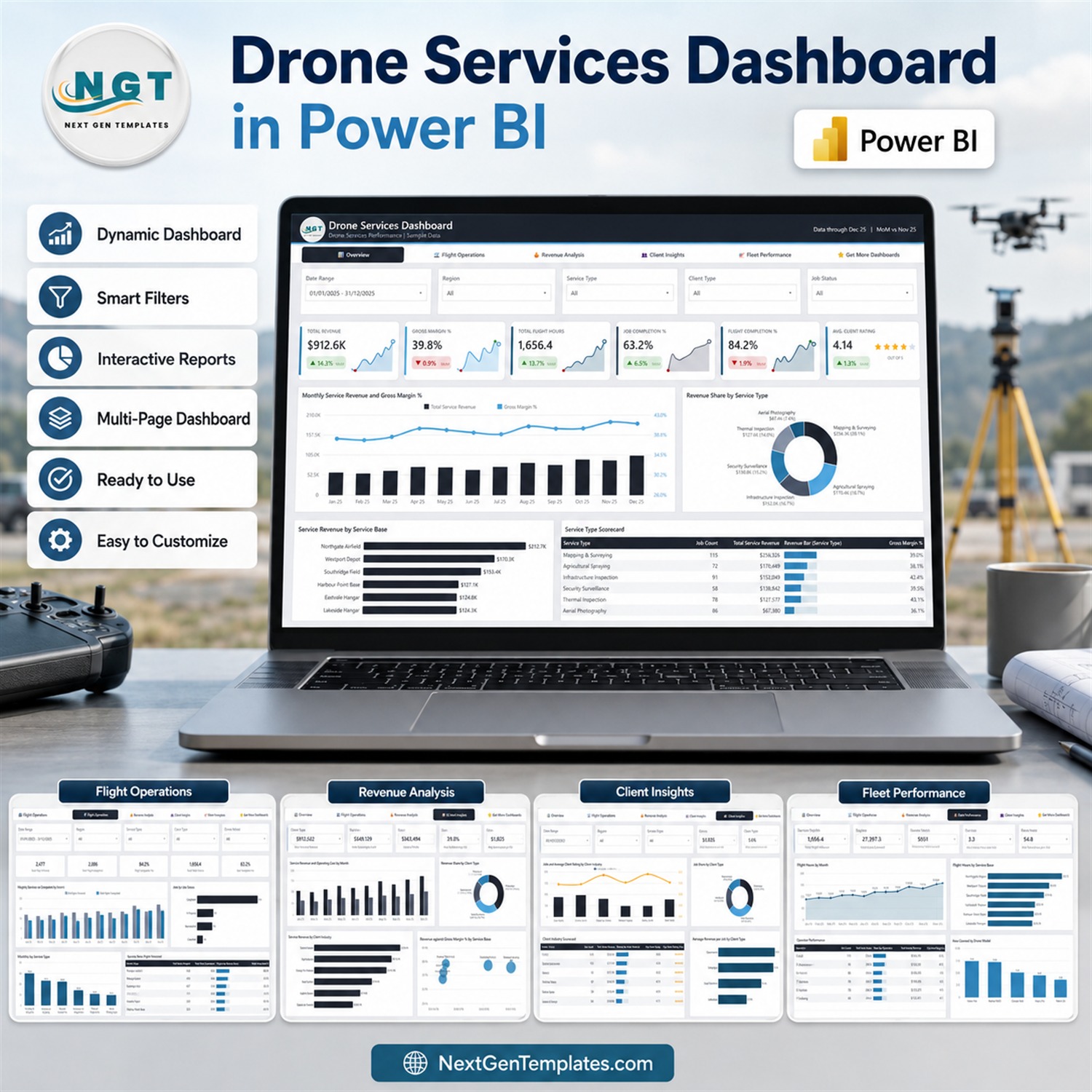
Drone Services Dashboard in Power BI turns job, flight, revenue, client, and fleet records into a focused five-page management view. Built for drone-service operators, aerial survey teams, and UAV business managers, it helps you review commercial performance and operational throughput without assembling a report from scratch.
The included Power BI file is already connected to a structured Excel data source with 500 realistic sample jobs. Replace the sample rows with your own consistently formatted records, refresh the model, and use the built-in slicers to explore results by date, region, service type, client type, job status, drone model, operator, and industry.
What this drone services Power BI dashboard shows
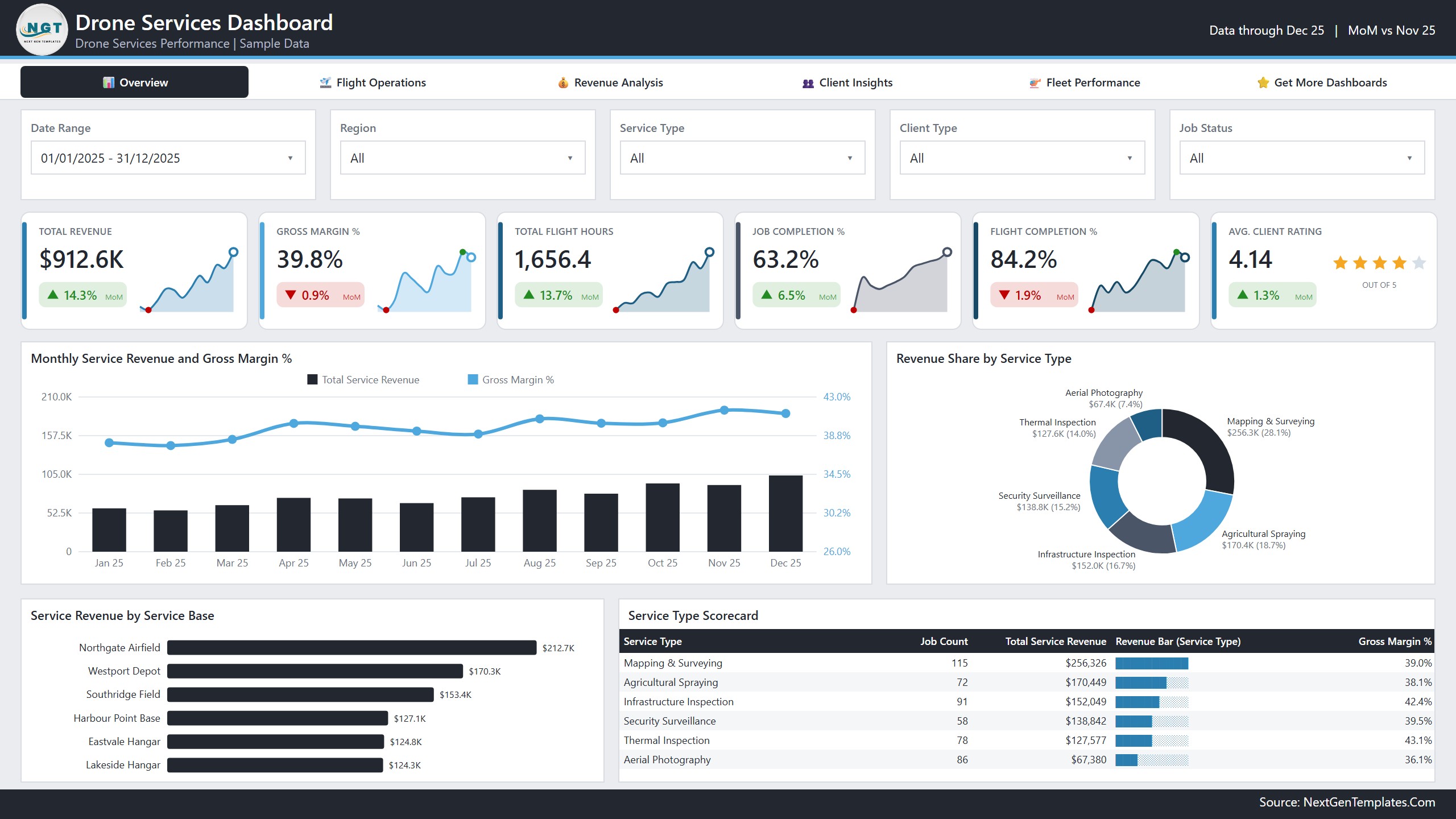
The Overview page gives managers a fast summary of the business. It presents total service revenue, gross margin, flight hours, job completion, flight completion, and average client rating. Supporting visuals compare monthly revenue and margin, revenue share by service type, service-base contribution, and a service-type scorecard.
The supplied sample data produces $912.6K in revenue, a 39.8% gross margin, 1,656.4 flight hours, an 84.2% flight-completion rate, and a 4.14 average client rating. These figures are demonstration values and update when you replace or extend the Excel data and refresh the report.
Five connected report pages
Overview
Use the main report to monitor the core commercial and operational measures together. Monthly trends make movement easier to spot, while service-type and service-base breakdowns help explain where revenue and margin are coming from.
Flight Operations
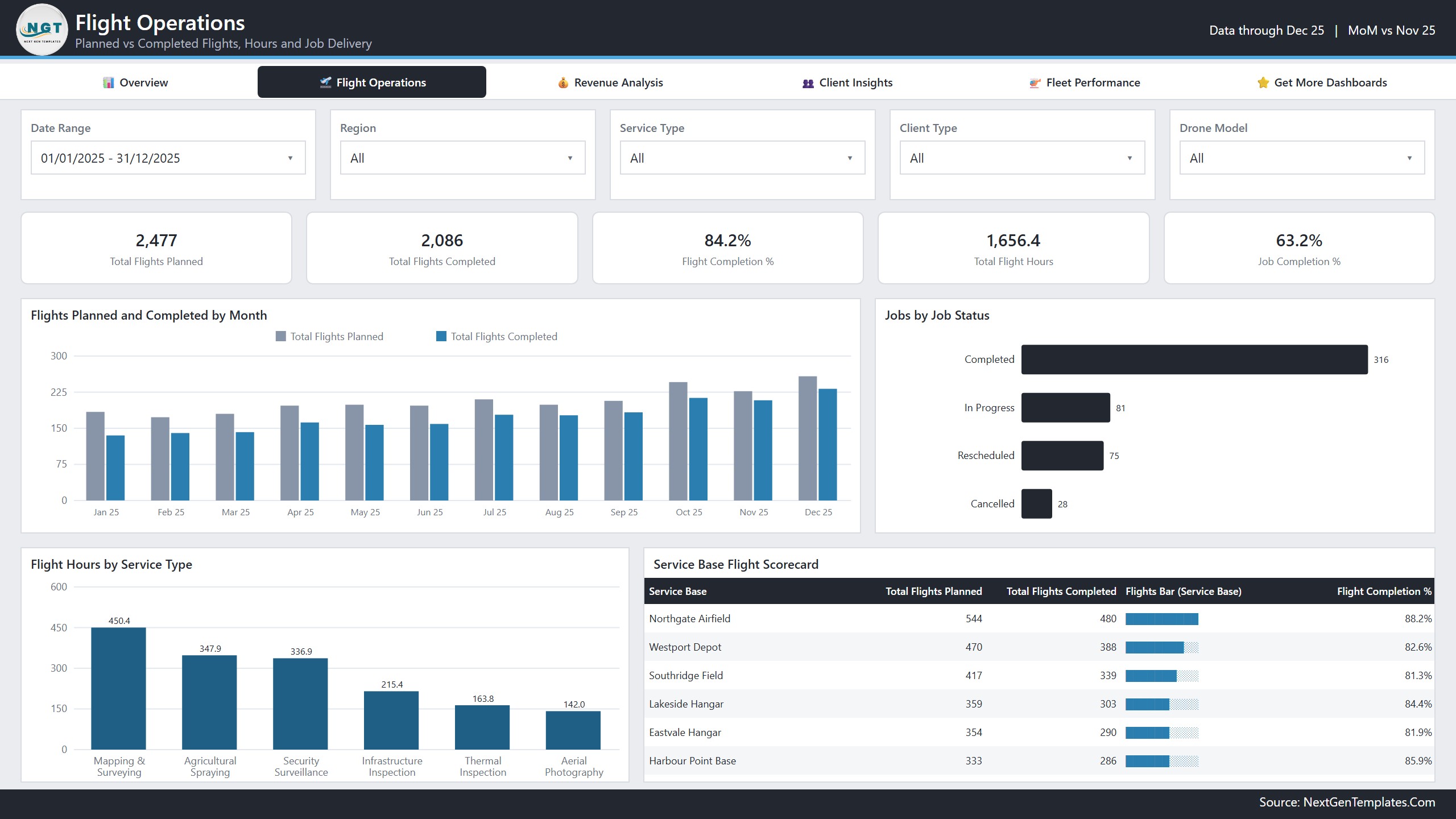
Compare planned and completed flights, review flight hours by service type, and understand the mix of completed, in-progress, rescheduled, and cancelled jobs. A service-base scorecard adds context for job volume, flight completion, flight hours, and client ratings.
Revenue Analysis
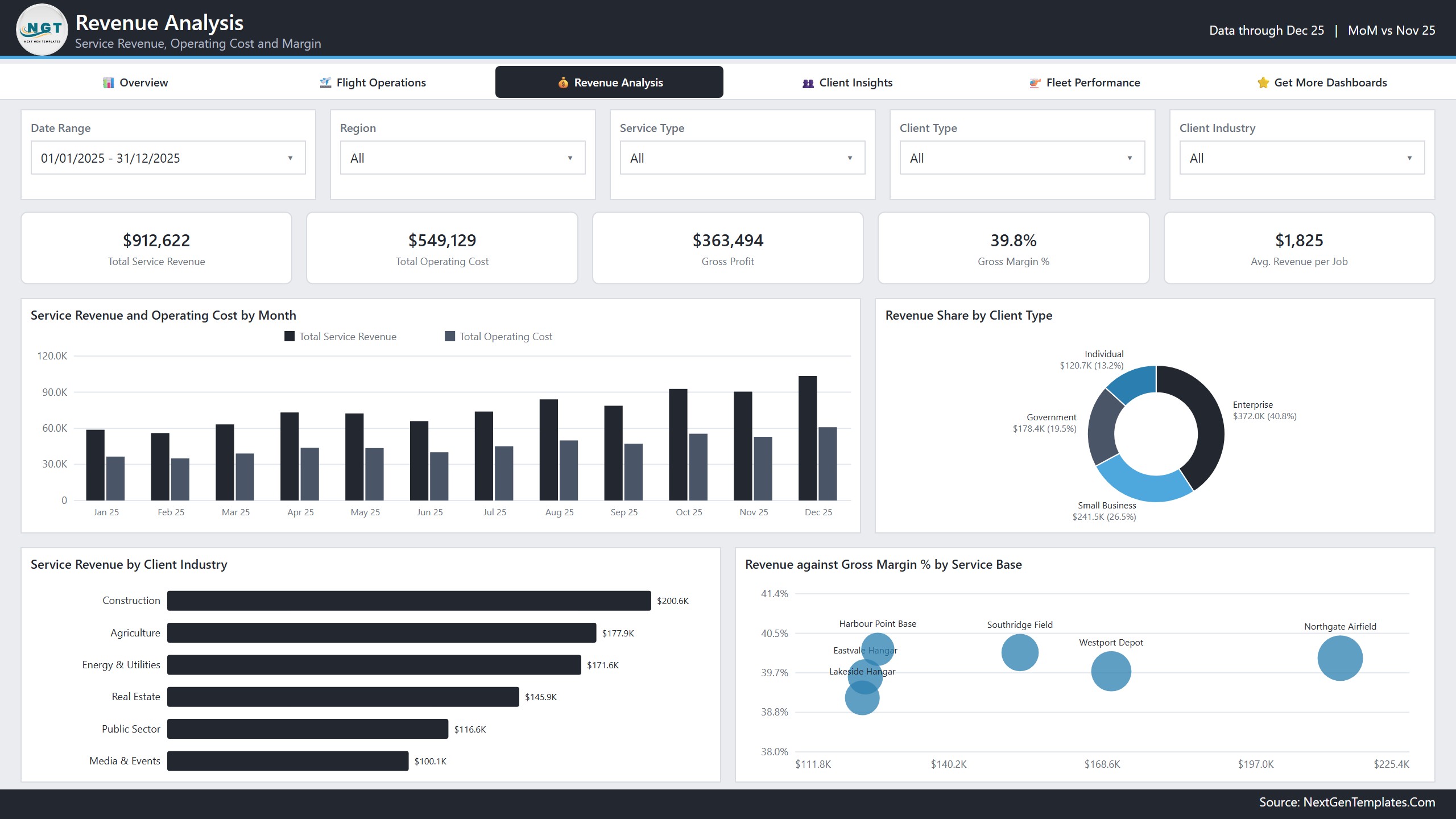
Track total service revenue, operating cost, gross profit, gross margin, and average revenue per job. Monthly revenue and cost, client-type share, industry contribution, and service-base margin comparisons support practical commercial reviews.
Client Insights
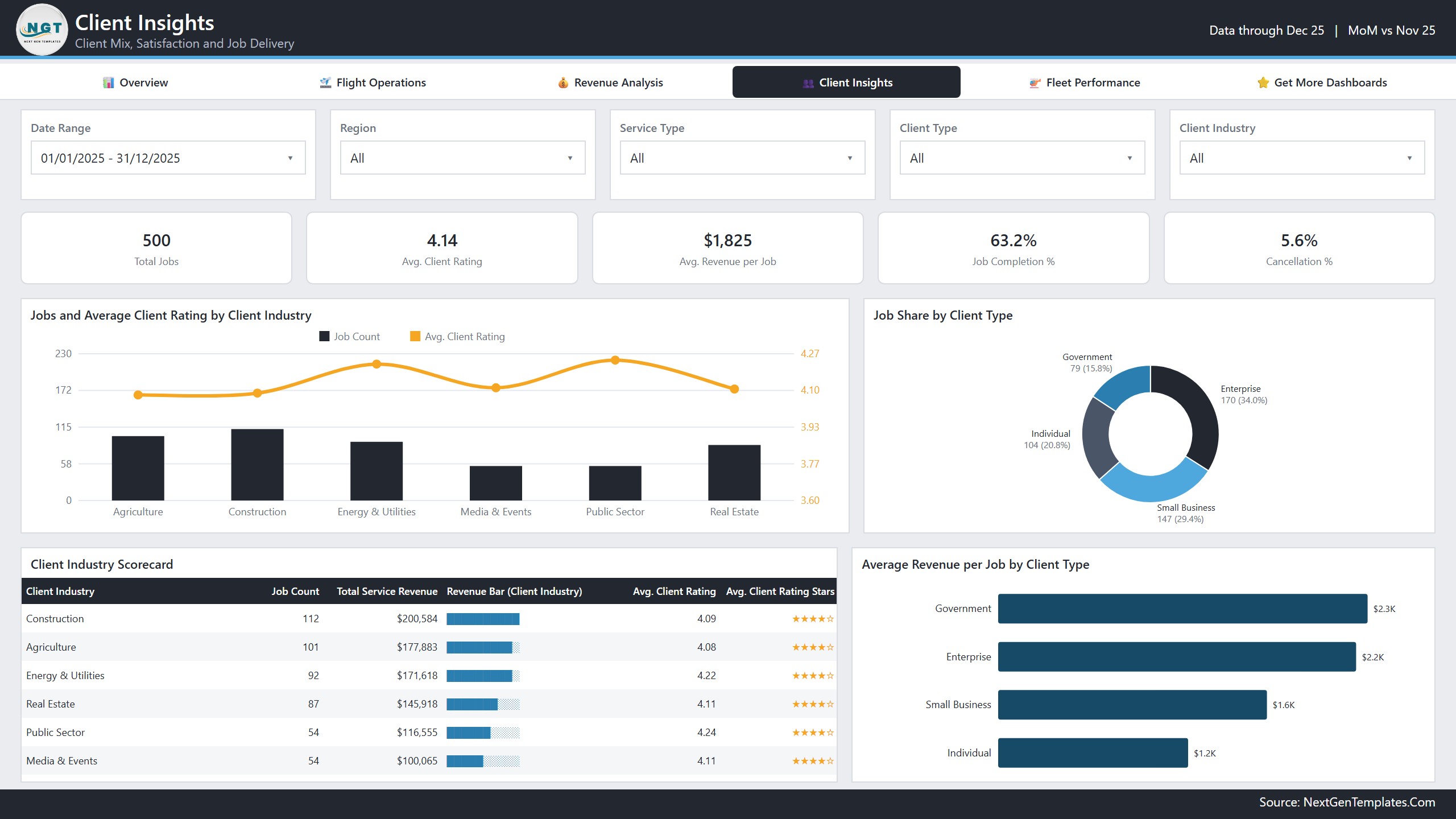
Review job volume and average rating by client industry, the share of work by client type, average revenue per job, completion rate, and cancellation rate. This page supports account-mix discussions without claiming to predict future demand or customer behavior.
Fleet Performance
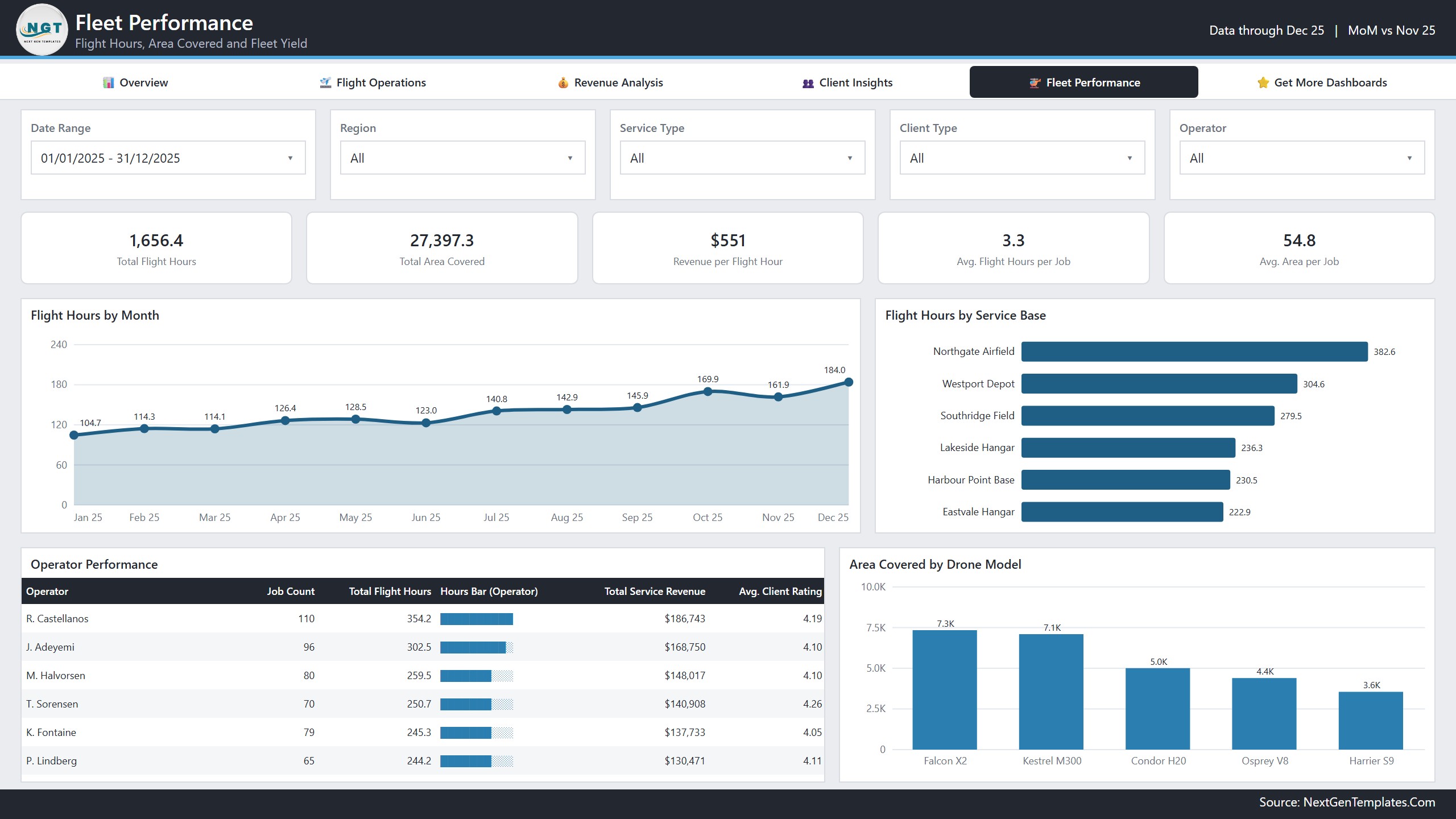
Analyze flight hours, area covered, revenue per flight hour, average hours per job, and average area per job. Operator and service-base comparisons provide an administrative performance view, while area covered by drone model highlights workload distribution. It is a reporting tool, not a flight-control, airworthiness, regulatory-compliance, or safety-management system.
Included in your download
- Editable Power BI Desktop report file (.pbix)
- Structured Excel source file with 500 sample job records
- Power BI user manual in PDF format
- Five designed pages with reusable navigation and filters
- Measures and visuals for revenue, cost, margin, jobs, flights, clients, operators, and drone models
Who can use this template?
- Drone service companies monitoring multi-service operations
- Aerial photography, mapping, inspection, surveying, and agricultural-spraying teams
- Operations managers comparing bases, operators, and service categories
- Commercial managers reviewing revenue, cost, margin, and client mix
- Power BI learners who want a realistic multi-page portfolio example
How to customize the Drone Services Dashboard in Power BI
- Keep the field names in the included Data.xlsx file unchanged.
- Replace the sample rows with your own validated job-level records.
- Open the PBIX file in Microsoft Power BI Desktop.
- Update the source path if Power BI requests it, then refresh the data model.
- Test totals, filters, and category mappings before sharing the report.
No Power BI Pro subscription is required to edit the local PBIX file in Power BI Desktop. Microsoft licensing may be required if you publish or share through the Power BI service.
Explore related dashboard templates
Compare the same business area in our Drone Services Dashboard in Excel, add a KPI-focused view with the Drone Services KPI Dashboard in Excel, explore agricultural operations in the Drone Farming Startups Dashboard in Power BI, or review logistics-oriented analytics in the Drone Delivery Services Dashboard in Power BI.
Important use note
This template is designed for business reporting and management analysis. The sample names and operational records are fictional. Validate your source data, definitions, costs, and measures before making decisions. The dashboard does not replace aviation authority requirements, maintenance systems, pilot logs, risk assessment, mission planning, or specialist safety and compliance processes.
Get the Drone Services Dashboard in Power BI and start with a polished five-page report, editable source data, and a practical setup guide.
Watch the demo video:
Frequently Asked Questions
How many pages does the dashboard have?
Five pages: Overview, Flight Operations, Revenue Analysis, Client Insights and Fleet Performance. Each page has its own visuals and shares the same navigation and filters.
What data does it run on?
The report is connected to a structured Excel file with 500 sample jobs. Replace the sample rows with your own job records, keep the field names unchanged, and refresh the model.
Which filters can I use?
Slicers cover date, region, service type, client type, job status, drone model, operator and industry.
Do I need a Power BI Pro subscription?
No Pro subscription is needed to edit the local PBIX file in Power BI Desktop, which is free. Microsoft licensing may apply if you publish or share the report through the Power BI service.
Is there an Excel version?
Yes. See the Drone Services Dashboard in Excel and the Drone Services KPI Dashboard in Excel.
Related Drone and Service Dashboards
- Drone Services Dashboard in Excel: the same business area in Excel
- Drone Delivery Services Dashboard in Power BI: a Power BI view for delivery operations
- Drone Farming Startups Dashboard in Power BI: a Power BI view for agricultural drone work
- Drone Services KPI Dashboard in Excel: a KPI-focused view in Excel
- Power BI Dashboard Mega Collection: 15 Power BI dashboard templates in one download
Browse all Power BI dashboards.
































Reviews
There are no reviews yet.