

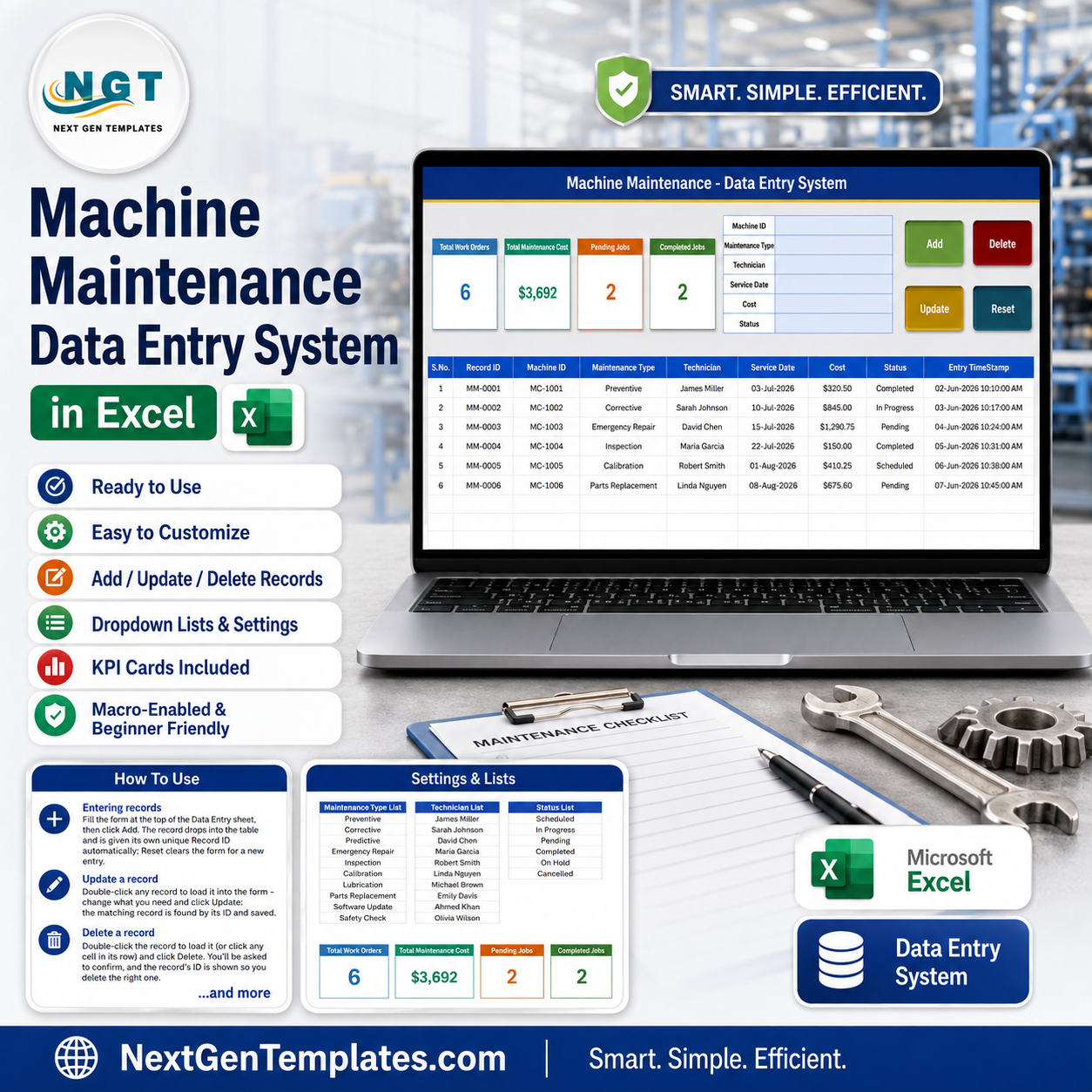
The Machine Maintenance Data Entry System in Excel replaces the shared maintenance notebook with one macro-enabled workbook. A six-field form – Machine ID, Maintenance Type, Technician, Service Date, Cost and Status – writes every job into a nine-column register with its own ID (MM-0001, MM-0002 and on) and an entry timestamp, while four cards above the table recalculate on each Add: Total Work Orders, Total Maintenance Cost, Pending Jobs and Completed Jobs. The download is a 65 KB .xlsm inside a ZIP, with four sheets, 10 maintenance types, 10 technician names and 6 status values already loaded plus six sample rows you delete in one pass. $6.99 once. No subscription, no per-seat licence, no account to create.
Key Features of the Machine Maintenance Data Entry System
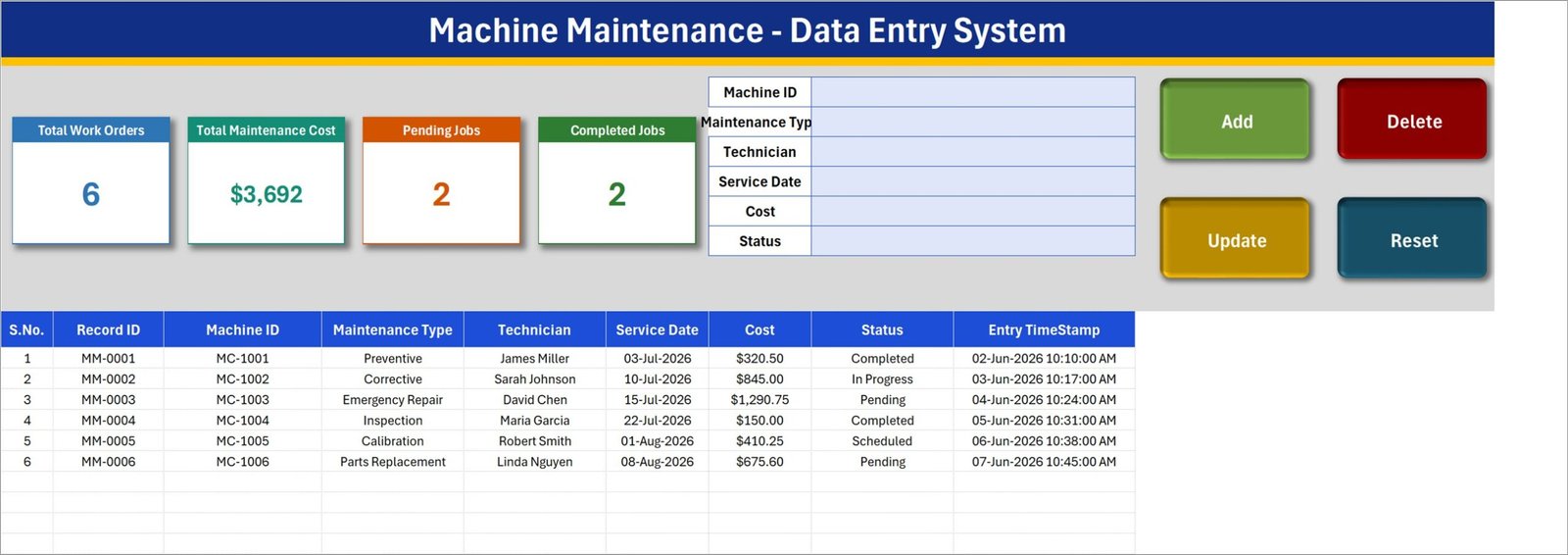
- A six-field form, not a spreadsheet row. Machine ID, Maintenance Type, Technician, Service Date, Cost and Status sit in a bordered form block at the top of the Data Entry sheet. Three of the six are dropdowns, so job types, technician names and status values stay spelled the same way every time.
- Add, Update, Delete and Reset are real VBA buttons. Add appends the record and stamps it; Reset clears the form for the next job; Delete asks you to confirm and shows the Record ID first; Update finds the record by its ID wherever it now sits in the table.
- Update without re-selecting the row. Double-click any record to pull it back into the form. The workbook remembers its Record ID behind the scenes, so you can change the cost or move a job from Pending to Completed and click Update – no hunting for the right line.
- Four cards that keep score. Total Work Orders counts the register, Total Maintenance Cost sums the Cost column, and Pending Jobs and Completed Jobs count their status values. In the shipped sample they read 6, $3,692, 2 and 2.
- IDs and timestamps you do not type. Every Add produces the next MM-0001 style Record ID and writes an Entry TimeStamp such as 02-Jun-2026 10:10:00 AM, so you always know when a job was logged as opposed to when it was scheduled.
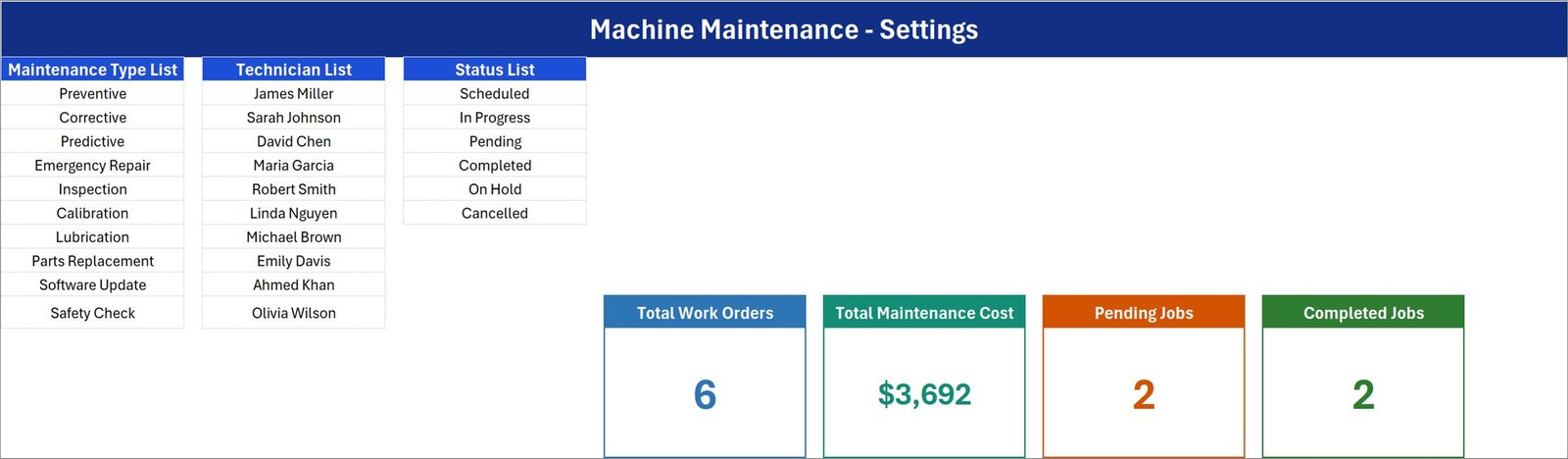
- Dropdown lists you own. The Setting sheet holds the three lists as plain rows. Add a technician, drop a maintenance type you never use, rename a status – every dropdown on the Data Entry sheet follows without touching a formula.
- Nine columns per record. S.No., Record ID, Machine ID, Maintenance Type, Technician, Service Date, Cost, Status and Entry TimeStamp – enough to answer “which machine, who worked on it, when, what did it cost, is it closed” from one table.
- You can also type straight into the table. The register columns carry the same dropdowns as the form, so bulk edits and pasted history are still safe.
What’s Inside the Machine Maintenance Data Entry System
Four sheets. Nothing hidden, nothing password-protected.
1. Data Entry
The working screen: the blue title banner, the four summary cards, the six-field form, the four coloured buttons and the register below them. Six sample records ship with it (MC-1001 to MC-1006, covering Preventive, Corrective, Emergency Repair, Inspection, Calibration and Parts Replacement) so you can see the shape of a filled system before you clear it.
2. Setting
Three editable lists – Maintenance Type (Preventive, Corrective, Predictive, Emergency Repair, Inspection, Calibration, Lubrication, Parts Replacement, Software Update, Safety Check), Technician (10 sample names) and Status (Scheduled, In Progress, Pending, Completed, On Hold, Cancelled). The four real KPI cards live here too; the cards on the Data Entry sheet are linked pictures of them, which is why restyling a card here restyles it there.
3. Instructions
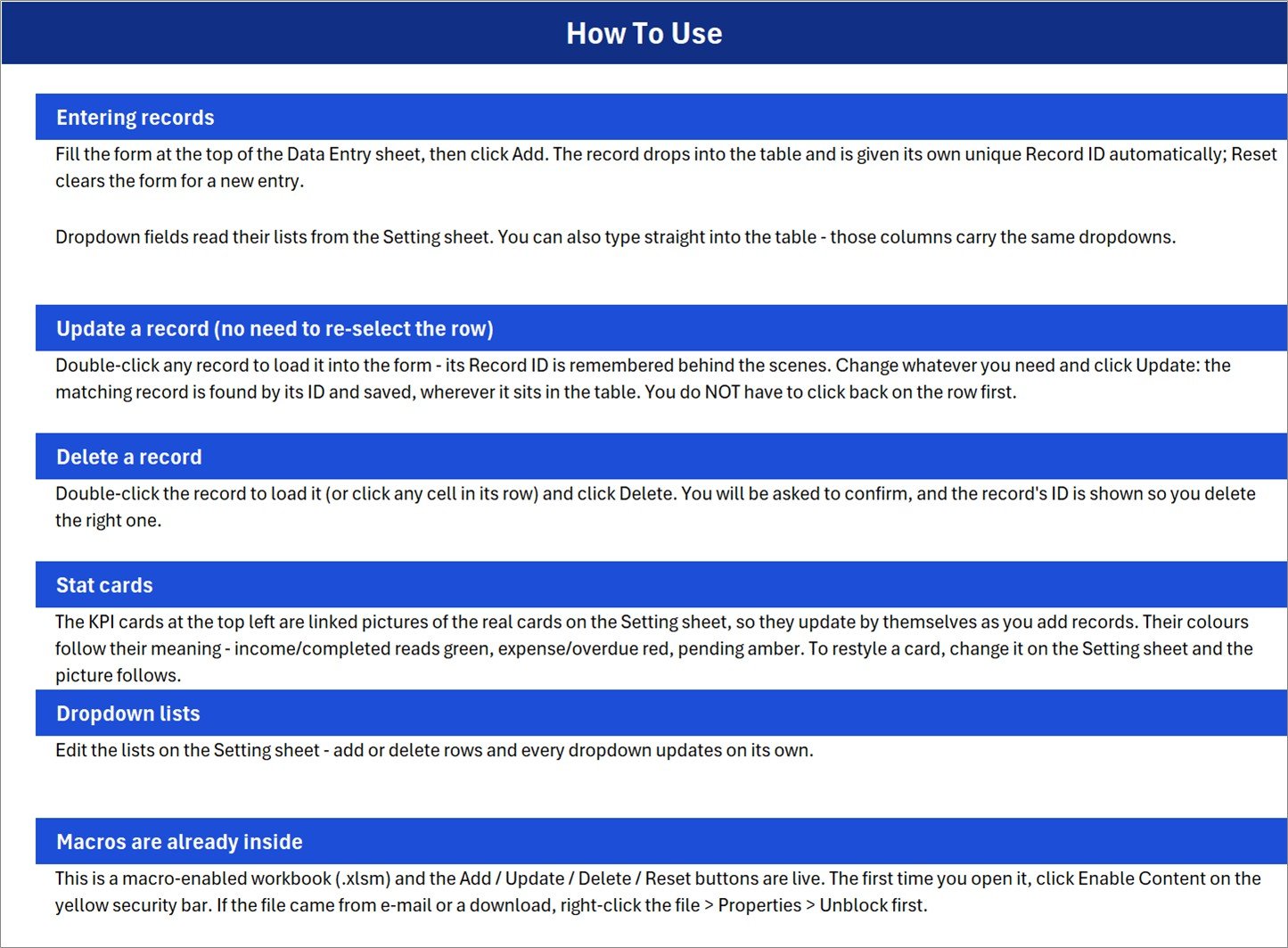
A one-page guide inside the workbook covering entering records, updating without re-selecting a row, deleting safely, how the stat cards are built, how to edit the dropdown lists, and the macro-enable step.
4. Get More Templates
A short links sheet pointing back to the rest of the NextGenTemplates library.
Machine Maintenance Data Entry System vs. Google Sheets vs. Paid CMMS Software – Where This Fits
| This Excel system | Google Sheets maintenance log | Paid CMMS (UpKeep, Fiix) | |
|---|---|---|---|
| Cost | $6.99 once | Free, but you build it | $20-$45 per user per month |
| Platform | Desktop Microsoft Excel (Windows) | Any browser | Web plus mobile app |
| Setup time | Minutes – unzip, enable macros, clear the samples | Hours of formula and validation work | Days, plus an asset import |
| Real-time team collaboration | No – one file, one editor at a time | Yes | Yes |
| Mobile access | View only, and the macro buttons will not run | Yes | Yes, with offline sync |
| Customizable fields | Yes – edit the lists and the columns freely | Yes | Usually only on higher tiers |
| Share with link | No – you send the file | Yes | Yes |
| Year-1 cost at 5 users | $6.99 | $0 | $1,200-$2,700 |
| Work-order approvals and meter readings | No | No | Yes |
| Works with no internet connection | Yes | No | Partly |
This is the small end of that scale on purpose. If five people need to update the same job at the same time, or you need meter-based triggers and spare-parts stock, buy a CMMS. If one person logs what was done to which machine and what it cost, a $6.99 workbook does it without a monthly bill.
Who This Template Is For – and Who It’s Not For
A good fit if you are: a maintenance supervisor in a small plant or workshop keeping a servicing history per machine; a facilities or building manager logging HVAC, lift and generator jobs; a workshop owner who wants a cost trail per machine for budget arguments; a QA or production lead who currently keeps this in a notebook or a plain sheet with no validation.
Not a good fit if you need: several technicians editing the same register at once; a mobile app for shop-floor entry; automatic scheduling from run hours, meter readings or condition sensors; spare-parts inventory and purchase orders; work-order approval routing or digital sign-off; audit-grade tamper-evident records; or Mac Excel, Excel for the web, or Google Sheets – the VBA buttons will not run there.
Two honest notes on the shipped sample so nothing surprises you. First, Pending Jobs and Completed Jobs count only those two status values, so with six records that also include In Progress and Scheduled they read 2 and 2 rather than adding up to 6 – that is by design, not a broken formula. Second, this is a record keeper, not maintenance software: it stores what you enter and totals it, and it will not remind you that a machine is due.
How to Use the Machine Maintenance Data Entry System
- Unzip and unblock. Extract Machine_Maintenance_System.xlsm. If Windows marked it as downloaded, right-click the file, choose Properties and tick Unblock.
- Open it in desktop Excel and click Enable Content on the yellow security bar. The Add, Update, Delete and Reset buttons are VBA and do nothing until macros are on.
- Rewrite the Setting sheet first. Put your own technician names in, trim the maintenance types to the ones you actually book, and adjust the status list to match how your team talks.
- Delete the six sample records from the register on the Data Entry sheet, then click Reset to clear the form.
- Log a job. Type the Machine ID, pick Maintenance Type, Technician and Status, set the Service Date, enter the Cost, click Add. The Record ID and Entry TimeStamp are written for you.
- Close a job later. Double-click its row, change Status to Completed and fix the final cost, then click Update. The card totals move immediately.
- Back it up. One file, one copy – keep it on OneDrive, a network share or a dated copy each month, the same way you would treat any single-file register.
Real-World Use Cases
Ravi, maintenance supervisor at a 40-machine packaging unit. He logs every preventive service and breakdown against the machine code. At month end he filters the register by Machine ID and can show that MC-1003 alone consumed $1,290 of emergency repair, which is the argument he needs for a replacement.
Claire, facilities manager for three office buildings. Lifts, chillers and generators each get a Machine ID. Her contractors are the technician list. The Pending Jobs card is her morning glance, and the Entry TimeStamp column settles “when did we report this” questions with the service company.
Daniel, owner of a CNC job shop with four staff. He wanted a servicing history without a monthly bill. Calibration and Lubrication entries go in as they happen, Total Maintenance Cost gives him a running spend figure, and the whole thing lives in one file he already knows how to back up.
Frequently Asked Questions
Do I have to enable macros?
Yes. This is a .xlsm workbook and the four buttons are VBA. Click Enable Content on the yellow bar the first time you open it, and unblock the file in Windows Properties if it came from a download or an e-mail attachment. Without macros you still see the sheets, but Add, Update, Delete and Reset do nothing.
Will it work in Excel for the web, Mac Excel or Google Sheets?
Treat it as a Windows desktop Excel template. Excel for the web does not run VBA at all, Google Sheets does not either, and Mac Excel handles this kind of form and button layout inconsistently. You can open and read the file elsewhere, but the buttons belong on Windows desktop Excel.
Can two technicians use it at the same time?
No. It is a single-file record keeper, so one person edits at a time. Multi-user entry is the line where you should be looking at a proper CMMS or a web app instead.
Can I add my own fields, like Downtime Hours or Work Order Number?
You can add columns to the register and type into them directly. The six form fields and the four buttons are wired in VBA, so extending the form means editing the macro – straightforward if you write VBA, and out of scope if you do not.
Does it schedule maintenance or send reminders?
No. It records what has been booked and done, with a Service Date and a Status. There is no calendar trigger, no run-hour rule and no notification – if you want the scheduling side, pair it with a maintenance calendar or dashboard template.
How many records can it hold?
Excel’s own limits apply, so tens of thousands of rows are fine on paper. In practice a single-file register stays comfortable in the low thousands; past that, split by year or move to a database-backed tool.
What exactly do I download?
One ZIP containing a single 65 KB file, Machine_Maintenance_System.xlsm. No installer, no add-in, no account.
About the Author
Built by PK – Microsoft Certified Professional with 15+ years of Excel, Google Sheets, and Power BI experience. Founder of NextGenTemplates, reaching 300K+ subscribers across YouTube channels. Every template is hand-built and tested before release.
Explore Related Templates
- Maintenance Work Order Data Entry System in Excel – the work-order side of the same job, if you raise tickets before the technician starts.
- Job Work Order Data Entry System in Excel – the same form-and-register pattern for customer job cards.
- Fleet Fuel Log Data Entry System in Excel – for the vehicles that sit outside the plant.
- Audit Findings and CAPA Data Entry System in Excel – when a breakdown turns into a corrective action.
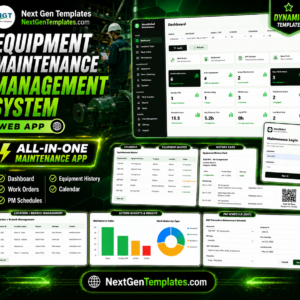
- Equipment Maintenance Management System Web App – the multi-user upgrade path when one file stops being enough.
Browse more in Excel VBA Tools and Manufacturing templates in Excel.
Get the Machine Maintenance Data Entry System in Excel for $6.99 (regular $11.99) – instant ZIP download, yours to keep and edit, no subscription. Add it to your cart above and start logging your first machine in the next ten minutes.
Last updated: 20 August 2026.
























Reviews
There are no reviews yet.