



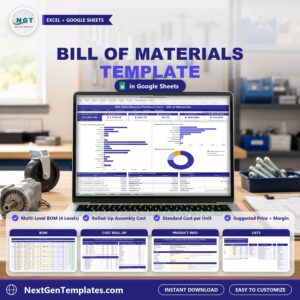
Bill of Materials Template in Excel and Google Sheets costs a product from its parts. List every part and sub-assembly in a multi-level bill of materials, type the quantities, unit costs, scrap and labor minutes, and get the rolled-up cost of every sub-assembly, the standard cost per unit, a suggested selling price and a purchase list for your next production run. It ships in two editions, Google Sheets and Microsoft Excel, with the same seven tabs, the same formulas and the same sample data: a fictional electric platform cart built by a manufacturer in Grand Rapids, Michigan.
Watch the Bill of Materials Template in Excel and Google Sheets walkthrough
🌍 Join 10,000+ customers in 180+ countries using NextGenTemplates to replace paid SaaS tools with one-time-purchase Excel, Google Sheets, Power BI and HTML templates.
✅ Instant download · One-time payment · No subscription · No per-user fees · Lifetime access
This is a bill of materials template for small manufacturers, product designers, purchasing teams and cost accountants who need to know what a finished product costs. It is a manual costing workbook with formulas and charts, not an ERP and not a macro tool: you type your parts, prices and quantities yourself.
🔑 Key Features of the Bill of Materials Template
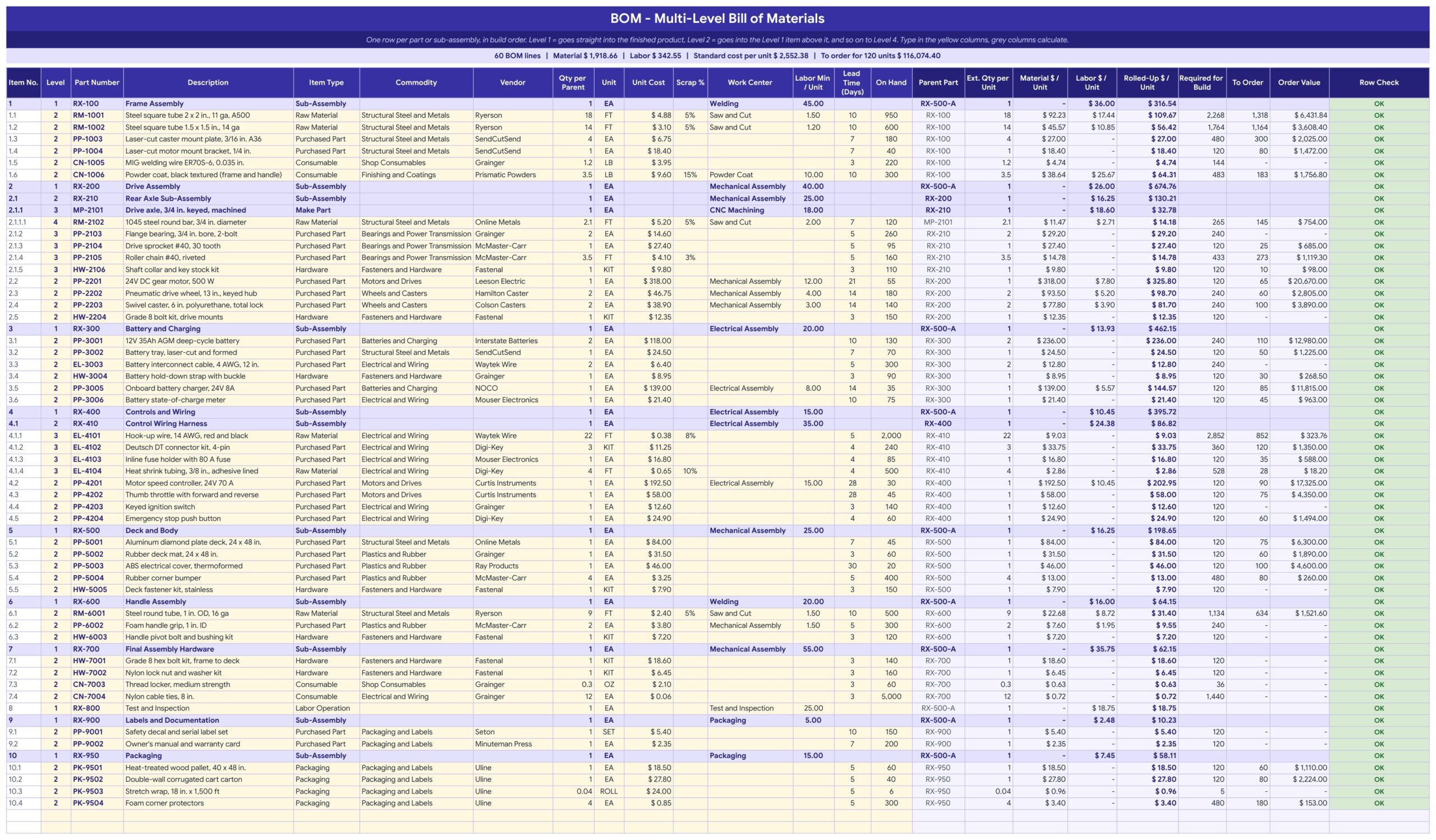
🏭 A multi-level BOM. Up to 200 lines in 4 levels. Level 1 goes straight into the finished product, Level 2 goes into the Level 1 item above it, and so on. Item numbers like 1, 1.2 and 2.1.1 and the parent part are worked out for you.
💰 Rolled-up cost. A sub-assembly’s cost is its own labor plus every part and sub-assembly below it. Material includes scrap, labor comes from the minutes and the work center rate, and overhead is a percent of direct labor.
🧮 Standard cost per unit and a suggested price. Set a target gross margin and the template shows the suggested selling price, then the gross profit and margin at your current list price.
🛒 A purchase list. For every bought part it shows Required for Build, On Hand, To Order and Order Value, rounded up to whole units, plus the lead time of each part.
📊 A Dashboard. Six tiles (standard cost, material, labor plus overhead, gross margin, build cost, purchase orders), three charts, the top 8 parts by material cost, the cost build-up and the BOM details.
✅ A Row Check on every line. It flags a missing level, quantity, vendor, commodity or work center, or a level that skips a step, and a Check cell on Product Info tells you when everything reconciles.
⚙️ Work center rates you control. Eight work centers with fully loaded hourly rates. Add your own vendors, commodities and units and the dropdowns follow.
📦 What’s Inside the Bill of Materials Template
The download is a ZIP with two files: the Excel edition (.xlsx, no macros) and a PDF guide that holds the “Make a copy” link to your own editable Google Sheet. Both editions have the same seven tabs: Dashboard, Product Info, BOM, Cost Roll-Up, Lists, How to Use and Explore More.
Page 1: Dashboard (Google Sheets)
The Dashboard opens with six tiles: Standard Cost per Unit, Material per Unit, Labor plus Overhead, Gross Margin, Build Cost and Purchase Orders. Beside them sit three charts (Purchase Order Value by Vendor, Rolled-Up Cost per Unit by Level 1 Item and Standard Cost Mix per Unit), then the top 8 parts by material cost, the cost build-up and pricing, and the BOM details. Links under the title jump to every tab.

Page 2: BOM (Google Sheets)
One row per part or sub-assembly, up to 200 lines in 4 levels. Type the part number, description, item type, commodity, vendor, quantity per parent, unit cost, scrap %, work center and labor minutes. The item number, parent part, extended quantity, material with scrap, labor, rolled-up cost, required for the build, to order, order value and a Row Check fill in for you. Sub-assemblies show in bold.
Page 3: Cost Roll-Up (Google Sheets)
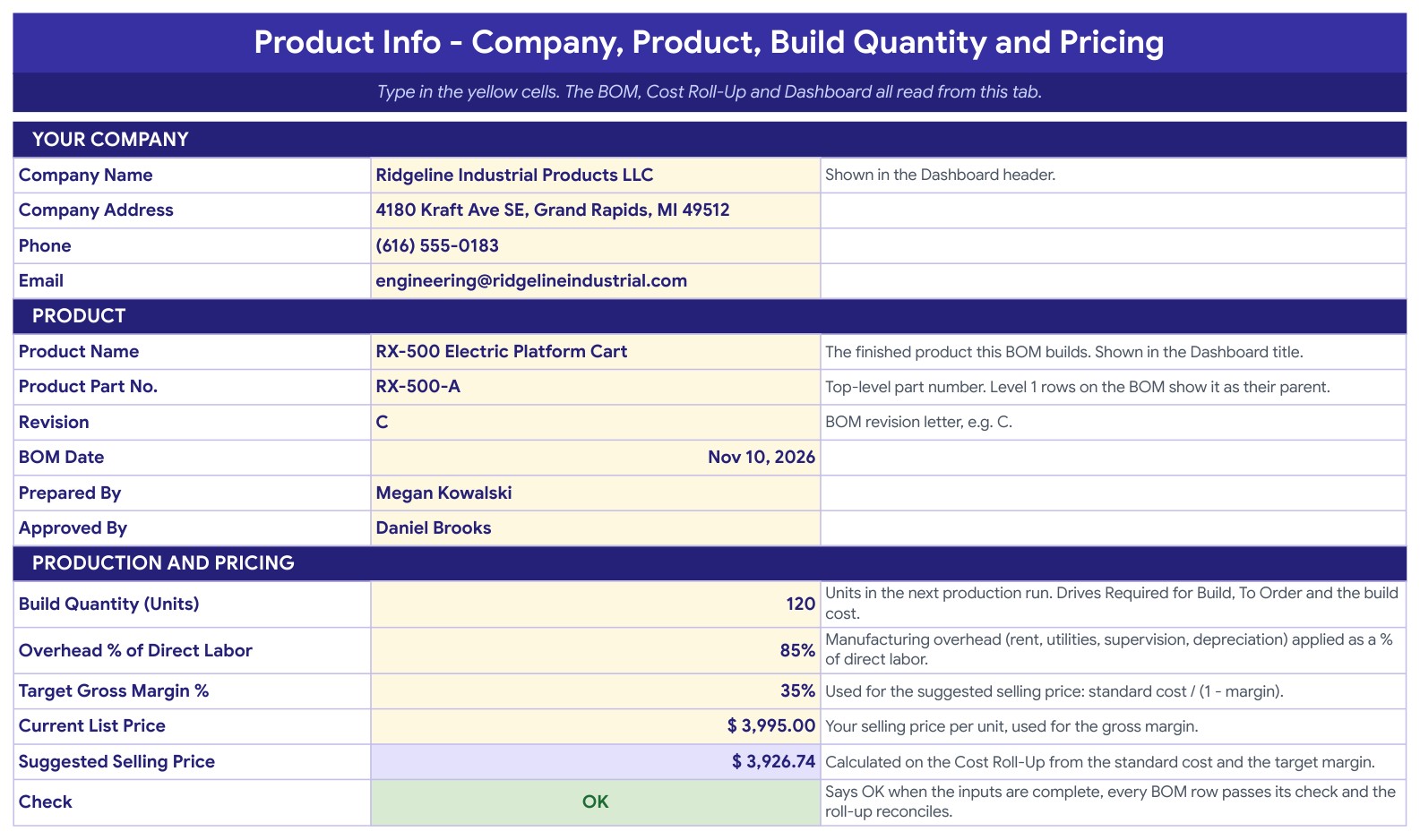
Cost by Level 1 item with its share of the total, material cost by commodity, purchasing by vendor with lines to order, order value and the longest lead time, and the cost build-up that ends in the standard cost per unit, the suggested price at your target margin and the gross margin at your list price.

Page 4: Product Info (Google Sheets)
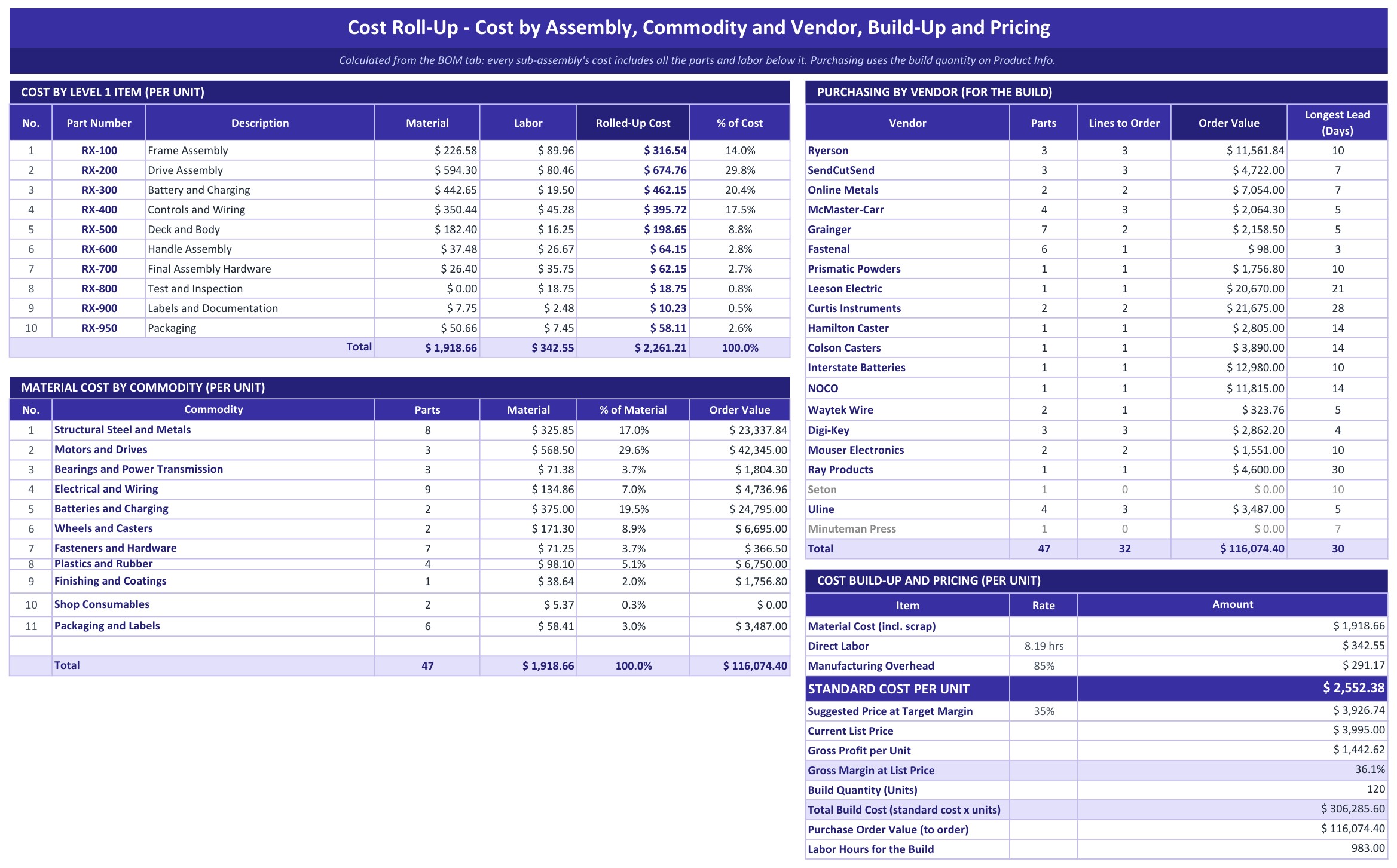
Type your company details, the product name, part number, revision, BOM date, who prepared and approved it, the build quantity, overhead as a percent of direct labor, the target gross margin and your current list price. A Check cell says OK when every BOM row passes and the totals reconcile.
Page 5: Lists (Google Sheets)
Enter each work center with its fully loaded hourly rate. The BOM looks the rate up by work center and the tab adds up labor minutes and labor dollars per unit. The lists on the right feed the dropdowns for item types, commodities, units and vendors.

Page 6: How to Use (Google Sheets)
A twelve-step guide inside the workbook, with the formulas explained in plain language and a tip for turning the dropdowns into chips.

Page 7: Explore More Templates (Google Sheets)
A page of recommended templates, popular categories and a WELCOME15 coupon for your next purchase.

Page 8: Dashboard (Excel edition)
The same Dashboard in Microsoft Excel: six tiles, three charts, the top 8 parts, the cost build-up and the BOM details.

Page 9: BOM (Excel edition)
The multi-level BOM in Excel with the same 4 levels, scrap, labor minutes, rolled-up cost and purchasing columns.

Page 10: Cost Roll-Up (Excel edition)
Cost by Level 1 item, material by commodity, purchasing by vendor and the pricing build-up, in Excel.
Page 11: Product Info (Excel edition)
The Product Info inputs in Excel, with the Check cell that confirms the totals reconcile.

Page 12: Lists (Excel edition)
Work centers with loaded hourly rates and the dropdown lists, in Excel.

📊 Bill of Materials Template vs. Blank Spreadsheet vs. ERP Software: Where This Fits
| Feature | Bill of Materials Template (Google Sheets + Excel) | Blank spreadsheet | ERP or PLM software |
|---|---|---|---|
| Cost | ✅ $6.99 one-time | Free to build, but your time | Monthly or annual license |
| Platform | ✅ Google Sheets and Microsoft Excel, both included | One platform | Web or desktop app |
| Multi-level cost roll-up | ✅ Built in, 4 levels | You write the formulas | ✅ Yes |
| Scrap, labor and overhead in the cost | ✅ Yes | Build it yourself | ✅ Yes |
| Purchase list with lead times | ✅ Yes | Add it yourself | ✅ Yes |
| Your data stays in your own file | ✅ Yes | ✅ Yes | Stored with the vendor |
| Live inventory and supplier integration | No, you type the on-hand quantities | No | ✅ Often yes |
For makers who want to know what a product costs and what to buy for the next run, without a subscription, this template sits in the sweet spot.
👥 Who This Template Is For, and Who It’s Not For
✅ This template is built for:
- Small manufacturers and workshops that need a standard cost per unit
- Product designers and engineers who cost a design before it goes to production
- Purchasing teams that turn a BOM into a list of what to order
- Cost accountants who set a selling price from the cost and a target margin
❌ This template is NOT for:
- Teams that need live inventory, work orders or supplier integration
- Products with more than 200 BOM lines or more than 4 levels
- Anyone who wants macros, because this version has none
⚙️ How to Use the Bill of Materials Template
- Open the PDF guide and click the “Make a copy” link for Google Sheets, or open the Excel file.
- On Product Info, type your company, the product, its part number, the build quantity, the overhead %, the target margin and your list price.
- On Lists, enter your work centers with their loaded hourly rates, and add your vendors and commodities.
- On the BOM tab, clear the yellow sample columns and enter your parts in build order, with each part directly under its parent.
- Open Cost Roll-Up to read the standard cost, the suggested price and the purchasing by vendor.
- Open the Dashboard for the tiles and charts, and watch the Check cell turn OK.
💼 Real-World Use Cases
A small manufacturer costs a 60-line electric platform cart and sees a standard cost of $2,552.38 per unit and a 36.1% margin at a $3,995 list price.
A purchasing manager plans a 120-unit run and gets a purchase list of 32 lines from 18 vendors worth $116,074, with the longest lead time at 30 days.
A product designer swaps a motor and watches the rolled-up cost of the Drive Assembly and the standard cost change at once.
❓ Frequently Asked Questions
What is a bill of materials?
A bill of materials, or BOM, lists every part, sub-assembly and quantity needed to build a product. This template adds the cost of each line so you can roll it up into a cost per unit.
What is a multi-level BOM?
It shows sub-assemblies inside assemblies. A part can sit under a sub-assembly that sits under the finished product, and each level’s cost rolls up into the one above.
Does it work in Google Sheets and in Excel?
Yes. The ZIP holds an Excel edition (.xlsx, no macros) and a PDF guide with the Make a copy link for Google Sheets. Both have the same seven tabs, formulas and sample data.
How many BOM lines and levels does it hold?
Up to 200 lines in 4 levels.
How are scrap, labor and overhead handled?
Scrap % raises the material cost of a line. Labor is the minutes times the work center’s hourly rate. Overhead is a percent of direct labor that you set on Product Info.
What does the sample data show?
A fictional RX-500 Electric Platform Cart: 60 BOM lines, 10 Level 1 items, 8 work centers and a 120-unit build. The vendors are real US distributors used as examples, and prices and lead times are illustrative, so use your own quotes.
Does it track my inventory?
No. You type the quantity on hand for each part and the template works out what to order.
Can I change the currency?
Yes. Currency is $ by default. Select the amount columns and change the number format.
👤 About the Author
Built by PK, Microsoft Certified Professional with 15+ years of Excel, Google Sheets and Power BI experience. Founder of NextGenTemplates. Every template is hand-built and tested before release. Watch the walkthroughs on @PKAnExcelExpert and @NextGenTemplates.
🔗 Explore Related Templates
📌 Inventory and Reorder Point Tracker in Excel and Google Sheets: track the stock of the parts you buy.
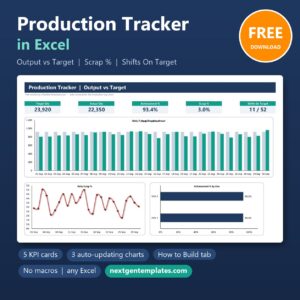
📌 Production Tracker in Excel: follow each production run once the BOM is costed.
📌 Manufacturing OEE Dashboard in Google Sheets: measure how well the line performs.
📌 Purchase Order and Vendor Management System Web App: manage the orders and vendors behind your purchase list.
Browse every Google Sheets template in the store.
🎥 Visit our YouTube channel for step-by-step video tutorials
👉 YouTube.com/@NextGenTemplates
📅 Last updated: November 2026







Reviews
There are no reviews yet.