

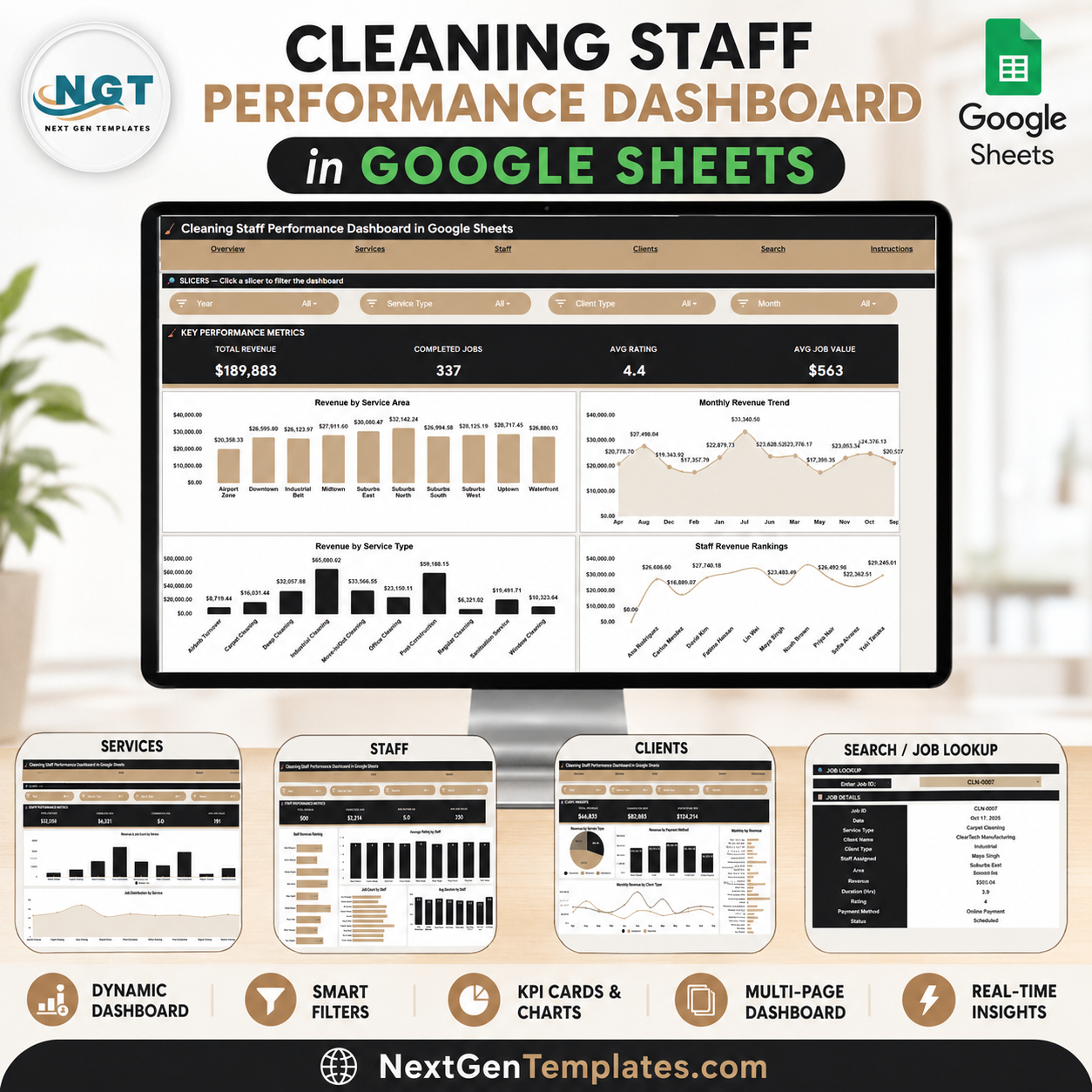
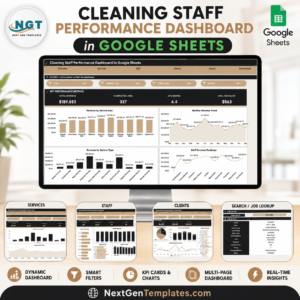
The Cleaning Staff Performance Dashboard in Google Sheets turns your job log into a 6-tab control center that tracks 4 headline KPIs and 14 charts across service areas, staff, and clients. Setup takes under 10 minutes — paste your jobs into one Data sheet and every KPI card, chart, and slicer updates automatically.Cleaning Staff Performance Dashboard in Google Sheets
🌍 Join 8,400+ teams in 40+ countries using NextGenTemplates to replace paid SaaS tools with one-time-purchase Excel, Google Sheets, Power BI, and HTML templates.Cleaning Staff Performance Dashboard in Google Sheets
✅ Instant download · One-time payment · No subscription · No per-user fees · Lifetime access
🔑 Key Features of the Cleaning Staff Performance Dashboard in Google Sheets
This Cleaning Service Dashboard in Google Sheets gives cleaning company owners a single view of revenue, productivity, and quality. The Overview tab shows four live KPI cards — Total Revenue, Completed Jobs, Average Rating, and Average Job Value — that recalculate the moment you add a job.Cleaning Staff Performance Dashboard in Google Sheets
It ships with 14 pre-built charts spread across Overview, Services, Staff, and Clients tabs, covering revenue by area, month, service type, staff member, and client. Every Overview chart is wired to slicers, so a single click filters the entire page by service area, service type, or cleaner.Cleaning Staff Performance Dashboard in Google Sheets
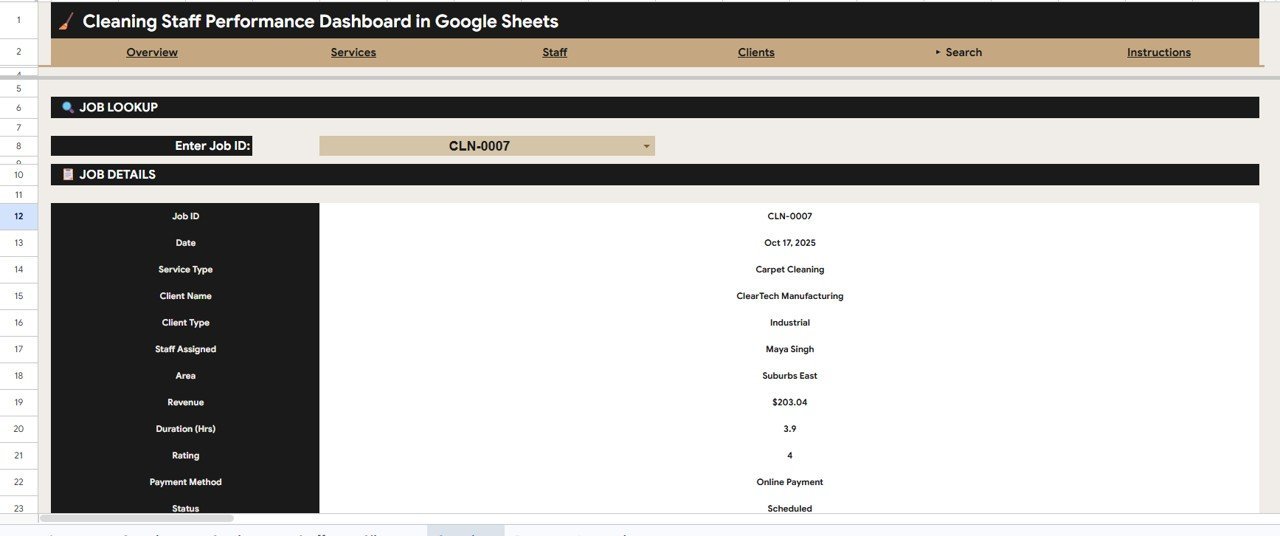
The built-in Search tab lets you type any Job ID and instantly pull that job’s date, service type, client, staff, area, revenue, duration, rating, payment method, and status — no scrolling through hundreds of rows. Because it runs in Google Sheets, the whole team can open it on a phone or laptop and share it with a single link.Cleaning Staff Performance Dashboard in Google Sheets
📦 What’s Inside the Cleaning Staff Performance Dashboard in Google Sheets
The template is organized into six tabs — four analysis pages plus a Search tool and a Data sheet — so you always know where to look.
Overview Page
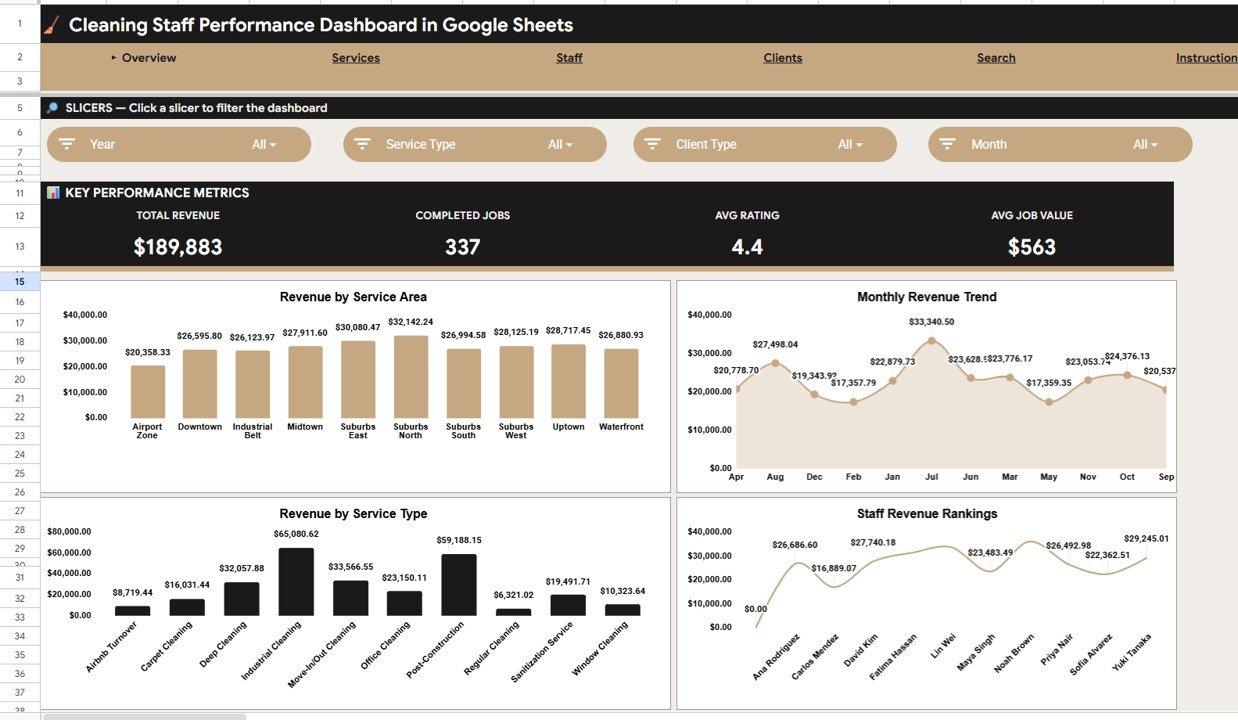
The home tab shows four KPI cards — Total Revenue, Completed Jobs, Average Rating, and Average Job Value — above four charts: Revenue by Service Area, Revenue by Month, Revenue by Service Type, and Revenue by Staff. Slicers at the top filter the whole page in one click.
Services Analysis
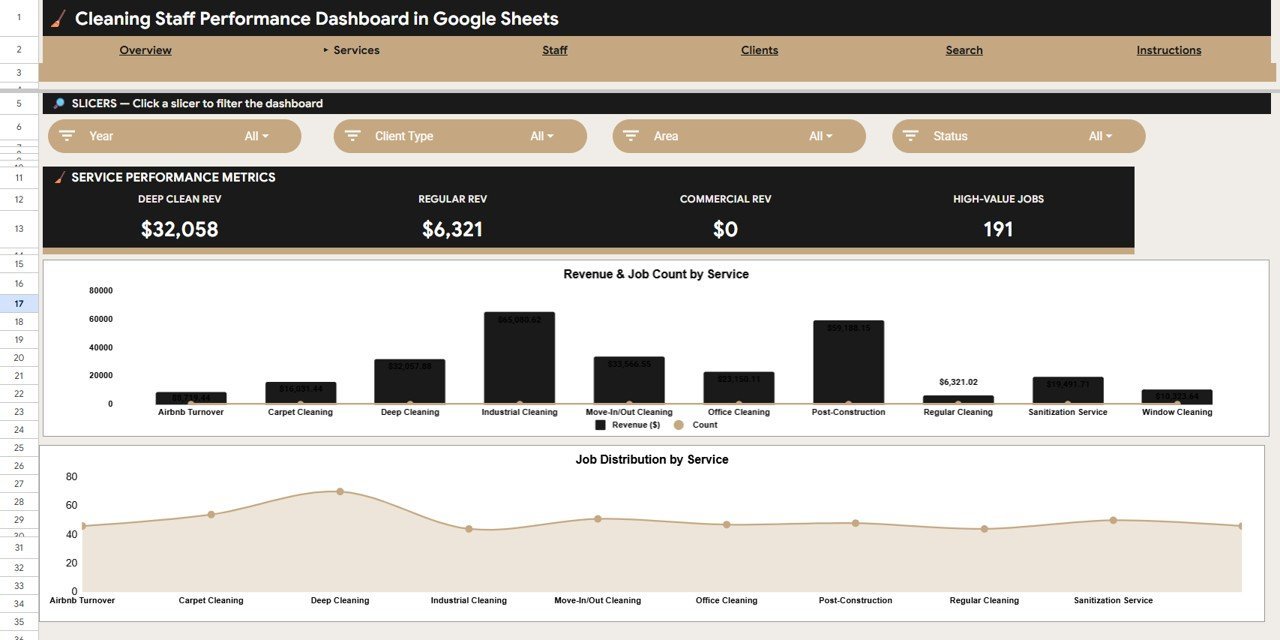
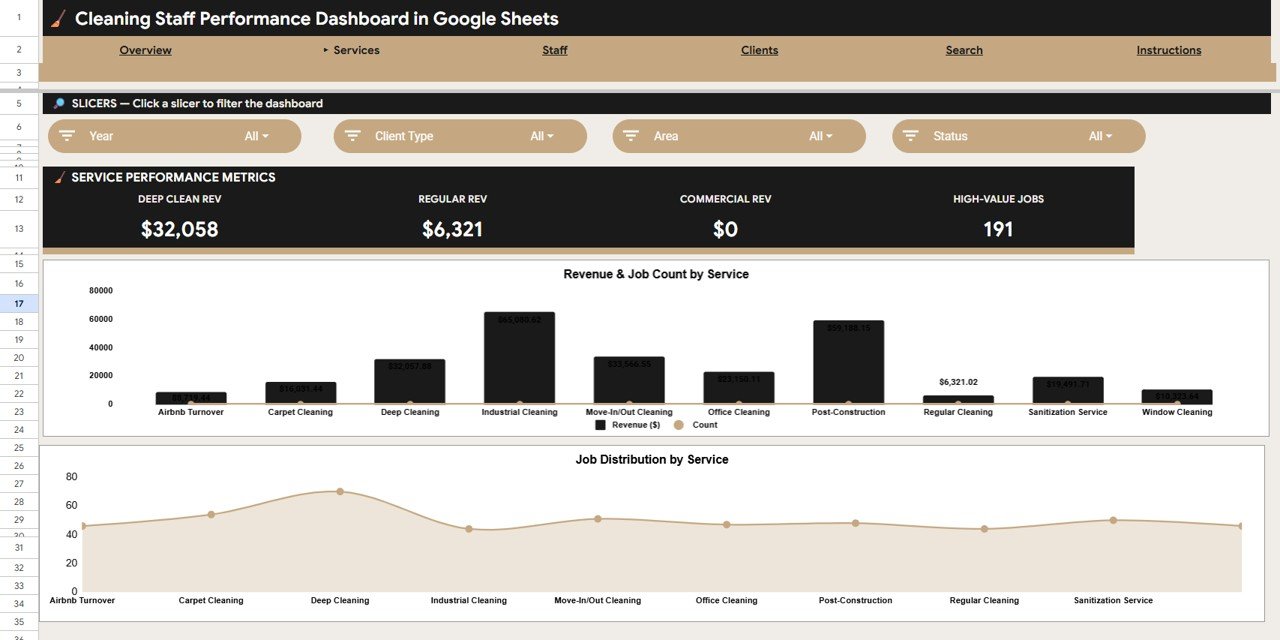
This tab breaks performance down by the cleaning services you offer. Charts include Revenue and Job Count by Service and Job Count by Service, so you can see which service lines bring the most money and the most work.Cleaning Staff Performance Dashboard in Google Sheets
Staff Analysis
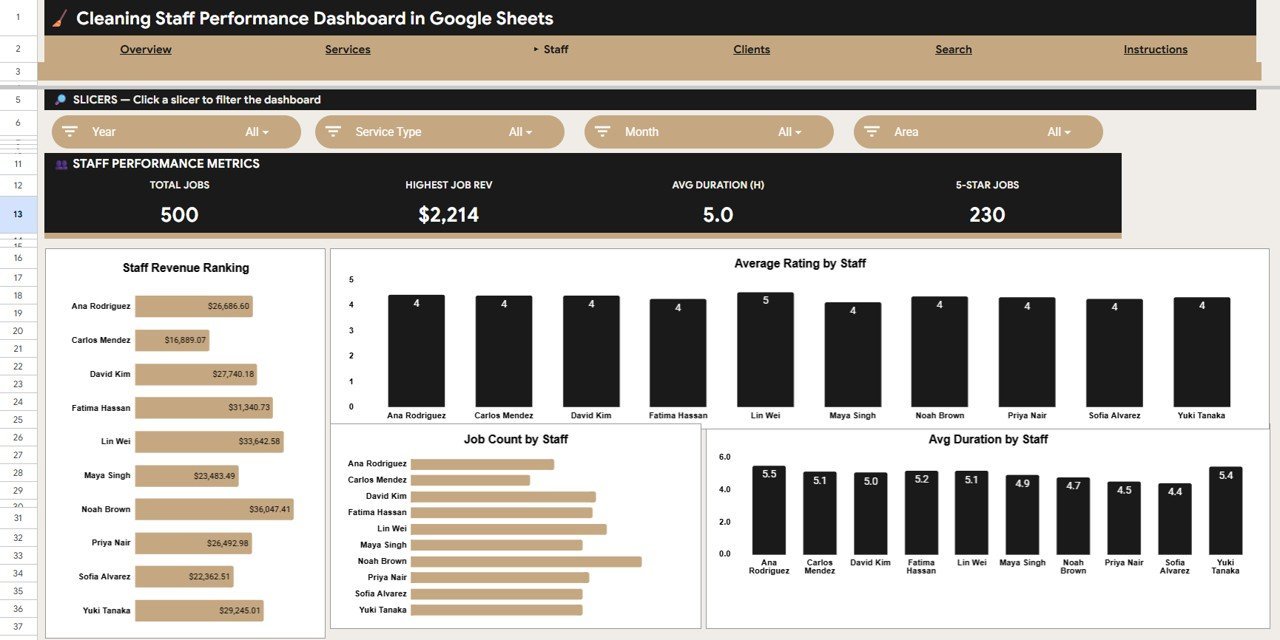
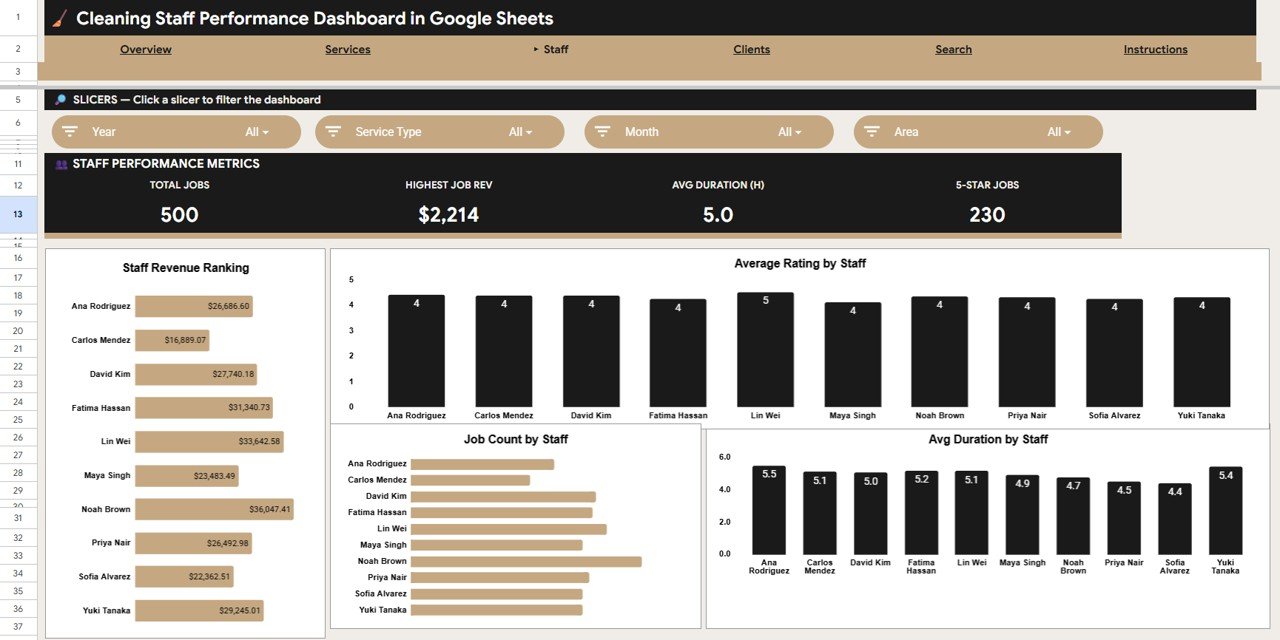
The Staff tab compares your cleaners side by side with Revenue by Staff, Average Rating by Staff, Job Count by Staff, and Average Duration by Staff. It is the fastest way to spot top performers and coaching opportunities.Cleaning Staff Performance Dashboard in Google Sheets
Clients Analysis
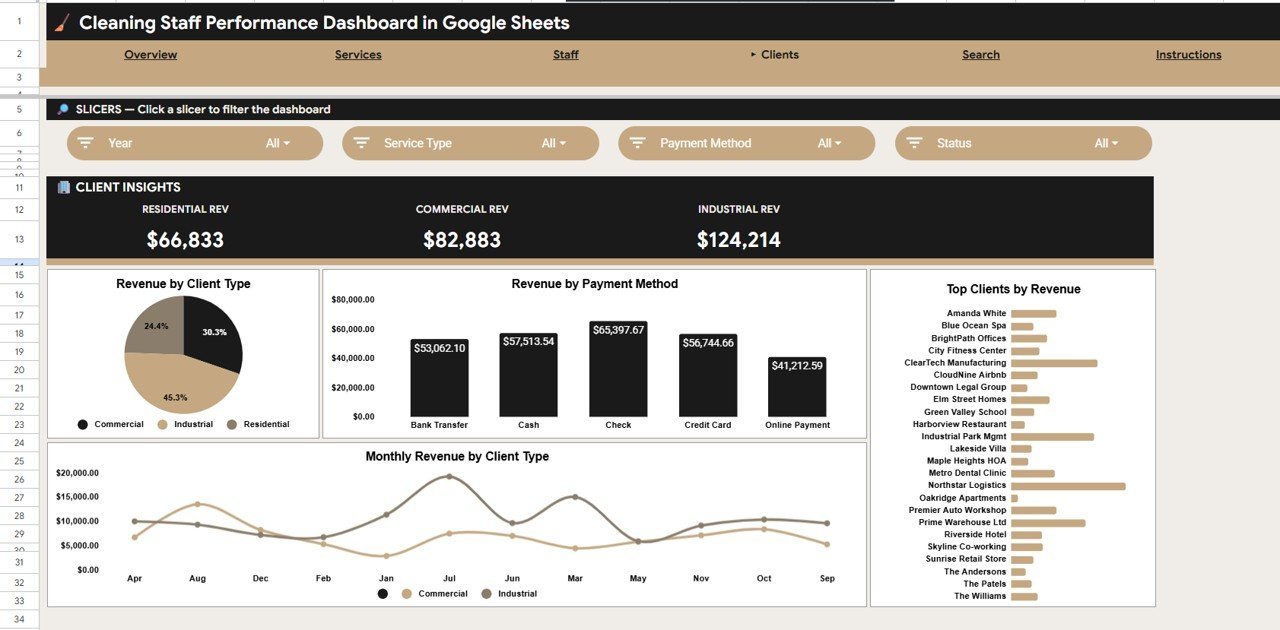
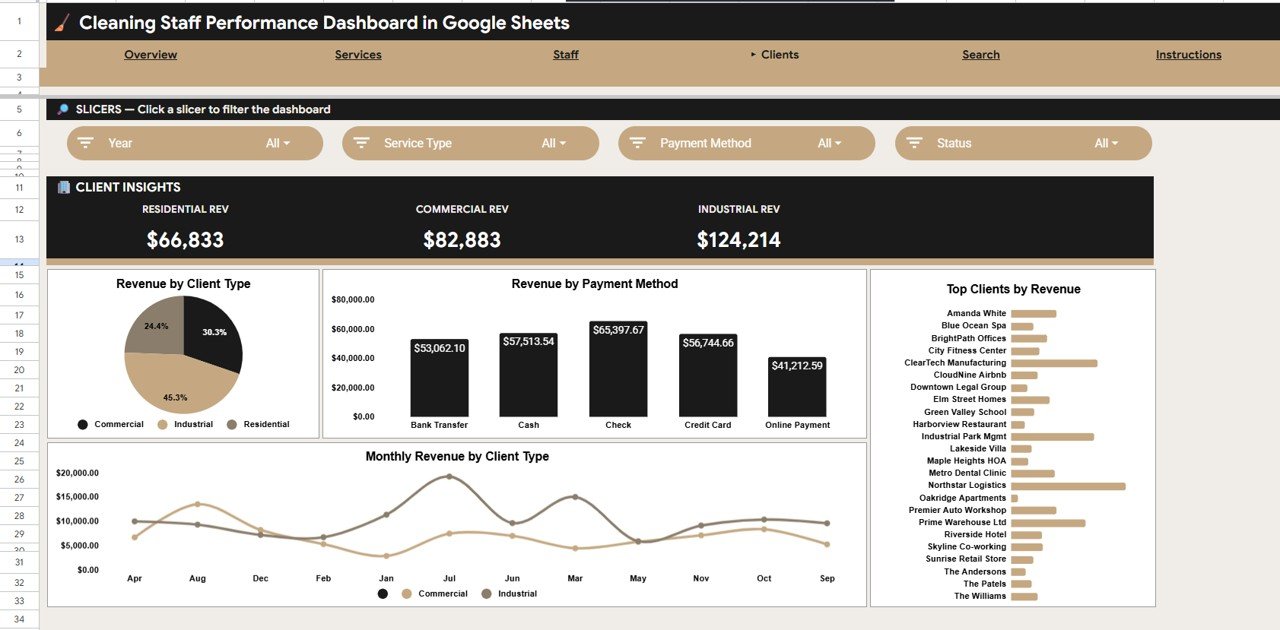
This tab focuses on where your money comes from with Revenue by Client Type, Revenue by Payment Method, Revenue by Client, and Monthly Revenue by Client Type. Use it to find your most valuable accounts and spot payment trends.
Search Sheet
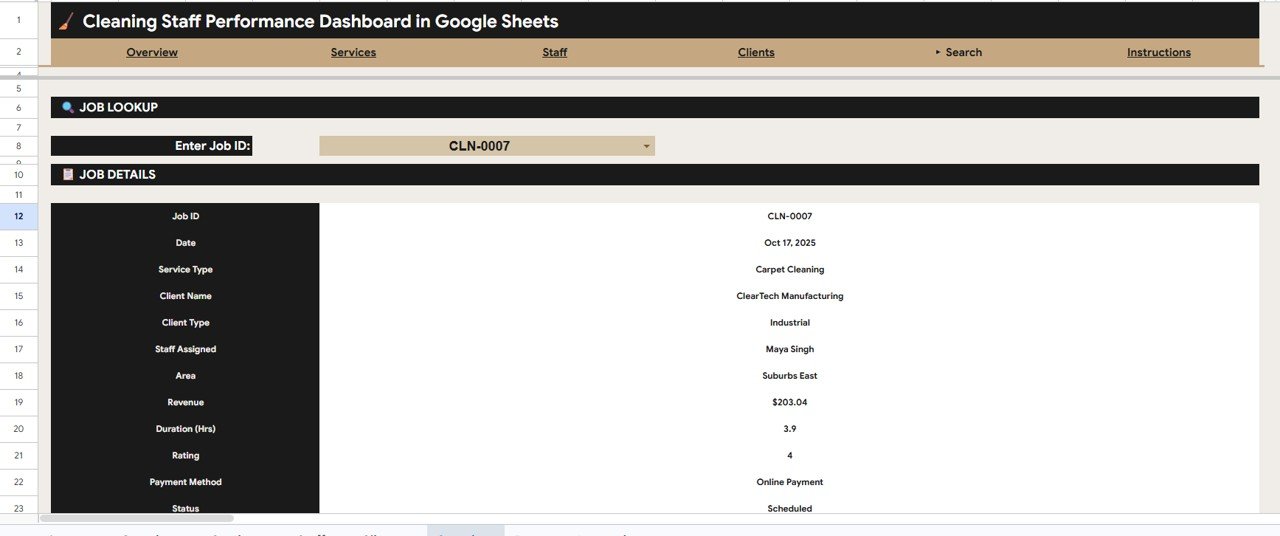
Enter any Job ID and the Search tab instantly returns that job’s Date, Service Type, Client Name, Client Type, Staff Assigned, Area, Revenue, Duration, Rating, Payment Method, and Status. It is the quickest way to answer a client or staff question on the spot.
Data Sheet
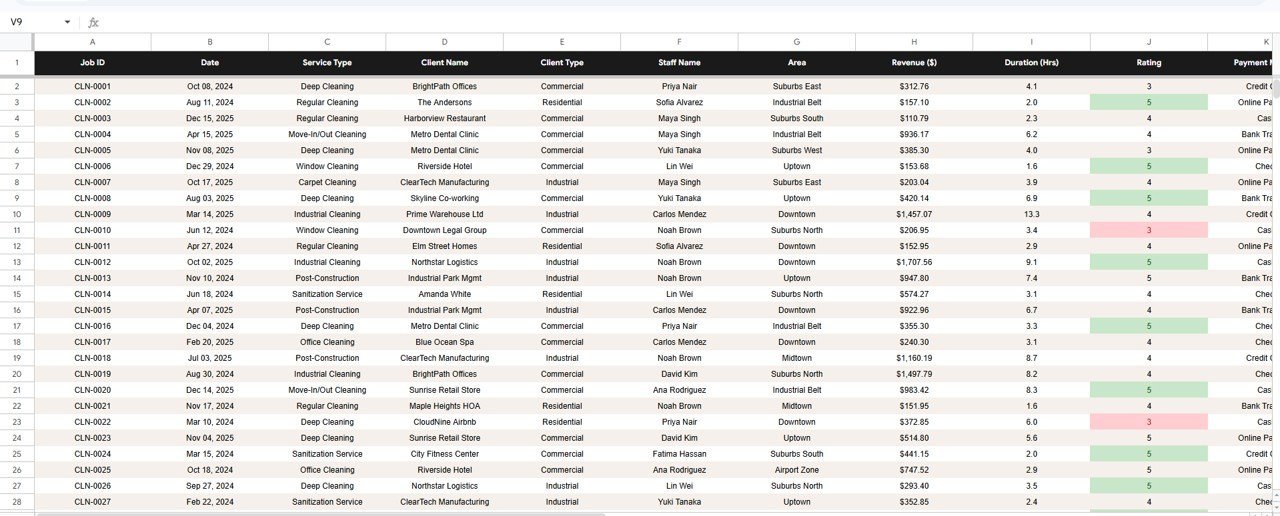
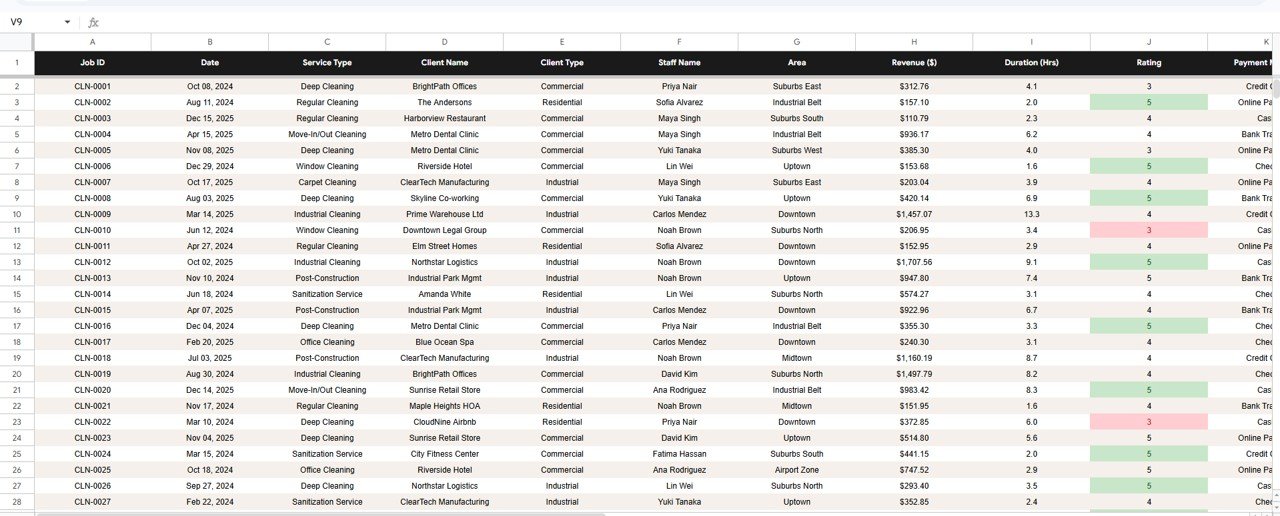
This is where your records live. Add each cleaning job as a row in the same column format and every KPI card, chart, slicer, and the Search tab update automatically — no formulas to rebuild.
📊 Cleaning Staff Performance Dashboard vs. Microsoft Excel vs. Paid Cleaning SaaS — Where This Fits
| Feature | Cleaning Staff Performance Dashboard (Google Sheets) | Microsoft Excel Dashboard | Jobber / Housecall Pro / ZenMaid |
|---|---|---|---|
| Cost | $9.99 one-time | $10-20 one-time | $29-149 / month |
| Platform | Google Sheets (cloud) | Desktop Excel file | Vendor cloud app |
| Setup time | Under 10 minutes | Under 10 minutes | Hours of onboarding |
| Real-time team collaboration | ✅ Built in | Limited | ✅ Yes |
| Mobile access | ✅ Any browser | Needs Excel mobile | ✅ Native apps |
| Customizable fields | ✅ Fully editable | ✅ Fully editable | Limited to vendor schema |
| Share with a link | ✅ One link | Email file copies | ✅ Yes |
| Staff performance + rating analysis | ✅ 4 staff charts | ✅ Yes | Add-on / higher tier |
| Year-1 cost at 5 users | $9.99 total | $10-20 total | $1,740-8,940 / year |
For cleaning companies that want staff, client, and revenue analytics without paying $29-149 every month, the Cleaning Staff Performance Dashboard in Google Sheets sits in the sweet spot.
👥 Who This Template Is For — and Who It’s Not For
✅ This template is built for:
- Owners of residential or commercial cleaning companies with 2-50 staff who want clear revenue and performance numbers
- Cleaning service managers who need to compare staff productivity, ratings, and job duration without a CRM subscription
- Maid services, janitorial, and office-cleaning businesses already running on Google Workspace
❌ This template is NOT for:
- Companies that need live scheduling, GPS tracking, or automated invoicing built in (use Jobber or Housecall Pro)
- Enterprise franchises needing role-based logins and audit trails across hundreds of branches
- Teams that do not use Google Sheets or Microsoft Excel at all
⚙️ How to Use the Cleaning Staff Performance Dashboard in Google Sheets
- Open the PDF guide in your download and click the link to copy the dashboard into your own Google Drive.
- Go to the Data sheet and replace the sample rows with your real cleaning jobs, keeping the same column order.
- Return to the Overview tab — the KPI cards and charts refresh automatically from your data.
- Use the slicers at the top of the Overview to filter by service area, service type, or staff member.
- Open the Search tab and enter a Job ID any time you need the full detail of a single cleaning job.
💼 Real-World Use Cases
Maria runs a 12-cleaner residential service. Each Monday she opens the Staff tab to see Revenue by Staff and Average Rating by Staff, rewards her top performer, and books a quick coaching call with anyone whose rating slipped — all without paying for a monthly CRM.
David manages commercial contracts for an office-cleaning firm. He uses the Clients tab to track Revenue by Client and Revenue by Payment Method, then uses Monthly Revenue by Client Type to forecast which contracts to renew first.
Priya owns a growing maid service in three areas. She filters the Overview with the service-area slicer to compare revenue across zones and decides where to hire her next two cleaners.
❓ Frequently Asked Questions
What KPIs does the Cleaning Staff Performance Dashboard in Google Sheets track?
The Cleaning Staff Performance Dashboard in Google Sheets tracks four headline KPIs — Total Revenue, Completed Jobs, Average Rating, and Average Job Value — plus 14 charts covering service areas, months, service types, staff, and clients. All metrics update automatically when you add jobs to the Data sheet.
How long does setup take?
Setup takes under 10 minutes. Copy the Cleaning Staff Performance Dashboard into your Google Drive, paste your cleaning jobs into the Data sheet using the same columns, and every KPI card and chart updates on its own.
How does this compare to paid cleaning software like Jobber or Housecall Pro?
Paid cleaning SaaS runs $29-149 per month and adds scheduling and invoicing. The Cleaning Staff Performance Dashboard in Google Sheets is a one-time $9.99 analytics tool focused on revenue, staff, and client reporting — ideal if you want insight without a subscription.
Can my whole cleaning team use it at once?
Yes. Because the Cleaning Staff Performance Dashboard runs in Google Sheets, you can share it with one link and let managers or staff view and edit it together in real time on any device.
Can I customize the services, areas, and staff names?
Absolutely. Every field in the Data sheet is editable, so you can rename services, areas, client types, and staff to match your cleaning business, and the charts relabel themselves automatically.
Do I need to know Google Sheets formulas to use it?
No. The Cleaning Staff Performance Dashboard is fully pre-built. You only enter job data — the formulas, charts, slicers, and Search tab are already wired up for you.Cleaning Staff Performance Dashboard in Google Sheets
👤 About the Author
Built by PK — Microsoft Certified Professional with 15+ years of Excel, Google Sheets, and Power BI experience. Founder of NextGenTemplates, reaching 300K+ subscribers across YouTube channels (@PK-AnExcelExpert, @NextGenTemplates, @NeoTechNavigators). Every template is hand-built and tested before release.Cleaning Staff Performance Dashboard in Google Sheets
🔗 Explore Related Templates
If you run a field-service business, these Google Sheets dashboards pair well with this one:
- Plumbing Contractor Dashboard in Google Sheets — jobs, revenue, and technician tracking for trades.
- Home Inspection Dashboard in Google Sheets — inspection volume and revenue analytics.
- Laundromat Business Dashboard in Google Sheets — service-business revenue and usage tracking.
Browse more in our Google Sheets Dashboards collection or the full Google Sheets templates library.
📖 Click here to read the Detailed Blog Post
Watch the step-by-step video Demo:
🎥 Visit our YouTube channel for step-by-step video tutorials
👉 YouTube.com/@NextGenTemplates
📅 Last updated: June 2026































Reviews
There are no reviews yet.