

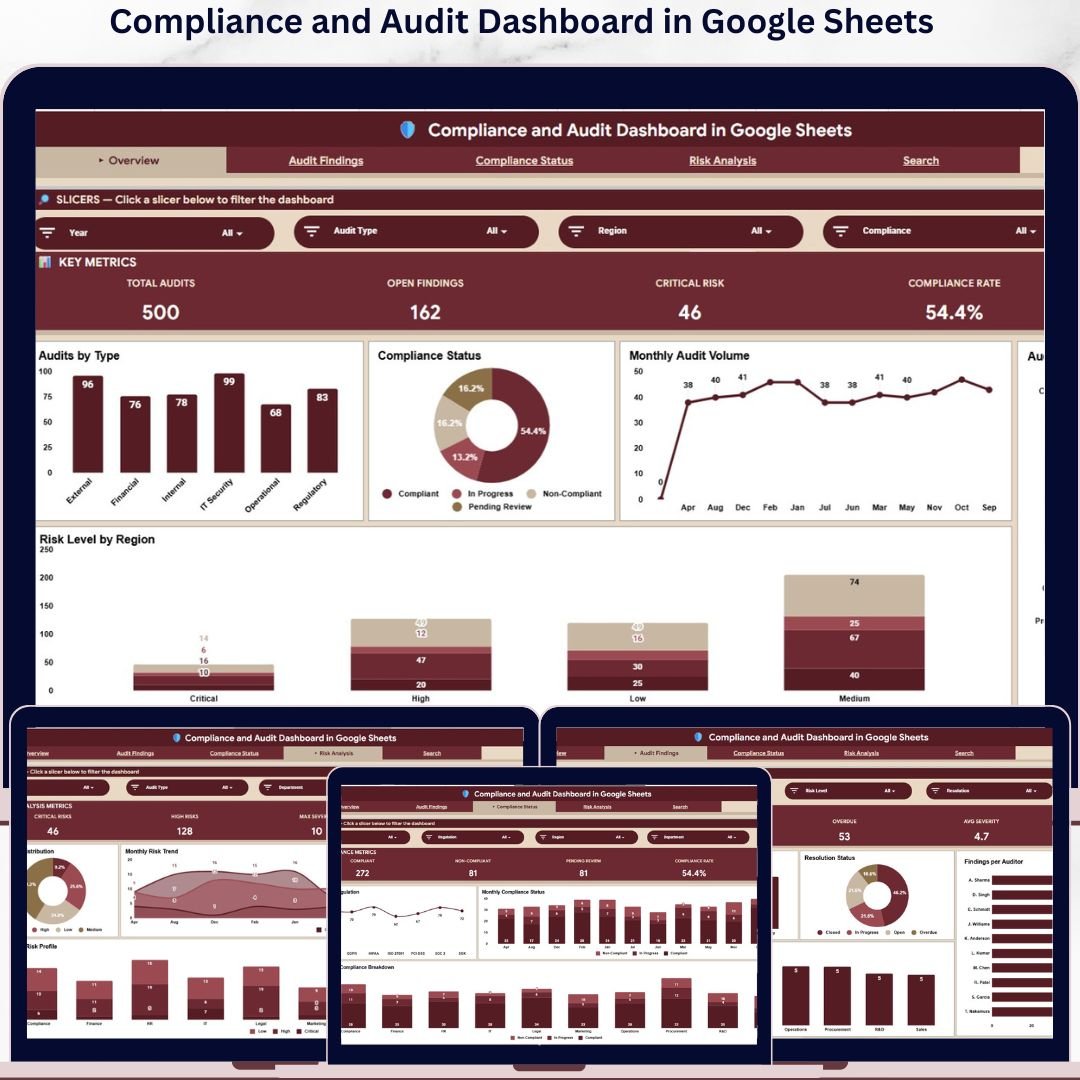


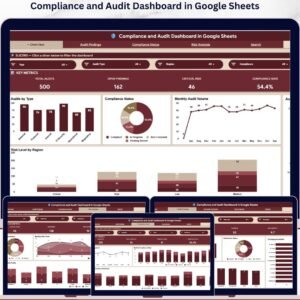
The Compliance and Audit Dashboard in Google Sheets tracks 15+ audit and compliance KPIs across 4 interactive analysis pages, with 18 pre-built charts, multiple slicers, and a dedicated Audit Record Lookup. Setup takes under 10 minutes — paste your audit records into the Data sheet and every chart, KPI card, and filter updates automatically.
🌍 Join 8,400+ teams in 40+ countries using NextGenTemplates to replace paid GRC and audit SaaS tools with one-time-purchase Excel, Google Sheets, Power BI, and HTML templates.
✅ Instant download · One-time payment · No subscription · No per-user fees · Lifetime access
🔑 Key Features of the Compliance and Audit Dashboard in Google Sheets
- 4 dedicated analysis pages — Overview, Audit Findings, Compliance Status, and Risk Analysis — each with its own KPI cards, charts, and slicer-based filters so audit managers can drill from a high-level snapshot down to specific findings, regulations, or risk levels.
- 15+ pre-built KPI cards covering Total Audits, Open Findings, Critical Risk count, Compliance Rate, Closed Rate, Overdue Findings, Average Severity, Compliant vs. Non-Compliant counts, Critical and High Risk counts, and Max Severity — every number recalculates the moment you update the Data sheet.
- 18 interactive charts including Audits by Type, Compliance Status by Category, Monthly Audit Volume by Month, Audits by Department, Risk Level by Region, Findings by Audit Type, Findings per Auditor, Audits by Regulation, Risk Level Distribution, and Department Risk Profile.
- Slicer-based filtering on every page — filter by Department, Region, Audit Type, Risk Level, Regulation, or Compliance Status with one click and watch every chart and KPI update instantly across the page.
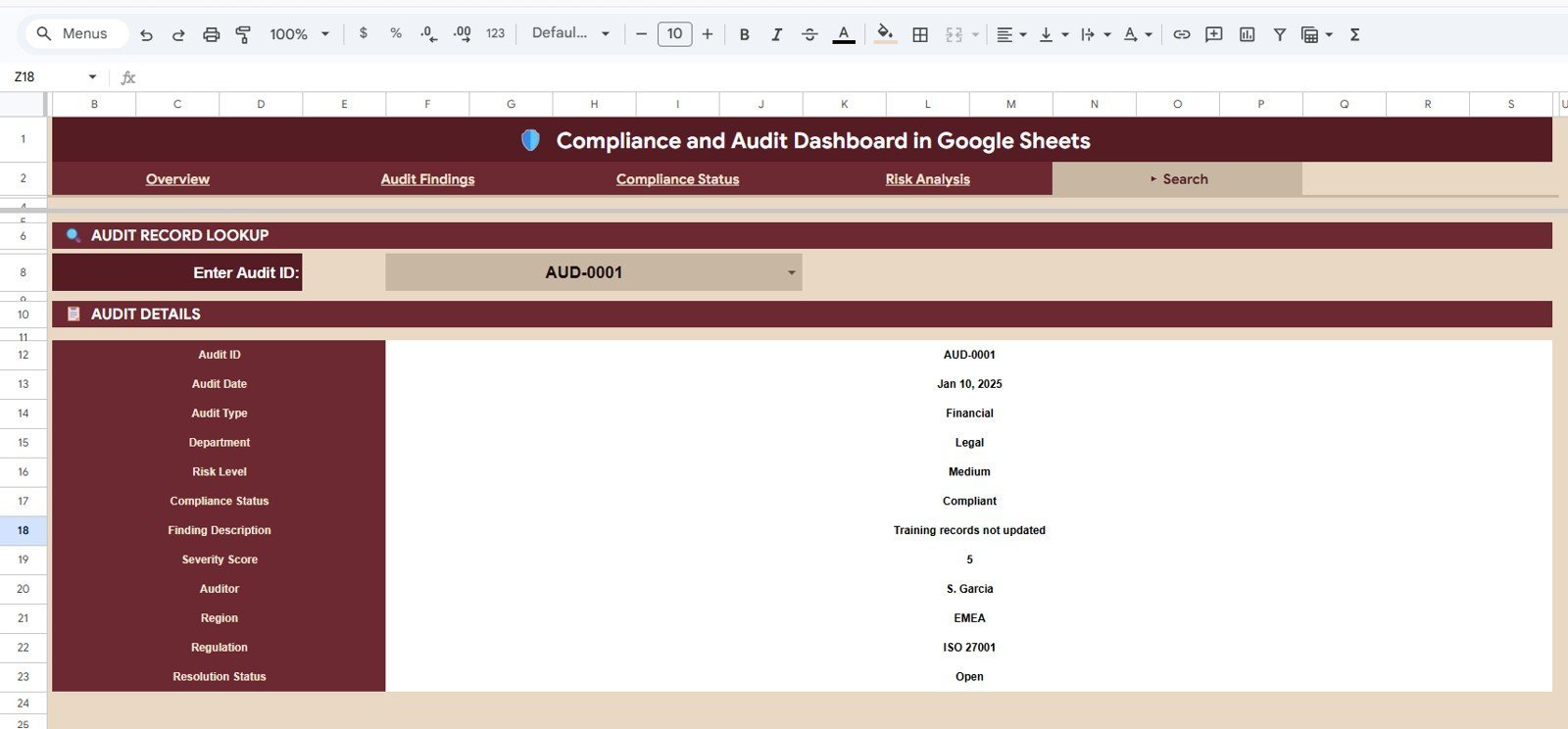
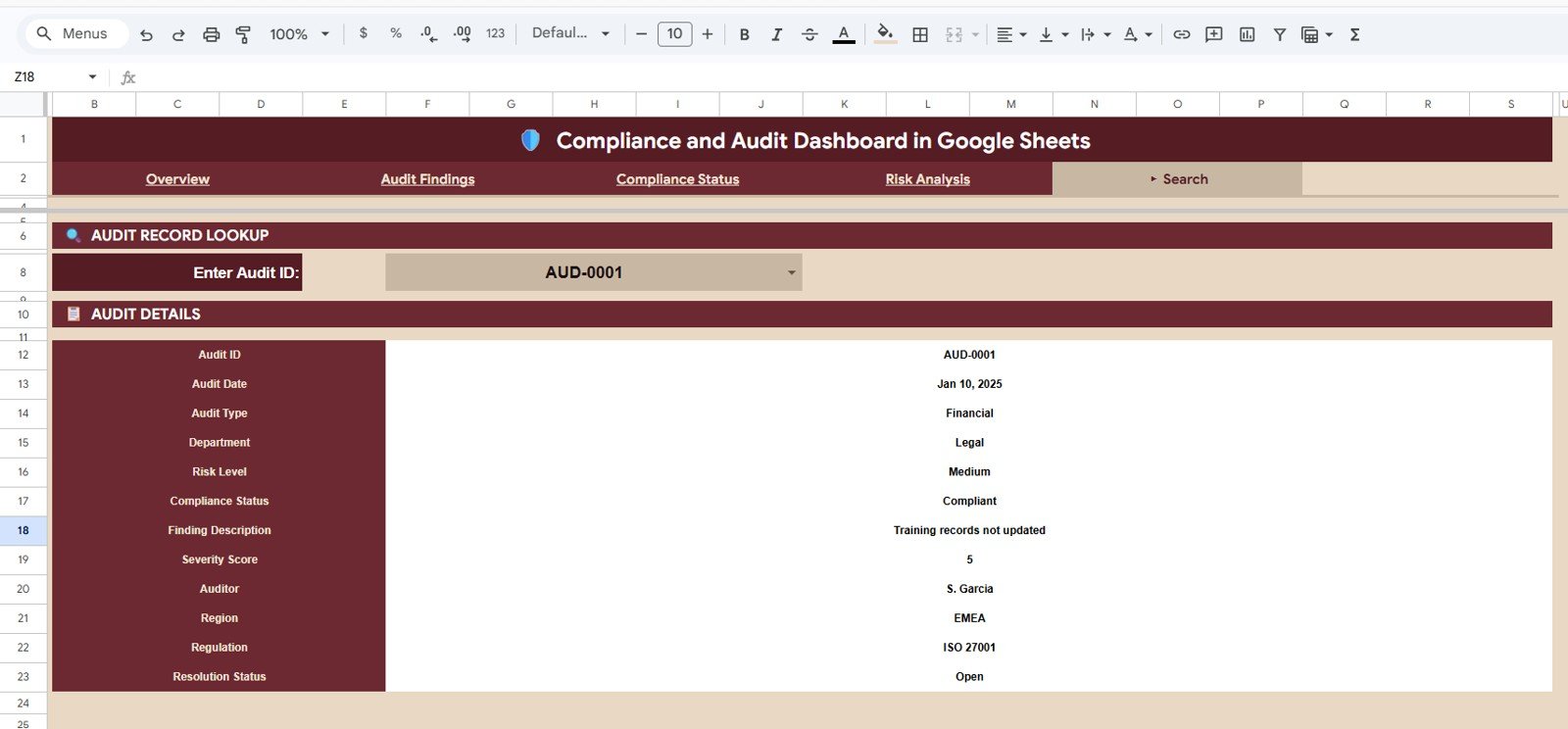
- Audit Record Lookup on the Search sheet — pick any Audit ID from a dropdown and instantly view all 12 fields for that record: Audit Date, Audit Type, Department, Risk Level, Compliance Status, Finding Description, Severity Score, Auditor, Region, Regulation, and Resolution Status.
- Native Google Sheets — no add-ons, no scripts to enable. Works on any browser, on desktop or mobile, shares with one link, and lets your audit team collaborate in real time without per-user license fees.
📦 What’s Inside the Compliance and Audit Dashboard in Google Sheets
Page 1: Overview
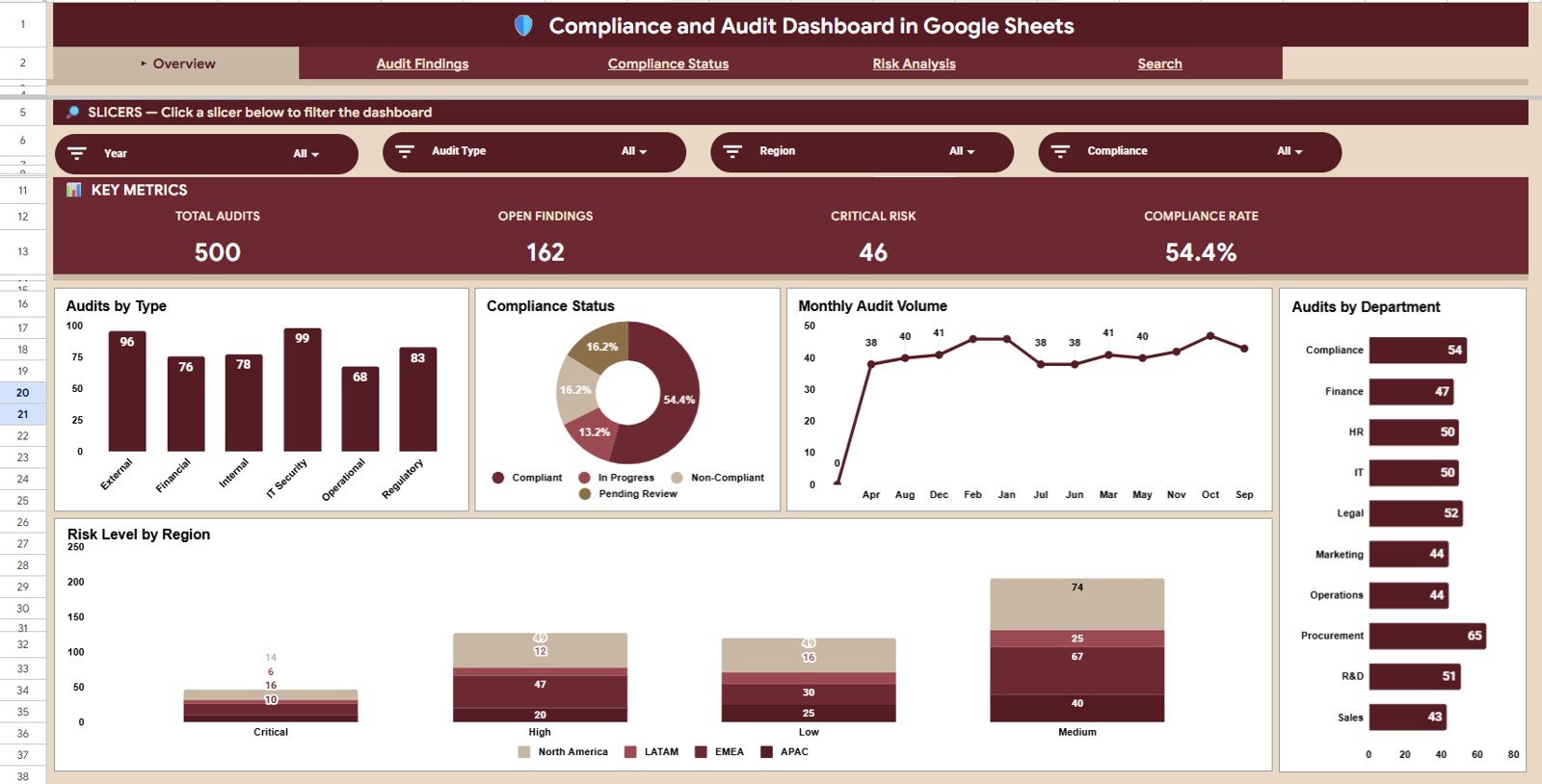
The Overview page shows 4 headline KPI cards — Total Audits, Open Findings, Critical Risk, and Compliance Rate — alongside 5 charts including Audits by Type, Compliance Status by Category, Monthly Audit Volume by Month, Audits by Department, and Risk Level by Region. Multiple slicers at the top let you filter the entire page by Department, Region, or Audit Type in one click.
Page 2: Audit Findings
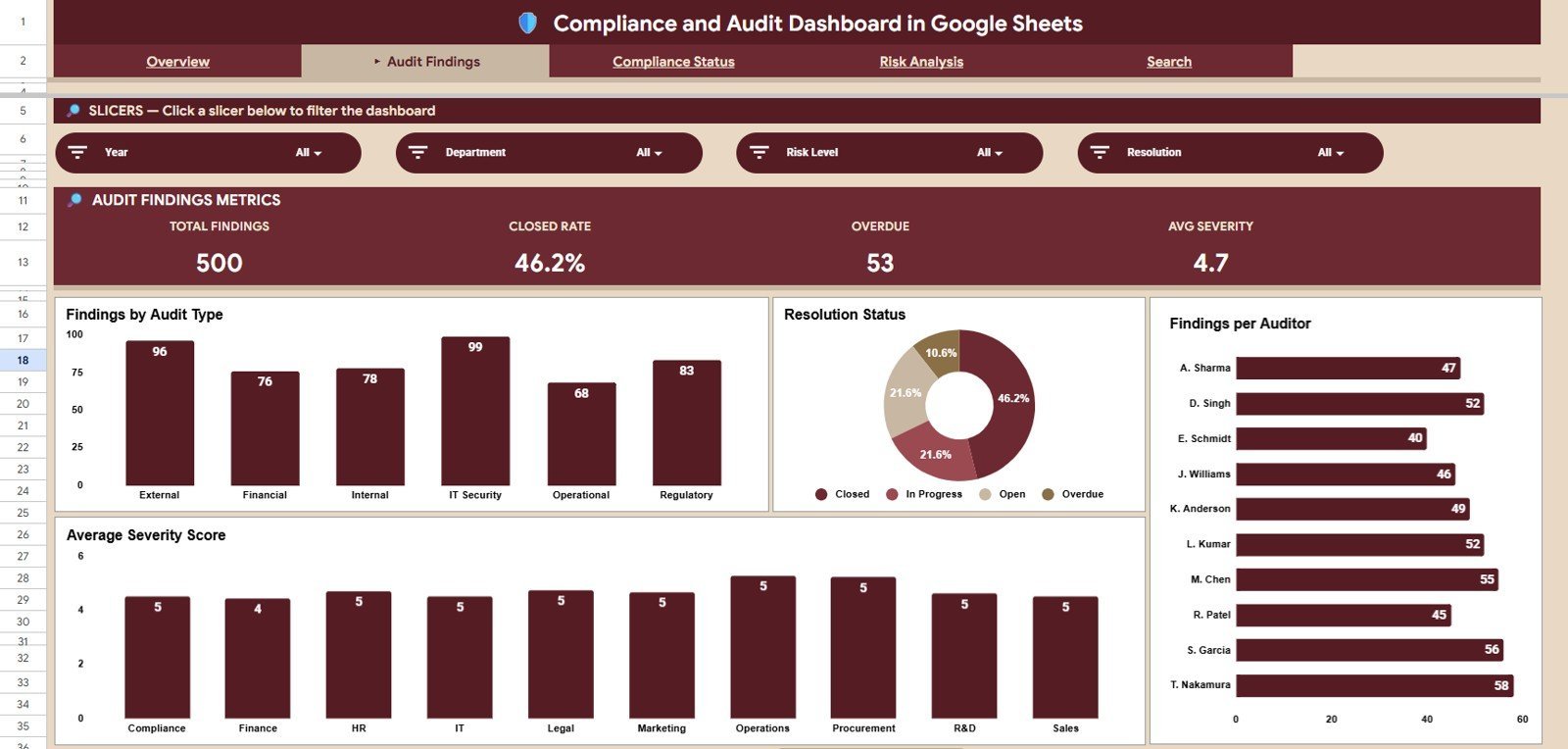
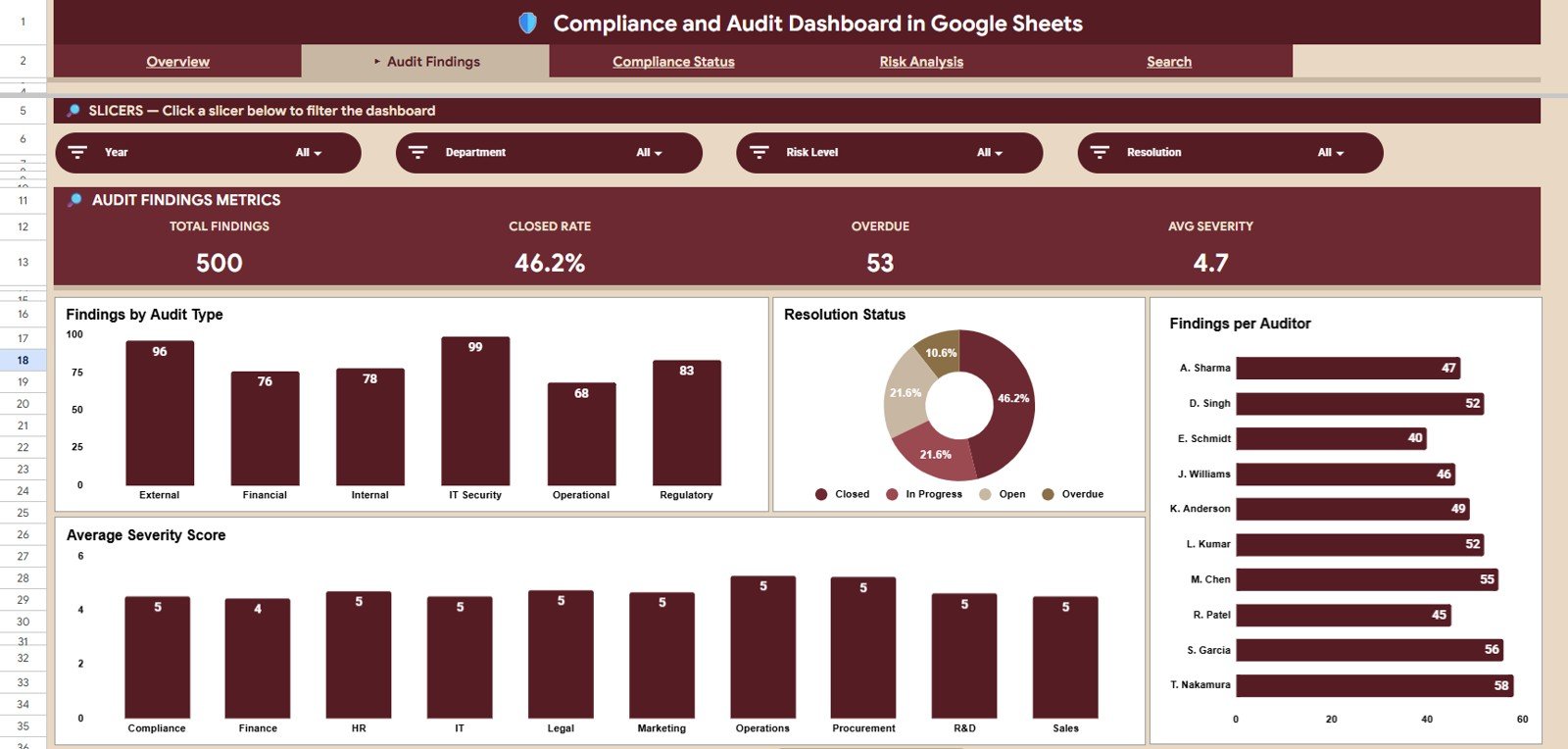
The Audit Findings page tracks Total Findings, Closed Rate, Overdue Findings, and Average Severity as KPI cards, then breaks the data down into Findings by Audit Type, Resolution Status by Category, Findings per Auditor, and Average Severity Score by Department — perfect for monthly audit committee reviews and auditor performance reporting.
Page 3: Compliance Status
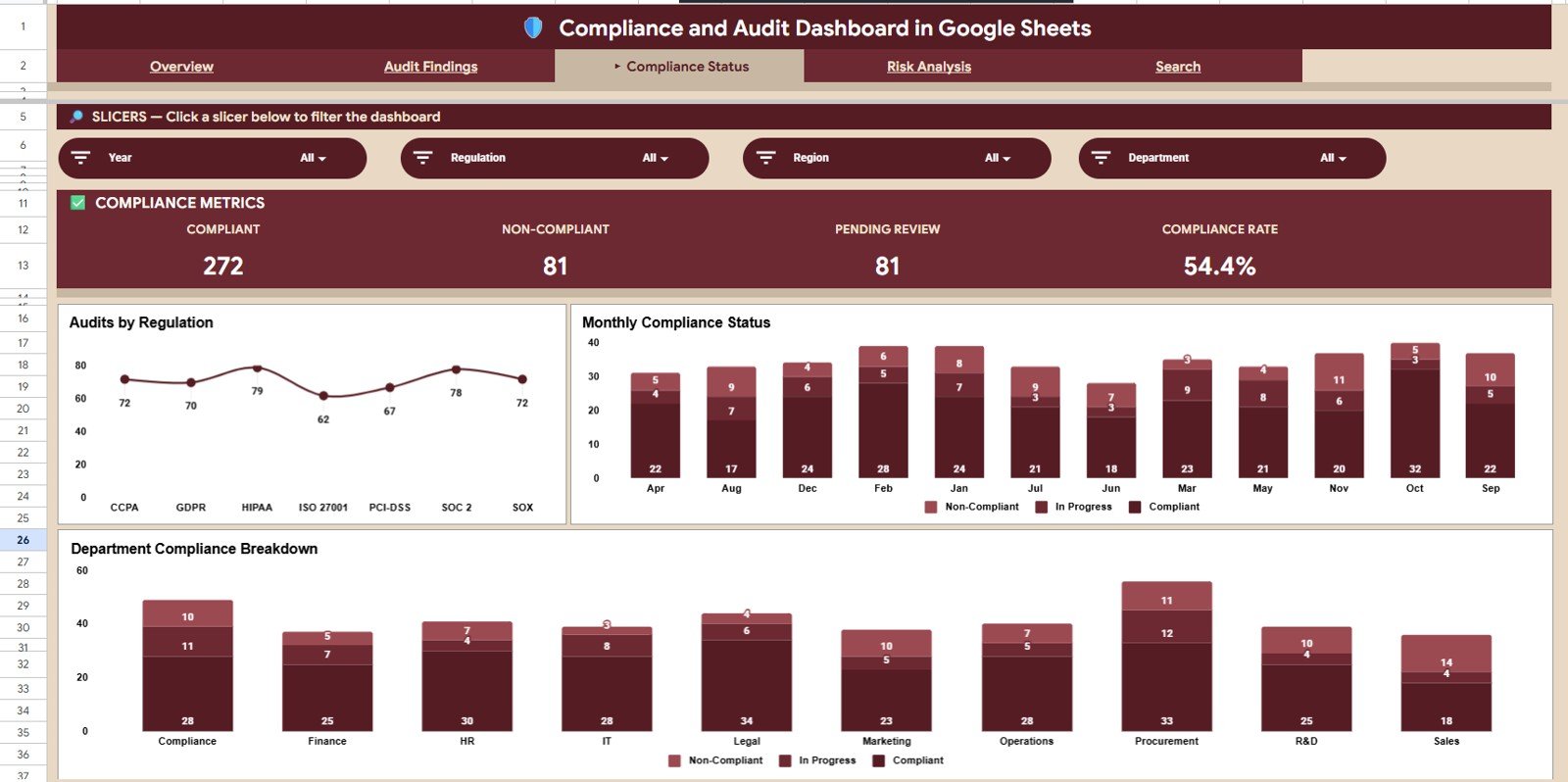
The Compliance Status page shows Compliant, Non-Compliant, Pending Review, and Compliance Rate as KPI cards, then visualises Audits by Regulation, Monthly Compliance Status by Month, and Department Compliance Breakdown — giving regulatory and quality teams a clear view of where the organisation stands against each regulation.
Page 4: Risk Analysis
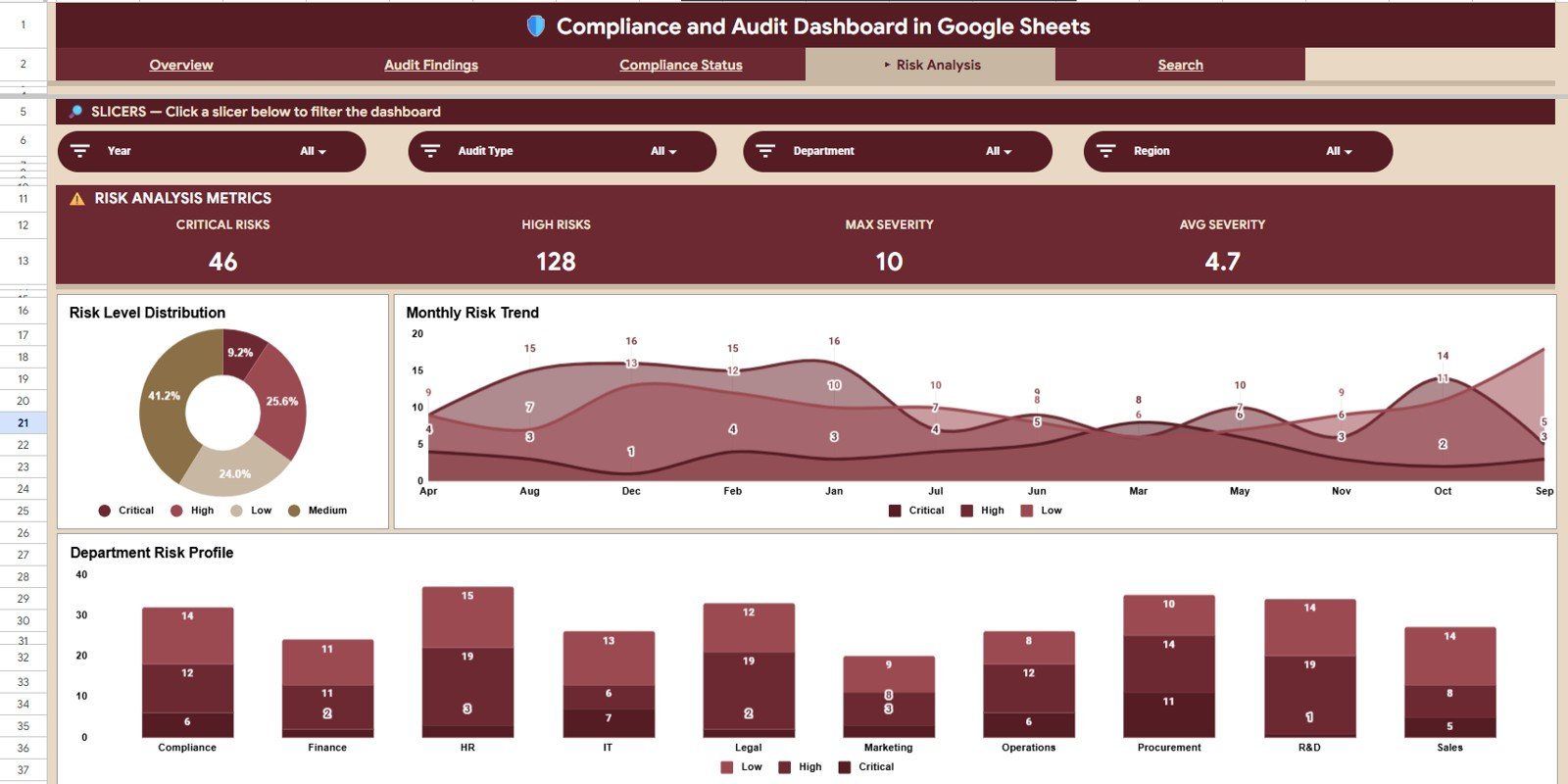
The Risk Analysis page surfaces Critical Risks, High Risks, Max Severity, and Average Severity as KPI cards, then drills into Risk Level Distribution, Monthly Risk Trend by Month, and Department Risk Profile — ideal for ERM teams that need to spot risk concentration and trend lines at a glance.
Page 5: Search Sheet
The Search sheet contains an Audit Record Lookup — select any Audit ID from a dropdown and instantly view the full audit record including Audit Date, Audit Type, Department, Risk Level, Compliance Status, Finding Description, Severity Score, Auditor, Region, Regulation, and Resolution Status. Built for audit managers who need to pull a specific record without filtering the entire data sheet.
Page 6: Data Sheet
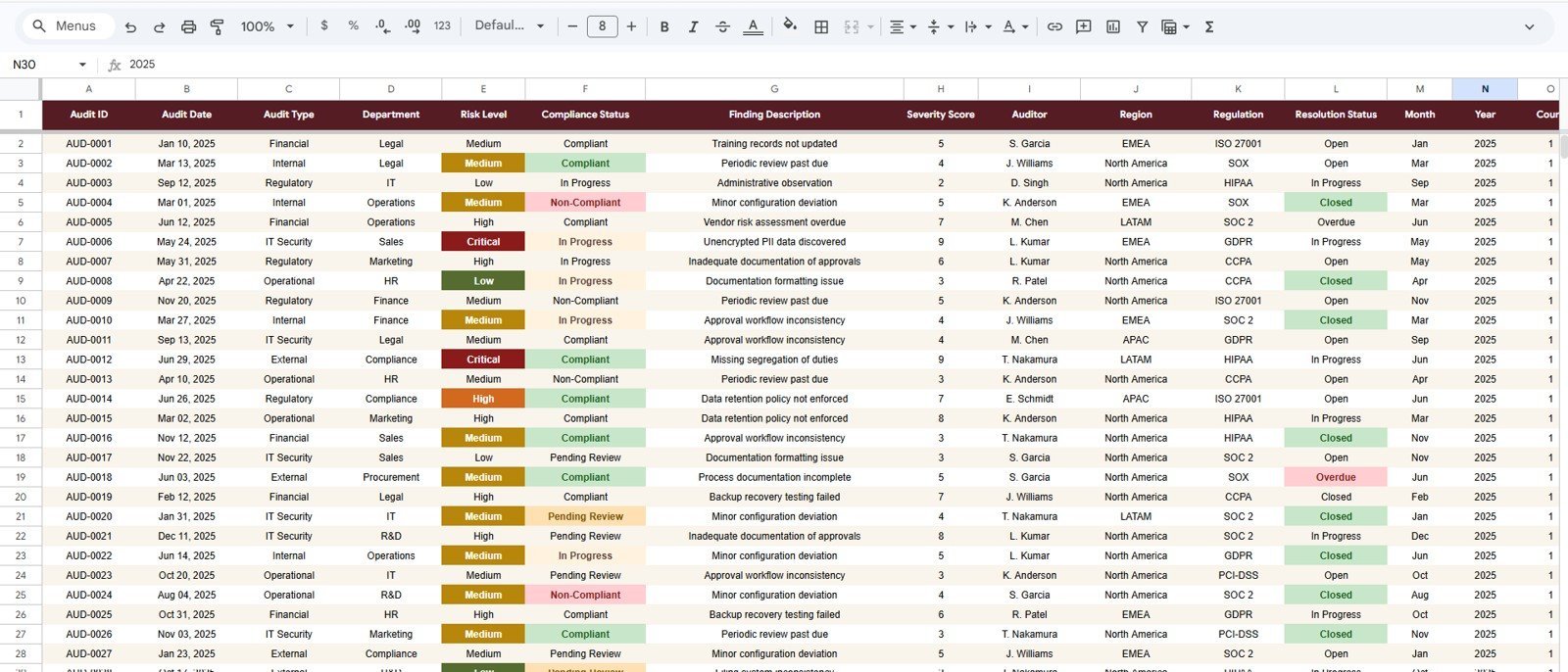
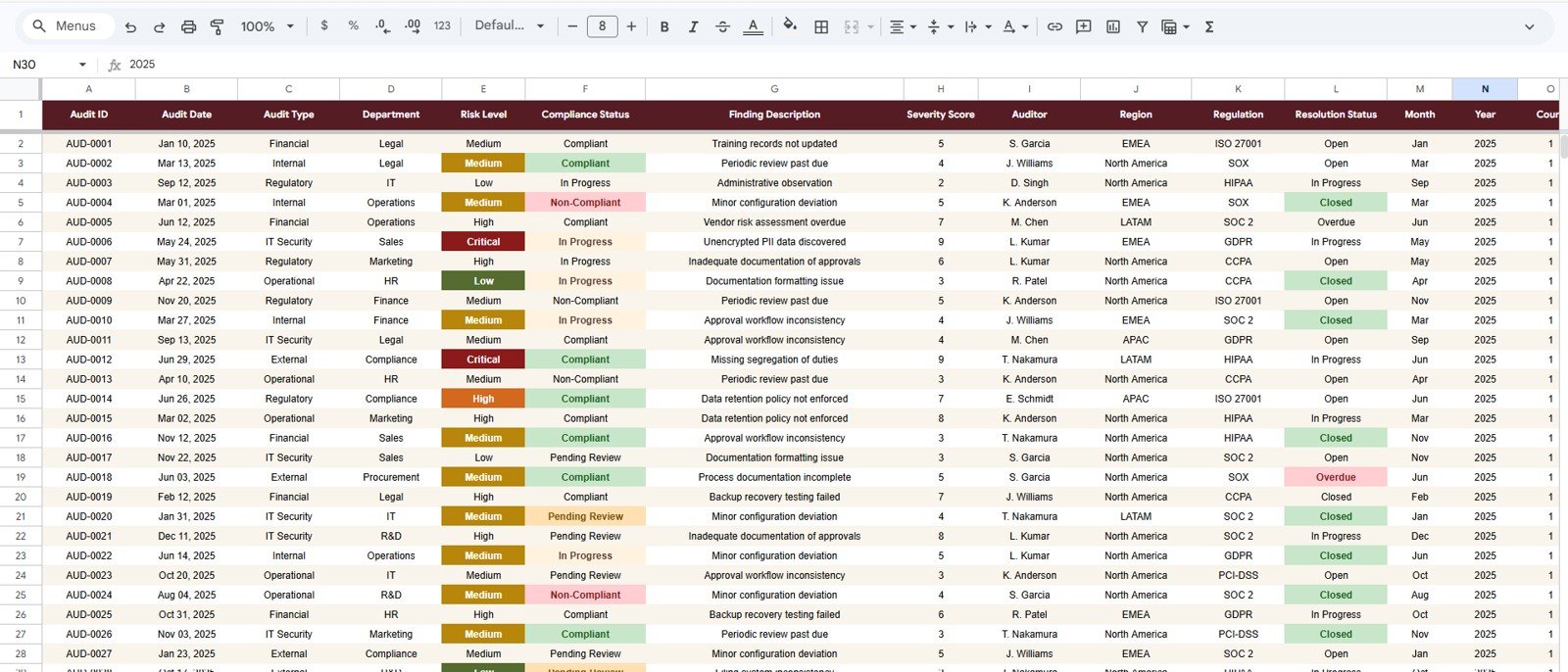
The Data sheet is where you replace the sample audit records with your own data — every page, KPI, chart, and lookup updates automatically. Keep the column structure intact and add as many rows as you need.
📊 Compliance and Audit Dashboard in Google Sheets vs. Microsoft Excel vs. Paid GRC SaaS — Where This Fits
| Feature | Compliance and Audit Dashboard in Google Sheets | Microsoft Excel Audit Dashboard | AuditBoard / LogicGate / MetricStream |
|---|---|---|---|
| Cost | $9.99 one-time | $15–25 one-time + Excel licence | $30,000–150,000 / year |
| Platform | Google Sheets (browser) | Microsoft Excel desktop | Proprietary cloud SaaS |
| Setup time | Under 10 minutes | 15–30 minutes | 3–6 months implementation |
| Real-time team collaboration | ✅ Native, multi-user editing | ❌ Co-authoring needs OneDrive/365 | ✅ |
| Mobile access | ✅ Free Sheets app | Limited on Excel mobile | ✅ |
| Customisable KPIs and charts | ✅ Full edit access | ✅ Full edit access | Limited, vendor-controlled |
| Share via link | ✅ One-click share | ❌ Manual file send | ✅ |
| Audit Record Lookup | ✅ Built-in search dropdown | Possible via VLOOKUP | ✅ |
| Year-1 cost at 5 users | $9.99 | $15–25 + 5× Excel licences | $30,000+ |
For audit and compliance teams that want a shareable, browser-based dashboard without paying enterprise GRC pricing, the Compliance and Audit Dashboard in Google Sheets sits in the sweet spot.
👥 Who This Template Is For — and Who It’s Not For
✅ This template is built for:
- Internal audit managers at 20–500 person companies running quarterly audit cycles
- Compliance officers tracking adherence to SOX, ISO 27001, GDPR, HIPAA, or industry regulations
- Risk managers building monthly risk reports for leadership and the audit committee
- Quality assurance teams in manufacturing, healthcare, or finance with recurring audit programs
- Consultants delivering audit and risk dashboards to multiple clients without standing up a GRC platform
❌ This template is NOT for:
- Enterprise GRC teams that require SOC 2 Type II hosting, SSO, role-based field-level permissions, and signed audit trails
- Heavily regulated environments where every record change must be cryptographically locked (e.g. FDA 21 CFR Part 11 e-records)
- Teams with 100,000+ audit findings — Google Sheets performance degrades on very large datasets
⚙️ How to Use the Compliance and Audit Dashboard in Google Sheets
- Purchase, download, and open the PDF guide — click the Google Sheets template link inside to save your own editable copy to Drive.
- Open the Data sheet and replace the sample audit records with your own, keeping the column headers exactly as provided.
- Switch to the Overview, Audit Findings, Compliance Status, and Risk Analysis pages — every KPI card and chart will already reflect your data.
- Use the slicers at the top of each page to filter by Department, Region, Audit Type, Risk Level, or Regulation.
- Open the Search sheet and pick any Audit ID from the dropdown to view the full record on demand.
- Share the file with your audit team using Google Drive’s link sharing — everyone edits the same live copy.
💼 Real-World Use Cases
Priya runs internal audit at a 180-person fintech. She uses the Compliance and Audit Dashboard in Google Sheets to track 60+ audits per quarter across SOX, PCI-DSS, and internal control reviews — sharing one link with her three auditors and presenting the Compliance Status page directly to the audit committee, without paying $40K a year for AuditBoard.
David is a Quality and Compliance lead at a mid-size medical device manufacturer. He uses the Risk Analysis page every Monday morning to flag any new Critical or High risks before the executive standup, and the Audit Findings page to track which auditors have overdue findings — all from his browser on whatever device he’s on.
Anika is a freelance GRC consultant. She delivers a copy of the dashboard to each client at the start of an engagement, loads their audit history into the Data sheet, and walks them through the Overview, Compliance Status, and Risk Analysis pages on the kickoff call — billable hours, no implementation project.
❓ Frequently Asked Questions
What KPIs does the Compliance and Audit Dashboard in Google Sheets track?
The Compliance and Audit Dashboard in Google Sheets tracks 15+ KPIs including Total Audits, Open Findings, Critical Risk, Compliance Rate, Closed Rate, Overdue Findings, Average Severity, Compliant, Non-Compliant, Pending Review, Critical Risks, High Risks, and Max Severity — all auto-calculated from the Data sheet.
How long does setup take?
Setup of the Compliance and Audit Dashboard in Google Sheets takes under 10 minutes. Click the Google Sheets link in the PDF guide to copy the template to your Drive, paste your audit records into the Data sheet, and every page recalculates automatically — no scripts, formulas, or add-ons to configure.
How does this compare to AuditBoard or LogicGate?
AuditBoard, LogicGate, and MetricStream start at $30,000–$150,000 per year and require multi-month implementations. The Compliance and Audit Dashboard in Google Sheets gives you the core audit KPIs, compliance breakdown, and risk analysis views for a $9.99 one-time payment with no per-user fees.
Can I filter the dashboard by Department or Region?
Yes. Every page in the Compliance and Audit Dashboard in Google Sheets includes slicers at the top that filter every KPI card and chart on the page by Department, Region, Audit Type, Risk Level, Regulation, or Compliance Status. Filtering takes one click.
Does the Search sheet show every field for an audit?
Yes. The Audit Record Lookup on the Search sheet displays all 12 fields — Audit ID, Audit Date, Audit Type, Department, Risk Level, Compliance Status, Finding Description, Severity Score, Auditor, Region, Regulation, and Resolution Status — for any Audit ID you pick from the dropdown.
Is this template editable, and can I add my own KPIs?
Yes. The Compliance and Audit Dashboard in Google Sheets is fully editable. You have full access to every formula, chart, and slicer, and you can add columns to the Data sheet or build additional KPI cards using SUMIFS, COUNTIFS, and AVERAGEIFS just like the existing ones.
Is the template available on other platforms?
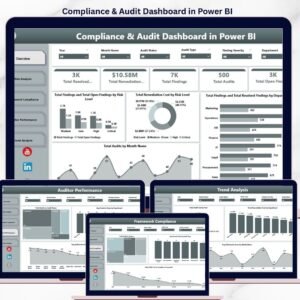
Yes. The same Compliance and Audit Dashboard is also available in Power BI for teams that prefer Microsoft’s BI stack with DAX measures and Power Query refresh.
👤 About the Author
Built by PK — Microsoft Certified Professional with 15+ years of Excel, Google Sheets, and Power BI experience. Founder of NextGenTemplates, reaching 300K+ subscribers across YouTube channels (@PK-AnExcelExpert, @NextGenTemplates, @NeoTechNavigators). Every template is hand-built and tested before release.
🔗 Explore Related Templates
- Also available as: Compliance and Audit Dashboard in Power BI — same KPIs and pages, built on DAX and Power Query.
- Browse all Google Sheets Dashboards — 300+ ready-to-use dashboards across HR, Sales, Finance, Operations, and more.
- SaaS Product Usage Dashboard in Google Sheets — adjacent dashboard for product and revenue analytics.
📖 Click here to read the Detailed Blog Post
Watch the step-by-step video tutorial:
🎥 Visit our YouTube channel for step-by-step video tutorials
👉 YouTube.com/@NextGenTemplates

































Reviews
There are no reviews yet.