

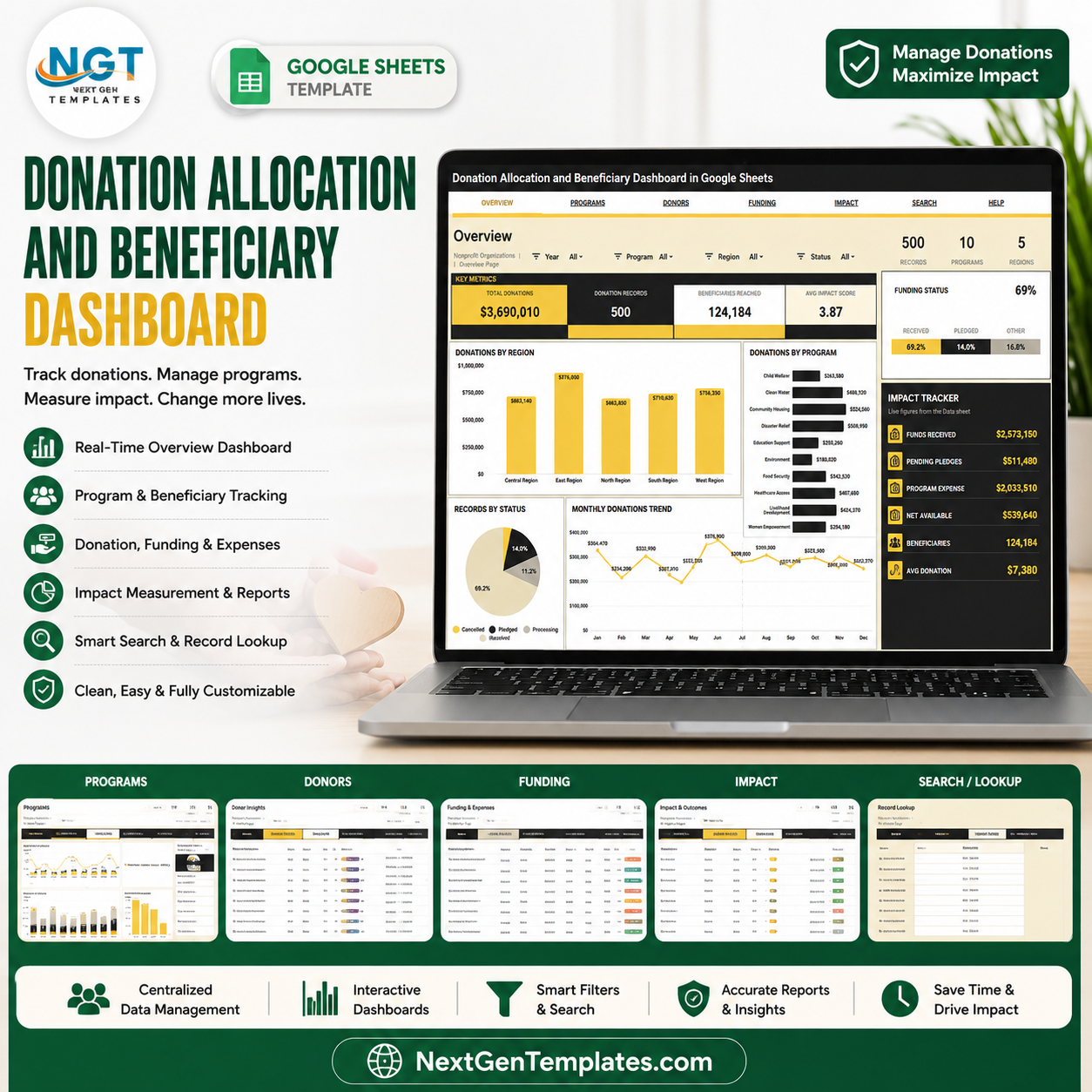

Giving USA 2026 reports that U.S. charitable giving reached $617.20 billion in 2025, up 5.7% in current dollars. The Donation Allocation and Beneficiary Dashboard in Google Sheets helps nonprofit, NGO, charity, and foundation teams see where funds came from, how they were allocated, which programs used them, how many beneficiaries were reached, and whether impact targets are moving in the right direction. Built by PK and backed by a 300K+ subscriber creator network, this one-time $9.99 template gives teams a spreadsheet-first reporting layer without per-user SaaS fees.
Key Features of Donation Allocation and Beneficiary Dashboard in Google Sheets
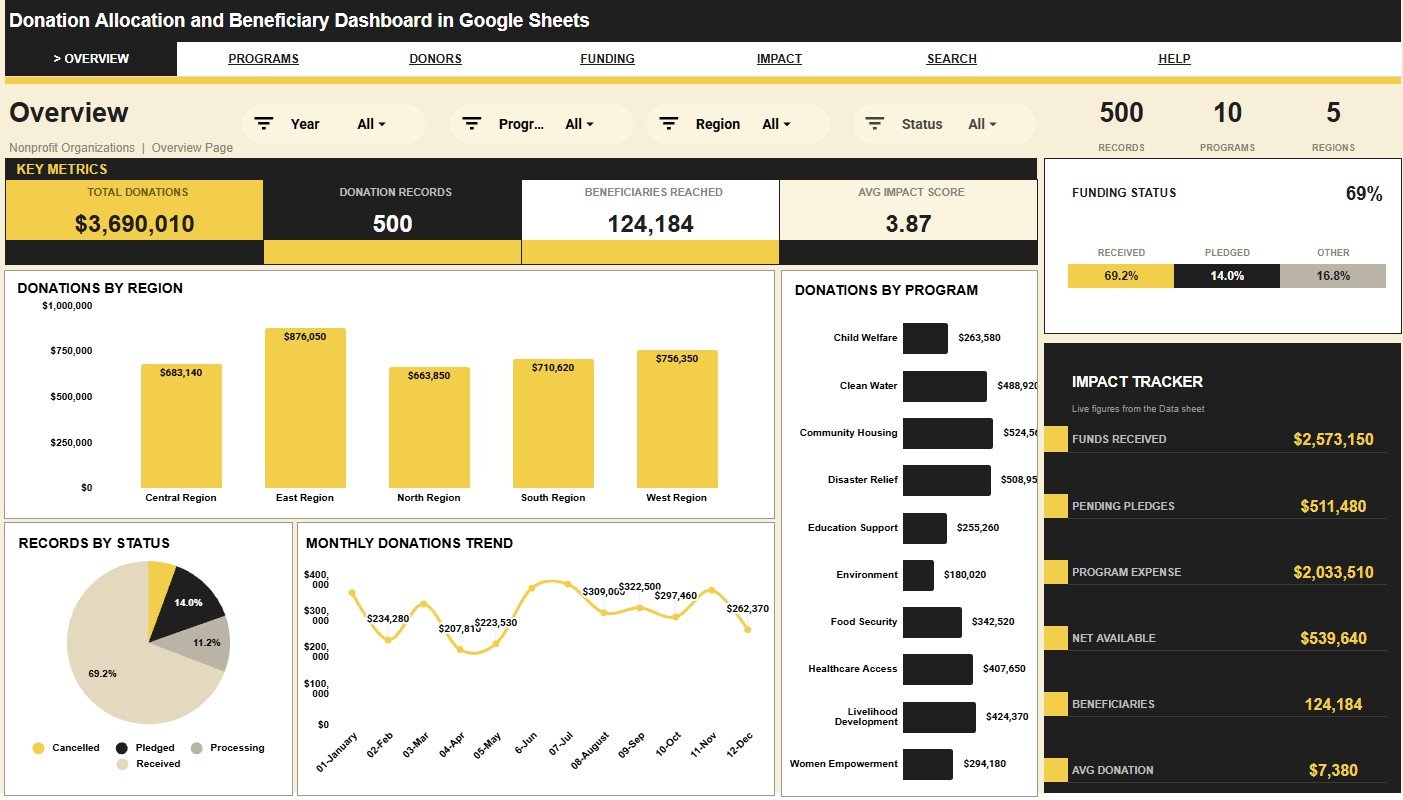
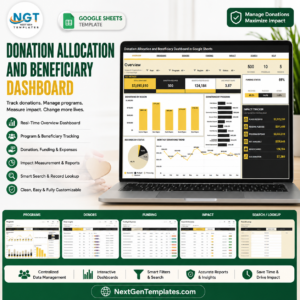
- 4 top-level KPI cards: Total Donations, Donation Records, Beneficiaries Reached, and Avg Impact Score keep leadership focused on the essentials.
- 7 organized sheet tabs: Overview, Program Performance, Donor Insights, Funding and Expenses, Impact and Outcomes, Search, and Data.
- 30 ready-made chart views: Review donations, expenses, records, channels, program performance, status, impact score, and beneficiaries.
- Interactive slicers: Filter pages quickly by fields such as program, region, month, status, channel, donor type, coordinator, and metrics.
- Program performance analysis: Compare records, donations, expenses, impact, beneficiaries, and status by program and region.
- Donor insight reporting: Analyze donations by donor type, gift type, channel, month, and tracker metrics.
- Funding and expense review: Monitor donations, expenses, funding status, regional allocation, and monthly movement.
- Impact and outcome view: Track beneficiaries, coordinators, donor type impact, monthly impact score, and outcome metrics.
- Search sheet included: Select one Record ID and view the full donation allocation record instantly.
- Editable Data sheet: Replace the sample records in the same format and keep the dashboard structure intact.
What’s Inside the Donation Allocation and Beneficiary Dashboard in Google Sheets
1. Overview Page
The Overview page gives executives a fast read on Total Donations, Donation Records, Beneficiaries Reached, and Avg Impact Score. Charts cover Donations by Region, Donations by Program, Records by Status, Donations by Month, Funding Status by Status, and Impact Tracker by Metric, with slicers for quick filtered review.
2. Program Performance
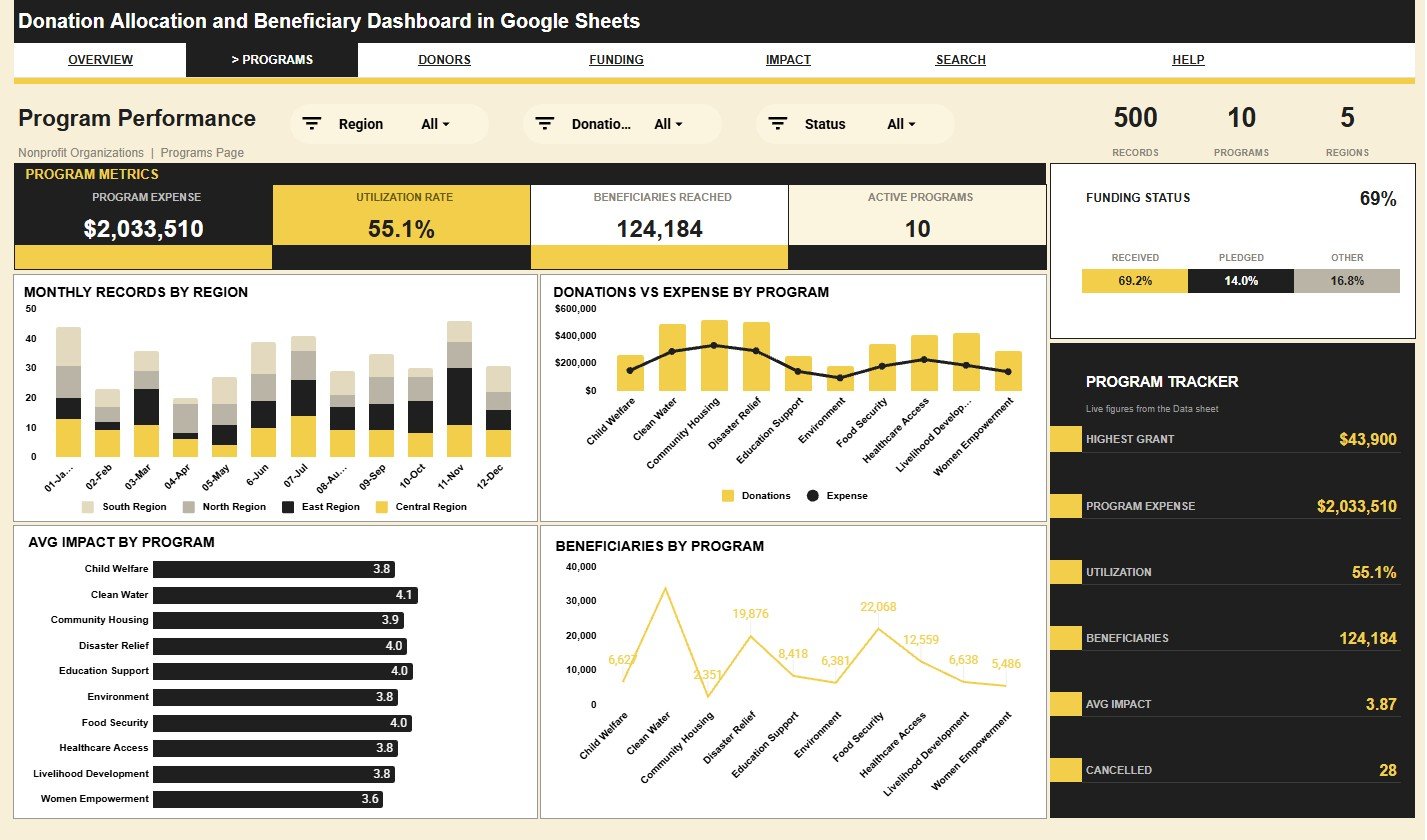
This tab focuses on program-level execution. Monthly Records by Region shows where activity is increasing, Donations and Expense by Program compares incoming funds with program cost, Avg Impact by Program highlights outcome quality, Beneficiaries by Program shows reach, and the tracker views help teams monitor status and metric trends.
3. Donor Insights
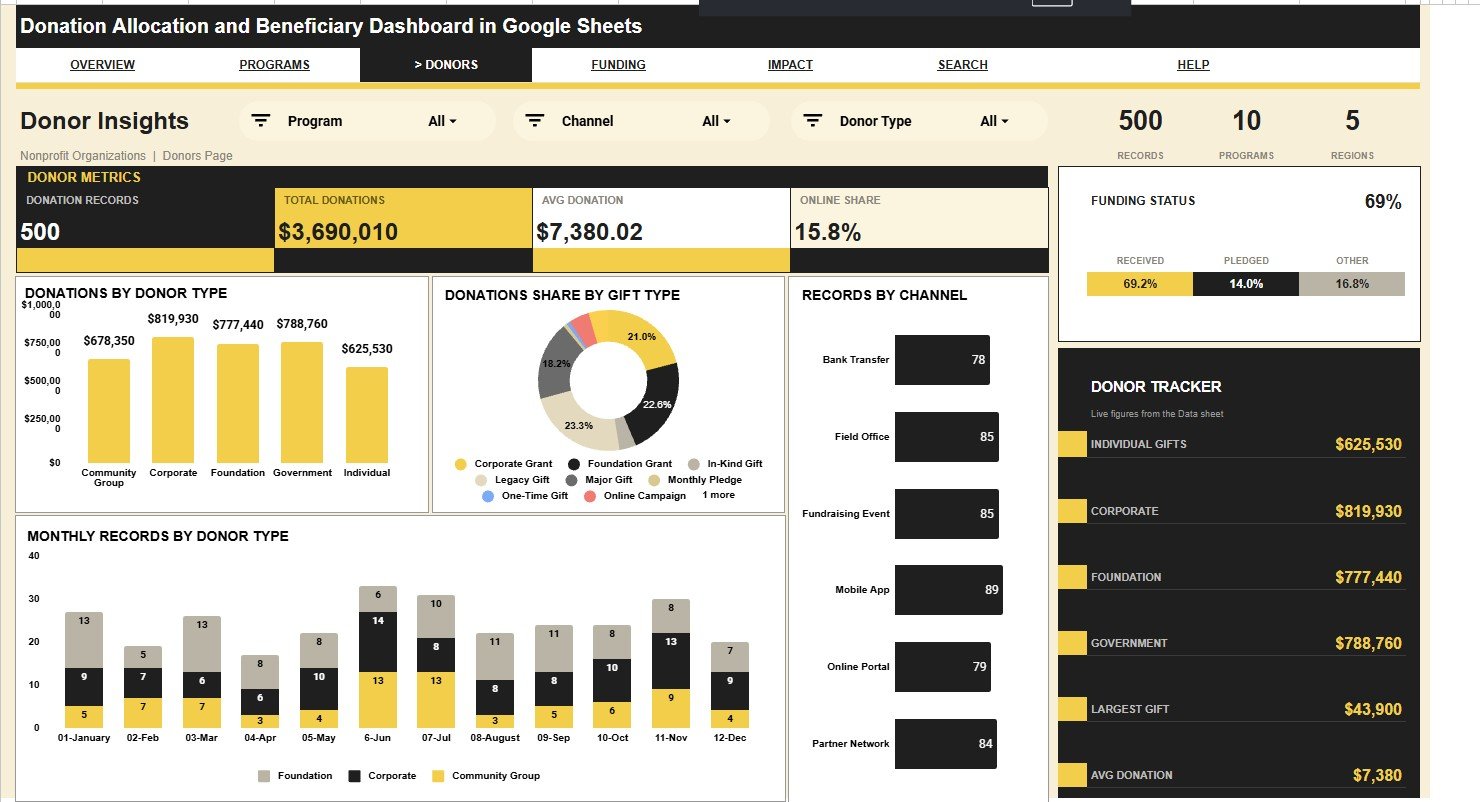
The Donor Insights tab explains how support arrives. It breaks donations down by donor type, gift type, channel, month, status, and tracker metric so fundraising and finance teams can see which donor segments and giving routes matter most.
4. Funding and Expenses
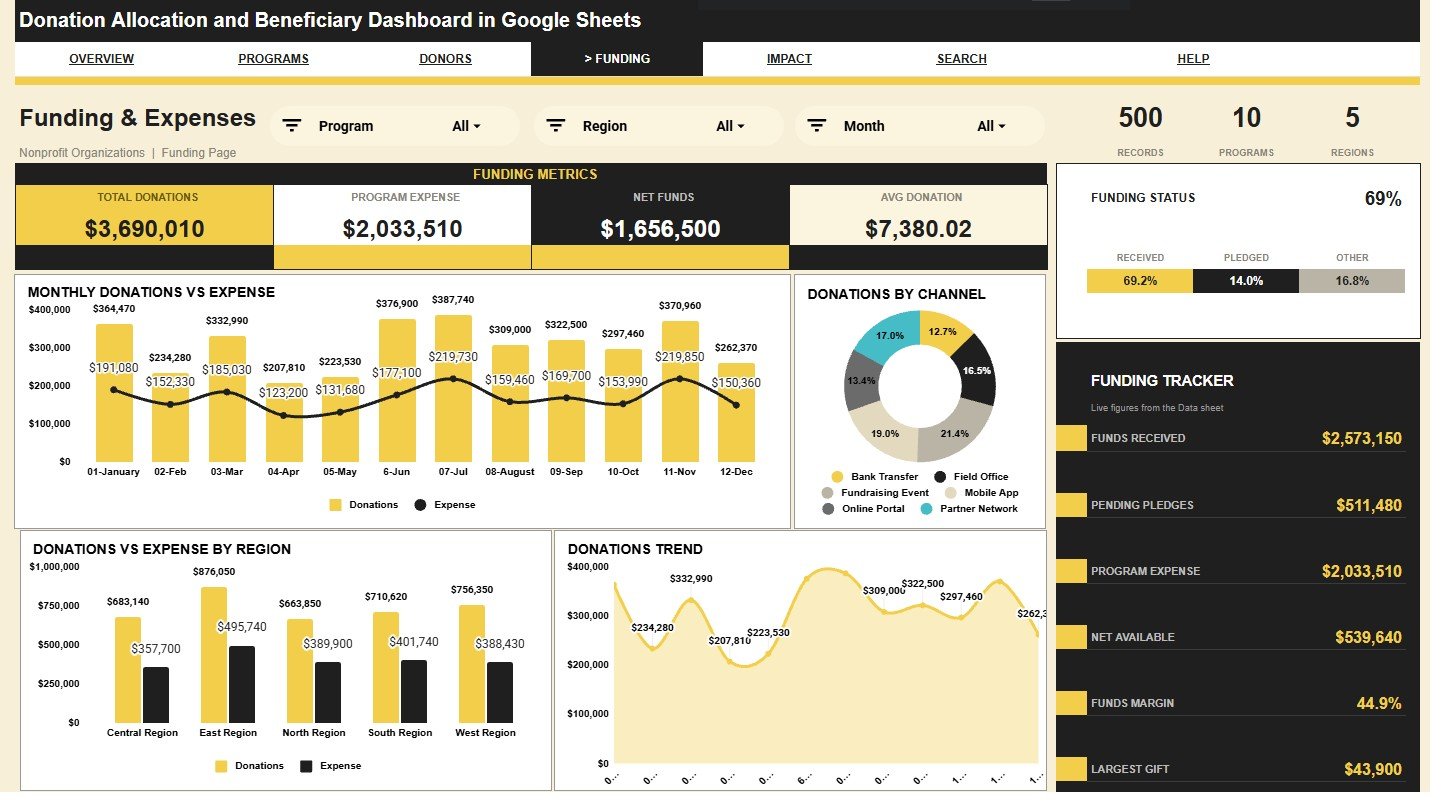
The Funding and Expenses tab connects donation intake with spending. Use it to compare monthly donations and expense, donations by channel, donations and expense by region, monthly donation movement, funding status, and funding tracker metrics.
5. Impact and Outcomes
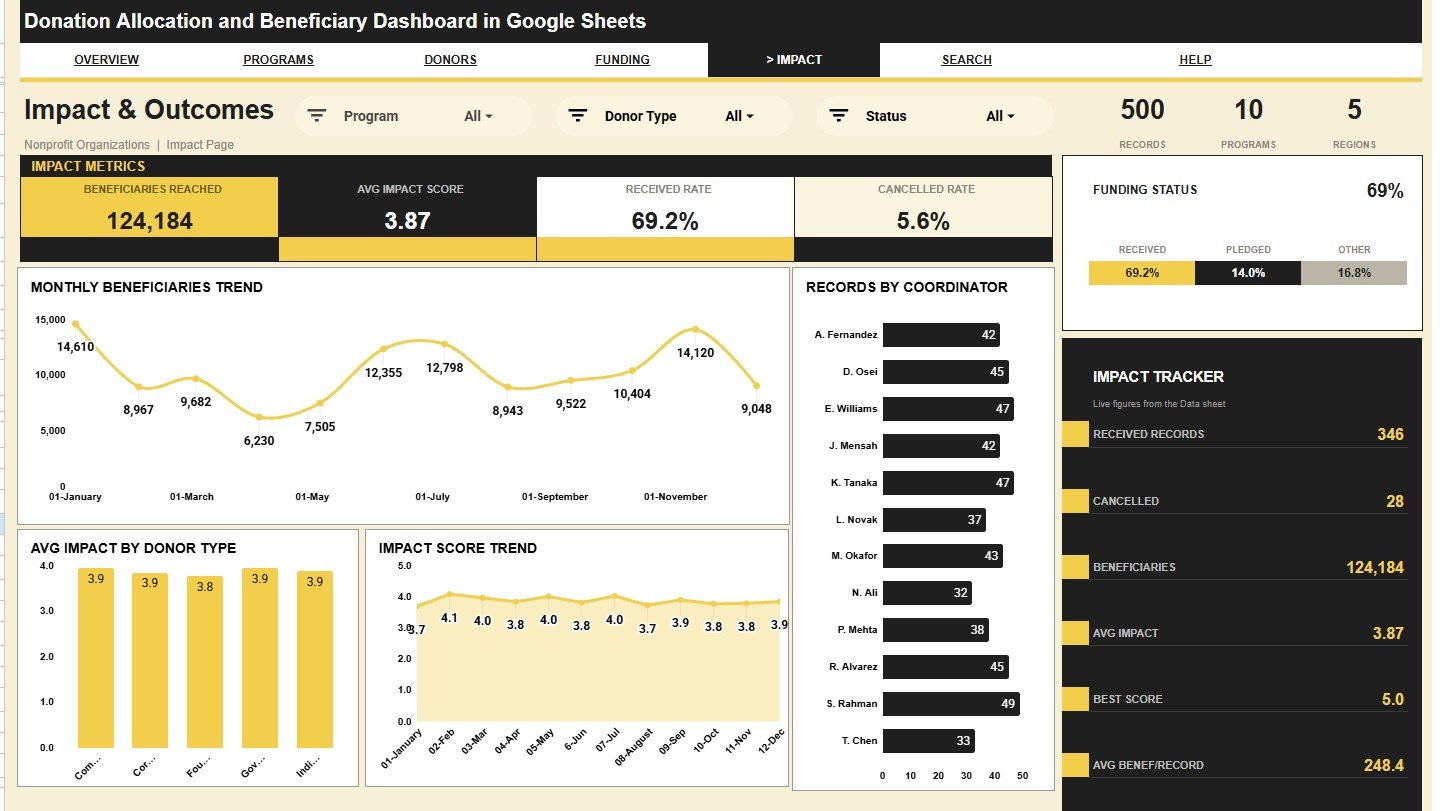
This tab helps teams connect money to mission. It includes monthly beneficiaries, records by coordinator, average impact by donor type, impact score by month, funding status, and an impact tracker by metric.
6. Search Sheet Tab
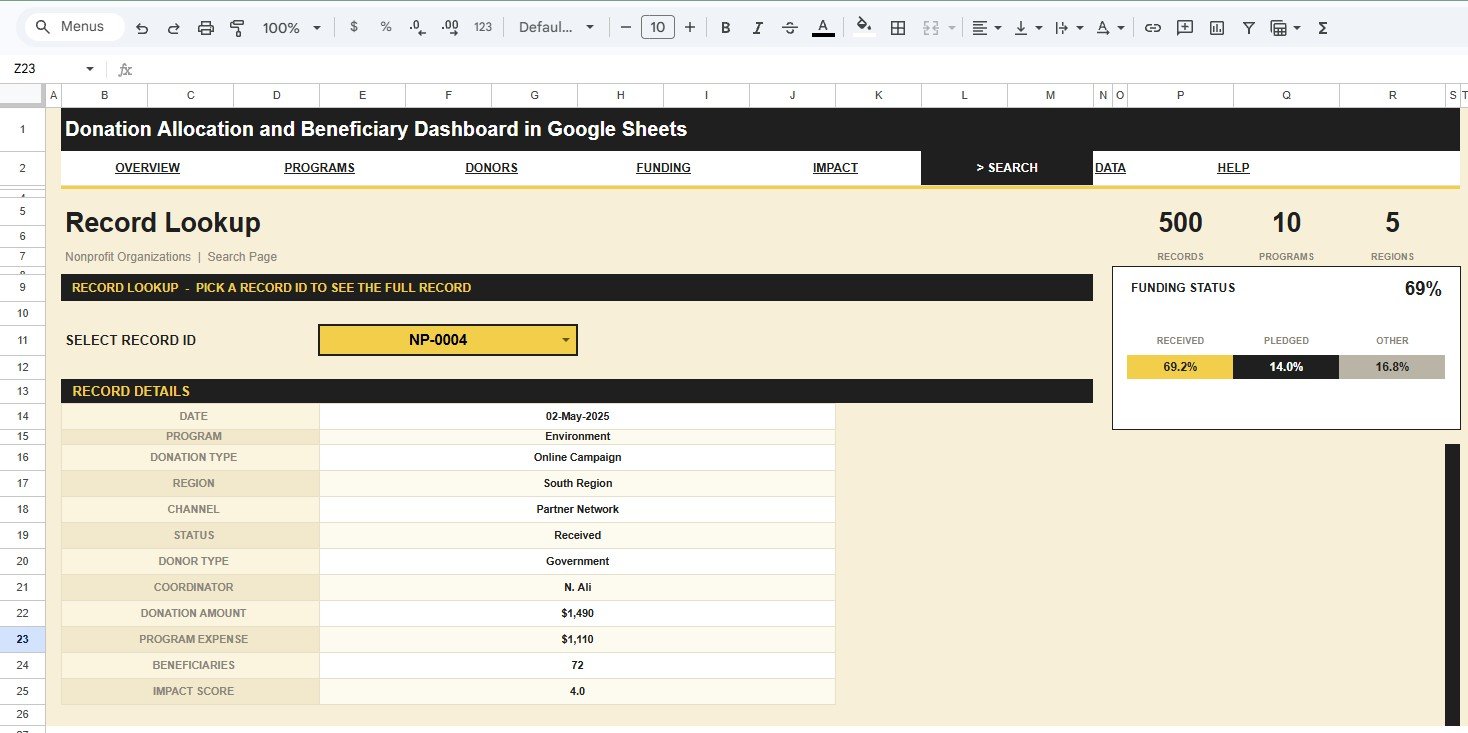
The Search sheet lets you select a Record ID and see the full record details, including date, program, donation type, region, channel, status, donor type, coordinator, donation amount, program expense, beneficiaries, and impact score.
7. Data Sheet Tab
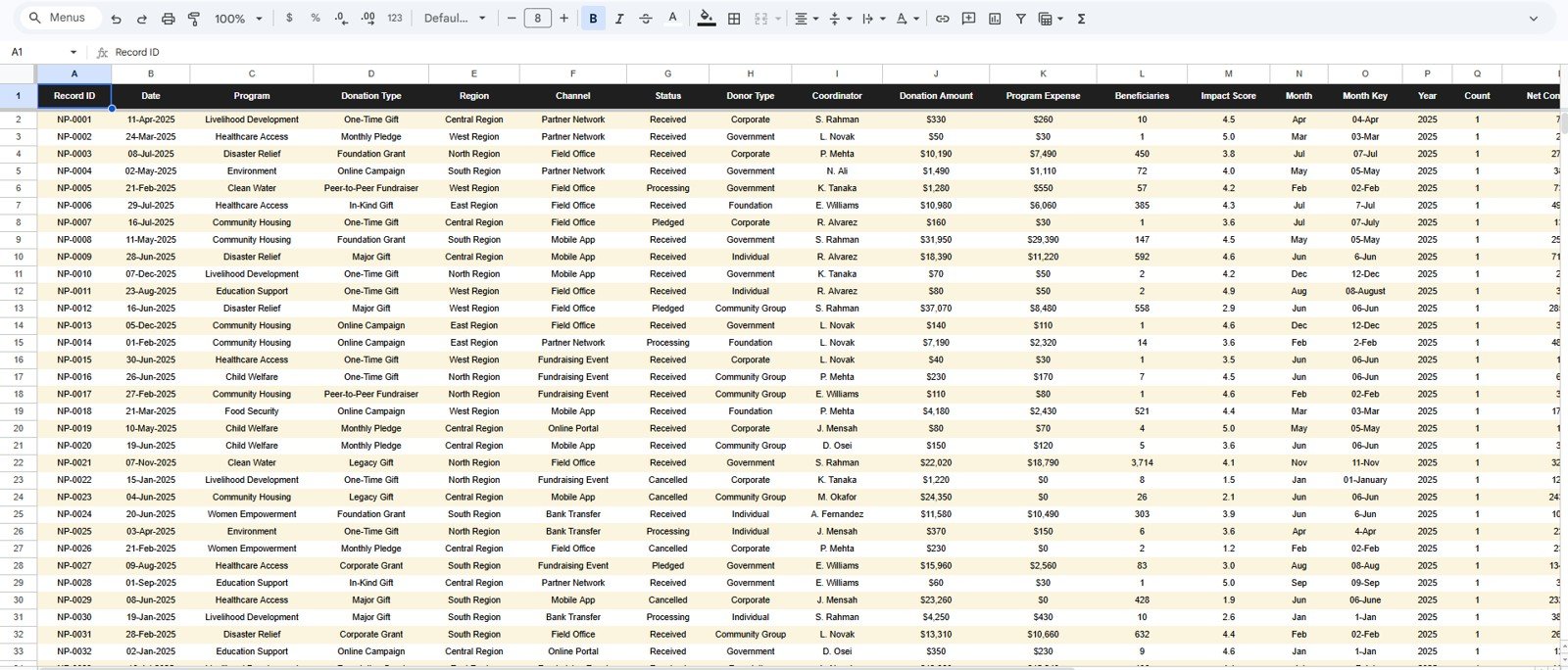
The Data sheet is the input layer. Add your donation allocation records in the same format and keep column names consistent so the cards, slicers, charts, and lookup sheet continue working.
Donation Allocation and Beneficiary Dashboard in Google Sheets vs. Microsoft Excel Dashboard vs. Paid Donor SaaS – Where This Fits
| Feature | This Google Sheets dashboard | Microsoft Excel dashboard | Paid donor SaaS or CRM |
|---|---|---|---|
| Cost | $9.99 one-time | Template price plus Excel or Microsoft 365 access | Recurring subscription and possible setup fees |
| Platform | Google Sheets in browser | Excel desktop or Microsoft 365 | Vendor cloud platform |
| Setup time | Copy the file, paste records, and review charts | Open workbook, replace data, and refresh | Implementation, imports, and user setup |
| Real-time team collaboration | Native Google Drive sharing | Available through OneDrive or SharePoint | Usually available by paid seat |
| Mobile access | Google Sheets app and browser | Excel mobile with limits | Usually included |
| Customizable fields | Edit sheets, formulas, charts, and slicers | Edit workbook structure | Often limited by vendor settings |
| Share with link | Yes, through Google Drive permissions | Possible through cloud storage | Usually login controlled |
| Year-1 cost at 5 users | $9.99 plus any Google Workspace plan already used | Template plus Microsoft licensing | Varies by vendor, usually recurring |
| Donation record lookup | Built-in Search sheet by Record ID | Requires setup unless included | Usually included in CRM search |
Who This Template Is For – and Who It’s Not For
This template is for nonprofit directors, NGO finance teams, fundraising managers, program coordinators, foundation reporting teams, charity operations leads, and consultants who already maintain structured donation records and need clear allocation reporting.
It is not a donor CRM, online donation form, payment processor, grant compliance system, tax receipt generator, accounting ledger, or live bank integration. Use it as a reporting dashboard after your donation, program, expense, beneficiary, and impact data has been prepared.
How to Use the Donation Allocation and Beneficiary Dashboard in Google Sheets
- Open the PDF guide in your download and use the Google Sheets copy link to create your own editable file.
- Go to the Data Sheet tab and replace the sample records using the same column structure.
- Keep Record ID, Date, Program, Donation Type, Region, Channel, Status, Donor Type, Coordinator, Donation Amount, Program Expense, Beneficiaries, and Impact Score consistent.
- Review the Overview page for high-level donation, record, beneficiary, and impact cards.
- Use slicers on each dashboard page to filter the charts by the fields you need.
- Open the Search sheet when you need to review one complete Record ID without scrolling the data table.
Real-World Use Cases
Anita, nonprofit finance lead: reviews Donations by Region, Donations and Expense by Program, and Funding Status by Status before monthly leadership meetings.
Marcus, program operations manager: uses Beneficiaries by Program and Avg Impact by Program to prepare program review notes for field teams.
Priya, fundraising consultant: filters donor and channel views to show clients which donor types and gift routes are driving the most support.
Frequently Asked Questions
Is this dashboard built in Google Sheets?
Yes. The dashboard is designed for Google Sheets and can be copied to Google Drive for editing and team sharing.
What KPI cards are included?
The Overview page includes Total Donations, Donation Records, Beneficiaries Reached, and Avg Impact Score.
Can I replace the sample data?
Yes. Add your own records in the Data Sheet tab using the same column structure and the dashboard pages can continue reading the data.
Does it include a search tab?
Yes. Select a Record ID and the Search sheet shows the complete record details in one place.
Can multiple people use it?
Yes. Google Sheets supports shared access, so teams can review or edit the workbook based on the permissions you set.
Does it connect to donation platforms automatically?
No. Export or prepare your donation records first, then paste them into the Data Sheet for analysis.
About the Author
Built by PK – Microsoft Certified Professional with 15+ years of Excel, Google Sheets, and Power BI experience. Founder of NextGenTemplates, reaching 300K+ subscribers across YouTube channels. Every template is hand-built and tested before release.
Explore Related Templates
You may also like Fundraising Campaign KPI Dashboard in Google Sheets, Charity Fundraising KPI Dashboard in Google Sheets, Donation Management Tracker in Google Sheets, and Political Campaign Dashboard in Google Sheets. Browse more Google Sheets templates and Google Sheets dashboard templates.
Ready to turn donation allocation records into cleaner program and beneficiary reporting? Use the Donation Allocation and Beneficiary Dashboard in Google Sheets to track donations, expenses, statuses, channels, programs, beneficiaries, and impact scores in one shareable workbook.
Watch the step-by-step video Demo:
Last updated: August 2026






























Reviews
There are no reviews yet.