

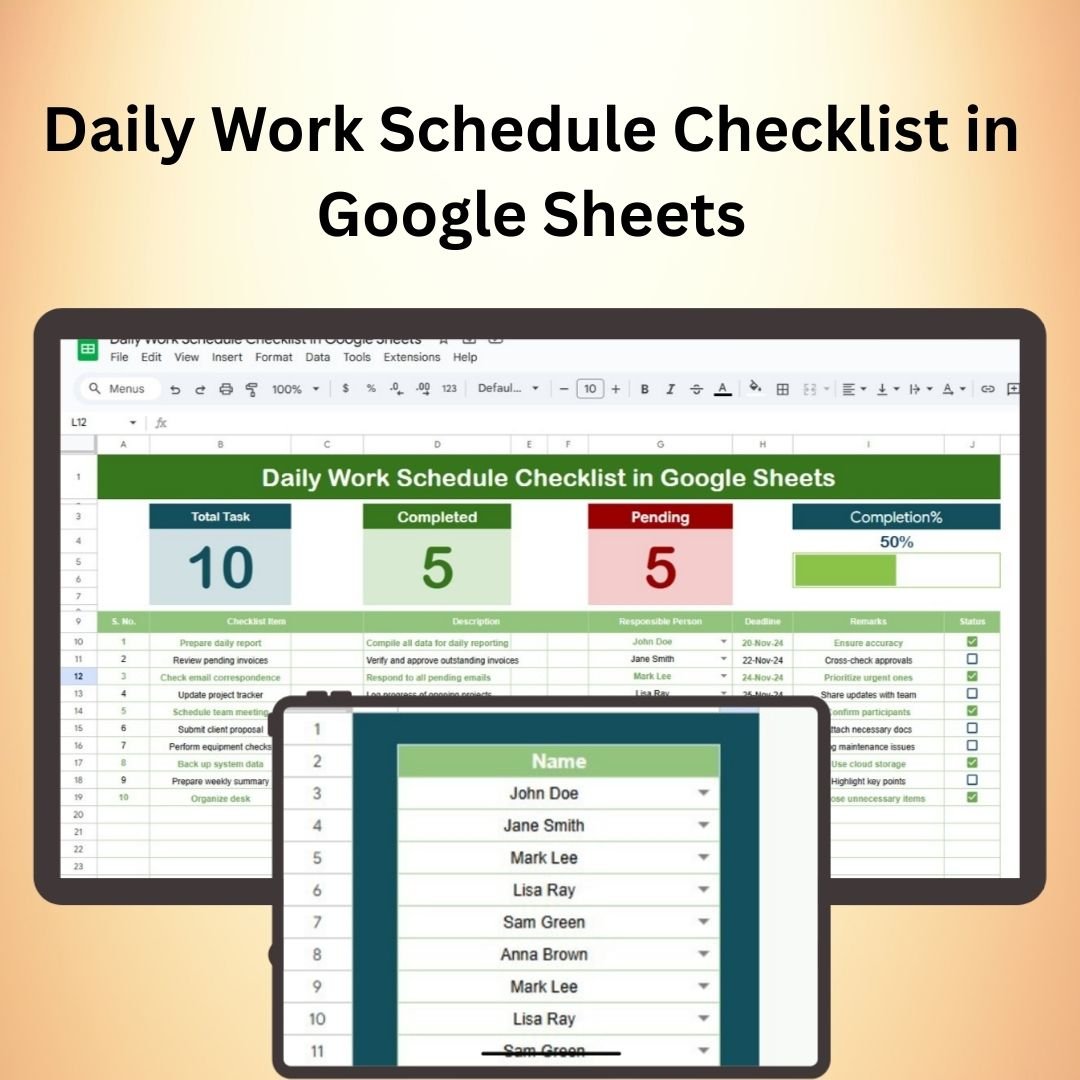


The Daily Work Schedule Checklist in Google Sheets is a practical and efficient tool designed to help individuals and teams organize their daily tasks, stay productive, and meet deadlines. Whether you’re managing personal tasks, overseeing a team, or planning work for a group, this checklist helps you structure and prioritize your day effectively. With its simple yet powerful design, the checklist ensures that nothing gets overlooked and all tasks are completed on time.
The Daily Work Schedule Checklist is fully customizable, allowing you to tailor it to your needs. It provides a clear overview of your tasks for the day, enabling you to track progress, set priorities, and ensure accountability. With color-coded categories, task deadlines, and progress tracking features, this Google Sheets template helps you stay on top of your workload.

Key Features of the Daily Work Schedule Checklist in Google Sheets
📌 Task Management and Prioritization
Easily list and categorize your daily tasks. The template allows you to assign priority levels (high, medium, or low) to each task to ensure that the most important items are completed first. This helps you stay focused on what matters most throughout the day.
🛠 Customizable Layout
The layout is simple and customizable to fit your needs. You can adjust categories, add new sections, or modify task descriptions, making it a versatile tool for both personal and team use. Whether you need a to-do list for work or personal tasks, this checklist can be tailored to suit your goals.
💡 Color-Coded Categories
Tasks are color-coded based on their priority or type, making it easy to visually identify important or time-sensitive items. This feature enhances readability and helps you quickly assess your workload at a glance.
🔢 Progress Tracking
Track the completion of each task with checkboxes. As you work through your schedule, simply check off completed tasks. This helps you stay motivated and gives a clear overview of what has been accomplished and what still needs attention.
🚀 Real-Time Collaboration
The checklist is hosted in Google Sheets, which means you can access it from anywhere and collaborate with others in real time. Whether you’re working solo or as part of a team, the checklist allows for seamless communication and task management.
📊 Automatic Date Updates
The template automatically updates the current date, so you never have to manually adjust the schedule. This ensures that your tasks are always aligned with the current day, making it easy to track daily goals and deadlines.
⚙ User-Friendly Interface
The checklist is designed to be intuitive and easy to use. Even if you’re new to Google Sheets, the layout is simple enough to get started right away. With clear headings and user-friendly features, this template is accessible for anyone.
🚀 Why You’ll Love the Daily Work Schedule Checklist in Google Sheets
✅ Task Prioritization – Assign priorities to tasks and focus on the most important ones first. ✅ Color-Coded and Organized – Visual cues make it easy to navigate and identify important tasks. ✅ Progress Tracking – Track completed tasks with checkboxes for a sense of accomplishment. ✅ Customizable and Flexible – Adjust the layout to fit your personal or team’s needs. ✅ Real-Time Collaboration – Work with your team and update tasks as you go.
📂 What’s Inside the Daily Work Schedule Checklist in Google Sheets?
- Task Management: List all your tasks with deadlines and priorities.
- Customizable Categories: Adjust sections and categories to fit your daily planning needs.
- Progress Tracker: Check off tasks as they are completed.
- Automatic Date Updates: The current date is automatically updated each day.
- Real-Time Collaboration: Share with team members and update tasks together.
🔍 How to Use the Daily Work Schedule Checklist in Google Sheets
1️⃣ Download the Template – Instant access to the Google Sheets file upon purchase. 2️⃣ Input Your Tasks – Add your daily tasks, including descriptions and deadlines. 3️⃣ Prioritize Tasks – Assign priority levels to ensure important tasks are completed first. 4️⃣ Track Progress – Check off completed tasks and monitor your productivity throughout the day. 5️⃣ Collaborate – Share the checklist with others to keep everyone aligned and on track.
🎯 Who Can Benefit from the Daily Work Schedule Checklist in Google Sheets? 🔹 Entrepreneurs
🔹 Project Managers
🔹 Freelancers
🔹 Employees and Team Members
🔹 Anyone looking to stay organized and manage their daily tasks effectively
Make your daily tasks more manageable and stay productive with the Daily Work Schedule Checklist in Google Sheets. This easy-to-use template helps you prioritize, track, and complete tasks on time, ensuring you stay on top of your goals.
Click here to read the Detailed blog post
https://neotechnavigators.com/daily-work-schedule-checklist-in-google-sheets/
Visit our YouTube channel to learn step-by-step video tutorials
Compatibility and Requirements
- Works in Google Sheets. You need a free Google account and a web browser.
- New to Sheets? Google’s guide How to use Google Sheets covers the basics.
Frequently Asked Questions
How do I mark a task as done?
Each task has a checkbox. Tick it when the task is complete to track your progress through the day.
Can I set task priorities?
Yes. You can give each task a high, medium or low priority, and tasks are color coded by priority or type.
Does the date update by itself?
Yes. The template updates the current date automatically, so you don’t have to change it each day.
Can my team use it together?
Yes. It runs in Google Sheets, so you can share it and update tasks with others in real time.
Is there an Excel version?
Yes. The Daily Work Schedule Checklist Template in Excel covers the same job in Excel.
Related Task and Checklist Templates
- Daily Work Schedule Checklist Template in Excel: the same checklist in Excel
- Monthly Review To-Do List Checklist in Google Sheets: review tasks at the end of each month
- To Do List Template in Google Sheets: a simple to-do list in Google Sheets
- Fully Functional To-do List in Excel: a to-do list with more features in Excel
- Checklist & SOP Pack: 12 checklist templates in one download
Browse all Google Sheets checklists or the Excel checklists.































Reviews
There are no reviews yet.