


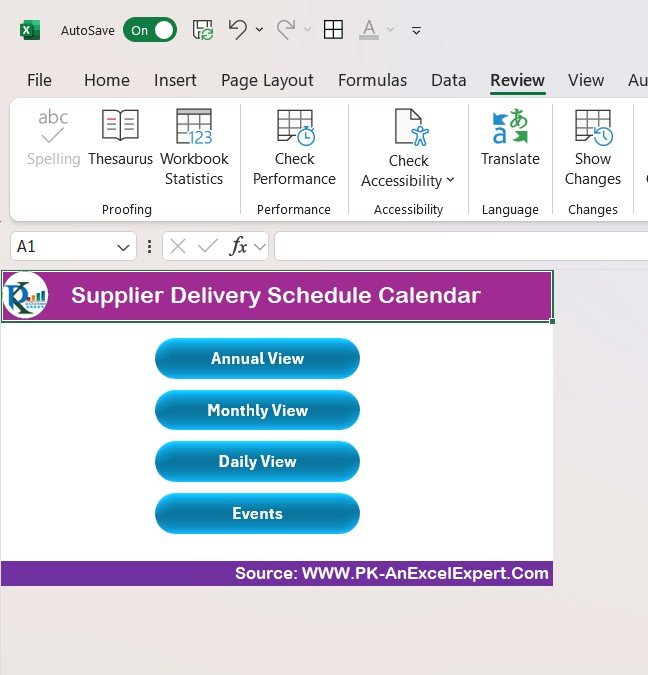



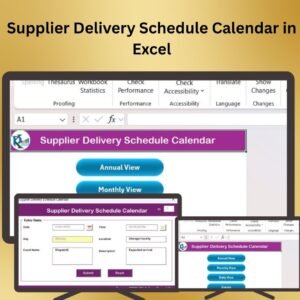
The Supplier Delivery Schedule Calendar in Excel is an essential tool for businesses that need to manage and track supplier deliveries efficiently. This template enables you to organize and visualize supplier delivery schedules, ensuring that all deliveries are timely and managed effectively. Whether you’re working with multiple suppliers or tracking a single product’s delivery timeline, this tool helps you stay organized and avoid delays.
With its easy-to-use interface, automatic date calculations, and visual delivery tracking, this Excel calendar provides a comprehensive view of all your supplier deliveries. Stay on top of delivery dates, manage suppliers, and ensure timely order fulfillment with this simple yet powerful template.

Key Features of the Supplier Delivery Schedule Calendar in Excel
📅 Delivery Tracking: Organize and track delivery dates for multiple suppliers in a single, easy-to-read calendar format.
⚙️ Automatic Date Calculations: Automatically calculate delivery timelines based on order date and expected delivery duration.
📈 Supplier Management: Easily manage supplier details such as contact information, delivery terms, and performance.
💼 Customizable Fields: Modify the template to fit your specific business needs, whether for tracking product deliveries, orders, or suppliers.
📊 Visual Calendar: A calendar format that allows you to view and track delivery schedules at a glance.
🔄 Real-Time Updates: Update and share the calendar in real-time for collaborative scheduling and delivery management.
Why You’ll Love the Supplier Delivery Schedule Calendar in Excel
✅ Simplifies Delivery Tracking: Easily manage and track delivery schedules in one place to prevent delays and keep operations running smoothly.
✅ Improved Supplier Management: Keep track of suppliers’ performance and monitor delivery timelines to ensure timely order fulfillment.
✅ Customizable: Tailor the calendar to fit your specific supplier needs, delivery dates, and products.
✅ Easy-to-Use Interface: Track deliveries effortlessly with a simple and intuitive Excel calendar format.
✅ Streamlined Collaboration: Share the schedule with your team or suppliers to ensure everyone is aligned and aware of upcoming deliveries.
What’s Inside the Supplier Delivery Schedule Calendar in Excel?
📅 Delivery Calendar: A visual calendar to organize and track supplier delivery dates and timelines.
⚙️ Supplier Details: A dedicated section to track supplier names, contact details, and delivery terms.
📈 Delivery Tracking: Easily track the status of each delivery, including scheduled, in progress, and completed.
💼 Customizable Fields: Modify delivery tracking categories, supplier information, and order details to suit your needs.
📊 Reporting Tools: Generate simple reports to monitor delivery performance and track overdue deliveries.
How to Use the Supplier Delivery Schedule Calendar in Excel
1️⃣ Download the Template – Get access to the pre-configured supplier delivery schedule calendar template.
2️⃣ Input Supplier Information: Enter supplier names, delivery dates, and contact details into the designated fields.
3️⃣ Track Deliveries: Monitor delivery dates and use color-coded status indicators to track whether deliveries are on time, delayed, or completed.
4️⃣ Generate Reports: Use the built-in tools to generate reports and assess delivery performance.
5️⃣ Collaborate: Share the calendar with your team for real-time updates and smooth communication.
Who Can Benefit from the Supplier Delivery Schedule Calendar in Excel?
🔹 Procurement Managers
🔹 Supply Chain Teams
🔹 Logistics Coordinators
🔹 Business Owners
🔹 Operations Managers
🔹 E-commerce Businesses
🔹 Warehouse Managers
Simplify supplier delivery management and ensure timely deliveries with the Supplier Delivery Schedule Calendar in Excel. Stay organized, track deliveries, and manage suppliers effectively.
Click here to read the detailed blog post
Visit our YouTube channel to learn step-by-step video tutorials
Compatibility and Requirements
- Works in Microsoft Excel desktop (Excel 2016 or later, or Microsoft 365).
- Microsoft’s guide Create a drop-down list explains the Excel feature this file is built on.
Frequently Asked Questions
What can I track in the Supplier Delivery Schedule Calendar?
You record supplier names, contact details, delivery terms and delivery dates. Each delivery gets a status such as scheduled, in progress or completed, and the calendar shows the dates at a glance.
Does it work out delivery dates for me?
Yes. The template calculates delivery timelines from the order date and the expected delivery duration you enter.
Can I spot late deliveries?
Yes. Color-coded status indicators show whether a delivery is on time, delayed or completed, and the reporting section helps you review overdue deliveries.
Can I change the fields to match my business?
Yes. You can edit the delivery categories, supplier details and order fields to suit the products you buy.
Related Supplier Templates
- Supplier Delivery Schedule Calendar in Google Sheets: the same delivery calendar in the browser
- Supplier Performance Review Calendar in Excel: plan regular reviews of the same suppliers
- Supplier Performance KPI Dashboard in Excel: measure supplier results with KPIs and charts
- Supplier Payment Request Tracker in Excel: follow payments once goods arrive
- Calendar & Planner Pack: 12 Excel and Google Sheets calendars in one bundle
Browse all Excel calendar templates or the Logistics templates.













Reviews
There are no reviews yet.