



The Supplier Performance Review Calendar in Excel is a powerful tool designed to help businesses manage and track supplier evaluations throughout the year. This comprehensive Excel template allows businesses to schedule and document supplier performance reviews, ensuring that supplier relationships are monitored effectively, and any issues are addressed in a timely manner.
By utilizing this calendar, you can streamline the review process, ensure that key performance indicators (KPIs) are met, and optimize supplier relationships to better align with your company’s goals. Whether you are managing a small number of suppliers or overseeing a complex supply chain, this tool simplifies the process, enhancing visibility and control over supplier performance.

Key Features of the Supplier Performance Review Calendar in Excel
📅 Structured Annual Overview
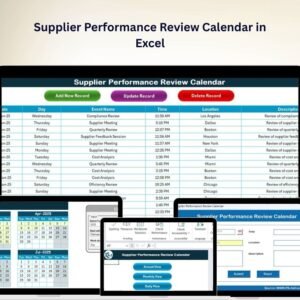
Annual View Sheet Tab: Provides a year-at-a-glance, allowing you to plan, schedule, and track supplier reviews throughout the entire year.
📅 Detailed Monthly and Daily Planning
Monthly View Sheet Tab: Breaks down the year into manageable months, so you can track reviews and ensure timely evaluations.
Daily View Sheet Tab: Provides a detailed schedule, ensuring that each supplier’s review is conducted on time.
📋 Comprehensive Event Management
Events Sheet Tab: Keeps a centralized record of all scheduled reviews, including details like dates, key discussion points, and stakeholders.
Add New Event Button: Simplifies adding new reviews or events to the calendar, keeping the schedule up-to-date with minimal effort.
🔄 Enhanced User Interaction
Action Buttons: Facilitate easy navigation through the various sections of the calendar, enhancing user experience and efficiency.
Add New Record Button: Easily add new supplier information or review details, ensuring the calendar remains comprehensive and current.
Update Existing Record: Quickly update existing supplier or event details, ensuring accurate and up-to-date information.
Advantages of Using the Supplier Performance Review Calendar in Excel
✅ Improved Supplier Relationship Management
By systematically scheduling and conducting performance reviews, businesses can foster stronger, more collaborative relationships with their suppliers.
✅ Enhanced Operational Efficiency
The structured layout aids in identifying performance trends and potential issues early, allowing businesses to address them proactively and optimize supply chain operations.
✅ Centralized Documentation
With all review schedules and supplier data in one location, this calendar simplifies access to critical information and supports strategic decision-making.
✅ User-Friendly Design
The calendar is designed with ease of use in mind, allowing anyone with basic Excel knowledge to use it effectively. The simple interface ensures quick setup and easy navigation.
Best Practices for Utilizing the Supplier Performance Review Calendar
Regular Updates: Keep the calendar updated by regularly adding new review dates and outcomes, ensuring that it remains an accurate record of supplier performance.
Collaborative Engagement: Include key stakeholders in the review process to foster collaboration and gain a complete perspective on supplier performance.
Data-Driven Analysis: Use the calendar to identify trends in supplier performance and to make informed decisions about future engagements, contract negotiations, and performance improvements.
Customization: Tailor the calendar to fit your specific needs by adding review criteria, evaluation templates, or additional data fields for a more comprehensive analysis.
Conclusion
The Supplier Performance Review Calendar in Excel is a must-have tool for businesses looking to streamline their supplier management process. Its structured and easy-to-use design helps businesses track, schedule, and analyze supplier performance reviews with efficiency. Whether you’re managing a small team or overseeing a complex supply chain, this tool ensures that your supplier relationships remain strong, transparent, and productive.
Click here to read the Detailed blog post
Supplier Performance Review Calendar in Excel
Visit our YouTube channel to learn step-by-step video tutorials
YouTube.com/@PKAnExcelExpert
Watch the step-by-step video Demo:
Compatibility and Requirements
- Works in Microsoft Excel desktop (Excel 2016 or later, or Microsoft 365).
- Every view and the Events sheet sit in one Excel workbook, so there is nothing else to install.
Who Can Use This Calendar
Procurement teams, purchasing managers, supply chain managers and small business owners who review suppliers on a regular schedule and want those reviews in one place.
How to Use the Supplier Performance Review Calendar
- Open the Annual View to see the year and plan when each supplier review should happen.
- Click the Add New Event button to add a review with its date, key discussion points and stakeholders.
- Check the Monthly View and Daily View to see which reviews are coming up.
- Use Add New Record or Update Existing Record to keep supplier and review details current.
- Look back at the Events sheet to spot performance trends before contract talks.
Frequently Asked Questions
Which calendar views are included?
There is an Annual View for the whole year, a Monthly View and a Daily View for detailed scheduling.
Where are the review details stored?
The Events sheet keeps a central record of every scheduled review, including dates, key discussion points and stakeholders.
How do I add or change a review?
Use the Add New Event or Add New Record button to add one, and Update Existing Record to change details that already exist.
Can I add my own review criteria?
Yes. You can tailor the calendar by adding review criteria, evaluation templates or extra data fields.
Related Supplier Management Templates
- Supplier Performance KPI Dashboard in Excel: measure supplier KPIs against targets
- Supplier Delivery Schedule Calendar in Excel: plan supplier deliveries by date
- Supplier Contact Calendar in Excel: schedule supplier calls and meetings
- Supplier Performance KPI Dashboard in Power BI: supplier KPIs built for Power BI
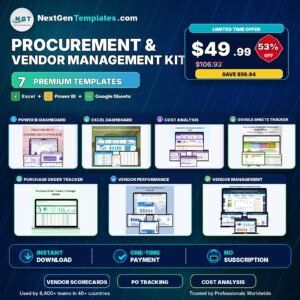
- Procurement and Vendor Management Kit: a bundle of procurement and vendor templates
Browse all Excel calendars or the Excel KPI dashboards.








Reviews
There are no reviews yet.