



Teamwork becomes powerful when everything is visible in one place. If your team struggles with scattered spreadsheets, unclear priorities, or inconsistent reporting, then the Team Performance Dashboard in Google Sheets is exactly what you need. This ready-to-use dashboard transforms raw task data into clean visuals, helping managers and teams work faster, smarter, and more efficiently. Designed with simplicity and accuracy in mind, it gives you real-time visibility into tasks, workload, hours, and performance levels — without needing any technical skills.Team Performance Dashboard in Google Sheets
From project teams to HR, IT, marketing, finance, and operations, every team relies on accurate updates to make timely decisions. But when information is scattered across different sheets, tracking becomes difficult. This dashboard solves the problem with fully automated KPI cards, charts, and analytics pages that show true productivity at a glance. With just one Google Sheet, you monitor everything — pending tasks, completed tasks, hours spent, performance ratings, and more.Team Performance Dashboard in Google Sheets

✨ Key Features of Team Performance Dashboard in Google Sheets
This dashboard is created to simplify team analysis and make decision-making effortless.Team Performance Dashboard in Google Sheets
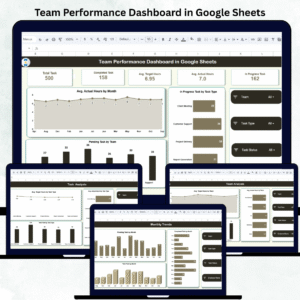
📌 Interactive KPI Cards – Instantly see total tasks, completed tasks, in-progress tasks, average target hours, and average actual hours.
📌 Insightful Charts – View productivity trends, workload distribution, and pending tasks with beautifully designed charts.
📌 Team Analysis Page – Compare workload, actual hours, target hours, and performance for each team.
📌 Task Analysis Page – Track hours and task volumes by task category such as development, design, QA, documentation, and more.
📌 Performance Analysis Page – Analyze tasks based on performance levels: High, Medium, and Low.
📌 Monthly Trends Page – Understand long-term patterns with month-wise pending, completed, and total task charts.
📌 Smart Search Feature – Find any task instantly using keyword or field name.
📌 Simple Data Entry – Enter raw task information in the Data Sheet and all visuals update automatically.
📌 Fully Cloud-Based – Access and update your dashboard from anywhere using Google Sheets.
📌 Beginner-Friendly – No coding, formulas, or design skills needed — everything is prebuilt.Team Performance Dashboard in Google Sheets
📦 What’s Inside the Team Performance Dashboard in Google Sheets
When you download this dashboard, you receive a powerful all-in-one performance management system:
🟢 Dashboard Home Page with KPI Cards & Task Insights
📊 Charts for Hours, Workload, and Task Status
📁 Team Analysis Page to compare efficiency across teams
🗂️ Task Analysis Page for category-wise comparison
📈 Performance Analysis Page showing completed & pending tasks by performance rating
📅 Monthly Trend Page for long-term performance patterns
🔍 Search Tool for quick task lookup
📄 Data Sheet Tab with structured columns: Task Name, Team, Task Type, Target Hours, Actual Hours, Status, Assigned Date, Completion Date, Performance Level
Every visual updates instantly, making performance reporting effortless.
🛠️ How to Use the Team Performance Dashboard in Google Sheets
Using this dashboard is incredibly easy:Team Performance Dashboard in Google Sheets
1️⃣ Enter all tasks in the Data Sheet.
2️⃣ Update Target Hours, Actual Hours, Dates, Status, and Performance Level.
3️⃣ The dashboard automatically refreshes all KPI cards and charts.
4️⃣ Use filters and charts to compare teams, spot delays, and find bottlenecks.
5️⃣ Monitor monthly trends to plan workload and future projects.
6️⃣ Use the search tool to quickly locate any task.
7️⃣ Share the sheet with your team for real-time collaboration.
No formulas. No complex setup. Everything works instantly.
👥 Who Can Benefit from This Team Performance Dashboard in Google Sheets
This dashboard is perfect for:Team Performance Dashboard in Google Sheets
💼 Project Teams – Track tasks, hours, and progress across projects.
🧑💻 IT & Development Teams – Monitor coding, testing, and deployment tasks.
🎨 Design Teams – Track design workloads, hours, and completion timelines.
📢 Marketing Teams – Monitor campaigns, content tasks, and performance levels.
📊 Operations & Admin Teams – Track daily workflows and recurring responsibilities.
🧾 HR & Support Teams – Track onboarding tasks, internal requests, and helpdesk performance.
🤝 Client-Facing Teams – Use it for clean reporting and client updates.
If your team manages tasks and deadlines daily, this dashboard will boost productivity instantly.
Click here to read the Detailed blog post
Watch the step-by-step video Demo:
Visit our YouTube channel to learn step-by-step video tutorials — Neotech Navigators
Compatibility and Requirements
- Works in Google Sheets. You need a free Google account and a web browser.
- Task data goes in the Data Sheet and the dashboard pages update from it. Google explains how its charts work in Add and edit a chart or graph.
Frequently Asked Questions
What data do I enter in the Data Sheet?
One row per task with these columns: Task Name, Team, Task Type, Target Hours, Actual Hours, Status, Assigned Date, Completion Date and Performance Level. The KPI cards and charts update from these rows.
Which pages does the dashboard have?
A Dashboard home page with KPI cards, a Team Analysis page, a Task Analysis page, a Performance Analysis page and a Monthly Trends page. There is also a search tool and the Data Sheet tab.
Can I compare teams?
Yes. The Team Analysis page compares workload, actual hours, target hours and performance for each team.
Can I see tasks by performance level?
Yes. The Performance Analysis page shows completed and pending tasks for the High, Medium and Low performance levels.
Is there an Excel or Power BI version?
Yes. See the Team Performance Dashboard in Excel and the Team Performance Dashboard in Power BI.
Related Performance Dashboards
- Team Performance Dashboard in Excel: the same dashboard for Excel
- Team Performance Dashboard in Power BI: the Power BI edition
- HR Performance Dashboard in Google Sheets: a performance view for HR teams
- Sports Team Performance Dashboard in Google Sheets: performance tracking for sports teams
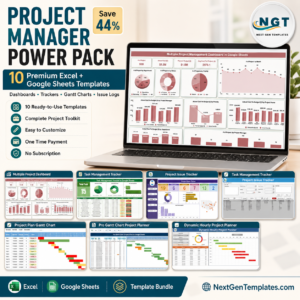
- Project Manager Power Pack: 10 templates for project managers in Excel and Google Sheets
Browse all Google Sheets dashboards.
































Reviews
There are no reviews yet.