



Maintaining a safe, compliant, and risk-free workplace is essential for every organization. Safety inspections help ensure that fire systems work properly, electrical panels are hazard-free, emergency exits stay clear, and equipment remains functional. But when inspection data lives in scattered spreadsheets or paper checklists, teams often miss deadlines, skip follow-ups, or lose critical information. The Office Safety Inspection Tracker in Google Sheets solves these challenges instantly — giving you a complete, automated system to track inspections, monitor risk, and manage compliance effortlessly. 🚨📋
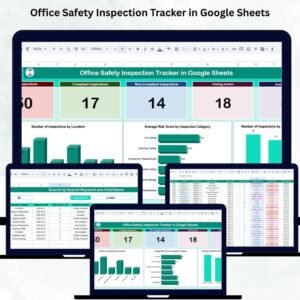
This ready-to-use tracker is designed for safety officers, facility managers, admin teams, and compliance departments. Whether you manage one office or dozens of locations, the dashboard transforms raw inspection data into meaningful insights. With automated KPIs, category-wise charts, risk scoring, pending action tracking, and a searchable inspection database, you get a clear picture of your workplace safety performance — all in real time.
Because it’s built in Google Sheets, this tracker is fully cloud-based, easy to customize, and perfect for teamwork. No complex tools. No coding. No special software required.

✨ Key Features of Office Safety Inspection Tracker in Google Sheets
This tracker includes powerful features that help organizations maintain a safe and compliant work environment.
🔹 Smart KPI Cards for Instant Insights
Get a clear snapshot of safety performance with:
Total Inspections
Compliant Inspections
Non-Compliant Inspections
Pending Actions
Average Risk Score
These key metrics help identify risk levels, compliance gaps, and areas needing urgent attention.
🔹 Location-Wise Inspection Tracking
See how many inspections occurred at each office location. This helps detect:
High-risk sites
Locations needing more frequent checks
Underperforming branches
🔹 Category-Wise Risk Analysis
Visual charts show Average Risk Score by Inspection Category, such as:
Fire Safety
Electrical Systems
Emergency Exits
Workspace Safety
Equipment Checks
These insights help teams prioritize high-risk categories and allocate resources effectively.
🔹 Compliance Status Comparison
A clear chart displays:
Compliant
Non-Compliant
Partially Compliant
Pending
This ensures teams can act quickly on issues that require follow-up.
🔹 Pending Action Tracking Made Easy
Track corrective actions using:
Responsible person
Target completion date
Issue status
Action notes
Never miss follow-ups again.
🔹 Search Tab for Quick Record Lookup
Search any inspection using:
Location
Category
Risk Score
Inspector Name
Status
Pending Action
Any keyword
Perfect for audits, compliance reviews, and safety meetings.
🔹 Auto-Updating Dashboard
Every time you update the Data Sheet, all KPIs and charts refresh instantly.
📦 What’s Inside the Office Safety Inspection Tracker
Your download includes everything needed to streamline workplace safety monitoring:
Dashboard Sheet with KPIs & charts
Search Sheet to filter thousands of records instantly
Data Sheet for inspection entries
Category & Location Analysis Sections
Pending Action Review Section
Common Data Sheet columns include:
✔ Inspection Date
✔ Location
✔ Inspection Category
✔ Inspector Name
✔ Compliance Status
✔ Risk Score
✔ Findings / Notes
✔ Pending Action
✔ Responsible Person
✔ Target Completion Date
✔ Status
This centralized structure ensures 100% clarity and zero missed details. 📝🔍
🛠️ How to Use the Office Safety Inspection Tracker
Using this tracker is simple and beginner-friendly:
🔸 Step 1: Update the Data Sheet
Enter your inspection details, risk scores, and compliance statuses.
🔸 Step 2: Review KPI Cards
Instantly see the total inspections, pending actions, and risk levels.
🔸 Step 3: Analyze Charts
View risk patterns, compliance trends, and location-wise performance.
🔸 Step 4: Track Pending Actions
Use responsible person and due dates to ensure issues are resolved quickly.
🔸 Step 5: Use the Search Tab
Find any inspection instantly during audits or management reviews.
Within minutes, your entire safety inspection process becomes structured, organized, and easy to manage. ✔️
👥 Who Can Benefit from This Inspection Tracker?
This tracker is ideal for:
Safety Officers & Compliance Teams
Ensure zero safety violations and smooth compliance audits.Facility & Admin Teams
Track inspections for equipment, fire systems, and building safety.Corporate Offices & Multi-location Companies
Compare risk scores across branches.Audit & Risk Management Teams
Access clean inspection records with one click.HR & Workplace Operations Teams
Maintain a safe and compliant environment for employees.
No matter your organization size, this tracker ensures complete visibility, accountability, and safety compliance. 🏢✨
Click here to read the Detailed Blog Post
Watch the step-by-step video Demo:
Visit our YouTube channel to learn step-by-step video tutorials — YouTube.com/@NeotechNavigators
Compatibility and Requirements
- Works in Google Sheets. You need a free Google account and a web browser.
- The tracker is cloud-based, so several people can enter inspections and review the dashboard at the same time. Google explains the basics in Get started with Google Sheets.
Frequently Asked Questions
What is included in the download?
A Dashboard sheet with KPI cards and charts, a Search sheet for filtering records, and a Data Sheet for inspection entries. It also has category and location analysis sections and a pending action review section.
What do I enter in the Data Sheet?
Inspection date, location, inspection category, inspector name, compliance status, risk score, findings or notes, pending action, responsible person, target completion date and status.
Which KPIs does the dashboard show?
Total inspections, compliant inspections, non-compliant inspections, pending actions and average risk score. Charts show average risk score by inspection category, inspections by location and a comparison of compliance status.
How do I follow up on open issues?
Record the responsible person, the target completion date, the issue status and action notes for each pending action. Use the pending action review section to see what is still open.
Is there an Excel version?
Yes. See the Office Safety Inspection Tracker in Excel.
Related Safety and Office Templates
- Office Safety Inspection Tracker in Excel: the same tracker for Excel
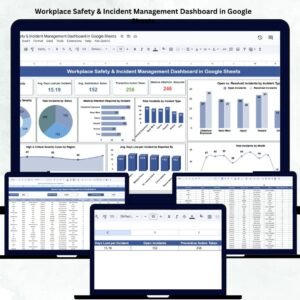
- Workplace Safety & Incident Management Dashboard in Google Sheets: a dashboard for safety incidents
- Office Security Incident Report Tracker in Google Sheets: log and follow security incidents
- Safety and Compliance Dashboard in Excel: a compliance overview in Excel
Browse all Google Sheets trackers.










Reviews
There are no reviews yet.