



Managing compliance requirements while ensuring employee wellness is no easy task in the healthcare industry. Hospitals, clinics, and wellness teams need an all-in-one solution that helps them stay organized, meet deadlines, and prioritize employee health. That’s exactly why we’ve created the Healthcare Compliance Employee Wellness Calendar in Excel—a ready-to-use tool designed to simplify your compliance and wellness planning.
This template combines compliance scheduling with employee wellness tracking in one structured Excel calendar. It is easy to use, beginner-friendly, and packed with automation features that save time and improve efficiency. Whether you need to track regulatory audits, safety checks, or wellness programs like yoga sessions and mental health workshops, this calendar keeps everything in one place.
✨ Key Features of Healthcare Compliance Employee Wellness Calendar
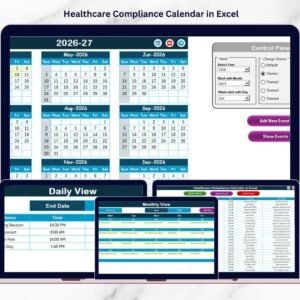
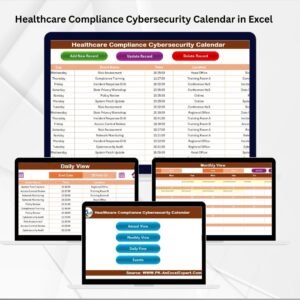
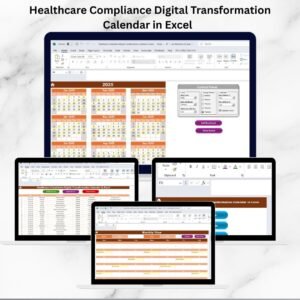
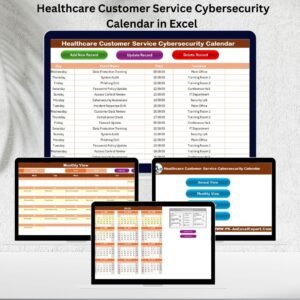
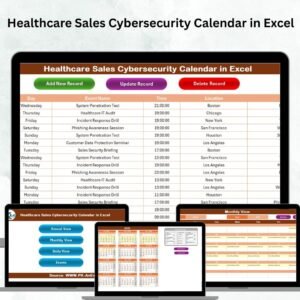
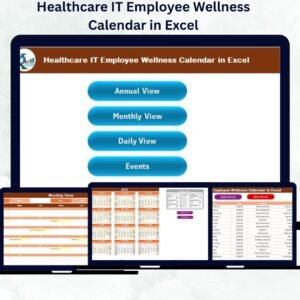
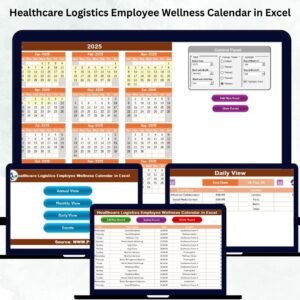
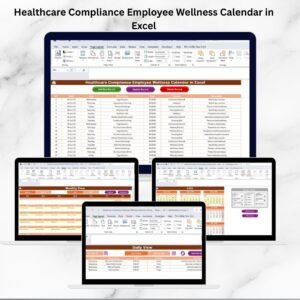
✅ Multi-View Navigation – Switch between Annual, Monthly, Daily, and Events views with just one click using built-in navigation buttons.
✅ Annual View Control Panel – Select your preferred year, adjust the starting month, choose the first day of the week, and even customize the theme with five color options.
✅ Event Management System – Add, update, and delete events easily with built-in forms. Every record includes ID, Date, Event Name, Time, Location, and Description for complete transparency.
✅ Highlight Critical Dates – Mark weekends, audits, and special events with color-coded highlights for quick visibility.
✅ Beginner-Friendly – No advanced Excel skills required. Everything works with simple buttons, drop-downs, and automated refresh features.

📂 What’s Inside the Healthcare Compliance Employee Wellness Calendar
This template comes with five powerful worksheets:
Home Sheet – An index page with quick navigation buttons.
Annual View Sheet – A year-at-a-glance calendar with controls and customization.
Monthly View Sheet – A focused monthly calendar to view and plan key events.
Daily View Sheet – Manage daily activities within specific date ranges.
Events Sheet – A full database of all events with add, update, and delete options.
Together, these worksheets create a complete planning solution for healthcare compliance and employee wellness.
📌 How to Use the Healthcare Compliance Employee Wellness Calendar
👉 Step 1: Open the Home Sheet and use the navigation buttons to switch between views.
👉 Step 2: In the Annual or Monthly view, select the year/month and click Add Event to create new records.
👉 Step 3: Use the Daily View for tracking short-term activities like compliance audits or wellness sessions.
👉 Step 4: Manage all your records in the Events Sheet—update existing entries, delete outdated events, and keep everything organized.
👉 Step 5: Customize your calendar with themes, highlights, and control options for a personalized experience.
With just a few clicks, your entire compliance and wellness calendar is updated and ready to share with your team.
👥 Who Can Benefit from This Calendar
🏥 Hospitals – Track compliance training, audits, and staff wellness events.
💊 Pharmaceutical Companies – Manage GMP checks, license renewals, and wellness drives.
🏨 Clinics – Organize daily schedules, compliance deadlines, and employee wellness workshops.
📋 Health Insurance Firms – Plan audits, compliance reviews, and employee wellness campaigns.
This calendar is ideal for any healthcare organization that wants to combine compliance management with employee well-being in one simple tool.
📖 Click here to read the Detailed blog post
Watch the step-by-step video tutorial:
Visit our YouTube channel to learn step-by-step video tutorials
Compatibility and Requirements
- Works in Microsoft Excel desktop (Excel 2016 or later, or Microsoft 365).
- The template uses navigation buttons, drop-downs and event forms. Microsoft explains drop-down lists in Create a drop-down list.
Frequently Asked Questions
Which views does the calendar have?
It has Annual, Monthly and Daily views, plus an Events sheet. A Home sheet holds the navigation buttons.
What details can I store for each event?
Each record has an ID, date, event name, time, location and description. You can add, update and delete events from the built-in forms.
Can I change the look of the calendar?
Yes. In the Annual view you choose the year, the starting month and the first day of the week. You can also pick one of five color themes.
Can I mark audits and weekends?
Yes. Weekends, audits and special events are highlighted with colors so critical dates are easy to spot.
Do I need advanced Excel skills?
No. The calendar works with simple buttons and drop-downs, so beginners can use it.
Related Calendar Templates
- Healthcare Compliance Calendar in Excel: a compliance-only calendar for healthcare teams
- Healthcare HR Employee Wellness Calendar in Excel: the wellness calendar for HR teams
- Health & Safety Compliance Calendar in Excel: safety checks and compliance dates
- Wellness Program Schedule Calendar in Excel: schedule wellness programs through the year
- Employee Wellness KPI Dashboard in Excel: track wellness KPIs
Browse all Excel calendar templates.






Reviews
There are no reviews yet.