



In the fast-moving world of healthcare IT, employee well-being is no longer optional — it’s a strategic priority. Managing wellness activities, mental health programs, and team-building events can be time-consuming without a proper system. That’s where the Healthcare IT Employee Wellness Calendar in Excel becomes your go-to productivity tool.
This ready-to-use Excel template simplifies planning, scheduling, and tracking of wellness activities for hospitals, clinics, and healthcare technology firms. Designed for HR teams and IT managers, it empowers organizations to promote a healthy and motivated workforce — all within one Excel file!Healthcare IT Employee Wellness Calendar in Excel
✨ Key Features of Healthcare IT Employee Wellness Calendar in Excel
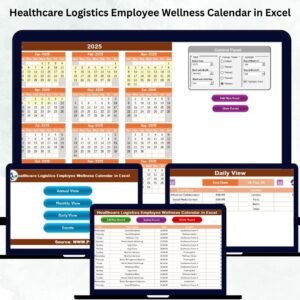
✅ 5 Smartly Designed Sheets – Includes Home, Annual View, Monthly View, Daily View, and Events tabs for seamless navigation.
📅 Annual Overview – Visualize wellness activities for the entire year with interactive event highlights.
📆 Monthly Focus – Drill down into specific months for detailed planning and quick updates.
📋 Daily Event Tracking – View and manage activities on a day-to-day basis for precise control.
🎨 Customizable Themes – Choose from 5 beautiful color schemes that match your organization’s branding.
⚙️ Built-in Automation – Add, update, or delete events easily using form buttons and VBA integration.
🔄 Dynamic Filtering – Select year, start month, and highlight weekends automatically.
🧘 Improved Engagement – Schedule yoga sessions, fitness drives, and health awareness days easily.
💾 Offline and Secure – 100% Excel-based; no internet or extra software required.

📂 What’s Inside the Healthcare IT Employee Wellness Calendar in Excel
This premium Excel template comes with five fully functional worksheets, each crafted to make event management effortless:
1️⃣ Home Sheet (Dashboard View)
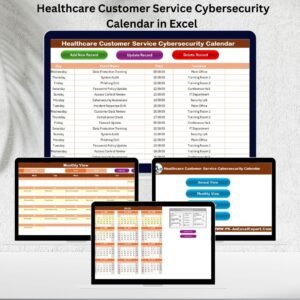
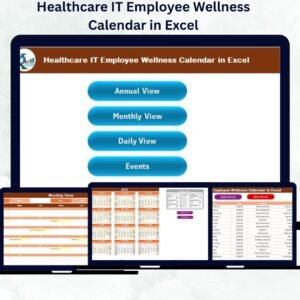
Acts as a control center with four navigation buttons — Annual View, Monthly View, Daily View, and Events.
Streamlines movement across sheets, making it feel like a real digital application.
2️⃣ Annual View Sheet
Displays all 12 months for a quick glance of yearly wellness programs.
Built-in Control Panel allows users to select year, adjust theme, and highlight weekends.
Event buttons let you Add New Events or Show Events for selected dates instantly.
3️⃣ Monthly View Sheet
Allows month-wise planning using dropdown filters for Year and Month.
Displays alerts like “More than 1…” when multiple events exist on a single day.
Ideal for scheduling mental health workshops, awareness weeks, or fitness challenges.
4️⃣ Daily View Sheet
Enter start and end dates to list all activities in a specific range.
Handy for day-level reporting, participation tracking, and event reviews.
5️⃣ Events Sheet (Database)
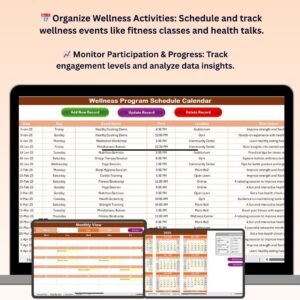
Stores every wellness event with columns like ID, Date, Day, Event Name, Time, Location, and Description.
Includes quick action buttons to Add, Update, or Delete records.
Serves as your complete event repository for audit or HR reports.
🧭 How to Use the Healthcare IT Employee Wellness Calendar in Excel
1️⃣ Download and Open the File — Works on all Excel desktop versions (with macros enabled).
2️⃣ Start from the Home Sheet — Use navigation buttons to switch views.
3️⃣ Add Events — Click “Add New Event,” enter details like Date, Time, and Location, and save.
4️⃣ Review and Edit — Use “Show Event” or “Update Record” to modify or view details anytime.
5️⃣ Apply Themes — Customize the workbook color using Theme options.
6️⃣ Analyze Activities — Track participation patterns and plan quarterly wellness initiatives.Healthcare IT Employee Wellness Calendar in Excel
💡 Tip: Use the Highlight feature to mark weekends or public holidays — it prevents scheduling overlap.
👥 Who Can Benefit from This Healthcare IT Employee Wellness Calendar
🏥 Hospital IT Managers – Plan vaccination drives, wellness camps, and tech team retreats.
💻 Software Developers (Healthcare Sector) – Stay organized with team activities and stress-relief sessions.
🧘 HR and Wellness Coordinators – Manage mental health workshops, yoga days, and awareness events.Healthcare IT Employee Wellness Calendar in Excel
🏢 Healthcare Administrators – Track organization-wide wellness campaigns and attendance.
📈 Medical Technology Teams – Promote better work-life balance and team engagement.
Whether you’re handling a small clinic or a large healthcare IT department, this calendar helps streamline operations and boost workplace happiness. 🌿
Click here to read the Detailed Blog Post
Watch the step-by-step video tutorial:
Visit our YouTube channel to learn step-by-step video tutorials
Compatibility and Requirements
- Works in Microsoft Excel on a Windows desktop with macros enabled. It does not run in Excel for the web, Google Sheets or mobile apps.
- The Add, Update and Delete event buttons use VBA. Microsoft explains how to turn macros on in Enable or disable macros in Microsoft 365 files.
- The file works offline and needs no extra software.
Frequently Asked Questions
Which sheets are included?
Five sheets: Home, Annual View, Monthly View, Daily View and Events.
How do I add a wellness event?
Click Add New Event, enter the date, time, location and description, then save. The event appears in the Events sheet and in the calendar views.
Can I change the colors?
Yes. The Annual View control panel lets you pick one of 5 color themes, choose the year and highlight weekends.
What happens when two events fall on the same day?
The Monthly View shows a “More than 1” alert for that day, so you can open the Daily View or the Events sheet to see them all.
Can I edit or delete an event later?
Yes. Use the Update and Delete buttons on the Events sheet, or Show Event to look up a record.
Is there a similar calendar for other healthcare teams?
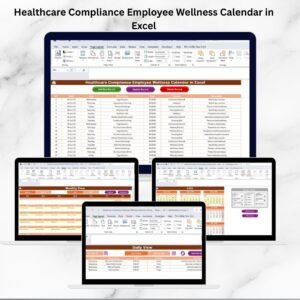
Yes. See the Healthcare HR Employee Wellness Calendar in Excel and the Healthcare Compliance Employee Wellness Calendar in Excel.
Related Employee Wellness Templates
- Healthcare HR Employee Wellness Calendar in Excel: the same calendar set up for HR teams
- Wellness Program Schedule Calendar in Excel: a general wellness program schedule
- Employee Wellness Program Enrolment Tracker in Excel: track who signs up for each program
- Employee Wellness KPI Dashboard in Excel: measure wellness results in Excel
- Employee Wellness KPI Dashboard in Power BI: the Power BI edition of the dashboard
Browse all Excel calendar templates.






Reviews
There are no reviews yet.