



In the modern healthcare world, compliance is no longer just a checklist—it’s the backbone of patient trust, data security, and operational excellence. Hospitals, clinics, diagnostic centers, and insurance providers face increasing regulations, from HIPAA to GxP standards. Missing a deadline can mean penalties, reputational risks, or worse. That’s why we created the Healthcare Compliance Digital Transformation Calendar in Excel—a powerful yet easy-to-use tool that helps you stay on top of every compliance requirement with confidence.
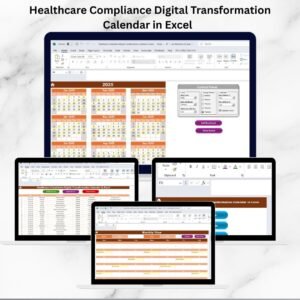
This ready-to-use calendar transforms compliance management into a structured, digital workflow. Healthcare Compliance Digital Transformation Calendar in ExcelInstead of juggling multiple spreadsheets, sticky notes, or outdated paper logs, everything you need is captured in one centralized Excel template.Healthcare Compliance Digital Transformation Calendar in Excel
✨ Key Features of Healthcare Compliance Digital Transformation Calendar in Excel
✅ Five Interactive Worksheets – Home, Annual View, Monthly View, Daily View, and Events database.
✅ Quick Navigation Buttons – Jump directly to the view you need with one click.
✅ Annual Overview – Track 12 months of compliance activities at a glance.
✅ Monthly Planning – Organize department checks, training, and audits easily.
✅ Daily Drill-Down – Manage detailed event records with precision.
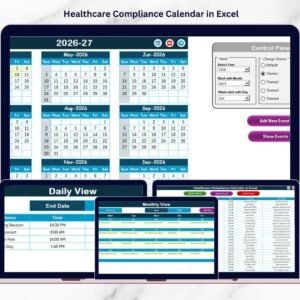
✅ Custom Control Panel – Change year, starting month, and start day instantly.
✅ Theme Selection – Choose from five professional color themes.
✅ Event Management Tools – Add, update, or delete records effortlessly.
✅ Highlight Critical Deadlines – Mark weekends and important compliance dates.
✅ Audit-Ready Database – Maintain structured, retrievable records for inspections.
📦 What’s Inside the Healthcare Compliance Calendar
When you download this template, you’ll get:
Home Tab: The central hub with navigation buttons for quick access.
Annual View: A 12-month calendar with customization options and event-highlighting features.
Monthly View: Focus on one month at a time, with “Add” and “Show Event” buttons for clarity.
Daily View: A filtered list of events between chosen start and end dates.
Events Tab: A complete database with fields like ID, Date, Day, Event Name, Time, Location, and Description.
THealthcare Compliance Digital Transformation Calendar in Excel his structure ensures you can move seamlessly from high-level planning to detailed execution.
🛠️ How to Use the Healthcare Compliance Digital Transformation Calendar
Open the Home Tab and select your preferred view—Annual, Monthly, Daily, or Events.
Set the Year and Preferences in the control panel (starting month, week, and color theme).
Add Compliance Activities such as audits, training, or reporting deadlines using the event form.
Switch Views to monitor events by year, month, or day.
Update or Delete Events directly from the Events database.
Use Highlight Options to emphasize critical tasks and ensure nothing is overlooked.
Review Monthly to make sure compliance requirements stay on track.
Even non-technical staff can use this tool without training—it’s that user-friendly.
👩⚕️ Who Can Benefit from This Healthcare Compliance Calendar?
🏥 Hospitals & Clinics – Track audits, training, and reporting deadlines.
💊 Pharmaceutical Companies – Stay compliant with GxP and clinical standards.
🧪 Research Labs – Manage certifications, inspections, and safety compliance.
🏢 Insurance Providers – Keep reporting schedules and audit readiness in check.
👨💼 Compliance Officers – Maintain centralized logs for quick access during inspections.
👩⚕️ Healthcare Administrators – Reduce risks by ensuring deadlines are never missed.
Whether you’re part of a large hospital or a small diagnostic center, this Excel-based calendar offers a cost-effective, flexible alternative to expensive compliance software.
📖 Click here to read the Detailed blog post
Watch the step-by-step video tutorial:
🎥 Visit our YouTube channel to learn step-by-step video tutorials
Compatibility and Requirements
- Works in Microsoft Excel desktop (Excel 2016 or later, or Microsoft 365).
- The Annual, Monthly and Daily views are built around one Events sheet and use the year, starting month and start day you set on the control panel. Microsoft’s Excel for Windows training covers the basics if you are new to Excel.
Frequently Asked Questions
Which sheets are included?
Five sheets: Home, Annual View, Monthly View, Daily View and Events.
What does the Events sheet store?
Each record has an ID, Date, Day, Event Name, Time, Location and Description. You can add, update or delete events from there.
Can I change the year and the first day of the week?
Yes. The control panel lets you set the year, the starting month and the start day, and choose one of five color themes.
How do I see events between two dates?
Open the Daily View and enter a start date and an end date. It lists the events that fall in that range.
Is there a version for a specific healthcare department?
Yes. For example, see the Healthcare IT Digital Transformation Calendar in Excel and the Healthcare HR Digital Transformation Calendar in Excel.
Related Healthcare Compliance Templates
- Healthcare Compliance Calendar in Excel: a compliance calendar without the digital transformation focus
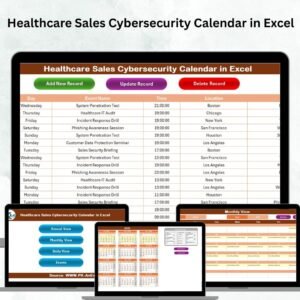
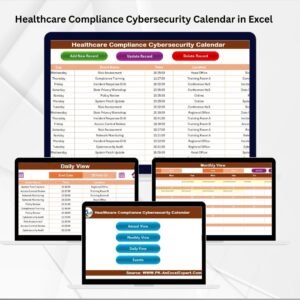
- Healthcare Compliance Cybersecurity Calendar in Excel: compliance dates for cybersecurity tasks
- Healthcare Compliance Sustainability Calendar in Excel: compliance dates for sustainability work
- Healthcare Operations Digital Transformation Calendar in Excel: the same calendar layout for operations teams
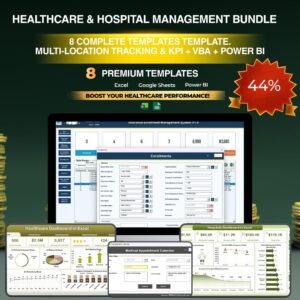
- Healthcare & Hospital Management Bundle: 8 templates for hospital teams in one download
Browse all Excel calendar templates.










Reviews
There are no reviews yet.