



In today’s fast-paced digital healthcare environment, organizations must handle two pressing priorities: achieving ambitious sales targets while protecting sensitive patient data against cyber threats. Without a structured system, deadlines slip, training sessions get overlooked, and compliance risks rise.Healthcare Sales Cybersecurity Calendar in Excel
That’s why we’ve created the Healthcare Sales Cybersecurity Calendar in Excel – a ready-to-use, interactive calendar designed to bring sales planning and cybersecurity management into one powerful tool. With annual, monthly, and daily views, this Excel calendar ensures your sales teams and IT leaders stay aligned while meeting critical compliance obligations.
✨ Key Features of the Healthcare Sales Cybersecurity Calendar in Excel
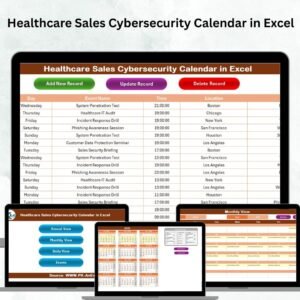
✅ 5 Functional Worksheets – Home, Annual View, Monthly View, Daily View, and Events database.
✅ Smart Navigation Buttons – Jump instantly to Annual, Monthly, Daily, or Event sheets.
✅ Control Panel Customization – Change year, start month, week day, or apply 5 different color themes.
✅ Event Management Tools – Add, update, or delete events with built-in forms.
✅ Highlight Options – Mark weekends or critical dates with one click.
✅ Dynamic Views – Switch seamlessly between yearly planning, monthly schedules, and daily event details.
✅ Compliance Support – Track training, audits, and regulatory deadlines alongside sales campaigns.
✅ Cloud-Ready Sharing – Share via OneDrive, Google Drive, or email for team collaboration.

📂 What’s Inside the Healthcare Sales Cybersecurity Calendar in Excel
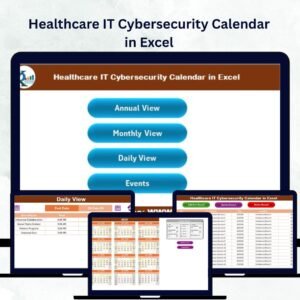
Home Sheet Tab – Your central hub with 4 quick navigation buttons.
Annual View Tab – Plan year-round with a 12-month calendar, control panel, and color-coded highlights.
Monthly View Tab – Zoom into a month, view events, and manage campaigns with ease.
Daily View Tab – Focus on specific date ranges for granular event tracking.
Events Sheet Tab – Centralized database for all events with auto-generated IDs, event names, time, and location.
This structure ensures you always have the right level of detail—whether you’re looking at the big picture or daily operations.
⚙️ How to Use the Healthcare Sales Cybersecurity Calendar in Excel
Start with the Home Tab – Use buttons to quickly move between views.
Set Up the Annual View – Select your year, start month, and theme. Highlight critical days like audits or compliance deadlines.
Plan Monthly Campaigns – Add sales meetings, product launches, or cybersecurity training. Multiple events on a day show up with an instant “More than 1…” alert.
Drill Down Daily Activities – Perfect for scheduling client calls, presentations, or awareness drills.
Update Events in the Database – Add, edit, or delete records using simple forms, keeping your entire team updated.
👥 Who Can Benefit from This Healthcare Sales Cybersecurity Calendar?
Healthcare Sales Teams – Plan meetings, track campaigns, and align with compliance.
Cybersecurity Managers – Schedule training, audits, and awareness drives.
Executives & Compliance Officers – Monitor sales performance and cybersecurity readiness in one place.
Hospitals, Clinics & Startups – Whether big or small, every healthcare organization can use this tool to stay organized and secure.Healthcare Sales Cybersecurity Calendar in Excel
🎯 Why Choose This Calendar?
Unlike generic planners, this Excel calendar is purpose-built for healthcare sales and cybersecurity integration. It’s customizable, user-friendly, and ensures no critical deadline is ever missed. By combining sales and security priorities, it empowers your organization to:
Increase productivity 🏆
Strengthen compliance 🔒
Improve collaboration 🤝
Reduce risk 🚨
Click here to read the Detailed blog post
Watch the step-by-step video tutorial:
Visit our YouTube channel to learn step-by-step video tutorials
Compatibility and Requirements
- Works in Microsoft Excel desktop (Excel 2016 or later, or Microsoft 365).
- The calendar has five worksheets: Home, Annual View, Monthly View, Daily View and Events.
- Excel’s own guide to printing a worksheet or workbook helps if you want a paper copy of a view.
Frequently Asked Questions
Which sheets are included?
Five sheets: Home, Annual View, Monthly View, Daily View and Events. The Home sheet has buttons that jump to the other views.
How do I change the year or start month?
Use the control panel on the Annual View sheet. You can set the year, the start month and the week day, and pick one of 5 color themes.
How do I add or remove an event?
Open the Events sheet and use the built-in forms to add, update or delete a record. Each event gets an auto-generated ID and has a name, time and location.
What happens when several events fall on one day?
The Monthly View shows a “More than 1” alert for that date, so you know to check the Daily View for the full list.
Can I highlight weekends or key dates?
Yes. The Annual View has highlight options for weekends and critical dates such as audits or compliance deadlines.
Is there a calendar for other healthcare teams?
Yes. See the Healthcare HR Cybersecurity Calendar in Excel and the Healthcare IT Cybersecurity Calendar in Excel.
Related Healthcare Calendar Templates
- Healthcare Sales Digital Transformation Calendar in Excel: the same sales calendar for digital projects
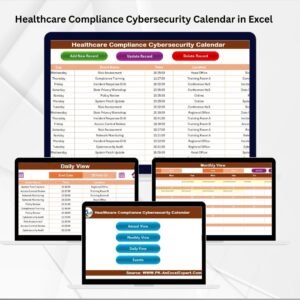
- Healthcare Compliance Cybersecurity Calendar in Excel: cybersecurity dates for the compliance team
- Healthcare IT Cybersecurity Calendar in Excel: a cybersecurity calendar for IT staff
- Sales Activity Calendar in Excel: a general calendar for sales activities
- Calendar & Planner Pack: 12 calendar and planner templates in one download
Browse all Excel calendar templates.
























Reviews
There are no reviews yet.