



Managing office supplies shouldn’t feel like chaos. Whether it’s a pack of pens or a new printer, every request matters—and so does having an efficient system to manage those orders. That’s why we built the Office Supply Order Tracker in Google Sheets — your all-in-one tool for organizing supply requests, controlling expenses, and making data-driven decisions without needing expensive software. ✅
Designed with HR managers, office admins, finance teams, and operations professionals in mind, this ready-to-use, single-tab tracker captures everything you need—from who requested what, to how much it cost, when it was ordered, and its status.

✨ Key Features of the Office Supply Order Tracker in Google Sheets
📋 One-Page Simplicity, Powerful Functionality
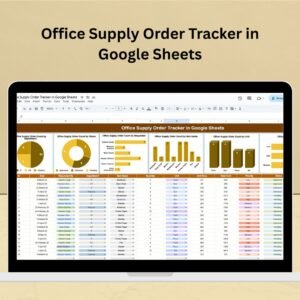
You don’t need five tabs to track supplies. This tracker keeps things clean and efficient with a single, smart sheet that includes:
🧾 Data Entry Section: Capture key details such as Request ID, Date, Department, Requested By, Item Name, Quantity, Unit, Unit Price, Priority, Status, and Remarks.
💰 Total Cost Column: Auto-calculates based on quantity and unit price.
🎯 Status & Priority Dropdowns: Track urgency and approval in seconds.
📊 Built-In Live Charts
Get instant visual clarity with dynamic charts that update automatically:
📈 Order Count by Department
📦 Order Count by Item Name
👤 Order Count by Requested By
⏳ Order Count by Status
🏷️ Order Count by Priority
📏 Order Count by Unit
These charts help spot order trends, identify delays, and streamline decision-making.
📦 What’s Inside the Office Supply Order Tracker?
✅ One fully editable Google Sheet template
📊 6 interactive charts built into the same page
⬇️ Dropdown fields for cleaner data input
🔐 Protected cost formulas
💬 Remarks column for notes or delivery instructions
💻 100% cloud-based and team-ready
Perfectly designed for plug-and-play use—just open it and start logging.
🧠 How to Use the Office Supply Order Tracker
Make a Copy to your Google Drive
Input your supply data using the form-like table
Assign status and priority via dropdowns
View charts instantly reflecting updated data
Export or share with your team as needed
Zero coding. Zero training. Maximum control. 💼
👥 Who Can Benefit from This Tracker?
This tracker is a must-have for:
🏢 HR & Office Admin Teams – Track stationery, tech, and pantry orders
🧾 Finance Teams – Monitor budgets and prevent overspending
🛠️ Operations Managers – Coordinate supply needs across departments
🏬 Facility Managers – Handle asset replenishment efficiently
📍 Multi-Location Businesses – Just add a “Location” column and manage all sites with one tracker
📚 Educational Institutions & NGOs – Control inventory in a structured, cost-effective way
💡 Advantages of Using This Tracker
🔄 Real-Time Chart Updates – No need to refresh or manually calculate
💼 Full Team Accountability – See who made which request, and when
💰 Built-in Budget Monitoring – Helps track monthly costs automatically
🧩 Fully Customizable – Add approval fields, delivery dates, or vendor info
🌐 Cloud-Based Collaboration – Ideal for hybrid and remote teams
🧠 No Learning Curve – Easy enough for any non-technical user
🗂️ Organized & Searchable – All data in one searchable interface
🔧 Opportunities for Improvement (Optional Upgrades)
Want to scale it further? Try these:
✅ Add Approval Columns – Manager sign-off or budget confirmation
📬 Auto Email Reminders – Use Google Apps Script to alert for urgent orders
📅 Create Monthly Reports Tab – Auto-summarize orders per month
🚚 Track Vendor Details – Add supplier names, shipping dates, and delivery status
📦 Link to Inventory Sheet – Monitor stock balance vs. incoming requests
The structure is there—customize it to match your workflow.
🛠️ Best Practices for Maximum Efficiency
🧾 Standardize Entry: Assign one person to enter all requests for consistency
🗓️ Review Weekly: Monitor high-priority or pending orders regularly
🔒 Protect Formulas: Lock cost and chart formulas to prevent edits
🧹 Archive Closed Orders: Move old data to an archive sheet every quarter
✅ Use Data Validation: Dropdowns help reduce spelling errors and duplicate entries
These tips help you keep it lean, clean, and stress-free.
📚 Click here to read the detailed blog post
Watch the step-by-step video Demo:
👉 Visit our YouTube channel to learn step-by-step video tutorials
Compatibility and Requirements
- Works in Google Sheets. You need a free Google account and a web browser.
- Status and priority are chosen from dropdown lists. Google explains dropdowns in Create an in-cell dropdown list.
Frequently Asked Questions
How many sheets does the tracker have?
One sheet. The data entry table and all six charts are on the same page.
What details can I record for each request?
Request ID, date, department, requested by, item name, quantity, unit, unit price, priority, status and remarks.
Is the total cost calculated for me?
Yes. The Total Cost column is calculated from quantity and unit price, and the cost formulas are protected.
Which charts are included?
Order count by department, item name, requested by, status, priority and unit. They update when you change the data.
Can I track several office locations?
Yes. Add a Location column to the table and log every site in the same tracker.
Is there an Excel version?
Yes. See the Office Supply Order Tracker in Excel.
Related Office Supply Templates
- Office Supply Order Tracker in Excel: the same order tracker for Excel
- Office Supply Request Tracker in Google Sheets: log supply requests from staff
- Office Supply Inventory Update Tracker in Google Sheets: keep stock levels up to date
- Purchase Order Tracker in Google Sheets: track purchase orders to suppliers
- Small Business Owner Essentials: 12 templates for owners in one download
Browse all Google Sheets trackers.






























Reviews
There are no reviews yet.