

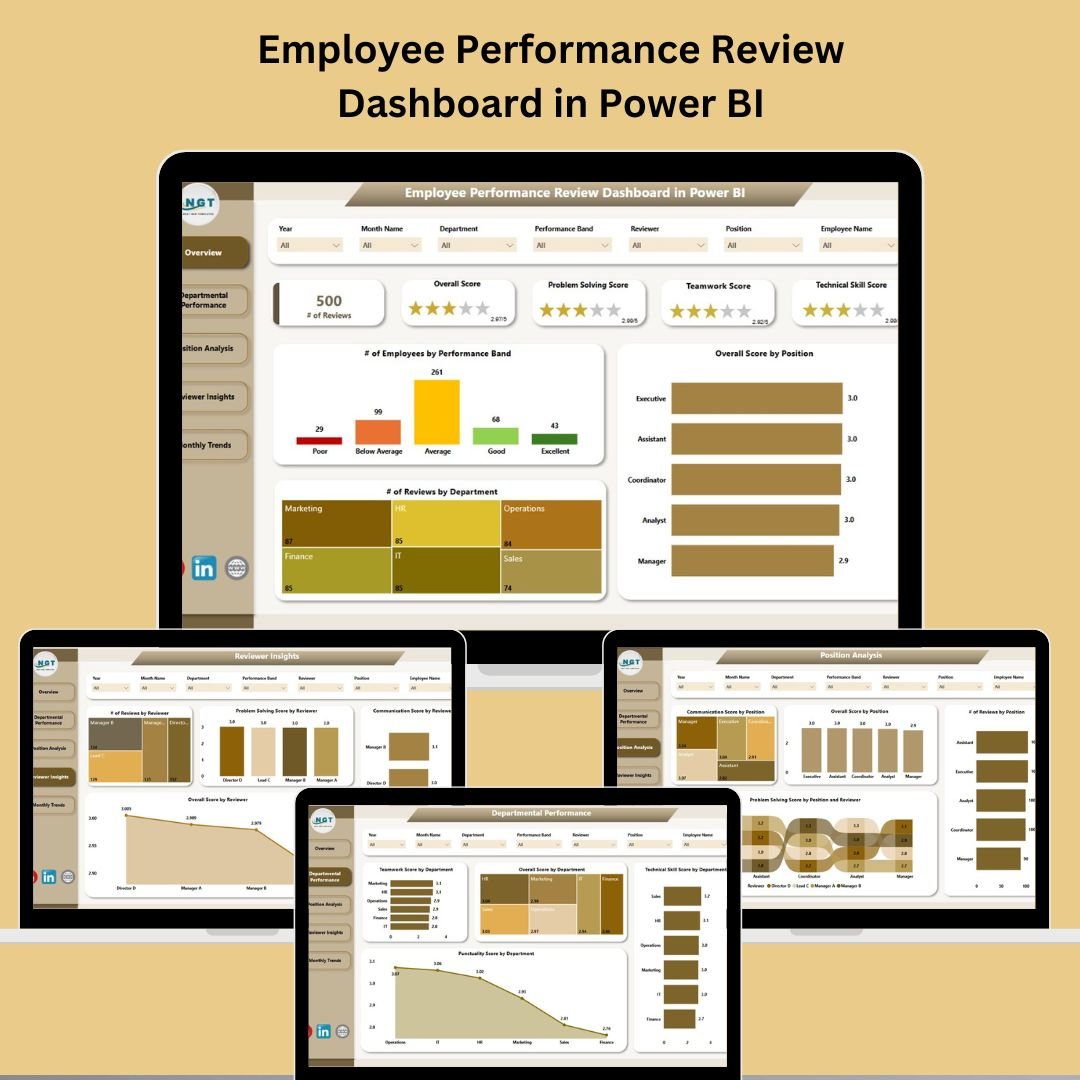


Struggling to track employee performance across teams, roles, and review cycles? 📉
Say goodbye to scattered spreadsheets and manual evaluation reports. The Employee Performance Review Dashboard in Power BI is a ready-to-use, visual, and interactive solution that empowers HR teams and managers to measure, monitor, and improve employee performance—all from one centralized platform. 📊🚀
This powerful dashboard turns performance data into actionable insights, helping you build a high-performing culture rooted in transparency and growth.
✅ Key Features of Employee Performance Review Dashboard
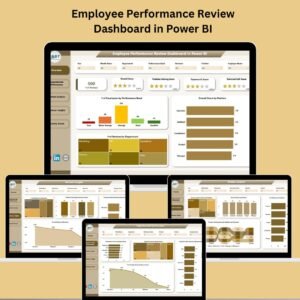
📋 Five Insightful Pages – Analyze performance across Overview, Department, Position, Reviewer, and Monthly Trends.
🧠 Visual Scorecards & Metrics – Track communication, teamwork, punctuality, technical skills, and overall performance.
📅 Monthly Trends Dashboard – Spot patterns and growth areas over time.
🎯 Custom Slicers – Filter data by department, reviewer, date, position, and more (7 slicers per page).
📈 Position & Department Analysis – Drill into strengths and gaps across roles and teams.
🙋♂️ Reviewer Insights Page – Evaluate the consistency and fairness of reviewers.
🔒 Role-Based Access Control – Secure sensitive employee data with Power BI’s row-level security.
No coding or BI background required—if you know Excel, you’re halfway there! 🖥️✅
📦 What’s Inside the Dashboard?
This Power BI template is made up of 5 well-structured pages with rich visuals and advanced filtering:
🧭 Overview Page
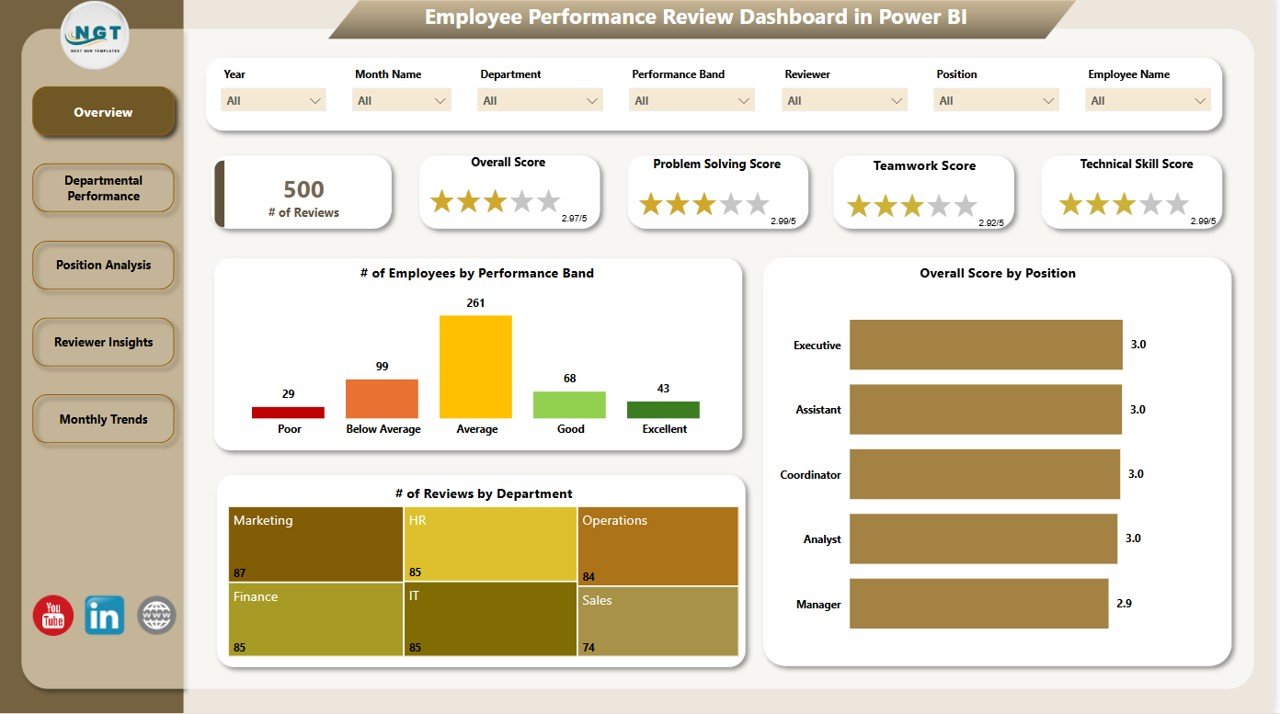
The central dashboard displays:
Number of Employees by Performance Band
Overall Score by Position
Reviews by Department
KPI Cards with average scores and counts
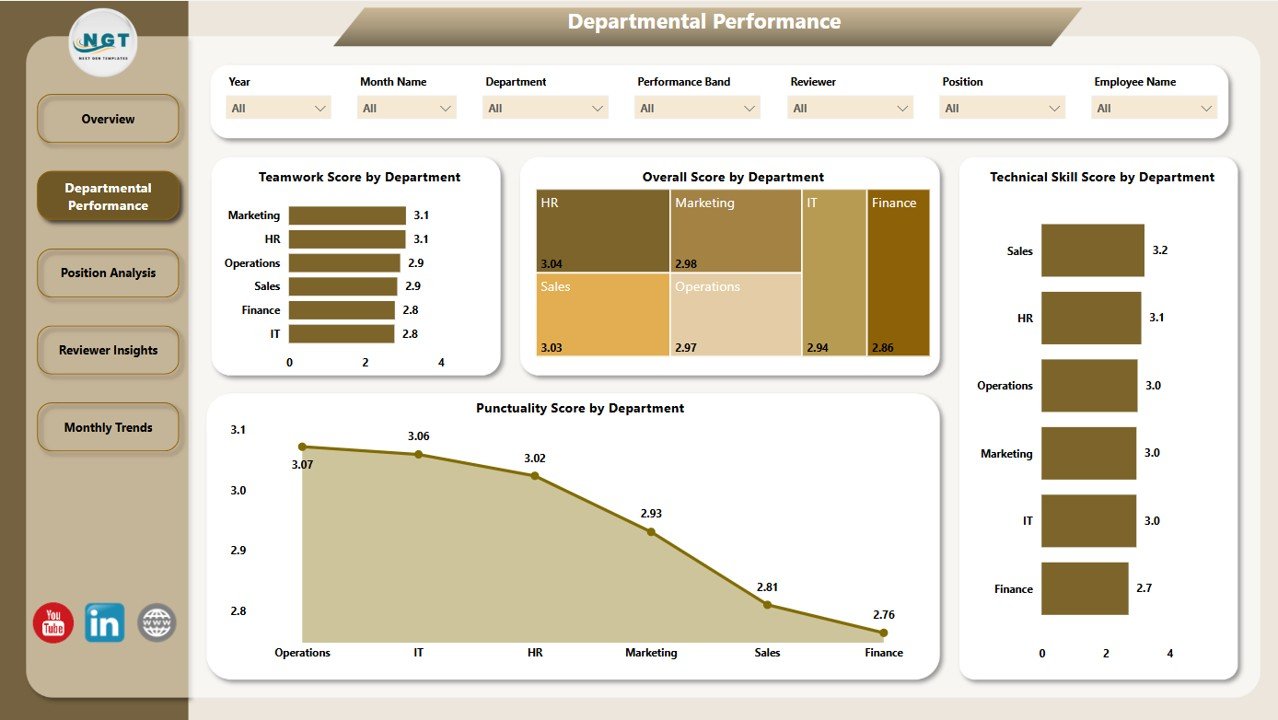
🏢 Departmental Performance Page
Explore how departments perform in:
Teamwork, Technical Skills, Punctuality
Overall Score Distribution
Use slicers to customize by date or reviewer
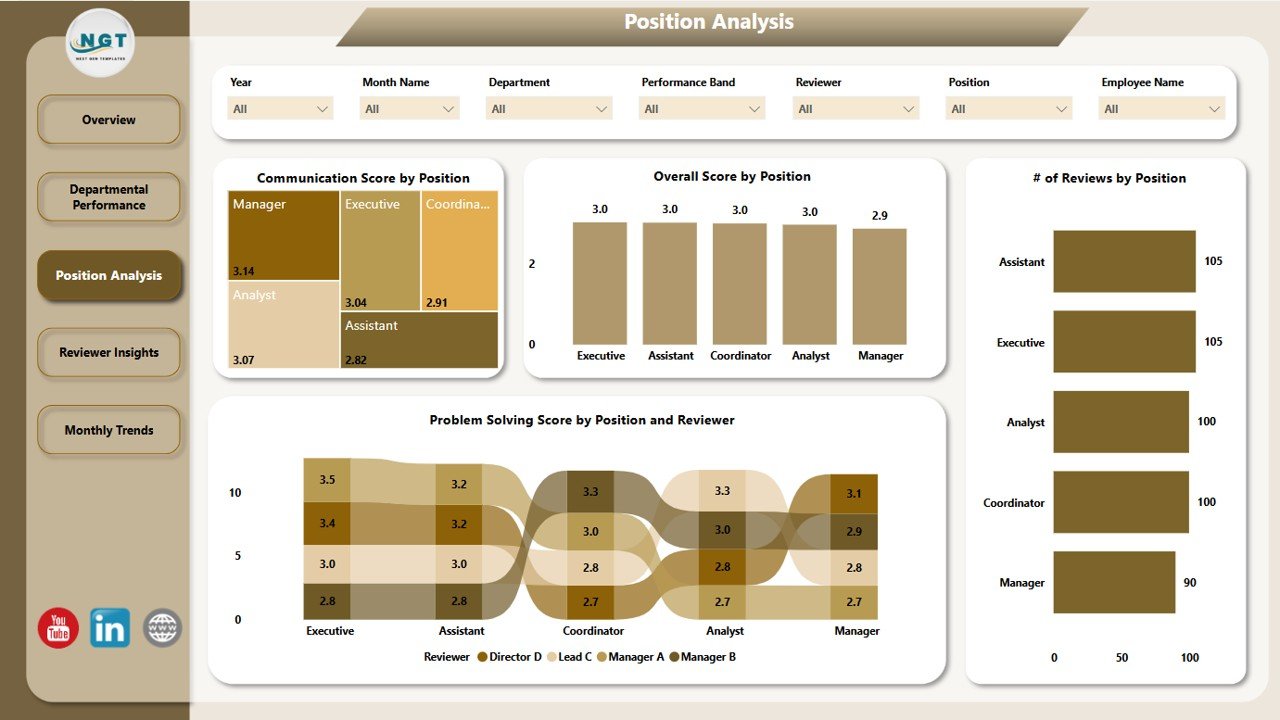
🧑💼 Position Analysis Page
Analyze performance trends by role:
Communication and Problem-Solving Scores
Number of Reviews and Overall Scores by Position
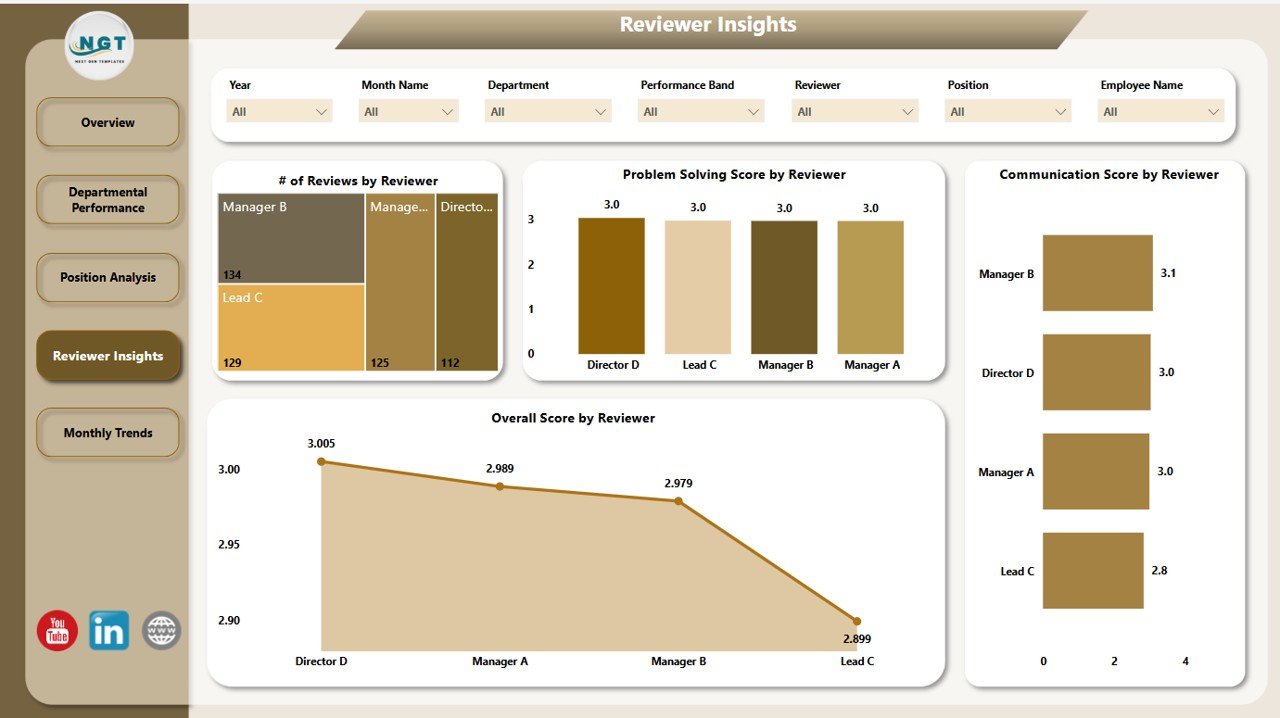
👥 Reviewer Insights Page
Measure reviewer performance and fairness:
Utilization %, Allocated Hours, Resources Reviewed
Role-based analysis for deeper accountability
📆 Monthly Trends Page
Track performance over time:
Monthly trend charts for Reviews Count, Overall Score, and Communication Score
All pages are interactive, customizable, and designed to give you full control over performance management.
🛠️ How to Use the Employee Performance Review Dashboard
Connect Excel Dataset – Prepare your performance review data in Excel.
Import into Power BI – Load the dataset and verify fields.
Customize Visuals – Add KPIs, charts, or scoring categories as needed.
Use Slicers to Filter – View insights for different departments, reviewers, or months.
Update Regularly – Sync new data each review cycle for real-time performance tracking.
Publish and Share – Use Power BI Service to distribute with row-level security.
👥 Who Can Benefit from This Dashboard?
✅ HR Managers – Gain real-time visibility into employee progress
✅ Department Heads – Pinpoint underperforming areas for intervention
✅ Executives – Make strategic talent and compensation decisions
✅ Team Leaders – Monitor feedback and guide employee development
✅ Learning & Development Teams – Assess training impact and ROI
Whether you’re reviewing quarterly goals or preparing for annual evaluations, this dashboard simplifies performance review processes with clarity and confidence. 💼
🔗 Click here to read the Detailed blog post
🔗 Visit our YouTube channel to learn step-by-step video tutorials
Watch the step-by-step video tutorial:
Compatibility and Requirements
- Works in Power BI Desktop, which is free to download. Microsoft explains how to get it in Get Power BI Desktop.
- You prepare your performance review data in Excel and connect it to the dashboard.
- Role-based access control uses Power BI row-level security once the report is published in Power BI Service.
Frequently Asked Questions
How many pages does the dashboard have?
Five pages: Overview, Departmental Performance, Position Analysis, Reviewer Insights and Monthly Trends. Each page has 7 slicers.
Which scores can I track?
Communication, teamwork, punctuality, technical skills, problem-solving and the overall score. KPI cards show average scores and review counts.
Where does the data come from?
You prepare your performance review data in Excel, import it into Power BI and check the fields. Sync new data each review cycle to keep the dashboard current.
Can I limit who sees employee data?
Yes. Publish the report in Power BI Service and use row-level security to set role-based access.
Is there an Excel or Google Sheets version?
Yes. See the Employee Performance Review Dashboard in Excel and the Employee Performance Review Dashboard in Google Sheets.
Related Employee Performance Templates
- Employee Performance Review Dashboard in Excel: the same review dashboard in Excel
- Employee Performance Review Dashboard in Google Sheets: the Google Sheets edition
- Employee Performance Tracking Dashboard in Power BI: another Power BI view of employee performance
- Employee Performance Review Report in Excel: a report layout for review results
- HR & Workforce Analytics Bundle: 10 HR templates in one download
Browse all Power BI dashboards.














Reviews
There are no reviews yet.