Oil and Gas Analysis Dashboard in Power BI
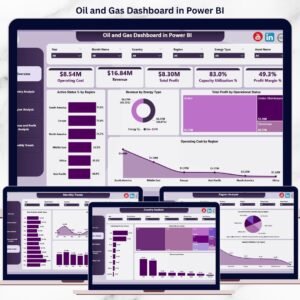
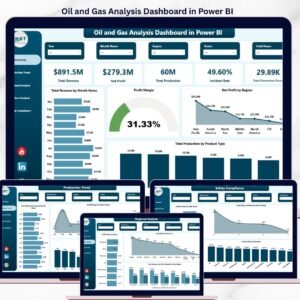
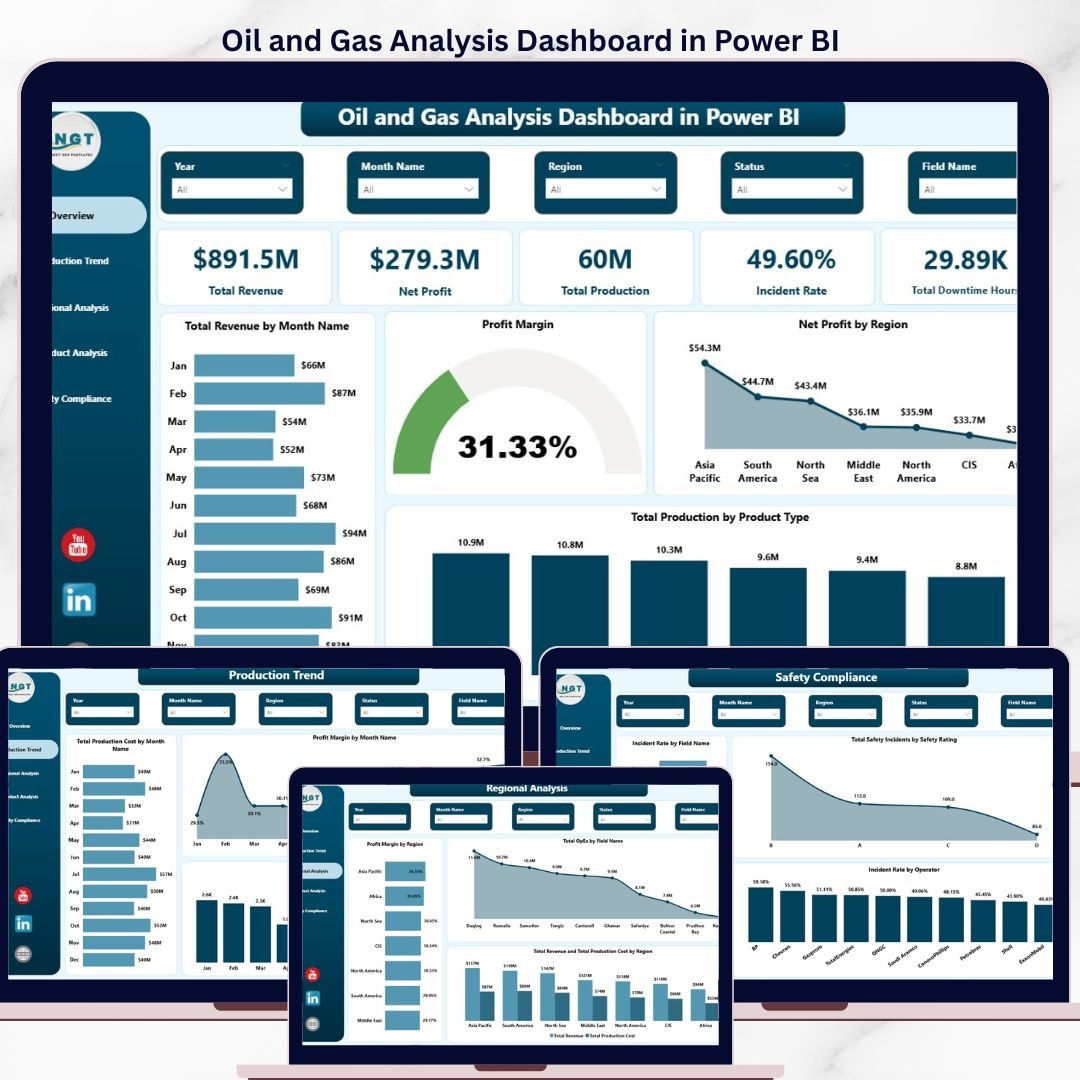
5 KPI cards. 5 dashboard pages. 13+ pre-built visuals. Cross-page slicers. Setup in under 10 minutes. The Oil and Gas Analysis Dashboard in Power BI is a production-ready .pbix template that gives upstream and downstream operators a single screen to track revenue, production volumes, profit margin, downtime, and safety incident rates — across regions, fields, operators, well types, and extraction methods.Oil and Gas Analysis Dashboard in Power BI
Trusted by 8,400+ teams in 40+ countries, this dashboard ships fully wired with sample oil & gas data, ready DAX measures, and slicer-driven navigation. Replace the sample data with your own well, field, or refinery exports and the entire 5-page report refreshes instantly. One-time payment. Instant download. No subscription. No SaaS lock-in.Oil and Gas Analysis Dashboard in Power BI
What’s Inside the .pbix File
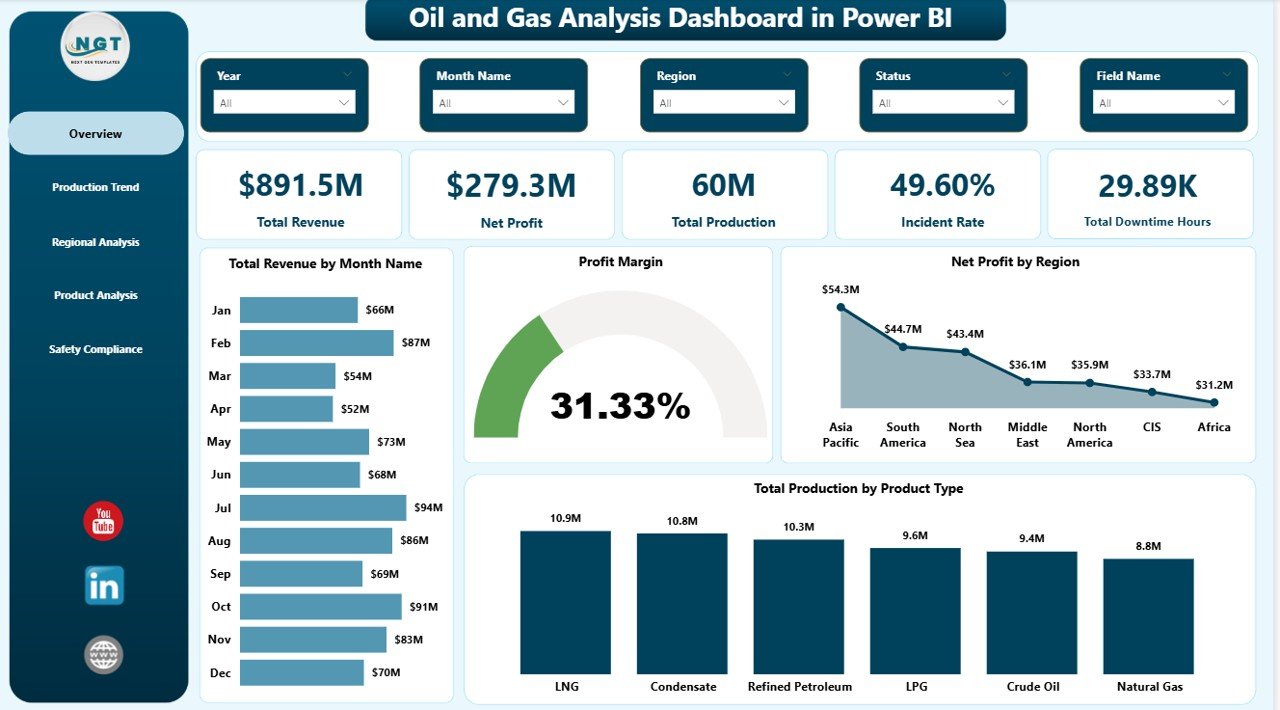
This is Page 1 of 5. The screenshot below shows the full Overview page exactly as it appears in Power BI Desktop after you open the downloaded file:Oil and Gas Analysis Dashboard in Power BI
 Oil and Gas Analysis Dashboard in Power BI
Page 1 — Overview
The landing page is built for executive review. Five KPI cards anchor the top of the canvas:Oil and Gas Analysis Dashboard in Power BI
- Total Revenue — aggregate revenue across all wells, fields, and product types in the selected period.
- Net Profit — revenue minus total OpEx and CapEx; the bottom-line profitability indicator for the operation.
- Total Production — cumulative volume produced (barrels, MCF, or unit of measure of your choice).
- Incident Rate — safety incidents per 200,000 hours worked; tracks the operational safety baseline.
- Total Downtime Hours — total hours wells/equipment were offline, the single biggest profit killer in upstream operations.
Below the cards, four analytical visuals tell the story of where revenue and production came from:
- Total Revenue by Month Name — column chart showing month-by-month revenue swings; spot seasonality and price-cycle effects at a glance.
- Profit Margin — gauge or KPI card showing margin percentage against a target line; reveals if revenue growth is actually translating to bottom-line gain.Oil and Gas Analysis Dashboard in Power BI
- Net Profit by Region — bar chart breaking down profitability by geographic region so executives can quickly see which basins or geographies are pulling weight.
- Total Production by Product Type — donut or column chart splitting production volume across crude oil, natural gas, condensate, and refined products.
Page 2 — Production Trend
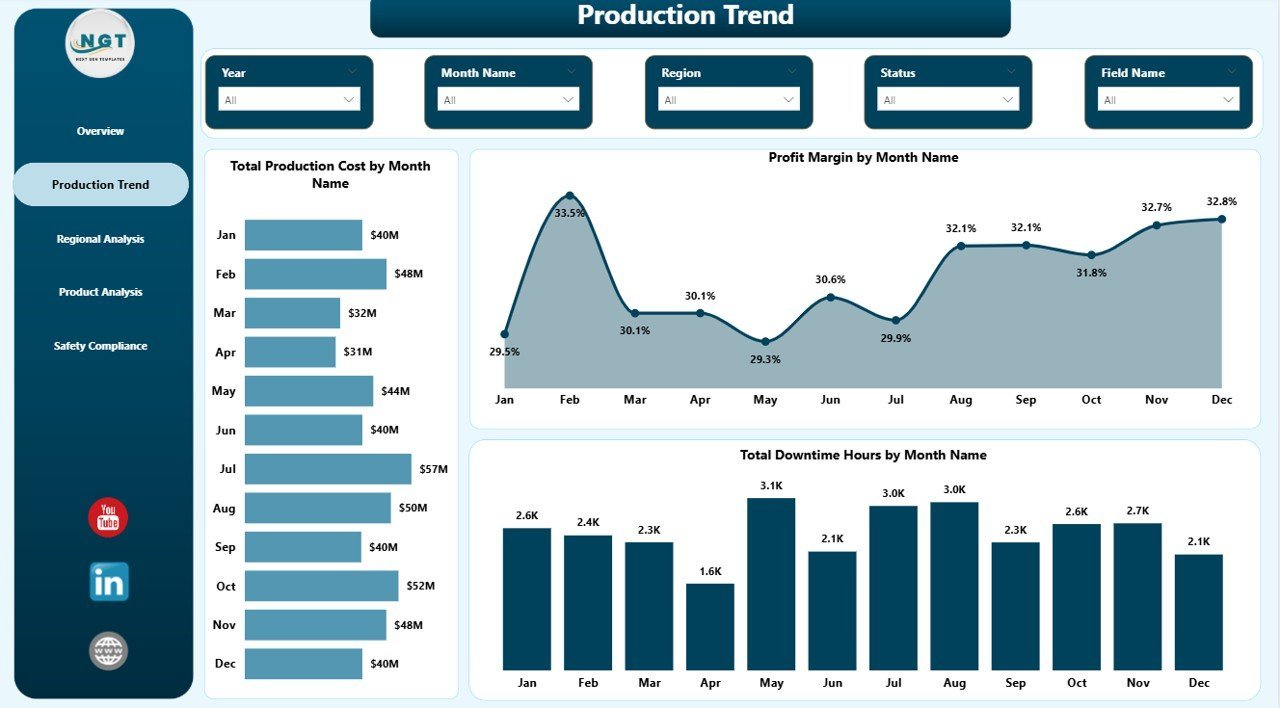
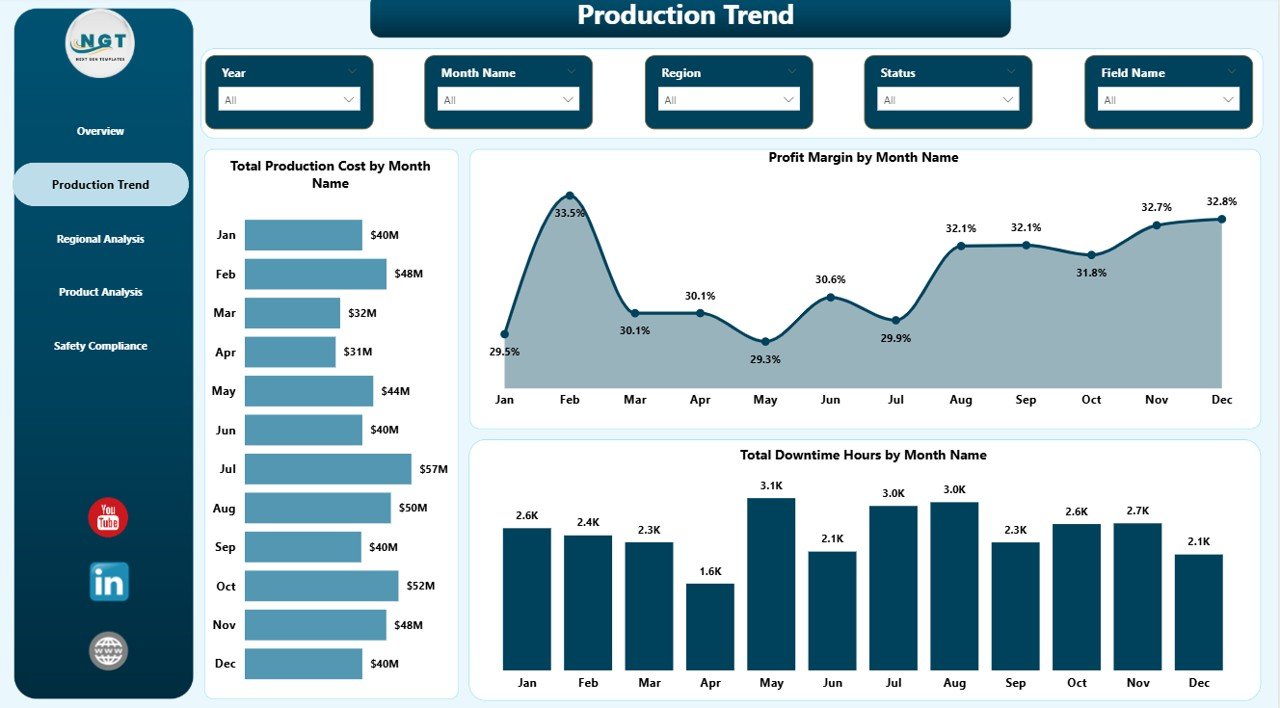
The second page focuses entirely on time-series performance. Three trend visuals expose the operational pulse of the business month over month:Oil and Gas Analysis Dashboard in Power BI
- Total Production Cost by Month Name — line chart that shows whether unit production costs are creeping up or trending down, the leading indicator for margin compression.
- Profit Margin by Month Name — month-over-month margin trajectory; pair this with revenue trend to detect whether top-line growth is profitable.
- Total Downtime Hours by Month Name — bar/column chart that surfaces unplanned outages, planned maintenance windows, and seasonal downtime patterns in one view.
 Production Trend
Page 3 — Regional Analysis
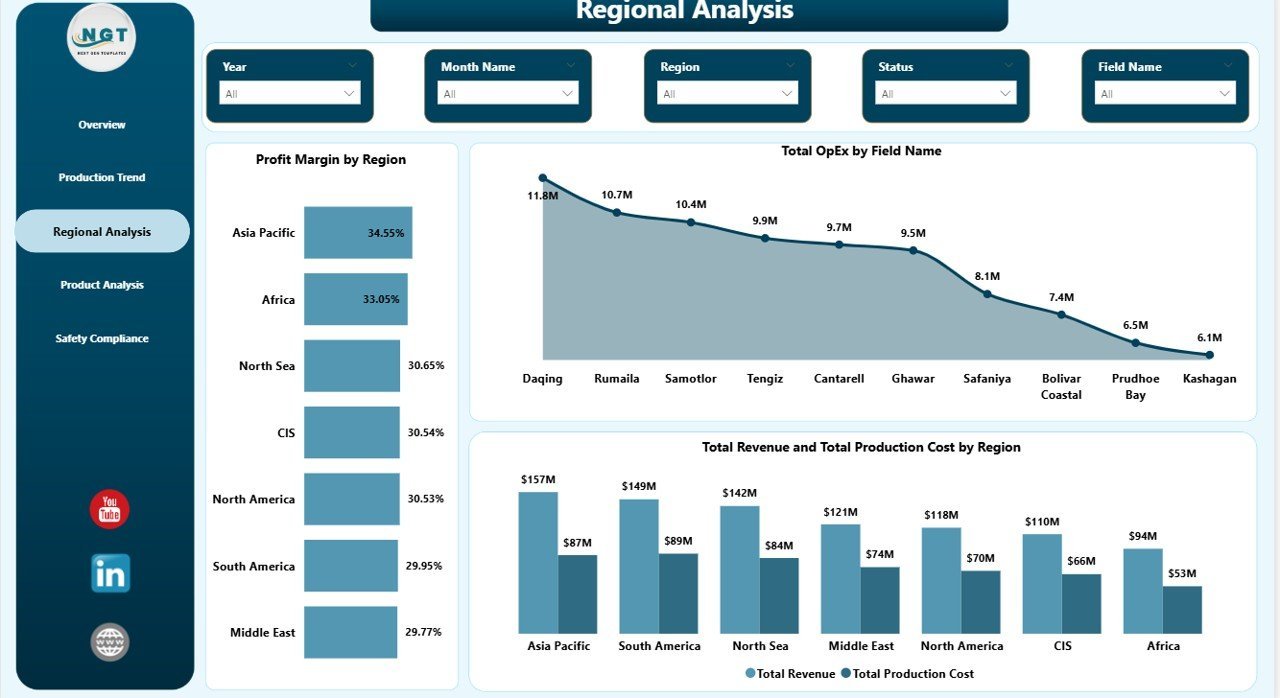
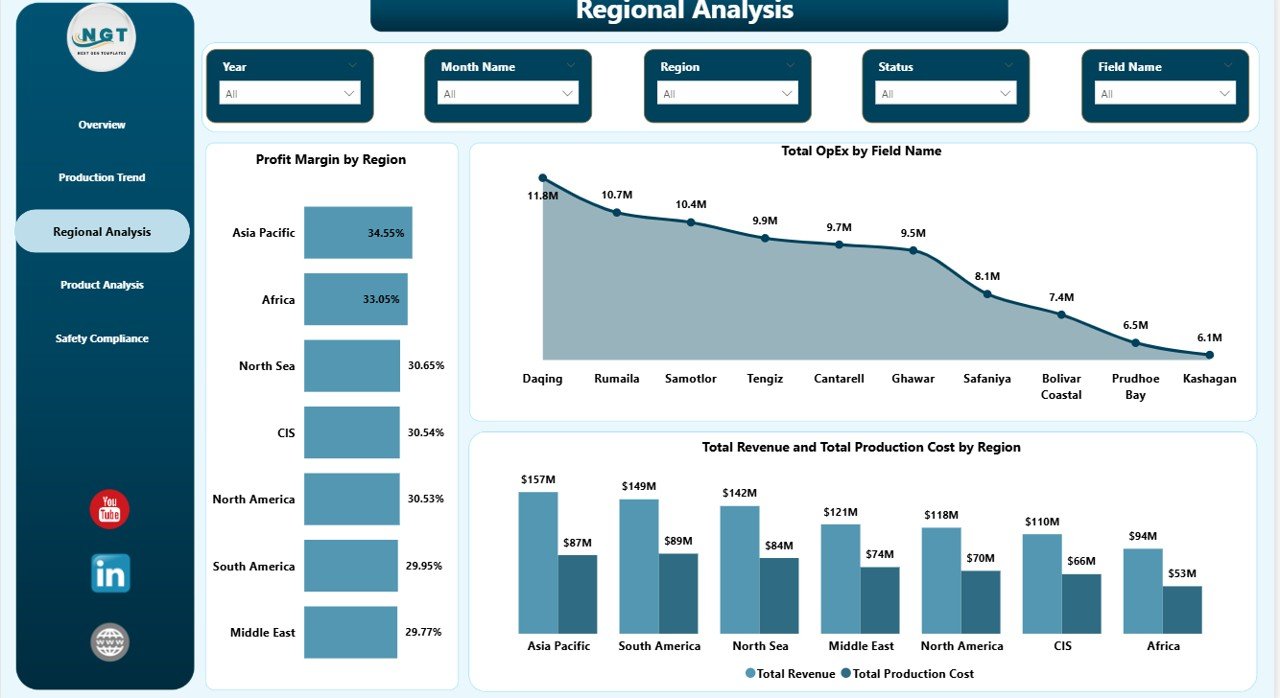
Page 3 is built for E&P managers and regional VPs. It cuts the entire dataset by geography:
- Profit Margin by Region — horizontal bar chart ranking regions by net margin so capital allocation decisions are data-driven, not political.
- Total OpEx by Field Name — drills below region into individual fields; shows which assets are cost-intensive and need an efficiency review.
- Total Revenue and Total Production Cost by Region — combination chart pairing top-line revenue with operating cost in the same visual; the gap tells the regional profit story.
 Regional Analysis
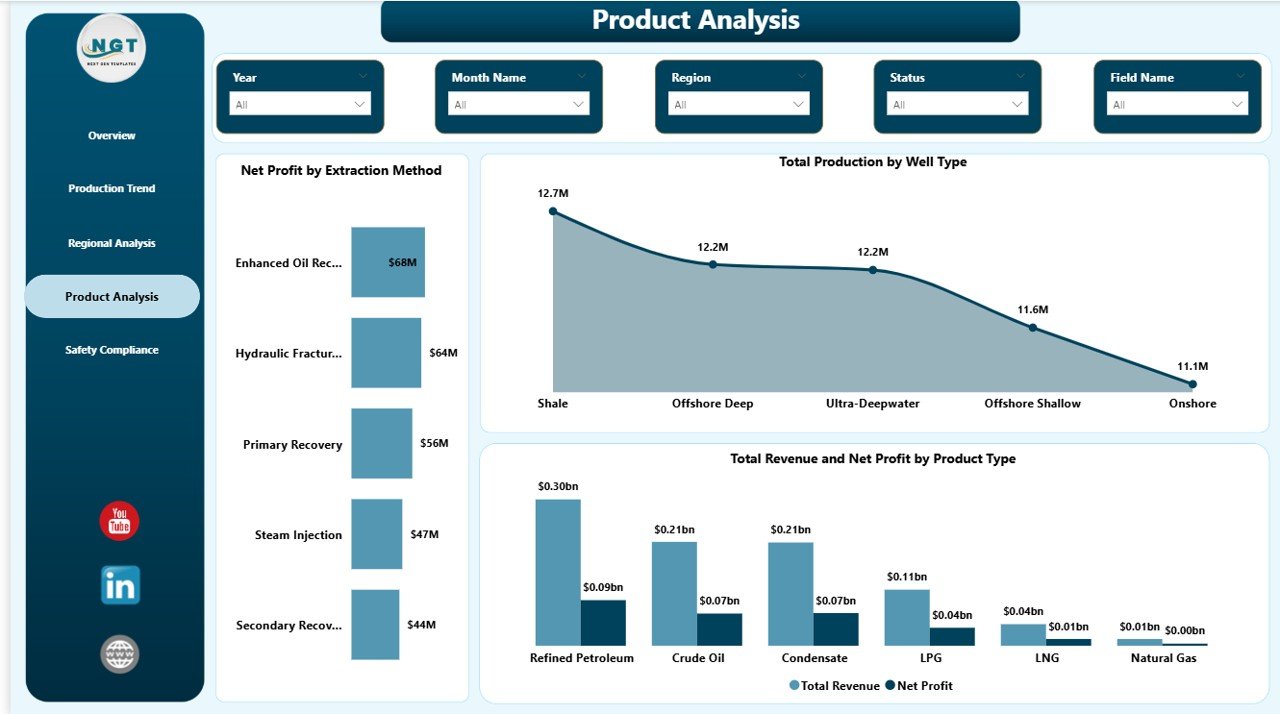
Page 4 — Product Analysis
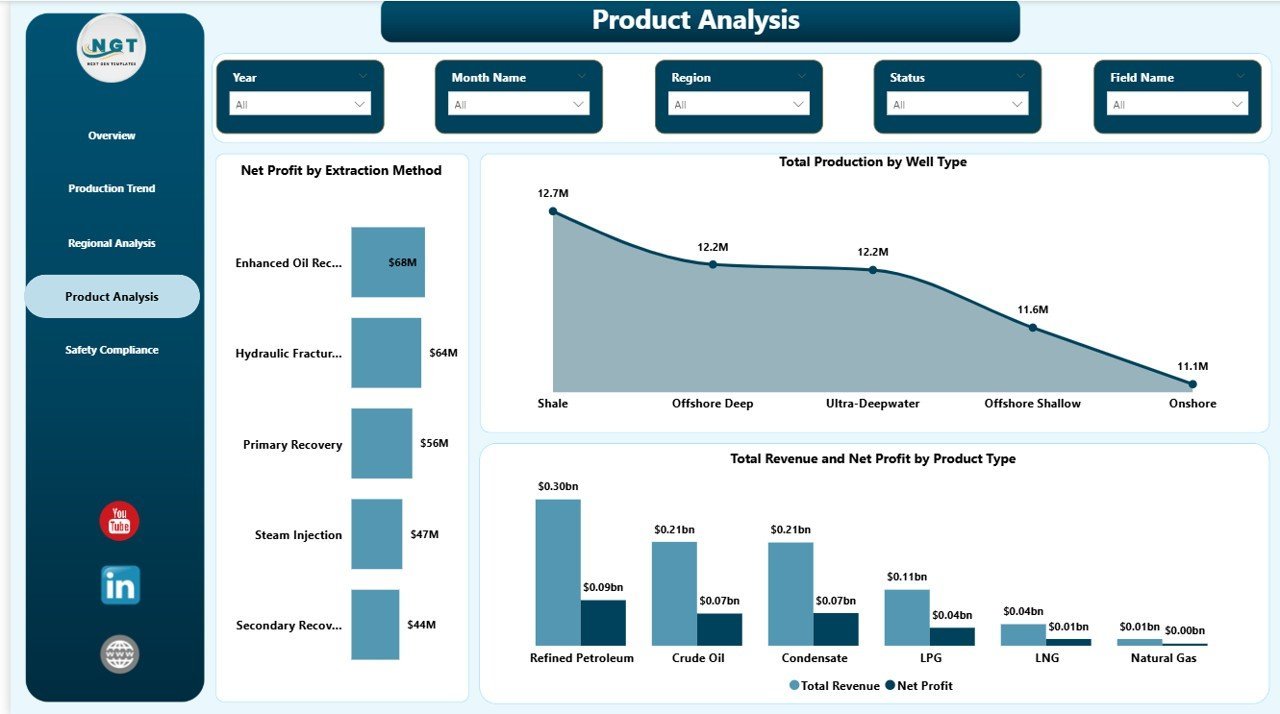
Page 4 reorients the dataset around what’s being produced and how it’s being extracted:
- Net Profit by Extraction Method — compares profitability across conventional, hydraulic fracturing, EOR (enhanced oil recovery), thermal, and offshore methods.
- Total Production by Well Type — splits volume across vertical, horizontal, directional, and multilateral wells; informs future drilling mix decisions.
- Total Revenue and Net Profit by Product Type — paired bars for each product line so you can see whether high-revenue products are also high-margin (often they aren’t).
 Product Analysis
Page 5 — Safety Compliance
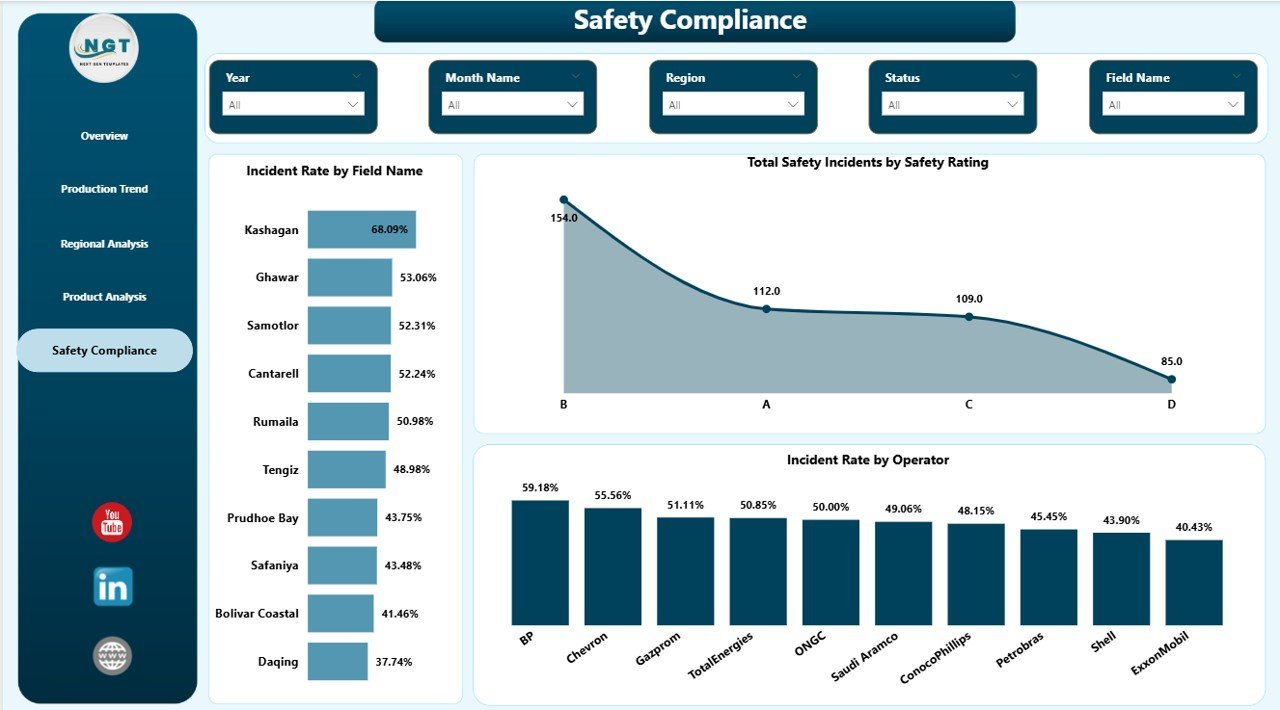
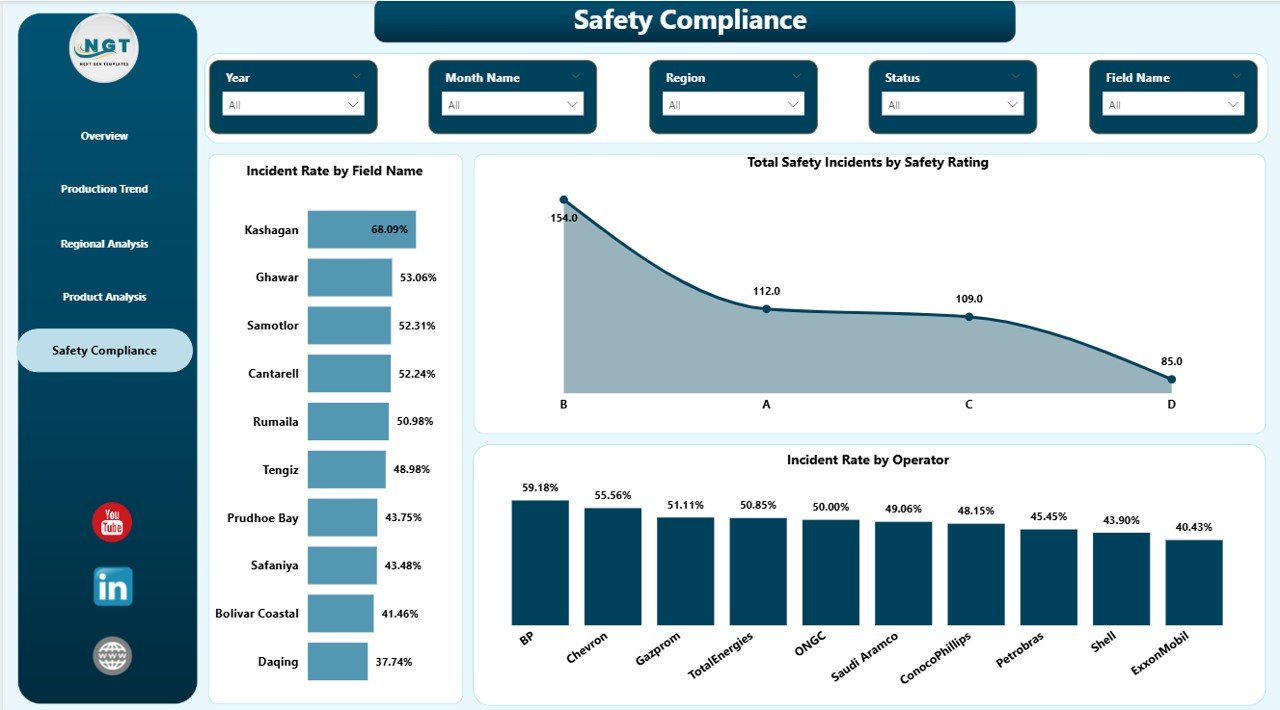
Safety is the page that often saves the business. Three visuals expose where incidents are happening and which operators are driving them:
- Incident Rate by Field Name — ranked bar chart showing exactly which fields have the highest incident frequency; this is your action list for HSE audits.
- Total Safety Incidents by Safety Rating — distribution of incidents across rating bands (low / moderate / high / critical); helps segment severity at a glance.
- Incident Rate by Operator — performance comparison across crews, contractors, or operating partners. Useful for contractor scorecards and HSE accountability conversations.
 Safety Compliance
Power BI vs Excel vs Paid Oil & Gas SaaS
| Capability | This Power BI Template | Excel Sister Template | Spotfire / IHS / P2 SaaS |
|---|---|---|---|
| Cost (one-time vs annual) | $17.99 one-time | $17.99 one-time | $8,000 – $40,000+/year |
| Platform required | Free Power BI Desktop | Microsoft Excel | Vendor login portal |
| Setup time | < 10 minutes | < 10 minutes | 3–8 weeks (consultant-led) |
| Cross-page slicers | Yes | Slicer-driven (no cross-page) | Yes |
| Browser & mobile access | Yes (publish to Power BI Service) | No (desktop only) | Yes |
| Auto-refresh from sources | Yes (SQL, SharePoint, OData, ERP) | Manual paste / Power Query | Yes |
| Row-Level Security (RLS) | Yes (Power BI native) | No | Yes |
| Editable / customizable | Fully editable .pbix | Fully editable workbook | Limited (vendor-controlled) |
| Year-1 cost (5 users) | $17.99 + Power BI Pro ($120 × 5) | $17.99 | $15,000 – $50,000 |
Who This Dashboard Is For
- ✅ E&P operations managers who need a single weekly board view of revenue, production, and downtime across multiple fields.
- ✅ Oilfield finance controllers who track OpEx, CapEx, and net profit by region or asset.
- ✅ HSE managers who need to surface high-incident-rate fields, operators, and safety bands.
- ✅ Energy industry consultants building client deliverables fast without starting from a blank canvas.
- ✅ Power BI analysts who want a working oil & gas data model and DAX measures to learn from or extend.
Who This Dashboard Is NOT For
- ❌ Teams who need real-time SCADA/PI Historian streaming integration (this is a refresh-based BI report, not a streaming dashboard).
- ❌ Reservoir engineers needing decline-curve forecasting or simulation models.
- ❌ Users who want a fully-managed SaaS where vendors host and maintain the data layer for them.
Real-World Use Cases
Case 1 — Independent E&P operator with 6 producing fields: The CEO wanted a single Monday-morning report covering revenue, net profit, downtime, and incident rate across all 6 fields. The team replaced the sample data with their monthly close exports and were live in under an hour. The Regional Analysis page replaced a 14-tab Excel pack the controller used to send weekly.
Case 2 — Oilfield service contractor working across 4 operators: The HSE lead used Page 5 (Safety Compliance) as their monthly contractor scorecard. The Incident Rate by Operator visual, paired with the Safety Rating donut, became the standing slide in the contractor performance review meeting with their largest client.
Case 3 — Energy consulting firm: The team uses this template as the starter file for client engagements. They duplicate the .pbix, swap in client well-level data, rebrand the colour theme, and deliver a 5-page board pack in 2 days instead of building from scratch over 2 weeks.
About the Author
Built by PK, Microsoft Certified Professional with 15+ years of hands-on Power BI, Excel, and Google Sheets experience. PK runs the YouTube channel @PKAnExcelExpert with 300K+ subscribers across the network and has shipped 5,500+ dashboard templates serving 8,400+ customers in 40+ countries. Every template is built, tested, and supported by a working analyst — not generated by a no-name template farm.
Frequently Asked Questions
Do I need a paid Power BI license to use this template?
No. You only need Power BI Desktop, which is free from Microsoft, to open, edit, and view the .pbix file on your computer. A Power BI Pro license (paid) is only required if you want to publish the report to the cloud Power BI Service and share it with colleagues through a workspace.
Can I replace the sample data with my own oil & gas operational data?
Yes. The template uses a clean, documented data table. Open the .pbix in Power BI Desktop, go to the data view, replace the sample rows with your own well-level or field-level data (matching the column structure), and click Refresh. All five pages and visuals update automatically.
Does the dashboard support Row-Level Security?
Yes. Power BI’s native Row-Level Security (RLS) works with this template. You can configure RLS roles so a regional manager sees only their region’s data and the CEO sees everything, all from the same .pbix file.
Will it connect to SQL Server, SharePoint, or my ERP?
Yes. The template uses Power Query under the hood. You can repoint the data source from the sample file to SQL Server, Azure SQL, SharePoint lists, OData, Oracle, SAP, or any other source supported by Power BI — without rebuilding the visuals.
Is there an Excel version of this dashboard?
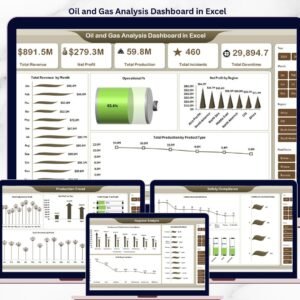
Yes. The Oil and Gas Analysis Dashboard in Excel is the sister template, built around pivot tables and slicers in Excel for teams that prefer working in spreadsheets. Both versions track the same KPIs.
Can I rebrand it with our company logo and colours?
Yes. Power BI themes, colour palettes, fonts, logo, and visual headers are fully editable. Most teams rebrand the dashboard in 15–30 minutes.
What’s the refund policy?
Because this is a digital download delivered instantly, all sales are final. We strongly recommend reviewing the screenshots and feature list above to confirm fit before purchase.
Last updated: May 2026
Companion read: Oil and Gas Analysis Dashboard in Power BI — Complete Walkthrough, KPI Definitions & Use Cases on PK-AnExcelExpert.com.
Browse more: Power BI Dashboards · Manufacturing Excel Dashboards
Watch the step-by-step video tutorial:
YouTube