

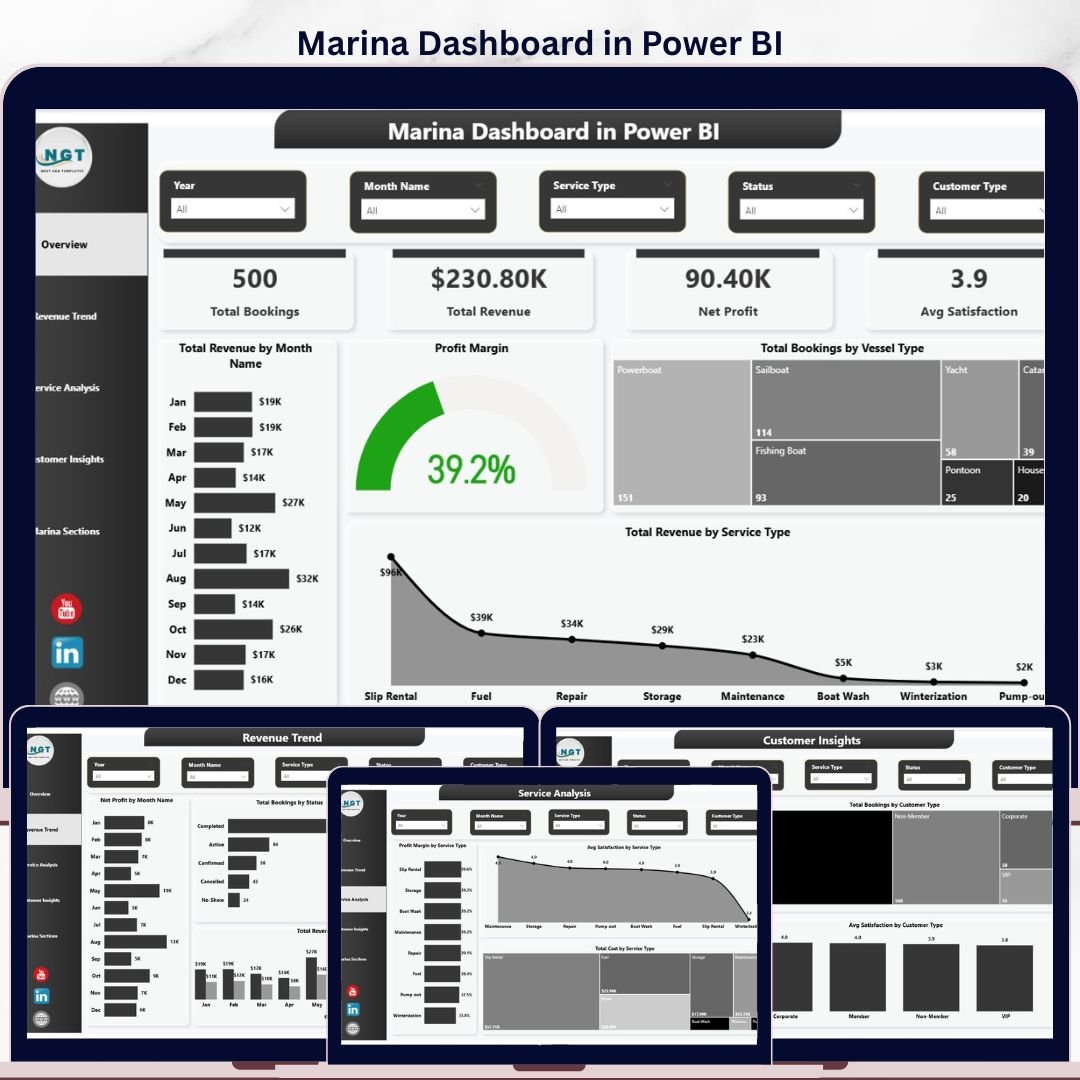
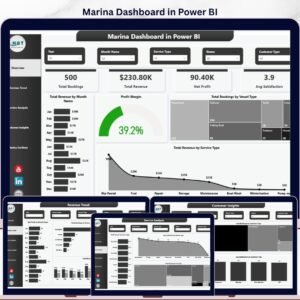
The Marina Dashboard in Power BI tracks 4 high-level KPIs across 5 interactive report pages, with 14 pre-built visuals and slicers for vessel type, service type, customer type, and marina section. Setup takes under 10 minutes — point Power BI Desktop at your booking data, click Refresh, and every visual updates automatically through the built-in data model.
🌍 Join 8,400+ teams in 40+ countries using Nextgen Templates to replace paid SaaS tools with one-time-purchase Excel, Google Sheets, Power BI, and HTML templates.
✅ Instant download · One-time payment · No subscription · No per-user fees · Lifetime access
This Power BI Marina Management Dashboard is built for harbor masters, marina operators, yacht club managers, and small boat-yard owners who need decision-grade analytics on slip occupancy, mooring revenue, fuel sales, repair-service profitability, and member retention — without paying $99 to $499 per month for marina-management SaaS like DockMaster, MarinaOffice, or Molo. The .pbix file is fully editable, runs on free Power BI Desktop, and can be published to Power BI Service for browser and mobile access.
🔑 Key Features of the Marina Dashboard in Power BI
📊 5 interactive report pages — Overview, Revenue Trend, Service Analysis, Customer Insights, and Marina Sections give marina operators a complete operational picture from a single .pbix file. Every page shares the same data model, so a slicer click on one page filters consistently across the entire report.
⛵ 4-way slicer filtering — Filter by Vessel Type, Service Type, Customer Type, and Marina Section to drill into yacht-club members, transient day-trippers, dry-storage tenants, or specific dock zones. Slicers use Power BI cross-filtering documented in the official Microsoft Power BI slicer guide.
💰 4 KPI cards on the Overview page — Total Bookings, Total Revenue, Net Profit, and Average Satisfaction update instantly the moment you change a slicer or refresh the data source. Every card pulls from the same underlying data table for consistency across pages.
📈 14 pre-built visuals across 5 pages — Revenue by Month, Profit Margin, Revenue vs Cost trends, Service Type profitability, Customer Type satisfaction comparison, and Marina Section performance — all driven by a clean DAX model that scales without performance issues on bookings tables up to 1 million rows.
🔄 Refresh-and-go workflow, no DAX edits required — Replace the sample dataset with your own bookings export from your POS or marina-management system, click Home → Refresh, and the entire dashboard rebuilds in seconds. No measures to rewrite, no relationships to remap.
💼 Designed for marinas of any size — Whether you operate a 50-slip family marina, a 300-slip yacht club, or a multi-section commercial harbor, the data model handles 5,000 to 1,000,000+ booking rows without report slowdown.
📱 Mobile-ready via Power BI Service — Publish the .pbix to Power BI Service and your dock managers, board members, and accountants can open the report on iOS or Android through the free Power BI mobile app. No file emailing, no version drift.
📦 What’s Inside the Marina Dashboard in Power BI
Page 1: Overview Page
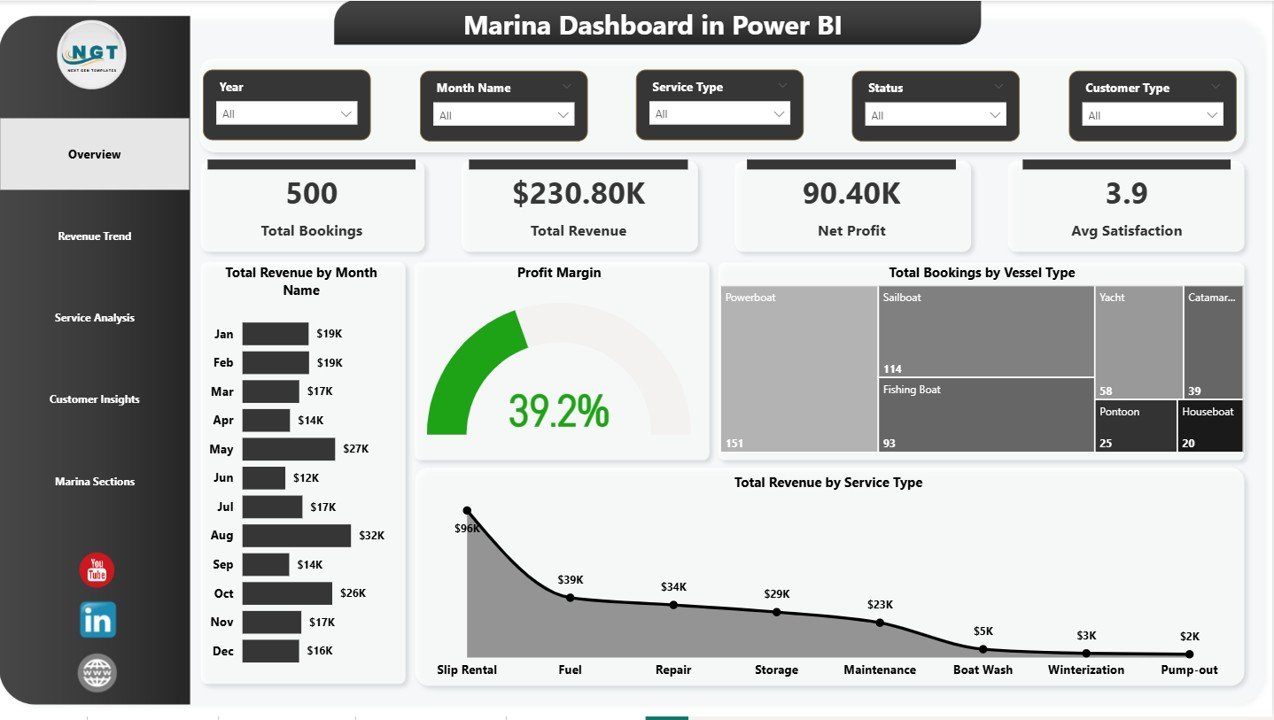
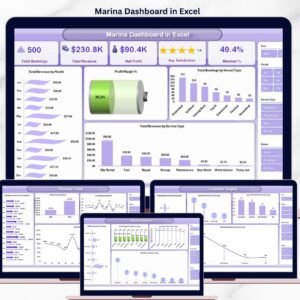
The Overview page presents the marina’s complete performance picture on a single canvas. Four KPI cards at the top display Total Bookings, Total Revenue, Net Profit, and Average Satisfaction. Four visuals beneath them cover Total Revenue by Month Name (annual revenue cycle including peak boating season), Profit Margin (overall profitability gauge), Total Bookings by Vessel Type (sailboat vs powerboat vs personal watercraft mix), and Total Revenue by Service Type (mooring, fuel, repair, storage breakdown). Multiple slicers above the cards filter the entire page by vessel, service, customer type, or section.
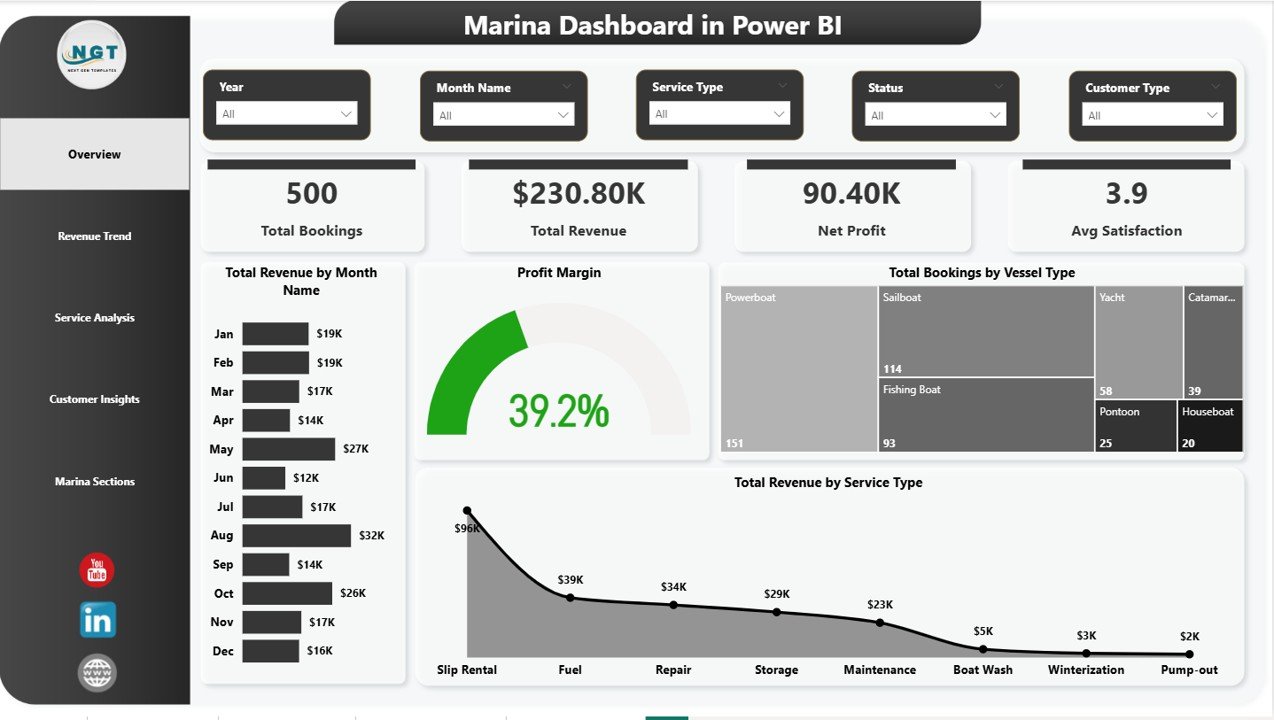
Overview Page
Page 2: Revenue Trend
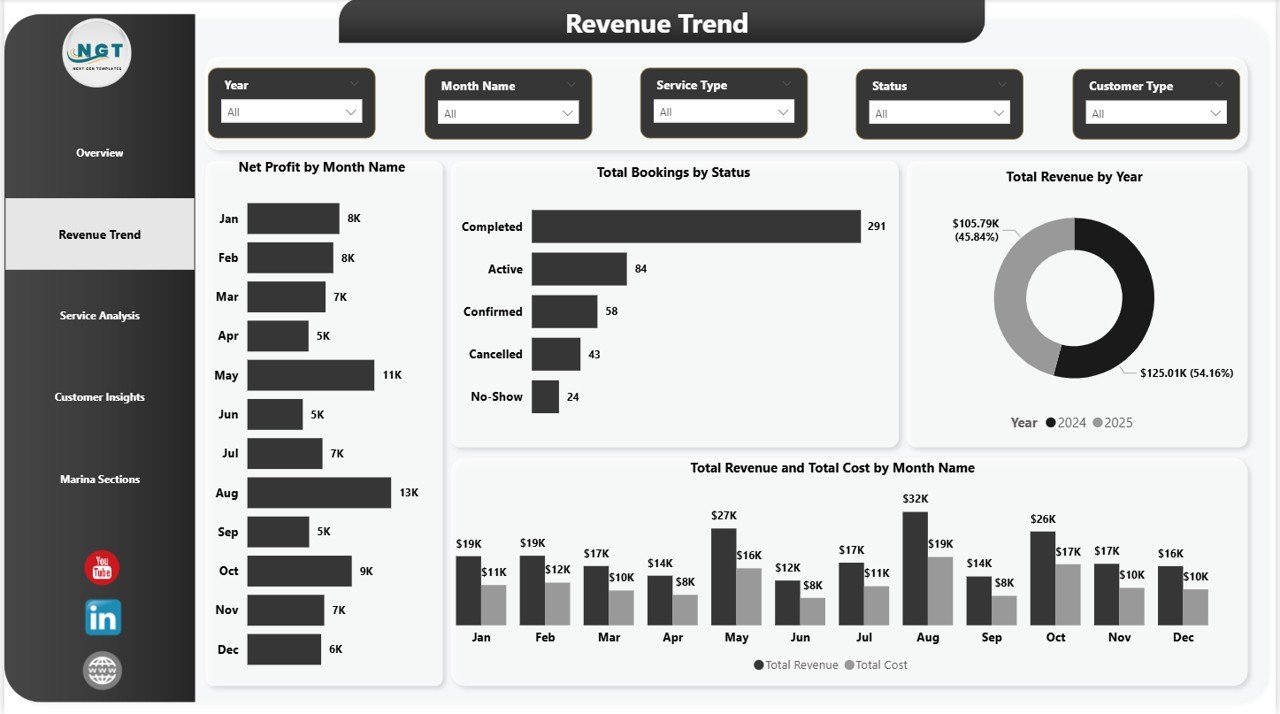
The Revenue Trend page focuses on financial momentum across time. Visuals include Net Profit by Month Name (bottom-line monthly health), Total Bookings by Status (confirmed vs cancelled vs no-show separation), Total Revenue by Year (multi-year growth trajectory), and Total Revenue and Total Cost by Month Name (margin-gap visualization on a combined axis). This page is ideal for monthly board reviews and lender meetings where year-over-year financial trends matter most.
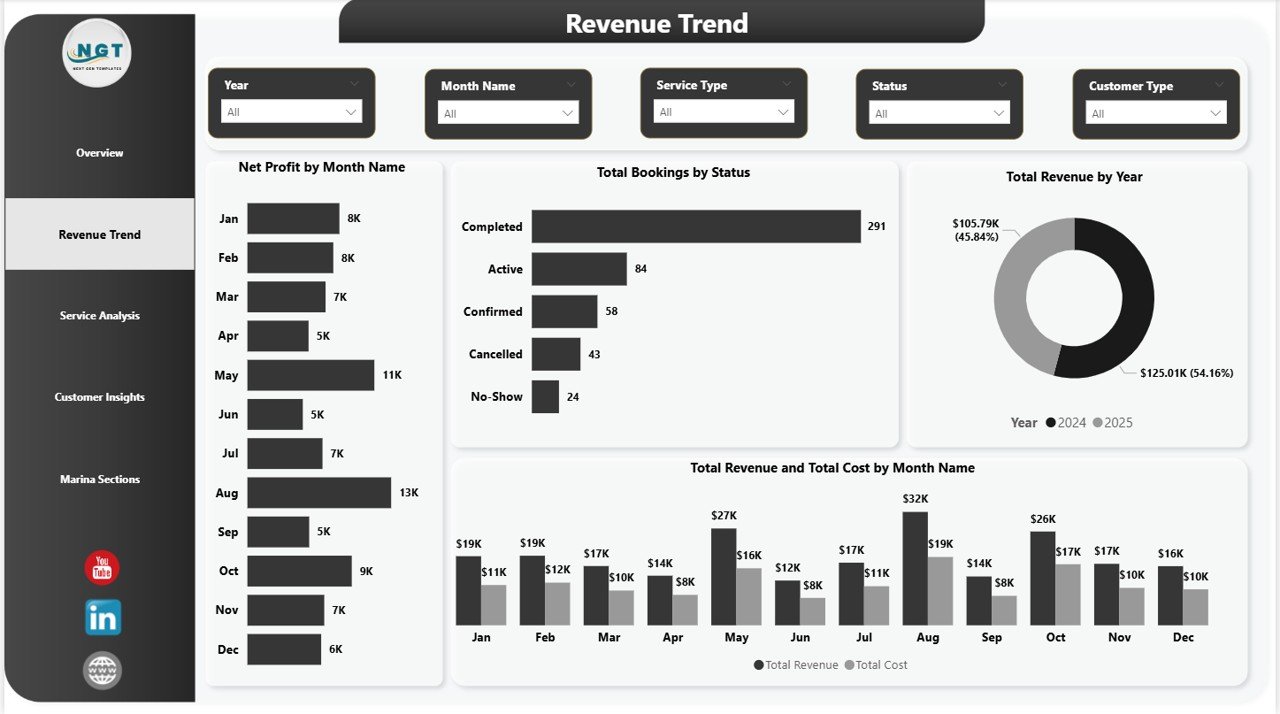
Revenue Trend
Page 3: Service Analysis
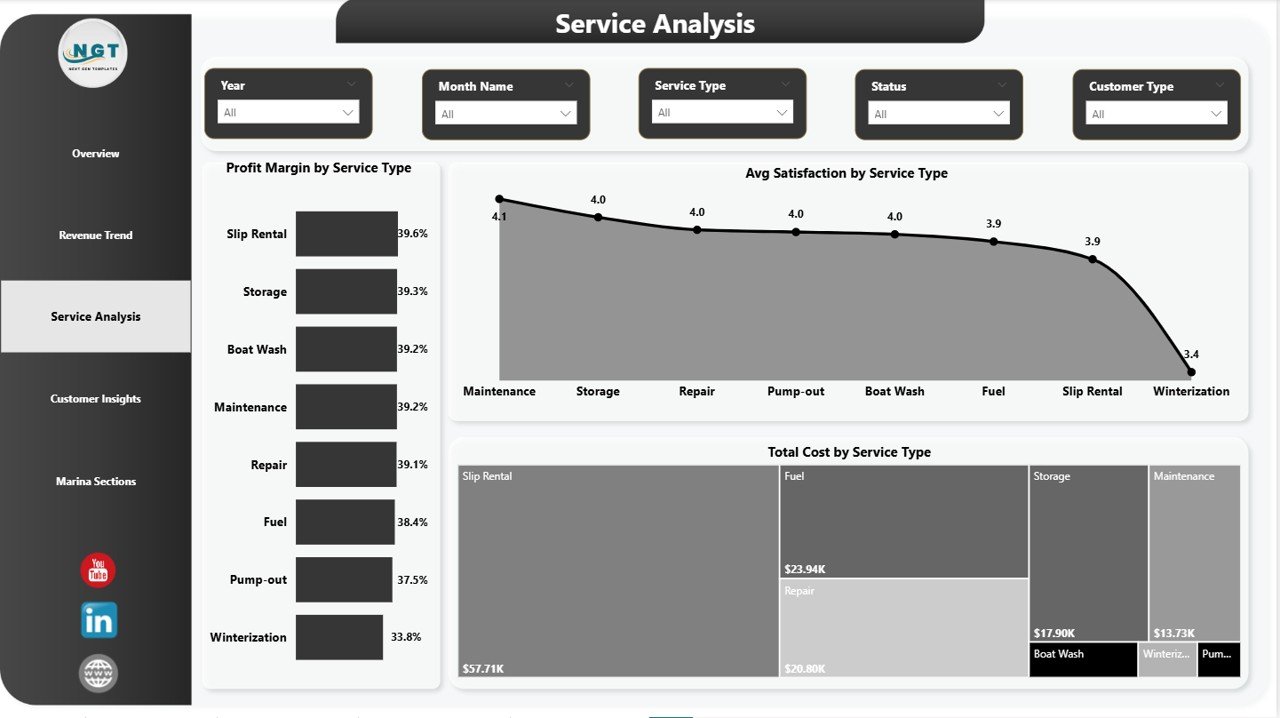
The Service Analysis page breaks down performance by service line. Visuals include Profit Margin by Service Type (which services produce the highest margin), Average Satisfaction by Service Type (which services keep customers happiest), and Total Cost by Service Type (where operating cost is concentrated). Use this page to identify which services — mooring, fuel sales, hull cleaning, winter storage, engine repair — deserve more investment and which to renegotiate or drop.
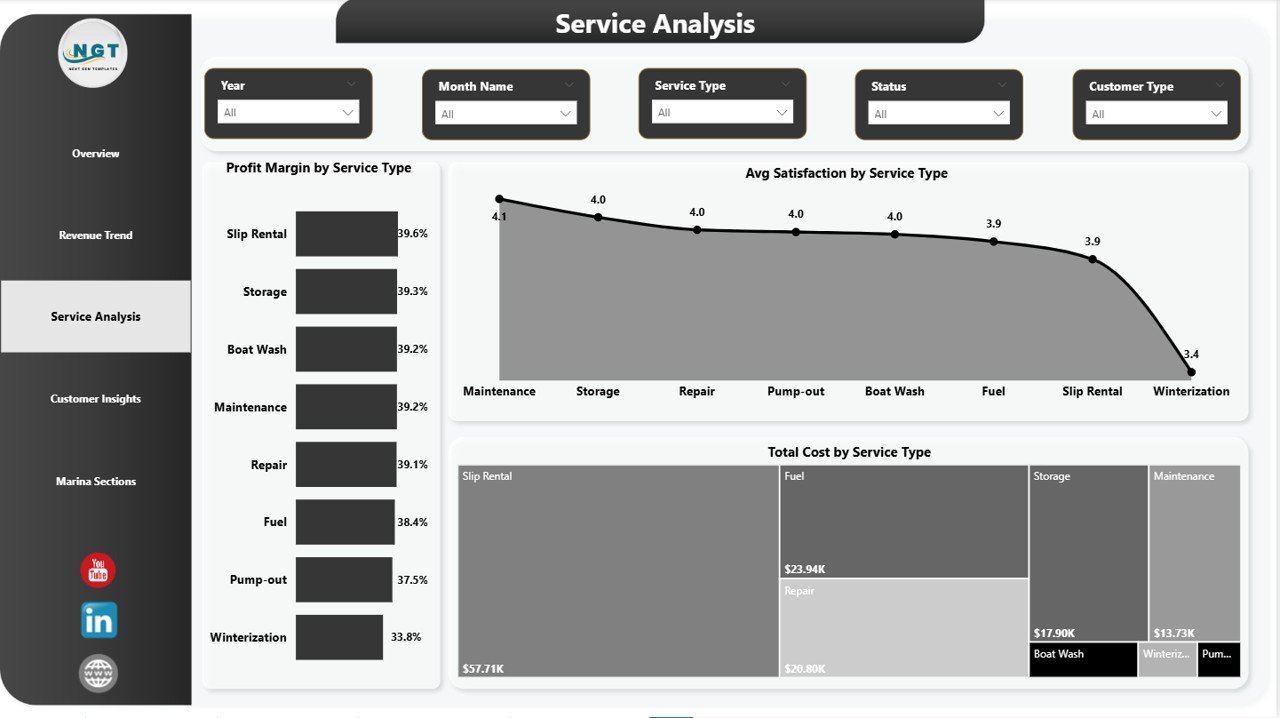
Service Analysis
Page 4: Customer Insights
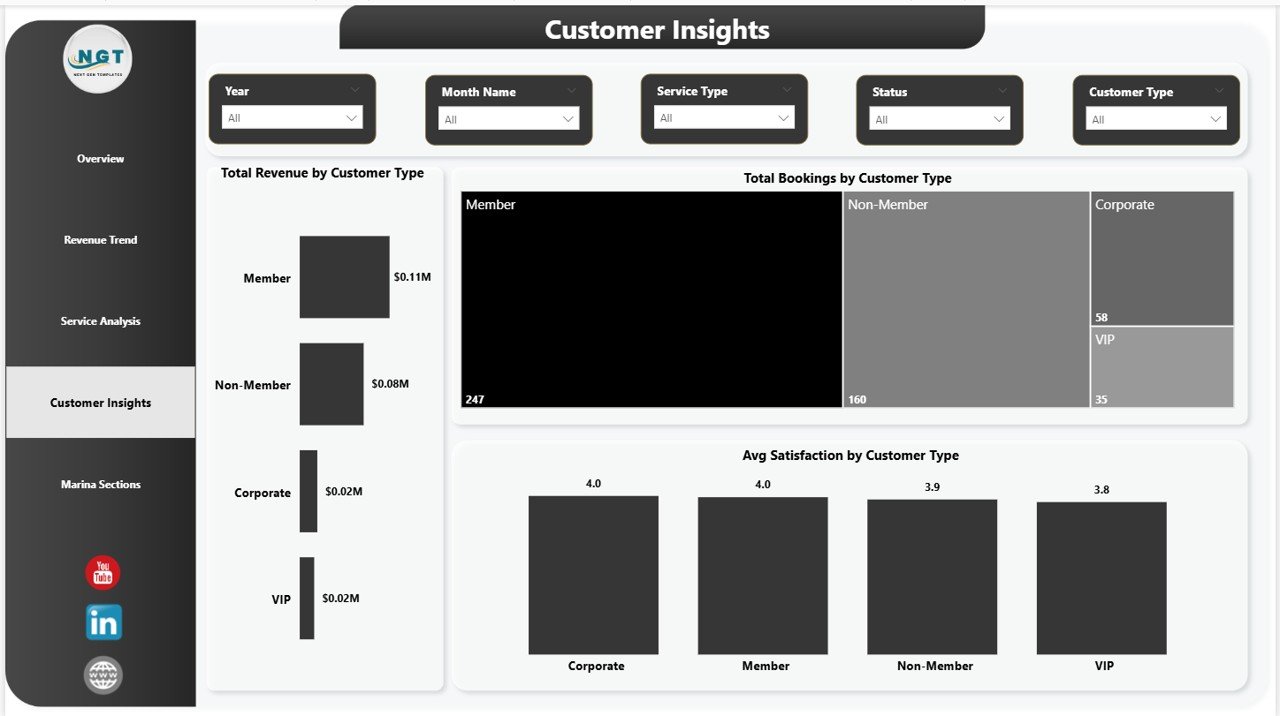
The Customer Insights page profiles the marina’s customer mix. Visuals include Total Revenue by Customer Type (revenue contribution by segment), Total Bookings by Customer Type (volume by segment), and Average Satisfaction by Customer Type (experience consistency across segments). Compare annual members against transient visitors, charter operators against private owners, and see which customer segment delivers the most lifetime value per booking.
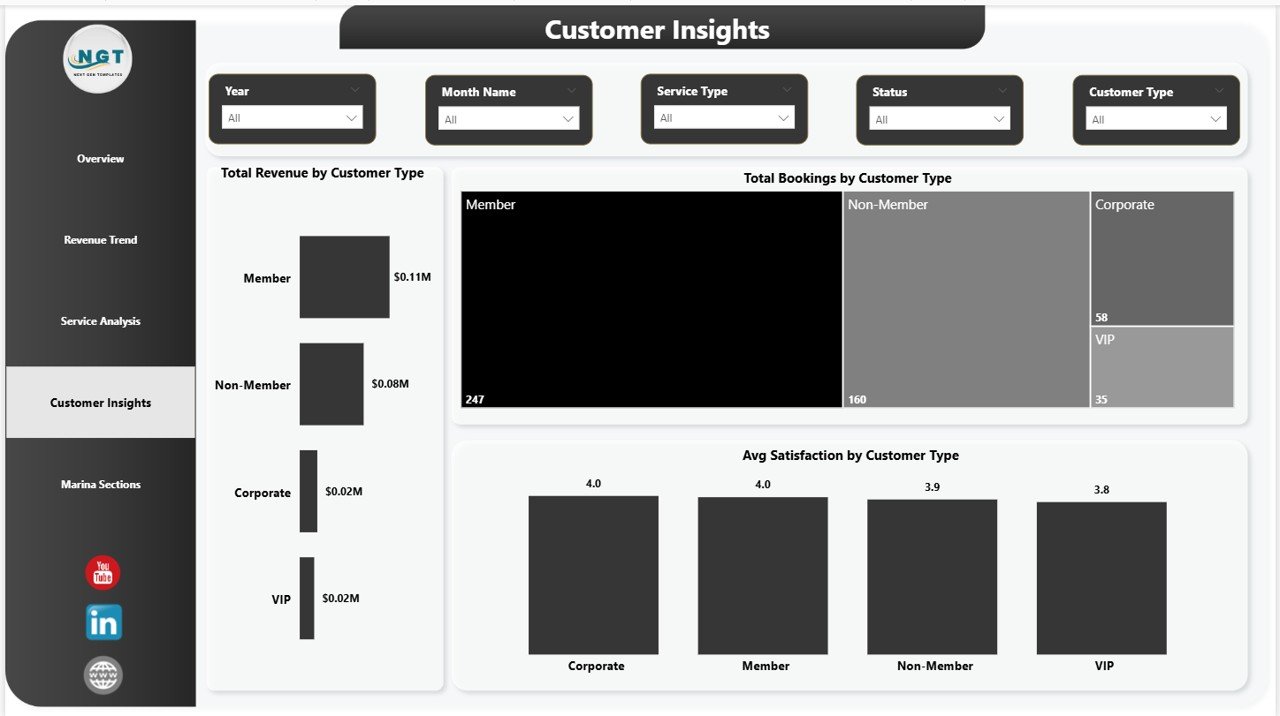
Customer Insights
Page 5: Marina Sections
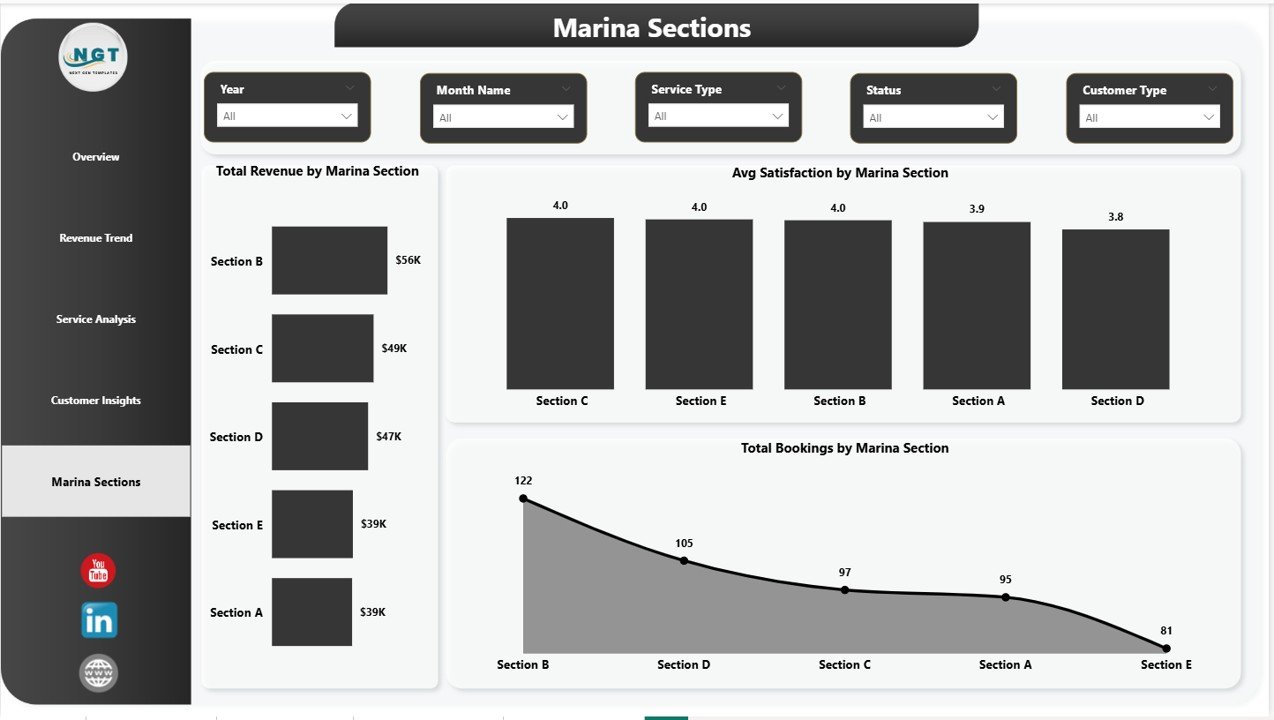
The Marina Sections page maps performance to physical zones in the harbor. Visuals include Total Revenue by Marina Section (which docks earn the most), Average Satisfaction by Marina Section (where customer experience varies), and Total Bookings by Marina Section (which zones run at capacity). Spot which docks are underutilized, where satisfaction is slipping, and where the next renovation budget should land.
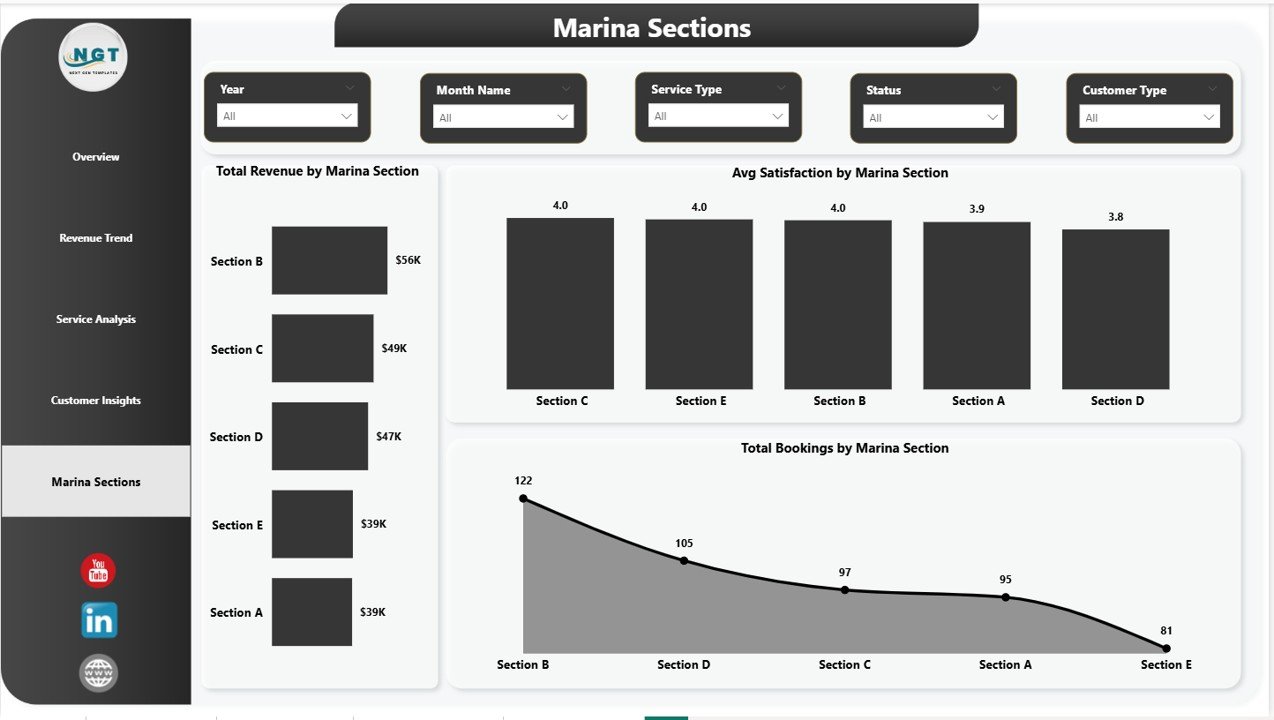
Marina Sections
📊 Marina Dashboard in Power BI vs. Tableau Hospitality Build vs. DockMaster / Molo SaaS — Where This Fits
| Feature | Marina Dashboard in Power BI | Tableau Hospitality Build | DockMaster / Molo / MarinaOffice SaaS |
|---|---|---|---|
| Cost | $17.99 one-time | $15 – $70 / user / month (Tableau license) | $99 – $499 / month + setup |
| Platform | Power BI Desktop (free) | Tableau Desktop / Cloud | Cloud SaaS (browser + mobile app) |
| Setup time | Under 10 minutes | 1 – 2 hours (data model + visual build) | 1 – 4 weeks onboarding |
| Real-time team collaboration | ✅ Power BI Service publish | ✅ Tableau Cloud | ✅ Native |
| Mobile access | ✅ Power BI mobile app | ✅ Tableau Mobile | ✅ Native app |
| Customizable visuals and DAX | ✅ Fully editable | ✅ Fully editable | ❌ Vendor-controlled |
| 4-way slicer filtering (Vessel, Service, Customer, Section) | ✅ Built-in | Build from scratch | ✅ Built-in filters |
| Year-1 cost at 5 users | $17.99 total | $900 – $4,200 | $1,188 – $5,988 |
| Reservations and POS integration | ❌ Manual data import | ❌ Manual | ✅ Built-in |
For marina operators who want professional Power BI analytics without recurring SaaS or BI license fees, the Marina Dashboard in Power BI sits in the sweet spot.
👥 Who This Template Is For — and Who It’s Not For
✅ This template is built for:
- Independent marina owners and harbor masters managing 30 – 500 slips
- Yacht club managers preparing monthly board reports and member updates in Power BI
- Boat-yard operators tracking repair-service profitability against mooring income
- Marina franchise regional managers comparing performance across 2 – 10 sites
- Hospitality consultants delivering Power BI dashboards to marina clients
- Hospitality and BI students learning Power BI through a real-world marina dataset
❌ This template is NOT for:
- Large commercial ports needing real-time AIS vessel tracking and customs integration
- Marinas requiring built-in credit-card processing or payment-gateway integration
- Operators wanting mobile-first dock-staff apps for reservations and check-ins (use Molo or DockMaster)
- Teams that don’t have Power BI Desktop installed and aren’t comfortable refreshing data sources
⚙️ How to Use the Marina Dashboard in Power BI
- Download and unzip the Marina Dashboard in Power BI file from your purchase confirmation email.
- Open the .pbix file in Power BI Desktop (free from Microsoft, Windows only).
- Click Home → Transform Data → Data Source Settings and point the data source to your own bookings file or warehouse table.
- Click Home → Refresh — every KPI card and visual updates automatically with your live data.
- Use the slicers on each page to filter by Vessel Type, Service Type, Customer Type, or Marina Section and see segmented performance instantly.
- Publish to Power BI Service via Home → Publish to share with your team or board, and access the report from any browser or the Power BI mobile app.
💼 Real-World Use Cases
Marcus owns a 120-slip marina on the Chesapeake Bay. Each month he points the Marina Dashboard in Power BI at his Square POS export and dock-software booking log, refreshes, and publishes the Overview and Revenue Trend pages to Power BI Service for his lender review. He used to pay $249/month for a marina-management dashboard he barely used — now he pays $17.99 once and spends 5 minutes a month on reporting.
Helena runs operations for a 4-location yacht-club group in Florida. She duplicates the Marina Dashboard in Power BI for each location, then maintains a master rollup that combines all four data sources. The Marina Sections page helps her board decide which site needs the next dock-renovation budget by showing slip-level revenue and satisfaction side by side.
Diego is a fractional CFO consulting for three small marinas. He uses the Customer Insights page to coach owners on shifting their booking mix toward annual members (higher LTV, lower acquisition cost) versus transient day visitors. The template paid for itself the first time he used it in a client engagement.
❓ Frequently Asked Questions
What KPIs does the Marina Dashboard in Power BI track?
The Marina Dashboard in Power BI tracks 4 headline KPIs — Total Bookings, Total Revenue, Net Profit, and Average Satisfaction — plus 14 supporting visuals across Revenue Trend, Service Analysis, Customer Insights, and Marina Sections pages. All KPIs and visuals update automatically when you point the data source at your own bookings file.
How does the Marina Dashboard in Power BI compare to DockMaster or Molo?
DockMaster and Molo are full marina-management SaaS platforms costing $99 – $499 per month with built-in reservations, payments, and channel sync. The Marina Dashboard in Power BI is a $17.99 one-time analytics layer ideal for operators who already manage bookings elsewhere and just need a customizable, drillable performance dashboard without a subscription.
How long does setup take?
Setup takes under 10 minutes for most marinas. Open the .pbix in Power BI Desktop, point the data source at your booking export through Transform Data → Data Source Settings, click Refresh, and the Marina Dashboard in Power BI is live. No DAX edits, no measure rewrites, no relationship changes.
Do I need a paid Power BI license to use this?
No. The Marina Dashboard in Power BI runs entirely on free Power BI Desktop for Windows. A Power BI Pro license is only required if you want to publish the report to Power BI Service for online team sharing — single-user desktop use is free.
Can I add my own KPIs, slicers, and visuals?
Yes, the Marina Dashboard in Power BI is fully unlocked. You can add new measures, calculated columns, custom visuals, or AI-driven Q&A panels alongside the existing ones. The .pbix has no protected objects, so it works as a strong starting point for further DAX and visual customization.
Does the template include sample marina data?
Yes, the Marina Dashboard in Power BI ships with sample bookings covering vessel types, service types, customer segments, marina sections, monthly revenue, and satisfaction scores — so you can see every page fully populated before plugging in your own data.
Is the Marina Dashboard in Power BI a one-time purchase?
Yes — $17.99 one-time, no subscription, no per-user fees, and no recurring charges. You receive instant download access, lifetime use rights, and free updates to the same template version.
👤 About the Author
Built by PK — Microsoft Certified Professional with 15+ years of Excel, Google Sheets, and Power BI experience. Founder of NextGenTemplates, reaching 300K+ subscribers across YouTube channels (@PK-AnExcelExpert, @NextGenTemplates, @NeoTechNavigators). Every template is hand-built and tested before release.
🔗 Explore Related Templates
If the Marina Dashboard in Power BI fits your workflow, you may also like these hospitality-adjacent templates from our Power BI Dashboard Templates library:
- B&B Dashboard in Power BI — small-property hospitality analytics with booking-source, room-type, and channel-performance views at the same price point.
- Yoga & Wellness Studio Dashboard in Power BI — service-business analytics with membership, class, and revenue tracking.
- Business Travel Services Dashboard in Power BI — broader hospitality-adjacent travel analytics in Power BI.
- Also available as: Marina Dashboard in Excel — same marina KPIs in pivot-driven Excel for teams without Power BI Desktop.
📖 Click here to read the Detailed Blog Post
🎥 Visit our YouTube channel for step-by-step video tutorials
👉 YouTube.com/@NextGenTemplates
📅 Last updated: May 2026
Watch the step-by-step video tutorial:
YouTube















Reviews
There are no reviews yet.