
Warehouse Operations Dashboard in Excel

Original price was: ₹2,999.00.Current price is: ₹1,799.00.
Details, requirements and demo below
Sale!

Warehouse Operations Dashboard in Excel

Original price was: ₹2,999.00.Current price is: ₹1,799.00.

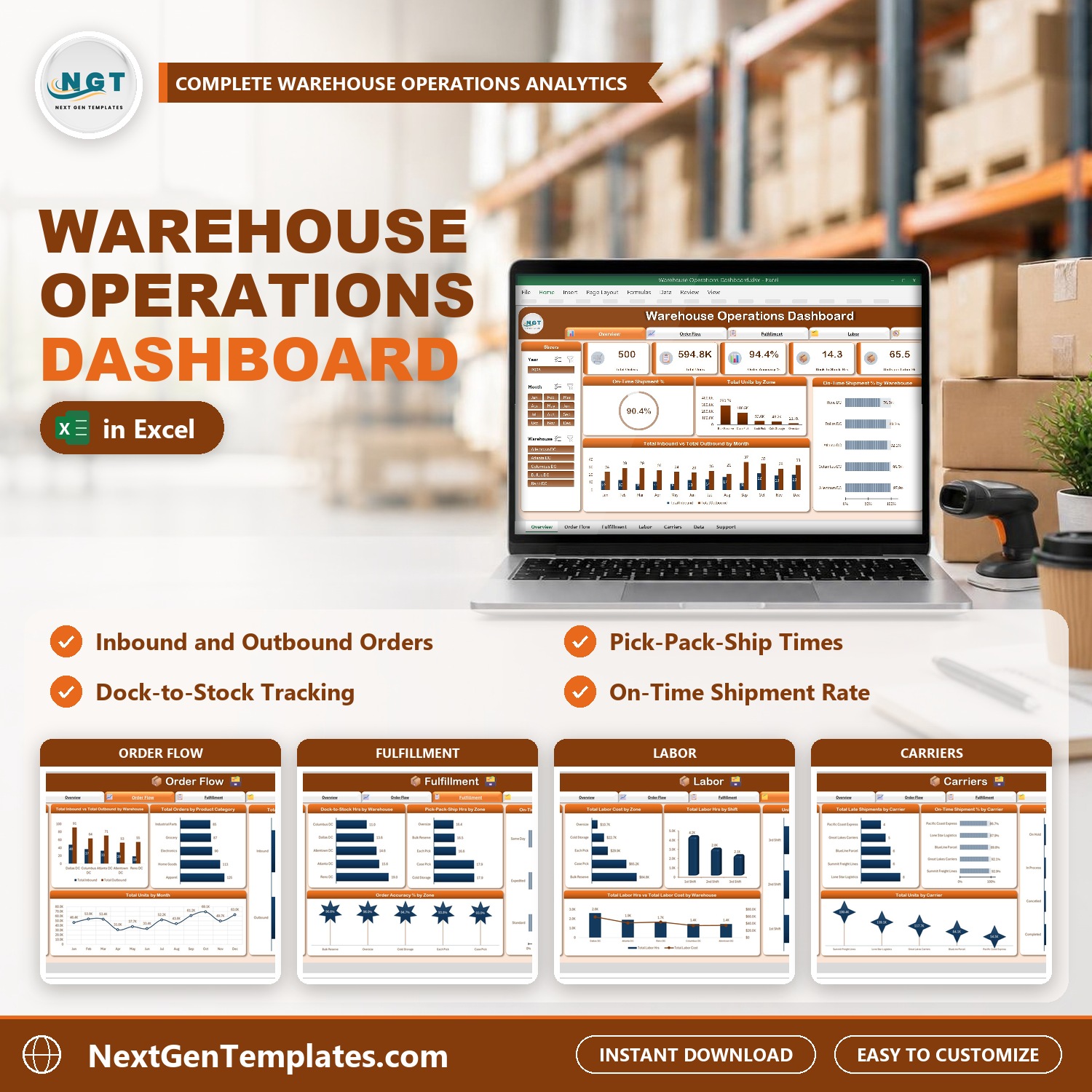
See how your warehouse orders are moving. Five pages (Overview, Order Flow, Fulfillment, Labor, Carriers), KPI cards for orders, units, order accuracy, dock-to-stock hours and units per labor hour, on-time shipment % and five slicers. Add your orders and click Refresh All. No macros.

Customize this template for your business (optional)

Handled by email: we contact you within 1 business day. One revision round included. What is included

- +
Have your own data? Build a dashboard from your Excel, CSV or Google Sheets file free in Dashboard Studio →
,

💡 Buy any 2 templates and save 20% automatically at checkout.

Included in All-Access Templates. Get this plus 7,000+ templates for ₹4,999.00 a year. Compare plans →
Pricing country
Prices follow your selected country; checkout uses your billing country.
Excel Pivot Tables & Dashboards: Basic to Advanced courseLaunch offer
🎓 NEXTGENTEMPLATES ACADEMY
Like this dashboard? Learn to build your own.
Excel Pivot Tables & Dashboards: Basic to Advanced

From your first Pivot Table to the Data Model, DAX, Power Query and a one-page KPI dashboard. 11h 51m of video by PK, with practice files, quizzes and a capstone.

See how your warehouse orders are really moving. The Warehouse Operations Dashboard in Excel turns a list of inbound and outbound orders into five clickable pages: Overview, Order Flow, Fulfillment, Labor and Carriers. Add your orders, click Refresh All, and every card and chart updates. It uses no macros and no add-ins.

Watch the Warehouse Operations Dashboard in Excel walkthrough

If you are looking for a warehouse dashboard excel template, a warehouse kpi dashboard excel workbook or a logistics dashboard excel file, this is a ready-made one.

Good to know: this is an add-data-and-refresh workbook, not a live connector to your WMS or ERP software. It is built for desktop Excel on Windows (Excel 2016 or later, or Microsoft 365). The sample data is fictional.

What You Get

  • Five dashboard pages: Overview, Order Flow, Fulfillment, Labor and Carriers
  • KPI cards for Total Orders, Total Units, Order Accuracy %, Dock-to-Stock Hrs and Units per Labor Hr, plus On-Time Shipment %
  • Five slicers (Year, Month, Warehouse, Zone and Carrier) that filter all five pages
  • A Data tab with 500 sample inbound and outbound orders and formula columns for month, year, inbound and outbound counts, shipped orders, on-time count, late shipments and accuracy
  • A Support tab that holds the pivot tables, plus a user manual PDF

Key Features

Overview Page

Five KPI cards sit across the top: Total Orders, Total Units, Order Accuracy %, Dock-to-Stock Hrs and Units per Labor Hr. Below them, a circle shows On-Time Shipment %, and charts show total units by zone, on-time shipment % by warehouse and total inbound vs total outbound by month.
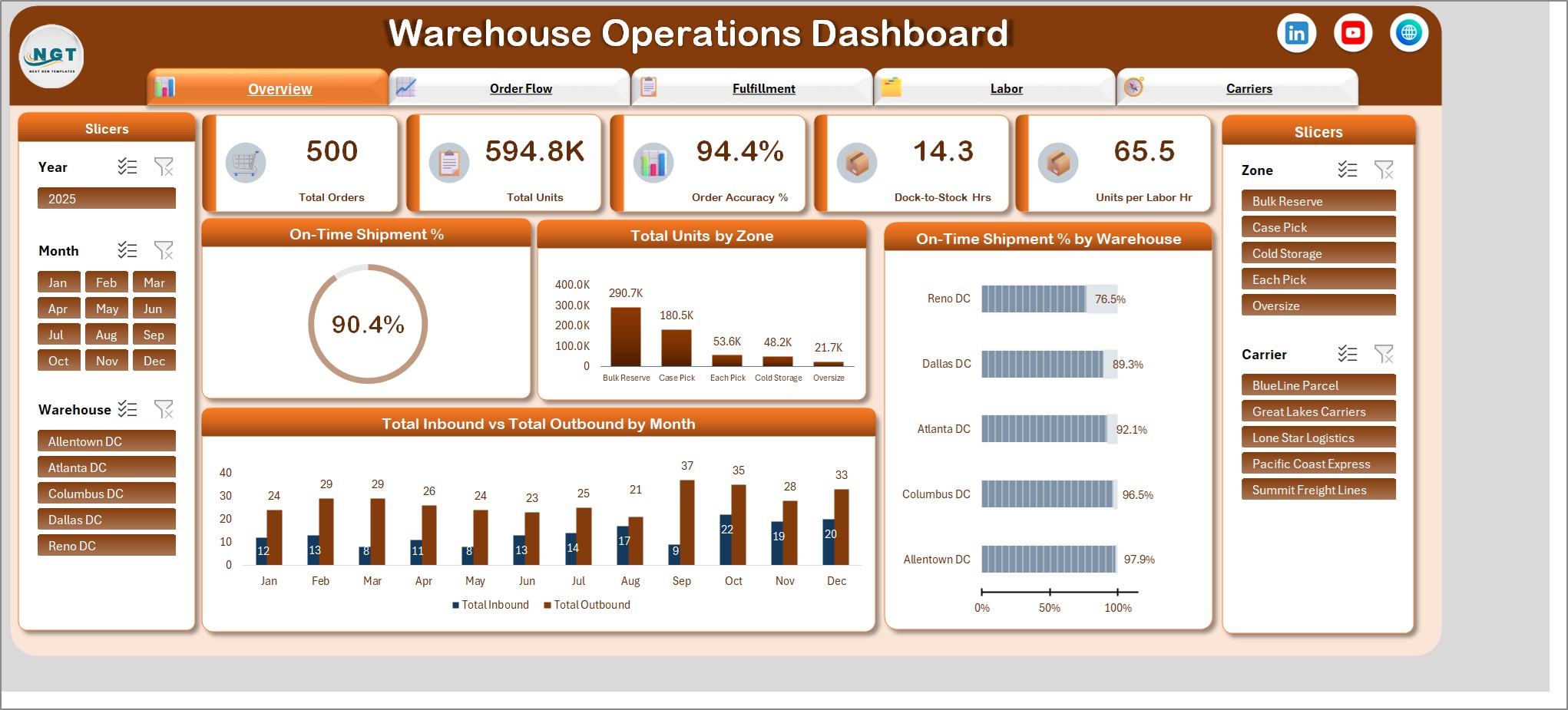
Overview page with five KPI cards, on-time shipment percent and total units by zone

Order Flow Page

Total inbound vs total outbound by warehouse, total orders by product category, total orders by order flow (the inbound and outbound split) and total units by month.
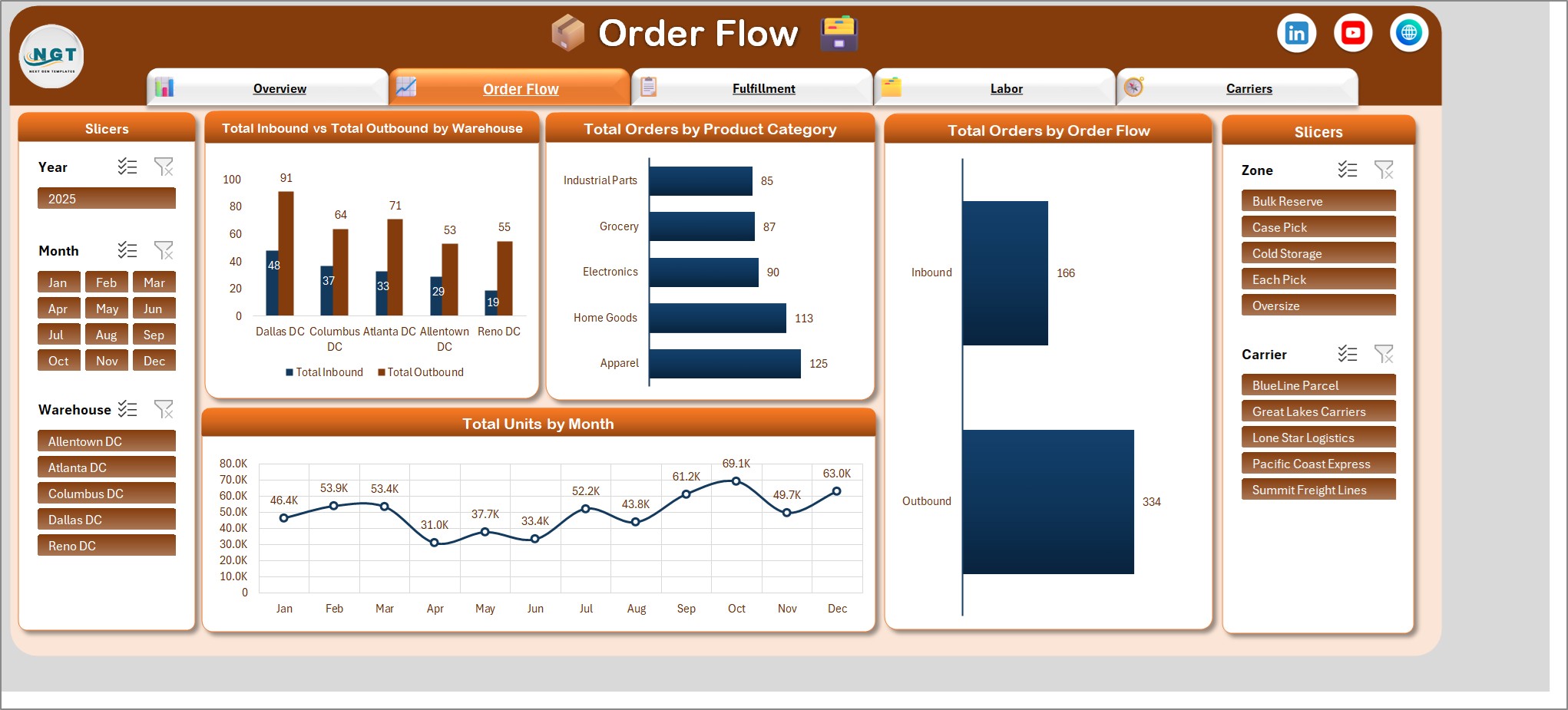
Order Flow page with inbound versus outbound by warehouse and total orders by product category

Fulfillment Page

Dock-to-stock hours by warehouse, pick-pack-ship hours by zone, on-time shipment % by priority and order accuracy % by zone.
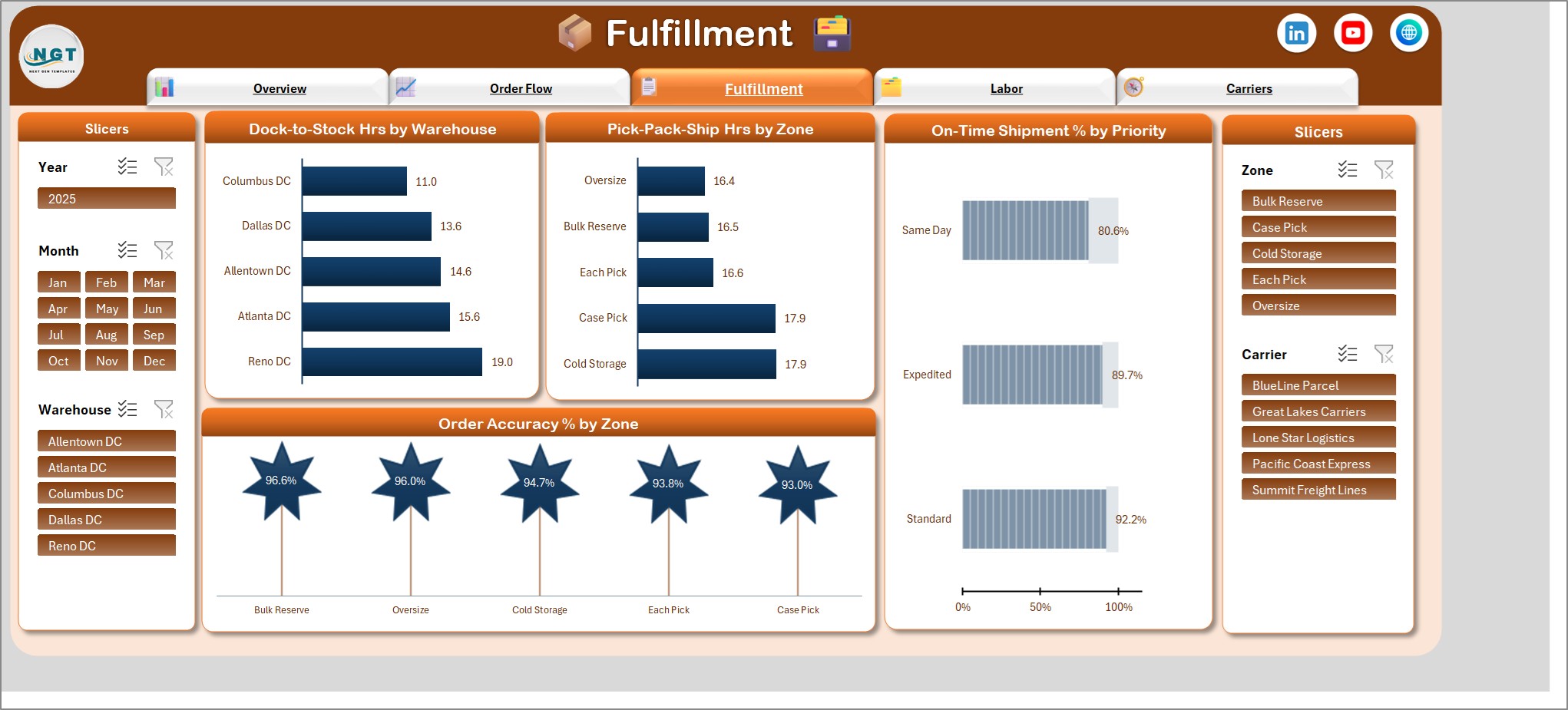
Fulfillment page with dock-to-stock hours by warehouse and on-time shipment percent by priority

Labor Page

Total labor cost by zone, total labor hours by shift, units per labor hour by shift and total labor hours vs total labor cost by warehouse.
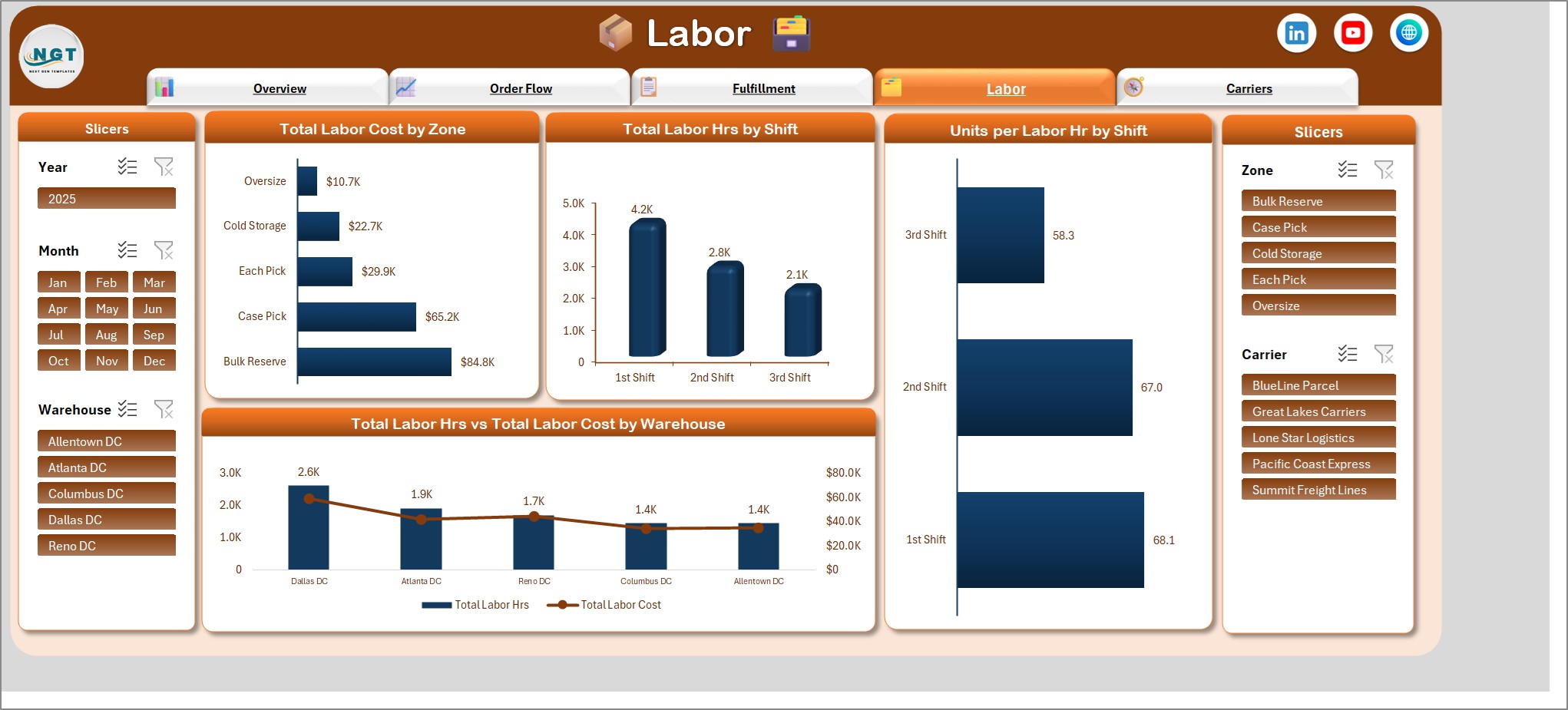
Labor page with total labor cost by zone and units per labor hour by shift

Carriers Page

Total late shipments by carrier, on-time shipment % by carrier, total orders by status and total units by carrier.
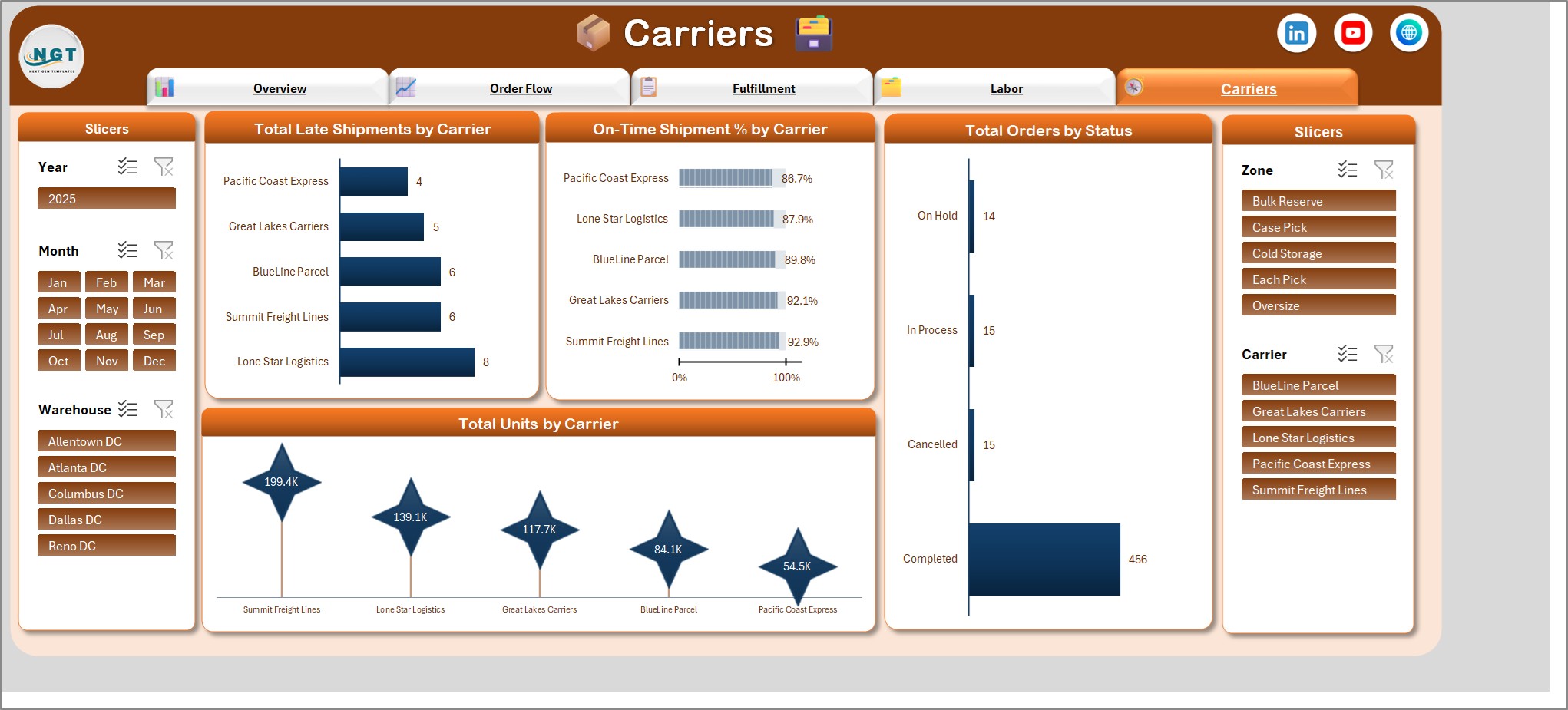
Carriers page with total late shipments by carrier and on-time shipment percent by carrier

Who Is It For?

Warehouse managers, operations managers, distribution center supervisors and logistics analysts who want to see how orders move through receiving, picking, packing and shipping, and where labor time is going. It also suits small business owners who run their own stockroom or fulfillment space.

How to Use

  1. Download the ZIP and open the Excel file.
  2. Go to the Data tab and replace the sample orders with your own, entering 1 in the Total Records column for every order.
  3. Click Refresh All.
  4. Use the Year, Month, Warehouse, Zone and Carrier slicers to filter every page.
  5. Move through the pages from the navigation bar.

Comparison

FeatureThis dashboardPlain order list
On-time shipment % and order accuracy %AutomaticManual formulas
Dock-to-stock and pick-pack-ship hoursOn the Fulfillment pageBuild yourself
Labor cost and units per labor hourCharts and slicersBuild yourself
Macros requiredNoNo
Live link to WMS softwareNoNo

Frequently Asked Questions

Does it connect to my warehouse management system?

No. It is an add-data-and-refresh workbook. Type or paste your orders on the Data tab, click Refresh All, and every card, chart and slicer updates. There is no live link to a WMS, ERP or any other system.

Is this a warehouse KPI dashboard in Excel?

Yes. It tracks on-time shipment %, order accuracy %, dock-to-stock hours, pick-pack-ship hours and units per labor hour, and breaks them down by warehouse, zone, shift, priority and carrier.

Does it need macros or add-ins?

No. It uses formulas, pivot tables, charts and slicers only, so there is nothing to enable beyond opening the file.

Which Excel version do I need?

Desktop Excel for Windows, Excel 2016 or later, or Microsoft 365. The slicers and pivot tables do not work fully in Excel for the web.

How do I add new orders?

Add a row on the Data tab for each inbound or outbound order and enter 1 in the Total Records column. The formula columns work out the month, year, shipped orders, on-time count, late shipments and accuracy. Then click Refresh All.

Which slicers are included?

Five slicers: Year, Month, Warehouse, Zone and Carrier. They filter all five pages at once.

Is the sample data real?

No. The 500 sample orders on the Data tab are fictional. Replace them with your own and refresh.

Can I keep real operations data in it?

Yes, but an Excel file is only as private as where you store it. Keep your copy somewhere access-controlled and share it with named people only.

Get the Dashboard

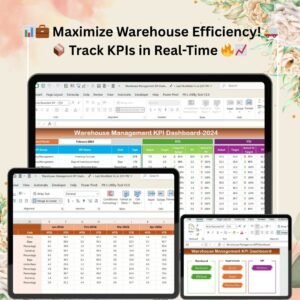
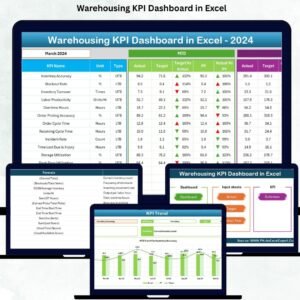
Download the Warehouse Operations Dashboard in Excel and see order flow, on-time shipment and labor productivity on one screen. For a longer KPI list, see the Warehouse Management KPI Dashboard in Excel, or browse all Excel templates.
Frequently asked questions

Which Excel version do I need?
Microsoft Excel 2016 or later on desktop (Microsoft 365 recommended). Many of our formula templates also open in Excel 2013 and Excel for the web - the exact requirement is listed in this product's description.
Does it work on Mac?
Yes. Formula-based Excel templates (no macros) work in Excel for Mac 2016 or later.
Does it work on mobile or Excel Online?
You can view it in the Excel mobile app and Excel for the web, but for entering data, using slicers and refreshing pivots we recommend desktop Excel.
How do I add my own data?
Replace the sample rows on the data sheet with your own (keep the column headers), then click Data > Refresh All so every chart and pivot updates.
Some sheets are protected - how do I edit them or change the logo?
A few of our trackers, data entry systems and dashboards protect sheets so formulas are not overwritten by mistake. Go to Review > Unprotect Sheet - most have no password. If Excel asks for one, message us with your order number and we will share it straight away.
How many records can it handle?
It has been tested with several thousand rows and suits normal small-business volumes. Excel itself handles over 1 million rows.
Is it a one-time payment or a subscription?
One-time payment. No subscription, no per-user fees and nothing to renew - the file is yours to keep.
How do I get the file after payment?
Instantly. The download link appears on screen after checkout, is emailed to you, and stays under My Account > Downloads on our website. If the email does not arrive within a few minutes, check your spam or promotions folder.
Is a user manual included?
Most of our newer products include a PDF user manual in the download. If yours does not have one, message us with your order number and we will send it.
Do I get free updates?
Bug fixes are always free - if something does not work as described, we fix it and send you the corrected file. New versions with new features are not included in the price, unless this product's description says otherwise.
Can you customise it for me?
Yes. Small changes to this template (your columns, categories, logo, colours, minor layout) cost the template price plus $40-80 (Rs 3,000-6,000 + GST), quoted once you send your list. A fully custom build is usually $100-200 (Rs 8,000-18,000 + GST) with two revision rounds. Email your requirements to [email protected] or message us on WhatsApp.
Can I use it for my business or my clients?
Yes, for your own personal or internal business use, for as long as you like. Reselling or redistributing the template is not allowed.
What is your refund policy?
Because these are digital downloads, they are non-refundable once delivered - except when the product does not match its description (report it within 48 hours of purchase) or there is a technical problem our team cannot fix within 72 hours. Email [email protected] with your order number.
How do I get help?
Email [email protected] (Mon-Fri, 10 AM-7 PM IST) or message us on WhatsApp +91 80770 90260 (chat only, no calls). Please include your order number.

Still have a question? Click Need help? at the bottom-left to ask our assistant, or message us on WhatsApp.

Reviews

There are no reviews yet.

Only logged in customers who have purchased this product may leave a review.

You may also like…

Warehouse Operations Dashboard in ExcelWarehouse Operations Dashboard in Excel
Original price was: ₹2,999.00.Current price is: ₹1,799.00.
- +
Have your own data? Build a dashboard from your Excel, CSV or Google Sheets file free in Dashboard Studio →
Scroll to Top