

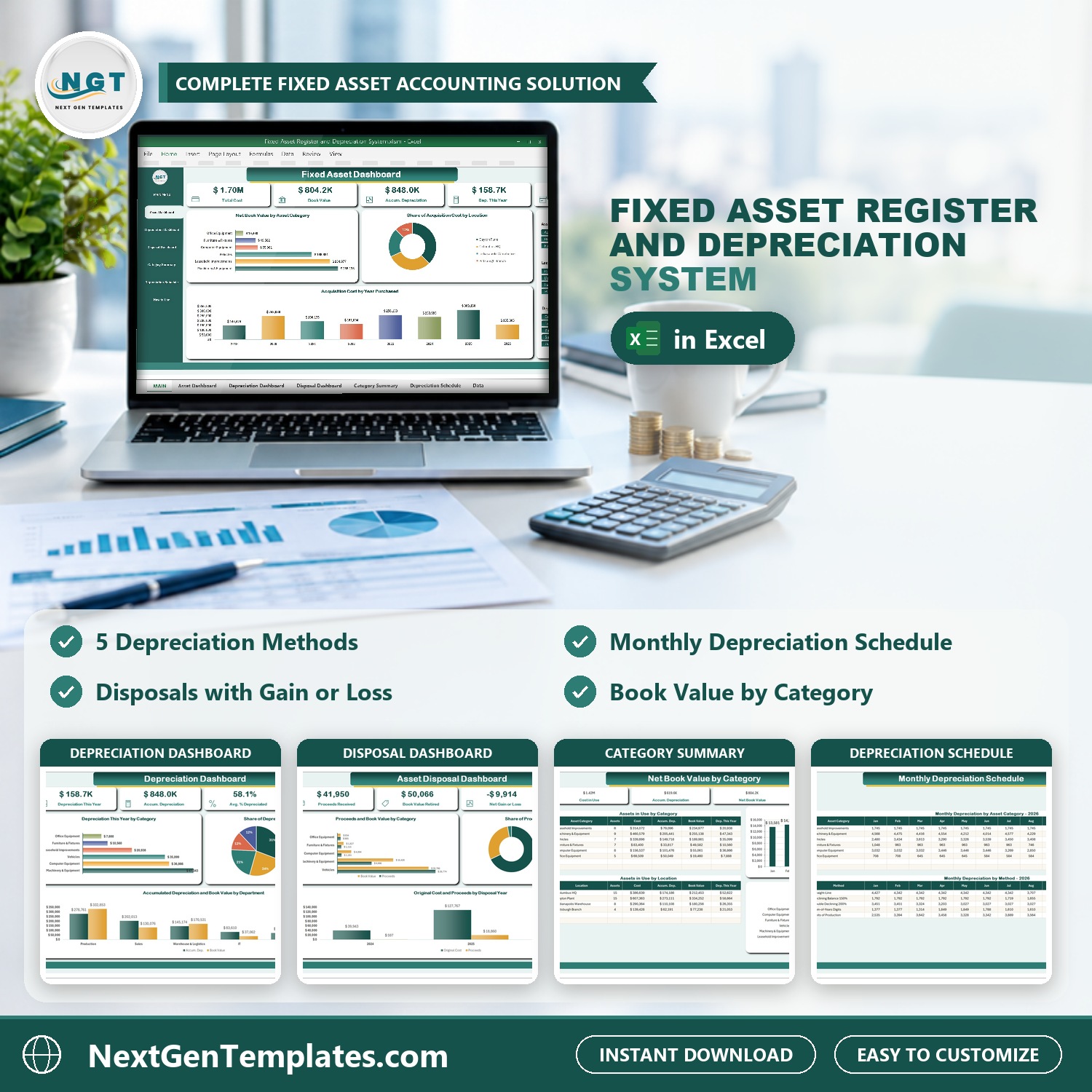

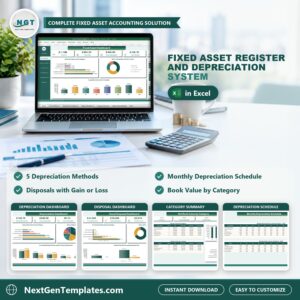
The Fixed Asset Register and Depreciation System in Excel VBA keeps your complete asset register in one macro-enabled Excel file: checked entry forms for assets, disposals and usage readings, five depreciation methods worked out every month, three slicer-driven dashboards, a category summary and a monthly depreciation schedule. Cost, accumulated depreciation, net book value and gain or loss on disposal are formulas, so they update the moment you add or change an asset.
Sample data for a demo company ships with 54 assets, 12 disposals, 226 usage readings and 14 documents, so every chart is populated the moment you open it. Replace it with your own and the whole system follows. If a fixed asset register in a plain spreadsheet has stopped telling you what your assets are worth, this is the step up: a depreciation schedule that works itself out and disposals that show the gain or loss.
🌍 Join 10,000+ customers in 180+ countries using NextGenTemplates to replace paid SaaS tools with one-time-purchase Excel, Google Sheets, Power BI and HTML templates.
✅ Instant download · One-time payment · No subscription · No per-user fees · Lifetime access
Watch the Fixed Asset Register and Depreciation System V1.0 in Excel VBA walkthrough
🎁 Try it free for 7 days before you buy: every form, register and dashboard works in the free trial, so you can test it on your own PC first.
🔑 Key Features of the Fixed Asset Register and Depreciation System
📌 A complete fixed asset register. The New Asset form takes the name, category, location, department, vendor, invoice and serial number, purchase and in-service dates, cost, salvage value, useful life and depreciation method. Each asset then shows its depreciable amount, months depreciated, accumulated depreciation, net book value, percent depreciated and status.
📌 Five depreciation methods. Straight-line, declining balance 150%, double declining 200% (switching to straight-line when that gives a larger charge), sum-of-the-years digits and units of production. Mix them in one register: each asset uses the method you pick for it.
📌 A depreciation schedule you can read. The Monthly Depreciation Schedule shows January to December by asset category and by method, with a year total. The full-month convention, the as-at (report) date and the schedule year are set once on the Settings sheet.
📌 Disposals with gain or loss. Record a sale, trade-in, scrapping, donation or write-off with the proceeds and any disposal cost. The workbook works out the net book value at disposal and the gain or loss, and the Disposal Register shows losses in red.
📌 Usage Log for units of production. Log machine hours, miles, units produced or cycles by month for the assets that wear by use, and their depreciation follows the readings.
📌 Three dashboards with slicers. The Fixed Asset, Depreciation and Asset Disposal dashboards filter by status, location, method, category, department and disposal result, and a Category Summary shows net book value by category and by location.
📌 Documents attached to the record. Link purchase invoices, warranty cards, insurance policies, asset photos and disposal certificates to the asset or disposal they belong to, then open them from the Document Register.
📌 Type-to-search and locked dates. Long lists filter as you type, and date boxes open a calendar picker, so 03/04 can never mean March on one PC and April on another.
📌 Everything is yours to edit. Asset categories, locations, departments, vendors, units of measure and document types are master lists you extend from the Manage Dropdown Lists form, with no sheet editing and no broken dropdowns. It is Excel VBA asset management that stays on your own PC.
📦 What’s Inside the Fixed Asset Register and Depreciation System
Thirteen pages, laid out in the order you actually work in them.
MAIN menu
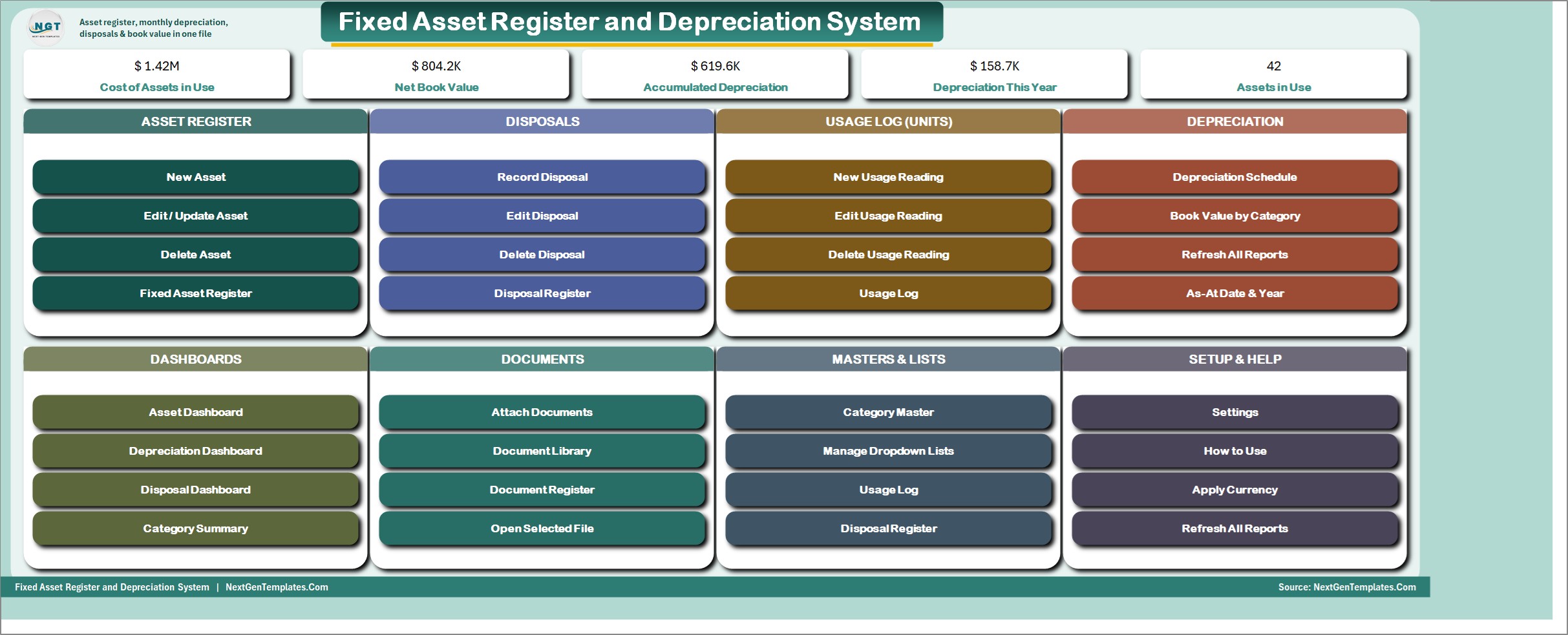
The file opens here every time. Five live KPI chips (Cost of Assets in Use, Net Book Value, Accumulated Depreciation, Depreciation This Year and Assets in Use) sit above colour-coded cards for the Asset Register, Disposals, Usage Log, Depreciation, Dashboards, Documents, Masters and Lists, and Setup and Help. Every job starts from one of its buttons.
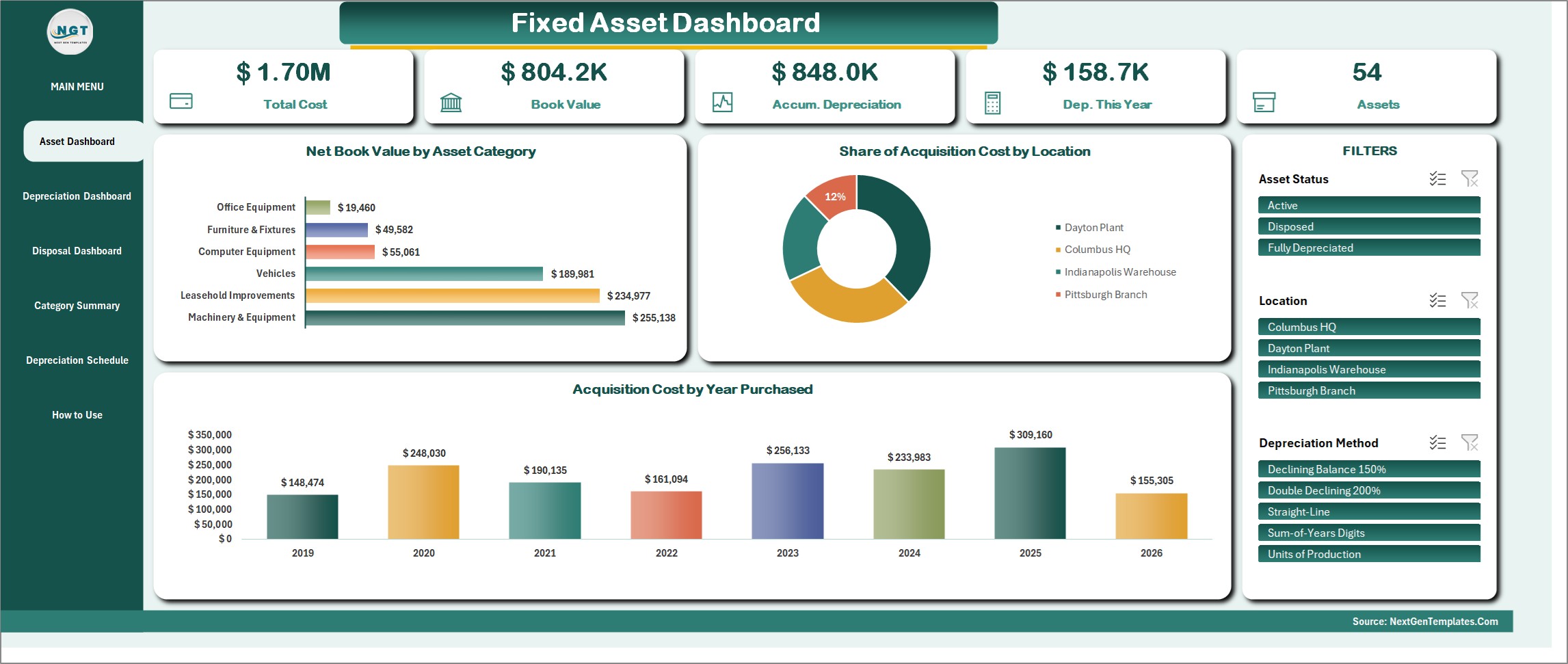
Fixed Asset Dashboard
Total Cost, Book Value, Accumulated Depreciation, Depreciation This Year and the number of assets, with Net Book Value by Asset Category, Share of Acquisition Cost by Location and Acquisition Cost by Year Purchased. Slicers for Asset Status, Location and Depreciation Method drive every figure and chart on the page.
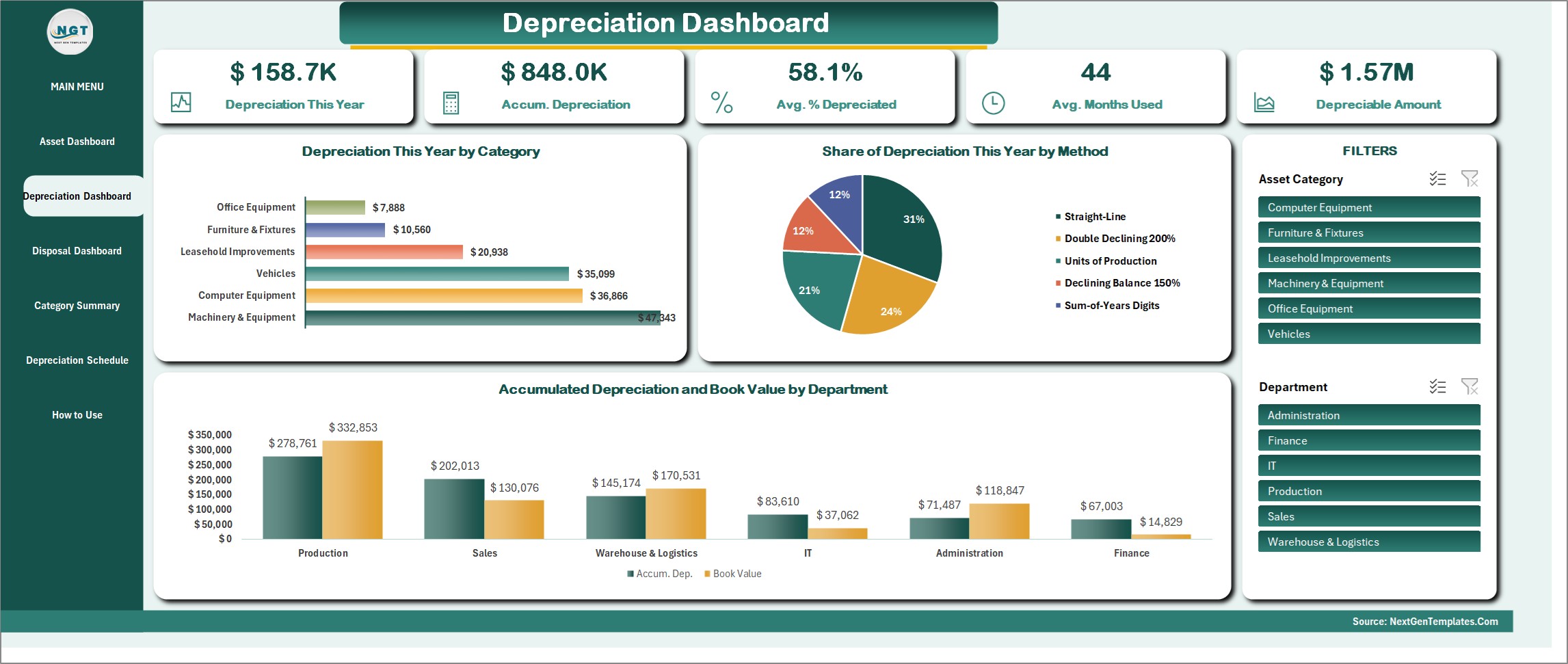
Depreciation Dashboard
Depreciation This Year, Accumulated Depreciation, Average Percent Depreciated, Average Months Used and the Depreciable Amount, with Depreciation This Year by Category, Share of Depreciation This Year by Method and Accumulated Depreciation and Book Value by Department. Filter by Asset Category or Department.
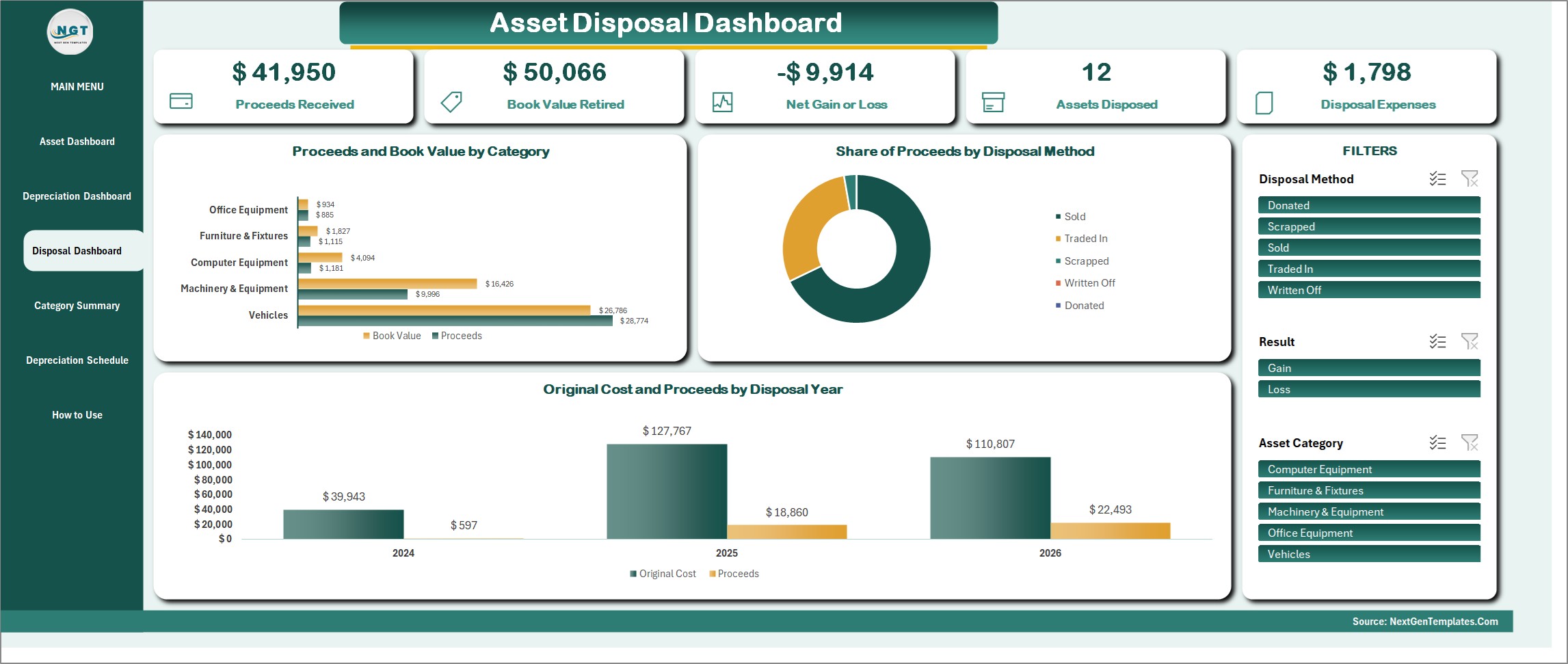
Asset Disposal Dashboard
Proceeds Received, Book Value Retired, Net Gain or Loss, Assets Disposed and Disposal Expenses, with Proceeds and Book Value by Category, Share of Proceeds by Disposal Method and Original Cost and Proceeds by Disposal Year. Slicers for Disposal Method, Result and Asset Category.
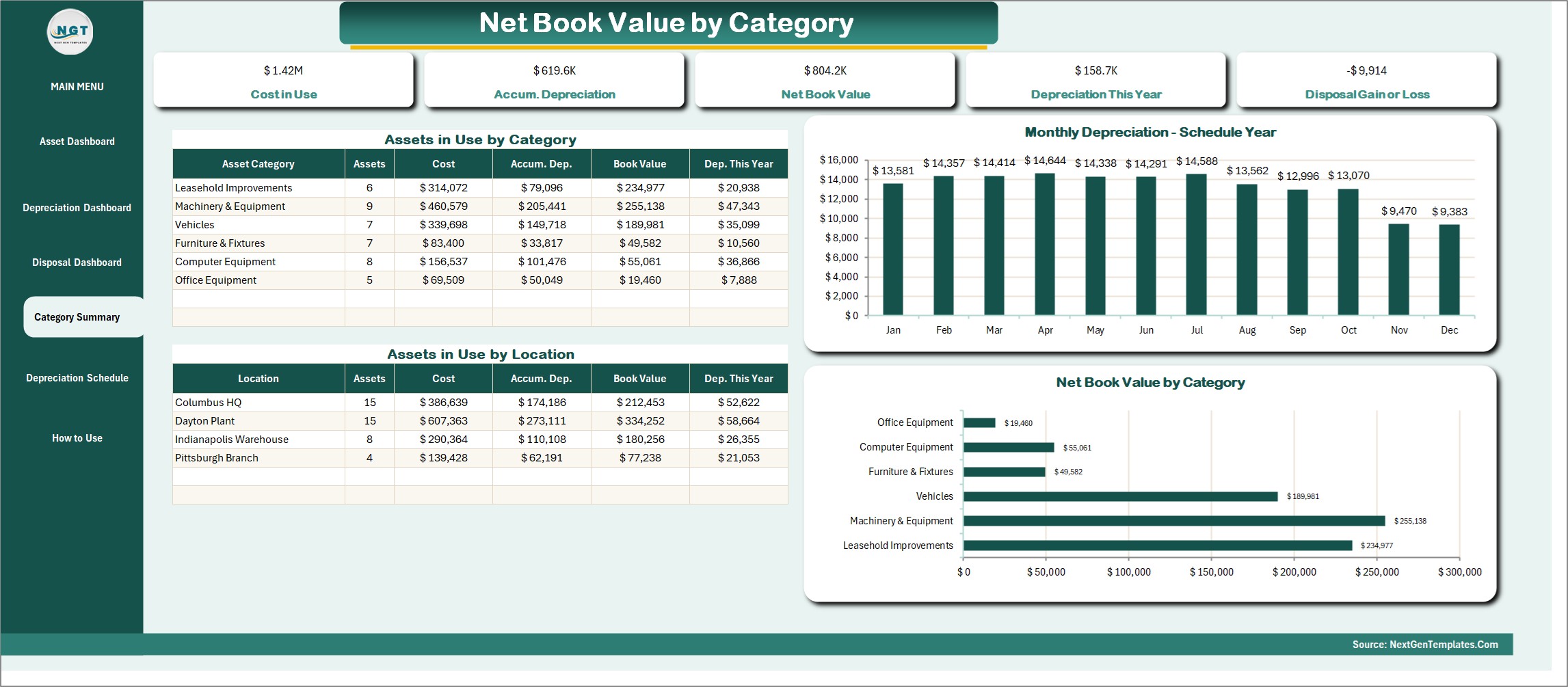
Category Summary
Net book value by asset category and by location in two tables, with a Monthly Depreciation chart for the schedule year and a Net Book Value by Category bar chart. Cost in Use, Accumulated Depreciation, Net Book Value, Depreciation This Year and Disposal Gain or Loss sit across the top.
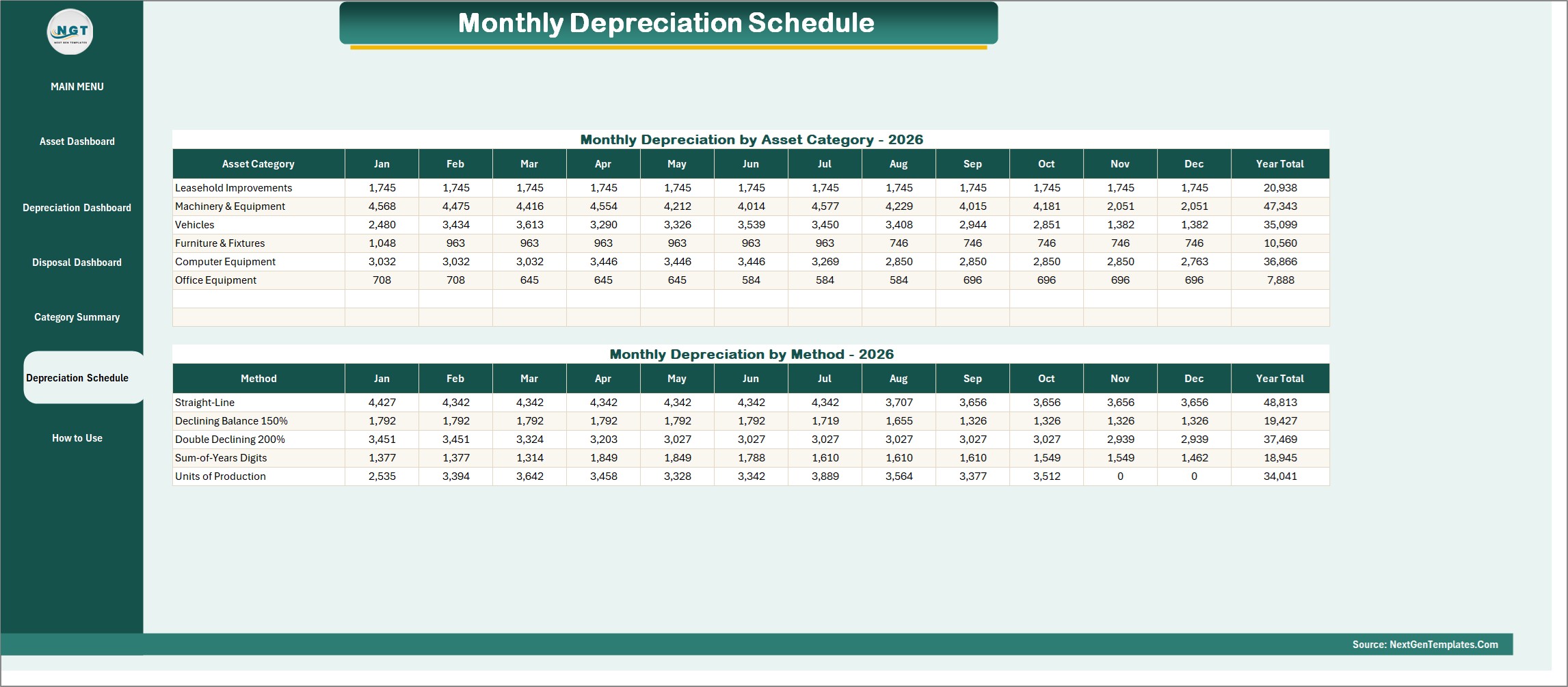
Monthly Depreciation Schedule
Depreciation for January to December by asset category, then again by depreciation method, each with a year total. Pick the schedule year in Settings and press Refresh All Reports.
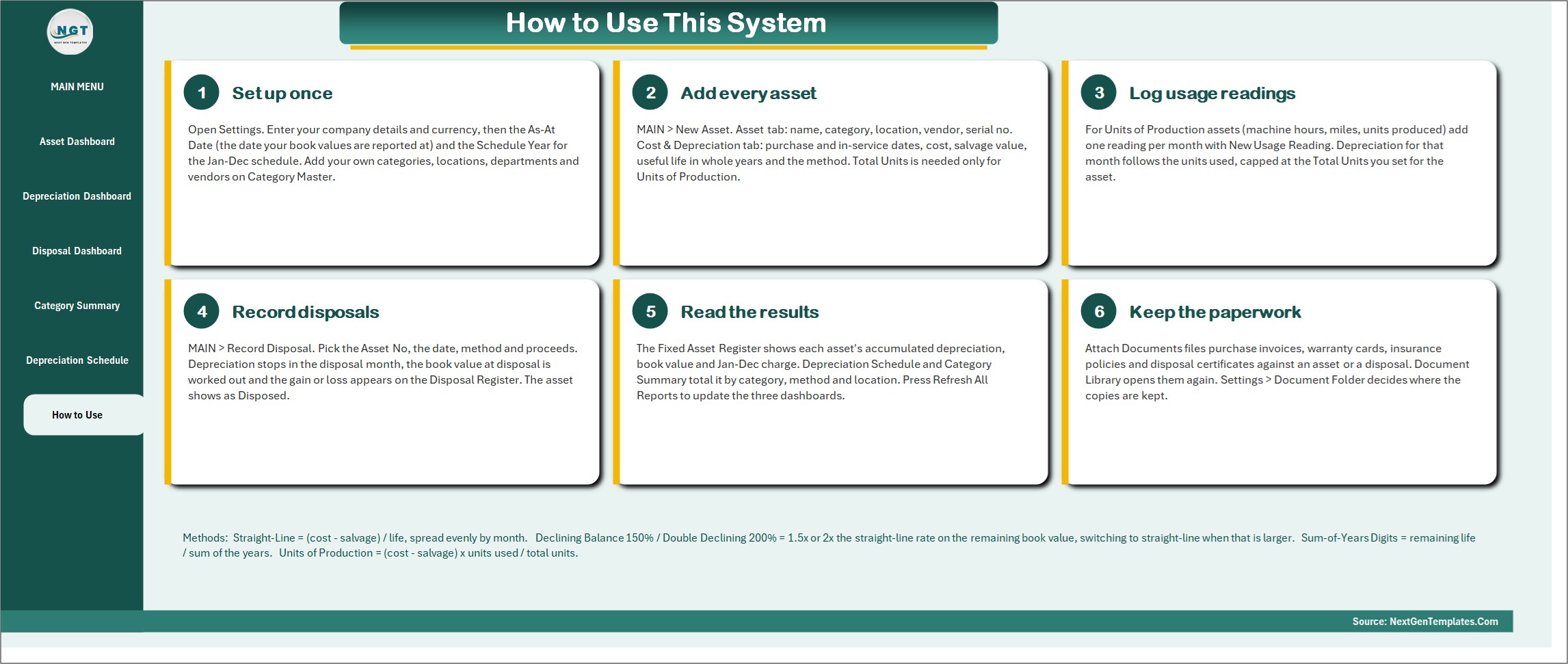
How to Use
Six numbered steps on one page: set up once, add every asset, log usage readings, record disposals, read the results and keep the paperwork. The depreciation formulas are summarised at the bottom so nobody has to guess how a figure was worked out.
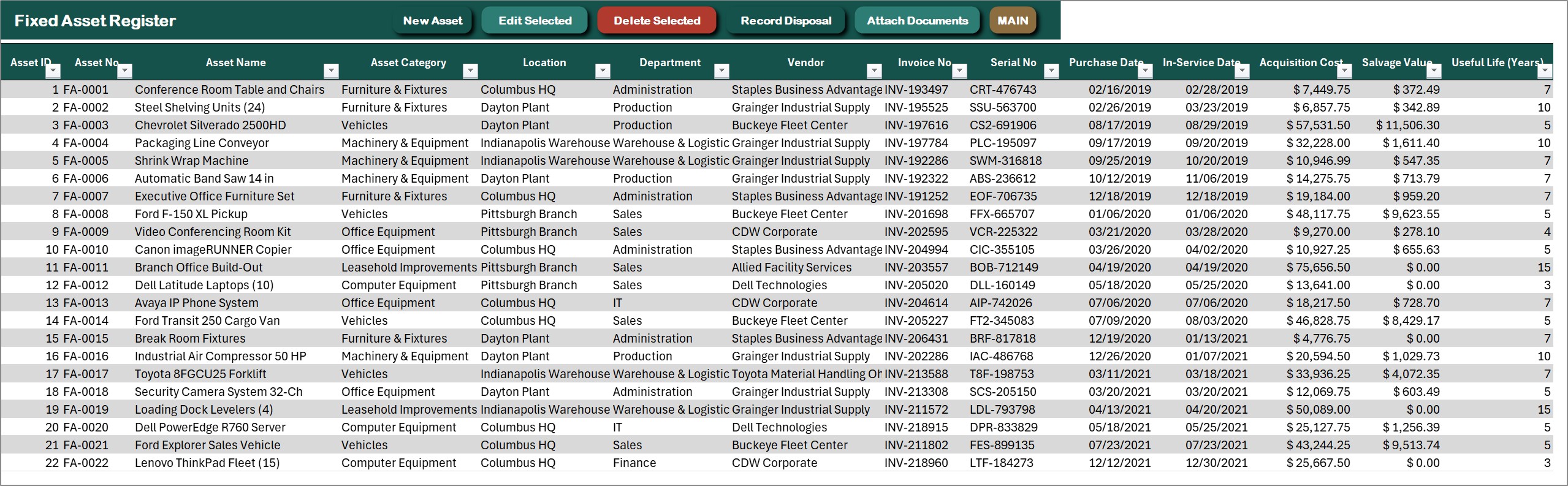
Fixed Asset Register
One row per asset: asset number, name, category, location, department, vendor, invoice and serial number, purchase and in-service dates, acquisition cost, salvage value, useful life and method, with the depreciable amount, months depreciated, accumulated depreciation, net book value, percent depreciated, status and the monthly schedule worked out by formulas. New Asset, Edit Selected, Delete Selected, Record Disposal and Attach Documents sit on the action bar.
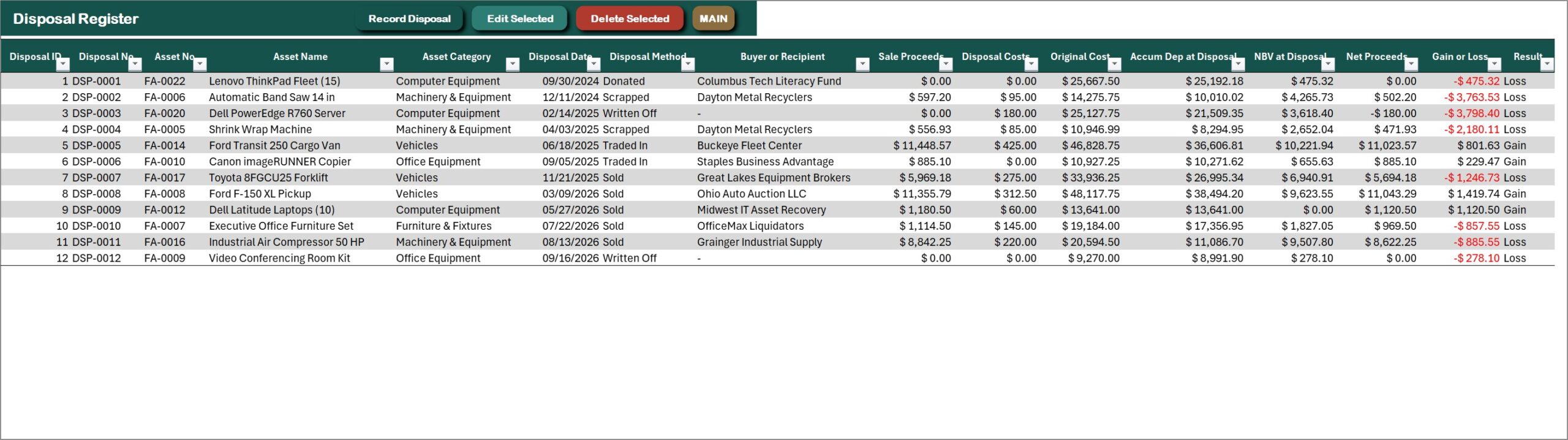
Disposal Register
Every disposal with its date, method (sold, traded in, scrapped, donated or written off), buyer or recipient, sale proceeds, disposal cost, the original cost and accumulated depreciation at disposal, the net book value at disposal and the gain or loss, with losses in red.
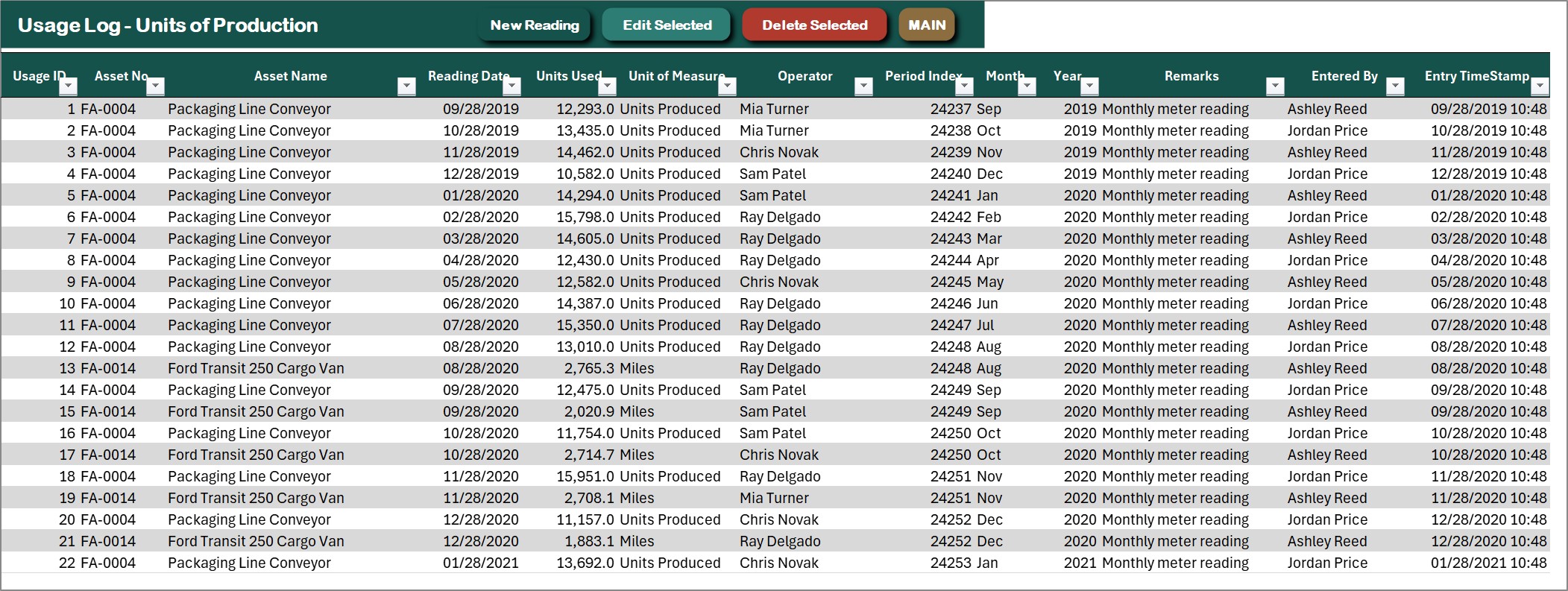
Usage Log for Units of Production
Monthly readings in machine hours, miles, units produced or cycles for the assets that depreciate by usage, with the reading date, units used, operator and remarks. New Reading, Edit Selected and Delete Selected are on the action bar.
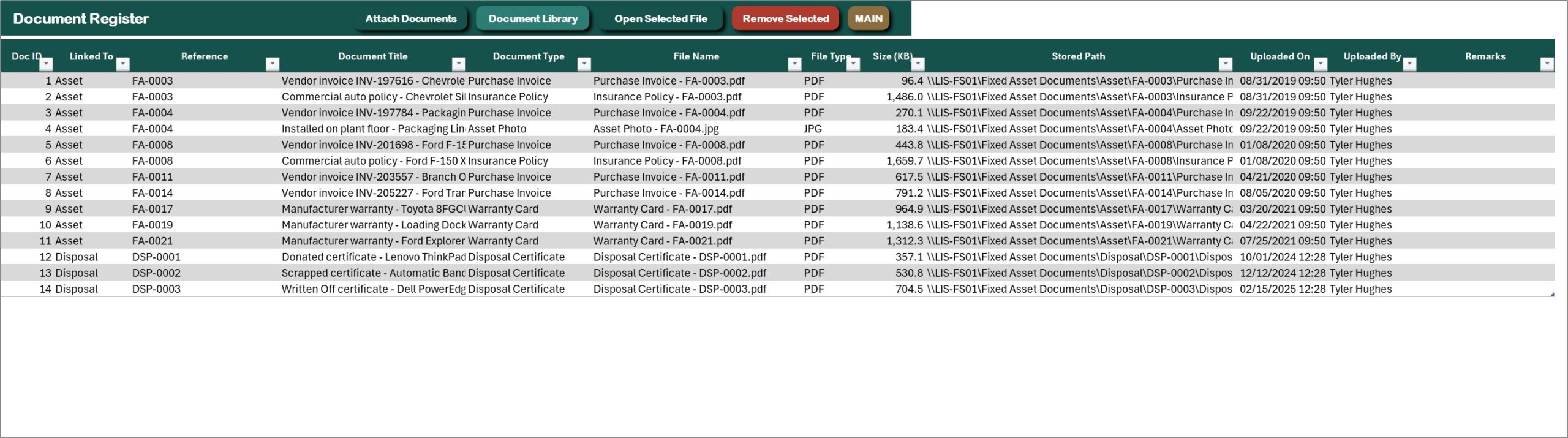
Document Register
Purchase invoices, warranty cards, insurance policies, asset photos and disposal certificates attached to the asset or disposal they belong to, with file name, size, who uploaded it and when. Open Selected File opens any of them in one click.
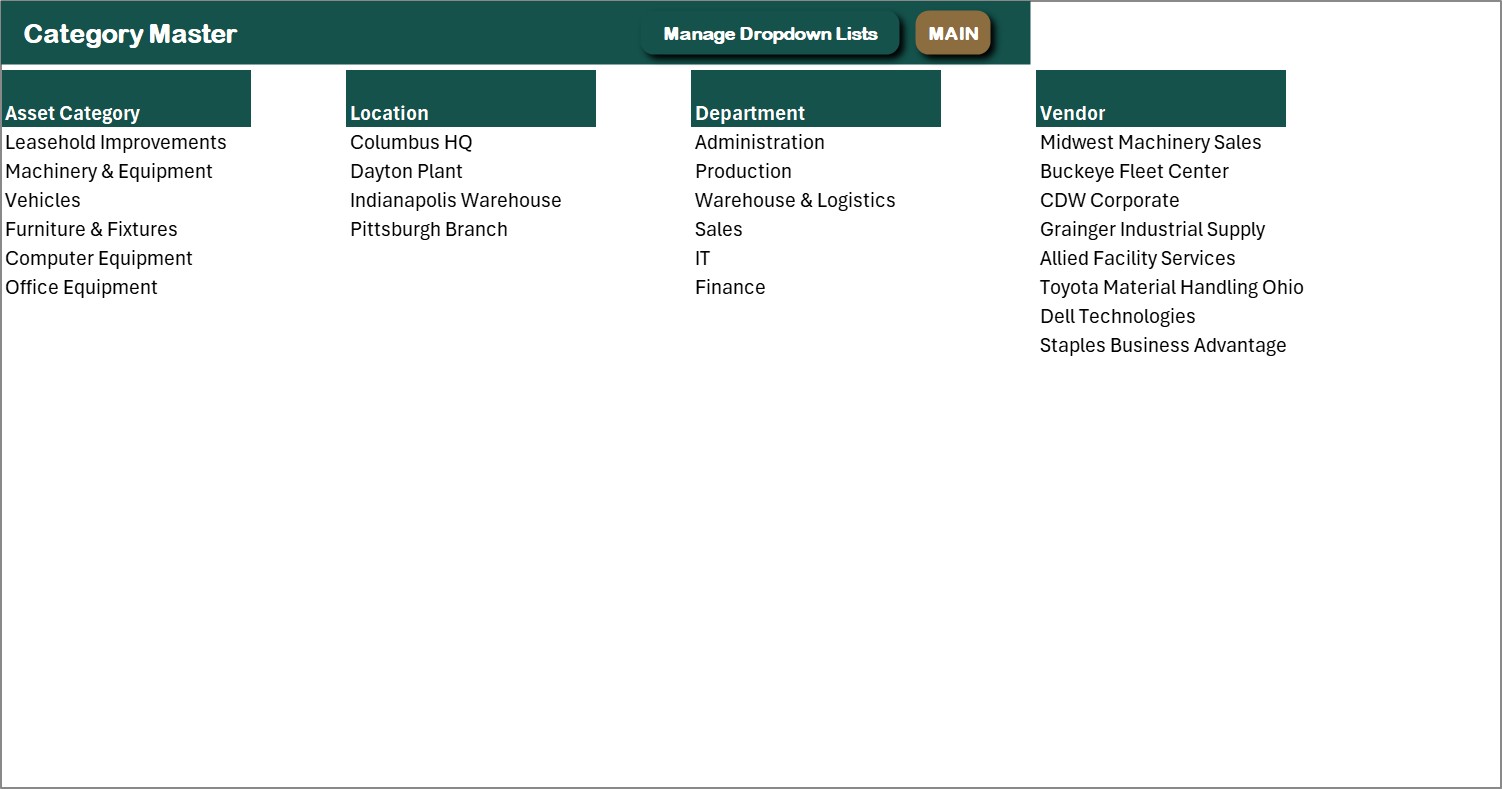
Category Master
The dropdown lists in one place: asset categories, locations, departments and vendors. Edit them here or from the Manage Dropdown Lists form, so a new location or vendor appears in every form straight away.
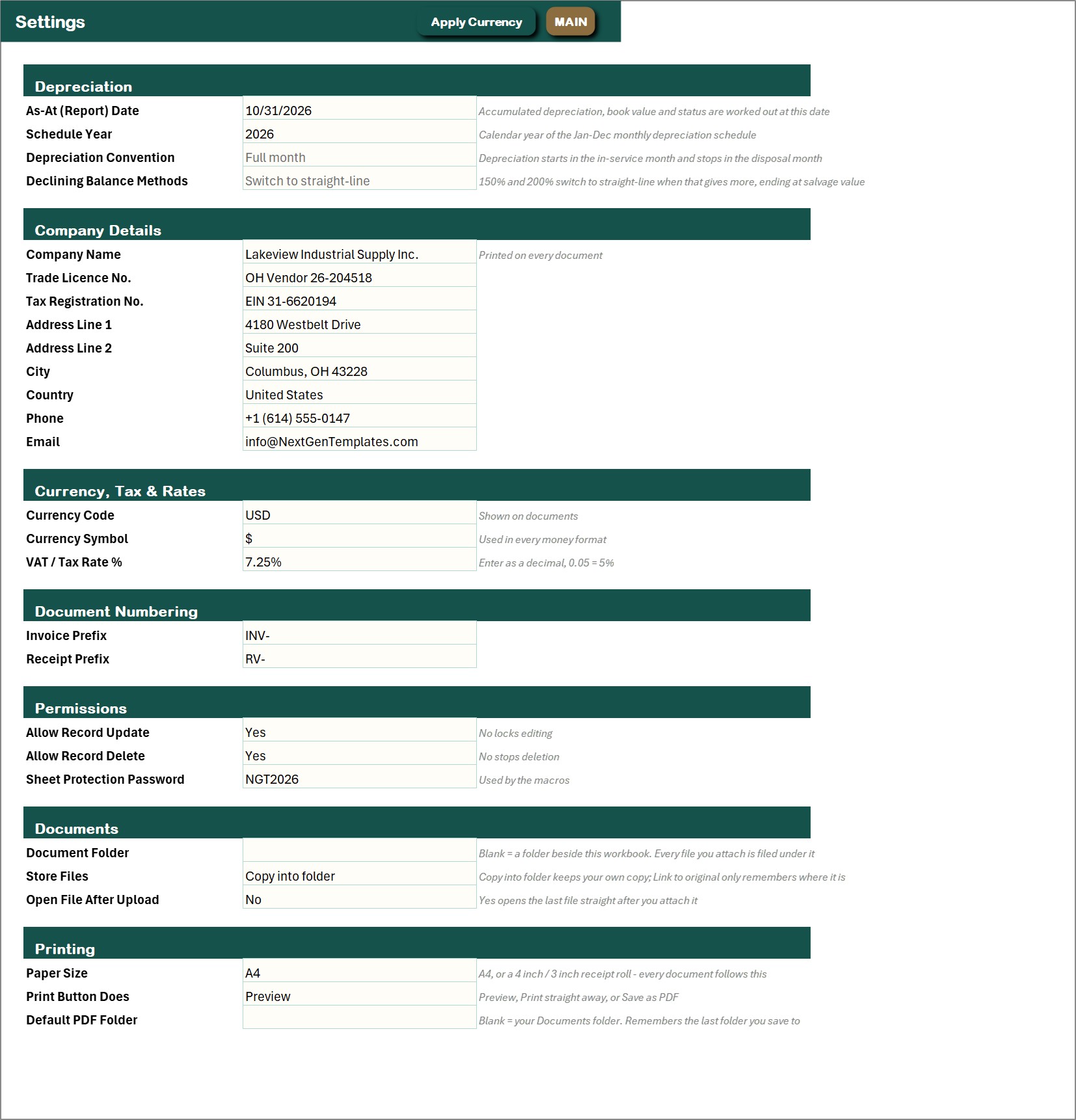
Settings
The As-At (report) date, the schedule year, the depreciation convention, company details, currency, permissions (allow record update, allow record delete) and the document folder.
📊 Fixed Asset Register and Depreciation System vs. an Asset Spreadsheet vs. Cloud Asset Software: Where This Fits
| Feature | This Excel VBA system | Plain asset list spreadsheet | Cloud asset software |
|---|---|---|---|
| Cost | $29 one-time ✅ | Free to $20 one-time | Monthly subscription, often per asset or user |
| Platform | Microsoft Excel for Windows (macros) | Excel or Google Sheets | Cloud, browser |
| Five depreciation methods in one register | Yes ✅ | Manual formulas per asset | Yes ✅ |
| Monthly depreciation schedule by category and method | Yes, automatic ✅ | Build it yourself | Yes ✅ |
| Disposals with net book value and gain or loss | Yes ✅ | Manual | Yes ✅ |
| Checked entry forms and attached documents | Yes ✅ | No | Yes ✅ |
| Tax depreciation (MACRS), barcode scanning, audit workflows | No | No | Often ✅ |
| Works offline, data stays on your PC | Yes ✅ | Yes | No |
For a small or mid-size business that wants a clean asset register, monthly depreciation and disposal results without a monthly subscription, this fixed asset register in Excel sits in the sweet spot. If you need MACRS tax tables, barcode scanning or many people working at once, buy dedicated asset software.
👥 Who This Template Is For, and Who It’s Not For
✅ This template is built for:
- Small and mid-size businesses that own machinery, vehicles, computers, furniture and leasehold improvements
- Bookkeepers and accountants who prepare the depreciation schedule and the fixed asset note each month or year
- Owners who want to know the net book value of what they own and the gain or loss when something is sold or scrapped
- Operations teams that depreciate equipment by machine hours, miles or units produced
❌ This template is NOT for:
- Teams that need several people in the same file at the same time, because this is a single-user desktop workbook
- Mac or Excel-for-web users; the forms are VBA and need Excel for Windows with macros enabled
- Businesses that need MACRS or other tax depreciation tables, barcode scanning, asset tagging or audit workflows
- Anyone expecting an accounting-software connection, because the file stays on your PC and connects to nothing
⚙️ How to Use the Fixed Asset Register and Depreciation System
- Download the ZIP, extract it, open the .xlsm file and click Enable Content so the VBA runs.
- Open Settings and enter your company details, currency, the as-at (report) date and the schedule year.
- Open Manage Dropdown Lists and replace the sample categories, locations, departments and vendors with your own.
- Press New Asset for each asset: cost, salvage value, useful life, in-service date and depreciation method.
- For units of production assets, add New Usage Reading entries each month.
- When an asset leaves, press Record Disposal and enter the date, method, proceeds and costs.
- Press Refresh All Reports and open the three dashboards, the Category Summary and the Monthly Depreciation Schedule.
- Delete the sample rows when you are ready, and the dashboards refresh themselves.
💼 Real-World Use Cases
Dana runs a small manufacturing plant. She registers every machine and forklift, depreciates the production lines by machine hours and watches the Depreciation Dashboard to see which departments carry the most book value.
Marcus keeps the books for a distribution company. At month end he refreshes the reports, copies the monthly depreciation by category into the ledger and prints the Category Summary for the fixed asset note.
Priya manages a growing office. Laptops and furniture are registered when bought, scrapped items are recorded as disposals with the loss, and the warranty cards sit in the Document Register next to the asset.
🎁 Try Before You Buy: 7-Day Free Trial
Download the free trial of the Fixed Asset Register and Depreciation System in Excel VBA and use the complete system for 7 days. Every form, register, dashboard, printable document and setting works exactly as in the full version, so you can test it with your own records before you decide.
How the free trial works
- Click Get the 7-Day Free Trial below, enter your email and download the ZIP from the email we send you. Unzip it.
- Open it in Microsoft Excel for Windows (the desktop app, not Excel Online or Mac) and click Enable Content on the yellow bar. If there is no yellow bar, right-click the file, choose Properties, tick Unblock and open it again.
- Your 7 days start the first time the file opens with macros on. A banner on the MAIN page shows how many days are left.
- After 7 days the trial locks and shows a Buy Full Version button. Buy the full version to keep working with no time limit.
| Free Trial | Full Version | |
|---|---|---|
| Every feature, form and dashboard | Yes | Yes |
| Time limit | 7 days | None, lifetime use |
| Trial banner | Yes | No |
| PDF user manual | No, full version only | Included |
| Editable (unlocked) VBA code | No, locked | Yes |
Enter your email and we send the download link straight to your inbox.
The trial runs once per computer: downloading it again does not restart the 7 days. Records you enter during the trial can be copied into the full version.
❓ Frequently Asked Questions
What does the Fixed Asset Register and Depreciation System track?
Every asset with its category, location, department, vendor, invoice and serial number, cost, salvage value, useful life and depreciation method, plus disposals, usage readings and attached documents. Three dashboards, a category summary and a monthly depreciation schedule report on top of the register.
Which depreciation methods does it support?
Five: straight-line, declining balance 150%, double declining 200% (which switches to straight-line when that gives a larger charge), sum-of-the-years digits and units of production. Pick the method for each asset on the New Asset form.
Can I try it before I buy?
Yes. A 7-day free trial with every form, register and dashboard working is on the product page. Enter your own assets and test it before you decide.
How are disposals handled?
Open Record Disposal, pick the asset, the date and the method (sold, traded in, scrapped, donated or written off) and enter any proceeds and disposal cost. The workbook works out the net book value at disposal and the gain or loss, and the asset stops depreciating.
Does it work out tax depreciation such as MACRS?
No. It uses the full-month convention and the five methods above, which suits management and book depreciation. It does not include MACRS tables or half-year and mid-quarter conventions, so confirm tax depreciation with your accountant.
Does it work on Mac or Excel for the web?
No. The entry forms are VBA, so it needs Microsoft Excel 2016 or later for Windows on the desktop, with macros enabled. It will open elsewhere but the buttons will not run.
Can several people use it at once?
No. It is a single-user desktop workbook and your data stays on your PC. Editing and deleting records can be switched off on the Settings sheet, but there are no separate user logins.
Is there sample data?
Yes. A demo company ships with 54 assets, 12 disposals, 226 usage readings and 14 documents, so every chart is populated when you open the file. Replace it with your own assets and the dashboards follow.
👤 About the Author
Built by PK, Microsoft Certified Professional with 15+ years of Excel, Google Sheets and Power BI experience. Founder of NextGenTemplates. Every template is hand-built and tested before release. Watch the walkthroughs on @PKAnExcelExpert and @NextGenTemplates.
🔗 Explore Related Templates
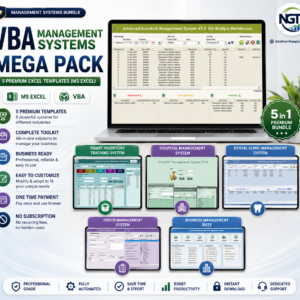
💎 Best value: the VBA Management Systems Mega Pack bundles five complete Excel VBA systems for less than buying them separately.
- Payroll Management System V1.0 in Excel VBA: another complete macro-enabled Excel system, for payroll.
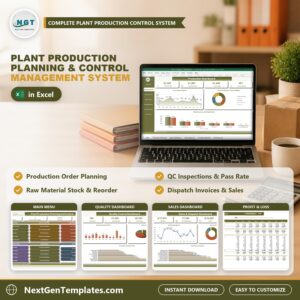
- Plant Production Planning and Control Management System V1.0 in Excel VBA: for the manufacturer whose machines you track here.
- Profit and Loss (P&L) Template in Excel: a place to bring the monthly depreciation charge into your results.
Browse more Excel VBA Tools or the full range of MS Excel templates.
🎥 Visit our YouTube channel for step-by-step video tutorials
👉 YouTube.com/@NextGenTemplates
📅 Last updated: November 2026
Compatibility and Requirements
- Runs in Microsoft Excel desktop on Windows (Excel 2016 or later, or Microsoft 365) with macros enabled. The entry forms are VBA, so it does not run in Excel for the web, Google Sheets or on mobile.
- Enable Content when you open the file. Microsoft explains the steps in Enable or disable macros in Microsoft 365 files.


Reviews
There are no reviews yet.