

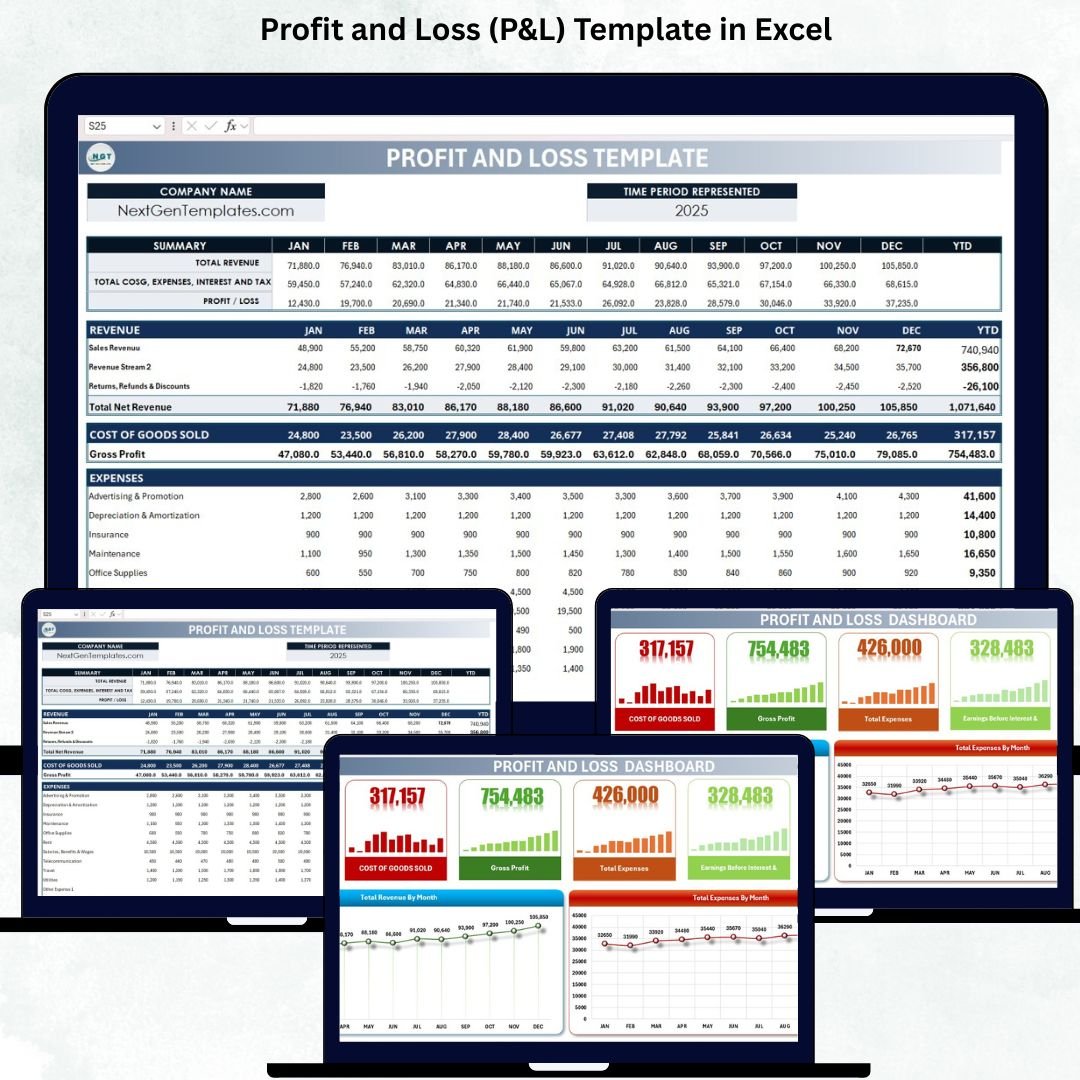

Understanding your business’s financial performance is essential for growth, stability, and smart decision-making. However, many companies still track revenue and expenses in scattered spreadsheets or rely on outdated reporting methods that lead to errors, delays, and confusion. The Profit and Loss (P&L) Template in Excel gives you a clean, automated, and professional way to monitor your financials month by month—without needing complex accounting software.
This ready-to-use Excel template provides a complete view of your revenue, expenses, cost of goods sold (COGS), gross profit, taxes, and net profit. It includes automated formulas, organized sections, and a visual dashboard that transforms financial data into meaningful insights. Whether you run a small business, manage multiple departments, or oversee financial planning, this template helps you maintain accuracy and make informed decisions with confidence.
✨ Key Features of the Profit and Loss (P&L) Template in Excel
📊 1. Monthly & Year-to-Date Profit Tracking
Track revenue, expenses, COGS, taxes, and profit for every month. The template automatically calculates year-to-date (YTD) totals, giving you a clear picture of financial performance throughout the year.
💰 2. Revenue Breakdown by Stream
Record multiple revenue sources, including sales, services, or custom revenue streams. Returns and discounts are handled automatically as negative values.
📉 3. Detailed Expenses Categorization
Monitor expenses across multiple categories such as rent, salaries, utilities, travel, maintenance, insurance, marketing, office supplies, and more. You can add additional expense categories anytime.
📈 4. Automated Financial Calculations
All major financial KPIs—Gross Profit, EBIT, Profit Before Tax, Net Profit—are calculated automatically, ensuring accuracy and saving time.
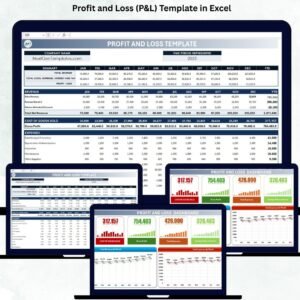
📊 5. Visual Dashboard for Quick Insights
The included dashboard provides summary cards and charts to help you instantly analyze profitability, revenue trends, and monthly expenses.
📦 What’s Inside the Profit and Loss (P&L) Template in Excel
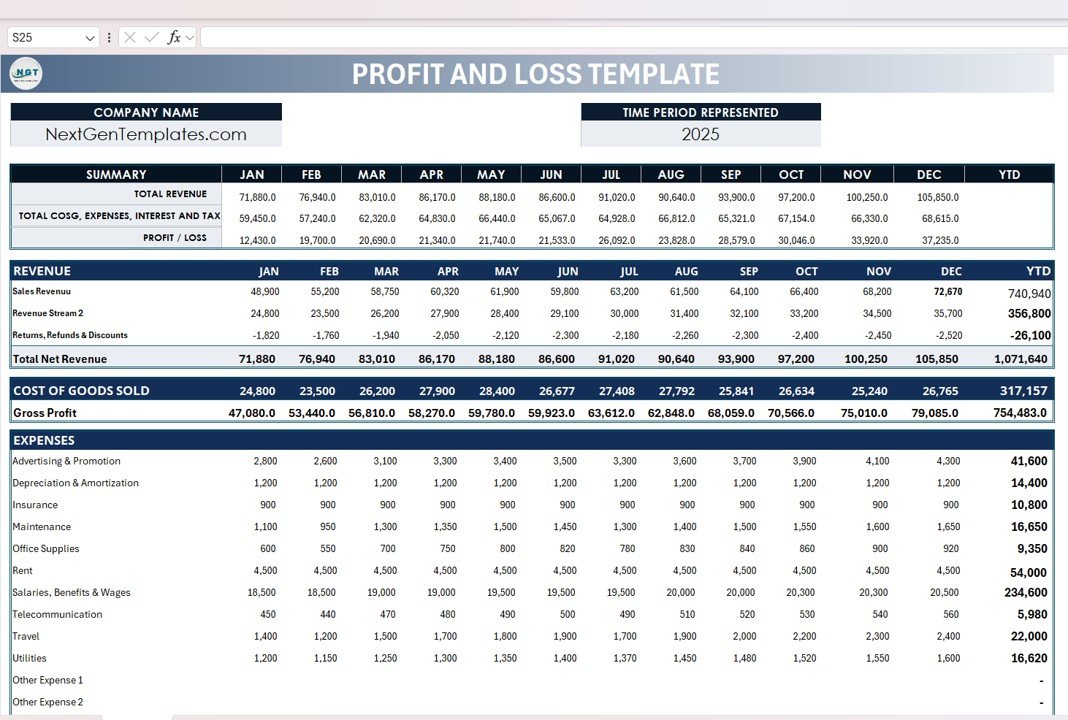
🗂️ 1. Template Sheet (Main P&L Report)
This sheet contains all your financial data organized into clear sections:
A) Company Header
Add your company name, financial year, and website (e.g., NextGenTemplates.com) for a professional look.
B) Summary Section (Monthly + YTD)
Instantly view:
Total Revenue
Total COGS
Total Expenses
Interest & Tax
Profit/Loss (Monthly & YTD)
This top-level summary helps managers quickly assess financial performance.
C) Revenue Section
Input monthly revenue for all streams, including:
Sales Revenue
Service Revenue / Custom Revenue
Returns, Refunds & Discounts
Total Net Revenue
The template automatically calculates YTD totals.
D) Cost of Goods Sold (COGS)
Track monthly COGS components such as:
Materials
Production
Vendor Charges
Other Direct Costs
It calculates Gross Profit using:
Gross Profit = Total Net Revenue – Total COGS
E) Expenses Section
Includes predefined expense categories like:
Advertising & Promotion
Salaries & Wages
Rent
Insurance
Utilities
Travel
Office Supplies
Maintenance
Depreciation & Amortization
Other expenses (with extra rows to add more categories)
F) Earnings & Taxes
All financial calculations are fully automated:
EBIT
Interest Expense
Profit Before Tax
Income Taxes
Profit After Tax
This gives you a complete and accurate financial report every month.
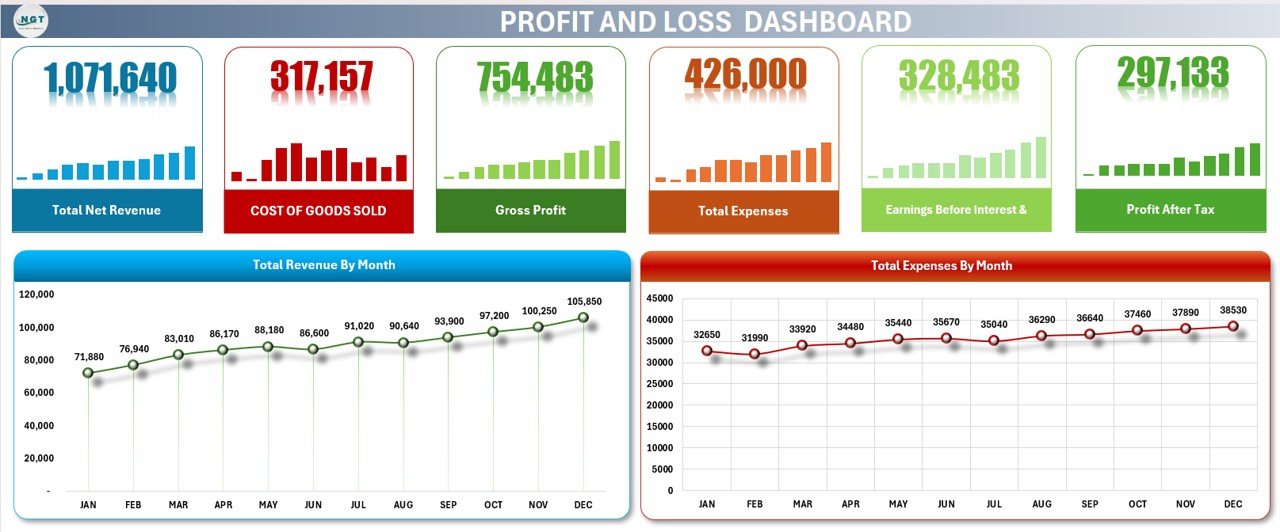
📊 2. Dashboard Sheet (Visual Financial Summary)
This dashboard includes summary cards and charts that provide quick insights such as:
Dashboard Cards Show:
Total Net Revenue
Total COGS
Gross Profit
Total Expenses
EBIT
Net Profit
Dashboard Charts Show:
Revenue by Month – Identify growth patterns & seasonal trends
Expenses by Month – Spot cost spikes & manage budgets better
With this dashboard, you can instantly understand your company’s financial health without manually analyzing long tables.
🎯 Who Can Benefit From This Profit and Loss (P&L) Template in Excel
📈 Small & Medium Businesses
Track financials without complex accounting tools.
💼 Business Owners & Managers
Get accurate numbers to make smarter decisions.
📊 Accountants & Finance Teams
Save hours on calculations and monthly reporting.
🚀 Startups & Entrepreneurs
Monitor cash flow, track profitability, and plan budgets effectively.
Click here to read the Detailed blog post
Visit our YouTube channel for step-by-step tutorials — Youtube.com/@PKAnExcelExpert
Compatibility and Requirements
- Works in Microsoft Excel desktop (Excel 2016 or later, or Microsoft 365).
- The Dashboard sheet uses standard Excel charts. Microsoft’s guide Create a chart from start to finish explains how to change them.
Frequently Asked Questions
Which sheets are in the Profit and Loss (P&L) Template in Excel?
Two: the Template sheet, which holds the full monthly P&L report, and the Dashboard sheet with summary cards and charts.
What does the template calculate for me?
Total net revenue, total COGS, gross profit, total expenses, EBIT, profit before tax and profit after tax, for each month and year to date.
Can I add my own expense categories?
Yes. The Expenses section has predefined categories such as rent, salaries and utilities, plus extra rows where you can add more.
How are returns and discounts handled?
Enter them in the Revenue section. They are treated as negative values, so total net revenue is already reduced.
Is there a Google Sheets version?
Yes. See the Profit and Loss Templates in Google Sheets linked below.
Related Finance Templates
- Profit and Loss Templates in Google Sheets: the P&L in the browser
- Small Business Profit and Loss Template in Excel: a simpler P&L for small firms
- Profit and Loss Chart in Excel with Examples: present profit and loss visually
- Finance & Accounting Command Center: 8 finance templates in one bundle
Browse all Excel financial tools or the Excel dashboards.














Reviews
There are no reviews yet.