

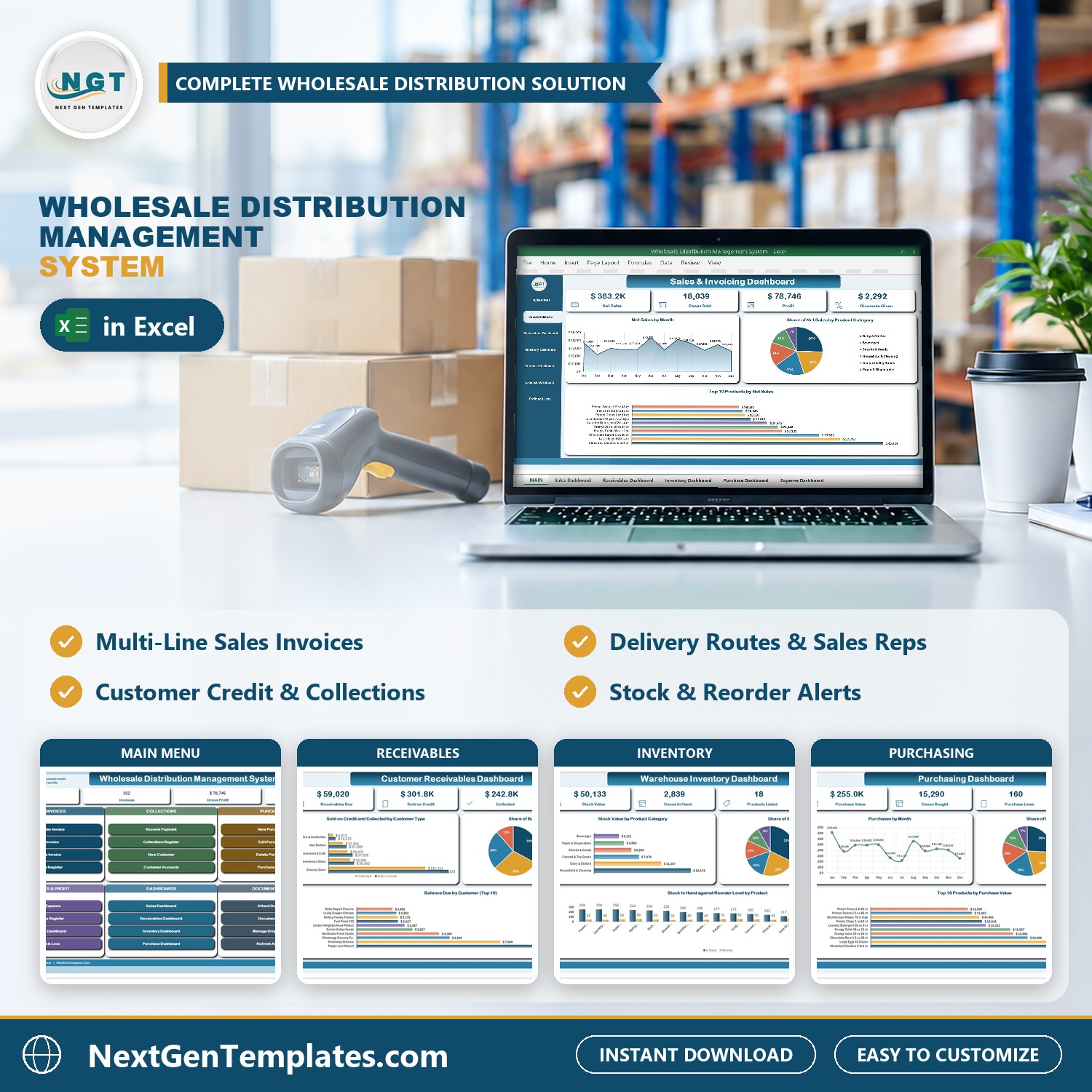

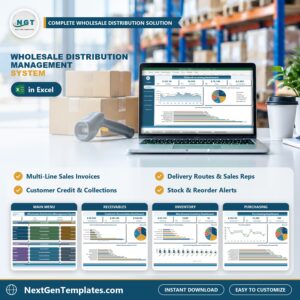
The Wholesale Distribution Management System runs a wholesale distribution business from one macro-enabled Excel file: 7 VBA entry forms, 8 registers, 5 slicer-driven dashboards, a live Profit & Loss statement and 4 printable documents that come out at A4, 4 inch and 3 inch. Sales invoices, delivery routes, customer credit, collections, stock, purchasing and expenses all sit in one workbook, and nothing is typed into a data sheet – every record goes in through a checked form.
Sample data ships with 352 sales invoices (1,500 lines), 30 customers, 18 products, 6 suppliers, 170 payments, 62 purchase bills and 198 expenses for a demo distributor, so every chart is populated the moment you open it. Replace it with your own and the whole system follows. If you have outgrown a wholesale invoice template or a stock list that cannot tell you who owes you money, this is the step up: invoices with a basket, customer credit, stock that moves by itself and paperwork you can print.
🌍 Join 10,000+ customers in 180+ countries using NextGenTemplates to replace paid SaaS tools with one-time-purchase Excel, Google Sheets, Power BI and HTML templates.
✅ Instant download · One-time payment · No subscription · No per-user fees · Lifetime access
Watch the Wholesale Distribution Management System V1.0 in Excel VBA walkthrough
🎁 Try it free for 7 days before you buy – every form, dashboard and report works in the free trial, so you can test it on your own PC first.
🔑 Key Features of the Wholesale Distribution Management System
📌 Sales invoices with a basket. Pick the customer and the customer type, delivery route and sales rep fill in for you. Choose a product, type the cases and press Add Item: the rate comes from the product master, the line drops into the basket and the total updates. Save writes one row per line under one invoice number.
📌 Customer credit you can see. Each customer carries a credit limit, what was paid on delivery, what was sold on credit, payments received and the balance due, with a credit status beside it. The Receivables Dashboard shows who owes you the most, by customer, customer type and sales rep.
📌 Collections with receipt numbers. The Receive Payment form records a check, ACH transfer, cash or card payment against a customer, numbers the receipt and updates the balance. The Collections Register keeps every receipt.
📌 Delivery routes and sales reps. Routes, reps, payment terms (COD, Net 15, Net 30, Net 45) and due dates are worked out from each customer’s terms, and every dashboard can be filtered by route.
📌 Stock that keeps itself up to date. Purchase bills add to stock, invoices take it out. The Product Catalog shows cases in hand, the reorder level and a stock status for every item, and the MAIN menu counts how many are low or out of stock.
📌 Purchasing and suppliers. Enter a purchase bill the same basket way, mark it received, and print a purchase order for the supplier. The Purchasing Dashboard shows spend by month, supplier and product.
📌 Printing the trade counter actually uses. Sales Invoice, Delivery Note, Payment Receipt and Purchase Order print from the same data at A4, 4 inch (104 mm) and 3 inch (80 mm). Paper size and what the print button does – Preview, Print or Save as PDF – are dropdowns on the Settings sheet.
📌 Documents one click away. Attach signed delivery proofs to invoices, resale certificates and credit applications to customers, and supplier invoices to purchases, then open them from the Document Library.
📌 Type-to-search and locked dates. Long lists such as customers and products filter as you type and match the start, middle or end of a name. Date boxes are locked and open a calendar picker, so 03/04 can never mean March on one PC and April on another.
📌 Everything is yours to edit. Routes, reps, product categories, brands, cities, units, payment terms, expense categories and document types are master lists you extend from the Manage Dropdown Lists form – no sheet editing, no broken dropdowns. It is Excel VBA distribution management that stays on your own PC.
📦 What’s Inside the Wholesale Distribution Management System
Seventeen pages, laid out in the order you actually work in them.
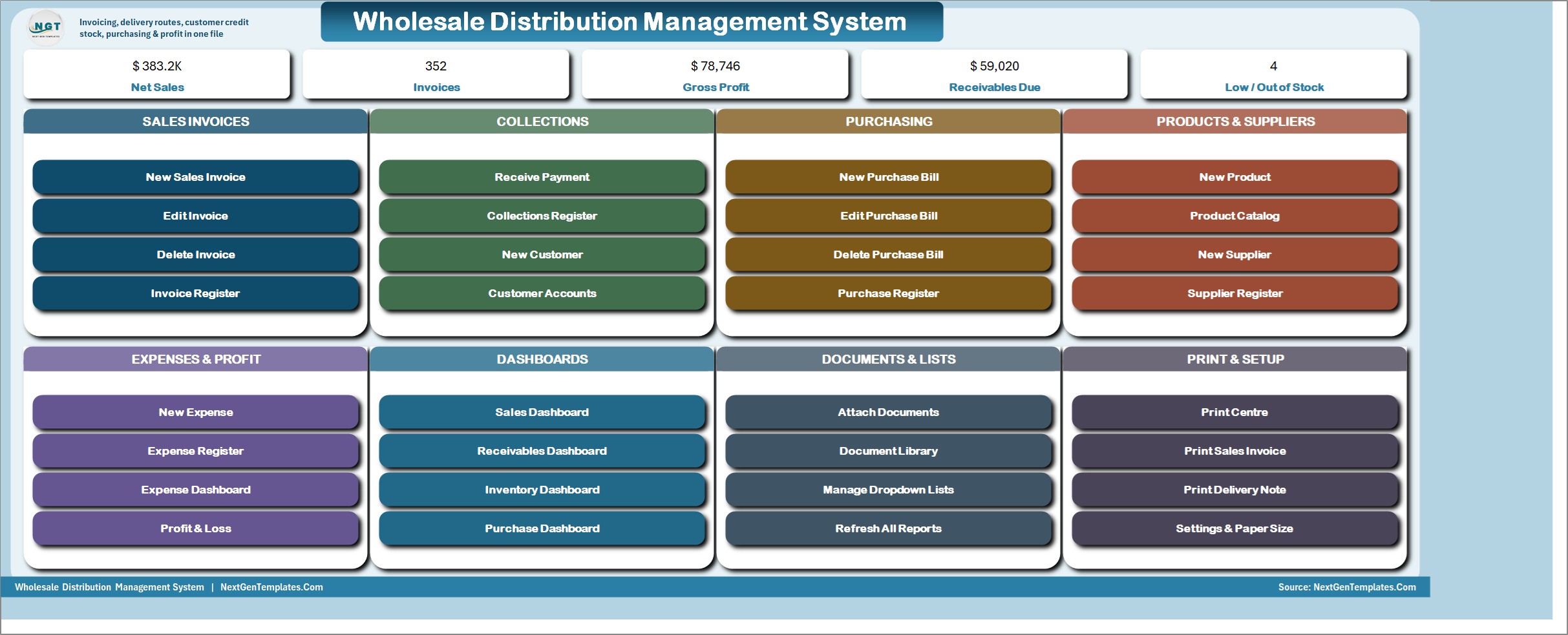
MAIN menu
The file opens here every time. Five live KPI chips – Net Sales, Invoices, Gross Profit, Receivables Due and Low / Out of Stock – then eight colour-coded cards: Sales Invoices, Collections, Purchasing, Products & Suppliers, Expenses & Profit, Dashboards, Documents & Lists and Print & Setup. Every job starts from one of its buttons.
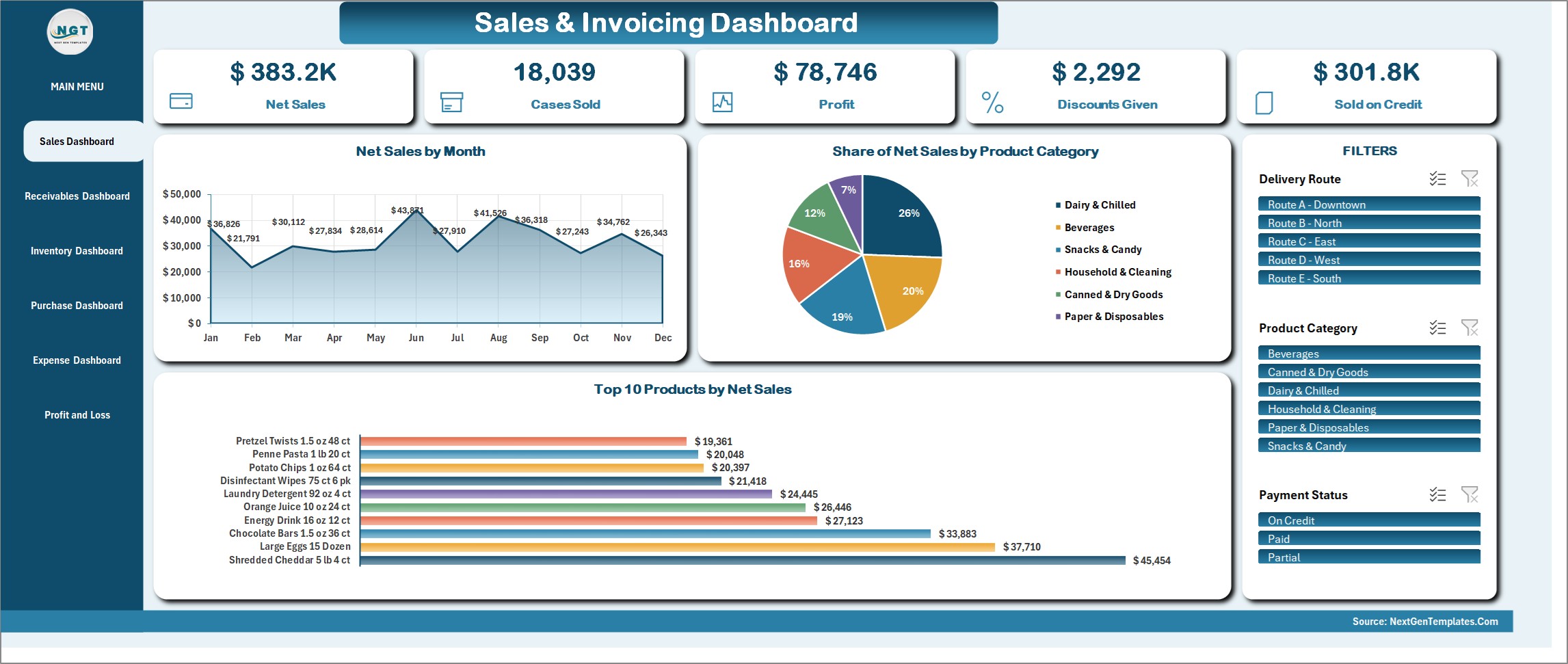
Sales & Invoicing Dashboard
Net Sales, Cases Sold, Profit, Discounts Given and Sold on Credit, with Net Sales by Month, Share of Net Sales by Product Category and Top 10 Products by Net Sales. Slicers for Delivery Route, Product Category and Payment Status drive every figure and chart on the page.
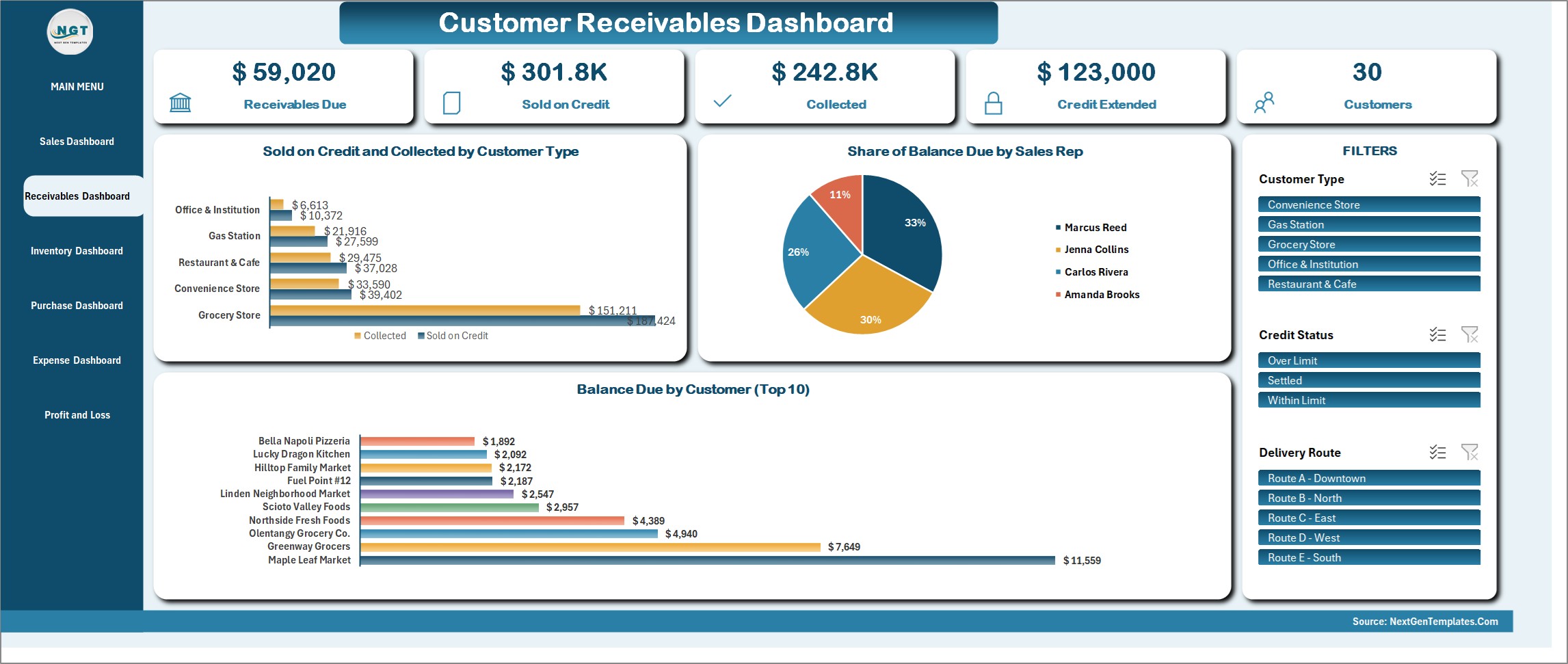
Customer Receivables Dashboard
Receivables Due, Sold on Credit, Collected, Credit Extended and the customer count, with Sold on Credit and Collected by Customer Type, Share of Balance Due by Sales Rep and Balance Due by Customer (Top 10). Filter by Customer Type, Credit Status or Delivery Route.
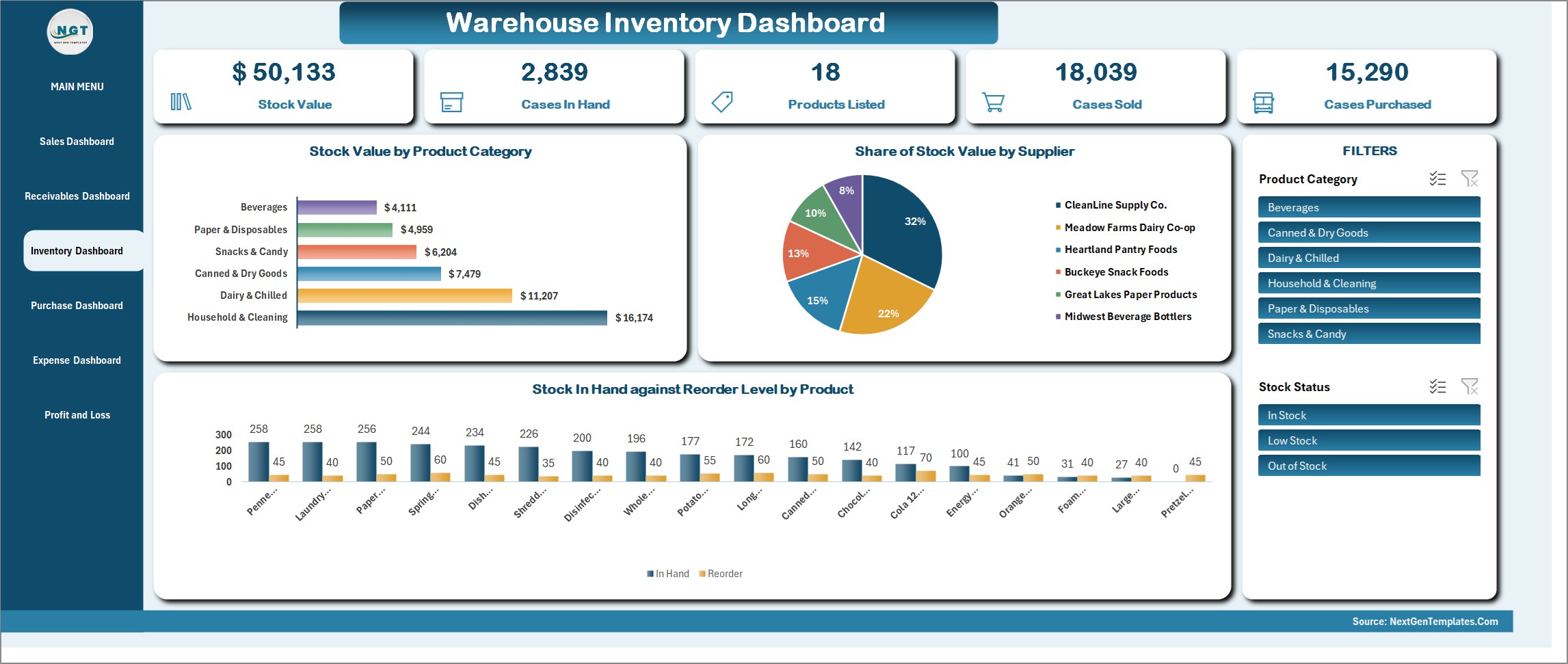
Warehouse Inventory Dashboard
Stock Value, Cases in Hand, Products Listed, Cases Sold and Cases Purchased, with Stock Value by Product Category, Share of Stock Value by Supplier and Stock in Hand against Reorder Level by Product. Slicers for Product Category and Stock Status.
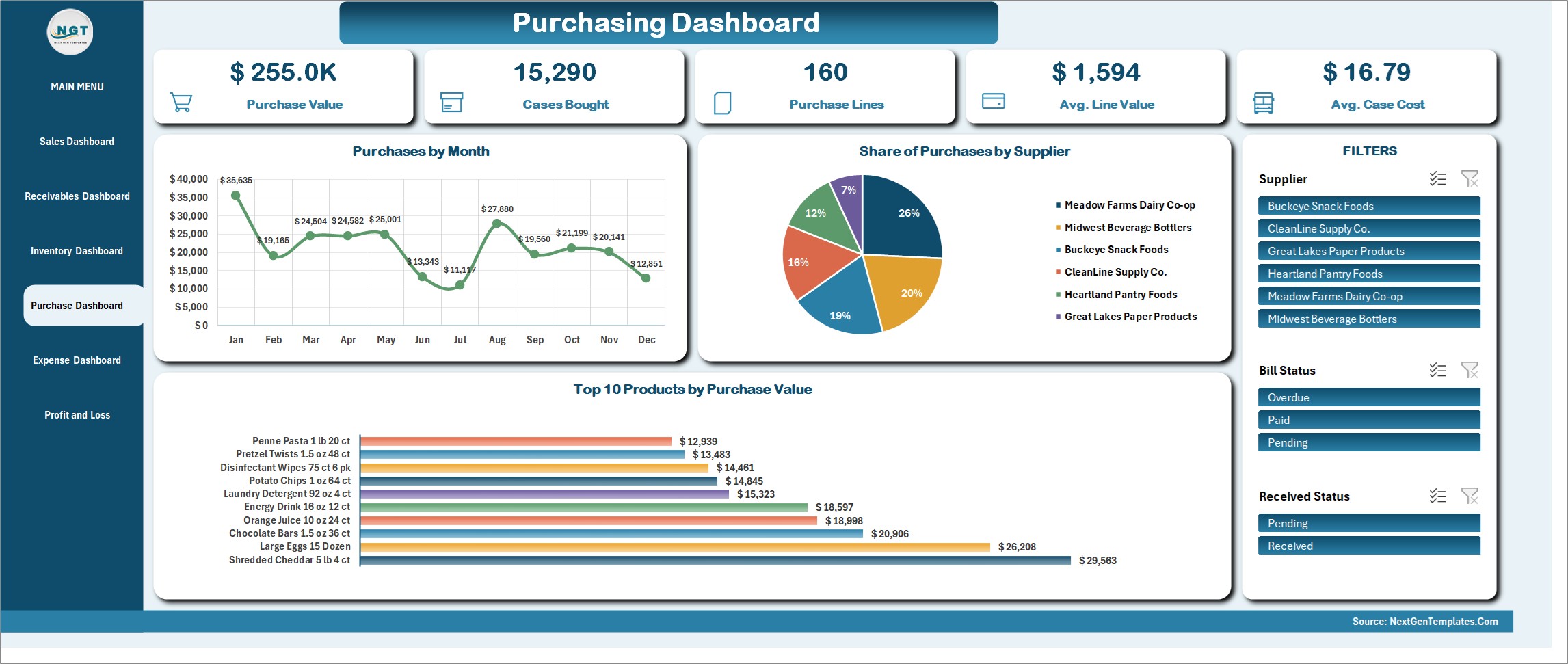
Purchasing Dashboard
Purchase Value, Cases Bought, Purchase Lines, Average Line Value and Average Case Cost, with Purchases by Month, Share of Purchases by Supplier and Top 10 Products by Purchase Value. Filter by Supplier, Bill Status or Received Status.
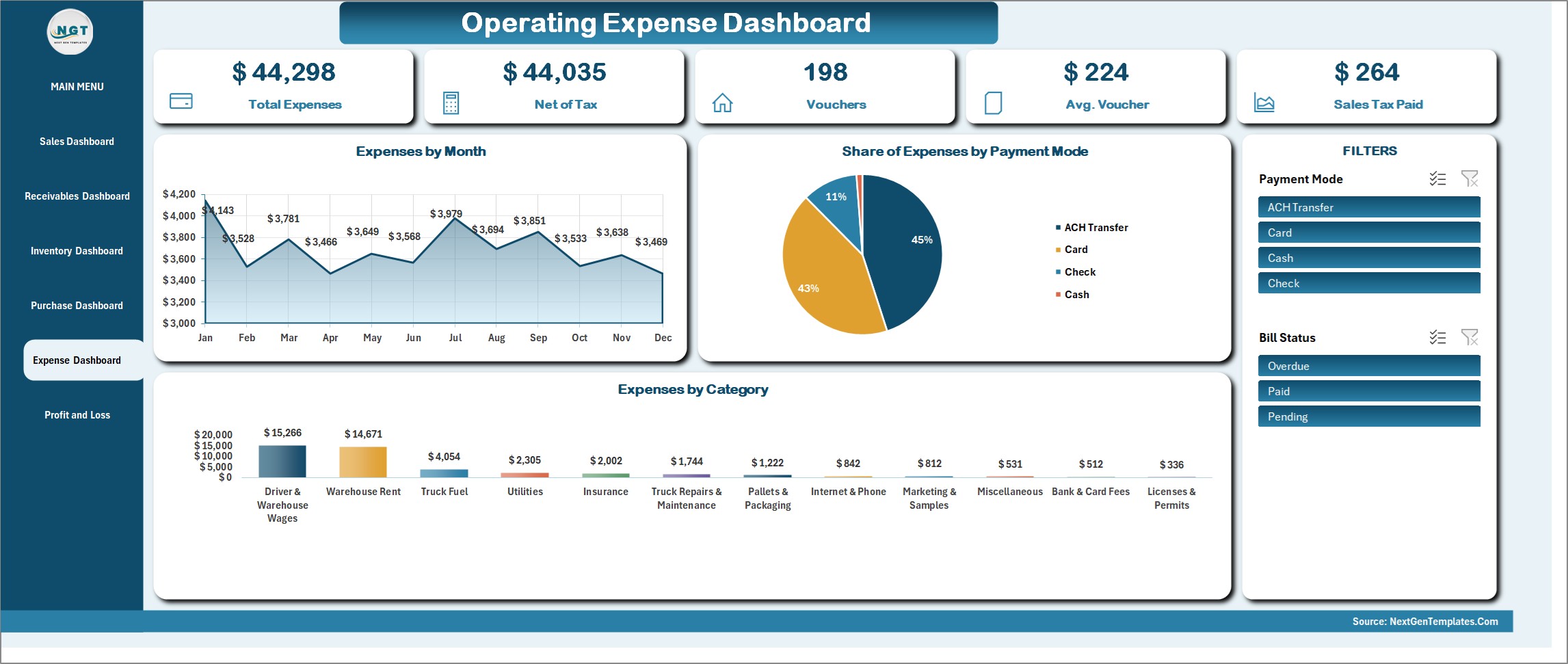
Operating Expense Dashboard
Total Expenses, Net of Tax, Vouchers, Average Voucher and Sales Tax Paid, with Expenses by Month, Share of Expenses by Payment Mode and Expenses by Category. Slicers for Payment Mode and Bill Status.
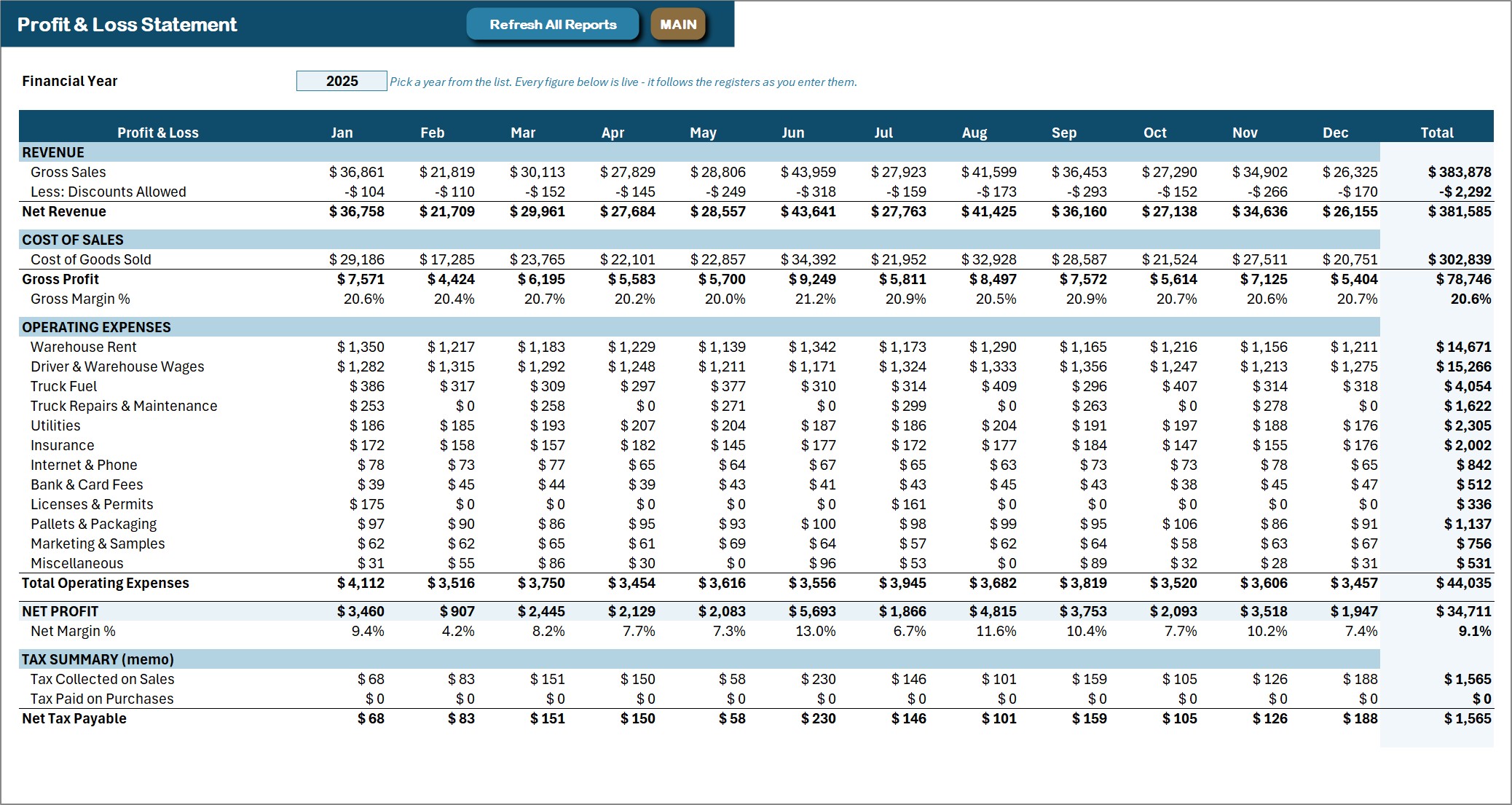
Profit & Loss statement
A live formula statement: twelve months and a year total, from gross sales and discounts through cost of goods sold and gross profit, every operating expense category, down to net profit and net margin – plus a tax summary memo showing tax collected on sales, tax paid on purchases and net tax payable. The Financial Year box picks the year and every figure follows the registers. Press Refresh All Reports after a batch of entries.
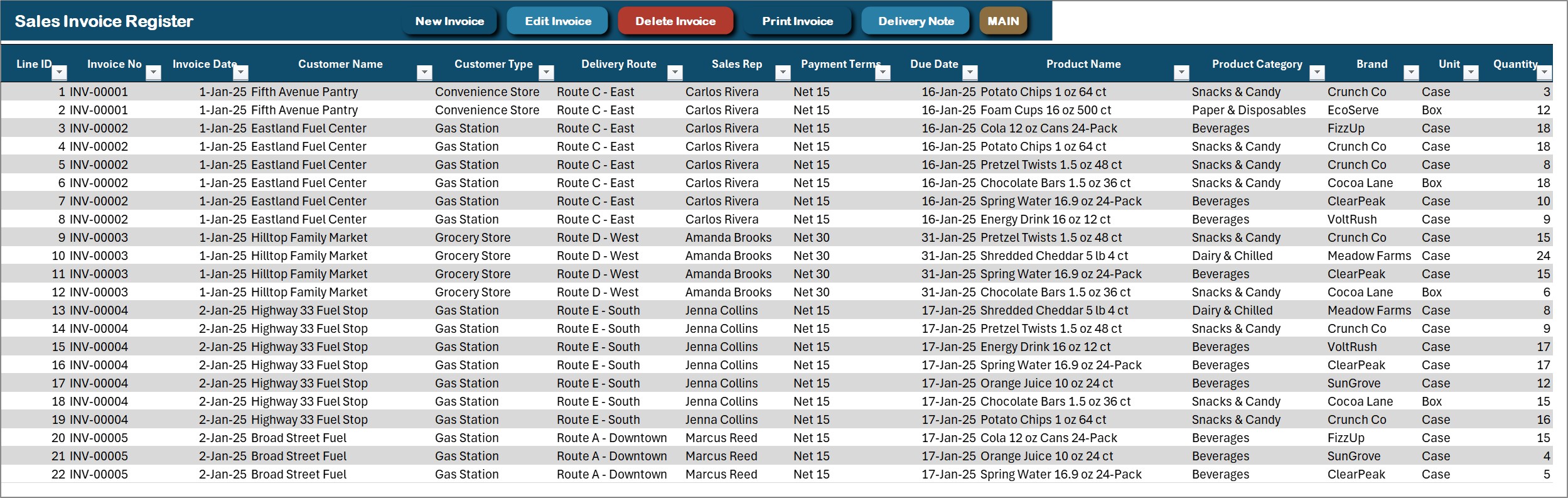
Sales Invoice Register
One row per item line under its invoice number: customer, customer type, delivery route, sales rep, payment terms, due date, product, category, brand, unit, quantity, price, discount, tax and the calculated totals. New Invoice, Edit Invoice, Delete Invoice, Print Invoice and Delivery Note sit on the action bar.
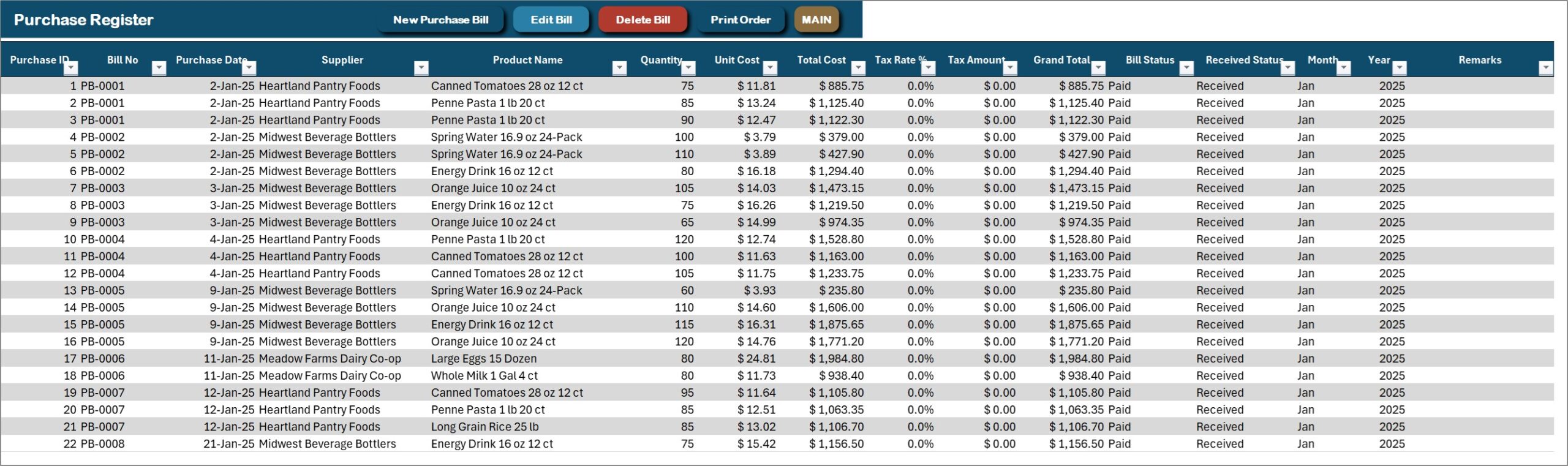
Purchase Register
Every purchase bill line: bill number, date, supplier, item, quantity, unit cost, tax, total, bill status and received status. Pressing Print Order prints the purchase order for the bill you clicked.
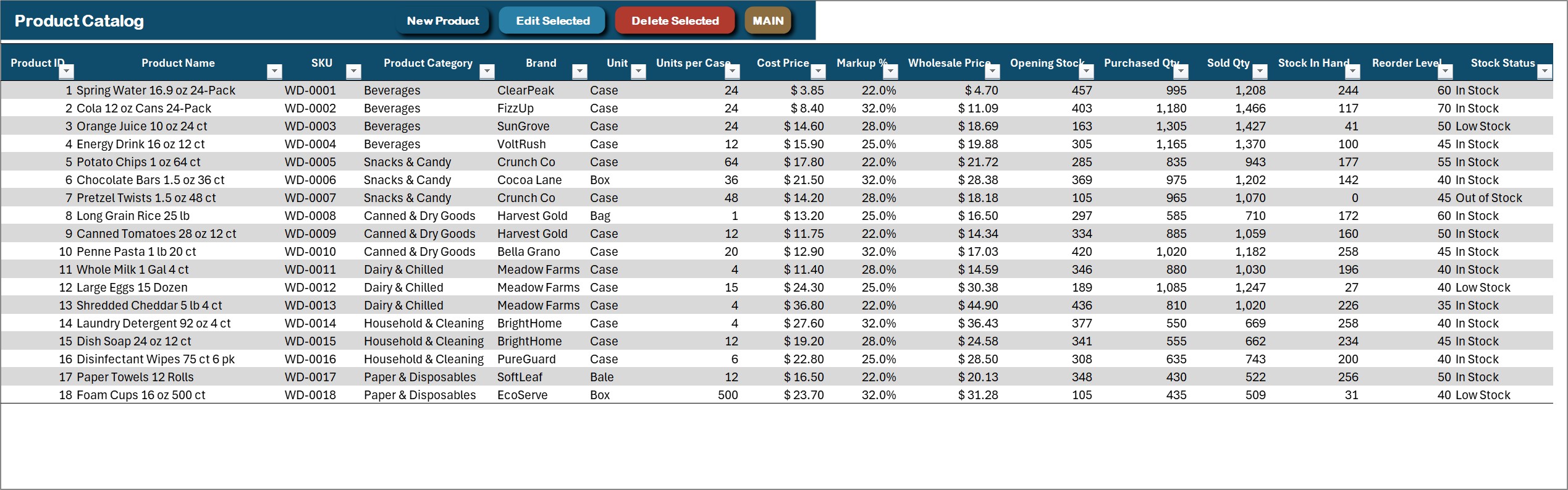
Product Catalog
Every product with its SKU, category, brand, unit, units per case, cost price, markup, wholesale price, opening stock, purchased and sold cases, stock in hand, reorder level and stock status. The stock columns are formulas fed by the purchase and invoice registers.
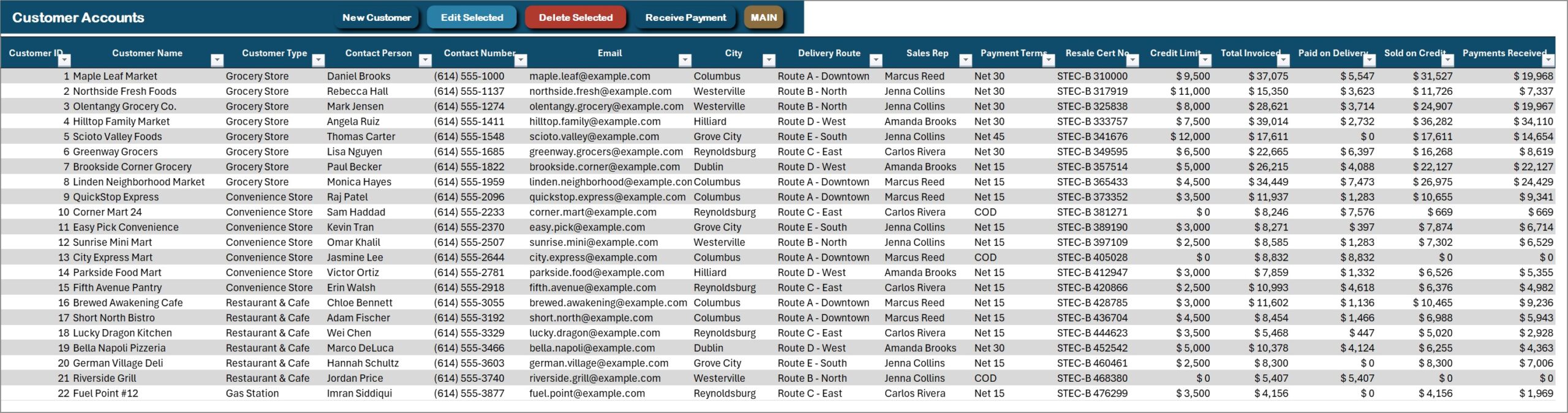
Customer Accounts
Customers with type, contact, delivery route, sales rep and payment terms, plus resale certificate number, credit limit, total invoiced, paid on delivery, sold on credit, payments received and the balance due with a credit status.
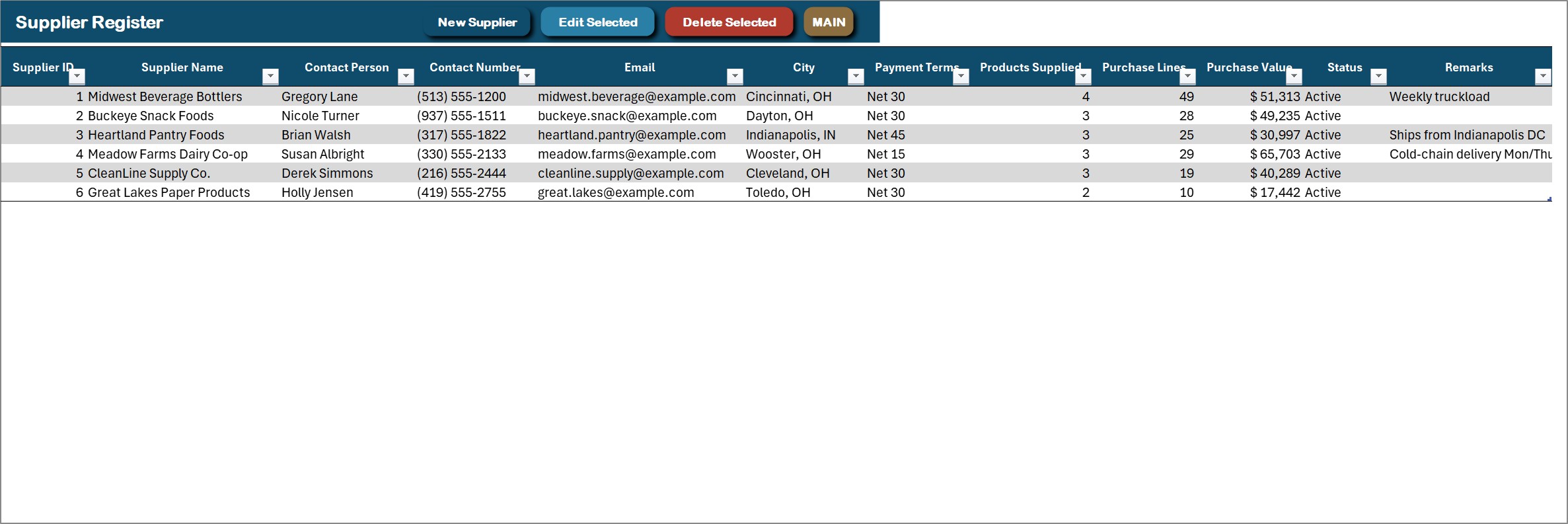
Supplier Register
Suppliers with contact person, phone, email, city, payment terms and status, plus purchase bills, purchase lines and purchase value counted from the Purchase Register.
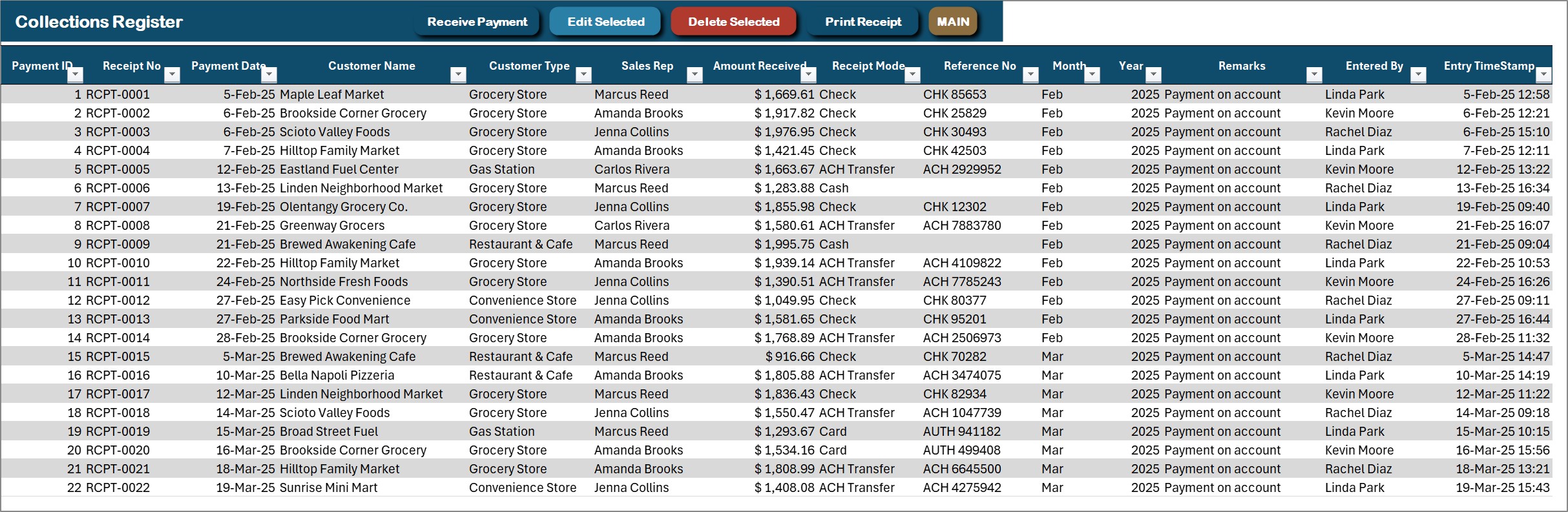
Collections Register
Every payment received, with a receipt number, date, customer, customer type, sales rep, amount, mode (check, ACH transfer, cash or card) and reference number. Receive Payment records one, Print Receipt prints it.
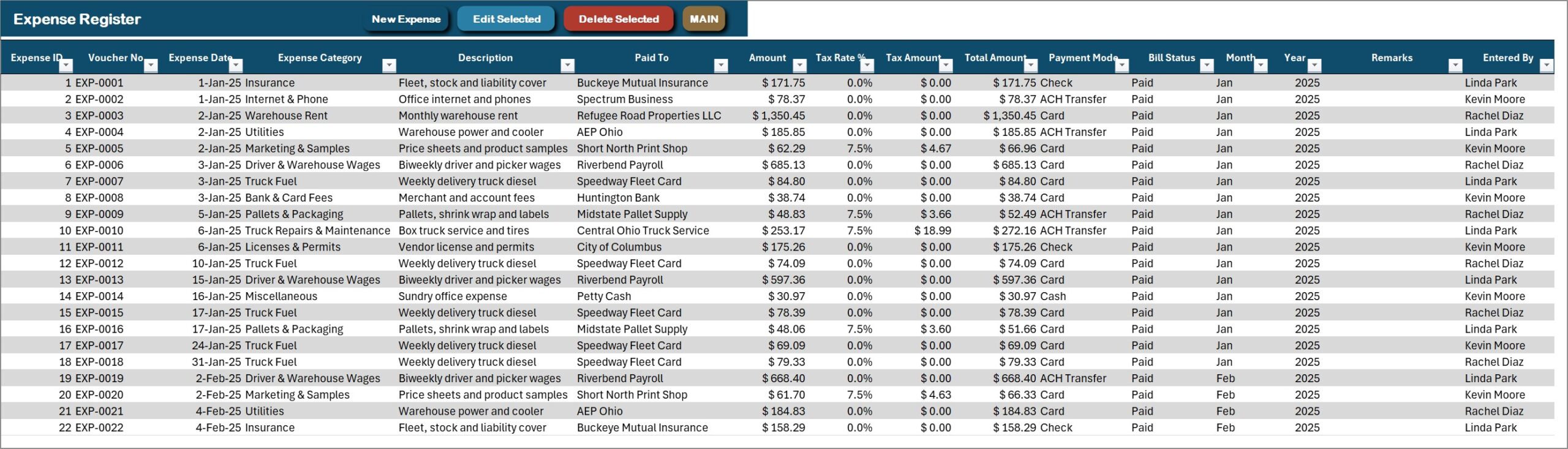
Expense Register
Warehouse rent, driver and warehouse wages, truck fuel, repairs, utilities, insurance, bank fees, licenses, packaging, marketing and more – with voucher number, payee, amount, tax, total, payment mode and status. This is the expense side of the Profit & Loss statement.
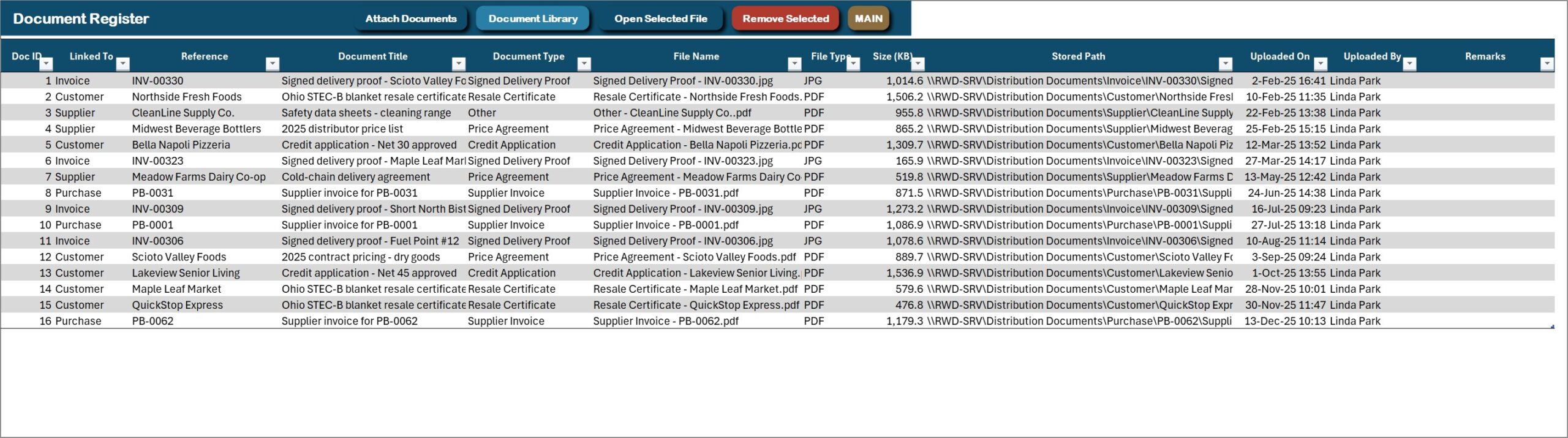
Document Library
Every attachment in one list – signed delivery proofs, resale certificates, credit applications, supplier invoices and price agreements – linked to the invoice, customer, purchase or supplier it belongs to, and opened in one click.
Category Master
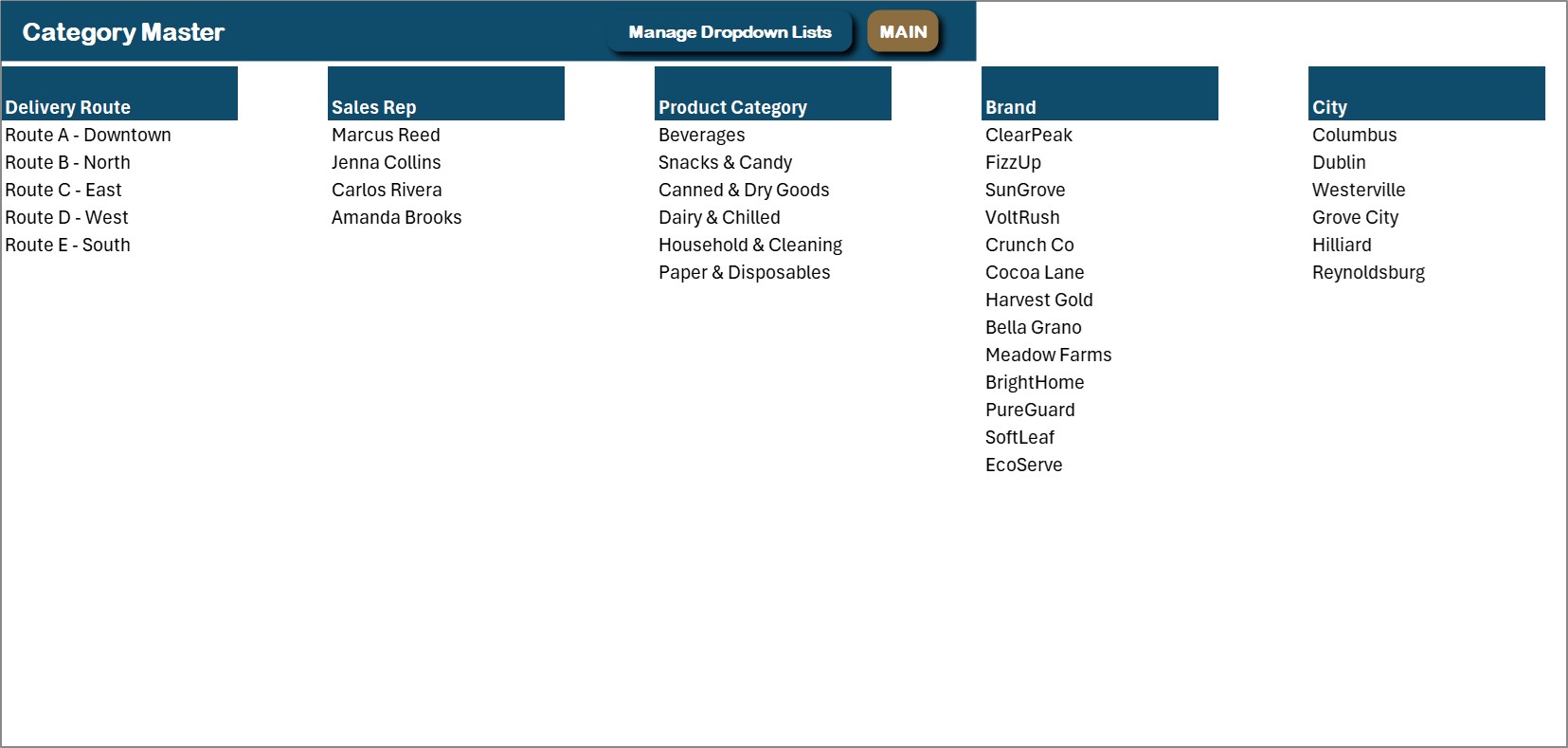
The main dropdown lists in one place: delivery routes, sales reps, product categories, brands and cities. Edit here or through the Manage Dropdown Lists form.
Settings
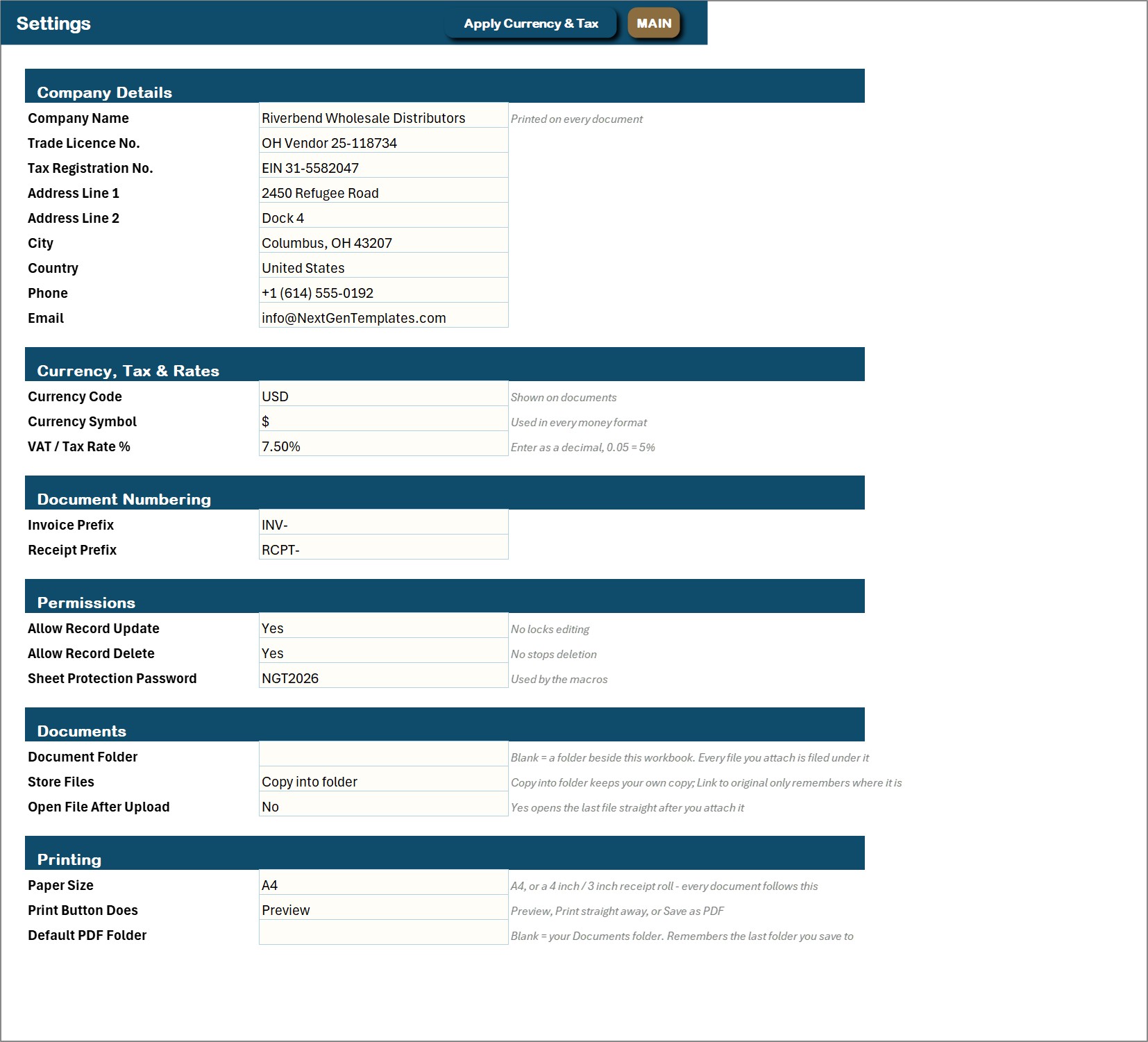
Company details printed on every document, currency code and symbol, sales tax rate, invoice and receipt numbering, permissions (allow record update, allow record delete), the document folder and the printing defaults: paper size, what the print button does and the default PDF folder.
📊 Wholesale Distribution Management System vs. an Invoice Spreadsheet vs. Cloud Distribution Software – Where This Fits
| Feature | This Excel VBA system | Plain invoice and stock spreadsheet | Cloud distribution software |
|---|---|---|---|
| Cost | $29 one-time ✅ | Free to $20 one-time | Monthly subscription, often per user |
| Platform | Microsoft Excel for Windows (macros) | Excel or Google Sheets | Cloud, browser |
| Setup time | Under 20 minutes ✅ | Hours of building | Days to weeks |
| Multi-line sales invoices with delivery route and sales rep | Yes ✅ | Manual | Yes ✅ |
| Customer credit limit, balance due and credit status | Yes, automatic ✅ | Manual formulas | Yes ✅ |
| Stock in hand and reorder status that update themselves | Yes ✅ | Manual | Yes ✅ |
| Print invoices, delivery notes, receipts and POs at A4 + 4 inch + 3 inch | Yes, all three ✅ | No | A4 / PDF |
| Live Profit & Loss statement | Yes ✅ | No | Depends on plan |
| Barcode scanning, route optimisation, e-invoicing | No | No | Often ✅ |
| Works offline, data stays on your PC | Yes ✅ | Yes | No |
For a small or mid-size distributor that wants invoicing, credit, stock, purchasing and profit in one place without a monthly subscription, this wholesale management system in Excel sits in the sweet spot. If you need barcode scanning, GPS route planning or many people working at once, buy dedicated distribution software.
👥 Who This Template Is For – and Who It’s Not For
✅ This template is built for:
- Small and mid-size wholesalers and distributors selling cases to stores, restaurants, gas stations and offices
- Owners who sell on credit and need to see balance due, credit limit and collections in one place
- Dispatch and office staff who print the invoice and the delivery note for every truck
- Businesses that want stock, purchasing and a monthly Profit & Loss without paying a subscription
❌ This template is NOT for:
- Teams that need several people in the same file at the same time – this is a single-user desktop workbook
- Mac or Excel-for-web users; the forms are VBA and need Excel for Windows with macros enabled
- Businesses that need barcode scanning, warehouse bin locations, GPS route planning, e-invoicing or tax filing
- Anyone expecting a bank, payment-gateway or accounting-software connection – the file stays on your PC and connects to nothing
⚙️ How to Use the Wholesale Distribution Management System
- Download the ZIP, extract it, open the .xlsm file and click Enable Content so the VBA runs.
- Go to Print & Setup > Settings & Paper Size and enter your company details, currency symbol, sales tax rate and printing defaults.
- Open Manage Dropdown Lists and replace the sample routes, reps, categories, brands and cities with your own.
- Add your suppliers, products and customers with the New Supplier, New Product and New Customer forms.
- Press New Purchase Bill to bring stock in, then New Sales Invoice to sell it.
- Use Receive Payment when a customer pays, and New Expense for running costs.
- Press Refresh All Reports and open the dashboards and the Profit & Loss.
- Delete the sample rows when you are ready – the dashboards and the Profit & Loss refresh themselves.
💼 Real-World Use Cases
Marcus runs a beverage and snack distribution route. He bills grocery stores and gas stations by case, prints the delivery note for the driver on A4, and watches the Customer Receivables Dashboard to see which accounts are over their limit before the next load goes out.
Jenna sells paper goods and cleaning supplies to offices and restaurants. She enters purchase bills as they arrive, sees Low Stock on the Inventory Dashboard before a product runs out, and prints the purchase order for the supplier.
Carlos owns a small cash-and-carry wholesaler. Invoices print on the 3 inch printer at the counter, payments get a numbered receipt, and the Profit & Loss tells him each month what the business actually made.
🎁 Try Before You Buy: 7-Day Free Trial
Download the free trial of the Wholesale Distribution Management System in Excel VBA and use the complete system for 7 days. Every form, register, dashboard, printable document and setting works exactly as in the full version, so you can test it with your own records before you decide.
How the free trial works
- Click Get the 7-Day Free Trial below, enter your email and download the ZIP from the email we send you. Unzip it.
- Open it in Microsoft Excel for Windows (the desktop app, not Excel Online or Mac) and click Enable Content on the yellow bar. If there is no yellow bar, right-click the file, choose Properties, tick Unblock and open it again.
- Your 7 days start the first time the file opens with macros on. A banner on the MAIN page shows how many days are left.
- After 7 days the trial locks and shows a Buy Full Version button. Buy the full version to keep working with no time limit.
| Free Trial | Full Version | |
|---|---|---|
| Every feature, form and dashboard | Yes | Yes |
| Time limit | 7 days | None, lifetime use |
| Trial banner | Yes | No |
| PDF user manual | Included | Included |
| Editable (unlocked) VBA code | No, locked | Yes |
Enter your email and we send the download link straight to your inbox.
The trial runs once per computer: downloading it again does not restart the 7 days. Records you enter during the trial can be copied into the full version.
❓ Frequently Asked Questions
What does the Wholesale Distribution Management System track?
Sales invoices, delivery routes and sales reps, customer accounts and credit, payments received, products and stock, purchase bills, suppliers, expenses and attached documents. Five dashboards and a live Profit & Loss statement are built on top of those registers.
Does it track customer credit?
Yes. Each customer has a credit limit, and the workbook works out what was paid on delivery, what was sold on credit, what has been received and the balance due, with a credit status beside it. The Receivables Dashboard shows the balances by customer, customer type and sales rep.
Does it scan barcodes or plan delivery routes?
No. A delivery route is a label on the invoice and a filter on the dashboards, and products are picked by typing and searching. There is no barcode scanning, GPS routing or route optimisation.
What can I print?
Sales Invoice, Delivery Note, Payment Receipt and Purchase Order, each at A4, 4 inch (104 mm) or 3 inch (80 mm). Choose the paper size and whether the button previews, prints or saves a PDF on the Settings sheet.
Can I stop staff editing or deleting records?
Yes. Editing and deleting can be switched off on the Settings sheet. There are no separate user logins – it is a single-user desktop workbook.
Does it work on Mac or Excel for the web?
No. The entry forms and the printing engine are VBA, so it needs Microsoft Excel 2016 or later for Windows on the desktop, with macros enabled. It will open elsewhere but the buttons will not run.
How long does setup take?
Under 20 minutes. Enable macros, fill in Settings, replace the dropdown master lists with your own, and add your suppliers, products and customers. The sample data can stay while you learn the system and be deleted later.
👤 About the Author
Built by PK – Microsoft Certified Professional with 15+ years of Excel, Google Sheets and Power BI experience. Founder of NextGenTemplates. Every template is hand-built and tested before release. Watch the walkthroughs on @PKAnExcelExpert and @NextGenTemplates.
🔗 Explore Related Templates
💎 Best value: the VBA Management Systems Mega Pack bundles five complete Excel VBA systems for less than buying them separately.
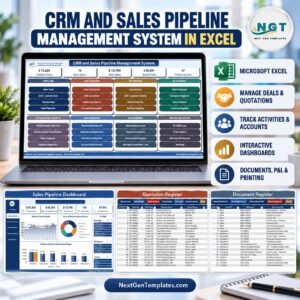
- CRM and Sales Pipeline Management System V1.0 in Excel VBA – the same engine for the sales side: deals, quotations, activities and documents.
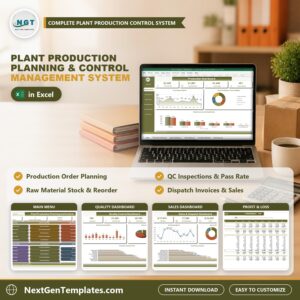
- Plant Production Planning and Control Management System V1.0 in Excel VBA – for the manufacturer that supplies the distributor.
Browse more Excel VBA Tools or the full range of MS Excel templates.
🎥 Visit our YouTube channel for step-by-step video tutorials
👉 YouTube.com/@NextGenTemplates
📅 Last updated: October 2026
Compatibility and Requirements
- Runs in Microsoft Excel desktop on Windows (Excel 2016 or later, or Microsoft 365) with macros enabled. The entry forms are VBA, so it does not run in Excel for the web, Google Sheets or on mobile.
- Enable Content when you open the file. Microsoft explains the steps in Enable or disable macros in Microsoft 365 files.
























Reviews
There are no reviews yet.