



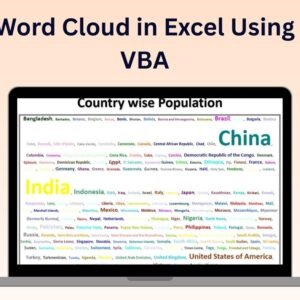
The Word Cloud in Excel Using VBA is a powerful and innovative tool that allows you to create visually engaging word clouds directly within Excel. By leveraging VBA (Visual Basic for Applications), this tool enables you to display the most frequently used words in your dataset in a beautiful, dynamic format. Word clouds are an excellent way to visually represent textual data, such as customer feedback, survey responses, or social media mentions, helping you quickly identify key themes and insights.
This tool is highly customizable, allowing you to adjust font sizes, colors, and word positioning based on word frequency or importance. With easy integration into your existing Excel files, it’s an ideal tool for marketers, analysts, and anyone who needs to visualize large amounts of text data quickly and efficiently. Whether you’re conducting a sentiment analysis or simply looking to create an engaging visual for a report or presentation, the Word Cloud in Excel Using VBA is the perfect solution.

Key Features of the Word Cloud in Excel Using VBA:
🌟 Dynamic Word Cloud Creation
Generate word clouds dynamically from any text-based data in Excel, such as customer reviews, feedback, or survey responses.
🎨 Customizable Word Appearance
Adjust the font sizes, colors, and orientations of words based on frequency or specific criteria, allowing you to create a word cloud that fits your branding or report style.
⚙️ VBA-Powered Automation
The tool is powered by VBA, making it easy to generate a word cloud with a click of a button. No complex coding is required, just input your data and let the VBA script do the work.
📊 Easy-to-Use Interface
The user-friendly interface ensures that anyone, regardless of Excel expertise, can easily create and customize their word cloud.
🔄 Real-Time Updates
As you modify or add data to your Excel sheet, the word cloud automatically updates in real-time, reflecting the changes instantly.
Why You’ll Love the Word Cloud in Excel Using VBA:
✅ Engaging Data Visualization – Transform your text data into an engaging and easy-to-understand word cloud, helping to highlight key themes and insights. ✅ Customizable to Fit Your Needs – Tailor the design, colors, and word placement to suit your business, project, or presentation style. ✅ Time-Saving Automation – Automatically generate the word cloud using the VBA tool, saving you time compared to manual creation or other external tools. ✅ Real-Time Data Integration – The word cloud automatically updates as new data is added, making it perfect for continuous analysis or reporting. ✅ User-Friendly – Create word clouds in minutes with this simple, no-code-required solution, even if you’re not an expert in VBA or data visualization.
What’s Inside the Word Cloud in Excel Using VBA:
- VBA-Driven Word Cloud Generation – Automatically create a word cloud from any textual data in Excel.
- Customizable Appearance – Adjust font sizes, colors, and placements based on word frequency or importance.
- Dynamic Updates – The word cloud adjusts in real-time as data is modified.
- User-Friendly – Simple interface, with easy-to-follow instructions for creating word clouds with minimal effort.
How to Use the Word Cloud in Excel Using VBA:
1️⃣ Download the Template – Access the Excel file immediately after purchase. 2️⃣ Input Your Data – Add your text-based data into Excel, such as customer feedback, survey responses, or social media comments. 3️⃣ Run the VBA Script – With a click of a button, the VBA script generates your word cloud. 4️⃣ Customize the Design – Adjust the word cloud’s font size, color, and layout to fit your needs. 5️⃣ Visualize Key Insights – Use the word cloud to identify key themes and insights from your data.
Who Can Benefit from the Word Cloud in Excel Using VBA:
- Marketers
- Data Analysts
- Business Analysts
- Project Managers
- Content Creators
- Anyone looking to visualize large volumes of textual data easily
The Word Cloud in Excel Using VBA is the perfect tool for quickly generating insightful and engaging visual representations of your text data. Whether you’re analyzing customer sentiment, reviewing survey responses, or creating visually striking reports, this tool will help you transform raw data into actionable insights.
Click here to read the Detailed blog post
https://www.pk-anexcelexpert.com/word-cloud-in-excel-using-vba/
Visit our YouTube channel to learn step-by-step video tutorials
Watch the step-by-step video tutorial:
Compatibility and Requirements
- Needs Microsoft Excel desktop on Windows with macros enabled, because the word cloud is built by a VBA script.
- It does not run in Excel for the web, Google Sheets or Excel mobile apps.
- Microsoft explains how to turn macros on in Enable or disable macros in Microsoft 365 files.
Frequently Asked Questions
What text can I turn into a word cloud?
Any text data in Excel, such as customer reviews, feedback, survey responses or social media comments.
How do I create the word cloud?
Add your text to the sheet and click the button. The VBA script builds the word cloud for you.
Do I need to know VBA?
No. The script is already written. You enter your data and run it with one click.
Can I change the look of the words?
Yes. You can adjust font sizes, colors and placement based on word frequency or importance.
Does it update when my data changes?
Yes. The word cloud updates as you add or modify text in the sheet.
Related Feedback and Visualization Templates
- Customer Feedback Analysis Dashboard in Excel: analyze feedback scores and trends
- Customer Feedback Analysis Dashboard in Google Sheets: the feedback dashboard in a browser
- Customer Feedback Tracker in Excel: log feedback as it comes in
- PK’s Utility Tool in Excel VBA: a free set of VBA shortcuts for Excel
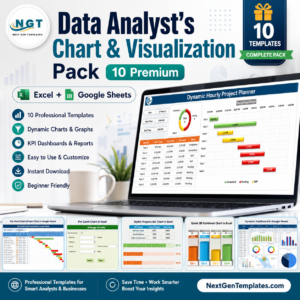
- Data Analyst’s Chart & Visualization Pack: 10 chart templates in one download
Browse all Excel VBA tools or the Excel charts and visualizations.







Reviews
There are no reviews yet.