

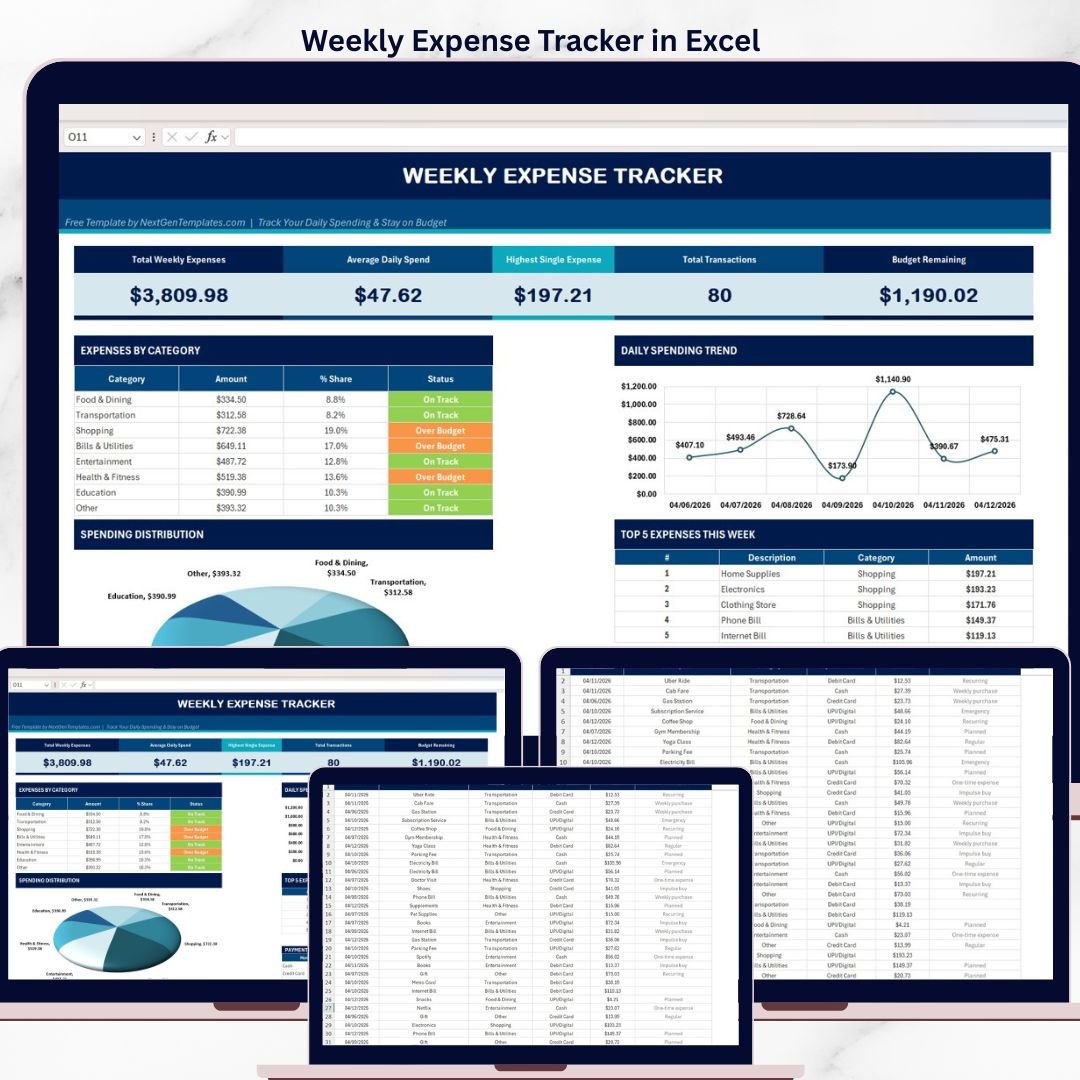
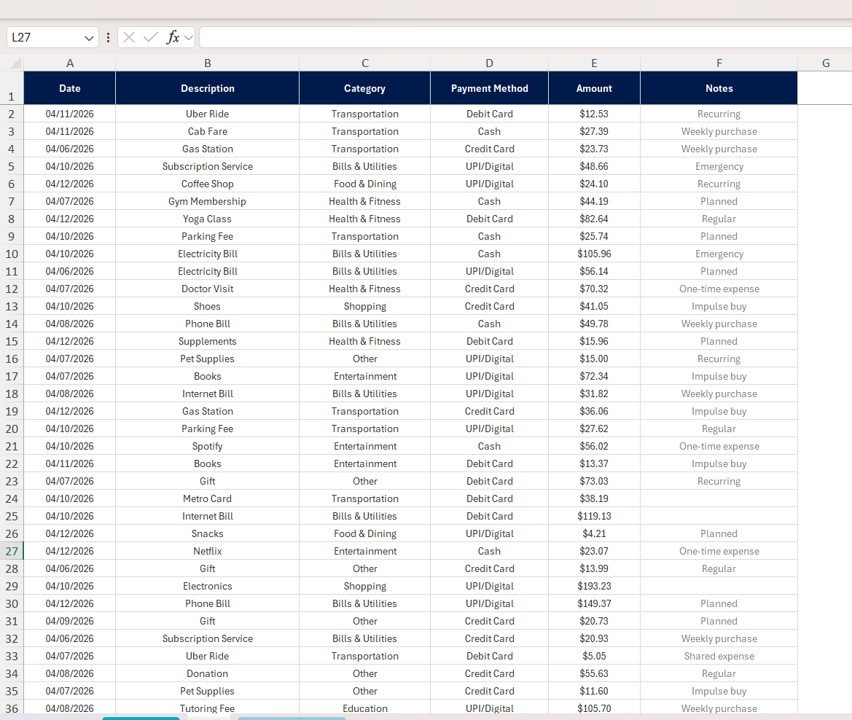


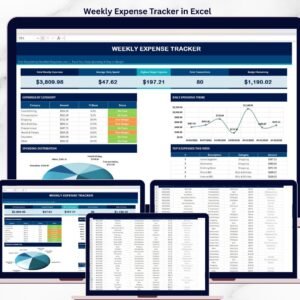
Weekly Expense Tracker in Excel is a 100% FREE downloadable personal finance template built for anyone who wants to take control of their weekly spending without complicated apps or monthly subscriptions. This Excel Tracker Template includes a professionally designed Dashboard page with 5 KPI cards, category-level budget tracking with traffic-light Status indicators, a pie chart for spending distribution, a 7-day line chart for daily trends, and a Top 5 Expenses table — all powered by a single simple data entry sheet with Date, Description, Category, Payment Method, Amount, and Notes columns.
Tracking your weekly expenses is the #1 habit that separates people who save money from people who wonder where it went. The Weekly Expense Tracker in Excel gives you a no-cost, no-login, no-subscription way to log every transaction, see exactly where your money is going, compare spending against category budgets, and identify the habits that are quietly draining your wallet. Whether you’re managing a student budget, household expenses, or personal cash flow, this tracker is ready to use the moment you open it. Looking for a more advanced option? Check out our Personal Expense Tracker in Google Sheets or upgrade to the premium Wedding Budget Dashboard in Excel for event-specific financial planning.
🔑 Key Features of Weekly Expense Tracker in Excel
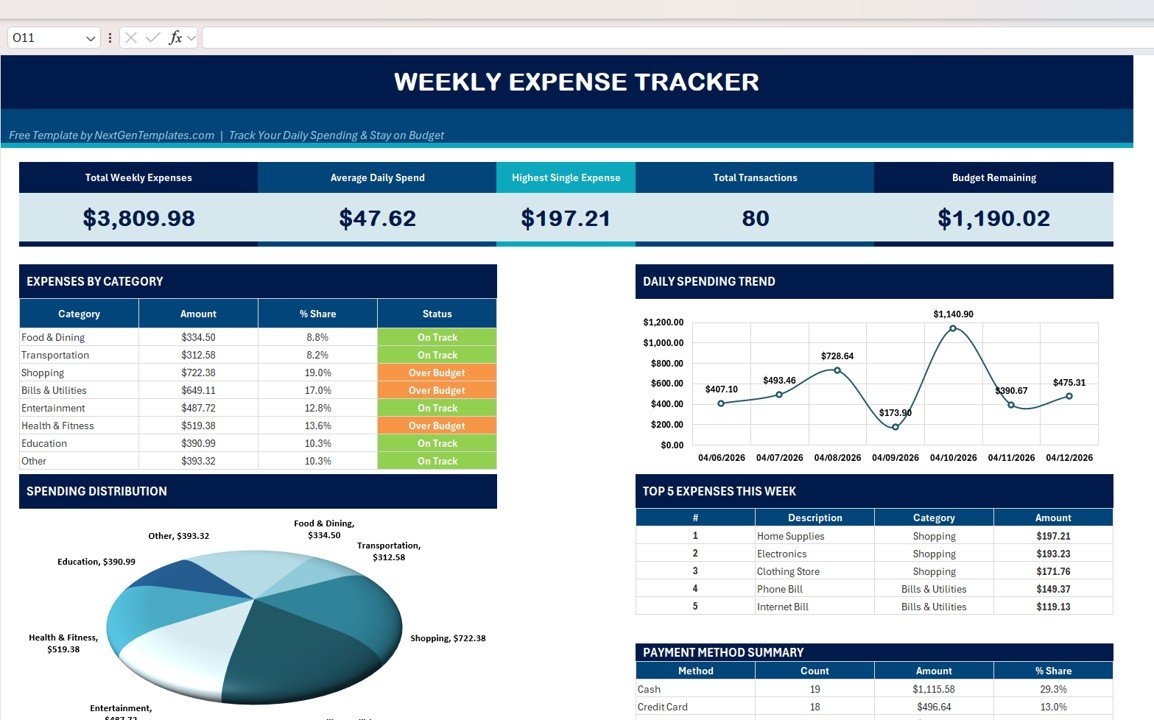
📌 5 High-Level KPI Cards — Instantly see Total Weekly Expenses, Average Daily Spend, Highest Single Expense, Total Transactions, and Budget Remaining the moment you open the dashboard. No clicking, no filtering — your financial pulse at a glance.
📌 Expenses by Category Table with Smart Status — Tracks 8 categories (Food & Dining, Transportation, Shopping, Bills & Utilities, Entertainment, Health & Fitness, Education, Other) with Amount, % Share, and color-coded Status (On Track / Over Budget) so you know at a glance which categories need attention.
📌 Spending Distribution Pie Chart — A clean visual breakdown of where your money went this week, instantly showing which categories dominate your budget.
📌 Daily Spending Trend Line Chart — A 7-day view of your daily spending pattern so you can spot high-spend days, recurring weekend blowouts, and the quiet days that balance your week.
📌 Top 5 Expenses This Week — A focused table highlighting your 5 biggest transactions — perfect for identifying impulse buys and big-ticket items you might want to think twice about next week.
📌 Payment Method Summary — Breaks down your spending by Cash, Credit Card, Debit Card, and UPI/Digital so you can see how you’re paying, not just what you’re paying for.
📌 Simple Data Entry Sheet — Just 6 columns (Date, Description, Category, Payment Method, Amount, Notes). No formulas to learn, no complex setup. Type a row and the entire dashboard updates automatically.
📌 100% Free Forever — No trial, no hidden charges, no email wall. Download, open in Microsoft Excel, and start tracking today.
📦 What’s Inside the Weekly Expense Tracker in Excel
The template ships with 2 fully connected sheets that handle the entire workflow from raw entry to beautiful insight:
🗂️ Dashboard Sheet — The command center. Contains all 5 KPI cards, the Expenses by Category table with Status indicators, Spending Distribution pie chart, Daily Spending Trend line chart, Top 5 Expenses table, and Payment Method Summary. Every visual updates automatically from the data sheet.
🗂️ Data Sheet — The input layer. Columns include Date, Description, Category, Payment Method, Amount, and Notes. Add as many rows as you need — weekly, monthly, yearly. Sample records are pre-filled so you can see the format and delete them when ready.
💡 The tracker is built with standard Excel formulas (SUMIF, COUNTIF, AVERAGE, MAX) and PivotTable logic — no macros, no VBA, no enable-content prompts. It works on Excel 2016, 2019, 2021, Microsoft 365, and Excel for Mac.
⚙️ How to Use the Weekly Expense Tracker in Excel
Getting started takes less than 2 minutes:
- Download the free Weekly Expense Tracker Excel file from NextGenTemplates.com.
- Open the file in Microsoft Excel (or Excel Online / Excel for Mac — all supported).
- Delete the sample rows on the Data sheet.
- Enter your own transactions: Date, Description, Category, Payment Method, Amount, and optional Notes.
- Switch to the Dashboard sheet — every chart, KPI card, and category total has already updated with your numbers.
- Review weekly — check your Budget Remaining, look at your Top 5, and adjust your habits for the coming week.
👥 Who Can Benefit from This Weekly Expense Tracker
✅ Students managing limited monthly allowances and trying to avoid end-of-month panic.
✅ Young professionals starting their first job and building healthy money habits early.
✅ Families tracking household groceries, utilities, and discretionary spending.
✅ Freelancers separating personal expenses from business deductions.
✅ Budgeters who prefer Excel over fintech apps for privacy and control.
✅ Anyone who wants a free, clean, visual way to answer the question: “Where did my money go this week?”
❓ Frequently Asked Questions
Is the Weekly Expense Tracker in Excel really free?
Yes. The Weekly Expense Tracker in Excel is 100% free to download and use. There is no trial period, no paid upgrade required, and no email gate. You can use it personally, share it with family, and customize it to fit your needs.
What KPIs does the Weekly Expense Tracker track?
The Weekly Expense Tracker tracks 5 core KPIs: Total Weekly Expenses, Average Daily Spend, Highest Single Expense, Total Transactions, and Budget Remaining. It also breaks down spending across 8 categories with On Track / Over Budget status indicators.
Do I need advanced Excel skills to use this tracker?
No. The Weekly Expense Tracker uses only standard Excel formulas — no macros, no VBA, no add-ins. If you can type a date, a description, and a number in a row, you can use this template. The Dashboard updates automatically.
Can I use the Weekly Expense Tracker on Excel for Mac or Excel Online?
Yes. Because the template uses only native Excel functions (no macros or VBA), it works perfectly on Excel for Mac, Excel Online, Microsoft 365, Excel 2016, 2019, and 2021. Open the file on any platform and the dashboard will render correctly.
Can I customize the expense categories in the Weekly Expense Tracker?
Absolutely. The 8 default categories (Food & Dining, Transportation, Shopping, Bills & Utilities, Entertainment, Health & Fitness, Education, Other) can be renamed directly on the Dashboard and Data sheets. Rename them to match your lifestyle — for example, “Pets,” “Subscriptions,” or “Childcare.”
Is there a paid version with more features?
Yes. If you want deeper analytics — monthly trends, income tracking, savings goals, and multi-month comparisons — check out our premium Wedding Budget Dashboard in Excel, Crypto Portfolio Dashboard in Excel, or the Personal Monthly Budget Tracker in Google Sheets.
🔗 Explore Related Templates
🔹 Personal Expense Tracker in Google Sheets — A cloud-based alternative for users who prefer Google Drive over Excel.
🔹 Wedding Budget Dashboard in Excel — A premium budget dashboard for event-specific financial planning.
🔹 Excel Financial Tools — Browse our complete library of budget, expense, and finance templates.
📖 Click here to read the Detailed Blog Post
🎥 Visit our YouTube channel to learn step-by-step video tutorials
👉 YouTube.com/@NextGenTemplates
Excel Help for This Tracker
The dashboard runs on standard formulas and PivotTable logic. Microsoft explains PivotTables in Create a PivotTable to analyze worksheet data.







Reviews
There are no reviews yet.