


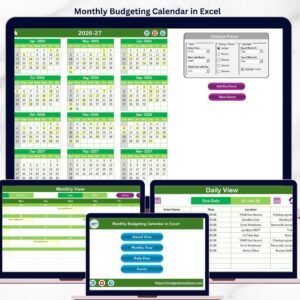
The Budget Tracking Calendar in Excel is a highly effective tool designed to help individuals and businesses manage their finances with ease. This comprehensive calendar allows you to track and organize your budget on a monthly, weekly, or daily basis, giving you full visibility over your income, expenses, and savings goals. Whether you’re managing a personal budget or handling company finances, this Excel template helps you stay on top of your budget by providing a clear and accessible layout.
With real-time updates, automated tracking, and intuitive features, the Budget Tracking Calendar is perfect for ensuring that you stay on track with your financial goals and avoid overspending. It helps you forecast future expenses, plan for savings, and make smarter financial decisions.

Key Features of the Budget Tracking Calendar in Excel
📌 Comprehensive Budget Tracking
Track all your income, expenses, and savings goals over a period of time. The calendar allows you to categorize each transaction and see how it impacts your overall budget, making it easier to manage your finances.
🛠 Customizable Income and Expense Categories
The template allows you to easily add and modify categories based on your specific needs. Whether it’s groceries, rent, utilities, or savings, you can adjust the categories to match your personal or business budget requirements.
💡 Real-Time Updates
As you enter new transactions, the calendar updates automatically to reflect changes in your budget. This real-time feature helps you stay informed about your financial status at all times.
🔢 Automatic Calculations
The template performs all necessary calculations, including totals, averages, and remaining balance, to help you quickly assess your financial situation without having to manually track each calculation.
🚀 Budget Visualization
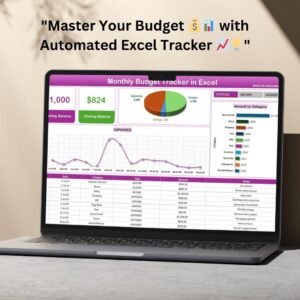
Track your financial progress with visually appealing graphs and charts that automatically update as you input data. These charts provide a clear overview of your spending, income, and savings.
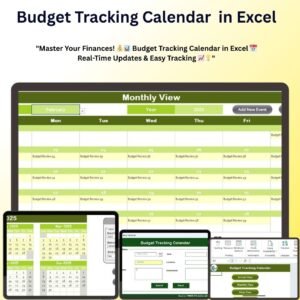
📅 Easy-to-Use Calendar Layout
The user-friendly calendar layout allows you to easily enter and track your expenses and income on a daily, weekly, or monthly basis. The intuitive design makes it simple to manage your budget and make updates as needed.
📊 Income and Expense Summary
At a glance, you can see your total income, total expenses, and balance for the month or year. This summary gives you a snapshot of your financial situation, helping you make better budgeting decisions.
⚙ Simple Setup and Customization
With clear instructions and a customizable interface, this template is easy to set up and adapt to your needs. No advanced Excel skills are required, making it perfect for both beginners and experienced users.
🚀 Why You’ll Love the Budget Tracking Calendar in Excel
✅ Track Income and Expenses – Easily categorize and monitor your financial inflows and outflows. ✅ Real-Time Data Updates – Automatically adjust your budget as you add new transactions. ✅ Customizable Categories – Tailor the categories to your personal or business needs. ✅ Automated Calculations – Enjoy automatic calculations for totals, savings, and remaining balance. ✅ Easy-to-Use Calendar Layout – Manage your budget in a simple, organized format.
📂 What’s Inside the Budget Tracking Calendar in Excel?
- Income and Expense Tracker: Track all your income and expenses in a clear, organized format.
- Customizable Categories: Add or remove categories to fit your specific needs.
- Real-Time Updates: The calendar adjusts automatically as you enter new data.
- Automatic Calculations: Keep track of totals, averages, and balances effortlessly.
- Graphs and Charts: Visualize your financial data with dynamic graphs that update in real-time.
- Simple Setup: Quick and easy setup with clear instructions for customization.
🔍 How to Use the Budget Tracking Calendar in Excel
1️⃣ Download the Template – Instantly access the Excel file upon purchase. 2️⃣ Enter Your Data – Input your income and expense data, and the calendar will automatically update. 3️⃣ Customize Categories – Modify the categories to reflect your unique financial situation. 4️⃣ Track Your Budget – Monitor your progress on a daily, weekly, or monthly basis. 5️⃣ Visualize Financial Progress – Use the charts to track spending patterns and savings goals.
🎯 Who Can Benefit from the Budget Tracking Calendar in Excel? 🔹 Personal Budgeters
🔹 Small Business Owners
🔹 Financial Planners
🔹 Accountants
🔹 Project Managers
🔹 Anyone looking to manage their finances more effectively
Stay on top of your finances and make smarter budgeting decisions with the Budget Tracking Calendar in Excel. With real-time updates, easy customization, and automated calculations, you’ll have everything you need to manage your financial goals.
Click here to read the Detailed blog post
https://www.pk-anexcelexpert.com/budget-tracking-calendar-in-excel/
Visit our YouTube channel to learn step-by-step video tutorials
Compatibility and Requirements
- Works in Microsoft Excel desktop (Excel 2016 or later, or Microsoft 365).
- Built with standard Excel charts. Microsoft’s guide Create a chart from start to finish explains how charts work.
Frequently Asked Questions
What can I track?
Income, expenses and savings goals on a daily, weekly or monthly basis.
Can I use my own categories?
Yes. You can add or change categories such as groceries, rent, utilities or savings.
Does it do the math for me?
Yes. It calculates totals, averages and the remaining balance, and shows total income, total expenses and balance for the month or year.
Is there a Google Sheets version?
Yes. See the Budget Tracking Calendar in Google Sheets.
Related Budget Templates
- Monthly Budgeting Calendar in Excel: another budget calendar
- Monthly Budget Tracker in Microsoft Excel: a full budget tracker
- Monthly Budget Planner Template in Excel: plan the month ahead
- Budget Tracking Calendar in Google Sheets: the Google Sheets edition
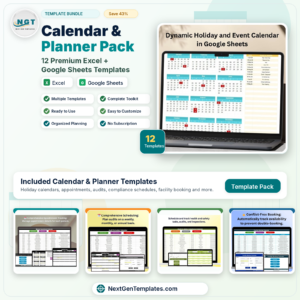
- Calendar & Planner Pack: 12 Excel and Google Sheets calendars and planners
Browse all Excel calendars or the Excel financial tools.









Reviews
There are no reviews yet.