Managing personal finances successfully requires a clear understanding of your assets, liabilities, and overall financial progress. However, many individuals struggle to monitor their wealth because financial information is often spread across multiple bank accounts, investment portfolios, loans, and digital assets. As a result, it becomes difficult to evaluate financial growth or identify areas that need improvement.
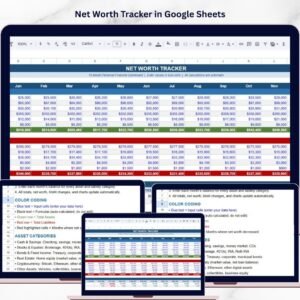
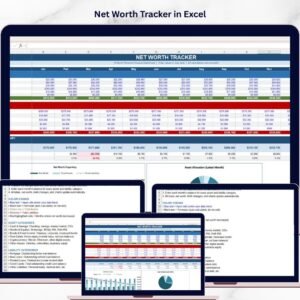
The Net Worth Tracker in Excel provides a simple yet powerful solution to organize and analyze your financial data. This ready-to-use Excel template helps individuals track assets, liabilities, and overall financial progress in one structured dashboard. By automatically calculating totals and updating charts whenever new data is entered, the tracker allows users to monitor their financial health with minimal effort.
With this Excel-based financial tracker, you can easily understand how your wealth changes each month. The dashboard provides a clear view of assets, liabilities, net worth growth, and financial trends over time. Because everything is organized in one place, users can quickly identify opportunities to grow investments, reduce debts, and improve financial stability.
Whether you are managing personal finances, planning long-term investments, or simply trying to stay on top of your financial goals, the Net Worth Tracker in Excel makes financial monitoring simple and effective.

💰 Key Feature of Net Worth Tracker in Excel
📊 Automatic Net Worth Calculation
The tracker automatically calculates net worth using the formula Total Assets – Total Liabilities, ensuring accurate financial analysis.
📅 12-Month Financial Tracking
Monitor financial balances from January to December to track your financial progress throughout the year.
📈 Interactive Financial Dashboard
Visual charts and summaries provide a clear overview of assets, liabilities, and net worth trends.
💼 Comprehensive Asset Tracking
Track various assets including cash, savings, investments, real estate, cryptocurrency, and other valuable assets.
💳 Detailed Liability Monitoring
Record debts such as mortgages, auto loans, student loans, credit cards, and other liabilities.
📉 Net Worth Growth Analysis
Identify whether your financial position is improving or declining with monthly change indicators.
📊 Visual Financial Charts
Charts help visualize financial progress and asset allocation for better decision-making.
⚡ Automated Excel Calculations
All totals and percentages update automatically, reducing manual work and errors.
📁 Structured Financial Template
The organized Excel layout makes financial tracking simple even for beginners.
📦 What’s Inside the Net Worth Tracker in Excel
This ready-to-use financial tracker includes several sections designed to provide a complete picture of your financial health.
1️⃣ 12-Month Financial Tracking
The template tracks financial data from January to December, allowing users to monitor financial changes throughout the year.
By updating balances monthly, users can:
Track wealth growth over time
Identify seasonal financial patterns
Monitor progress toward financial goals
2️⃣ Asset Tracking Section
The Assets section records all items that contribute to personal wealth.
Common asset categories included:
Cash & Savings Accounts
Stocks & Equities
Bonds & Fixed Income Investments
Real Estate Properties
Cryptocurrency Holdings
Other Personal Assets
Each category records monthly values, and Excel automatically calculates the Total Assets.
3️⃣ Liability Tracking Section
The Liabilities section records all financial obligations.
Common liabilities tracked include:
Mortgage Loans
Auto Loans
Student Loans
Credit Card Balances
Other Financial Liabilities
Because the tracker records these balances monthly, users can easily monitor debt reduction progress.
4️⃣ Net Worth Summary Dashboard
The dashboard automatically calculates financial metrics including:
Net Worth
Monthly Change ($)
Monthly Change (%)
These indicators help users quickly evaluate financial progress.
5️⃣ Visual Financial Charts
The template includes several charts that simplify financial analysis.
📈 Net Worth Trend Chart
Shows the monthly trend for:
Net Worth
Total Assets
Total Liabilities
This chart helps users visualize long-term financial growth.
📊 Asset Allocation Chart
A pie chart shows the distribution of assets in the latest month.
This helps users understand where their wealth is invested.
⚙️ How to Use the Net Worth Tracker in Excel
Using this financial tracker is simple and requires minimal Excel knowledge.
1️⃣ Download and open the Net Worth Tracker Excel template.
2️⃣ Enter your financial data including assets and liabilities.
3️⃣ Update values each month based on current balances.
4️⃣ Excel automatically calculates totals and updates charts.
5️⃣ Review the dashboard to analyze financial trends and progress.
Within minutes, you will have a complete overview of your financial position.
🎯 Who Can Benefit from This Net Worth Tracker in Excel
This financial tracker is useful for anyone who wants better control over their finances.
👤 Individuals Managing Personal Finances – Track assets, debts, and financial progress.
👨👩👧 Families Managing Household Finances – Monitor overall family wealth and liabilities.
📈 Investors – Analyze portfolio growth and asset allocation.
💼 Financial Planners – Track and analyze client financial positions.
🚀 Entrepreneurs – Monitor personal wealth and financial stability.
Because the template provides a complete financial overview, it helps users make smarter financial decisions and stay focused on long-term wealth building.
Click here to read the Detailed blog post
Watch the step-by-step video tutorial:
Visit our YouTube channel to learn step-by-step video tutorials
Compatibility and Requirements
- Works in Microsoft Excel desktop (Excel 2016 or later, or Microsoft 365).
- The dashboard includes a net worth trend chart and an asset allocation pie chart. Microsoft explains how to build and edit them in Create a chart from start to finish.
Frequently Asked Questions
How is net worth calculated?
The tracker subtracts Total Liabilities from Total Assets for each month and shows the result on the dashboard.
Which assets and debts can I record?
Assets include cash and savings, stocks, bonds, real estate, cryptocurrency and other assets. Liabilities include mortgages, auto loans, student loans, credit cards and other debts.
How often do I update it?
The template tracks January to December, so you enter your balances once a month. Totals, monthly change in dollars and percent, and the charts update automatically.
Which charts are included?
A Net Worth Trend chart shows net worth, total assets and total liabilities by month. An Asset Allocation pie chart shows how your assets are split in the latest month.
Is there a Google Sheets version?
Yes. See the Net Worth Tracker in Google Sheets and the Personal Finance Net Worth Tracker in Google Sheets.
Related Personal Finance Templates
- Net Worth Tracker in Google Sheets: the same tracker for Google Sheets
- Personal Finance Net Worth Tracker in Google Sheets: a personal finance version for Google Sheets
- Emergency Fund Tracker in Excel: track savings set aside for emergencies
Browse all Excel financial tools.