



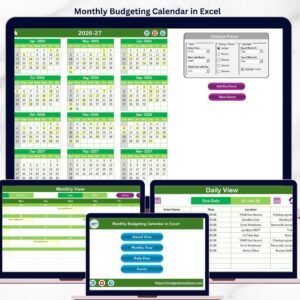
The Budget Planning Calendar in Excel is an essential tool for individuals and businesses looking to effectively manage their finances. This Excel-based calendar provides a structured approach to budgeting, allowing you to track income, expenses, savings, and overall financial goals with ease. Whether you’re planning your personal budget or managing a business’s finances, this tool helps you stay organized, track spending, and ensure that you stay within budget.
With its intuitive design, this calendar makes budgeting easy by breaking down monthly, quarterly, and yearly financial goals into actionable tasks. It’s a comprehensive solution for anyone looking to take control of their financial planning, optimize cash flow, and make data-driven decisions to achieve their financial objectives.
Key Features of the Budget Planning Calendar in Excel
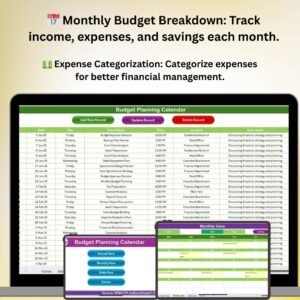
📅 Monthly Budget Breakdown
Track monthly income, expenses, and savings with easy-to-use input fields. Break down each category to ensure you are staying within your financial limits and meeting your savings targets.
💵 Expense Tracking & Categorization
Categorize and track your expenses by type (e.g., utilities, rent, groceries, etc.). This feature allows you to see where your money is going and identify areas where you can cut back.
📈 Real-Time Budget Analysis
Use real-time tracking to compare your planned budget with actual spending. Identify discrepancies early and adjust accordingly to stay on track.
📊 Income & Expense Visualization
Visualize your income and expenses using dynamic charts and graphs. Quickly see how your spending aligns with your budget and how much you’re saving each month.
📅 Yearly Overview & Goal Setting
Set yearly financial goals and track your progress. Get an overview of your financial goals for the year, including savings and debt repayment targets, and monitor how you’re progressing.
🔄 Automatic Calculations & Updates
Save time with automatic calculations for totals and balances. As you input data, the calendar updates itself in real-time, ensuring accuracy and reducing manual effort.
Why You’ll Love the Budget Planning Calendar in Excel
✅ Efficient Financial Management
Organize and manage your personal or business finances with ease. Stay on top of income, expenses, and savings goals, and ensure you’re living within your means.
✅ Track & Optimize Spending
Track your monthly expenses and categorize them to help you optimize spending. Identify areas for potential savings and avoid overspending in specific categories.
✅ Data-Driven Insights for Financial Decisions
Use charts and visual reports to analyze your financial situation. Make informed decisions based on real-time data to improve your budgeting and financial planning.
✅ Customizable for Personal & Business Budgets
Whether for personal use or business finance, this calendar is fully customizable. Adjust categories, set unique goals, and track specific metrics relevant to your financial situation.
✅ Achieve Your Financial Goals
Set savings, investment, or debt reduction goals and track your progress. Stay focused on your financial targets and achieve them with ease by using this efficient budgeting tool.
What’s Inside the Budget Planning Calendar in Excel?
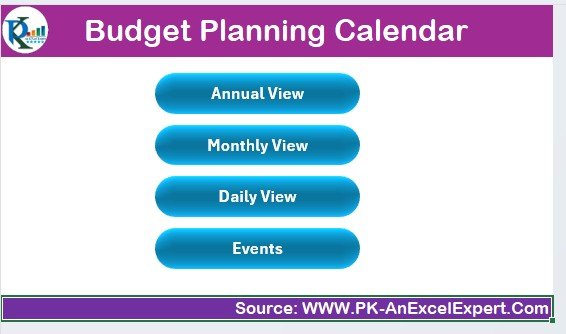
- Monthly Budget Breakdown: Track income, expenses, and savings monthly.
- Expense Categorization: Categorize your expenses and see where your money goes.
- Real-Time Analysis: Monitor and compare planned vs. actual spending.
- Income & Expense Visualization: Visualize your finances with dynamic charts.
- Yearly Goal Setting: Set and track yearly financial goals and targets.
- Automatic Calculations: Benefit from real-time updates and automatic calculations.
How to Use the Budget Planning Calendar in Excel
1️⃣ Download the Template: Access the Budget Planning Calendar instantly.
2️⃣ Set Your Financial Goals: Input your yearly savings, expense, and income goals.
3️⃣ Track Monthly Income & Expenses: Record your monthly income and categorize your expenses.
4️⃣ Monitor Your Budget Performance: Compare actual spending with your planned budget and track savings.
5️⃣ Make Data-Driven Adjustments: Use charts and reports to identify areas for improvement and adjust your budget accordingly.
Who Can Benefit from the Budget Planning Calendar in Excel?
🔹 Individuals & Families Looking to Manage Finances
🔹 Small Business Owners & Entrepreneurs
🔹 Financial Planners & Advisors
🔹 Personal Finance Enthusiasts
🔹 Nonprofit Organizations Managing Budgets
🔹 Corporate Finance Teams
Stay on top of your financial planning and ensure that you’re reaching your financial goals with the Budget Planning Calendar in Excel. Organize, track, and optimize your finances for a brighter financial future.
Click here to read the Detailed blog post
Visit our YouTube channel to learn step-by-step video tutorials
Youtube.com/@PKAnExcelExpert
Compatibility and Requirements
- Works in Microsoft Excel desktop (Excel 2016 or later, or Microsoft 365).
- Results show in charts you can restyle. Microsoft explains Excel charts in Create a chart from start to finish.
Frequently Asked Questions
What does the Budget Planning Calendar track?
Monthly income, expenses and savings, expense categories, planned versus actual spending and yearly financial goals.
Does it calculate totals for me?
Yes. Totals and balances calculate automatically as you enter data.
Can I compare my plan with actual spending?
Yes. It compares your planned budget with actual spending so you can spot gaps early.
Is it for personal or business budgets?
Both. You can adjust the categories and goals for personal or business finances.
Is there a Google Sheets version?
Yes. The Budget Planning Calendar in Google Sheets works in a browser.
Related Budget Templates
- Budget Planning Calendar in Google Sheets: the same calendar in a browser
- Weekly Expense Tracker in Excel: a free weekly spending tracker
- Daily Expense Tracker Data Entry System in Excel: log daily expenses with a form
- Personal Expense Tracker in Google Sheets: track personal spending in a browser
- Calendar & Planner Pack: 12 calendar and planner templates in one download
Browse all Excel calendars or the Excel financial tools.









Reviews
There are no reviews yet.