
Financial emergencies can occur at any time. Unexpected expenses such as medical bills, job loss, home repairs, or urgent travel costs can create significant financial stress if you are not prepared. That is why financial experts strongly recommend maintaining an emergency fund that can cover several months of living expenses.
However, many individuals struggle to calculate their emergency savings target, track their monthly contributions, and stay motivated throughout the savings journey.
This is exactly where the Emergency Fund Tracker in Excel becomes extremely helpful.
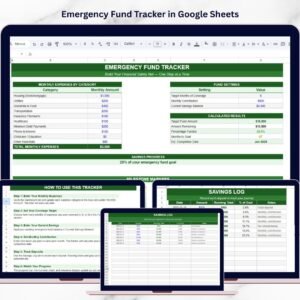
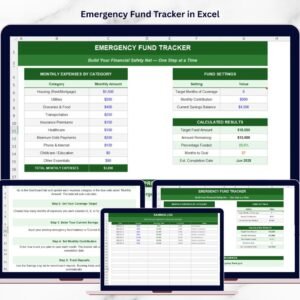
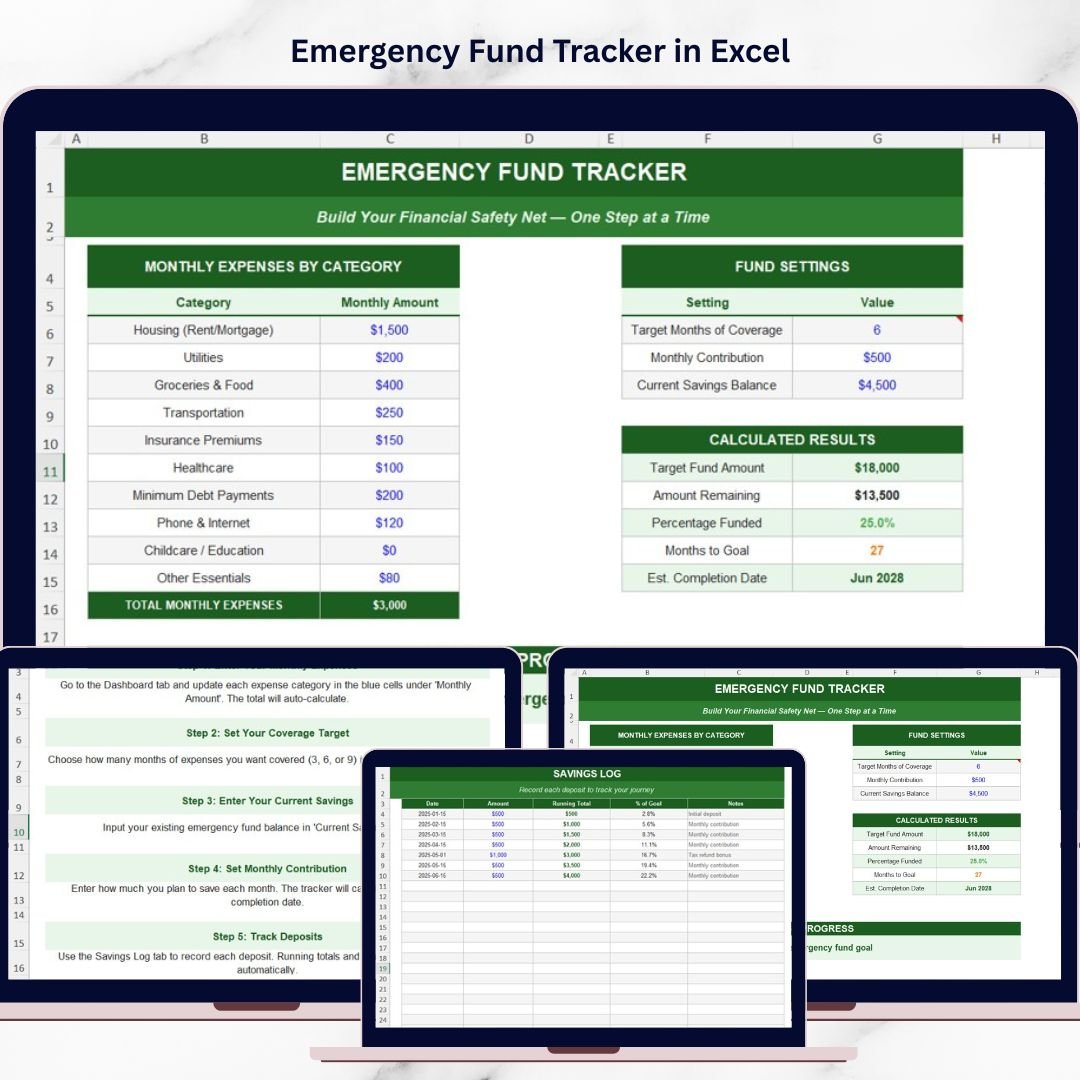
The Emergency Fund Tracker in Excel is a ready-to-use financial planning template designed to help individuals calculate their emergency fund target, track monthly expenses, monitor savings progress, and build a reliable financial safety net.
Instead of manually calculating savings targets and tracking contributions, this Excel template automatically performs all calculations and presents the results in a clear and organized dashboard.
With structured tables, automated formulas, and progress tracking indicators, users can easily monitor their savings progress and stay motivated while building their emergency fund.
Whether you are just starting your savings journey or already saving regularly, this tracker helps you stay disciplined and focused on your financial goals.
🚀 Key Feature of Emergency Fund Tracker in Excel
The Emergency Fund Tracker is designed to make financial planning simple, clear, and motivating.
💰 Monthly Expense Tracking System
Easily record your monthly expenses across different categories to determine how much emergency savings you need.
📊 Automatic Emergency Fund Calculation
The tracker automatically calculates your target emergency fund based on your monthly expenses and chosen coverage period.
🎯 Goal-Based Savings Planning
Set your target fund amount based on 3, 6, or 9 months of living expenses.
📈 Savings Progress Tracker
A visual progress bar shows how much of your emergency fund goal has been achieved.
🧮 Automated Excel Calculations
Excel formulas automatically calculate savings progress, remaining balance, and estimated completion date.
📅 Estimated Goal Completion Date
The tracker estimates when your emergency fund goal will be completed based on your monthly contributions.
🏆 Savings Milestone Tracking
Celebrate key milestones such as 25%, 50%, 75%, and 100% completion of your emergency fund.
📘 Savings Log Sheet
Record every deposit you make toward your emergency fund and maintain a clear history of contributions.
⚡ Simple & Beginner-Friendly Design
The template is easy to use even for people with basic Excel knowledge.
📊 What’s Inside the Emergency Fund Tracker in Excel
This Excel template contains several powerful sections that help users track and manage their emergency savings.
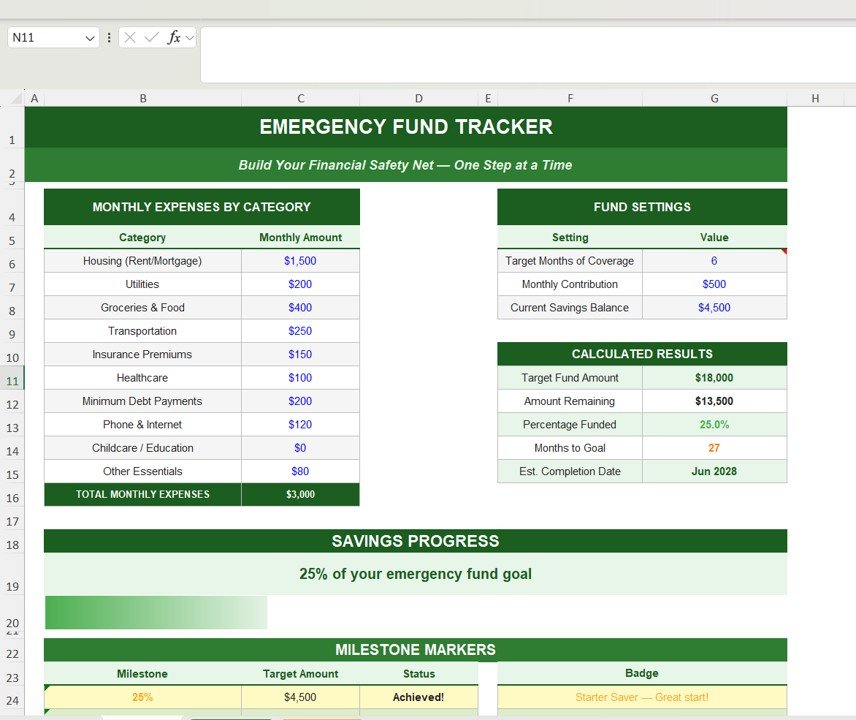
1️⃣ Monthly Expenses Tracker
The expense tracking section allows users to enter their monthly expenses in different categories such as:
Housing (Rent or Mortgage)
Utilities
Groceries & Food
Transportation
Insurance
Healthcare
Debt Payments
Phone & Internet
Childcare or Education
Other Essential Expenses
The template automatically calculates the total monthly expenses, which becomes the foundation for determining the emergency fund target.
2️⃣ Emergency Fund Settings
In this section, users can define their savings strategy.
Users can enter:
Target months of coverage (3, 6, or 9 months)
Monthly savings contribution
Current savings balance
Based on these inputs, the tracker automatically calculates the target emergency fund amount.
3️⃣ Automatic Financial Calculations
The template calculates several important financial metrics automatically:
Target Emergency Fund Amount
Remaining Amount to Reach the Goal
Percentage of Goal Completed
Months Remaining to Reach Target
Estimated Completion Date
These calculations help users clearly understand how close they are to achieving financial security.
4️⃣ Savings Progress Tracker
A visual progress indicator shows how much of the emergency fund goal has been completed.
For example:
25% Goal Achieved
50% Goal Achieved
75% Goal Achieved
100% Emergency Fund Completed
This progress tracking helps users stay motivated and consistent with their savings plan.
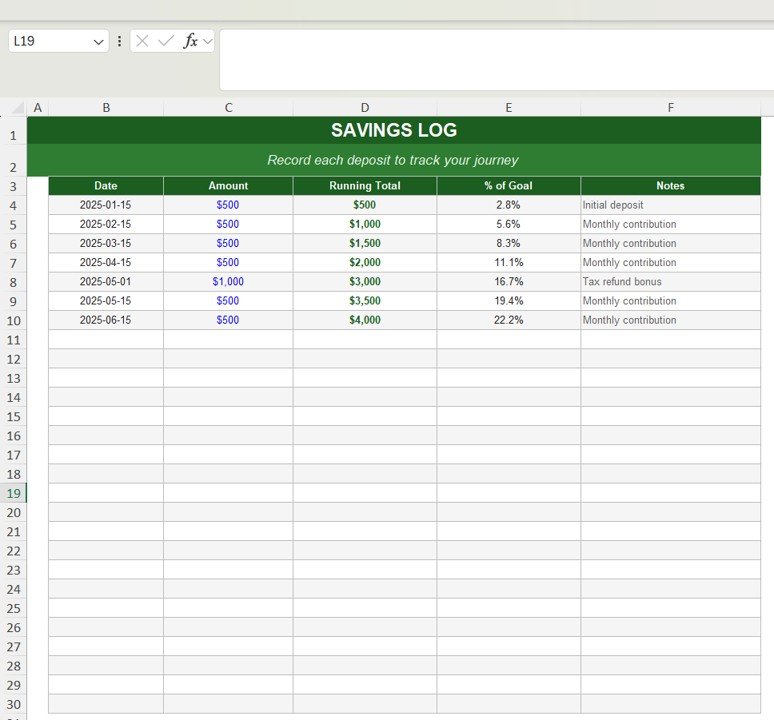
5️⃣ Savings Log
The Savings Log sheet records every contribution made toward the emergency fund.
The log includes fields such as:
Date
Deposit Amount
Running Total
Percentage of Goal Completed
Notes
Users can record contributions from monthly savings, tax refunds, bonuses, or additional deposits.
This provides a complete and transparent record of savings progress.
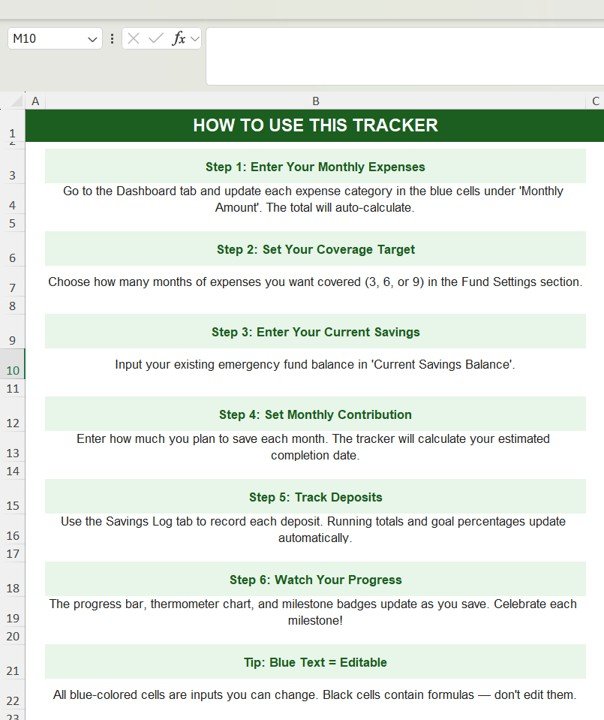
⚙️ How to Use the Emergency Fund Tracker in Excel
Using the tracker is very simple.
1️⃣ Enter your monthly expenses in the expense tracker section.
2️⃣ Define your target months of coverage and monthly savings contribution.
3️⃣ Add your current savings balance.
4️⃣ Record every deposit in the Savings Log sheet.
5️⃣ Monitor the progress bar and milestone indicators as your savings grow.
Even users with minimal Excel experience can easily use this template to manage their savings plan.
👥 Who Can Benefit from This Emergency Fund Tracker
This financial planning template is ideal for anyone who wants to build a strong financial safety net.
👨💼 Working Professionals – Build financial security for unexpected expenses.
👩💻 Freelancers & Self-Employed Individuals – Maintain financial stability during income fluctuations.
👨👩👧 Families – Prepare for unexpected household emergencies.
🎓 Students & Young Professionals – Start building healthy financial habits early.
💰 Personal Finance Enthusiasts – Track savings goals and maintain disciplined financial planning.
Click here to read the Detailed blog post
Watch the step-by-step video tutorial:
Visit our YouTube channel to learn step-by-step video tutorials
Compatibility and Requirements
- Works in Microsoft Excel desktop (Excel 2016 or later, or Microsoft 365).
- The progress bar and milestone indicators update from your savings entries. Microsoft covers building charts in Create a chart from start to finish.
Frequently Asked Questions
How does the tracker calculate my emergency fund target?
It adds up your monthly expenses and multiplies the total by the number of months you choose, either 3, 6 or 9.
What expense categories are included?
Housing (rent or mortgage), utilities, groceries and food, transportation, insurance, healthcare, debt payments, phone and internet, childcare or education, and other essential expenses.
Can it tell me when I will reach my goal?
Yes. Enter your monthly savings contribution and current balance. The template shows the remaining amount, the months left and an estimated completion date.
How do I record deposits?
Use the Savings Log sheet. Each row holds the date, deposit amount, running total, percentage of goal completed and a notes field. You can log monthly savings, tax refunds, bonuses or extra deposits.
Is there a Google Sheets version?
Yes. See the Emergency Fund Tracker in Google Sheets and the Emergency Fund Savings Tracker in Google Sheets.
Related Savings Templates
- Emergency Fund Tracker in Google Sheets: the same tracker for Google Sheets
- Emergency Fund Savings Tracker in Google Sheets: another savings tracker for Google Sheets
- Emergency Fund Checklist Template in Excel: a checklist to go with your savings plan
- Small Business Owner Essentials: 12 templates for owners in one download
Browse all Excel financial tools.