

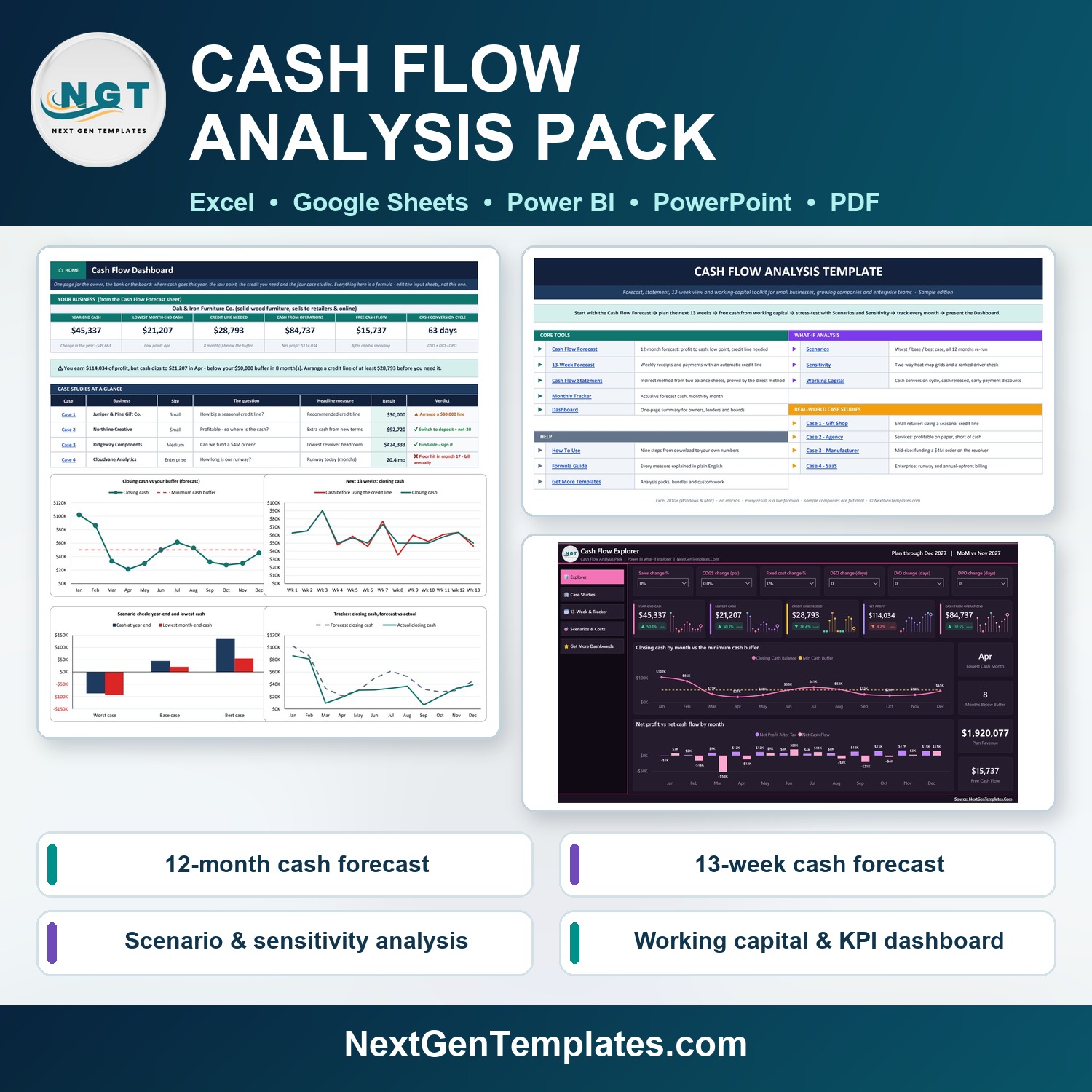


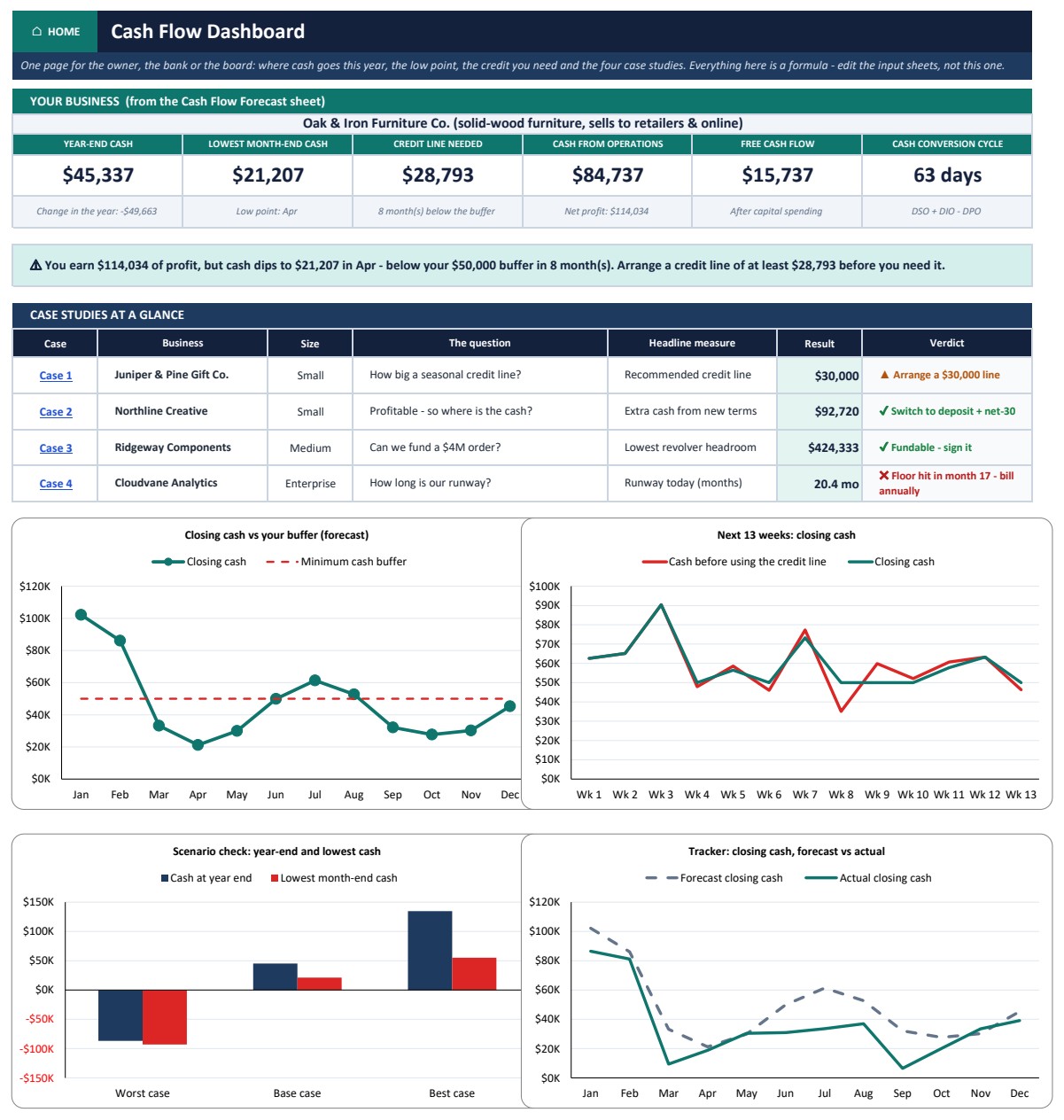
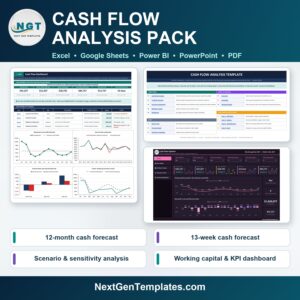
The Cash Flow Analysis Pack answers the question every owner, finance manager and lender asks when the bank balance and the profit figure disagree: where does the cash go, and when will it run short? The pack contains a 16-sheet Excel workbook in a Sample edition and a Blank edition, the same model as a Google Sheets copy, an interactive Power BI explorer, a 16-slide editable PowerPoint deck and a 10-page PDF user guide. Every result is a live formula, with no macros and no add-ins. In the sample company, Oak & Iron Furniture Co. earns $114,034 of net profit, yet operations generate only $84,737 of cash, the bank balance dips to $21,207 in April, and a $28,793 credit line covers the gap. The pack is built by PK, whose YouTube channels reach 300K+ subscribers, and it is covered by our refund policy.
Watch the Cash Flow Analysis Pack walkthrough
Key Features of the Cash Flow Analysis Pack
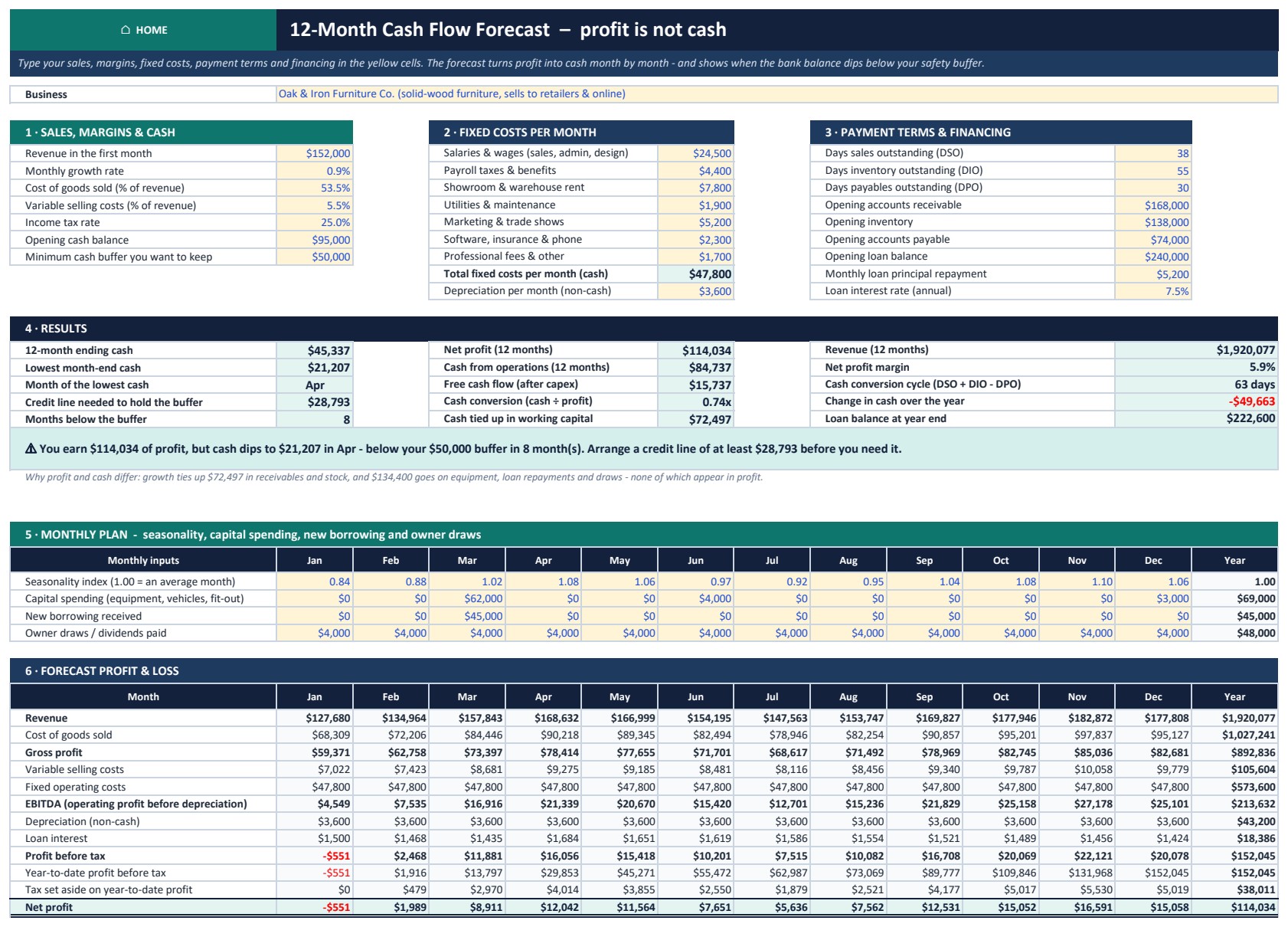
- 12-month cash flow forecast (indirect method): sales, growth, seasonality, margins, fixed costs, payment days, loans, capital spending and owner draws turn profit into cash month by month, and report the low point, the credit line you need and the cash conversion.
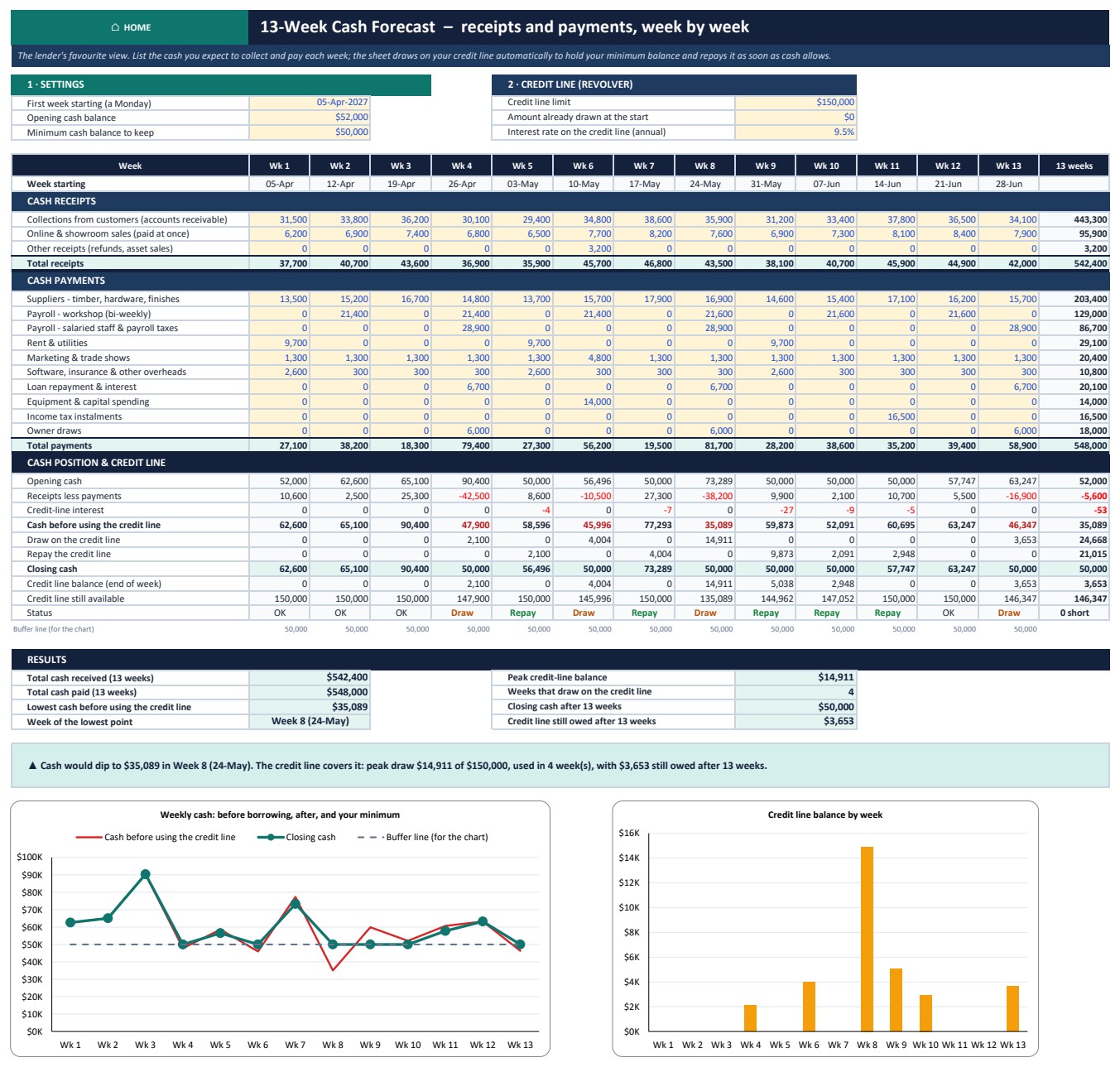
- 13-week cash forecast (direct method): receipts and payments week by week with an automatic credit line that draws only what keeps you at your minimum balance and repays when cash allows.
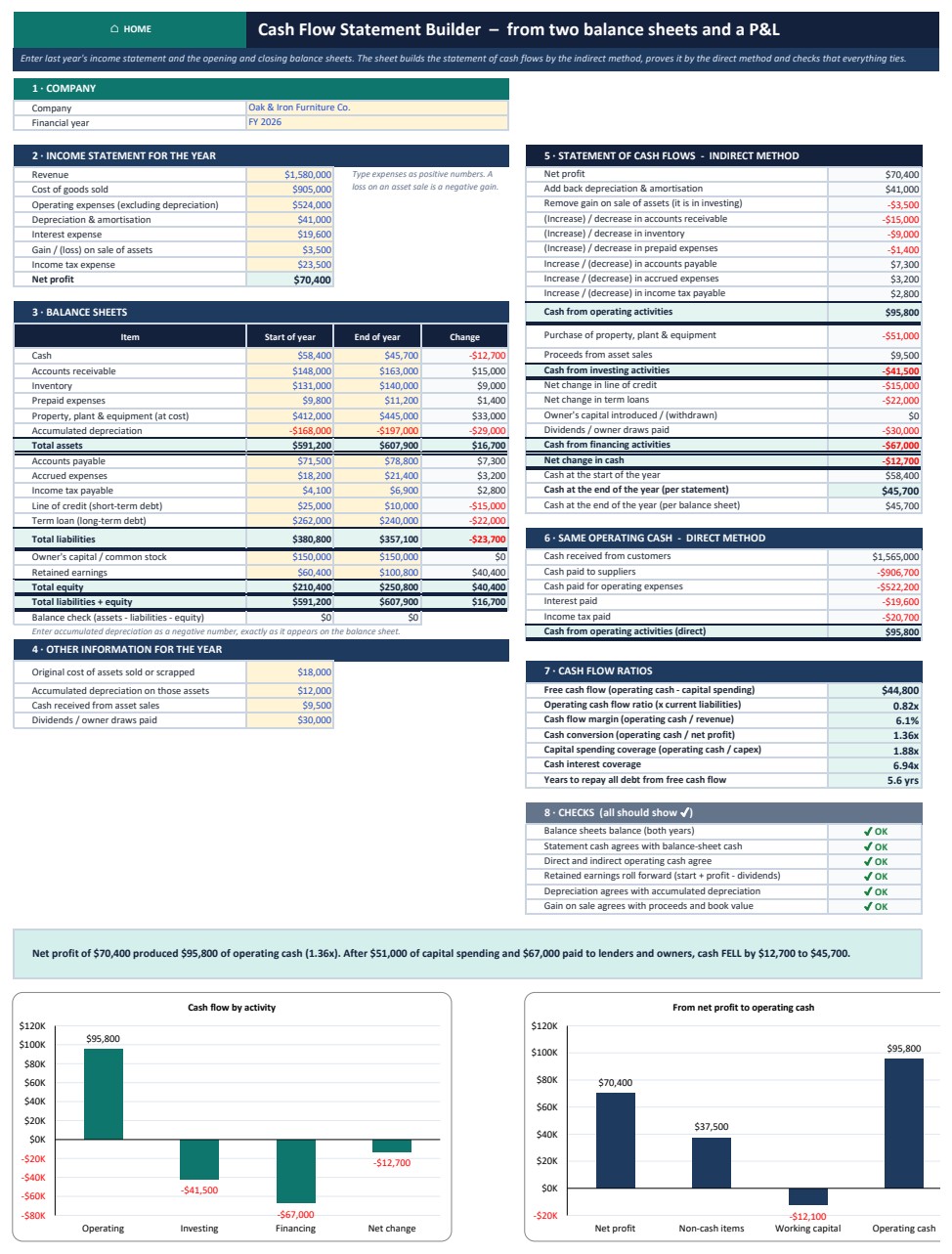
- Cash flow statement template: enter an income statement and two balance sheets and it builds the statement of cash flows by the indirect method, proves operating cash by the direct method, and runs seven cash ratios and six checks.
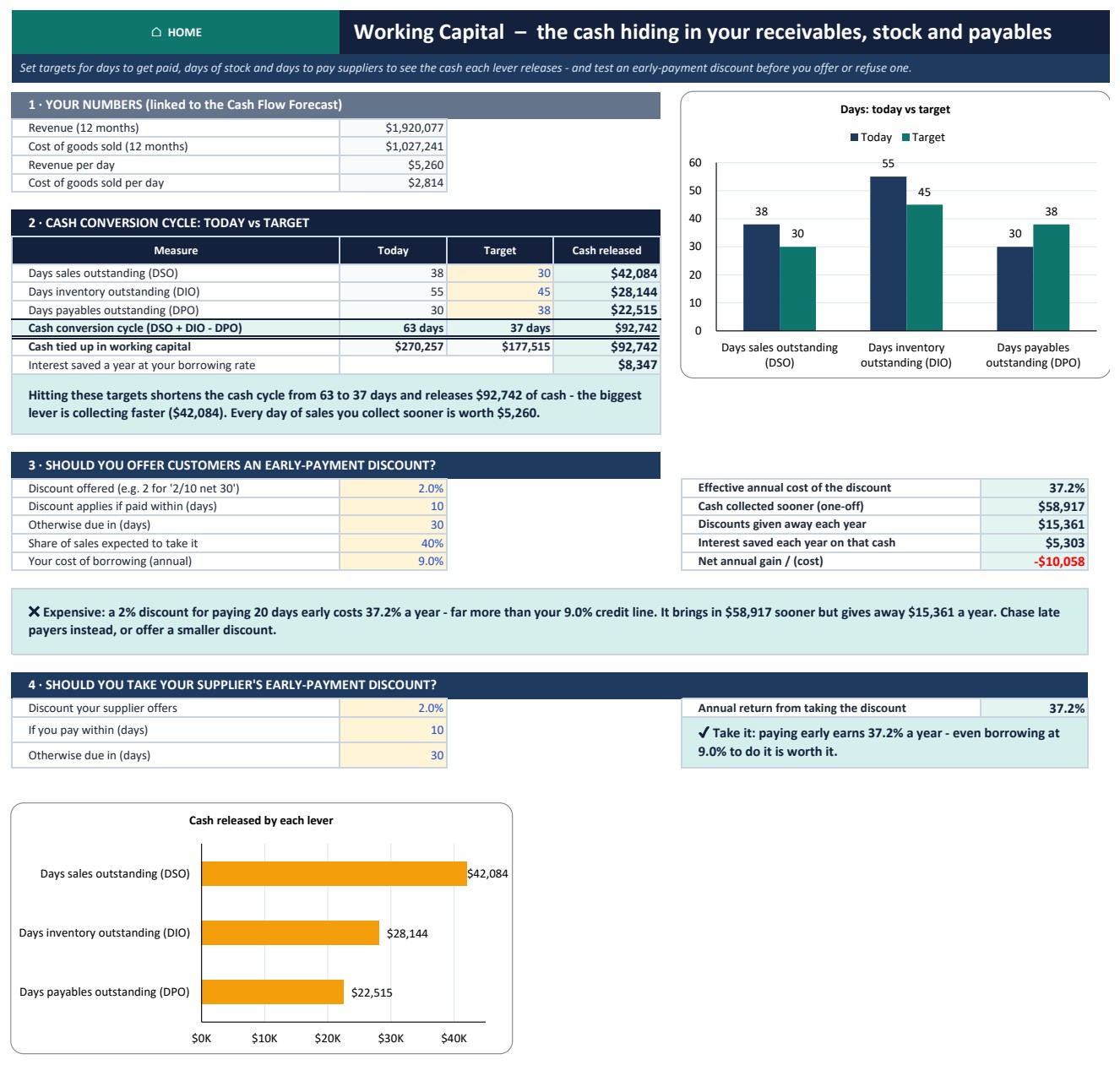
- Working capital analysis: DSO, DIO and DPO today versus target, the cash each lever releases, and whether a 2/10 net 30 early-payment discount is worth offering or taking.
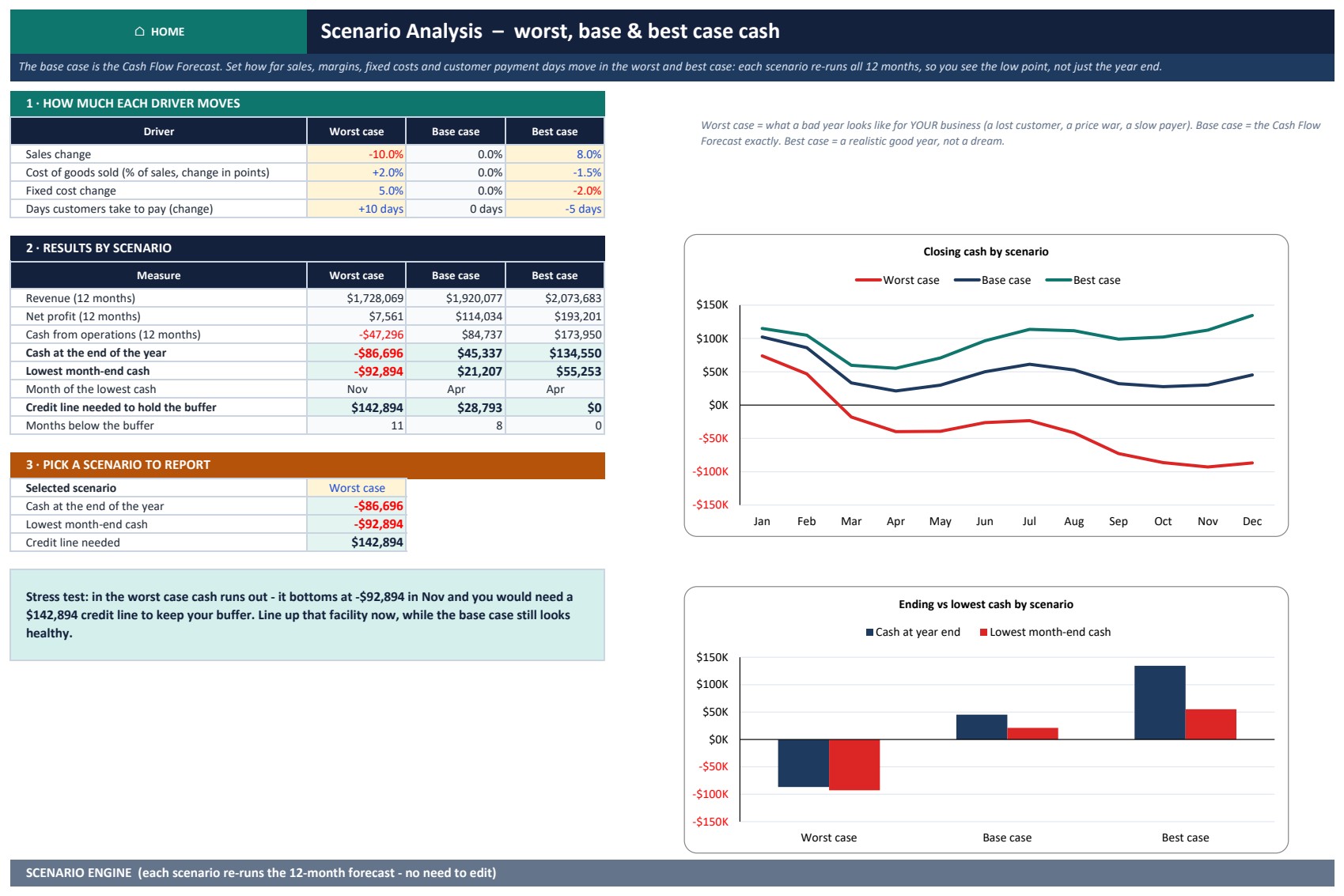
- Scenarios and sensitivity: worst, base and best cases that re-run all 12 months, two-way heat-map grids and a ranked check of six cash drivers.
- Monthly tracker: log actual cash in and out, then see the variance, actual versus forecast closing cash and how accurate the forecast has been.
- Google Sheets and Power BI editions: a one-click Make a copy link to the same model, and a Power BI what-if explorer with sliders for sales, margin, fixed costs and payment days.
What’s Inside the Cash Flow Pack
The workbook opens on a Home page that links to every sheet. Core tools: Dashboard, Cash Flow Forecast, 13-Week Forecast, Cash Flow Statement and Monthly Tracker. What-if analysis: Scenarios, Sensitivity and Working Capital. Four worked case studies, each answering a different cash question:
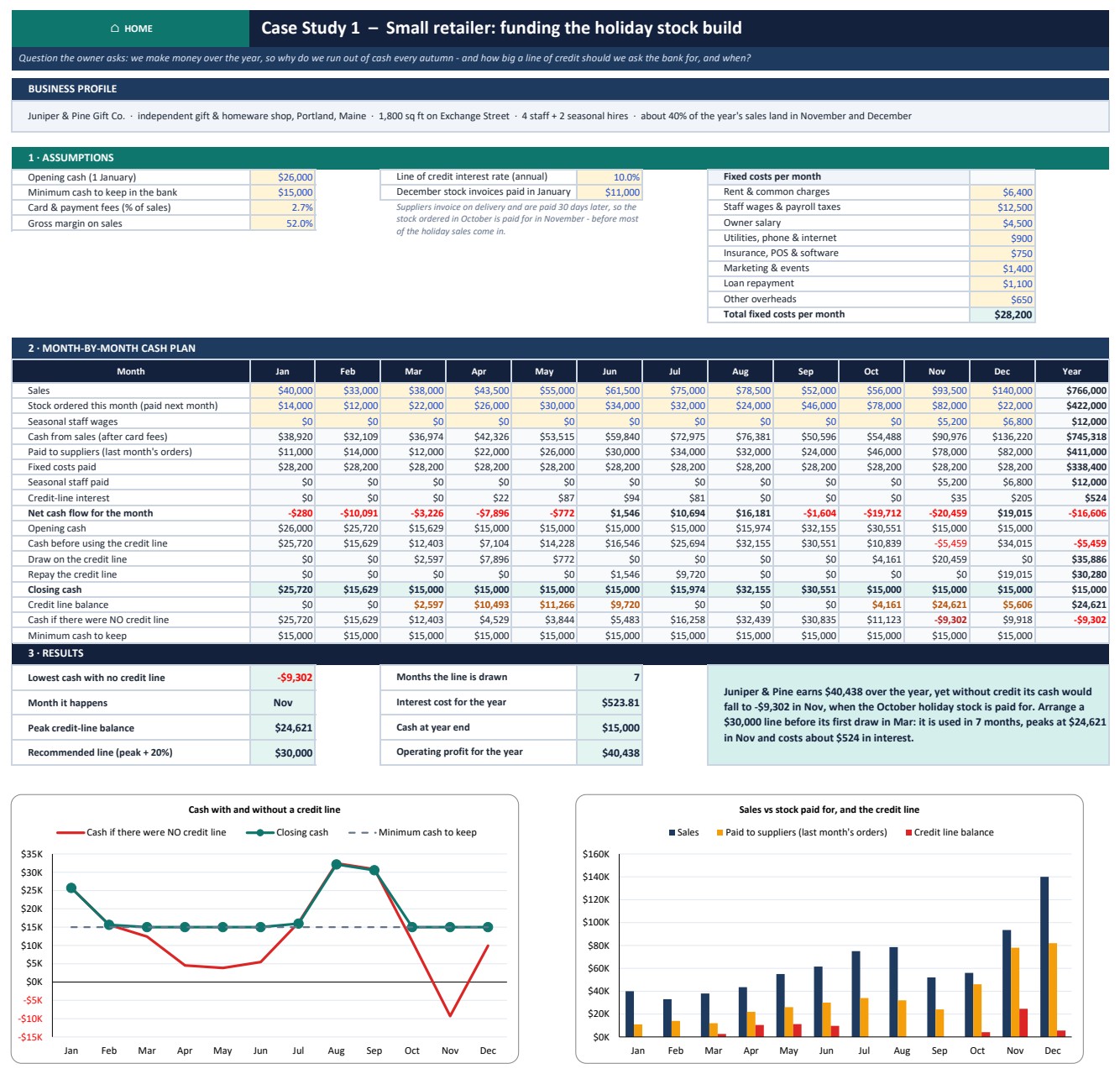
- Gift shop (Juniper & Pine Gift Co.): earns $40,438 over the year, yet without credit its cash would fall to -$9,302 in November when the holiday stock is paid for. The model recommends a $30,000 line of credit.
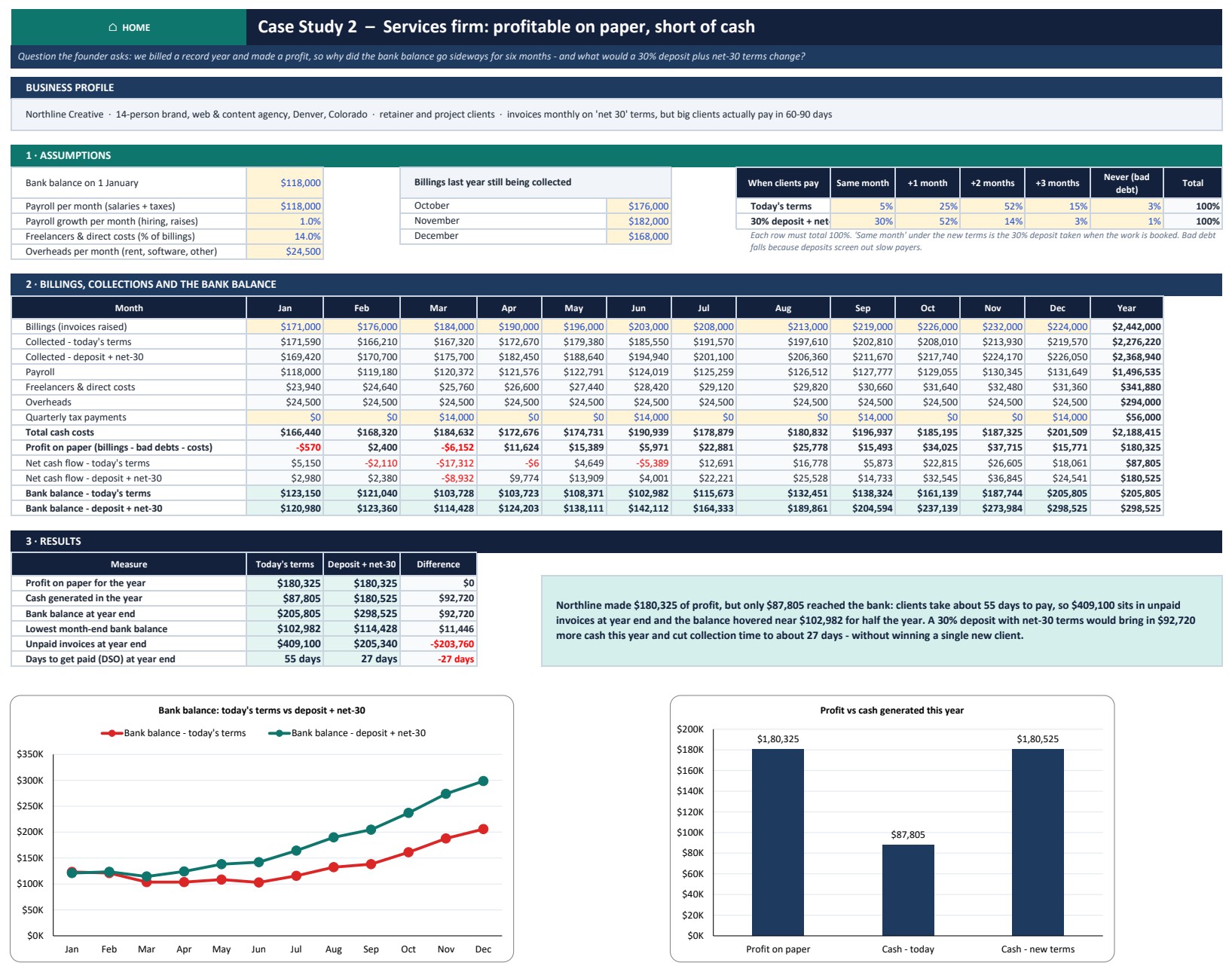
- Creative agency (Northline Creative): $180,325 of profit, but only $87,805 reaches the bank because clients take about 55 days to pay. A 30% deposit with net-30 terms brings in $92,720 more cash in the year.
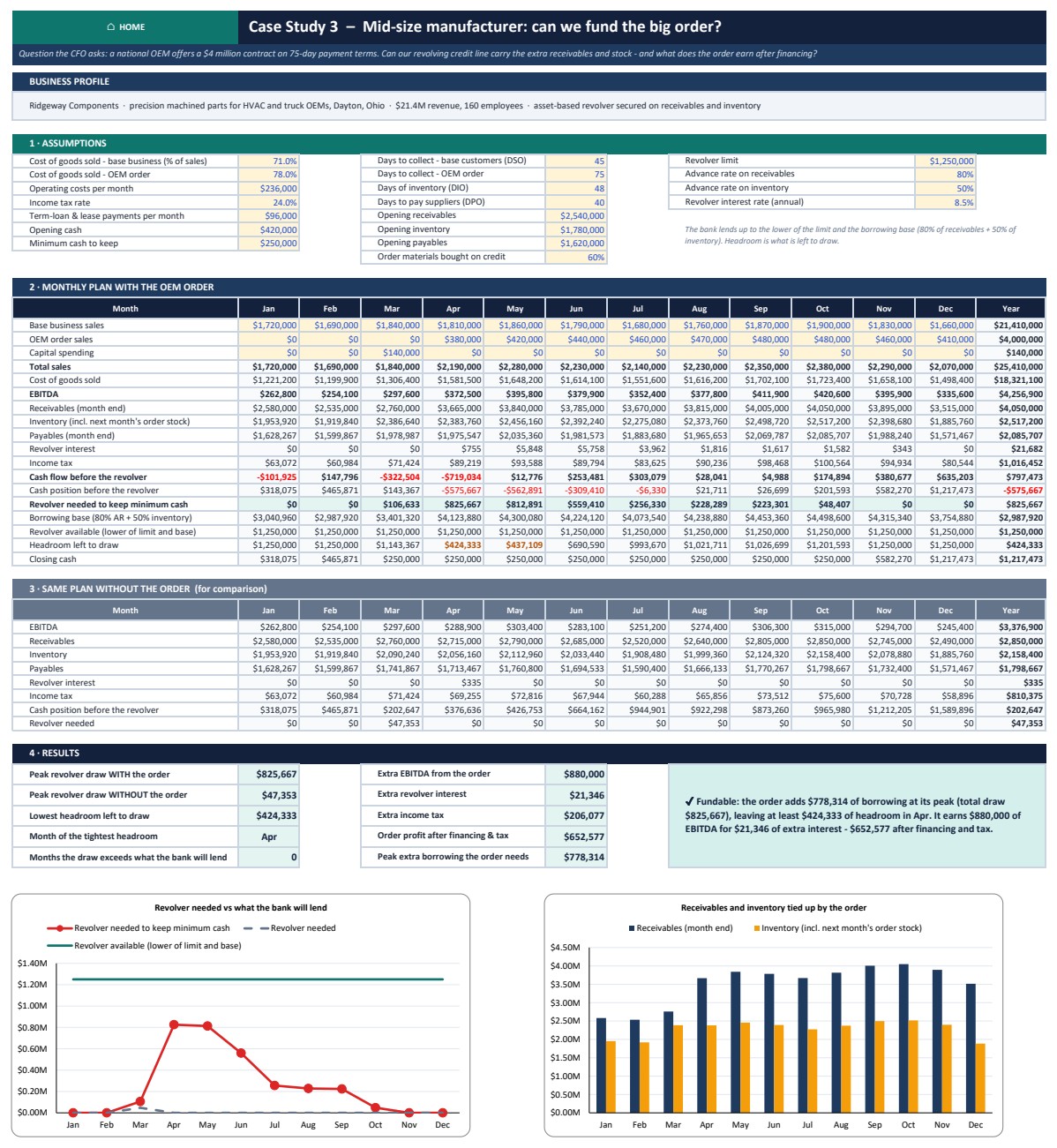
- Manufacturer (Ridgeway Components): a $4M OEM order on 75-day terms lifts the peak revolver draw to $825,667 against a $1,250,000 limit, leaving at least $424,333 of headroom.
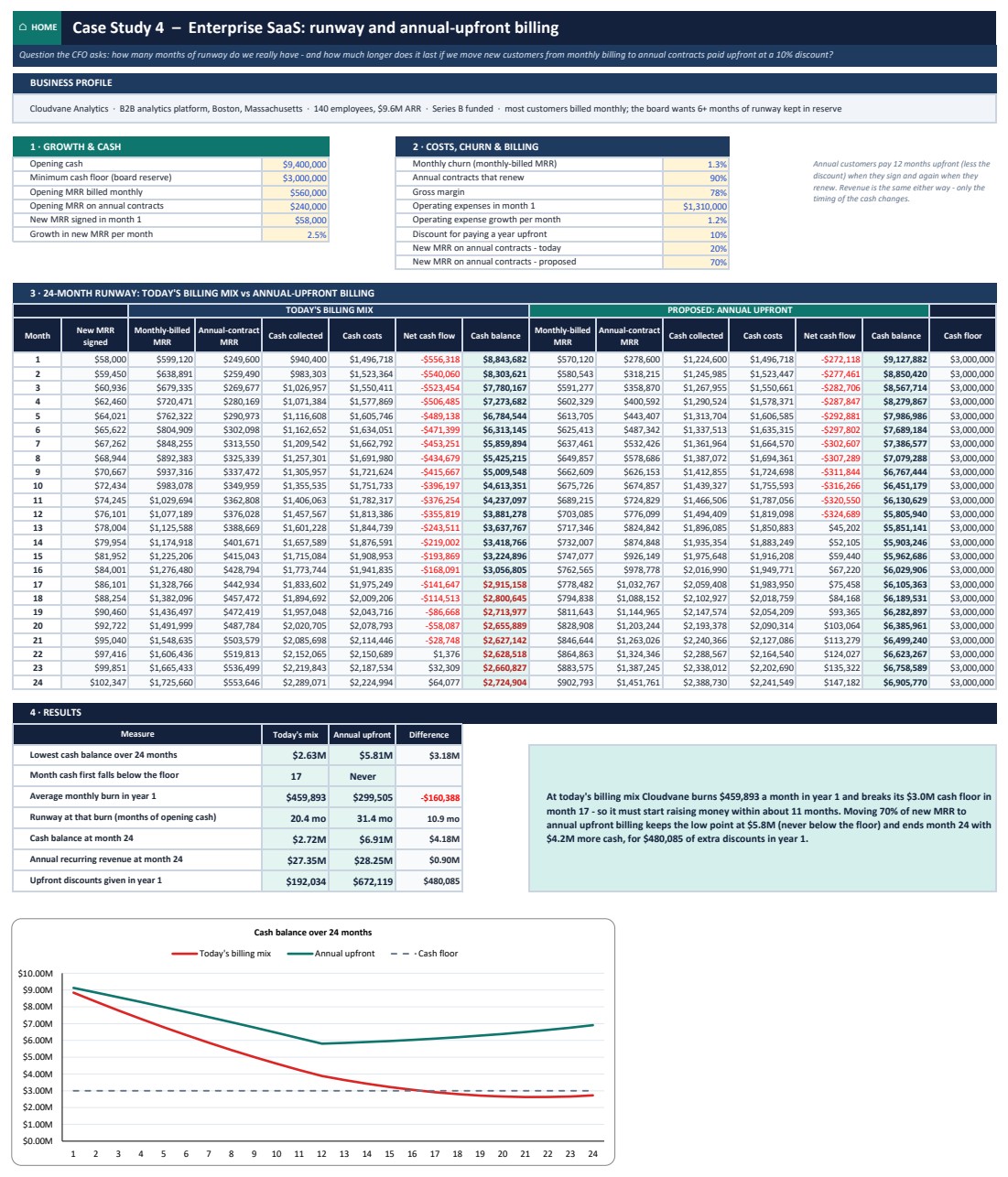
- Enterprise SaaS (Cloudvane Analytics): burns $459,893 a month in year 1 and breaks its $3.0M cash floor in month 17. Annual upfront billing for 70% of new MRR keeps cash above the floor.
The pack also includes a Formula Guide sheet, a How To Use sheet, the Blank edition for your own numbers, the PowerPoint deck and the PDF guide.
Cash Flow Analysis Pack vs. Free Cash Flow Template vs. Paid Forecasting Software – Where This Fits
| Feature | This pack | Free cash flow template | Paid forecasting SaaS |
|---|---|---|---|
| Cost | One-time purchase | Free | Monthly subscription |
| Platforms | Excel, Google Sheets and Power BI | Usually one | Web app |
| 12-month forecast and 13-week forecast | Both, with an automatic credit line | Usually one of them | Yes |
| Cash flow statement from two balance sheets | Yes, with 6 checks | Rarely | Varies |
| Working capital and early-payment discount test | Yes | Rarely | Varies |
| Scenarios that re-run all 12 months | Yes, plus sensitivity grids | No | Yes |
| Customizable formulas | Fully editable, nothing locked | Usually | Limited to the vendor’s model |
| Case studies and a presentation deck | 4 cases plus a 16-slide deck | No | No |
Who This Template Is For – and Who It’s Not For
It is for small-business owners who are profitable on paper but short of cash, finance managers and FP&A analysts preparing a cash forecast for a bank or board, consultants and agencies who want to shorten collection time, manufacturers funding a large order, startup founders tracking runway, and students learning cash flow analysis with worked examples.
It is not for teams that need live links to accounting software, since you type or paste your own figures. It is not a full three-statement financial model, a budgeting system, or tax, lending or investment advice. All five sample companies are fictional, and their numbers are illustrations, not industry benchmarks.
How to Use the Cash Flow Pack
- Open the Sample edition and click through Home. Every sheet has a HOME button.
- On the Cash Flow Forecast sheet, replace the yellow cells: sales, growth, seasonality, margins, fixed costs, payment days, opening balances, loans, capital spending and draws.
- Set your minimum cash buffer. The forecast flags every month below it and tells you the credit line to arrange.
- Plan the next 13 weeks, then stress-test with Scenarios and Sensitivity, and look for hidden cash on the Working Capital sheet.
- Log actual cash each month on the Monthly Tracker, then print the Dashboard or present the included PowerPoint deck.

Real-World Use Cases
Maria, gift shop owner. Maria could not see why a profitable year left her overdrawn each November. The Case 1 sheet showed the holiday stock bill landing before the sales, and sized the line of credit to ask the bank for.
David, agency finance lead. David used the Case 2 sheet to compare today’s net-60 habits with a 30% deposit plus net-30, and took the cash impact to his clients’ next contract talk.
Anita, plant finance manager. Anita adapted the Case 3 sheet to a large customer order on long payment terms and checked the revolver headroom before accepting it.
Frequently Asked Questions
Does it need macros or an internet connection?
No. The Excel file is a plain .xlsx with worksheet formulas and charts, and it works offline in Excel 2010 and later on Windows and Mac. The Google Sheets copy runs in any browser.
Why is my year-end cash lower than my profit?
Growth ties cash up in receivables and stock, and loan repayments, equipment and owner draws leave the bank without touching profit. The forecast shows each item month by month.
Is there a blank version?
Yes. The Blank edition clears the core tools for your own numbers and keeps the four case studies filled as worked examples.
Can I change the currency?
Yes. In Excel, select the cells, press Ctrl+1 and replace the $ in the number format. In Google Sheets use Format, Number, Custom currency.
What does the Power BI file do?
It is an interactive explorer, not a copy of the calculator. Move the sliders for sales, margin, fixed costs and payment days and the 12-month cash curve, low point and credit line redraw. To use your own numbers, edit Data.xlsx and refresh.
Is it a replacement for the Cash Flow Template in Excel?
No. The Cash Flow Template in Excel is a simpler single-purpose template. This pack adds the 13-week forecast, the cash flow statement builder, working capital, scenarios, case studies, Google Sheets, Power BI, a deck and a guide.
About the Author
Built by PK – Microsoft Certified Professional with 15+ years of Excel, Google Sheets, and Power BI experience. Founder of NextGenTemplates, reaching 300K+ subscribers across YouTube channels. Every template is hand-built and tested before release.
Explore Related Templates
- Break-Even Analysis Pack in Excel: the sister analysis pack for pricing and volume decisions.
- CFO’s Financial Command Toolkit: 10 finance templates in one bundle.
- Profit and Loss (P&L) Template in Excel
- Cash Flow Template in Excel
- Manufacturing Business Plan Templates Kit
Browse more Excel financial tools and Excel analysis templates, or read the full walkthrough of the Cash Flow Analysis Pack on our blog.
Download the pack today and see your low-cash month before it arrives.
Last updated: October 2026

















Reviews
There are no reviews yet.