



The Tax Filing Calendar in Excel is an essential tool for businesses and individuals to stay organized and compliant with tax filing deadlines. Whether you’re managing personal taxes or handling business tax obligations, this Excel-based calendar helps you keep track of key tax filing dates, reminders, and tasks, ensuring that you never miss an important deadline.
This customizable tax calendar helps you plan, prepare, and execute your tax filing with ease. With features like deadline tracking, tax form management, and customized reminders, the tool ensures that all of your tax documents are filed on time, reducing the risk of penalties or late fees.
Key Features of the Tax Filing Calendar in Excel
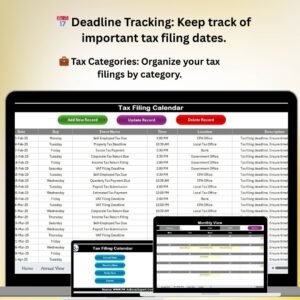
📅 Tax Filing Deadlines Tracking
Track critical tax filing deadlines for individuals, businesses, and tax-related documents. Ensure you stay compliant with federal, state, and local tax authorities.
📝 Customizable Tax Form Categories
Organize your tax forms by type (e.g., W-2, 1099, business tax returns) and keep track of filing statuses. Stay organized and ensure you don’t forget any crucial forms.
🔔 Tax Reminders & Alerts
Set up automated reminders for upcoming deadlines. Be notified in advance of filing dates, helping you stay ahead of your tax obligations and reduce stress during tax season.
📈 Progress Monitoring & Status Tracking
Track the status of each form and filing process, from preparation to submission. Know where you stand with each task and identify any incomplete actions.
⚙️ Customizable & Scalable
Adapt the calendar to suit your specific needs, whether you’re an individual or a small business owner. Easily add new forms, deadlines, and notes as your tax situation evolves.
📊 Tax Filing Overview
Get a clear overview of all upcoming tax filing requirements and deadlines in one place, helping you plan your filing schedule efficiently.
Why You’ll Love the Tax Filing Calendar in Excel

✅ Stay Organized & On Time
Track all of your tax filing deadlines and tasks in one place, ensuring that nothing is overlooked and reducing the risk of missed deadlines or penalties.
✅ Simplify Tax Preparation
Easily manage the documents you need to file and track progress through every step of the process. The calendar helps you stay on top of your tax obligations.
✅ Reduce Stress During Tax Season
With reminders and alerts, you’ll never have to worry about forgetting important tax filing dates, allowing you to focus on getting your taxes filed correctly and on time.
✅ Customizable & Scalable
Whether you’re an individual or a business owner, the calendar is fully customizable to meet your needs. Add or modify deadlines, forms, and notes based on your specific tax filing requirements.
✅ Improved Compliance & Financial Management
Ensure compliance with tax regulations and improve your financial management practices by keeping accurate records and tracking your filing progress in real time.
What’s Inside the Tax Filing Calendar in Excel?
- Tax Filing Deadlines Tracking: Track federal, state, and local tax deadlines.
- Customizable Tax Form Categories: Organize tax forms based on type and filing status.
- Tax Reminders & Alerts: Set automated reminders for filing deadlines.
- Progress Monitoring & Status Tracking: Track your filing progress and completion.
- Customizable Fields: Modify the calendar to fit your personal or business tax filing needs.
How to Use the Tax Filing Calendar in Excel
1️⃣ Download the Template: Instantly access the Tax Filing Calendar in Excel.
2️⃣ Input Your Tax Deadlines: Add your federal, state, and local tax filing deadlines.
3️⃣ Track Forms & Filing Status: Keep track of tax forms, their status, and any outstanding requirements.
4️⃣ Set Reminders & Alerts: Set up automated reminders for upcoming deadlines and tasks.
5️⃣ Monitor Your Progress: Track the completion of your filing tasks and ensure all required documents are submitted on time.
Who Can Benefit from the Tax Filing Calendar in Excel?
🔹 Individuals Managing Personal Taxes
🔹 Small Business Owners & Entrepreneurs
🔹 Accounting & Tax Professionals
🔹 Financial Planners & Consultants
🔹 Tax Preparers & Filing Services
🔹 Anyone Looking to Stay Organized During Tax Season
Stay ahead of your tax filing obligations and avoid penalties with the Tax Filing Calendar in Excel. Keep track of deadlines, manage forms, and ensure that your taxes are filed correctly and on time.
Click here to read the Detailed blog post
Visit our YouTube channel to learn step-by-step video tutorials
Youtube.com/@PKAnExcelExpert
Compatibility and Requirements
- Works in Microsoft Excel desktop (Excel 2016 or later, or Microsoft 365).
- Deadlines, form categories and notes are editable, so you can enter the dates that apply to you.
Frequently Asked Questions
Which deadlines can I track?
You can add federal, state and local tax filing deadlines for personal or business taxes.
Can I organize filings by tax form?
Yes. Group forms by type, such as W-2, 1099 or business tax returns, and track each filing status.
Can I see what is still pending?
Yes. Each form and filing step carries a status from preparation to submission.
Does the calendar include the official tax dates?
You add your own deadlines when you set it up, so the dates match your location and tax year.
Is there a Google Sheets version?
Yes. The Tax Filing Calendar in Google Sheets is listed separately.
Related Tax and Compliance Templates
- Tax Filing Calendar in Google Sheets: the same tax calendar in Google Sheets
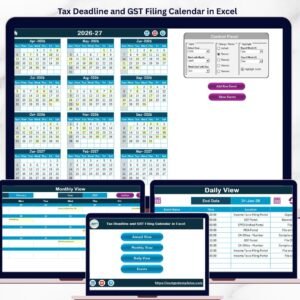
- Tax Deadline and GST Filing Calendar in Excel: a calendar for tax deadlines and GST filing
- Tax Preparation Checklist in Excel: a checklist for preparing tax documents
- Tax Compliance KPI Dashboard in Excel: tracks tax compliance KPIs in Excel
- Calendar & Planner Pack: twelve calendar and planner templates in one pack
Browse all Excel calendars or the Excel financial tools.

































Reviews
There are no reviews yet.