



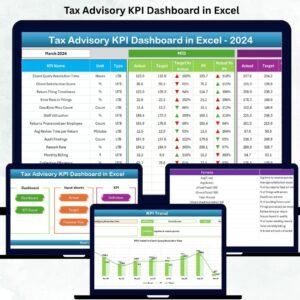
The Tax Compliance KPI Dashboard in Excel is an essential tool for businesses and organizations to ensure they are meeting their tax obligations on time. This dynamic dashboard allows you to monitor key performance indicators (KPIs) related to tax compliance, helping you track deadlines, tax payments, filings, and any potential risks associated with non-compliance.
Designed to provide a clear overview of your tax status, the dashboard offers real-time updates, visually appealing graphs, and customizable tracking options. Whether you’re handling corporate taxes, VAT, or other tax obligations, this dashboard simplifies the process of staying compliant with tax regulations and maintaining timely reporting.

Key Features of the Tax Compliance KPI Dashboard in Excel
📌 Comprehensive KPI Tracking
Track a range of tax compliance KPIs, including tax filing deadlines, payment due dates, outstanding liabilities, and filing statuses. With this comprehensive tracking, you can stay on top of your tax responsibilities and avoid penalties.
🛠 Customizable Dashboard
The dashboard is fully customizable to reflect the specific tax compliance metrics relevant to your business. You can easily adjust KPIs, data fields, and categories to align with your tax obligations and reporting requirements.
💡 Real-Time Updates
As you enter new data, such as payment statuses or filing dates, the dashboard automatically updates, ensuring you always have the most current information at your fingertips. This real-time feature helps you stay proactive in addressing any potential compliance issues.
🔢 Tax Filing and Payment Monitoring
Easily monitor the status of tax filings and payments, ensuring deadlines are met and filings are completed accurately. The dashboard provides a clear visual representation of your tax status, helping you identify any overdue actions or potential issues.
🚀 Visual Data Representation
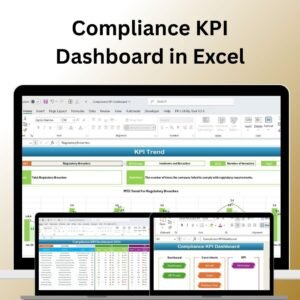
The dashboard features dynamic, easy-to-read charts and graphs that give you a quick overview of your tax compliance status. Visual indicators, such as progress bars and color-coded labels, help you spot areas that require immediate attention.
📊 Risk Management
With integrated risk tracking, the dashboard highlights areas of concern, such as overdue filings or payments, and provides actionable insights to mitigate risks and ensure full compliance with tax regulations.
⚙ Simple Setup and Customization
Setting up the Tax Compliance KPI Dashboard is quick and easy, with clear instructions to help you customize the dashboard according to your unique tax requirements. No advanced Excel skills are needed to get started.
🚀 Why You’ll Love the Tax Compliance KPI Dashboard in Excel
✅ Track Tax Compliance KPIs – Stay on top of filing deadlines, payments, and liabilities. ✅ Customizable to Your Needs – Adjust the dashboard to match your tax reporting requirements. ✅ Real-Time Updates – Automatically reflect new data and track your tax compliance status. ✅ Visual Risk Indicators – Identify potential risks or overdue actions with color-coded visuals. ✅ Easy Setup – Quick and simple to implement with clear setup instructions.
📂 What’s Inside the Tax Compliance KPI Dashboard in Excel?
- KPI Tracking: Track filing dates, payment due dates, liabilities, and filing statuses.
- Real-Time Data Updates: The dashboard updates automatically as new information is entered.
- Customizable Dashboard: Tailor the dashboard to your business’s tax compliance needs.
- Dynamic Charts and Graphs: Visualize tax compliance progress with clear, dynamic visuals.
- Risk Management Features: Identify potential risks and overdue actions to stay compliant.
🔍 How to Use the Tax Compliance KPI Dashboard in Excel
1️⃣ Download the Template – Get instant access to the Excel file upon purchase. 2️⃣ Enter Your Tax Data – Input tax filing dates, payment details, and other KPIs. 3️⃣ Customize the Dashboard – Adjust categories, KPIs, and visuals to fit your business’s needs. 4️⃣ Monitor Compliance – Use the dashboard to track your tax obligations and stay on top of deadlines. 5️⃣ Generate Reports – Share tax compliance reports with stakeholders or auditors with ease.
🎯 Who Can Benefit from the Tax Compliance KPI Dashboard in Excel? 🔹 Tax Managers
🔹 Finance Teams
🔹 Accountants
🔹 Business Owners
🔹 Legal and Compliance Officers
🔹 Anyone responsible for ensuring tax compliance in an organization
Stay compliant and reduce your tax-related risks with the Tax Compliance KPI Dashboard in Excel. Track key tax metrics, monitor deadlines, and make informed decisions with this powerful and customizable dashboard tool.
Click here to read the Detailed blog post
https://www.pk-anexcelexpert.com/tax-compliance-kpi-dashboard-in-excel/
Visit our YouTube channel to learn step-by-step video tutorials
Compatibility and Requirements
- Works in Microsoft Excel desktop (Excel 2016 or later, or Microsoft 365).
- The dashboard uses charts, progress bars and color-coded labels. Microsoft explains charts in Create a chart from start to finish.
Frequently Asked Questions
Which tax KPIs does the dashboard track?
It tracks tax filing deadlines, payment due dates, outstanding liabilities and filing status.
Does it update when I add new data?
Yes. When you enter new payment statuses or filing dates, the dashboard updates on its own.
Can I change the KPIs to fit my tax obligations?
Yes. You can adjust the KPIs, data fields and categories to match your own reporting requirements.
How does it show overdue items?
Color-coded labels and progress bars highlight overdue filings or payments, so you see what needs attention first.
Is there a Google Sheets version?
Yes. The Tax Compliance KPI Dashboard in Google Sheets tracks the same KPIs in a browser.
Related Tax and Compliance Templates
- Tax Compliance KPI Dashboard in Google Sheets: the same dashboard in Google Sheets
- Tax Filing Calendar in Excel: plan every filing date on a calendar
- Automated Tax Filing Dashboard in Excel: follow filing progress on a full dashboard
- Legal Compliance KPI Dashboard in Excel: track legal compliance KPIs next to tax
- Finance & Accounting Command Center: 8 finance templates in one download
Browse all Excel KPI dashboards or the Excel financial tools.



















Reviews
There are no reviews yet.